







Abstract
Objective
To determine how ultrawide (UW) and dual displays configurations can influence neck biomechanics and performance compared to a single display.
Background
Studies have assessed neck kinematics and performance when using dual displays, but these studies have used screen sizes smaller than today’s display size, have inconsistent participant placement, and few have assessed these two variables together.
Methods
Seventeen participants completed five tasks on six display configurations. Neck kinematics and performance were tracked for each configuration.
Results
Centered configurations produced significantly different median neck rotation angles compared to secondary configurations (p < .001) for three of the tasks. A 34” curved UW display with a longer viewing distance produced similar neck kinematics to a single 24” display with the potential to also reduce screen interactions. When compared to single, the benefit of secondary versus centered monitors was dependent on the type of task being performed. Users may prefer the UW, centered dual, and secondary dual configurations over the single display.
Conclusion
The benefit of secondary versus centered displays is dependent on the type of task being performed. Dual displays are still beneficial but should be used with a monitor arm to switch between centered and secondary configurations as necessary. Future work should look at larger UW displays to see if these results hold compared to dual display configurations.
Application
The results can be used to make evidence-based guidelines for displays based on size and task. Researchers can use this information to design future studies looking at specific configurations.
Introduction
Over the past 10 years, the average computer display size increased from 19.5” in 2011 (IDC, 2015) to 21.5” in 2019 and is projected to be 23.8” by 2023 (IDC, 2019). In 2019, curved display sales grew 44.7%, with sales increasing in both the consumer and commercial markets (IDC, 2019). Curved displays can be ultrawide (UW) with aspect ratios such as 21:9 or 32:9. These curved UW displays may replace dual and multi-display configurations. A systematic review found that dual-display configurations increase user satisfaction and productivity but may also result in neck rotation compared to a single display (Gallagher et al., 2021). This is of concern because previous work has shown that the frequency of neck rotation movements longer than 4 s is associated with neck pain and neck pain at follow-up (Coenen et al., 2016). Given that neck rotation evident with dual displays, this study assessed how a 34” UW curved display affects user experience compared to a single display and four common dual display configurations.
A recent systematic review found that the experimental design of studies on dual displays has led to conflicting results for user posture (Gallagher et al., 2021). Of the seven biomechanical studies included in this review, three had their participants centered on the displays (Farias Zuniga & Côté, 2017; Nimbarte et al., 2013; Stringfellow, 2007), one had a primary display and an off-center secondary display (Szeto et al., 2014), and three did not mention the configuration (Estember et al., 2015; Shamsul Bahri et al., 2016; Yoo, 2014). This may lead to inconsistent results if the same task is tested on different configurations. For example, Nimbarte et al. (2013) found that participants had head rotation during their tasks with dual monitors; however, they were centered on the two screens and were required to turn their head to read both displays. Conversely, Szeto et al. (2014) had the participants use a primary display and one secondary display to the right; therefore, the participants did not have to rotate their head when using the primary display. A second limitation of biomechanics studies on dual displays is that they have only assessed small screen sizes (15”−17”; Gallagher et al., 2021), much smaller than the most popular size of 21.5” in 2019 (IDC, 2019).
Across the performance literature, users overwhelmingly prefer dual displays and demonstrated performance improvements when using them (Gallagher et al., 2021). Dual displays have the greatest effect on performance for untrained users and may decrease the productivity gap between a trained and untrained user (Anderson, 2007). While a larger screen area improved performance, many authors for the user performance studies included in the dual-display systematic review (Gallagher et al., 2021) stated that their tasks might not have been complex enough to test the display configurations. For example, Anderson (2004) found no differences in productivity between display configurations with two and three displays, and studies looking at greater than three displays found disadvantages such as wasted screen space and an increase in the physical size of the setup (Ball & North, 2005). As average display size increases, it will be important to note if this ceiling effect exists between displays closer to the average screen size today (24”), dual displays, and UW displays.
Curved displays are becoming more popular in today’s market, with many purchased for commercial use to replace smaller displays (IDC, 2019). Increased screen width requires increased curvature of the display to maintain accuracy, speed, and minimize fatigue (Kyung & Park, 2020). Czerwinski et al. (2003) used three projectors onto a plexiglass panel as their 46.5” UW display with an aspect ratio of 4:1. The UW screen decreased the user’s total time on a task in seconds by 9% (Czerwinski et al., 2003). To date, no study has looked at user biomechanics when using an UW curved display.
This study aimed to determine how an UW and varying dual displays can influence neck biomechanics and performance compared to a single display. We hypothesized that display configurations ideal for performance may not always be the best arrangement for neck biomechanics, and this may be task dependent. We compared these variables across six configurations that cover the larger and newer displays on the market and other configurations that utilize portrait orientations and a laptop as a second display.
Methods
A convenience sample of 17 graduate students (10 females) were recruited from the University of Arkansas student population. The average and standard deviation for age was 25.2 (3.0) years; height, 172.7 (8.6) cm; and mass, 78.0 (16.0) kg. The inclusion criteria were no current injuries to the head, neck, back, or upper extremities; no glasses; and being 18 years old or older. Participants must have also used a Windows-based computer as their primary computer and be familiar with Microsoft Word, Excel, and PowerPoint. This research complied with the tenets of the Declaration of Helsinki and was approved by the Institutional Review Board at the University of Arkansas. Informed consent was obtained from each participant.
Display Configurations
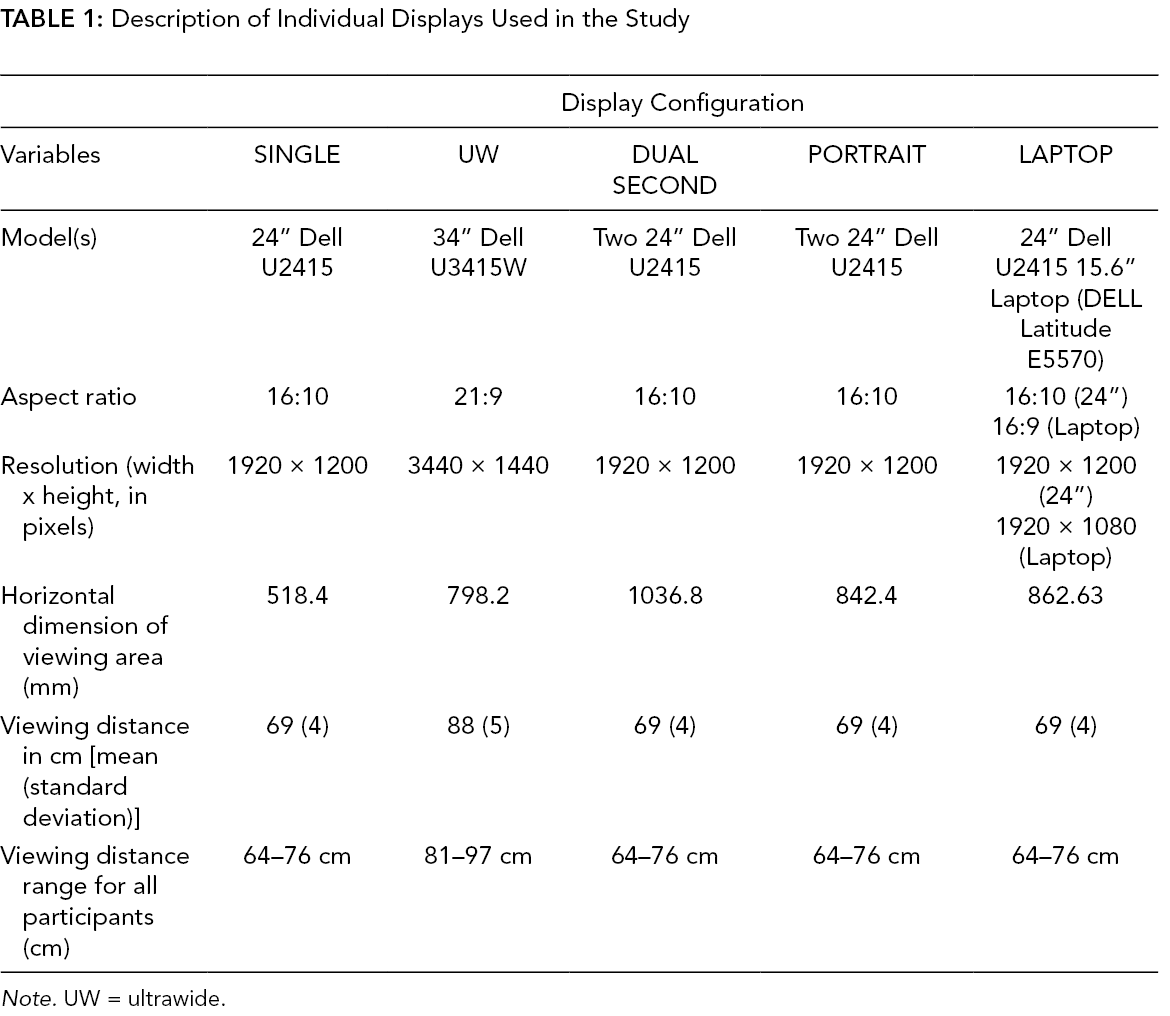
Six display configurations were evaluated in this study (Table 1, Figure 1): a single 24” display (SINGLE), a single 34” curved UW display (UW, 1900R curvature), two 24” displays with the midline centered on the participant and rotated 15º each (DUAL), one 24” display with a laptop rotated 15º (LAPTOP), two 24” displays with one rotated 15 degrees (SECOND), and two 24” displays with one rotated 15º and in a portrait landscape (PORTRAIT). Participants came into the lab for collections on six different days, with one display being tested each day.
Description of Individual Displays Used in the Study
Note. UW = ultrawide.
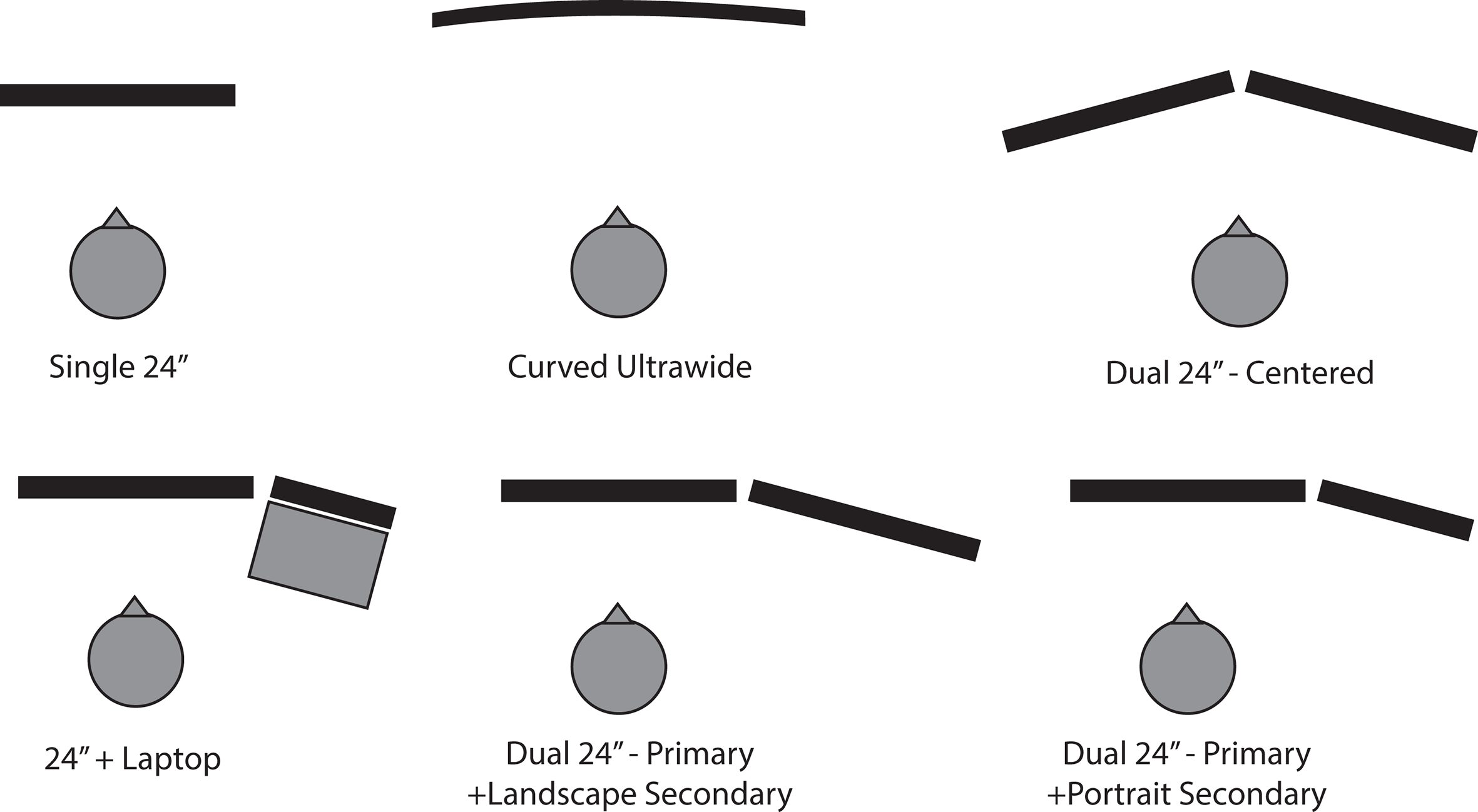
Display configurations.
Workstation Configuration
The top of the display was adjusted to eye level with the participant. Eye level was achieved by having the participant sit and look straight ahead. The researcher aligned the top of the monitor with the participant’s eyes. The viewing distance was placed an arm’s length away from the participant (Table 1). An arm’s length was measured by having the participant hold their arms straight out in front of them at a 90º angle; the monitor was placed so that their fingertips touched the screen. An exception was made for the UW display, which was placed an extra hand length away based on pilot work. A field study has also shown that users position a curved 34” UW display further back than their standard panel display that they originally used (Bartha et al., 2020). The keyboard and office chair were adjusted to a comfortable position for the participant and kept consistent throughout the study.
Tasks
The participant performed five 10-min tasks for each configuration. The five tasks are typical for multi-display users (Stringfellow, 2007)—copy and pasting (COPY-PASTE), drag/dropping (DRAG-DROP), referencing information while preparing a document (REFERENCE), monitoring incoming information (MONITOR), and information comparison (COMPARE; see Supplementary Information for more detail). Each task was varied slightly from day-to-day (i.e., different colors on a picture, stocks, terms to drag/drop, etc.) to avoid any learning effect that may take place. A Latin Square was used to randomize the task order. The window size and layout for each task were predetermined and kept consistent across all configurations. Participants were instructed not to resize windows or move any windows. Mouse clicks, scrolls, and screen/window changes were recorded using a screen recording software (Techsmith Morae, Okemos, Michigan). Participants were not allowed to lean on their elbows or rest their head on their left arm during the collections.
Instrumentation
A passive motion capture system (Qualisys AB, Göteborg, Sweden) tracked head, trunk, and hand position. Reflective markers were placed on the following landmarks: right and left acromion processes, bilateral tragus, the C7 vertebrae, the styloid processes of the radius and ulna, and distal heads of the 2nd and 5th metacarpals of the right hand. Two clusters of markers were used, a cluster of five markers was placed on the side of the head (above the ear), and a cluster with four markers was placed on the chest. Markers were also placed on the corners of the displays and desk. The markers on the display were there to ensure consistent placement of the display between participants. Motion capture data were collected at a frequency of 50.0 Hz. A trial with the participant seated, looking straight ahead, and the head and trunk aligned was used to define 0º of neck rotation.
The Post-Study System Usability Questionnaire (PSSUQ) for laboratory usability studies (Lewis, 1995) was used to assess the participant’s satisfaction with each display configuration. The instrument was modified from 19 to 11 items by removing questions related to information quality and errors.
Experimental Protocol
Participants came into the lab on six separate days. Each lab visit was 90 min. On the first visit, the participant read an information form and provided their written informed consent. Participants were then instrumented with motion capture markers. Each day the participant used one of the six display configurations. A Latin Square was used to randomize the display configurations between participants and days. Participants were given practice versions of the tasks to familiarize themselves with the new display configuration. After the practice tasks were finished, the participant began the five 10-min tasks. After they finished their last task, they filled out the PSSUQ.
Data Analysis
Motion capture data were processed with Visual 3D (v6, C-motion inc. Germantown, MD). A third-order polynomial was used to fill gaps in our marker data of a maximum of 25 frames (.5 s; Howarth & Callaghan, 2010). The signal was then low pass filtered (Butterworth, 2nd order, dual-pass) with an effective cut-off frequency of 6 Hz. The trunk was defined by the right and left iliac crests and the right and left acromion processes. The head segment was defined by the right and left acromion processes and the right and left tragus markers. Neck rotation angle was defined as the head segment with respect to the trunk segment about the transverse axis. An amplitude probability distribution function (APDF) was used to calculate the median neck rotation angle (50th percentile) and range of motion (difference in the 90th and 10th percentile). A larger difference between the 90th and 10th percentile indicates that the participant utilized a larger portion of their neck rotation range of motion during the collection. To determine if a larger viewable area results in more movement of the mouse, hand movement was measured for the two mouse dominant tasks, COMPARE and DRAG-DROP. Hand movement was not assessed for the LAPTOP configuration because the laptop occluded the hand markers. The hand was represented as the centroid of the four markers and expressed within a plane of the desk surface. We calculated the total distance traveled in this plane in 10 min.
Statistical Analysis
All statistics were performed in JMP Pro 15 (15.2, SAS Institute, Cary, NC). For neck rotation median angle and range of motion, a one-way repeated measures ANOVA was conducted for each task with a factor of display configuration. Tukey post hoc tests assessed significant main effects. A neck angle of 0º means that the head and the trunk were aligned. Statistical significance was set to p < .05.
Hand distance, performance, and PSSUQ variables were not normally distributed; therefore, a Friedman’s Rank Test (the nonparametric equivalent of a one-way repeated measures ANOVA; Pereira et al., 2015) was run on each variable. If this test was significant, we conducted a nonparametric comparison on each display to SINGLE using the Dunn Method for Joint Ranking. The reported p value for this test represents a Bonferroni correction and statistical significance was set at p < .05. Matched-pairs rank biserial r was used as an effect size. This effect size is the difference between the ratio of the positive rank-sum to the total rank-sum and the ratio of the negative rank-sum to the total rank-sum (Kerby, 2014). The effect size varies from −1 to +1, where 0 indicates that the monitors are statistically equal, +1 means the configuration performed better than SINGLE, while −1 means the configuration performed worse than SINGLE for a given metric. Effect sizes are considered low if they are between ±.1 and ±.3, medium if they are between ±.3 to ±.5, and large if they are between ±.5 and ±1.0 (Cohen, 1992). We also identified p values that fell between .05 and .20, as it may be worth designing future studies to better estimate potential effects for these variables (Wainer & Robinson, 2003).
Results
Kinematics
In this section, a reference to the “centered configurations” refers to the SINGLE, UW, and DUAL displays conditions. Reference to the “secondary configurations” refers to LAPTOP, SECOND, and PORTRAIT.
Neck rotation median angle
For the COMPARE, COPY-PASTE, and REFERENCE tasks, the neck rotation median was significantly different for the centered versus the secondary configurations (p < .001). For COMPARE (Figure 2), the neck was rotated to the left for the centered configurations, whereas the participant’s head and trunk were aligned in the secondary configurations. For REFERENCE and COPY-PASTE (Figure 2), the centered configurations had a head and trunk alignment, while the secondary configurations resulted in neck angles rotated toward the right. During the MONITORING task, all displays resulted a median angle where the head was aligned with the trunk (Figure 3).
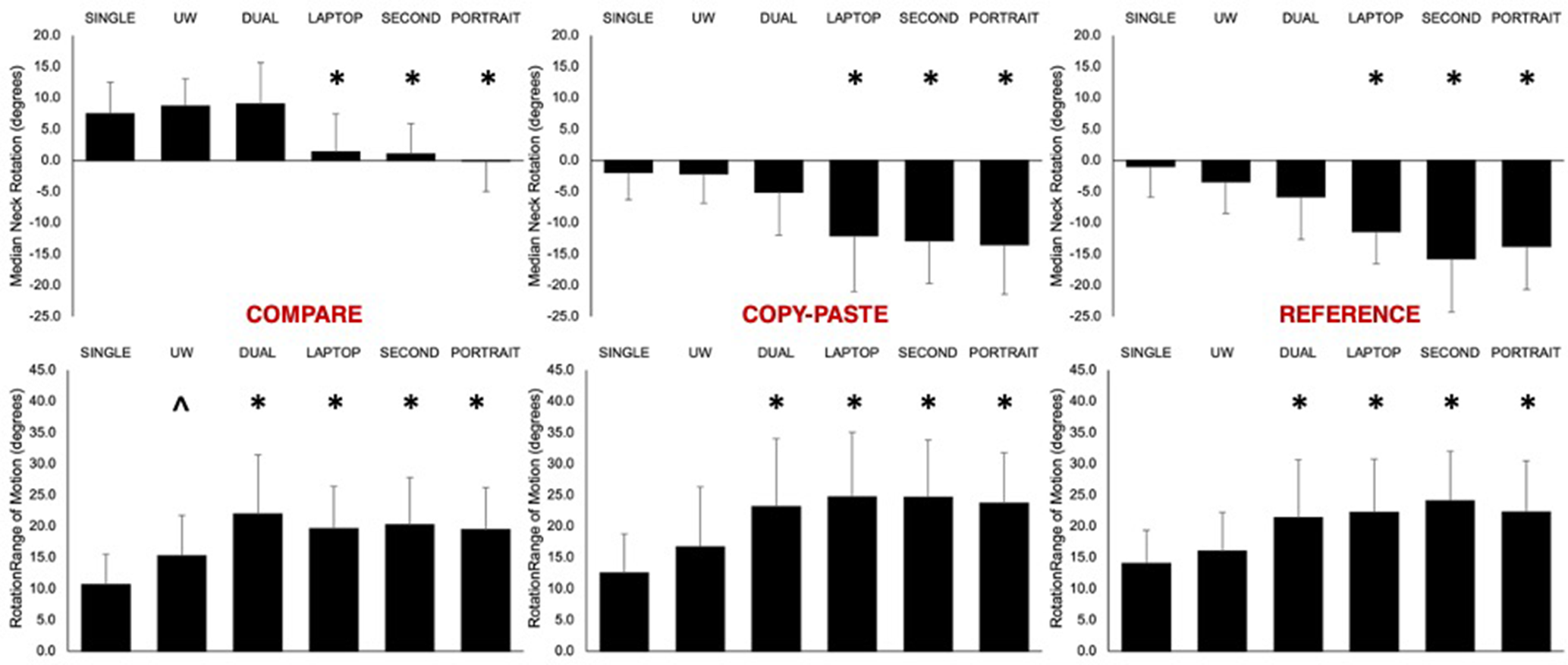
Rotation angle median (top row) and range of motion (bottom row) for the COMPARE, COPY-PASTE, and REFERENCE tasks. For the median angle, positive is left rotation, and negative is right rotation. Symbols denote significant differences between display configurations.
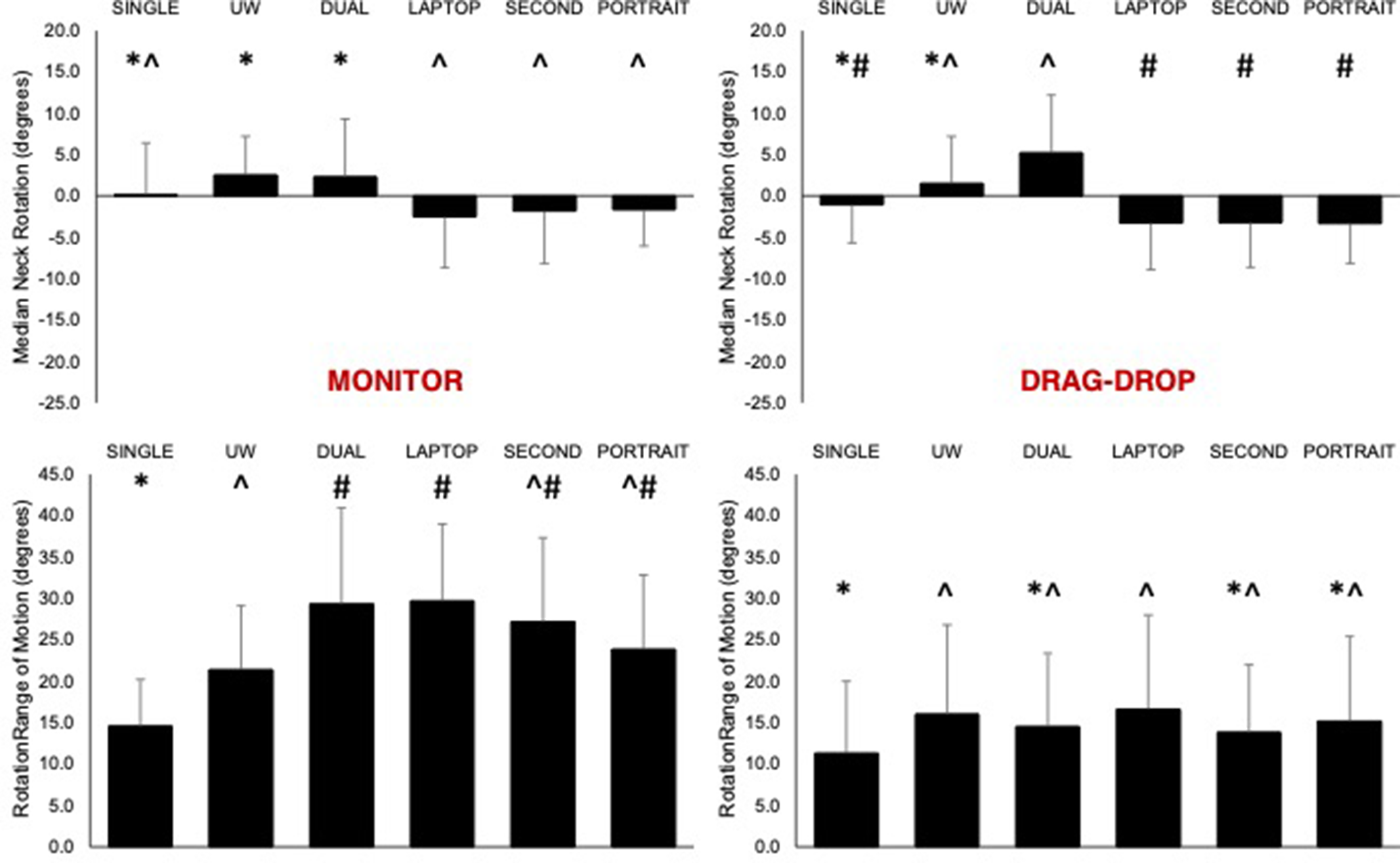
Rotation angle median (top row) and range of motion (bottom row) for the MONITOR and DRAG-DROP tasks. For the median angle, positive is left rotation, and negative is right rotation. Symbols denote significant differences between configurations.
Neck rotation range of motion
COMPARE, COPY-PASTE, and REFERENCE had similar range of motion patterns (p < .001). SINGLE (~10º) and UW (~15º) resulted in the smallest range of motion across these tasks. The other four conditions required between 20º and 25º of range of motion, which was significantly different from SINGLE and UW. For the COMPARE, COPY-PASTE, and REFERENCING tasks, the DUAL, LAPTOP, SECOND, and PORTRAIT displays had larger ranges of motion compared with the other two displays (p < .001).
Qualitative evaluation of neck kinematics
Figure 4 provides the APDF results for the 10th, 50th, and 90th percentiles across all displays and tasks. For the SINGLE and UW displays, the participants during the COMPARE task typically stayed with their head rotated to the left for the 10-min trial, which was designated the primary side of the display. For the remaining tasks, the head angle remained around 0º, with the participants engaging in left and right rotation. The dual display configuration followed the same trend; however, it is evident that the range of motion was larger (also denoted statistically significant in Figures 2 and 3). For all tasks but COMPARE, the head angle was biased to the right for the configuration with primary displays (bottom row of Figure 4).
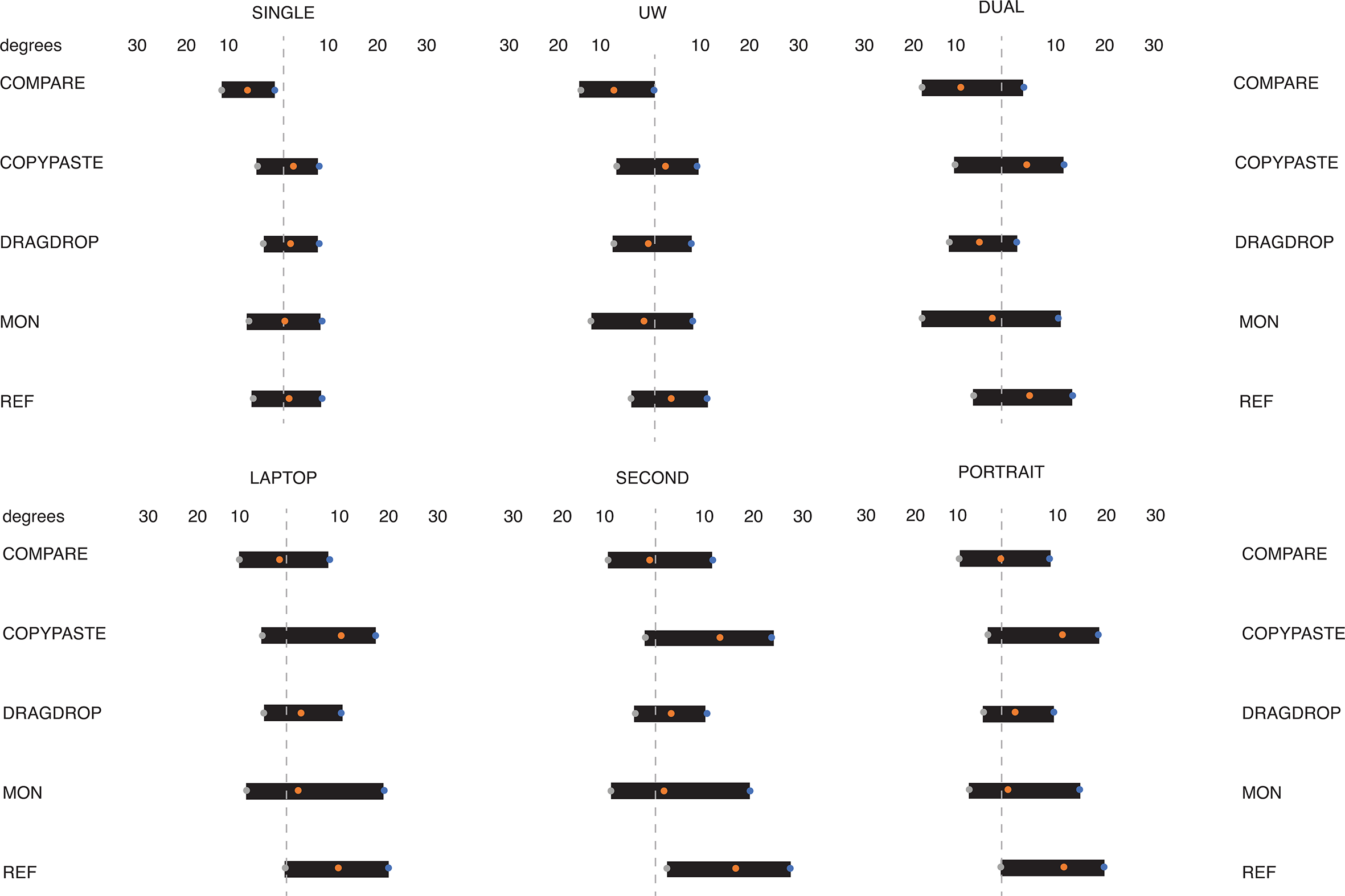
Amplitude probability distribution function results plotted by monitor and task. The orange dot in the center of the black bar represents the mean 50th percentile across all participants. The gray dot on the left represents the mean 10th percentile across participants, and the blue dot represents the mean 90th percentile across participants. The dashed line represents 0º of neck rotation (the participant looking straight ahead).
Hand distance
One participant’s data were removed from analysis due to missing markers. There was a significant main effect of display for the COMPARE (χ2(4) = 10.9, p = .027) and DRAG-DROP (χ2(4) = 14.5, p = .006) tasks (Table 2). During the UW condition, the hand distance traveled was larger than SINGLE for COMPARE (p = .027, r = .72) and DRAG-DROP (p < .001, r = .76).
Median (Interquartile Range) Hand Distance (Meters) for Display Configurations With Significant Differences
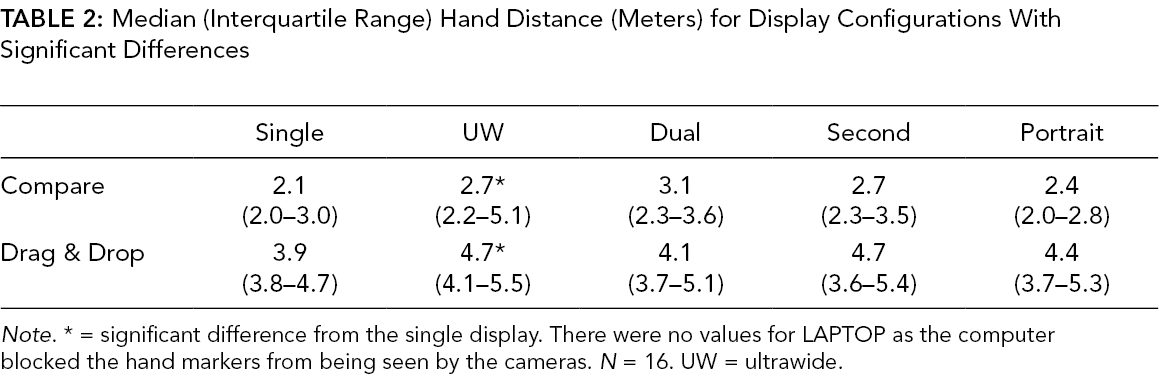
Note. * = significant difference from the single display. There were no values for LAPTOP as the computer blocked the hand markers from being seen by the cameras. N = 16. UW = ultrawide.
Performance
Screen interactions
One participant was removed from the screen interactions analysis (Table 3). There was a significant main effect of display during the COPY-PASTE task for clicks (χ2(5) = 14.9, p = .011) and scrolls (χ2(5) = 14.5, p = .013). Compared to SINGLE, mouse clicks (p < .001; r = .84) and scrolls (p = .013; r = .78) were lower during COPY-PASTE for PORTRAIT. UW also showed a decrease in clicks and scrolls. The differences were not significant; however, there was a large effect (clicks: p = .072, r = .65; scrolls: p = .082; r = .66).
Median (Interquartile Range) of Select Performance Variables
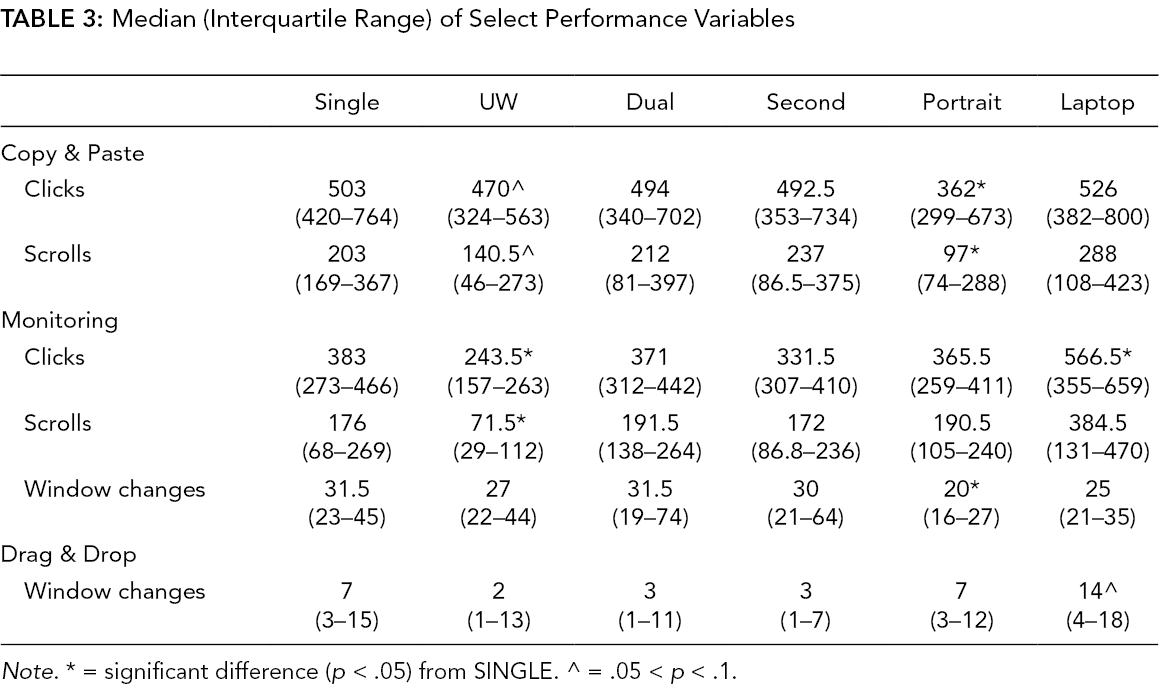
Note. * = significant difference (p < .05) from SINGLE. ^ = .05 < p < .1.
There was a significant main effect of display during the MONITORING task for clicks (χ2(5) = 29.6, p < .001), window switches (χ2(5) = 14.0 , p = .015), and scrolls (χ2(5) = 26.6, p < .001). Compared to SINGLE, mouse clicks and scrolls increased for LAPTOP (clicks: p = .035, r = –.81; scrolls: p = .004, r = –.85) and decreased for UW (clicks: p = .006, r = .74; scrolls: p = .037, r = .62). (Figure 4). The PORTRAIT display required less window switches than the SINGLE (p = .014, r = .81).
There was a significant main effect of display during the DRAG-DROP task for window switches (χ2(5) = 23.1, p < .001). Post hoc tests did not show any of the displays being significantly different from SINGLE; however, LAPTOP approached significance (p = .09; r = –.49) – there were more window switches when using LAPTOP versus SINGLE during the drag and drop task.
PSSUQ survey
There was a main effect of MONITOR for the final survey score (χ2(5) = 25.0; p < .001); however, post-hoc analyses found no significant differences from SINGLE. PSSUQ survey scores (Table 4) were higher for UW, DUAL, and SECOND compared to single and the effect sizes (.60–.76) signify a large effect; therefore, users may generally prefer configurations with a larger horizontal display length versus the SINGLE 24” display.
Median (Interquartile Range) PSSUQ Survey Scores and Statistics Compared to SINGLE
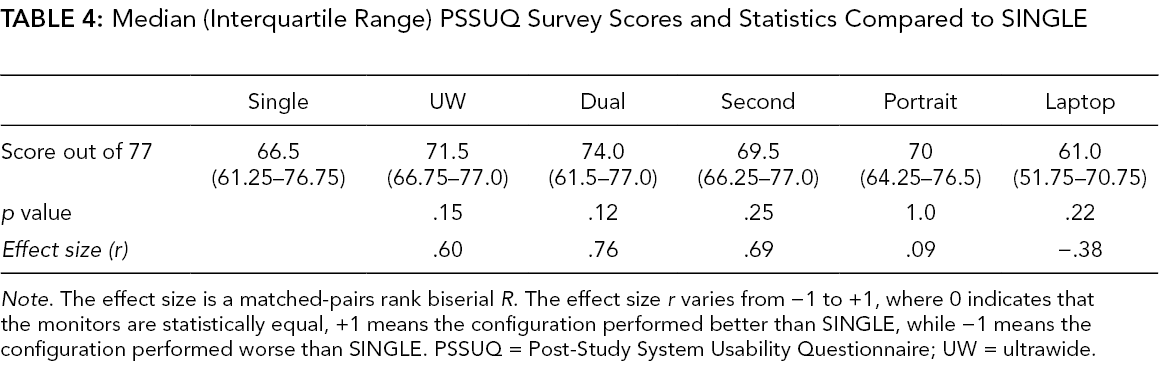
Note. The effect size is a matched-pairs rank biserial R. The effect size r varies from −1 to +1, where 0 indicates that the monitors are statistically equal, +1 means the configuration performed better than SINGLE, while −1 means the configuration performed worse than SINGLE. PSSUQ = Post-Study System Usability Questionnaire; UW = ultrawide.
Discussion
This study assessed neck kinematics and user performance for six display configurations across five different tasks, which allowed us to examine the complex interactions that can occur across configuration and task type. Our results align with the previous systematic review on dual displays (Gallagher et al., 2021). First, users may prefer configurations with more horizontal screen area. Second, neck rotation was present compared to the single monitor; however, the magnitude of rotation depended on the task and configuration being used. Evaluating multiple configurations in one study demonstrated a few differences from the review. While less user interaction was found with the UW display, which is in line with the systematic review (Gallagher et al., 2021), using a laptop as a second display increased interaction for one of the tasks compared to the single display. Our hypothesis that differences may be task-dependent was partially supported. The centered configurations (SINGLE, DUAL, UW) and secondary configurations (SECOND, LAPTOP, PORTRAIT) demonstrated similar median neck rotation angles and ROM for three of the tasks (COMPARE, COPY-PASTE, REFERENCE). Overall, our work indicates that careful consideration must be made when purchasing displays and determining appropriate configuration.
For three of the tasks (REFERENCE, COPY-PASTE, COMPARE), the median neck rotation angle was grouped depending on if the configuration was centered on the participant (SINGLE, DUAL, UW) versus using one primary and one second display (LAPTOP, SECOND, PORTRAIT). When performing the REFERENCE and COPY-PASTE tasks, participants had more neck rotation to the right when using secondary displays compared to the centered displays. In these tasks, the participant spent most of their time on the internet browser positioned on the right side of the resulting in neck rotation to the right for the secondary configurations. For the COMPARE task, participants had their head rotated to the left when using the centered configurations. In contrast, the participant had minimal neck rotation for the secondary configurations. The majority of time for this task was spent utilizing the window where they drew their figure. For the centered configurations, the window that the participants were drawing in was positioned on the left display or left side of the screen. For the secondary configurations, the drawing screen was on the center configurations. The DUAL results are consistent with previous research that found centered-dual configurations increased muscle activity for the right sternocleidomastoid, indicating that the head was rotated to the left more often (Nimbarte et al., 2013). These results support the idea that head and trunk alignment is dependent on the display setup used and the task being performed.
Compared to the other dual display configuration, the SINGLE display had the lowest neck rotation range of motion across all five tasks, consistent with its smallest viewable width. Our results are similar to those found previously for dual monitors (Nimbarte et al., 2013; Stringfellow, 2007); however, task was an important determinant of the neck rotation range of motion and should be considered by both researchers and practitioners when setting up displays and respective tasks in research and the field. The ranges of motion in our study are also below the threshold used in prospective cohort studies of 45º to signify nonneutral neck rotation (Ariëns et al., 2001; Coenen et al., 2016). The frequency per day of neck rotation greater than 45º lasting for greater than 4 s was associated with neck pain reporting (Coenen et al., 2016). Our results fall below this 45º threshold, which may signify a low risk to neck pain reporting when using these display conditions; however, future studies will be needed to evaluate this in the field. Wearable sensors now provide the ability to collect neck angle long durations outside of the lab (Han et al., 2019; Szeto et al., 2020). These methods can assess neck rotation when using wider displays at longer viewing distances to determine the relationship between neck rotation angle and musculoskeletal disorder development.
The UW display resulted in fewer mouse clicks and scrolls than SINGLE for the MONITOR task and may also be result in better performance for COPY-PASTE. Despite this, the UW display had more hand movement during mouse dominant tasks compared to SINGLE. Instead of tracking cursor distance traveled, hand movement was tracked to determine if a larger horizontal dimension of the UW or dual displays was related to more hand movement when using the mouse. Mouse cursor speed was not adjusted between the configurations, so it is possible that by adjusting cursor speed specifically for the UW display, hand movement distance would decrease. Future studies looking at UW displays should assess mouse usage and cursor speed to ensure there is no increase in upper extremity discomfort during mouse-dominant tasks.
There were no significant differences in the number of window switches and mouse clicks between DUAL and SINGLE. This was not consistent with previous studies that found dual displays decreased mouse clicks and window switches compared to a single display (Hutchings et al., 2004; Ling et al., 2017; Owens et al., 2012, September). The 24” display used in our study may have minimized any differences in these variables. The window locations were also fixed during these tasks. This limited any natural window placement, which could have reduced these variables as well.
There is a potential that participants preferred displays with a larger horizontal viewable distance (DUAL, SECONDARY, and UW) and since the p-values fall between .05 and .2 (SOURCE) for the PSSUQ results and/or the effect sizes may be characterized as large, it would be worth designing future studies that compare the implementation of dual monitors versus UW monitors in the workplace. Utilizing less displays in the study design as well as more targeted tasks and usage scenarios would allow for a better estimate of a potential effect on user performance.
If dual monitors are to be used, we recommend using a display mount to allow for flexibility between DUAL and SECONDARY. DUAL kept the head and trunk median in alignment for different tasks were more beneficial for neck kinematics depending on which of the 2 setups were being used. Using a laptop as a secondary monitor is not recommended over a single monitor as user satisfaction was not significantly different from SINGLE and saw increases in screen interactions, indicating a possible decrease in performance. We also had three of our participants that said they use a 21” display oriented in portrait mode for their work. PORTRAIT demonstrated reduced window changes when during the MONITORING task, and less clicks and scrolls for COPY-PASTE. Unfortunately, this configuration may no longer be practical if larger displays (such as the 24” in our study) are installed in the future. The height of a 24” display in portrait does not allow for the top of the portrait screen to align with the display in landscape; however, it is important for ergonomists to understand if their clients do want a portrait display for items such as menus or longer spreadsheets. If this is the case, it may not be beneficial to change out all displays, but rather keep smaller displays available (i.e., 21”) to use in portrait mode.
Due to the worldwide COVID-19 pandemic, many people rapidly shifted to working from home. A study during the pandemic showed of those working at a large U.S. University, 29% used laptops, and 39% used laptops plus an external display (Czerwinski et al., 2003). Our study shows that using a laptop as the secondary display can result in more rotated neck postures and wasn’t preferred more than using the single 24” display alone. Davis et al. (2020) suggest using the laptop as a secondary display. Going a step further, if the laptop’s extra screen area isn’t needed, the user may be better served by closing the laptop, so they are not tempted to use it extensively as a secondary display. Thirty-one percent of users did not have their primary screen centered, which resulted in twisting their neck or back to view the display (Davis et al., 2020). Our study supports this idea since off-centered displays produced neck rotation for the COPY-PASTE and REFERENCE tasks. Davis et al. (2020) suggest that a proper setup for dual displays is to have a primary display centered on you and a secondary one to the side. We have added to this by demonstrating that how you set up your monitors is task dependent and may need to change depending on one’s goals for the day.
A strength of our study is that we included six commonly used configurations in one study and looked at a variety of tasks, allowing us to make recommendations on display configurations. When looking at the results comprehensively, the 34” UW display with a longer viewing distance, as utilized in this study, has the potential for positive effects on performance without comprising biomechanics. The UW display provided similar neck kinematics to the SINGLE display, with only a small increase in range of motion, while also reducing the number of screen interactions. The UW display may also provide more freedom for window placement by the user without increasing neck rotation. For example, there is no bevel in the middle like there would be with a dual display set up, so the participant can utilize the middle of the display to align a document of interest with minimal neck rotation. The increased horizontal viewable dimension of the SECOND configuration plus the potential for the user to position a window on that secondary display that is used extensively (such as in the REF task) has the potential to increase the frequency of nonneutral next postures. This was not present with the UW display, likely because of the smaller horizontal viewable display and not needing to rotate the head as much to view the right side of the monitor. One exception to this with the UW display was still when one side of the display is used extensively, as was seen in the COMPARE task. This may occur if a person was comparing items between two windows but then does not adjust their window placement when they are done with the comparison. A way to alter this that could be beneficial is to have participants center their main window and then put the second window they are using for comparison on the left or right of this centered window. This would allow the benefits seen with the primary display but also with reduced range of motion of the neck being utilized. Caution must also be taken when extrapolating these results to larger UW displays, such as a 38” or 49” diagonal UW display.
When designing this study, one of our initial challenges was determining the viewing distance for the UW display. We selected a longer viewing distance for the UW display and kept all single and dual configurations with the 24” displays the same. Pilot work found that keeping the UW display at the same distance as the other monitors caused eye strain. A previous field study also found preferred a longer viewing distance when an UW display was introduced (Bartha et al., 2020). We acknowledge that neck rotation range of motion is a function of horizontal display size and viewing distance. As a result, the results in this study do not apply if the user maintains the same viewing distance as they do for a single display. In that case, the UW display may result in more neck rotation than the SINGLE.
We chose for all configurations with the 24” display to remain at the same distances based on previous evidence that found no differences in viewing distances between single and dual displays when 19” monitors were used (Shin & Hegde, 2010). We also used the participant’s anthropometrics to guide viewing distances, which resulted in different viewing distances between participants. This may increase the variability in neck rotation between participants; however, we used a within-subject experimental design and consistent viewing distances within a participant to account for this variability. The average viewing distance for the 24” display in our study (69 cm) was similar to previously reported average self-selected viewing distances for the same display size (72 cm; Shin & Hegde, 2010).
Finally, window position was fixed for all participants to avoid variability between participants, which prevented any natural window placements. We did this to decrease the variability related to participants’ window placement; however, future work should look at how users utilize this larger screen area and if it would affect their user experiences.
Conclusion
The UW display with a longer viewing distance produced similar neck kinematics as SINGLE while also reducing screen interactions. Since the market is growing for UW displays, future work should assess user preferred viewing distances, proper window placements, the potential for increased upper extremities movement, and the potential for increased eye strain when controlling for visual angle. Dual displays are still beneficial, especially if task flexibility is required. If a dual display configuration is used, use display mounts to create flexibility between the DUAL and SECOND configurations. Caution should be exercised when using a laptop as a secondary screen since usability was not different from a single display, and display interactions increased, indicating a possible decrease in performance.
Key Points
Display configurations with larger horizontal viewable length have the potential to increase user satisfaction compared to a single 24” display.
If two monitors are to be used, they should be mounted on monitor arms so that the user can vary their position between DUAL and SECOND based on the task performed.
The 34” UW display with a longer viewing distance resulted in neck kinematics similar to a single monitor, reduced range of motion compared to dual displays, and decreased screen interactions compared to SINGLE.
The results for the UW display only apply if the viewing distance is increased compared to what is utilized for a SINGLE display.
Training for users of UW displays is still recommended, especially on how to best position windows for a variety of tasks and scenarios.
Supplemental Material
Online supplementary file 1 - Supplemental material for Examining Potential User Experience Trade-Offs Between Common Computer Display Configurations
Supplemental material, Online supplementary file 1, for Examining Potential User Experience Trade-Offs Between Common Computer Display Configurations by Caleb C. Burruss, Elizabeth Bjornsen and Kaitlin M. Gallagher in Human Factors: The Journal of Human Factors and Ergonomics Society
Footnotes
Acknowledgments
The Office Ergonomics Research Committee provided funding for this project. Herman-Miller provided adjustable computer display arms in-kind.

Supplemental Material
The online supplemental material is available with the manuscript on the HF website.
Author Biographies
Caleb C. Burruss received his Bachelor of Science in Exercise Science from the University of Arkansas in 2019. He is currently a Master of Science in Exercise Science student at the University of Arkansas–Fayetteville.
Elizabeth Bjornsen received her Master of Science in Exercise Science from the University of Arkansas in 2020. She is currently pursuing her doctoral work at the University of North Carolina–Chapel Hill.
Kaitlin M. Gallagher received her PhD in kinesiology at the University of Waterloo in 2015. She is currently an assistant professor at the University of Arkansas – Fayetteville in the Department of Health, Human Performance, and Recreation.
References
Supplementary Material
Please find the following supplemental material available below.
For Open Access articles published under a Creative Commons License, all supplemental material carries the same license as the article it is associated with.
For non-Open Access articles published, all supplemental material carries a non-exclusive license, and permission requests for re-use of supplemental material or any part of supplemental material shall be sent directly to the copyright owner as specified in the copyright notice associated with the article.
