






Abstract
Classroom teachers could learn a lot from the football coach — specifically, how to use cutting-edge video software to improve teaching techniques.

Athletic coaches have been known to sit toward the back of the room and draw X's and O's during professional development sessions. Like the rest of us, they're sometimes good at acting as if they're listening. Maybe they are or maybe they aren't — either way, they likely know more about how their coaching affects their athletes' performance than teachers do regarding student achievement. It is equally possible that the athletes are learning more quickly and in a deeper way than students in the classroom.
Why? Coaches were and continue to be light years ahead of K-12 teachers and administrators in using video and video annotation tools (VATs) to help themselves and their players improve. Coaching an athletic sport and classroom teaching have notable differences, but they also have important similarities. Both give assignments, provide learning materials, set expectations, provide motivation and practice, monitor progress, and provide timely feedback for formative and summative assessments — games and tests. Both also know that to increase student achievement or athletic skill, they must get better at what they do. In the past number of years, athletics seems to have a leg up on teachers in becoming better at what they do because coaches have embraced the use of video and VATs to learn and grow, while most other educators have not.
There was a day when both educators and athletic coaches were excited about the possibilities of VHS. For some reason — the weight of a VHS recorder, the number of extension cords, time, or skill required to use them — educators lost interest in this resource, while athletic departments increased their enthusiasm and involvement.
The athletic establishment is in the lead now with video, but classroom educators who are willing to step out and risk embracing this resource can still catch up.
Using video and VATs
Just as the coach captures video of a practice session or a game to improve coaching skills and players' skills, teachers capture video to improve the instructional skills that increase student achievement.
Imagine a teacher who is troubled that students can't grasp what she believes is an easy concept. So, she:
Uses a digital camera to capture video of herself as she tries to teach the concept to students;
Loads the video into a VAT;
Clips out 10 specific minutes in which she and the students are working hard on this concept;
Closely watches it several times to detect or determine what is blocking students from learning;
Clips and tags several specific exchanges between herself and the students, uses the word-processing and audio-recording function to record her comments on what she is noticing;
Loads the video onto a password-protected web site;
Solicits comments and advice from others — her achievement coach, university professor, principal, mother in Poughkeepsie — who can access the site, watch the video, tag particular actions by the teacher or students, comment on the tags, send the video back to the online site, and let the teacher know by return e-mail that the comments are ready for her to view; and
Opens the analyzed video, reviews the opinions of her viewers, and reads useful comments.
VATs might be one of the most effective methods for teachers to learn new instructional skills. While the profession hasn't coalesced around a single set of instructional skills, educational researchers have identified a number of strategies that increase the likelihood that students will achieve. These strategies are often quite concrete and hence easily observable. As part of its evaluation process, every district is probably creating its own list of what “effective teaching” means in any particular situation.
Given such a list of skills for which teachers will be accountable and that principals will assess against, a video and a VAT becomes a valuable resource. Local teachers at different grade levels and in different content areas who are expert at any of the skills on the list could create “anchor videos” showing what a particular skill should look like and sound like when used in the classroom. These videos could be loaded into the VAT web site, and teachers could use them to practice and compare their performance of a skill against the local expert. The anchor videos might become part of the induction curriculum.
Video, a VAT, and an agreed-upon teacher skills list also could become part of a teacher appraisal. In this scenario, each skill has been defined and filmed as an anchor video. This anchor video portrays good practices so teachers can see what standards they'll be measured against and won't have to guess what the principal wants. The video annotation tools provide a convenient meeting place for them. The teacher knows what she must demonstrate in the classroom as part of her appraisal. She can practice until she is comfortable and confident with the skill, then produce a video clip of it and upload it onto the VAT. The principal can view the clip at an opportune time, comment on it, and send the clip and comments back to the teacher. This technology would not preclude the appraiser from doing a direct classroom observation — but a classroom observation wouldn't be necessary for each required skill. It is also the case that the day the principal observes a teacher is not necessarily the day that the teacher demonstrates a skill at her best.
Investing in video and VAT
Why make the investment? Simply put: They work. Just ask an athletic coach. For educators, the following rationale should be compelling:
Video provides an objective record to accompany a teacher's memory of a lesson. The video helps the teacher see the full, complex scene that she's orchestrating. The VAT allows the teacher to annotate a piece of the video for closer inspection. Used over time, teachers improve their ability to “notice” the important aspects of the teaching/learning process.
There is hardly a more powerful support for evidence-based reflection, since the teacher can view and think about the lesson as many times as she wants, either by herself or with others. Professional learning communities and video clubs will find this a powerful resource.
In traditional teacher appraisal, the teacher often focuses on particular aspects of her teaching or the student's responses, but video and a VAT lets the teacher see what's happening with students in other parts of the room, especially if the teacher is able to use a camera with a 360-degree lens.
Achievement coaches can make exciting use of video and a VAT to build relationships with teachers, help them learn new instructional strategies, and monitor their progress. Steven G. Barkley, a strong proponent of classroom coaching using video includes the following story in his book:
A school I visited showed me an elaborate setup with expensive underwater video cameras recording strokes and movements made by members of the swim team. Wonderful idea; it vastly improved the swimmers' performance. I asked to see where and how the teachers were being videotaped. I was told they were not. What's up with that? (2010, p. xiii)
Video and a VAT are natural tools to use with teachers in induction programs. Schools could identify the instructional skills and knowledge inductees must demonstrate and create anchor videos that demonstrate them. Inductees can create video timelines of their progress, use them for reflective practice, and in meetings with their mentors.
Video and a VAT appear to assist in the teacher change process. As Tonya Tripp and Peter Rich observed:
As teachers used video analysis to reflect on their teaching, they reported a change process consisting of the following steps: (a) recognizing the need to change, (b) brainstorming ideas for change, (c) implementing the ideas, and (d) evaluating changes that were implemented. Teachers said that video analysis was beneficial at each of these stages and that they were more likely to change their teaching practices when they used video analysis to reflect than previous feedback methods they had used to improve their teaching, such as personal reflections, classroom observations, and workshops. (Tripp & Rich, 2012)
Finally, video and a VAT enables the teacher to build a catalog of her best teaching — a personalized, professional video portfolio. She can create clips of her best application of mandated instructional strategies, her best classroom management techniques, her reflecting abilities, and her ability to fix problem areas and grow in her professional skills. In doing this, she becomes the owner of her own professional life. She doesn't need to rely on the opinion of others to understand her abilities.
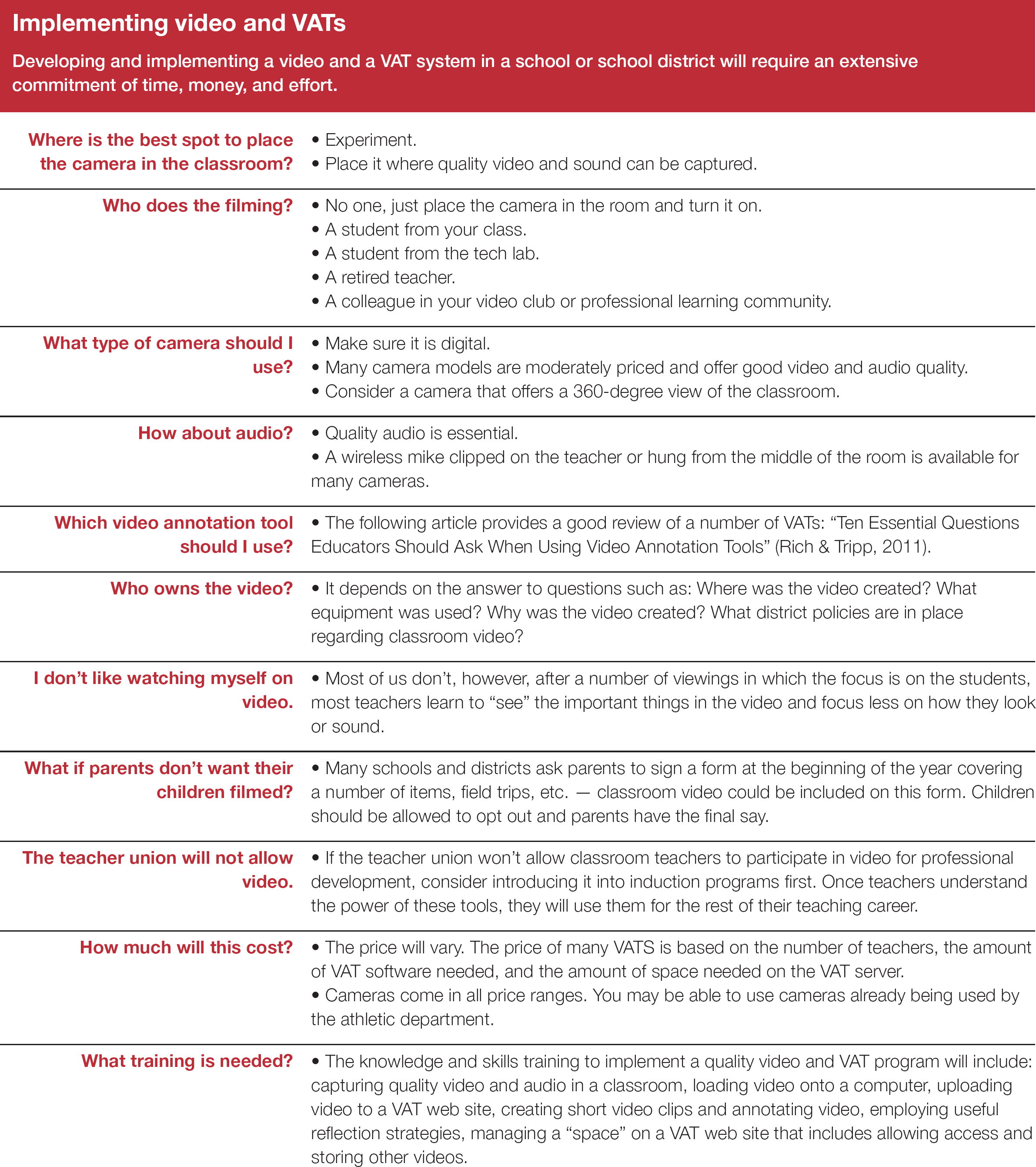
Conclusion
Video as a resource for teacher learning has been around for years. The literature reflects extensive use by colleges of education with student teachers; athletic coaches are veterans at this technology. But video has struggled to make an impact with in-service teachers. Since wise teachers know the value of instructional video in facilitating student learning, surely they will soon understand that the same gains can be applied to themselves, professionally.
Learning to capture quality classroom video and use a video annotation tool to help teachers learn and grow can move new and experienced teachers faster along their learning curves. The incline of the curve will depend, among other things, on the attitude of in-service educators, especially veterans, toward using classroom video and a VAT, district support for the project and professional development in general, the educators' general facility with technology, and the time and incentives that can be devoted to this issue.
Once the techniques have been mastered, and it won't take long, the resource for discovery and growth becomes like no other. Hopefully, teachers, their unions, administrators, and boards of education will do what's necessary to put this into more widespread use.
Videos of teachers teaching are available on the web. Here are just a few that a district could tap for anchor videos. Some web sites offer fee-based access to videos. In addition, many larger school districts collect and manage their own libraries of video lessons.
TIMSS video
This site is intended to make available to the public the 53 public use video lessons that were collected as part of the Trends in International Math and Science Studies (TIMSS) video studies. The site includes the 53 videos plus translations of the videos into English, linked by time codes to the videos, and various resources that accompany the videos such as textbook pages and teacher commentaries. The site is most interesting to educators who want to explore the teaching practices of different countries. Free.
Teacher Channel
Teacher Channel's video library offers educators a wide range of subjects for grades K-12. The videos also include information on alignment with Common Core State Standards and ancillary material for teachers to use in their own classrooms. In addition, Teaching Channel Presents, a weekly one-hour program featuring Teacher Channel videos, airs on many PBS stations across the U.S. Free.
TeacherTube
This teacher-created site is five years old and features videos created and uploaded by teachers themselves. Participants are invited to share feedback on what they like and don't. Free.
Educators Virtual Mentor
Educators Virtual Mentor (EVM) has selected 52 teaching strategies around which they have captured 1,375 video clips of teachers applying the strategies in the classroom. Videos are available for elementary, middle, and high school teachers. Rubrics created by the EVM staff for each strategy help them select the videos. Users are encouraged to rate each video clip. Fee-based.