







Abstract

Some students with disabilities develop a dependence on others for support and can benefit from self-management strategies to increase independence. Self-operated auditory prompting systems are an effective self-management intervention used to increase independence for students with disabilities while continuing to provide the support that they often need for task performance. However, many teachers do not know how to create and implement self-operated auditory prompting with their students. This article provides a step-by-step guide for teachers, discussing how to create and implement self-operated auditory prompting systems with students. Systematic instructions for recording auditory prompting systems are provided.
When teaching new skills, teachers often use prompting to support students with disabilities. Whereas some students eventually achieve independence and no longer need prompting, others become dependent on the support (i.e., prompt dependent; Mays & Heflin, 2011). For students who struggle with prompt dependence, one way that they can receive the support that they need while decreasing reliance on others is through the use of self-operated prompting systems (Taber-Doughty, 2005). Such systems are typically categorized as picture- auditory- or video-based; all are effective interventions to promote task completion and decrease reliance on others during performance of target tasks (Mechling, 2007). The purpose of this article is to provide teachers with the information necessary to determine whether a self-operated auditory prompting system (SOAPS) could be an appropriate intervention for students, as well as provide teachers with a step-by-step guide detailing how to create and implement a SOAPS for students with disabilities.
Self-Operated Auditory Prompting Systems
Self-operated auditory prompting, a self-management strategy, provides antecedent cues to promote task completion or engagement in specific behaviors (Taber-Doughty, 2005). A SOAPS allows students the opportunity to engage in tasks with scripted auditory prompts delivered through technology (e.g., audio recorder), allowing teachers to increase proximity between themselves and students. The application of a SOAPS has been successful for students with autism; mild, moderate, and severe intellectual disability; and visual impairment (Mechling, 2007). Prior research suggests that a SOAPS is an effective intervention to increase independence during task performance or reduce problem behavior in daily living skills (Bouck, Satsangi, Bartlett, & Weng, 2012; Bouck, Satsangi, Muhl, & Bartlett, 2013); personal care skills (Mays & Heflin, 2011); community skills (Taber-Doughty, 2005); and vocational skills (Cihak, Alberto, & Fredrick, 2007; Hughes, Alberto, & Fredrick, 2006; Montgomery, Storey, Post, & Lemley, 2011; Taber-Doughty, 2005). However, whereas a video-based SOAPS holds an advantage over other self-operated systems because of the ability to offer students visual and auditory support concurrently (Mechling, Gast, & Seid, 2010), not all students need a visual support to complete tasks or maintain appropriate behaviors independently (Taber-Doughty, Patton, & Brennan, 2008); this should be considered before implementing a SOAPS with students.
Is a SOAPS Appropriate for My Student?
The use of SOAPS may be warranted when students are unable to perform tasks or maintain appropriate behaviors independently. Multiple guidelines are available for teachers to use when determining if a SOAPS is appropriate for their students, including the student’s response level to verbal prompting, the student’s ability to perform the task without visual demonstration, the student’s preference, and the student’s tolerance for wearing equipment if needed (e.g., headphones; Taber-Doughty, 2005). Research suggests that students who exhibit the following behaviors could benefit from a SOAPS: students who follow directions but forget the steps in a task, students who follow directions and complete the task but with poor quality and accuracy, and students who follow directions and remember steps in the task but become easily distracted (Post, Montgomery, & Storey, 2009). However, teachers should explore other options (e.g., picture- or video-based self-operated prompting systems) if students do not follow directions, respond to oral prompts, or respond to reminders of encouragement (Post et al., 2009).
Creating and Implementing a SOAPS
Teachers need to consider many factors when creating and implementing a SOAPS. Specifically, this article discusses 11 steps—from development to implementation—that teachers should consider when using a SOAPS with students with disabilities. A description of each step follows, with two case scenarios to illustrate a SOAPS in practice.
Scenario 1: Andrew
Andrew is a fourth-grade student with autism and a severe intellectual disability. He spends his school day in a self-contained setting. Andrew struggles when he leaves his classroom to clean the windows and doors in his school; he often engages in high-pitched vocalizations that interfere with his task completion as well as with the performance of others in close proximity to him. Listening to music on his iPod during reinforcement time usually calms Andrew down after returning to the classroom from this task. Ms. Stiles, Andrew’s teacher, decided that a SOAPS might be helpful in reducing the problem behavior of vocalizations during this task.
Scenario 2: Stacy
Stacy is an 11th-grade student with a mild intellectual disability. She spends part of her school day at a local grocery store for vocational training. Stacy often forgets to complete all the steps in her work tasks. Her job coach, Mr. Williams, developed a pictorial checklist for her to use at the grocery store; however, Stacy refuses to use it. She stated that she did not want any of her friends who are also her coworkers to see her with the pictures. Stacy’s teachers Ms. Jonas and Mr. Williams decided that a SOAPS might assist Stacy in accurate task completion.
Development Phase
The development phase walks teachers through steps that occur before implementing a SOAPS with students. Steps include task analysis, student assessment, decisions essential to creating an effective SOAPS, technology choices, and, finally, the recording and editing of the auditory prompting system. Although a SOAPS can be developed for a variety of tasks and across multiple settings, with emphasis on the unique needs of the target student, the general considerations during development are similar.
Step 1: Create the Task Analysis
When a SOAPS is used, a task analysis should be created. Task analyses are used to break down target tasks into small, incremental teachable steps and list them in sequential order (Mays & Heflin, 2011; Taber-Doughty, 2005). The task analysis will assist teachers when assessing the student’s current performance to use for baseline information.
Step 2: Assess Student Performance
Teacher assessment of the student’s ability to complete the target task should include the amount and types of prompting given to the student, the behaviors that the student exhibited during task performance (e.g., noncompliance, aggression), and the functions that those behaviors served (e.g., escape, get attention; Cihak et al., 2007; Hughes et al., 2006). Teachers should also record the duration to complete each task step and the duration of transition time between steps, as well as whom the student responds to in a positive manner. When problem behaviors are present, a functional assessment of student behavior can be conducted to determine whether a student is not completing a task because he or she wants to escape the task, gain control, or seek attention from others (Cihak et al., 2007; Hughes et al., 2006). When teachers know the function of student behavior, they can determine what type of reinforcement should be provided in the recording. This information will provide the teacher with the data needed to determine the format best suited for the script, how detailed the script should be, and who to choose for the voice when recording the script.
Step 3: Choose a Format for the Script
After student performance is assessed, teachers should have an idea of what type of support should be given in the student’s script. The script is the wording used in the recording. Scripts can encompass many forms of support, including step-by-step instructions (Mays & Heflin, 2011), self-evaluative prompts (Montgomery et al., 2011), or functionally equivalent reinforcement (Hughes et al., 2006). These formats can be used solely or in conjunction with one another (e.g., a script combining self-evaluative prompts and functionally equivalent reinforcement). In addition to using one of these formats, teachers could add student-preferred music to the recording.
Step-by-step instructions
When recording a script that includes step-by-step instructions, teachers need to choose to (a) have the student stop/pause the recording between each step in a task or (b) leave enough time between steps for performance (i.e., the student does not have to press any button between steps; Mays & Heflin, 2011). However, some technology options do not require the student to press the Stop/Pause button between steps, because each step is on a separate file. Instead, the student has to press Play or Forward when ready for the next step. For example, once the step has played for the student, the technology automatically stops (e.g., Olympus DP-10; Bouck et al., 2012; Bouck et al., 2013) or continues to repeat the same auditory prompt (i.e., looping the prompt; Taber-Doughty, 2005) until the student presses Play or Forward when ready for the next step. One advantage to having the recording stop after each step is that multiple students who have different paces for task performance could use the same recording, which can save the teacher time when preparing materials.
Self-evaluative prompts
When students are able to remember the steps in a task but the quality of performance is low or inaccurate or the student is unable to stay on task, the use of self-evaluative prompts in the auditory recording can improve these areas of task performance (Montgomery et al., 2011; Post et al., 2009). When using self-evaluative prompts (e.g., “Are you working?” “Did you remember to clean all four chairs?”), teachers need to decide how often to provide self-evaluative prompts in the recording (e.g., 30-second fixed-interval prompts, varied schedule with an average of one prompt every minute). According to Montgomery and colleagues (2011), the schedule of self-evaluative prompting and wording used for prompts reflected what the students typically received from their teacher before a SOAPS was introduced.
Functionally equivalent reinforcement
Another format includes using reinforcement after an initial prompt to start the task to maintain appropriate behavior. The type of reinforcement used in the recording (e.g., attention prompts, escape prompts) is added to the script according to student assessment data (Cihak et al., 2007). During assessment, if the function of a student’s behavior is to escape from the target task, escape prompts should be used in the recording to support a student to continue with the task (e.g., “It’s almost break time, Mary—finish your work and you get a break”; Hughes et al., 2006). However, if the function of a student’s behavior is to seek attention from others, attention prompts should be used (e.g., “Great job,” “I like the way you are working”; Hughes et al., 2006). Attention prompts can also be used in the script for students who are easily distracted (Post et al., 2009). As with the self-evaluative prompting format, teachers need to choose how often prompts are provided.
Step 4: Choose a Voice
Once the script is written, the teacher needs to select who will read the script during the recording. Many options are available: the teacher, another familiar adult, a peer, an unfamiliar voice, or the student. Students have been successful using a SOAPS when unfamiliar voices are used in the recording (Cihak et al., 2007; Hughes et al., 2006), which could benefit teachers who may need to delegate the task of recording to save time. If the student follows directives better from a particular person (e.g., teacher), using this person to read the script may be a better option (Mays & Heflin, 2011). Teachers can always change the voice at a later time if the goal is to learn to follow directives from various persons. Having students read the script is also an option if they are capable of reading it clearly and fluently with the appropriate volume. When students read the script themselves, they are also spending time learning the task (e.g., memorizing, internalizing), which may be a benefit with a SOAPS (Bouck et al., 2013). Teaching students to record the script themselves (e.g., a grocery list) can also increase the chance that students will continue using this support after they are no longer receiving services, provided they are able to acquire the technology (Bouck et al., 2012).
Step 5: Choose Technology for Recording and Student Use
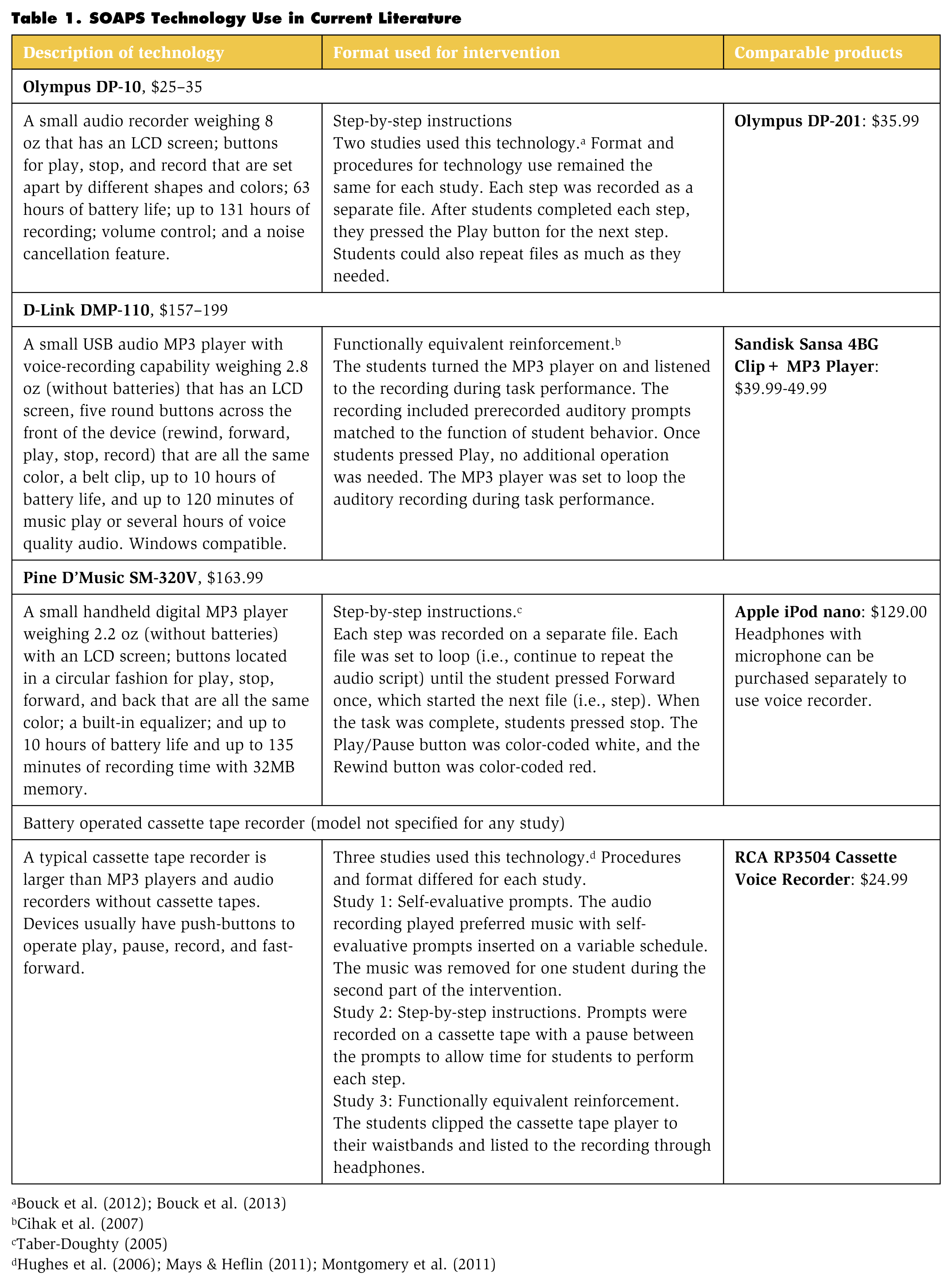
Teachers have many options when it comes to choosing which technology to use with a SOAPS. Recent technological advances provide advantages over older technologies (e.g., increased portability, ease of editing initial recordings for teachers, higher social validity). However, use of older technologies to record and deliver a SOAPS can be effective for teachers and students (Mays & Heflin, 2011; Montgomery et al., 2011). Table 1 describes some technologies used in current (i.e., no more than 10 years old) literature using a SOAPS.
SOAPS Technology Use in Current Literature
Recording
Depending on the choice of technology, teachers record the script either on the same device that the student will use or on a separate device, later transferring the recording to the student device. For example, teachers who plan to use an mp3 player without audio recorder capability need to record the script directly on a computer or on a recording device and then transfer it to the mp3 player for student use. Other times, the person recording the script will do so directly on the device that the student will use. For example, when an audio recorder is used to deliver the SOAPS, the script can be recorded directly onto it (e.g., Olympus DP-10; Bouck et al., 2012). Finally, some technologies give the teacher an option to record the script on a computer or the device itself (e.g., iPod touch, tablets, smartphones), and teacher preference can determine the method to use.
Student use
As with any other decision-making process involving assistive technology, teachers need to take the following into consideration: student preference, abilities, and needs; environments in which the device will be used; and information from the family (Watts, O’Brian, & Wojcik, 2004). Newer technologies have an advantage over older technologies in their ability to be multifaceted for student use. For example, an iPod touch could serve as a communication device, include daily pictorial schedules, contain auditory prompting scripts, and combine a SOAPS (e.g., video-based instruction with auditory prompts). However, older technologies may accommodate a student’s needs better than other devices. For example, some students may benefit from technology that has a tactile surface (i.e., buttons that students can feel) rather than technology with a touchscreen (e.g., iPod touch).
Apps
When using mobile technologies (e.g., iPods, smartphones), teachers will also need to choose a mobile application, or app, to record and deliver the script. Multiple app options exist for teachers. Two free options include GarageBand and VoiceRecorder, which are compatible with Apple products. GarageBand allows users to create audio tracks that can be downloaded to iTunes, with or without music in the background. VoiceRecorder is an audio recorder with unlimited recording time. An option for teachers with devices compatible with Android products is Hi-Q MP3 Voice, also a free audio recorder app.
Step 6: Record Script
Once the script is written and technology is chosen, it is time to record the script. This process will depend on the technology being used for the prompting device and the format being used—for example, the steps needed to record a script on an iPod will differ for the steps needed with an audio recorder. For teachers with Apple products, Table 2 provides a step-by-step guide to recording a script on a MacBook and mobile products with touchscreens using the app GarageBand.
Steps to Record a Script With the GarageBand App (No Music Background)
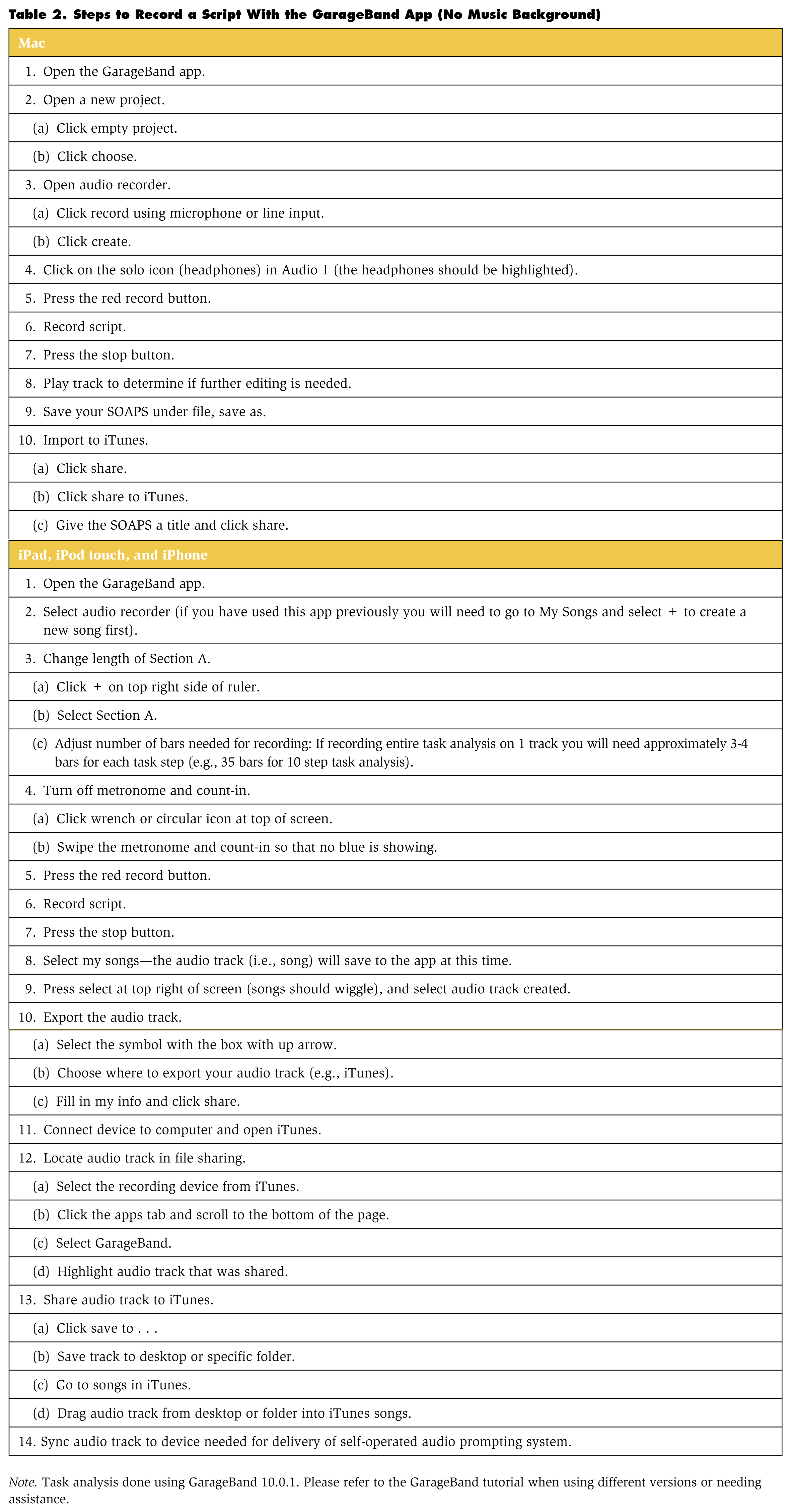
Note. Task analysis done using GarageBand 10.0.1. Please refer to the GarageBand tutorial when using different versions or needing assistance.
Step 7: Test Out the Recording
After the auditory prompts are recorded, teachers should test them out to determine if any additional changes are needed before introducing them to students, particularly if step-by-step instructions were provided. Another recommendation is to have someone who was not part of the SOAPS creation listen to the recording to provide an objective perspective of the prompting system. After testing, edits can be made as needed before presenting the system to the student. Some newer technologies allow teachers to make edits to the original SOAPS instead of creating a new recording, which can save time. For example, the GarageBand app saves audio tracks created, and teachers can make adjustments to the original recording (e.g., adding more time between prompts) without having to create a new audio track.
Developing Andrew’s SOAPS
Ms. Stiles created a task analysis for the tasks of cleaning windows and cleaning doors. This task analysis assisted Ms. Stiles as she assessed Andrew throughout the week. Ms. Stiles observed paraeducators working with Andrew in close proximity to provide support. Andrew responded positively to verbal prompting, especially from Mr. Wesley, but often reengaged in vocalizations approximately 30 seconds after a prompt was provided. Andrew was given a brief functional assessment, and results indicated that his outbursts were negatively reinforced in the form of escape from demand. For part of the assessment, Ms. Stiles asked the paraeducators not to give prompting support to Andrew during his task performance. Andrew averaged 11 vocalizations per session, with each session lasting an average of 5 minutes. Ms. Stiles choose to use the format including functionally equivalent reinforcement in Andrew’s script. Ms. Stiles wrote the script out according to the data that she collected using an initial prompt to begin work and escape prompts. Prompts in the script included “It’s time to start your work,” “When you finish, you get a break,” “Finish your work and you get a break,” “You get a break soon,” and “It’s almost break time, Andrew.” Ms. Stiles chose to use Mr. Wesley as the voice of the recording because Andrew responded positively to him during task performance. The script provided prompts on a 30-second fixed-interval schedule.

Ms. Stiles had a few technology options but decided to use an iPod touch for the prompting system. Andrew uses the iPod during classroom activities and is accurate when navigating the technology with the touchscreen. Ms. Stiles used GarageBand when recording the script with Mr. Wesley. Ms. Stiles tried using the app on both her Mac computer and the iPod touch, following the steps provided in Tables 2 and 3. She preferred using the computer to record the SOAPS because she was able to record the script, download the audio track, and upload it to iTunes in less time on the computer, but she thought that it was promising that the steps could all be done on the same device if she did not have access to a Mac computer. Ms. Stiles set the audio track to loop; that is, the audio track with Andrew’s five prompts continued to play until he was done with his task and pressed Stop. Because there was no task analysis on the recording, Ms. Stiles did not have someone else test out the recording.
Developing Stacy’s SOAPS
Ms. Jonas and Mr. Williams discussed the job tasks that Stacy performs at the grocery store. They decided to develop a SOAPS for stocking shelves. Ms. Jonas asked Mr. Williams to create the task analysis for stocking shelves because he was more knowledgeable about Stacy’s work tasks. Mr. Williams and Ms. Jonas assessed Stacy’s performance on five occasions. With a system of least-to-most prompts, Stacy independently completed an average of five of 10 steps of her task analysis per session. If Stacy skipped a step, a verbal prompt was provided indicating the next step. Also, prompts were provided if there were more than 15 seconds of no activity. Stacy completed her task with 100% accuracy when Mr. Williams or Ms. Jonas provided specific verbal prompts during task performance (e.g., “Take box off your shelf”). Ms. Jonas took the task analysis along with Stacy’s baseline data and created the script for Stacy using the step-by-step format. Providing step-by-step instructions in the recording gave Stacy the support needed to complete the work task accurately. Ms. Jonas chose to use her voice to record the script because Stacy did not differ in performance when observers changed.
Ms. Jonas did not have any mobile technology in her classroom for Stacy to use for her SOAPS, but she was able to purchase a basic audio recorder for about $25 at a local store using the classroom supply budget. She bought the Olympus DP-201 and used the audio recorder to record Stacy’s script. Each step was recorded as a separate file. Before introducing the SOAPS to Stacy, a grocery store employee tested it, and no edits were deemed necessary.
Implementation Phase
Now that the teachers have created the self-operated systems, they are ready to implement them. Implementation steps consider what a student needs to be successful with the SOAPS—including training, practice, progress monitoring, and fading procedures.
Step 8: Train the Student
After the SOAPS is developed, tested, and refined, the student should receive adequate training to learn how to use the device. First, the teacher should demonstrate how to operate the technology, including how to use the buttons, where to place the technology during task completion (e.g., pants pocket), and how to wear headphones, if necessary (Montgomery et al., 2011). Before the SOAPS is implemented for the target task, training can consist of presenting the student with a sample SOAPS (e.g., two-step task analysis) and requiring him or her to operate the technology, verbalize the instructions heard on the recording, and demonstrate steps while meeting a criterion (e.g., 100% proficiency for two consecutive sessions; Cihak et al., 2007). When the student practices using the technology, the teacher should pay attention to any challenges encountered (e.g., fine-motor difficulty pressing correct buttons or screen area, difficulty remembering what button to press to play recording). If the student has any difficulties, necessary modifications should be made to the technology, such as color-coding buttons (Taber-Doughty, 2005).
Step 9: Task Performance
Once the student demonstrates competence in operating the device, the teacher should introduce the script with the task for the student to perform. While the student performs the task, the teacher should observe her or him for any difficulties in performance, such as pressing incorrect buttons or not keeping up with the pace of the auditory recording. Other strategies can be used in with a SOAPS as needed—for instance, error correction techniques (e.g., least-to-most prompting) may be initially needed alongside a SOAPS. Some students may benefit from a visual model before performing the task via a SOAPS (e.g., combining video modeling with a SOAPS) until they have a better grasp of how to perform the skill (Taber-Doughty et al., 2008). Any teaching strategies provided to students as they learn to use a SOAPS should be faded because the goal is reliance on the SOAPS to complete tasks, until they are ready to fade the auditory prompting system altogether.
Step 10: Monitor Student Performance
When performance is evaluated regularly, effective decisions can be made on whether to continue, modify, or stop the intervention (Watts et al., 2004). Without information on student performance, teachers risk continued use of an ineffective intervention or support (e.g., assistive technology device). Teachers can graph the student’s performance to examine level of mean performance, trend, and variability of data to make informed instructional decisions (Horner et al., 2005).
Step 11: Fading the SOAPS
The ultimate goal is for students to perform tasks and maintain appropriate behaviors independently, without intervention. Once the student has reached a previously determined criterion, teachers should begin to gradually change the antecedent stimulus (i.e., auditory prompts; Alberto, Taber, & Fredrick, 1999) to determine if fading is appropriate. For example, with the step-by-step instructional format, the script can be edited to combine steps in the task analysis (see Andrew’s performance graph in Figure 1 for an example). Self-evaluative prompts and functionally equivalent reinforcement can be faded by increasing the time between fixed-interval statements (e.g., change from every 30 seconds to every 1 minute) or by changing from fixed-time intervals to variable-time intervals (Alberto et al., 1999).
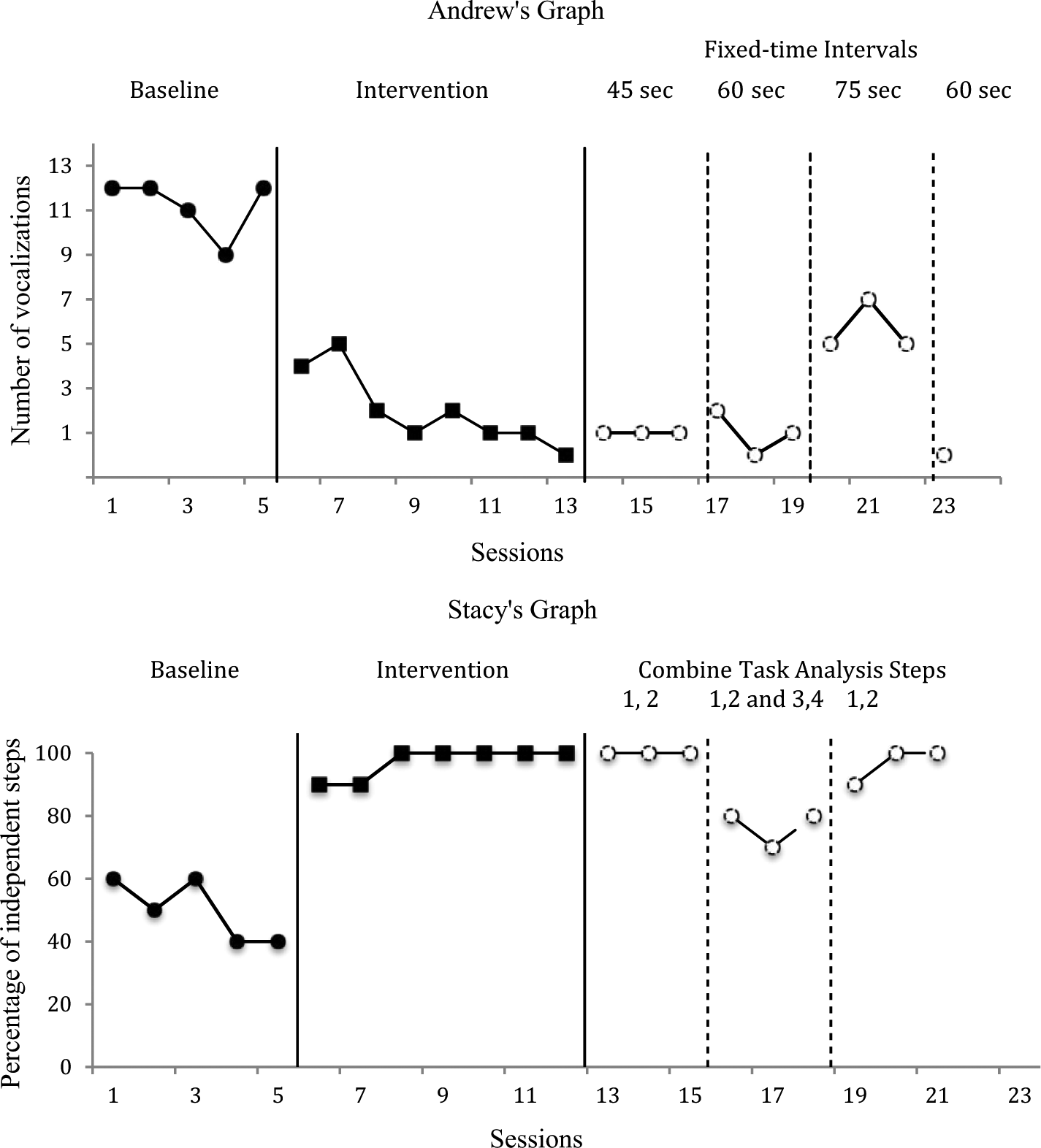
Sample Graphs From Andrew’s and Stacy’s Scenarios
Implementing Andrew’s SOAPS
During the training phase, Ms. Stiles showed Andrew how to navigate the device to locate the iTunes track that had his recording. Andrew was already familiar with turning the device on and off, using volume control, and troubleshooting back to the homepage when inadvertently hitting a button. Ms. Stiles showed him where to retrieve the iPod and headphone before performing the cleaning tasks. She gave him a SOAPS with a two-step task analysis: turn off the light—pause—sit at his desk. It took Andrew six sessions to meet the mastery criterion, which was 100% accuracy for two consecutive sessions independently. Andrew used the SOAPS each morning that the class performed the cleaning tasks. Andrew required prompting from Ms. Stiles to take the iPod out of his locker before leaving the classroom. Ms. Stiles placed on Andrew’s desk a picture prompt of the iPod and his locker because he was typically finishing independent academic work before leaving the classroom to clean. After providing gestural prompts during the first few sessions (i.e., pointing to the picture prompt), Andrew began to get his iPod independently. Monitoring data indicated that vocalizations were reduced during task performance under a SOAPS. Once Andrew met the criterion—which was no more than an average of one vocalization per session for three consecutive sessions—Ms. Stiles initiated a fading procedure. She changed the fixed-time schedule to include prompts every 45 seconds. Time between intervals increased by 15 seconds each time that a criterion was met. When prompts were provided every 75 seconds, vocalizations increased (as shown in his performance graph), and Andrew could not get back to criterion. Ms. Stiles reintroduced fixed-time intervals every 60 seconds. The only edits that were required to change the prompting schedule required Ms. Stiles to open the current audio track in GarageBand, add more space between the voice recordings on it, and save it as a new recording to upload to iTunes.
Implementing Stacy’s SOAPS
During the training phase, Ms. Jonas showed Stacy how to use the audio recorder. Stacy was able to manipulate the device within one 10-minute training session. Ms. Jonas showed Stacy how to turn the audio recorder on and off, how to play and stop the recording, how to repeat the recording, and how to adjust the volume. Stacy was required to independently complete each step. Mr. Williams rechecked her understanding and knowledge of the device and showed Stacy where she could retrieve the technology in her manager’s office before work. Stacy did not require any additional teaching strategies when using the SOAPS. Stacy independently retrieved the audio recorder and used the SOAPS to complete her work tasks with 100% fidelity. Stacy placed the audio recorder in her pocket during task performance, taking it out each time hat she needed to press Play for the next step. She listened to the recording through headphones. Monitoring data indicated that her performance improved immediately (see Figure 1 for a graph of Stacy’s performance data), and Mr. Williams was able to give Stacy more independence in the work environment. Once Stacy met mastery—which was 100% of steps completed independently for five consecutive sessions—Ms. Jonas began fading the SOAPS. First, she combined task steps starting with Steps 1 and 2 only (i.e., the rest of the steps were not altered). When criterion was met, which was 100% mastery for three consecutive sessions, she combined Steps 3 and 4. When Steps 1 and 2 and Steps 3 and 4 were combined, Stacy did not meet the criterion. She struggled to complete both task steps in the file that contained Steps 3 and 4. Ms. Jonas separated those steps back into separate files. Because Stacy was successful using the SOAPS, Ms. Jonas taught her how to record other tasks using the audio recorder (e.g., her grocery list, chores at home) so that she could manage the system on her own. Stacy enjoyed having a more discreet option to assist her with different tasks.
Final Thoughts
SOAPS was able to assist Andrew and Stacy in decreasing their reliance on others while still providing the reinforcement and verbal prompting they needed for improved task performance and behavior management. The implementation of a SOAPS with students with disabilities holds promise for offering them a discreet intervention option to receive support specific to their needs. Although a SOAPS may not be applicable to all situations, this prompting system can help students struggling with independence. The steps outlined in this article can assist teachers with the development and implementation of this evidence-based self-operated strategy to improve student success.