







Abstract

Mr. Rose, a third grade general education teacher, and Ms. Smith, a special education teacher, co-teach in an urban elementary school with a high number of students receiving free or reduced-price lunch. The school integrates computer science and computational thinking into curriculum as part of their science, technology, engineering, and mathematics (STEM) initiative. Mr. Rose and Ms. Smith have identified several challenges they will need to address to meet the needs of several of their students with learning disabilities. These challenges include difficulty with complex, multistep problem solving, lack of access to and experience with technology, and difficulty with fine motor skills.
There is an increased focus on including computing and computational thinking in K-12 instruction within science, technology, engineering, and mathematics (STEM) education and to provide that instruction in ways that promote access for students traditionally underrepresented in the STEM fields, such as students with disabilities (Israel, Pearson, Tapia, Wherfel, & Reese, 2015). Several reasons drive this focus on computing for a broad range of learners. First, of all the STEM fields, the greatest demand for workers exists in computer science. In fact, the U.S. Department of Labor has estimated that there will be 1.4 million job openings for computing-related jobs by 2020, but at the current rate of people being prepared for those positions, only approximately 30% of those positions will be filled (Bureau of Labor Statistics, U.S. Department of Labor, 2014). The National Science Foundation (2009) explained that beyond traditional computer science and programming positions, computing is becoming necessary in other career paths including journalism and the creative arts. Second, Code.org (n.d.), a nonprofit industry aimed at expanding computing education opportunities in K-12, has predicted that approximately two thirds of all computing jobs will be outside of the technology industry in areas such as banking, retail, government, entertainment, manufacturing, and health care. Thus, the demand for workers who are skilled in computing will be across industries. In addition to the pipeline rationale, there are several instructional benefits for students that result from the inclusion of computing within K-12 programs. These include:
Creating real-world applied contexts for teaching mathematics, algorithmic problem solving, and collaborative inquiry (Fessakis, Gouli, & Mavroudi, 2013; Jona et al., 2014)
Building higher-order thinking skills (Kafai & Burke, 2014)
Increasing collaborative problem solving (Kafai & Burke, 2014)
Increasing positive attitudes about computer science and computer science skills (Baytak & Land, 2011; Lambert & Guiffre, 2009)
Thus, providing computing experiences for K-12 students with and without disabilities can open the doors to multiple career paths and provide broad educational benefits.
There is an increased focus on including computing and computational thinking in K-12 instruction within science, technology, engineering, and mathematics (STEM) education and to provide that instruction in ways that promote access for students traditionally underrepresented in the STEM fields.
Despite national attention on computer science, many teachers have naïve conceptions about what computational thinking and computing entails because computing has not yet been fully integrated into teacher preparation. To address this confusion, the Computer Science Teachers Association and International Society of Technology in Education (2011) broadly defined computational thinking as a “problem-solving process” that includes formulating problems in a way that enables us to use a computer and other tools to help solve them; logically organizing and analyzing data; representing data through abstractions such as models and simulations; automating solutions through algorithmic thinking (a series of ordered steps); identifying, analyzing, and implementing possible solutions with the goal of achieving the most efficient and effective combinations of steps and resources; and generalizing and transferring this problem solving process to a wide variety of problems. (p. 1)
It can be gathered from this definition that students with disabilities who struggle with complex problem solving, mathematics, and abstract reasoning may face numerous challenges when presented with instruction in computing. For example, students with disabilities may struggle with abstract computing processes such as a multistep procedure for using “if, then” commands and with new vocabulary such as algorithm (Israel et al., 2015). Consequently, the national focus on increasing computer science and computing education directly influences the work of special educators. Teachers working with students with disabilities must now consider how to best support their learners within these inclusive educational environments so that they can meaningfully engage in and benefit from computing education.
How Is Computing Typically Taught in K-12 settings?
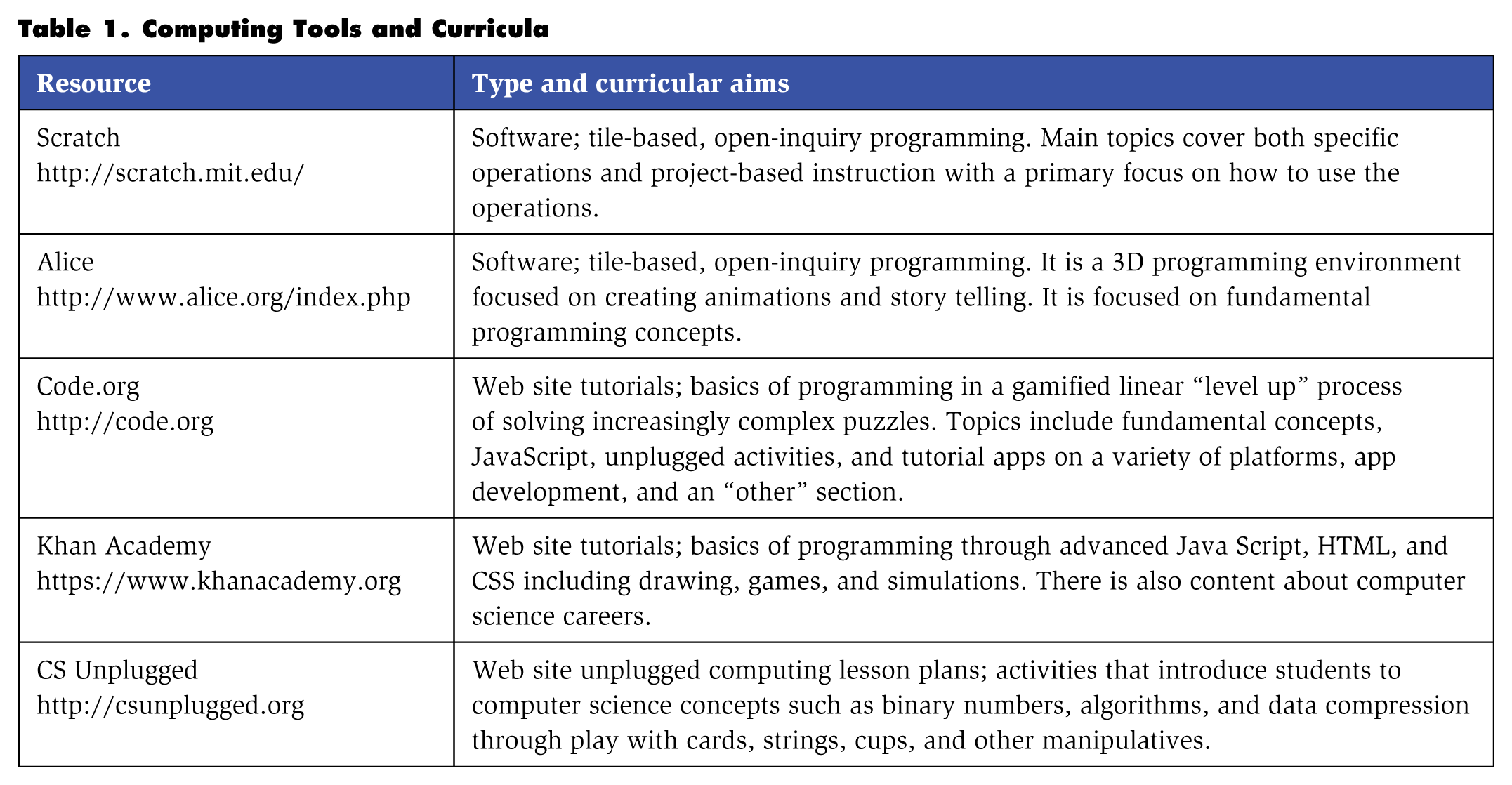
There are many ways to integrate computing education into K-12 instruction, and the resources to support this instruction continue to grow. Computing education may involve either linear progression through discrete computing skills with tutorial software that teaches computing (e.g., Code.org or the Khan Academy) or open exploration/inquiry where students and their teachers use programming software for their instructional purposes. Younger students often begin learning computing (i.e., how to use a computer) and programming (i.e., how to code) with graphically intuitive tile-based software such as the open-source software Scratch. Older students may begin with these same programs or learn how to program within professional programming languages such as Java or Python. Table 1 provides a list of popular computing and programming curricula used in K-12 settings, and Figure 1 provides an example of an elementary student’s project within Scratch. In addition to teaching computing in isolation, computer science instruction can also be integrated into the content areas, especially in math and science. For example, when teaching geometry, students can program animations for different polygons. Israel and colleagues (2015) found that elementary school teachers often integrated computing into content area instruction due to a lack of dedicated time for computing instruction.
Computing Tools and Curricula
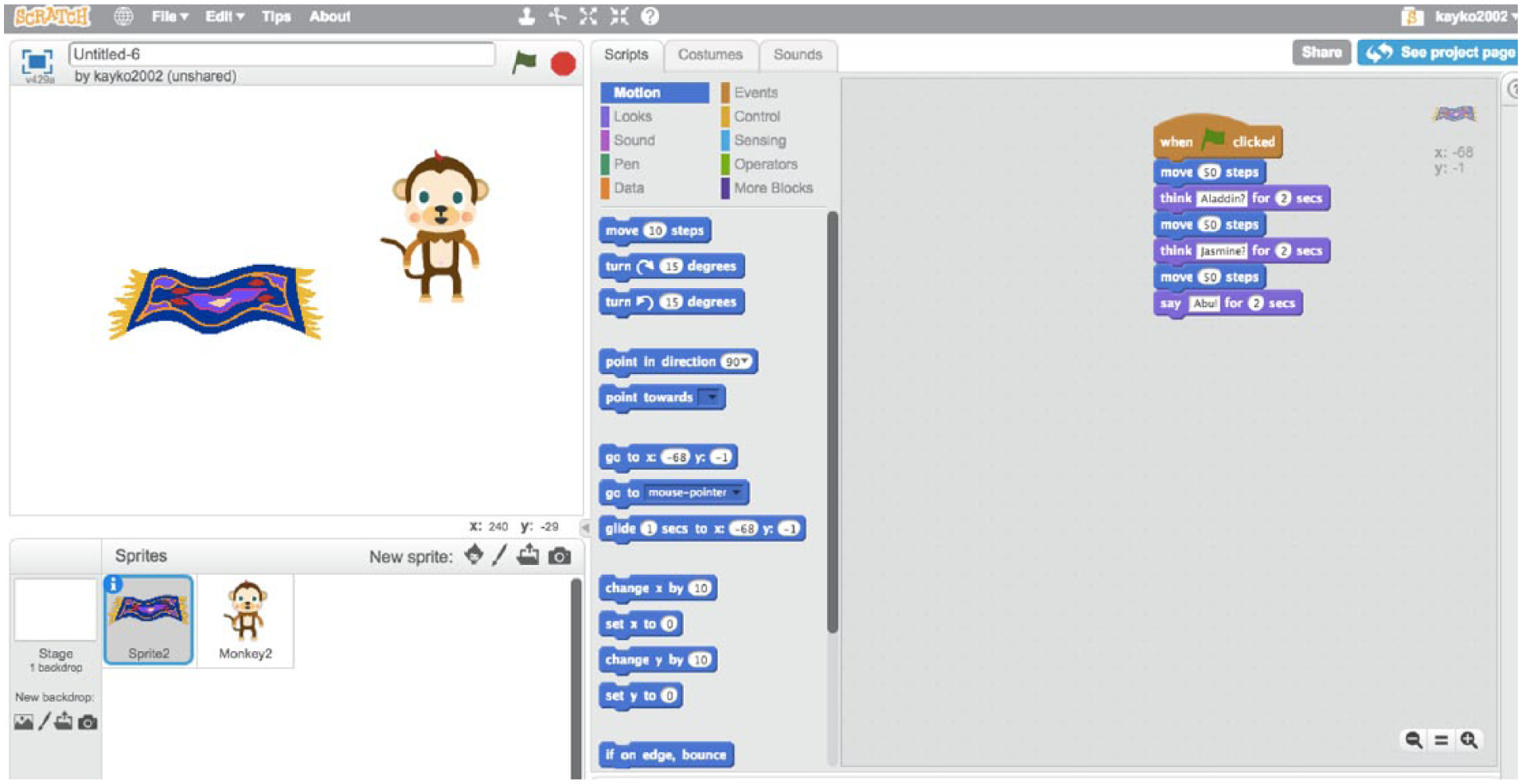
Screenshot of an elementary student’s project in Scratch
Strategies That Increase Access and Engagement in Computing Education
Teaching Computing Through the UDL Framework
Universal design for learning (UDL) is an instructional planning framework for meaningfully engaging a range of learners, including students with disabilities, by proactively addressing barriers to learning (Center for Applied Special Technology [CAST], 2011; Rose & Meyer, 2002). There is a growing body of research demonstrating the educational efficacy of teaching through the UDL framework (e.g., Marino et al., 2014; Rappolt-Schlichtmann et al., 2013). Within the context of computing education, UDL can serve as the instructional framework in which teachers can embed the necessary supports, technologies, and strategies that lead to effective instruction for a broad range of learners. Table 2 showcases how the UDL principles, guidelines, and checkpoints can support accessible computing instruction.
Teaching Computing Through the UDL Framework
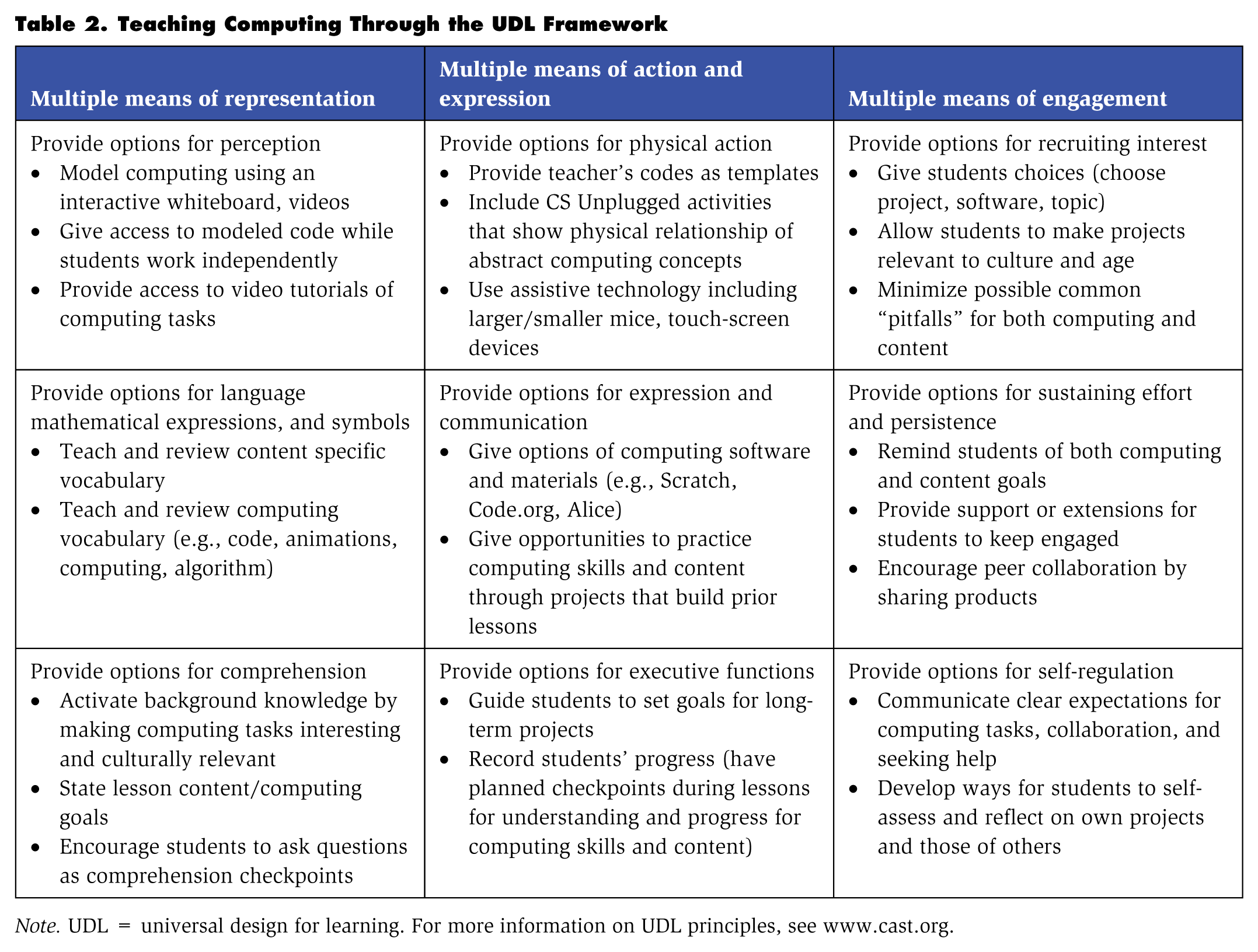
Note. UDL = universal design for learning. For more information on UDL principles, see www.cast.org.
UDL encompasses three central principles that can be applied to computing education.
Multiple means of representation. Principle 1 emphasizes that teachers should present instruction in multiple ways so that students have different methods of accessing that information. During computing instruction, this principle is critical as students often benefit from a variety of different presentation methods. Depending on their needs, students can observe the teacher model the use of computing software (such as Scratch or Alice), see the code that the teacher created afterward, watch videos and demos of that code used online, or break apart existing code that their teacher modeled. For some students a combination of these engagement options or variation in sequence of presentation is required.
Multiple methods of action and expression. Principle 2 emphasizes the use of multiple methods for allowing students to express their understanding. In computing, this principle can be achieved fairly effortlessly because computing activities inherently have flexibility built into them. There is not typically only one way of coding or demonstrating understanding of that code. Students can use programming software in different ways including creating their own projects, replicating the teacher’s program, expanding on the teacher’s program, or using templates that the teacher created with partially created codes. They can also explain how they designed their program and provide directions to help peers replicate their programs.
Multiple ways to engage students. Principle 3 asserts that teachers should include multiple options for engaging students. Teachers can do so by providing choices in computing projects that involve the same skills in different way and encouraging collaboration. It is also important to include culturally relevant computing activities such as highlighting careers of computer scientists with different cultural backgrounds, genders, and disabilities and helping students make connections between computing and their own lives. Teachers can also provide different learning options. Some students may prefer “level up” practice within gamified tutorial programs such as Code.org and others may like to practice those skills in a more open exploration using software such as Scratch.
Strategies to consider computing through the UDL framework are provided in Table 2.
Balancing Explicit Instruction With Open-Inquiry Activities
Explicit instruction is a systematic and direct approach to teaching. This type of instruction has been demonstrated as effective for students with learning disabilities and others who struggle with following multistep directions within complex tasks inherent in computing activities (Israel et al., 2015). In their book, Archer and Hughes (2011) researched 16 elements of explicit instruction illustrating roughly 30 years of evidence-based instructional strategies. Table 3 offers several of these strategies and how they can be applied for computing instruction.
Explicit Instruction in Computing Education
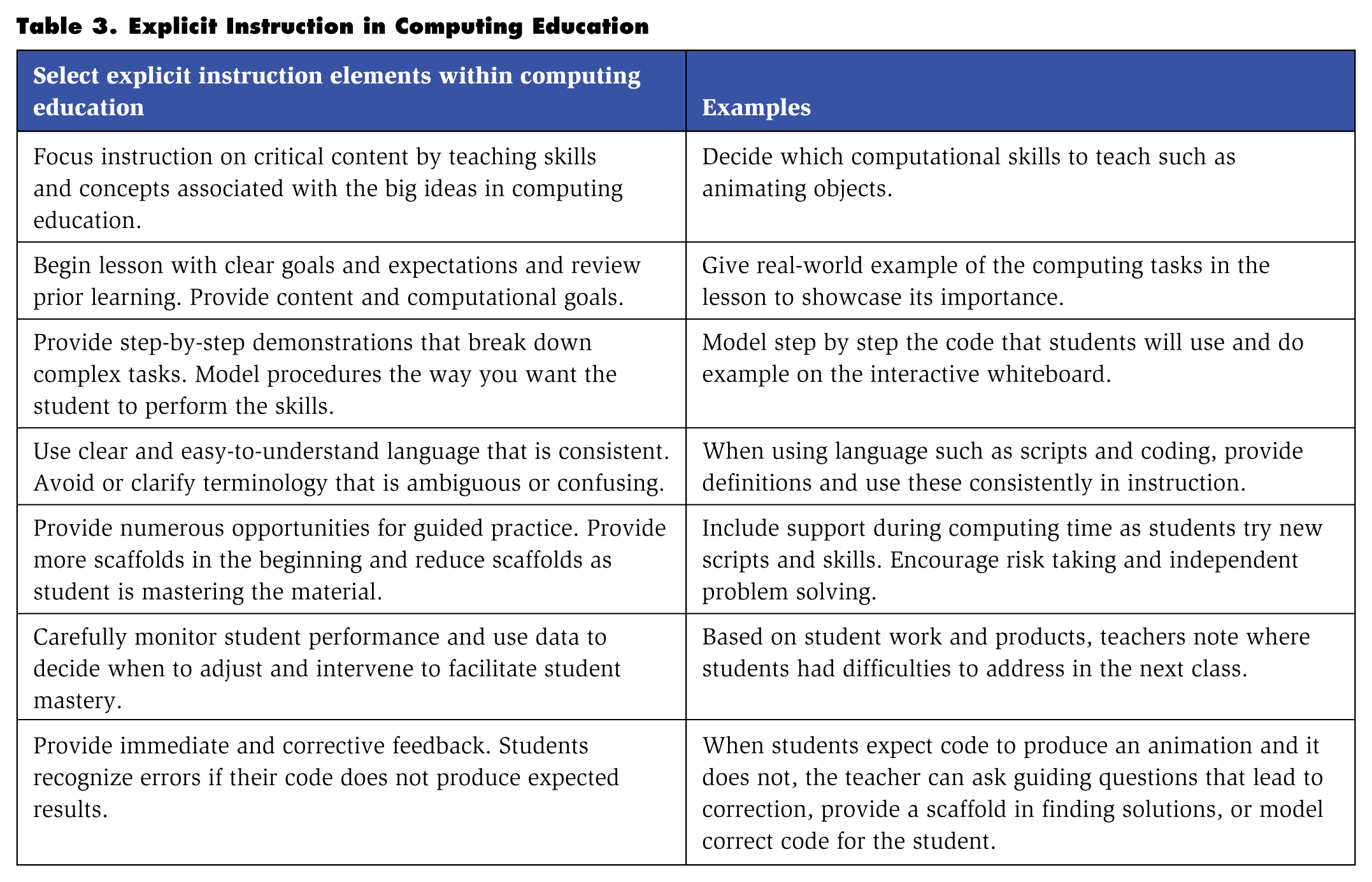
Explicit instruction can reduce students’ frustrations in computational tasks because each step is explained concisely and monitored until students have mastered the step. Allowing students ample opportunities to develop and practice skills that have been taught is an essential component of delivering effective instruction. With that said, it is important to balance explicit instruction of discrete skills with open-ended inquiry for students to have the opportunity to use skills learned through explicit instruction to engage in open-ended, problem-solving computing tasks (Israel et al., 2015; Kafai & Burke, 2014).
The balance between explicit instruction and more open computing instruction can be a challenge for teachers. Explicit instruction can be either provided prior to open-inquiry activities or embedded within those activities. Israel and colleagues (2015) described a model wherein teachers cycled through computing mini-lessons followed by short periods of open exploration. Through this process, teachers provided explicit instruction that allowed for more successful open inquiry for students who needed that level of support. Israel and colleagues described one teacher, for example, who modeled how to animate an object in Scratch and provided step-by-step directions on the interactive white board. She then had students use those skills within a constrained inquiry activity wherein students had choice in what they could animate but had to use the discrete skills she modeled. Finally, once the students demonstrated proficiency in those skills, they had options for independent practice within more open computing activities of their choice.
It should be noted, in computing, students will know if they used code as intended based on whether the inputted code produces the expected outcome. This is different from other areas of instruction (such as writing a grammatically correct paragraph) because in traditional instruction, the students may not always know if their work is correct. Table 3 provides strategies that account for this inherent feedback within computing.
Mr. Rose and Ms. Smith are planning to teach students about the process of corn and soy production. To integrate computational thinking with this content goal, the teachers decide to engage students in writing programs for a seed to travel through a food production maze using Scratch. Ms. Smith suspects that students with learning disabilities will struggle with “if, then” codes required to complete this assignment. She, therefore, models writing such a code explicitly, and she leaves her example on the interactive whiteboard for the students to view as they create their mazes. Once students finish writing their codes, they can either continue to embellish their maze by adding more features or discuss their finished product with peers to gain new perspectives and feedback.
Encouraging Student-to- Student Collaboration
Computing is often highly collaborative because of the focus on creativity and finding solutions to ambiguous or ill-defined problems. As in other areas of student collaboration, students with disabilities and their peers may need to be taught the necessary skills to work successfully in collaborative environments. McMaster and Fuchs (2002), in their review of collaborative learning studies, described multiple training procedures to prepare students for collaborative learning activities. One cannot assume that students will know how to ask a peer for help when problems occur or that they know how to offer support to a peer who is struggling in a manner that promotes skill acquisition and independence. Teachers can facilitate these interactions through cooperative learning strategies.
Computing is often highly collaborative because of the focus on creativity and finding solutions to ambiguous or ill-defined problems. Like in other areas of student collaboration, students with disabilities and their peers may need to be taught the necessary skills to work successfully in collaborative environments.
Cooperative Learning
Cooperative learning involves students working together to help each other learn content and discover new information (Slavin, 1991). It requires active student involvement and relies on student interaction as a primary means for promoting complex reasoning, critical thought, and the development of problem-solving skills (Rose, 2004). It can span across all grade levels from elementary through high school and fits well within the context of computing education. For example, teachers can form groups and assign roles for students to program. Roles could include animation leader, content leader, coding leader, and sound effects leader.
Research indicates that successful cooperative learning is dependent on individual accountability and group rewards (Slavin, 1991). Individual accountability requires each member of the group to perform an individual task that contributes to the overall completion of the assigned group goal (Johnson & Johnson, 1999). Group rewards is a form of recognition to all team members upon the successful completion of the task. Both factors can be the incentives for students to actively participate in cooperative learning.
McMaster and Fuchs (2002) found that individual accountability and group rewards have the potential to increase achievement of students with learning disabilities. The roles of students with disabilities should capitalize on their strengths and allow for modified expectations if necessary. For example, if they are collaboratively creating a game in Scratch, students who struggle with planning multistep projects may require preplanning with the teacher to determine individual goals prior to the group collaboration.
Student-to-Student Help Seeking
When students cannot find a solution to a computing problem, they often get frustrated and want the teacher or another student to help them find solutions. To get students to articulate those problems effectively, studies such as Webb, Ing, Kersting, and Nemer (2006) and Karabenick and Dembo (2011) recommended providing students with specific prompts to encourage them “to give elaborated explanations, to explain materials in their own words, and to explain why they believe their answers are correct or incorrect” (Webb et al., 2006, p. 81).
Accordingly, teachers can encourage collaborative discourse that provides students with language to assist them in seeking and giving help. For example, Park and Lash’s (2014) collaborative discussion framework (see Figure 2) encourages students to collaborate during computing activities. This framework guides student conversations through four questions when they are stuck on difficult task: (a) What are you trying to do? (b) What have you tried already? (c) What else do you think you can try? And (d) what would happen if . . . ? (see Figure 2). This framework should be explicitly taught to students as a strategy to seek help from other students before asking the teacher.
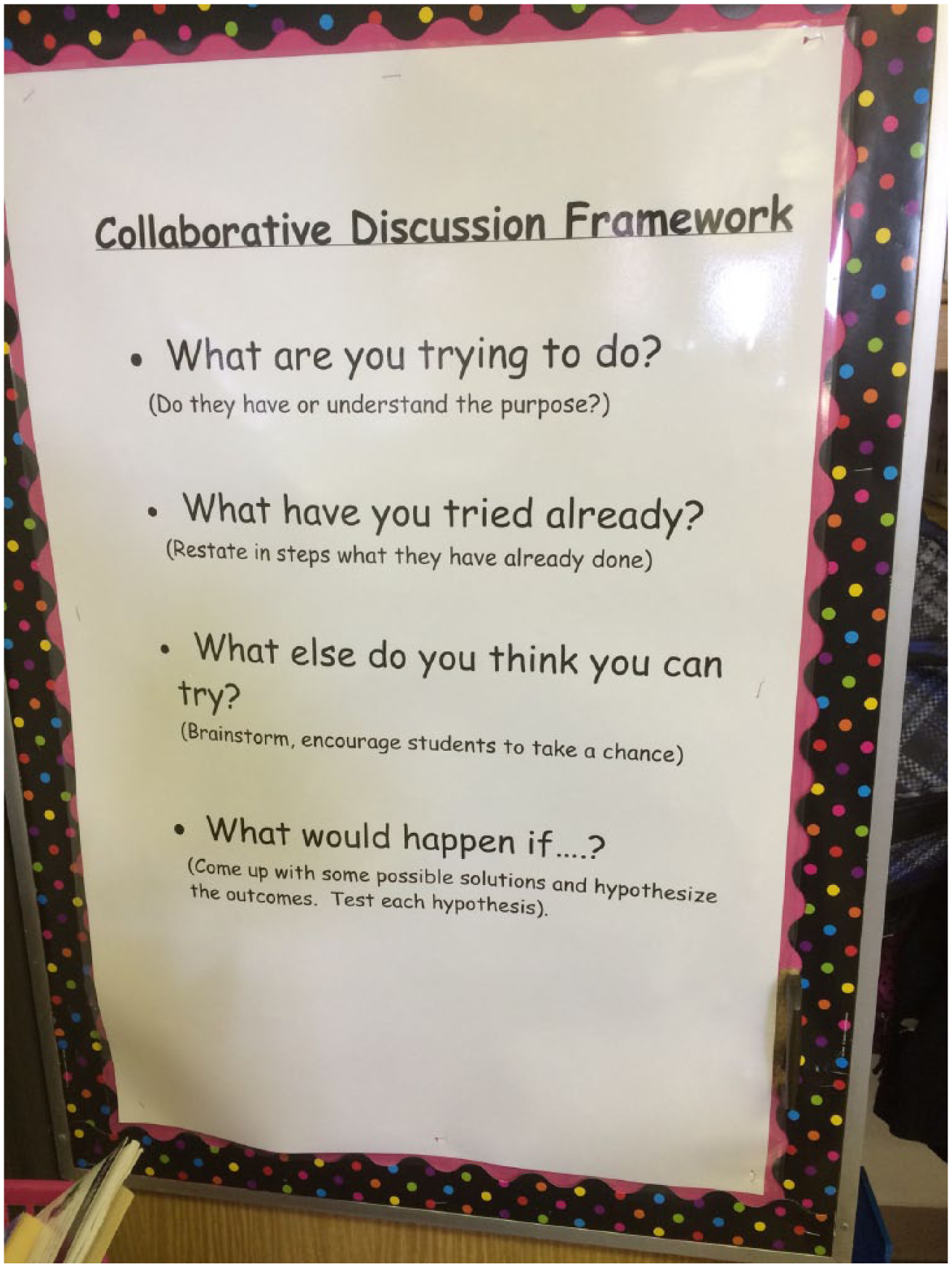
Example of Collaborative Discussion Framework classroom poster
Mr. Rose and Ms. Smith encourage collaborative problem solving in their classroom. They introduced their students to the Collaborative Discussion Framework as a tool that promotes collaborative problem solving and reduces learned helplessness and overreliance on teacher assistance. Students with disabilities use this framework as a prompt to seek help from their peers without feeling embarrassed for not knowing how to solve the problem.

Experiment With Different Software and Hardware to Increase Accessibility
To include a broad range of learners in computing, teachers should consider whether the software and hardware that the students access present barriers to learning and participation. For example, students with fine motor difficulties may struggle with using a mouse. Because of these barriers, teachers must examine the accessibility of the hardware and software their students use.
Assistive technologies (AT) and instructional technologies (IT) go hand in hand when considering access issues during computational thinking activities. Students with disabilities who have access to AT during traditional instruction that includes technology (such as word processing) will likely need access to these technologies during computational thinking instruction. The same type of process for making AT considerations in traditional instructional areas should be afforded to computational thinking instruction. For example, teachers and individualized education program teams make AT determination decisions based on students’ needs and abilities, the required tasks, and the learning environment. These same areas should be considered during computational thinking instruction.
Ms. Smith observed Thomas, a student with fine motor difficulty. She noticed that although he loves engaging in computer-based learning, he is not engaged in the planned computing activity. Upon further observation, she noticed that he had difficulty with dragging the coding tiles and making changes within those tiles. She first gave him a different mouse to use, but he still had a difficult time navigating Scratch. She then allowed Thomas to use the interactive whiteboard to do his computing with his hands rather than a mouse, which was much more effective for Thomas.
Other tools that teachers can use to respond to student challenges include the following:
Fine motor challenges: touch-screen computers with either different styluses or using finger gestures, different size mouses, or the use of interactive whiteboards
Memory challenges: video tutorials readily available or video models created by the teacher, peers, or the participating students
Complex problem-solving challenges: experiment with different software that provide both linear and open computing activities. For example, Code.org and Khan Academy offer linear lessons, whereas Scratch and Alice offer a more open platform for using those skills.
Final Thoughts
There are many strategies special educators can employ to increase opportunities for students with learning disabilities to succeed in computing education. Because computing education is a new area of instruction, many special educators may not know how to provide support to students as they learn computing. In this article, several strategies and resources were outlined that special educators can implement to support students who find computing challenging. These instructional practices should be considered alongside the individual needs of each student to develop meaningful, engaging, and accessible computing experiences for students with disabilities.