







Abstract
This article addresses practice guidelines for applying High Leverage Practices (HLPs), Universal Design for Learning (UDL) guidelines, and effective communication strategies when using multimodal digital communication platforms to document learning and support reciprocal teacher-family interactions about student academic performance in special education and inclusive contexts. Additionally, the article includes important considerations such as support needs and potential pitfalls associated with using digital communication tools. In providing multimodal evidence of learning using digital communication platforms, teachers can document learning in multiple ways, share learning artifacts with families, and track progress toward learning goals. When using digital tools to communicate about learning progress, teachers can ask students to reflect on artifacts, provide action-oriented feedback, and model learning interactions and strategies. Adhering to these practice guidelines helps teachers maximize the ways in which such tools enhance the implementation of HLPs and UDL strategies to improve teacher-family relationships and enhance student learning.
Leslie is a special education teacher at Sunshine Elementary School. Teachers at the school recognized the need to better document students’ learning progress and communicate assessment information to families. With the support of the principal, the teachers decided to use a digital communication platform to create multimodal learning artifacts that demonstrate and document student learning. They provided families with access to the artifacts, creating opportunities for dialogue around student learning. Leslie observed that students and families responded favorably to frequent and regular interaction via the digital communication platform.
When families and educators build collaborative relationships, students are more likely to experience enhanced achievement (e.g., Wilder, 2014). Unfortunately, this ideal is not always achieved (e.g., Andrews & Brown, 2015). To foster trusting partnerships, families and educators can engage in supportive and responsive communication about individualized learning goals and student progress (Elbaum et al., 2016). Constructive use of digital communication platforms in conjunction with effective implementation practices that meaningfully involve students and families can enhance collaborative teacher-family relationships. Because research supporting the use of technology in education often does not keep up with the pace of technological change (Goodall, 2016; Thomas et al., 2019), using digital communication platforms in ways that are consistent with research-based practices is critical.
Educators can enhance their use of technology by drawing on their knowledge of research-based teaching methods, such as the high leverage practices (HLPs) endorsed by the Council for Exceptional Children and the principles of Universal Design for Learning (UDL). Over the past decade, scholars have identified 22 HLPs essential to effective teaching and learning in special education settings (McLeskey et al., 2022). HLPs related to multimodal assessment and communication include (a) using assistive and instructional technologies, (b) using multiple sources of information to develop a comprehensive understanding of a student’s strengths and needs, (c) interpreting and communicating assessment information with stakeholders, and (d) collaborating with families to support student learning (McLeskey et al., 2022). Additionally, when educators implement UDL guidelines, they promote flexible learning environments and mitigate learning barriers through practices such as providing multiple ways for students to express their knowledge and reflect on their learning (CAST, 2018; Rao et al., 2021). Using multimodal digital communication platforms can facilitate and enhance the implementation of these HLPs and UDL guidelines when teachers are intentional about applying principles of best practice (see
Checklist of Teacher Actions for Applying HLPs and UDL When Using Multimodal Digital Communication Platforms for Communicating About Learning Progress.
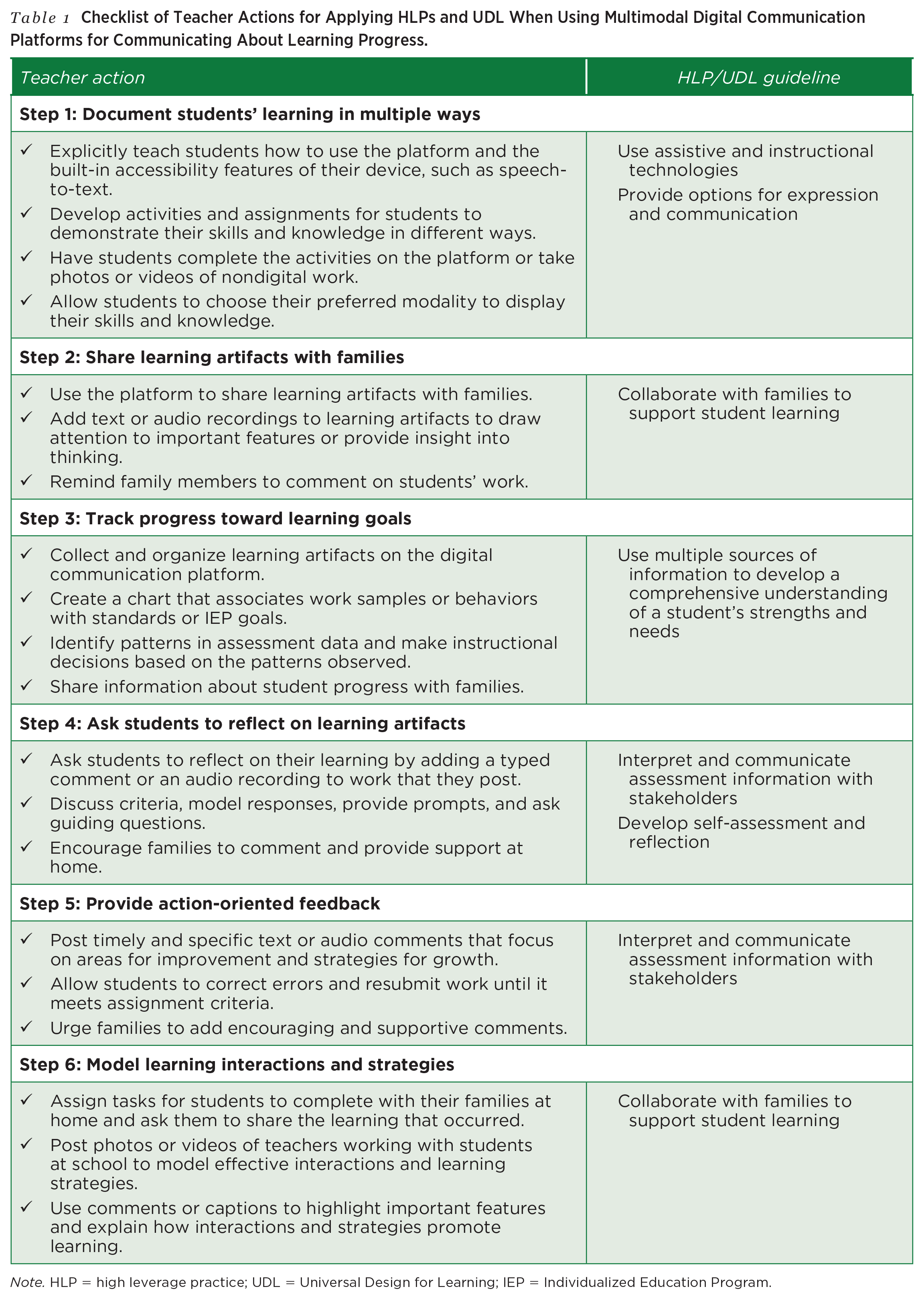
Note. HLP = high leverage practice; UDL = Universal Design for Learning; IEP = Individualized Education Program.
Research on the use of mobile devices and applications reveals favorable outcomes for students who have a range of disabilities across various contexts and in conjunction with other evidence-based practices (Kearney et al., 2023; Thomas et al., 2019). When using multimodal digital communication applications, individuals can create, share, and communicate about user-generated content that includes text, images, video, and/or audio recordings. Use of such applications can enhance the convenience and immediacy of communication and provide visual and auditory information that would otherwise be difficult to share. However, using these technologies cannot single-handedly inspire meaningful school-home communication about students’ learning, strengths, and needs, nor should they be the sole means of communication because not all families can access the technology. Other limitations include possible language barriers, lack of nonverbal cues leading to misinterpretation, and privacy and security concerns. Thus, teachers should embed communication technology within their broader practice of using multiple modes (e.g., email, phone, face-to-face) to interact with families, being flexible in their use of these modes, and grounding their communication in equity, respect, advocacy, and commitment to the child and family (Thompson et al., 2015; Turnbull et al., 2022).
In this article, we provide concrete practice guidelines and associated actions for utilizing multimodal digital communication platforms to document and communicate students’ academic progress. The research-based guidelines presented in this article can be enacted with various digital communication platforms that enable school-home communication. When selecting specific platforms, educators should seek up-to-date information on features and fees. Common Sense Education provides helpful reviews and comparisons of family communication platforms (e.g., Bloomz, ClassDojo, Seesaw), some of which offer a free version (Elgersma, 2022). The practice guidelines presented in this article specifically apply to technologies that allow users to
• type, write, draw, take pictures, and/or make audio or video recordings;
• create, display, and share samples of learning progress with families;
• monitor student progress toward academic or behavioral goals over time;
• communicate through commenting and/or messaging.
The practice guidelines we describe focus on two main areas: (a) providing multimodal evidence of learning and (b) communicating about students’ learning progress. A checklist of specific steps teachers can implement for each practice guideline is provided in
Providing Multimodal Evidence of Learning
Using digital tools to engage students in multimodal activities that demonstrate their learning aligns with HLPs and UDL guidelines such as using assistive and instructional technology to support student needs and using multiple sources of information to develop a comprehensive understanding of a student’s strengths, challenges, and progress toward learning goals (McLeskey et al., 2022). Providing students with multiple ways to express their learning and share the processes and products of their learning with their families positions students as agents in connecting learning between school and home contexts (Willis & Exley, 2018). When using multimodal digital communication platforms, teachers can implement the following practice guidelines: (a) documenting learning in multiple ways, (b) sharing learning artifacts with families, and (c) tracking progress toward learning goals.
Step 1: Document Learning in Multiple Ways
Mobile devices and apps provide built-in assistive technology options, such as customized display, text-to-speech, speech recognition, predictive text, and spell check (Rao et al., 2021). Special educators can implement assistive and instructional technologies to meet the needs of students with disabilities, who often have difficulty communicating their knowledge, especially when completing writing tasks. As shown in
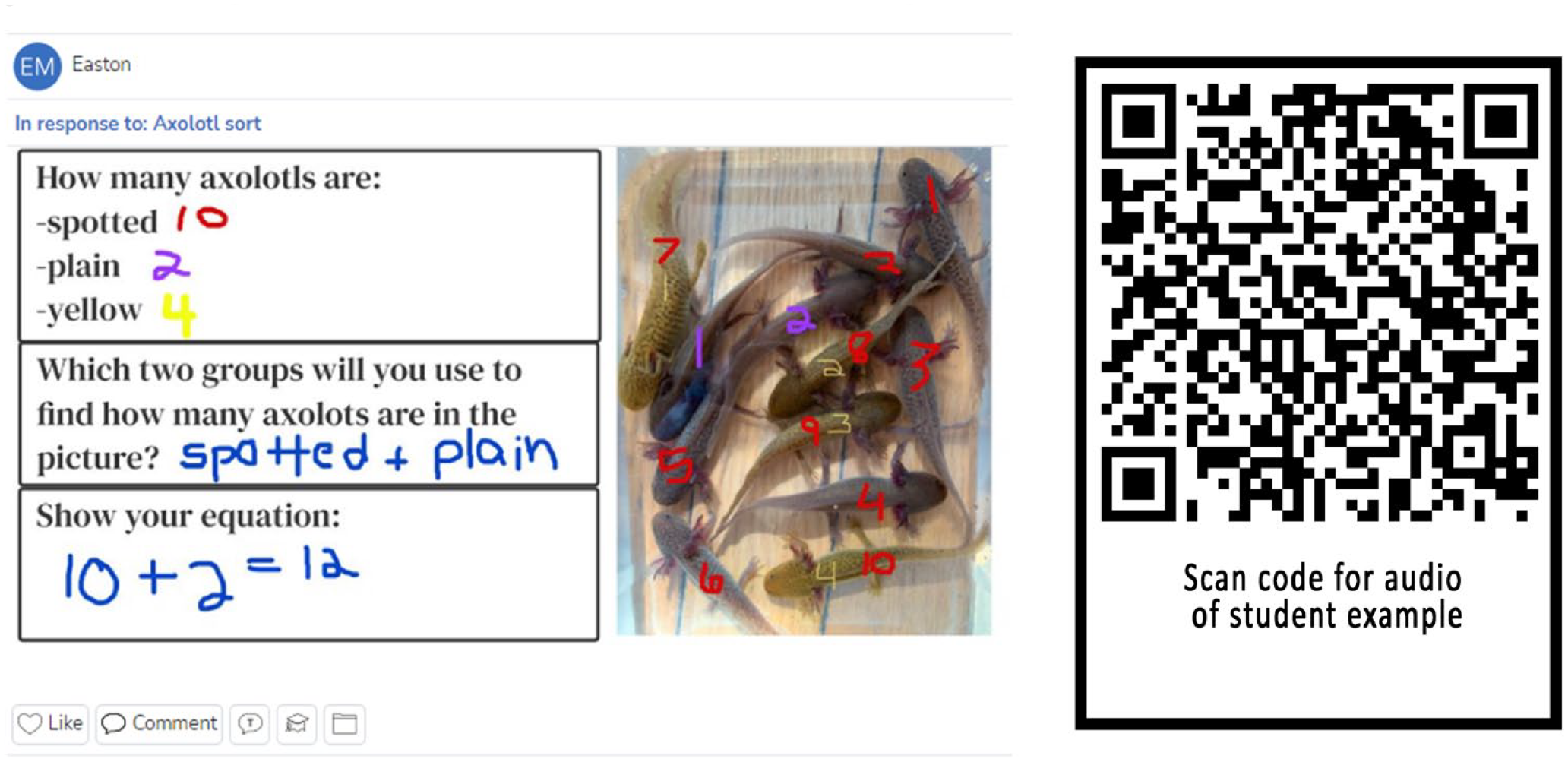
Creating multimodal documentation of student learning
To implement this guideline, special educators and students will need devices such as iPads, Chromebooks, or laptops with built-in assistive technology features (e.g., speech-to-text), cameras, microphones, and a multimodal digital communication platform. First, educators should explicitly teach students how to use the digital platform and assistive technology features. Then, they should develop activities and assignments that allow students to demonstrate their knowledge and thinking processes. Students can complete assignments within the digital communication platform using pictures, drawings, text, video, and/or audio recording, or they can photograph or video nondigital work using the device’s camera and microphone. When feasible, teachers can allow students to choose their preferred modality for displaying their skills and knowledge.
Leslie realizes students need to engage with content and skills in multiple ways to remove barriers and compensate for learning challenges. To ensure that students can take full advantage of the digital communication platform, Leslie explicitly teaches students how to use the tools, regularly encouraging them to explore response options and assistive technology features to determine how to best demonstrate their learning. Leslie assigns activities that incorporate audio or video recordings, pictures, drawings, and/or text, often allowing students to choose their preferred modality. In her experience, recordings provide more insight into students’ understanding of topics than text alone because many students experience writing challenges.
Step 2: Share Learning Artifacts With Families
Sharing evidence of student learning progress with families can help to foster a team-based approach to educating students with disabilities (McLeskey et al., 2022). Mobile documentation of learning, such as work samples, photographs, and audio or video recordings, can make student learning visible, provide families with consistent and transparent information about what happens in the classroom, and promote communication among students, families, and teachers (Cousik & Maconochie, 2017; Lim & Cho, 2019; Willis & Exley, 2018). Sharing evidence with families can also motivate students to do their best work and assist families in supporting the learning process at home (Cox et al., 2021; Lim & Cho, 2019). Commentary, picture captions, or audio recordings can be included to illustrate the learning process that occurred, not just the product or outcome (Buchholz & Riley, 2020; Gauvreau & Sandall, 2019; Higgins & Cherrington, 2017).
Teachers can use digital communication platforms to facilitate the process of sharing learning artifacts with families in a quick and efficient manner. For example, when a student posts their work on Seesaw, the teacher simply approves the post, and family members receive a notification to view the work sample. Teachers or students may then add text or audio recordings to learning artifacts to draw attention to important features or provide insight into their thinking. Educators can encourage family members to comment on the students’ work, thereby supporting dialog around the learning artifact. They should use caution, however, and follow district guidelines regarding confidentiality and privacy when sharing digital media with families.
Leslie communicates with families across multiple modes for different purposes (e.g., face-to-face, phone, email, digital communication app). She appreciates the ease of multimodal communication via an app that allows her to share pictures, videos, and student work samples. Once students post their work (and she approves it), family members receive a notification that prompts them to review the learning artifact. When they view the actual work sample, hear audio of their child’s explanation, and read Leslie’s and their child’s written comments, the family members gain much more information and insight than they would from seeing a number or a letter grade in a gradebook.
Step 3: Track Progress Toward Learning Goals
To understand students’ strengths and needs, monitor progress, and inform instruction, special education teachers collect assessment data from multiple sources, including observations, work samples, and curriculum-based measures (McLeskey et al., 2022). By using technology, they can enhance efforts to monitor student progress toward individualized education program (IEP) goals and help families better understand students’ achievements and challenges (Wade et al., 2022). Digital communication platforms can be used to keep samples of student work in one place. As shown in
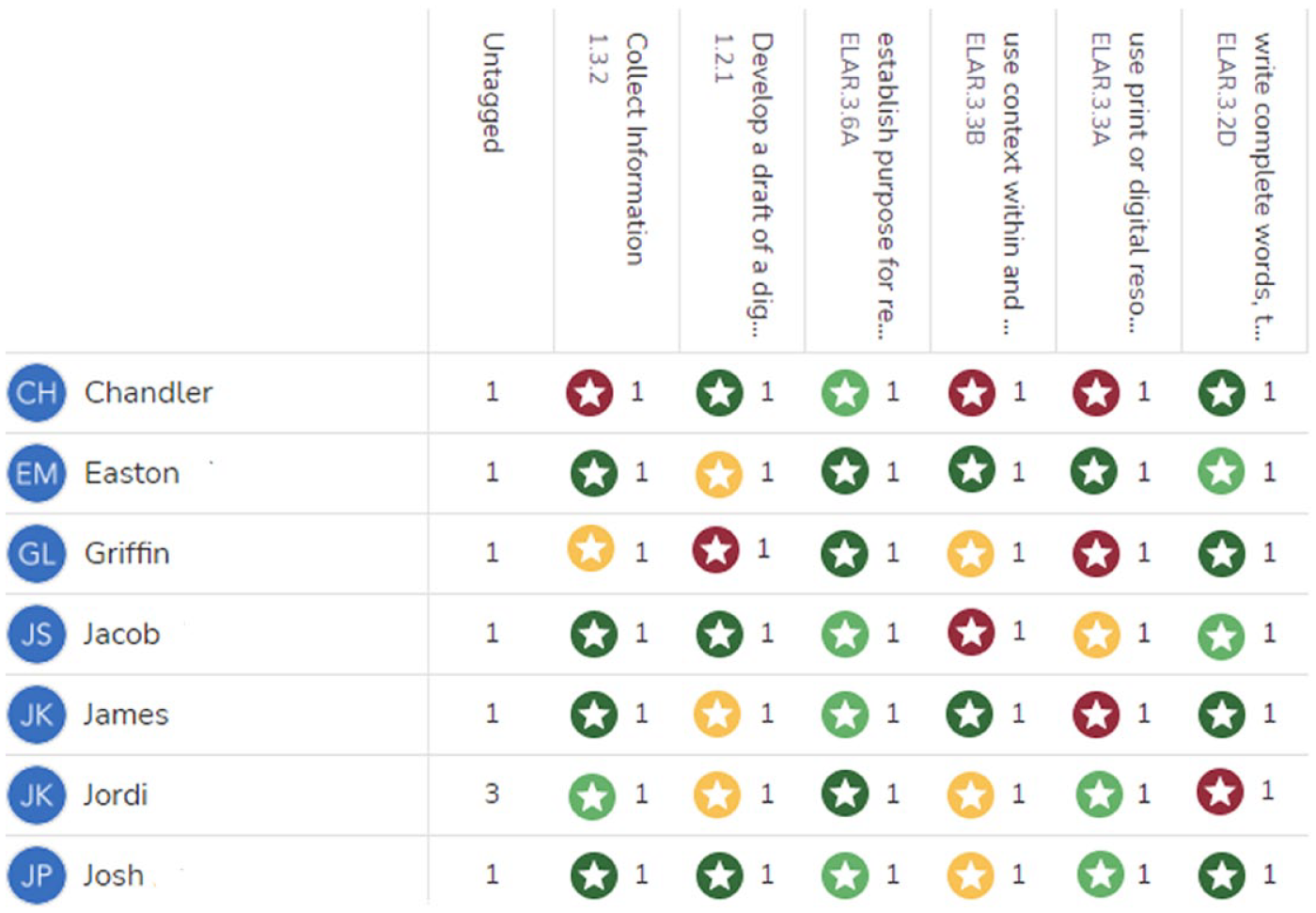
Tracking students’ progress to interpret and communicate assessment information
When tracking students’ progress over time, teachers can gather and organize work samples from multiple sources on the digital communication platform. Digital artifacts can include work created on the platform and pictures or recordings of nondigital work. Next, teachers may create a chart that associates work samples or behaviors with standards or IEP goals, identify patterns in the assessment data, make instructional decisions, and share personalized information about student progress with families. For example, Seesaw has a progress monitoring feature that allows educators to tag, score, and chart learning artifacts. Other platforms, such as Bloomz and ClassDojo, provide ways to monitor and track student behavior or social-emotional learning. Caution should be exercised, however, when using the automated reporting features of these platforms, especially when sharing negative information, because such messages may lead to unintended consequences (e.g., student punishment at home, conflict in the parent-teacher relationship). We recommend providing personalized, rather than automated, messages to parents, especially when communicating about student behavioral challenges.
Leslie regularly implements curriculum-based measurement probes and exit tickets using multimedia creation tools. Her students use these tools along with the camera and microphone on their device to document their work and add voiceovers. Leslie uses a digital communication app to keep learning artifacts in one place and track students’ performance over time. For example, she uses audio recordings to assess reading fluency and to encourage students to explain their thinking in math. She can watch and/or listen to the recordings, gain insight into students’ understanding, and better interpret the kinds of errors they make. She tags learning artifacts with IEP goals, uses charts to identify patterns, and makes instructional decisions based on the data. She shares these charts with families via the digital communication app and during parent-teacher conferences.
Communicating About Learning Progress
By using digital communication platforms, teachers expand the ways in which they can implement HLPs, such as interpreting and communicating assessment information to family members and collaborating with them to support student learning. As shown in
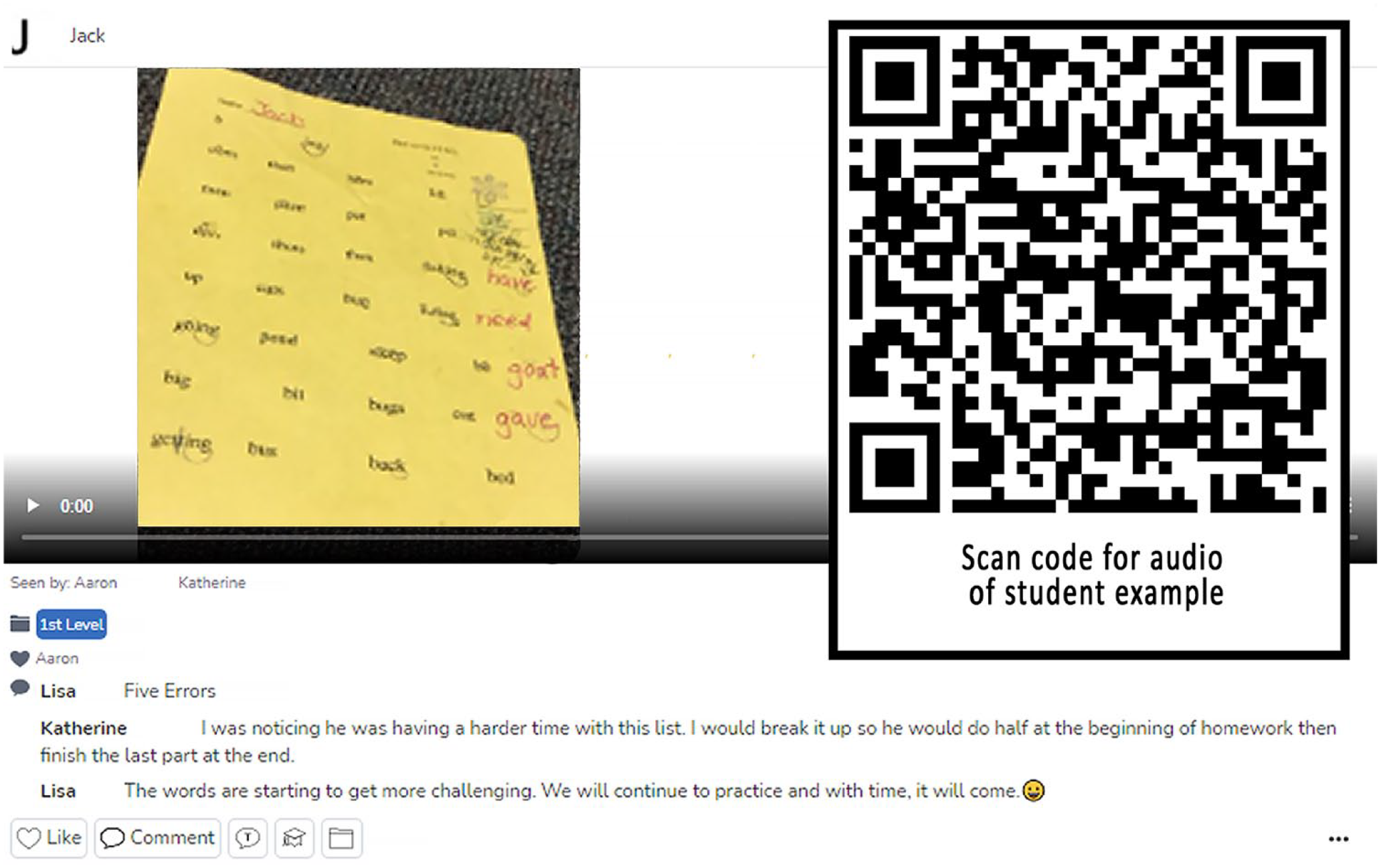
Sharing and communicating about multimodal learning artifacts
Step 4: Ask Students to Reflect on Learning Artifacts
Digital communication platforms can provide educators with an authentic way to engage students in learning through self-assessment and reflection, aligning with the UDL guideline for self-regulation (CAST, 2018; Rao et al., 2021). Through formative self-assessment, students essentially provide feedback to themselves, which helps them to recognize their progress and become more aware of processes that promote their learning (Andrade, 2019). Self-assessment and reflection also promote metacognition, self-regulation, and social-emotional competency, ultimately leading to academic gains (Andrade, 2019; Yoder, 2014). Student reflections are especially effective when educators interact with students, providing supports such as prompts, open-ended questions, rubrics, and checklists (Kori et al., 2014).
Educators can encourage students to reflect on their work by asking them to add text or audio comments to learning artifacts posted on the digital communication platform. To help students develop skills in reflecting on their learning, teachers can provide scaffolding by discussing criteria, modeling responses, giving prompts, and asking guiding questions. They can also encourage families to comment on students’ reflections and to provide additional support to students at home.
Leslie notes that when students and families comment on the work posted on the digital communication platform, they have an opportunity to reflect on progress and recognize the need for additional support or more practice. To encourage students to reflect and to support their use of language (an area in which students with disabilities often struggle), Leslie discusses and models expectations for students’ reflections and lists the criteria on the board. If their reflections are incomplete, she sends them a comment with guiding questions, such as “What strategies helped you complete the assignment?” or “How can you modify and improve your work?” Sometimes families add encouraging comments or take the initiative to provide support and practice at home. For example, when reviewing a math fluency assessment, one parent commented, “It looks like we need to work on our math facts at home.”
Step 5: Provide Action-Oriented Feedback
Research on use of mobile technologies to communicate with families about student strengths and areas in need of improvement suggests that teachers should provide action-oriented and differentiated feedback (Doss et al., 2019). In one study, students whose parents received weekly improvement-oriented text messages (e.g., “Kelly was easily distracted when completing classwork—using the checklist we created can help her to stay focused”) reported their parents spoke more frequently with them about how they could improve in school compared to (a) students whose parents did not receive any weekly text messages and (b) students whose parents received only positive text messages (e.g., “John actively participated in the group project—great job!”; Kraft & Rogers, 2015). Teachers should be purposeful and selective in what they share with families. Too little or too much information can reduce effectiveness. Sending action-oriented messages with less than 15 words as few as three times per week can yield student learning benefits (Cortes et al., 2021; Kraft & Rogers, 2015).
To implement this guideline, educators can provide timely, specific, action-oriented feedback on students’ work by posting text or audio comments that focus on areas for improvement and strategies for growth. They can also allow students to correct errors and resubmit work until it meets the assignment criteria. Finally, teachers can invite families to add comments that provide encouragement and support.
Leslie realizes the importance of providing timely and specific feedback so students know how they are doing and how to successfully meet expectations. She often uses comments to quickly provide brief feedback on students’ work by either typing or audio recording a message. She also highlights instructions or circles errors and then provides information in the comments so students can correct their errors or revise incomplete work (e.g., “Those are parallel, not perpendicular lines” or “Include more supporting details”). Students can then make corrections and resubmit their work, continuing the process until the work meets expectations. Families can see the work and the feedback. In this way, they can observe the process and the dialogue that occurred while creating the learning artifact. Parents sometimes offer feedback as well (e.g., “Great job!” or “Is this your best effort?”).
Step 6: Model Learning Interactions and Strategies
Digital communication platforms can enhance coherence between home and school contexts when educators and families share home and school learning interactions in a reciprocal way. In addition to sharing learning artifacts with families, educators can invite families to use digital communication apps to share students’ home learning experiences, demonstrating the learning process that occurred and the benefits of the experience (Buchholz & Riley, 2020; Goodall, 2016; Higgins & Cherrington, 2017; Lim & Cho, 2019; Turnbull et al., 2022). Furthermore, providing video demonstrations of intervention strategies along with text-based messages or comments can be an effective way for teachers to support family members in implementing research-based practices to improve student learning at home (Snell et al., 2020).
When modeling learning interactions and strategies, teachers can provide assignments with instructions for tasks that students do at home with their families and ask them to share evidence of the learning that occurred via the digital communication platform. To model effective interactions and learning strategies, teachers can also post photos or videos of themselves working with the student at school. They can use comments or captions to highlight important features of these learning interactions and strategies. Making the learning process visible by recording these interactions along with comments explaining how and why the interactions promote learning can help family members better implement strategies at home.
Leslie invites students and families to share at-home learning via the digital platform. She appreciates the creative videos that students and their families post about their learning at home. She also records learning interactions to model strategies to help support student success. Instead of sending home detailed written instructions, which have not always been effective, Leslie sends families short videos (2 minutes or less). She uses think-alouds to explain the strategy and its purpose, adding comments that draw attention to key features of the learning process. For example, when recording writing conferences, Leslie illustrates a strategy for encouraging students to add more details and includes a comment explaining that verbalizing and using pictures helps children learn to write in more detail.
Additional Considerations
To ensure effective use of digital communication platforms, educators and school leaders should consider how to appropriately support implementation and be aware of potential pitfalls that can occur. Whether these tools result in good or harm depends on implementation processes; hence, establishing and following best practices is critical.
Supporting Effective Use
Even though effective and regular communication is associated with enhanced student learning outcomes, educators often do not receive sufficient support for implementing best practices (Goodall, 2016; Kyzar et al., 2019). Thus, school leaders should establish a clear purpose for using digital communication platforms and provide opportunities for all communication partners to access and learn how to use the tools (Goodall, 2016). Educators should be aware of the resources needed for home use of digital platforms and take steps to facilitate equitable communication across levels of family income and access to technology. Both families and teachers also need access to training on how to use selected platforms effectively and how to avoid potential pitfalls. Teachers can learn to use digital communication platforms by attending workshops, using online resources, experimenting, and collaborating with peers. As they use digital tools, they can learn from their experience, share effective strategies with each other, and use feedback from parents to modify their communication practices (Anderson & Kyzar, 2022). Educators also need just-in-time support so they can cope with technology malfunctions and model for students how to react constructively when things do not work out as planned (Wade et al., 2022). Ongoing technical assistance can include follow-up training, online resources, coaching, and peer support.
Avoiding Potential Pitfalls
Although digital communication platforms have the potential to enhance school-home communication regarding students’ learning progress, educators and school leaders should be aware of and attempt to avoid pitfalls that may hinder their use of these tools, including the following:
• Not all families have sufficient access and knowledge about how to use digital communication platforms. Educators should determine whether families have access to technology and can use it. They may need training, support, translation tools, and alternative methods of communication (Gauvreau & Sandall, 2019).
• Families’ expectations about communication may differ from teachers’ communication practices. Teachers can survey and/or ask families directly about their needs and preferences and then consider that information when determining communication frequency, mode, and response time (Gauvreau & Sandall, 2019; Lim & Cho, 2019).
• Family members may be unsure of how often to comment on learning artifacts or what to say in their remarks. Thus, to support families in making regular positive and substantive comments, teachers may need to provide encouragement and individualized guidance (Higgins & Cherrington, 2017; Willis & Exley, 2018).
• Educators should be aware of and address security, privacy, and confidentiality issues to protect students’ digital identities (Gauvreau & Sandall, 2019). They should check their school and district communication policies prior to using an application. Schools may require, for example, consent forms for photography and surveys to determine parent preferences for receiving messages.
• Home-school communication about student behavior should be approached with respect, reciprocity, and responsiveness (Barrera & Kramer, 2017) because behavior is shaped by culture. Thus, teachers should avoid using platforms such as ClassDojo as surveillance tools for behavior in ways that prioritize control, compliance, and conformity (Manolev et al., 2018) over positive home-school communication.
• Although digital platforms provide one means to communicate about students’ academic progress, other modes of communication, such as email or face-to-face communication, are also needed. Teachers should consider the nature and purpose of messages when selecting the mode of communication (Thompson et al., 2015).
• Using digital communication platforms can enhance school-home communication, but only to the extent that there is a strong foundation. Thus, teachers should embed the use of these tools within their broader practice of building trusting relationships with families.
Conclusion
Intentionally applying HLPs, UDL guidelines, and effective communication strategies to the use of multimodal digital platforms can help special education teachers document learning and support reciprocal teacher-family interaction about student performance in special education and inclusive contexts (see
Supplemental Material
sj-mp3-1-tcx-10.1177_00400599241257440 – Supplemental material for Using a Multimodal Digital Platform to Communicate About Students’ Learning Progress
Supplemental material, sj-mp3-1-tcx-10.1177_00400599241257440 for Using a Multimodal Digital Platform to Communicate About Students’ Learning Progress by Susan E. Anderson, Kathleen B. Kyzar and Julie Hulce in TEACHING Exceptional Children
Supplemental Material
sj-mp3-2-tcx-10.1177_00400599241257440 – Supplemental material for Using a Multimodal Digital Platform to Communicate About Students’ Learning Progress
Supplemental material, sj-mp3-2-tcx-10.1177_00400599241257440 for Using a Multimodal Digital Platform to Communicate About Students’ Learning Progress by Susan E. Anderson, Kathleen B. Kyzar and Julie Hulce in TEACHING Exceptional Children
Footnotes
Declaration of Conflicting Interests
The author(s) declared no potential conflicts of interest with respect to the research, authorship, and/or publication of this article.
Funding
The author(s) received no financial support for the research, authorship, and/or publication of this article.

References
Supplementary Material
Please find the following supplemental material available below.
For Open Access articles published under a Creative Commons License, all supplemental material carries the same license as the article it is associated with.
For non-Open Access articles published, all supplemental material carries a non-exclusive license, and permission requests for re-use of supplemental material or any part of supplemental material shall be sent directly to the copyright owner as specified in the copyright notice associated with the article.
