







Abstract
Mrs. Gold is a high school self-contained teacher at Williamstown High School, a rural school district. Her program supports high school students with intellectual and developmental disabilities (IDD) with a focus on transition. She aims to prepare her students for life after secondary education in the areas of employment, continuing education, and independent living. Mrs. Gold recognizes gaining life skills greatly improves her students’ quality of life in all areas during their educational careers and after in their adult lives. Every year, Mrs. Gold teaches a variety of life skills, including domestic tasks such as cooking and cleaning, navigating safely within their communities, and financial skills. Mrs. Gold has implemented various teaching strategies to support her students’ learning and has documented significant growth in her students’ life skills when she provides in vivo (i.e., teaching in realistic settings, in real time) or community-based instruction (CBI). Mrs. Gold prefers in vivo or CBI methods because they effectively help her students generalize life skills instruction to real-world situations. However, these opportunities are often limited and inconsistent due to her school’s rural setting. Limited public transportation and significant distances to community centers make consistently using CBI challenging. Staff shortages make it difficult to provide consistent and effective in vivo instruction in life skills to Mrs. Gold’s students. Seeking support, Mrs. Gold reached out to her special education director, who suggested technology-based intervention as a potential solution. Eager to learn more, Mrs. Gold began exploring various technology-based interventions and the possibilities technology offers to support her pursuit of life skills instruction.
Technology to Support Life Skills
Life skills allow one to care for themselves, socially interact with others, be part of a community, and participate in leisure activities (G. M. Clark et al., 1994; Davis & Lee, 2023). Teaching life skills to students with IDD can increase autonomy and help them become meaningful participants in their respective communities, especially as they transition from secondary education to adulthood (Bridges et al., 2020). Unfortunately, teachers like Mrs. Gold encounter challenges in providing effective and efficient life skills instruction due to teacher or staff shortages, lack of curriculum or resources, and limited access to community centers for CBI (Cheek et al., 2022; Schutz & Travers, 2023). In response, researchers have explored various technology-based interventions (e.g., virtual reality [VR], video modeling [VM]) to provide students with IDD instruction in needed life skills and have determined technological interventions are effective in supporting individuals with IDD to learn essential life skills (Rowe, Mazzotti, et al., 2020).
VM and video prompting (VP), collectively referred to as “video-based instruction” (VBI), are among the most consistently explored and used technology-based interventions for teaching various life skills to students with IDD (Sun & Brock, 2023). Using VM for life skills instruction involves showing students a video of someone (e.g., an adult, a peer, or even themselves) performing an entire task from start to finish in a single video clip, which students will then model after (Kanfush & Jaffe, 2019). VP is similar to VM but breaks down the task into smaller steps, with separate videos of each step presented to the students sequentially (Sun & Brock, 2023). Both methods provide students with a visual model of the skill they are learning, which researchers found enhances student acquisition and maintenance of life skills (Park et al., 2019). When students are presented with VBI, they can watch and rewatch as needed, allowing teachers to individualize instruction and provide repeated practice, which is crucial for teaching and mastering novel life skills (Kanfush & Jaffe, 2019; Taconet et al., 2024).
Two more recent technology-based interventions to support the development of life skills in students with IDD include augmented reality (AR) and VR (McMahon et al., 2020; Yenioglu et al., 2023). AR combines virtual content and the real world to create an interactive experience for students with disabilities (Bower et al., 2014; Yenioglu et al., 2023). VR involves virtual simulations of a three-dimensional environment mimicking real life (Carreon et al., 2024). VR can take multiple forms, from fully immersive, which typically involves headsets and fully interactive three-dimensional environments, to nonimmersive, often involving computers or Chromebooks, phones, or tablets (Yakubova et al., 2022). Both provide students with opportunities to practice and participate in life skills in safe and controlled environments (Dixon et al., 2020; Panerai et al., 2018). Previous researchers found VR and AR to be effective in teaching life skills to students with IDD (e.g., Bridges et al., 2020; Cihak et al., 2016).
Recently, researchers explored the use of nonimmersive VR to support the acquisition, maintenance, and generalization of life skills in secondary students with IDD in rural schools. Jakubow et al. (2025) and Bouck et al. (2025) both explored high school students learning food preparation skills (i.e., making a grilled cheese sandwich on the stove) using a nonimmersive VR app downloadable onto Chromebooks (for a screenshot of the VR system, see Figure 1). In both studies, the students both acquired the skill in the VR environment and generalized to making pizza in an oven in the VR environment. In the Bouck et al. study, researchers also implemented the system of least prompts (SLP) and probed students immediately after completing the VR training; in the Jakubow et al. study, researchers did not implement the SLP, and students were probed the next session following the VR session. Furthermore, the students’ skill acquisition was relatively efficient, with the three participating students averaging about half hour of instruction via the VR across about eight sessions.
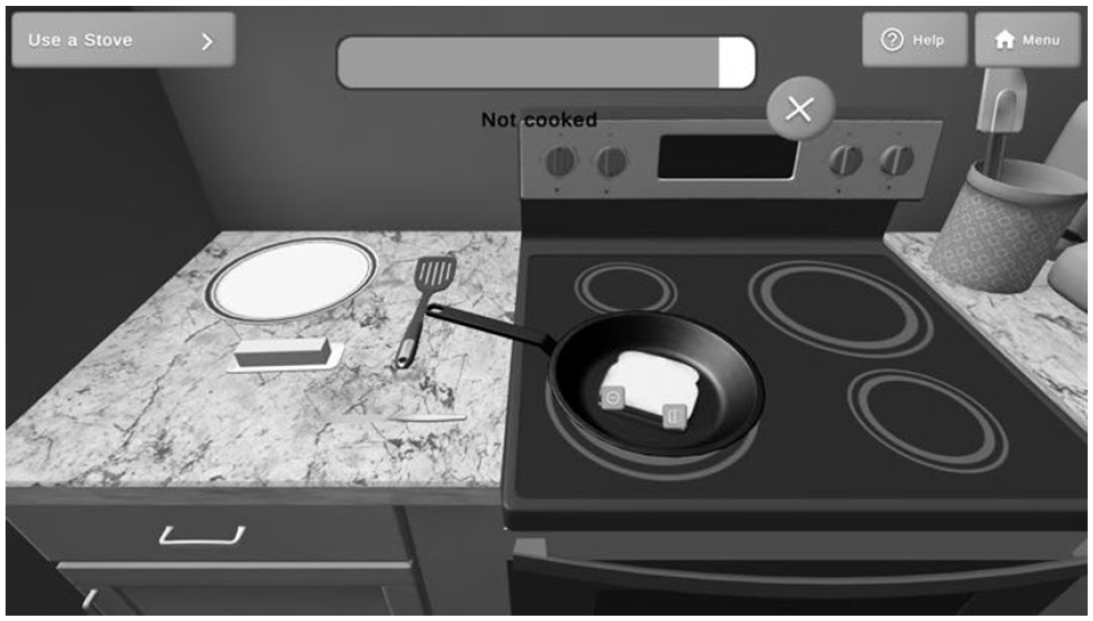
Nonimmersive virtual reality cooking a grilled cheese sandwich on a stove
Per the suggestion from her special education coordinator, Mrs. Gold dedicates time to researching technology-based interventions to support her students’ life skills learning. She is intrigued by the capabilities of AR and VR due to their engaging and realistic environments. Mrs. Gold’s next step is to learn more about AR and VR and what specific options might exist and, ultimately, determine which technology-based intervention she wants and is able to pursue and implement in her classroom.
Choosing One’s Reality
Although both provide controlled, safe environments for practicing life skills, VR and AR present distinct differences that teachers should consider. Most notably, AR does not vary in its level of immersion like VR. Instead, AR overlays digital elements onto the real world without replacing them, meaning students remain in their actual environment. This lack of immersion can pose challenges for teachers like Mrs. Gold, who face barriers in accessing realistic community settings (e.g., grocery stores). Historically, access to AR or VR in schools was limited due to the cost of acquiring VR interventions. However, according to a recent survey, nearly 80% of teachers have access to some form of VR (Carreon et al., 2022), making VR an accessible and cost-effective solution for delivering life skills instruction, particularly in geographically isolated schools or schools with budget constraints.
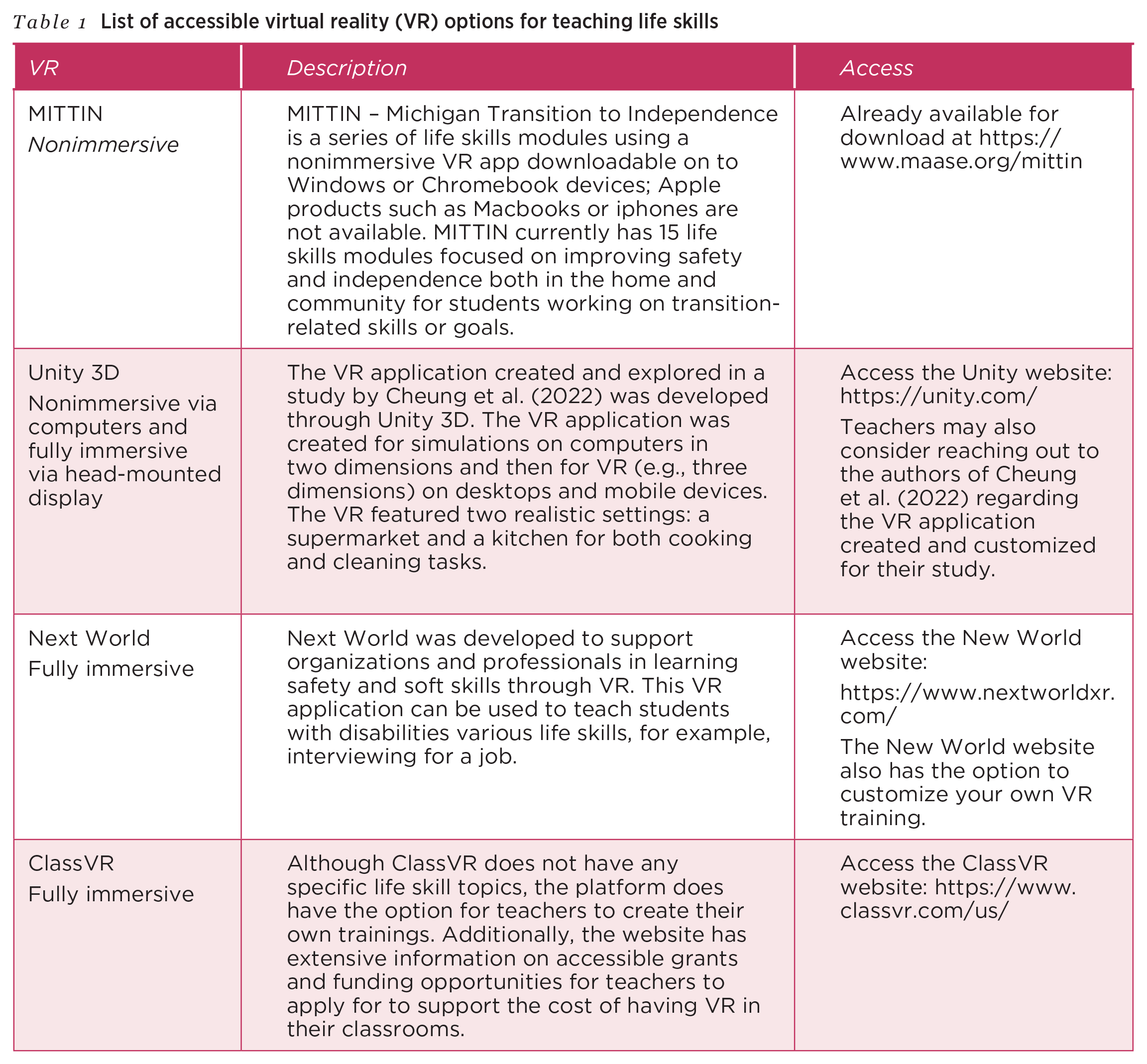
After researching the differences between AR and VR, Mrs. Gold chose to implement VR in her classroom, recognizing its potential to support her students in learning life skills, particularly ones she struggles to support in her classroom, such as community skills. She found easily accessible VR options for free or at a low cost (see Table 1). However, she realizes implementing VR is more complex than just finding and accessing VR options. Mrs. Gold needs to consider implementation details (e.g., hardware [e.g., Chromebook] and immersive vs. nonimmersive VR) and practical strategies to incorporate VR into her classroom).
List of accessible virtual reality (VR) options for teaching life skills
Once teachers select VR as the best option, they must decide whether to use fully immersive or nonimmersive VR options. Fully immersive VR (e.g., headset like ClassVR Premium Headset, Meta Quest 3) can be beneficial for teaching more complex and higher-stake life skills, such as navigating safely to and from an unfamiliar location for a job interview, because fully immersive is a controlled, simulated environment (Carreon et al., 2022). A caveat is that fully immersive VR requires more advanced equipment with a higher degree of technical support and may feel overwhelming for students with sensory needs or who struggle with independently staying on task and benefit from prompts. Fully immersive VR can be more cost-prohibitive given the equipment needed. On the other hand, nonimmersive VR uses desktop simulations, which allow students to engage in life skills tasks using standard, more readily available devices, such as computers or Chromebooks, phones, or tablets (Yakubova et al., 2022). A nonimmersive VR option is generally easier to set up and more cost-effective and can be implemented with fewer technical barriers (Kavanagh et al., 2017).
The availability of technological support is another important factor for teachers to consider when deciding which VR to implement in classrooms. Although it is ideal to have access to vendor support or district technology personnel, this may not always be realistic, especially in rural or underfunded districts (Yakubova et al., 2022). In these cases, teachers can seek free online tutorials (e.g., YouTube videos), user communities, or resources directly from the VR program’s website. Additionally, many educational VR platforms come with built-in guides and troubleshooting tips that can ideally minimize the need for external support. Teachers may also want to partner with other special education teachers in their building or district who have used VR successfully or who are interested in learning more about VR themselves. Teachers may even consider forming a professional learning community to formalize their efforts of implementing VR in their classrooms, buildings, and districts. Ultimately, teachers should consider their comfort level with technology and available support options to choose the VR system that best fits their classroom needs.
Regardless of the immersion level of VR selected, teachers should anticipate similar instructional planning times. Both fully and nonimmersive VR require thoughtful preparation, including aligning the VR life skills modules to students’ individualized education program (IEP) goals, determining prompting supports, planning for generalization, and providing supplemental activities if or when needed. The differences lie more in technical setup, support, and access to required devices rather than time needed to develop instructional activities or plan for implementation using the VR program.
Planning for VR Implementation
Once teachers have selected their level of VR immersion, the next step involves planning how to use VR effectively as a teaching tool. An effective VR program can deliver much of the life skills instruction itself, but teachers are not obsolete. Teachers play a critical role in ensuring the VR tool is used to benefit students and their learning of life skills. For instance, Mrs. Gold will need to consider who requires training before implementation; plan for whole group, small group, or individual use of the VR; determine if students need additional support; and select how to support students in generalizing life skills acquired through VR to real-world settings.
Training
Based on how teachers, such as Mrs. Gold, plan to use VR, they must provide adequate training to paraeducators, co-teachers, other educators (e.g., related support personnel), and students who will interact with the VR. This includes setting aside time for other educators to explore the VR themselves and, if possible, attend structured training sessions. Once the needed educators feel comfortable, it is time to introduce VR technology to students. Teachers should begin by explaining to their students the purpose behind VR, clearly communicating why VR is being integrated into the classroom and the specific life skills VR will help them learn. Next, teachers should model the proper care and handling of the VR equipment, establishing clear procedures for its use. This could include visuals and frequent reminders of expectations. For example, Mrs. Gold chose a VR that is downloadable on Chromebooks. As such, her students will be taught to access the VR program independently, return the device to its designated location inside her classroom, and plug it back into the charger. Mrs. Gold uses visuals to remind students where the Chromebooks are kept in the classroom and to plug them into the charger so the devices are ready to be used by the next student or during the next lesson.
Student Use
Teachers should consider when whole group, small group, or individual instruction is appropriate when planning for VR implementation. Mrs. Gold, for instance, evaluates these groupings each time she plans a lesson using VR. Whole group instruction can be useful when introducing a new life skill to an entire class. One means of doing this is to project the VR onto a larger screen, which would allow all students to observe the life skill, ask questions, and foster a group discussion. Whole group instruction also allows teachers to model the life skill more efficiently to a whole class as opposed to individuals. Small group instruction may be more useful for life skills requiring more individualized or differentiated interaction from teachers. When Mrs. Gold uses small group instruction, she often divides her students into groups of two to four based on needed skills and strengths. This allows her to monitor each student’s progress and level of engagement while providing targeted assistance when needed as students engage with the VR. Finally, individual instruction provides the most tailored experience, ideal for students needing many additional prompts or specific support. For instance, Mrs. Gold prefers to work through the VR with students one-on-one when they benefit from additional prompting, adjusting the pace if possible, and selecting life skills that align with her students’ IEP goals.
At this point, Mrs. Gold has fully planned for the implementation of her chosen nonimmersive VR program. She feels confident in her preparations to train coworkers and students on how to use the VR effectively and responsibly. She has designed life skills lessons that involve VR in whole group, small group, and individual (e.g., one-on-one) instruction. However, Mrs. Gold also understands learning a life skill in a VR environment is not the end goal—students must be able to apply those learned life skills in real-world settings. As she prepares to launch the VR lessons, she begins planning how to support her students in generalizing what they learn through VR to settings including their homes, schools, and communities. She knows generalization is critical to developing lasting independence, and she wants to make sure her students are set up for success beyond the screen.
Generalization
Teachers should plan for generalization before the implementation of VR because this significantly enhances students’ independence (Shurr et al., 2019. Generalization is the goal for all life skills learning, ensuring life skills acquired in one setting (i.e., the VR) can be transferred to other environments (e.g., the real world, such as one’s home or community setting; K. A. Clark et al., 2019). For teachers who do not have access to CBI, simulations offer an effective alternative. For example, if learning home life skills, such as cooking, teachers could use the family and consumer sciences room—if it exists—for students to demonstrate the skills in a real kitchen or laundry room after learning in the VR environment. Teachers can also set up simulated experiences in their classrooms, such as using items to set up a mini-simulated store for shopping and checking out at a grocery store.
If CBI is possible, teachers should prepare their students to generalize to real-world settings and understand how these settings may differ from the VR environment, such as when a grocery store varies in design or products from the grocery store in the VR. This preparation can include discussing the variations they might encounter, including using tools such as Google Images to compare different grocery store layouts, or practicing flexibility and calming strategies for handling overwhelming environments (e.g., some grocery stores have bright, fluorescent lights that may be overstimulating for some students; grocery stores can be loud, so students may want to bring their noise-reducing headphones). Social skills, such as asking for help from an employee to find an item in a real store, can also be practiced during this time. For teaching life skills in the home environment, such as using a washing machine to do laundry, teachers can demonstrate and discuss variations in washing machines and how to navigate a new or different machine (e.g., the washing machine in the VR environment, at school, and even at home). First, teachers can compare the VR washing machine and the washing machine at school used to generalize and practice doing laundry to prepare students for the similarities and differences in the machines and identify the important labels to look for. To further extend generalization, teachers can collaborate with the parents or guardians of their students to identify specific brands or models of washing machines at home. If possible, teachers could ask parents or guardians to send in pictures of their washing machines or simply use online images. Then, teachers can use these images to guide students in recognizing important labels, such as cycle type or water temperature, even when there are variations in the machine design. Overall, these strategies can enhance the likelihood of successful skill transfer (Steere & DiPipi-Hoy, 2012).
Implementation of VR
Once teachers have thoroughly planned how they will use VR, they can begin implementing it in their classrooms. To effectively implement, teachers should be prepared to adapt supports to meet individual student needs, systematically collect data to guide instructional decisions, and whenever possible, align with student IEP goals. In terms of adapting support, some students may require additional prompting when using VR to learn life skills. One possible way teachers can provide additional prompting is through response-prompting strategies, which have been used to teach other novel skills to students with IDD and can be used along with VR.
For example, the SLP (Shepley et al., 2019; Walker, 2008) benefits students who may already demonstrate independence in some steps of task analysis (TA). The SLP is appropriate because it allows students to respond to the VR independently first, without any support (Shepley et al., 2019). The SLP begins with the least intrusive prompt after independence (e.g., a gesture) and increases support as needed (Reyes et al., 2022). For example, Mrs. Gold provides a gesture for her student who is learning to prepare food (e.g., pizza rolls) in a microwave via the nonimmersive VR and places the plate of pizza rolls into the microwave without the cover (see Table 2). If her student does not respond to her gesture by moving the cover to the plate, Mrs. Gold may provide an indirect verbal prompt such as, “How will you be sure the pizza rolls don’t make a mess in the microwave?”
Task Analyses for Nonimmersive Virtual Reality to Collect Student Accuracy and Independence Data
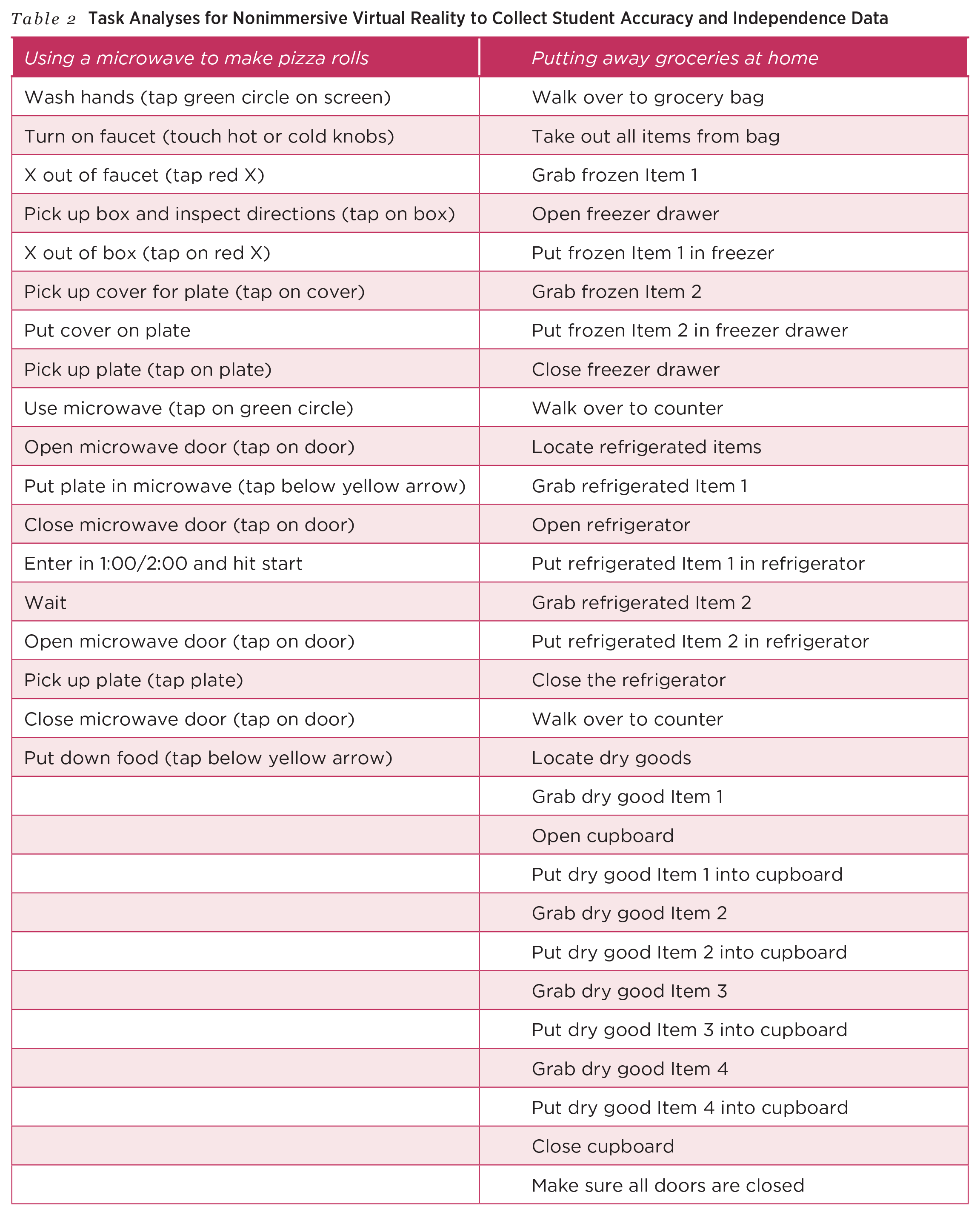
Another response strategy teachers may consider is constant time delay (Walker, 2008). For instance, a student in Mrs. Gold’s classroom is learning to put away groceries in the nonimmersive VR. Mrs. Gold set a 5-second delay before providing a prompt. When the student selects a refrigerated item from her shopping bag, Mrs. Gold waits 5 seconds to see if the student initiates the step of putting the item into the refrigerator independently (see Table 2). If the student does not begin putting the item in the appropriate location (e.g., the refrigerator), Mrs. Gold then provides a prompt such as, “Go ahead and put the item in the refrigerator.” This fixed time delay remains consistent throughout instruction, giving the student time to respond independently and accurately before any prompt is delivered. Mrs. Gold uses the same 5-second delay consistently throughout the session, allowing the student to anticipate the structure and increasing the likelihood of independent responding over time.
After a week of implementing the VR program in her classroom, Mrs. Gold begins monitoring student progress more formally and systematically. She reviews how each student is engaging with the VR tasks and reflects on their performance compared to their IEP goals. To ensure she is making informed instructional decisions, Mrs. Gold selects data collection methods that capture both students’ ability to complete each step of the life skill and their overall understanding of the task. She plans to collect this information consistently so she can adjust instruction as needed and communicate student progress with families and the IEP team.
Data Collection
Because life skills instruction for students with IDD often connects to IEP goals, teachers need to be mindful regarding collecting data when using VR for instruction. Collecting data allows teachers to make instructional decisions, track student learning, and note progress toward meeting IEP goals. If applicable, teachers can collect data via the VR system. Another means to collect data on student progress involves using TA sheets, in which an adult or, if appropriate, a peer records data on each step of the skill as the student performs it in the VR system (see Table 2). Teachers can gather detailed insights into their students’ accuracy and independence in completing the life skill by checking off items on the TA. Teachers can pair this method of collecting data with a response-prompting strategy, such as SLP. The TA sheet could include tracking the number of prompts and the level of prompts a student requires to complete the life skill in the VR. For example, Mrs. Gold is using the nonimmersive VR to support her student in acquiring the skill of putting groceries away from a list in a nonimmersive VR program, and she will use a TA sheet to record their level of accuracy in completing the steps of shopping for groceries TA (e.g., getting groceries cart, looking at the list, locating the correct aisle) and their level of independence. For instance, if the student in this example walks past the correct aisle, Mrs. Gold might first provide a gesture (G; e.g., pointing toward the correct aisle). If her student does not respond, Mrs. Gold will move to the next level of prompting and provide an indirect verbal (IV) prompt such as, “Where would you find crackers?” Should the IV prompt be insufficient, Mrs. Gold will provide a direct verbal (DV) prompt such as, “The crackers are in this aisle.” Mrs. Gold records each step, level of prompt, and number of prompts used (e.g., G, IV, DV; Shepley et al., 2019), which will help her monitor student progress over time and make better informed data-based decisions using the VR.
Another effective method for assessing student learning is the use of a pre-post assessment (see Figure 2). These assessments allow teachers to measure their students’ depth of knowledge regarding the life skills task. Taking this one step further, teachers can combine both monitoring progress via TA sheets and administering a pre-post assessment to capture students’ ability to perform steps accurately and assess their understanding and application of the life skill. Regardless of which data collection method is chosen, teachers can monitor the effectiveness of the VR intervention, assess student progress in learning important life skills, and make informed instructional decisions.
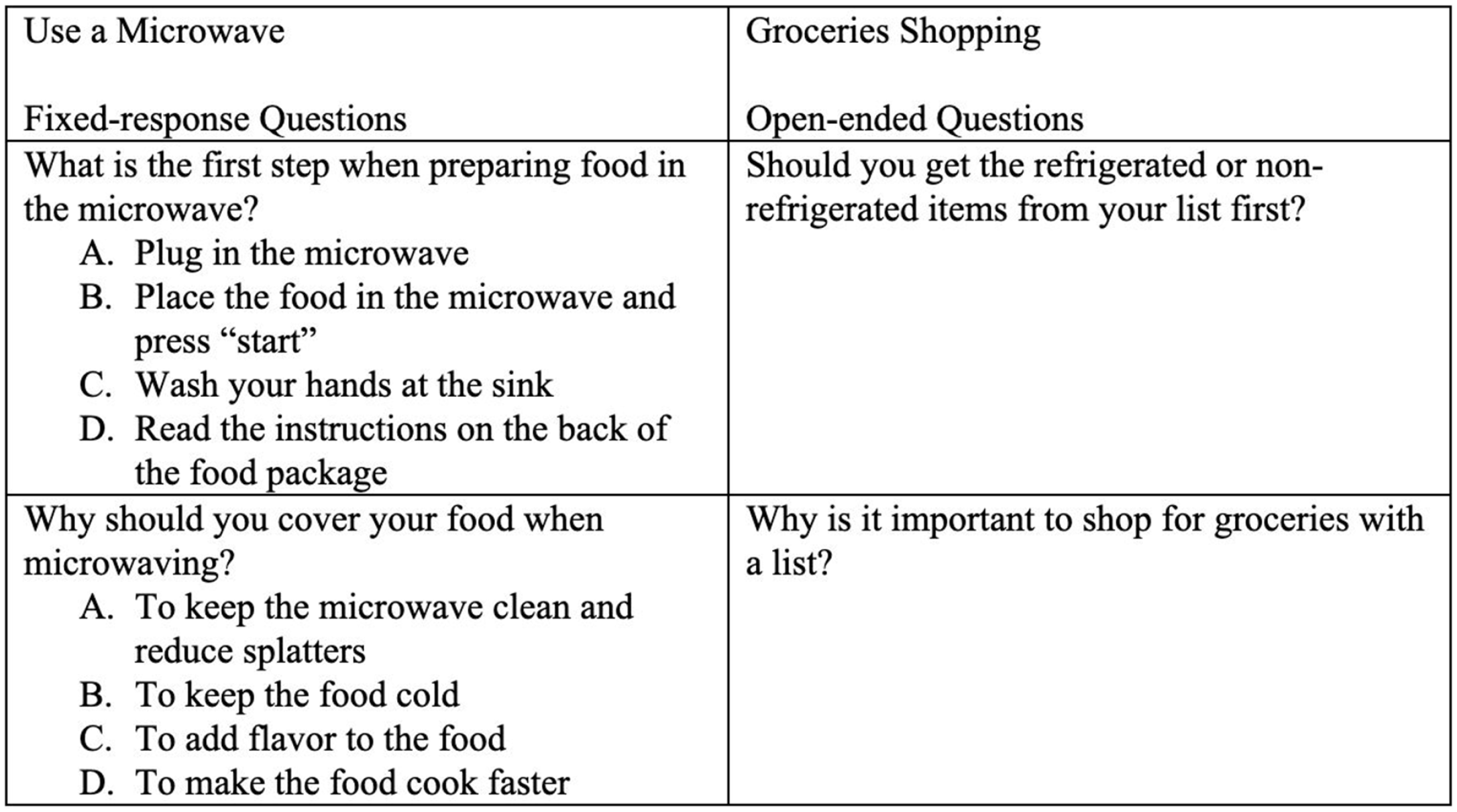
Example of pre/post assessment questions used to assess student learning of the life skills
Conclusion
Mrs. Gold implemented nonimmersive VR into her classroom for an entire school year and felt the technology exposed her students to more life skills than in previous years but in a safe and controlled environment for learning. According to Mrs. Gold’s data collection measures, her students’ accuracy and independence in completing life skills improved, and they required fewer prompts as they progressed through the VR. They also demonstrated success with generalizing in the simulated environment, and parents noted more student independence in home and community settings in these skills. As Mrs. Gold reflected on the school year, she noted VR enhanced her students’ learning outcomes, engagement, and motivation.
VR, like other technology-based options (e.g., VBI and AR), provides an opportunity to support students with IDD in acquiring life skills. VR can now be an affordable option to support students with IDD learning and accessing life skills practice in contexts that are less conducive to CBI or real-life opportunities, such as rural schools (Collins & Ludlow, 2018; Rowe, Carter, et al., 2020). Although VR takes planning for implementation, like any intervention or curriculum, it can provide high-quality instruction and engage students. VR can also reduce students’ dependence on teachers if the VR selected has built-in prompts and support for students. For teachers like Mrs. Gold, VR represents a promising solution to overcome barriers to life skills instruction, ultimately empowering students with IDD to achieve greater independence in life both during and after secondary education.
Footnotes
Declaration of Conflicting Interests
The author(s) declared no potential conflicts of interest with respect to the research, authorship, and/or publication of this article.
Funding
The author(s) received no financial support for the research, authorship, and/or publication of this article.
