







Abstract
This case study reports the instructional development, impact, and lessons learned regarding the use of Facebook as an educational tool within a large enrollment Biology class at Spelman College (Atlanta, GA). We describe the use of this social networking site to (a) engage students in active scientific discussions, (b) build community within the student body in class, and (c) promote communication between students and instructors. To achieve this, we created a Facebook Group page that students were required to join and use to complete the main assignment of this class, which was to read, discuss, and write about a science news article in the popular media. Overall, we find that Facebook, due to its popularity with students and its informal nature, is very effective in engaging them.
Organization Background
Institutional Background
Spelman College is a historically Black all-women's college located in Atlanta, GA, and an international leader in the education of women of African descent (Niche College Rankings, 2015). Spelman's Biology Department is nationally recognized as one of the highest contributors of African American female students to U.S. medical schools and graduate schools. The Biology Department maintains more than 300 majors and graduates approximately 60 majors each year (Spelman College Fact Book, 2015). The new biology curriculum is skills based, and each class emphasizes one of the four skills of reading, presenting, writing, and conducting research (Hibbard, Leonard, & Pai, 2016). Additionally, the curriculum is student centered and employs active learning pedagogies that value active participation of the students in the class (Hibbard et al., 2016; Pai, 2009; Pai et al., 2010).
Bioseminar—The Capstone Course in the Biology Department
A unique component of Spelman's biology program of study is a mandatory seminar class (referred to as Bioseminar) that students complete during their sophomore and senior years. The goal of the course, as stated in the syllabus, is for students “to develop and articulate their own sense of scientific and professional identity, through an iterative communal process of inquiry, analysis and reflection.”
Science, Technology, Engineering, and Math (STEM) education in the United States continues to be plagued by concerns about retaining women in the field (Moss-Racusin, Dovidio, Brescoll, Graham, & Handelsman, 2012; National Science Foundation, Division of Science Resources Statistics, 2011). Strategies that are successful in retaining women in the STEM disciplines include providing opportunities for (a) adequate mentoring, (b) belonging to a community of STEM practitioners, and (c) feeling a sense of professional identity (Carlone & Johnson, 2007; Dirks & Cunningham, 2006; Etzkowitz, Kemelgor, Neuschatz, Uzzi, & Alonzo, 1994; Ginther & Kahn, 2012a, 2012b; Herrera, Hurtado, Garcia, & Gasiewski, 2012; National Institutes of Health [NIH], 2008; Steinke et al., 2007). The Bioseminar course at Spelman was designed in light of aforementioned factors that enhance persistence of females in the field. Specifically, the idea behind creating a class that enrolled both sophomores and seniors was to provide an opportunity for peer mentoring of the sophomores by the seniors as well as to create a sense of community that expanded beyond the students' immediate cohort or the course instructors. To develop a sense of professional identity, one of the key elements of this class is an essay on the validity of a scientific claim appearing in the news. Charging the students with the task of assessing the robustness of a scientific claim that is being discussed in the media allows them an opportunity to see themselves as science professionals, not just as consumers of science news.
Bioseminar is thus the capstone course in the Biology curriculum, one that enables students to make connections among different classes within their Biology major as well as among the classes from various disciplines. The course deliberately takes such an interdisciplinary approach so that students may learn to integrate ideas from different aspects of their education and apply them to making decisions about everyday life as well as their careers.
In keeping with the capstone goals of the class, the focus in this course is to develop the professional identity of the students and to create a strong sense of community among Spelman students and faculty. The major approach in this class is to engage students in active discussions on topics that are at the intersection of science and society and to get students in the habit of analyzing information from the perspective of “science as a way of knowing the world.” Thus, the class requires students to discuss recent news in the media related to science, the environment, health, or medicine. This yearlong process of active engagement in evaluating science in the news with a community of peers enhances students' identity as budding science professionals; they begin to see themselves as scientists and not mere science watchers.
Class Structure of Bioseminar
Bioseminar meets only once a week for a 50-min period in a large auditorium and typically has approximately 130 to 150 students. It is a one-half credit course with a grade of pass or fail. As previously mentioned, each semester, the seminar has different interdisciplinary themes, which are explored with the scientific method. For example, the first semester it was taught, the class centered around heavy metal pollution in Anniston, AL, and explored the social, legal, economic, as well as the ecological aspects of having heavy metal pollution in a small community. In the subsequent semester, the course examined breast cancer in a similar vein.
Each year, the main assignment of the class is an essay on a topic of students' choice that is related to the current theme. Students are required to identify a topic that interests them based on a news article in the media about a discovery in the area of Biology connected to the theme. They are then required to discuss the article with their peers to examine the claim in detail. Next, they are asked to find the original source of the article and related materials and decide whether the claim described in the news is valid or not. Once they begin a discussion, they are required to scrutinize the claim made in the news by exploring multiple primary sources. This exercise culminates in a written essay that critically and carefully examines the claim made in the news.
Education Technology in Bioseminar
The class has always employed various types of education technology including some form of a learning management system (LMS) and class room response system (CRS).
The first of the two mentioned earlier, a LMS (Moodlerooms) was employed in this course, primarily as means of posting course materials including syllabi, readings, and lecture slides. Although LMS are widely used by educational institutions, interestingly, the goals of LMS use are not clearly defined (Naveh, Tubin, & Pliskin, 2012). Thus, often popular LMS brands are designed for a general instructional audience with an apparent emphasis on course administration as opposed to pedagogy. This one-size fits all approach limits the creativity of instructors and likely cools student enthusiasm for the online learning experience associated with these systems (Lane, 2008).
Aside from the ability to share course materials, one of our primary pedagogical needs from education technology was to extend the classroom online to enable discussions on science topics. While most of the modern LMS, including Moodlerooms have discussion or forum capabilities, student engagement in these discussion boards varies with the skill of the instructor or the students' ability to identify with the discussion topic in the course (Vrasidas, 2004). This ability to identify can be greatly influenced by the students' prior knowledge of the topic or the level of student maturity. The assumption is that more academically mature students or students with more prior knowledge will engage at a higher level (Zhu, 2006). Recommendations for the best learning experiences usually include (a) clear titles, (b) notification to students that the discussion is ongoing, (c) level of expected participation, (d) some modeling of response style or depth, (e) creating a team spirit, and (f) coaxing of reticent students' responses (Brindley, Blaschke, & Walti, 2009). However, given our prior experience with using discussion features of LMS, we were aware that students at Spelman are unlikely to engage in discussions on the LMS, possibly because of the inconvenience of having to log in to the LMS (see also Mafuna & Wadesango, 2012). Additionally, the typical LMS also does not invite student-centered learning approaches. A social constructivism learning approach would allow for self-governed, problem-based, and collaborative learning (Dalsgaard, 2006).
The second of the two educational technologies mentioned earlier, CRS or clickers, were introduced to promote discussion. Many instructors within higher education are using classroom technology that allows students to respond and interact via small, handheld, remote keypads (Bruff, 2009). Classroom response systems allow instructors to instantly collect student responses to a multiple choice question, which are quickly quantified and the results are displayed on classroom projection screens (Bruff, 2009). This way, students and instructors can see the results and discuss them. Although a simple exercise, the use of clickers for class Q&A improves the level of interactivity in large classrooms (Caldwell, 2007). For large science lecture classes specifically, many colleges have incorporated clickers to address (a) the passive nature of traditional lectures and (b) keeping large numbers of students engaged and attentive while taking in scientific lesson content (Burnstein & Lederman, 2001). As class size increases, the likelihood of there being students hesitant to speak up or engage in discussion increases due to “fear of public mistakes or embarrassment, fear of peer disapproval, or pre-existing expectations of passive behavior in a lecture course” (Caldwell, 2007, p. 11). The anonymity provided by clickers can help engage these students who are less likely to participate in more traditional classroom discussions (Bruff, 2009). The use of clickers definitely improved the level of student engagement in the classroom; however, we were in need of a technology tool that could enable interaction and discussion outside of the class time.
Thus, though the previous class structure of our Bioseminar course included education technologies that enabled participation by all students through the use of clickers in classroom discussions and a means of extending classroom discussion beyond the class time via the LMS, these tools were not very effective at engaging them in a full-fledged discussion necessitating the adoption of an additional education technology tool.
Need for Additional Educational Technologies in Bioseminar
The need for additional technologies in Bioseminar was identified based on formal assessment of the course over the years via college administered course evaluations and surveys of students in previous years of their seminar experiences. The course evaluations suggested that the class was engaging and interesting (the score has been over 4- on a 5-point scale in the recent years); however, it appeared there were two main areas of improvement.
The first area of improvement was with regard to community development, which appeared to be hindered by the overall class structure. The chief hurdle to this goal was that the sophomores and seniors remained two distinct groups that did not interact unless specifically told to do so inside the class. Specifically, students reported that they did not speak to students who were not in their cohort and did not even learn the names of the students in the class who were not in their cohort. Thus, the overall lack of communication between sophomores and seniors needed to be addressed.
The second shortcoming was that the discussions could not be fully developed due to limited class time. This was an obstacle to the aim of students developing their own scientific identity. One of the persistent challenges of a large science classroom is ensuring an engaging learning environment where all students are actively participating in class activities. In a typical classroom, often it is impossible to hear from all students because of time restrictions. This is compounded by the fact that many students hesitate to participate in big classroom settings. And though our LMS has a discussion feature for online discussions, in the past, it was not effective in engaging students in online discussions.
This led us to search for an avenue of discussion where students were more likely to participate because of ease of access and less likely to hesitate to express their thoughts due to the formal tone of the medium.
Case Description
Overall, the Bioseminar instructors were in need of a technology that (a) allowed for community development and (b) facilitated easy communication. We decided to use the most popular social media platform Facebook for our purpose (see Duggan, 2015 for statistics on Facebook use). Note that our goal was for Facebook to complement the technologies we were already using, not replace our LMS or CRS which we continued to use in the course. We reasoned that this social media tool was ideal for our purpose, given that most students have Facebook accounts. Additionally, most students see Facebook as a place for informal communication, and therefore, we hoped it would help generate uninhibited conversations on science topics, career paths, and the professional identities of our students. Because students are already logging in to Facebook for other purposes (Bicen & Cavus, 2011; Duggan, 2015), we were confident that this medium would enhance the discussions on the topics of interest related to class (for this and other approaches to using Facebook in education, see Gafni & Deri, 2012; McLoughlin & Lee, 2007; Piotrowski, 2015a, 2015b; Selwyn, 2009, 2011; Wang, Woo, Quek, Yang, & Liu, 2011).
Facebook is a network that is freely available to anyone online. Users create a profile by providing basic personal information including educational background, hobbies, occupation, and a picture. Once a user creates a profile, they can connect with other users who are termed as their friends. Users can post information about themselves on their Facebook wall and see posts from their friends. These posts range from updates on their whereabouts and activities, to photos, videos, and links to web pages. Friends may express their reaction to a post by liking the post or writing a comment on it. Users receive notifications about the reactions to their posts and thus can respond back to the comments on their original posts. Users may also pose questions to poll their friends for opinions. A user may address specific questions or comments to specific friends by mentioning their names, which creates a tag for those friends. These basic Facebook elements enabled its adoption for our purpose of facilitating discussion.
Many of the issues mentioned previously that hinder student enthusiasm for discussions on a LMS are not evident in social media networks such as Facebook. A recent study revealed that Facebook had a positive impact on mentor–mentee relationships and student learning and also found that students also wanted to use Facebook for other educational purposes (Pollara & Zhu, 2011). This suggests that using social media networks in addition to typical LMS would allow for more student-driven collaborative learning and discussion. Our basic goal was to get students to post their scientific articles through web page links, pose questions to their friends, and elicit a discussion on the topic of interest.
Adapting Facebook for Class
Our approach to adapting Facebook for class was to create a Facebook Group that would involve all of the class instructors and students. Any user may create a Facebook Group by specifying a name and at least one other member. The user that creates the Group would be an administrator. The administrator determines the settings for the Group. Therefore, they decide whether the Group is open, closed, or secret. An open Group is one whose activities are visible to friends of Group members. A closed Group on the other hand does not allow anyone outside the Group to view the Group's activities.
The group privacy setting used was closed, which allows anyone to see the group and its members but restricts viewing of posts and content to group members. This was selected over the more restrictive secret setting to allow students to see which of their friends and other Spelman students had already joined in order to entice them to become members. The more permissive open setting where nonmembers can view posts was decided against in order to protect student privacy and to eliminate any student concerns of having their posts viewed by friends outside of the class who may judge or misinterpret postings in the absence of the context of class setting. This privacy setting also helped to establish the Group page as a true extension of the classroom community where students could continue in-class conversations/topics or begin a new thread sparked by the course content and have confidence that their thoughts would be viewed from the context of the Bioseminar course by fellow classmates. This protection of post privacy was critical, given that the course often covered controversial and personal topics.
Once a Group is formed, it may be populated by inviting existing friends of the administrator or if others send a request to join the group. Thus, members of a group may or may not be friends with each other on Facebook. Users are able to find Groups by searching for a Group name on Facebook and sending a request, much like a friend request. Alternatively, the administrator can send a Group page link to the individuals they wish to ask to join the Group. The administrator may elect to make all decisions about who may join the Group when a request is sent to the Group or to allow other members enroll new members.
Creating and Populating the Class Group
We used the Group feature to create a closed Group entitled “Biology Seminar 2011–2012” which then was the online avenue for Bioseminar students to interact with each other and the six instructors of this course. The seminar Group was created a few weeks before classes started by the lead seminar instructor who then asked the other instructors to join the Group and made all instructors administrators.
The Spelman Biology seminar 2011–2012 Facebook Group page was managed by all six instructors throughout the course year. Each instructor was given the highest level of administrative clearance, that of Group Page Manager. This status allows each instructor to manage administrator roles, edit the Group page, add apps, create posts as the Group, respond to and delete comments, and send messages as the Group create ads and view insights (facebook.com/help/pages/admins).
From the first day of class, students were instructed to log in to Facebook and request membership to the Biology Seminar 2011–2012 Group. Students were given the link to the Group page but could also find it by a simple search on Facebook. One potential difficulty was that it required students to have a Facebook account. Because over 90% of college students already have Facebook accounts (Ellison, Steinfield, & Lampe, 2007), this was not an issue for the vast majority of Bioseminar students. A few students who did not have accounts joined Facebook without major objections as joining is free and their account could be closed at the end of the course. In addition, 2 students (of 148) shared that they had discontinued their accounts for personal reasons and were unable to join the class Group. These students were encouraged to create Facebook accounts with pseudonyms for class purposes and complied with that suggestion.
Each student had to request to join the Facebook Group page, and their request could be accepted by any current member of the Group. Membership approval can also be restricted to administrators only (see earlier); however, we elected to allow students to approve memberships as well in order to increase their sense of ownership of the page. Although students could add other Facebook users to the Group who were not enrolled in the class, this did not happen. If it had occurred, one of the administrators could easily remove unwanted members as Spelman professors are very familiar with their students and unfamiliar members would have been easily detected by them. Most students joined within the first few weeks of the academic year, with over 75% student members after the first 2 weeks of class in fall. Another 24 students joined in the spring semester when new sophomore majors join the course.
Setting the Standards for Group Usage
Participation in online Facebook discussions was part of the grade earned by students each semester. Per the course syllabus, “Essay, Online surveys, and Participation on Facebook Group” counted for 50% of the grade. Thus, Facebook activity itself accounted for 25% of the total grade. Failure to earn a passing grade for this element would likely result in the student failing the class (although in fact, no one failed to participate).
Rather than setting a standard for Facebook participation ourselves, we used a strategy of letting students determine the standards of participation. This served to generate student buy-in and also allowed students to have a sense of ownership of the Facebook space. We involved students in setting the standards for appropriate rate of participation on the Facebook Group page via the use of clicker questions during the first class period. Thus, students were given multiple options and asked to determine the minimum standards for Facebook participation for a passing grade. Using clickers, students voted that one post of a science article, two scholarly comments on others' articles, and three likes was an adequate extent of participation for the semester (other reactions became available in 2015). Note that the other options required more activity and this was the least amount of effort required from the students out of the various proposals for Facebook activity.
Extending the Class to the Online Facebook Forum
Once the standards were established for the minimum level of participation by students, we made intentional efforts to get student traffic on the Group page in the second and third week of class in three ways. First, we required them to go there for links to mandatory surveys that were posted only there and students were also enticed to join quickly by posting course information to the page such as an electronic copy of the syllabus (though this was also available on the LMS). Second, we posted information on the class assignment and its timetable on the Group page. Third, we announced that we were going to start online discussions by posting articles and asking questions on those articles that some random students would be tagged to answer by the next class period.
These three activities had the desired result of generating some initial traffic on the Group page. Next, we asked them to link to news items (either videos or text) that they wished to discuss with us or their peers. They were also asked to tag some peers to ensure discussion.
Maintaining the Online Facebook Forum After the Initial Setup
After the Group was formed and the initial activities were over, the course instructors relied on two main ways to maintain the online Facebook forum. First, there was an intentional emphasis that the Facebook Group was the main means of information dissemination for this class. Thus, students were encouraged to join the Group by directing them to the Facebook page for useful beginning of semester course information such as where used clickers could be purchased and what codes to use for course registration. This way, students were encouraged to view the Facebook page as an integral part of the course from Day 1. Reminders to join the Group and how to do so were reviewed at the start of each class in the first month of the course.
The second approach taken by the instructors was to deliberately extend the classroom discussion by posting articles or videos that delved deeper into the weekly discussion topic, soon after class to the Group page. Students could then read or view them, ask questions about them, provide their own comments or opinions on the topic, and generally continue the discussion with both fellow students and instructors. Thus, the course use of the Facebook Group page went far beyond simply distributing handouts and housekeeping information, becoming a full-fledged online classroom where a discussion involving all 148 students could actually be held.
Throughout the semester, the Group page continued to be used as a direct extension of the class discussion. As mentioned previously, although specific students were initially tagged to respond to a post, many students quickly began to participate without the need for tagging and this approach to promote activity was dropped after the first few weeks of class.
Nature of Facebook Use by the Group
The Facebook Group page was intended primarily for the major essay assignment and for housekeeping purposes; however, it was easily adapted for over a dozen additional different uses by the class community. The almost 20 different uses included not only (a) activities directly related to this class but also (b) activities related to other classes or academic affairs, (c) activities related to career planning and identity development, and (d) activities related to community building.
Class-related uses
Housekeeping: Uses of this page included information disseminated by instructors via announcements, as well as the posting class readings and other handouts. The immediate nature of online postings and the low activation energy required allowed students and instructors to provide useful course feedback with minimal effort on their part. Pre-engaging for class: The Facebook page was also used to pre-engage the students in the weekly topic. For example, the week before select seniors within the class participated in a panel discussion, topics were posted on the Facebook page and they were asked to formulate their thoughts on these topics to prepare them for the discussion. Similarly, before doing a case study on menstrual synchrony, students were polled with the question tool on Facebook to see whether they had experienced menstrual synchrony in their college lives. Follow-up to class: The Facebook forum facilitated the continuation of class discussion after class time. In one instance, videos that were planned to be shown in class failed due to technical difficulties. They were instead posted online on Facebook, allowing students to get the material without having to use precious in-class time the following week. A more significant use was to enhance the classroom discussion by providing more materials as was with the example of lovesickness which was a topic in class. Another example is when a faculty member challenged the students to submit responses to the question about proximate versus ultimate explanations of a biological phenomenon. This question was never discussed in class, rather it was posted on Facebook and the students with the top five answers, as judged by the lead instructor, were awarded with a dinner date with the course instructors. Assignments: Perhaps the most important use of Facebook within Bioseminar was its integration into the main assignment each semester. This assignment therefore sparked a huge number of posts and comments and accounted for the vast majority of the Group page usage. Further, it enforced a minimum online engagement of and interaction between students. Additionally, it allowed students to see what interesting topics their peers had selected and to gather peer opinions on their own articles. Thus, this assignment went far to create connections between students and to create a sense of online community.
“If we could regenerate a heart days after birth then can we regain that ability as human adults? I thought this was a very interesting article on why stem cell researchers are not able to find a way to regenerate a human heart. Looks like future research to me!”
Queries: An interesting use of this forum turned out to be student queries related to this class and its activities such as assignment deadlines, submission processes, and so on. Students would post their queries and often other students would answer the questions easily.
“When is the actual paper due?” Responses: “april 30th” and “Scroll down to check out the assignment/rubric that Dr. X posted about 2 weeks ago”
“If we could regenerate a heart days after birth then can we regain that ability as human adults? I thought this was a very interesting article on why stem cell researchers are not able to find a way to regenerate a human heart. Looks like future research to me!”
“When is the actual paper due?” Responses: “april 30th” and “Scroll down to check out the assignment/rubric that Dr. X posted about 2 weeks ago”
Uses for other classes and academic affairs
Advising: Faculty and students often used this forum to bring up questions related to advising. For example, one faculty member announced a delay in handing out the registration pins that students needed for registering for classes in the following semester. Questions about other classes: Students turned to this medium to ask questions about their other classes. A case in point was when sophomores enrolled in the mandatory introductory biology class asked questions about the materials in that class on the Bioseminar Facebook page. One faculty member, who incidentally did not actually teach the class the sophomores were asking questions about, then discussed certain molecular methods by posting illustrations and answering the questions students asked.
Career development and professional identity development
Announcements about professional events: Faculty as well as students posted information on talks and seminars that Group members might be interested in, often but not always these talks were related to class discussion topics. For example, when the class was discussing the false claim about vaccines causing autism in children, a course instructor announced a talk on the same topic at a local university. Announcements about career development opportunities: Information about workshops, internships, and research opportunities were frequently posted on this forum. Some announcements of this nature include information about sessions on applying to graduate school, sea-semester information, summer program options for sophomores, teaching opportunities for seniors, and so on. Discussions on work–life balance: Members often used this venue for starting a discussion on not just career planning but also work–life balance. For example, one instructor posted articles from the news about a female COO's struggles with juggling a high-flying career and a family with small children. Students then responded to this article about work–life balance. Sharing of professional milestones: A key part of professional identity development is when young professionals are able to see themselves as part of a community that sees them as a professional (Carlone & Johnson, 2007; Dirks & Cunningham, 2006; Etzkowitz et al., 1994; Ginther & Kahn, 2012a, 2012b; Herrera et al., 2012; NIH, 2008; Steinke et al., 2007). The Facebook Group provided a venue for students to share their professional successes. One student announced that she had completed a research project for a summer program and was going to present it. Other times students reported their success in getting into research programs. Recently, an alumna shared her lab notebook page picture as an illustration of her competence and confidence in tackling graduate work at an elite institution. Instructors also celebrated student success, for example, by congratulating students who presented at conferences or won prizes for conference presentations. Professional help: In keeping with our aim of developing student identity as science professionals, instructors used this Group to offer advice to students on professional matters beyond the scope of the classes. One illustration of this is when an instructor offered to help students prepare effectively for a national conference that many seniors were traveling to. Another time, an instructor offered help with writing personal statements for graduate school applications.
Community development
Kudos: An important aspect of community building is celebrating the success of its members. The instructors often posted congratulatory notes about faculty and staff success. For example, felicitations were extended to two faculty members who received recognition from the college for teaching and research. Additionally, since much of class time was devoted to talks and presentations, both by instructors and students, the Facebook Group quickly became a way for students to applaud their fellow students who went above and beyond in their classroom work. It also became a venue for students to present their multimedia work from other biology classes, particularly movie and video presentations. These posts received numerous positive comments and likes from their fellow students, while at the same time generating sophomore interest in those upper-level classes. Comments/reflections: The Facebook Group page has been invaluable in providing a space for students to simply comment or reflect on their class experience. For instance, several times in the academic year, students commented on the value of the class discussion that day. One notable example was around a panel discussion featuring seniors talking about their journey as young scientists and the life experiences that influenced them to choose science as a career. Shortly after the class, many sophomores commented on the powerful impact of that discussion on encouraging them as they struggled through the rigorous biology curriculum. After another discussion around women in science, several students commented on the usefulness of that class and brought up questions about their own future paths as scientists. By the end of the school year, the seniors began to reflect on their time in college and their experiences as women in the sciences. These posts were particularly well liked by the sophomores in the class and served as a fantastic community building opportunity for the biology majors participating in seminar.
The Facebook Group also operated as a space for students to reflect on their classroom experiences outside of class. Particularly, after heated classroom discussions, which were often abruptly ended due to class time constraints, students turned to the Facebook page to continue the discussion and to reflect on what the discussion topic sparked in them and how it applied to their lives and studies. The Facebook Group also often functioned as a mini soapbox, as one student put it; it became a place to have their voices heard after in-class discussions and explain why these topics were important for them.
A useful blurring of the lines between academic and personal use of Facebook was the unsolicited student feedback on the Bioseminar classes. It is often difficult as an instructor to accurately gauge what components of a large lecture truly reach the students without performing formal course surveys. However, with the Facebook page as a forum, students sometimes posted powerful responses to a class directly afterward.
Humor and other personal thoughts: Like nearly all other social media outlets, humor also found its way into our Facebook Group. There were multiple reposts of funny science- and college-related humor, including chemistry jokes and PhD comics, from both the students and instructors. Although often not directly related to our class discussions, the posts were not disruptive or divisive, but rather served to lighten the topic discussions and to give the page more of an inclusive community feeling. Additionally, the instructors often posted funny videos related to college-related topics like cheating, which were very well received by the students. Both instructors and students shared inspiring articles and videos as well as solicited support for efforts on other fronts unrelated to the class on the Facebook page. Peer mentoring: As the school year progressed, students began to more frequently offer their advice to their fellow students about many of these same topics and seemed particularly focused on ways to be a successful female science student. The most remarkable outcome of having this medium was the emergence of peer mentoring in the community of students. Although in the past sophomores and seniors were unlikely to interact with each other, in the Facebook Group, the sophomores often turned to seniors for advice on how they would navigate the path as a science major. Seniors in their turn often took the time to give unsolicited advice. For example, a senior who had graduated from Spelman the previous spring greeted the returning Spelman students on the Group page and recommended a class on scientific communication that she thought was useful for her in her graduate program. See below for other examples.
“It is a very competitive program, but do not shy aware from the program if you do not think that you have “good enough” credentials. They look at WAY more than grades. They are there to help!!!” Insight into Group members' personalities: Some of the posts though only marginally academic in nature, clearly expanded the Group page beyond the basic components of the Bioseminar course. While there would never be enough in-class time to allow for all of these types of announcements to be shared, the online site provided a forum that was quickly embraced by the students to do just that. It also gave both the instructors and students a window into the diverse activities, interests, and paths that the Spelman Biology student body is pursuing. Such a broad view of the student body as a whole would otherwise be difficult to collect if constrained to in-class or outside of class face-to-face meetings. Sharing memories of collective experiences: Members of this Group often posted pictures of the class experiences. For example, one student posted pictures of a memorable class. Another student posted a video of a faculty member's address to them at their senior luncheon. A third example was when a graduating senior commented that the advice she heard from the college's commencement speaker reminded her of the discussions with a certain course instructor in this class.
“Although today was the last day of class, I truly realized the importance and benefits of Sophomore/Senior Biology Seminar. Watching the video clip at the end of class brought back several small yet great memories of times that I had completely overlooked. I haven't been very active in posting to this Facebook discussion because I don't particularly like Facebook but class today really encouraged me to give this whole Facebook thing another try. Going through and reading different articles has been not only informative but also very enjoyable. The support we receive as sophomores to continue as Biology majors is essential in our success and it is extremely comforting to be able to see our future selves in the graduating seniors. Thank you to the seniors for encouraging us to stick it out. And thank you to the professors for always trying to make seminar a fun learning environment.”
“Today's session was very informative and motivational. It couldn't have come at a better time since this week has been very stressful. I am now reassured that this is the major for me and I can do it!! Thanks panel:)” Example 2: “Today's seminar was great! I have many fears starting my PhD program in June but I am grateful for the stories shared that let me know I am not alone and it is possible to have it all.”
“It is a very competitive program, but do not shy aware from the program if you do not think that you have “good enough” credentials. They look at WAY more than grades. They are there to help!!!”
“Although today was the last day of class, I truly realized the importance and benefits of Sophomore/Senior Biology Seminar. Watching the video clip at the end of class brought back several small yet great memories of times that I had completely overlooked. I haven't been very active in posting to this Facebook discussion because I don't particularly like Facebook but class today really encouraged me to give this whole Facebook thing another try. Going through and reading different articles has been not only informative but also very enjoyable. The support we receive as sophomores to continue as Biology majors is essential in our success and it is extremely comforting to be able to see our future selves in the graduating seniors. Thank you to the seniors for encouraging us to stick it out. And thank you to the professors for always trying to make seminar a fun learning environment.”
Interestingly, the majority of the uses listed earlier were not required for a passing grade for students, yet students chose to utilize the Group in myriad of ways. Further, they chose to be present and interact on this medium frequently. Thus, based on the variety of uses that the students themselves found for the Facebook Group page, we conclude that this social media tool is easily adapted for educational purposes. We also find that at least in this case, it was very successful in helping us achieve our pedagogical goals.
Case Analysis and Discussion
Features of Facebook That Enable a Successful Adaption for Class
There were several elements of Facebook that make it possible to adapt this medium for education. Below we discuss some key elements.
Closed Group created a private and professional space: Having the option to make the Group closed whereby folks out of the Group are not privy to receiving notification about Group members' activities in the Group enables an LMS-like setting where the Group is truly only for the purpose of the class. This lets the students keep their personal and professional spaces on Facebook separate. Profile pictures allowed face recognition of the large student body: Each user has the option of using their own picture as a profile picture. This makes it possible for all users to immediately associate a face with a name. Thus, this was possibly one of the biggest contributors in creating a sense of community by building familiarity among users. Easy access facilitated constant communication: The majority of youth have Facebook accounts and are avid Facebook users. In addition, they are likely to check their Facebook account on a continuous basis and even check notifications on mobile devices. This makes it likely that they check their class Group page, whereas if we used an LMS, the different login required for an LMS would likely result in less student participation. Notification feature enabled a fast-paced discussion: Activity on the Group page results in automatic notifications to all members unless they opt out of being notified. The notifications feature, we believe is crucial to promoting a sound discussion. Posts and comments were likely to get almost immediate response from someone in the community. Tagging allowed timely responses: This feature allows users to tag specific members who they wish to engage with in a discussion or solicit a response from. This feature made it possible to kick-start online discussions by making specific students responsible for participation, especially in the early phase of use when students were getting accustomed to using Facebook for class use. A second use of this feature was that it alerted instructors to queries and comments directed at them. Posting videos and links was possible for all users: Facebook users can easily post links to articles or videos that are easily embedded in the page. This Group feature is unlike the structure of a typical LMS where only administrators (course instructors) are able to post materials. Allowing all users and not just the administrators to post materials is a way to make the online classroom space truly a space that belonged to all users rather than just the instructors. This set a tone of student ownership which we believe is vital to the success of this Group page in sustaining meaningful communication and discussions around science topics. Posting documents allowed dissemination of class materials: Instructors could use the document feature in Facebook to disseminate class materials when needed. Posting photos was an option: Similar to the possibility of students posting links and videos, the option for students to post photos enabled them to personalize this space. Students used this feature to post pictures of classes that they found memorable. Instructors used this feature to post pictures of students or colleagues that they were celebrating the successes of. This feature thus made it easy to build a sense of community among users. Asynchronous and online discussions allowed participation at users' pace: Facebook discussions tend to be asynchronous. Unlike classroom discussions that are over with the class period, Facebook discussions may continue long after the class is over. Students sometimes continued a discussion on a topic several weeks or months after the original post. This is a clear strength of this medium as it allows users to participate at their own pace. Additionally, it allows for a richer discussion because students can join the discussion after they have had a chance to reflect on the matter or after they have had other experiences that they connect to this matter. Diverse measures of audience interests allow the community to assess the level of interest in the topic: Facebook records the audience level of interest in a post in a variety of ways. For example, one measure is the number of comments that a post generates and the length of time the discussion goes on. Similarly, with the time stamp, it is also easy to see the immediacy with which users respond to posts. Other measures include the number of likes and views for a post or a comment. Thus, even students who may be silent in class have an opportunity to participate in the discussion by expressing their support for a position in a debate or their appreciation for an argument with their likes. (Note that since that time even more features are available.) Visibility of all activity to all users allows for more interactions among users: A traditional class and LMS are limited in the nature of interactions possible between faculty and students. However, on the Facebook page, instructors have the option of being less formal and participate in discussions with their students in a less formal tone. Unlike with the LMS where peer-to-peer interactions are limited, Facebook makes it possible to easily have peer-to-peer interactions. For instance, students are able to answer each others' questions, comment on each others' assignments, congratulate their fellow students, and encourage their fellow students. Interactive survey tools allow instructors to better prepare students for class activity: In a traditional class, instructors might prepare students for class by asking them to read something beforehand or take on an online quiz. These approaches while effective are not interactive. The Facebook tool for polling students with various questions in an interactive way allows students to prepare for in-class activities. Not only do students respond to the poll questions which allows instructors to quickly assess level of preparedness and interest, but in addition, they can add to the possible responses for that question. Further, they can post comments on the poll question and other materials.
Patterns of Facebook Use by Group Members Over Time
Rate of populating the Facebook Group: Once the Facebook Group was established, it was populated by members fairly quickly. The Group grew to a membership of 150 + from Fall 2011 when the lead instructor started it to Fall 2012 when we started the new academic year. Rate of activity on Facebook Group over time: Initially, the instructors made a big effort to check the Group page in order to add conversation starters and to comment on students' posts frequently (multiple times a day; Figure 1). The importance of this at the beginning of the semester was to show the students that the instructors valued the discussion happening online and that it was an easy way to further connect with us beyond the large lecture room setting. By the end of the second week of September, posts were consistently seen by well over 100 members as shown by the number of views recorded on Facebook. This was a clear indication that the initial efforts to encourage use of the page had in fact worked to engage the students online. Thus, though use of Facebook Group page by students was slow to begin with, it picked up pace in the second month of the semester (Figure 2). Time course of faculty posts and comments on the Bioseminar Facebook Group. The Group was established in the beginning of September. Classes ended at the beginning of December and resumed in mid-January. Classes ended for the year at the end of May. Time course of student posts and comments on the Bioseminar Facebook Group. The Group was established in the beginning of September. Classes ended at the beginning of December and resumed in mid-January. Classes ended for the year at the end of May.
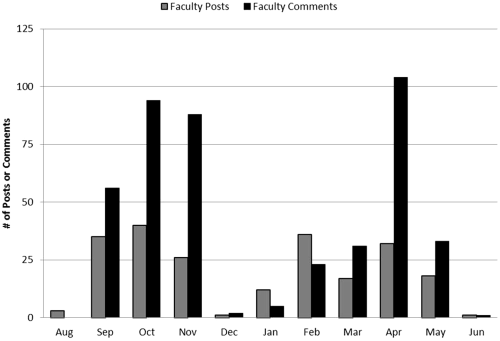
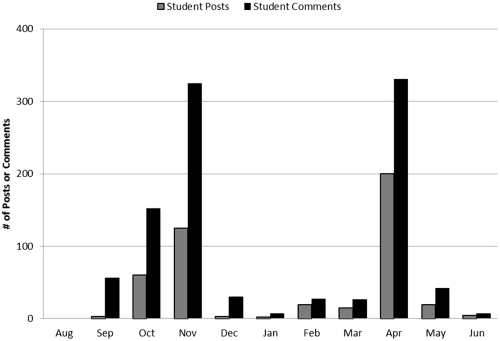
As reflected in Figures 1 and 2, in the early part of the semester, the majority of posts were authored by faculty, whereas in the later months, students were more likely to post in the Group. Student activity on the Group page in terms of both posts and comments peaked around the time of the submission of the essay assignment in November 2011 and April 2012, in the fall and spring semesters, respectively (Figure 2). This was as expected because this was the only formal assignment associated with the Facebook Group page.
However, quite unexpectedly, students continued to use the Group page even after the required assignment was completed. For instance, even after the semester ended in fall semester of 2011 in early December and in May of spring semester of 2012, there continued to be posts on the Group page. Figure 2 reveals that students contributed dozens of posts in the months of December 2011 and January 2012 even after the end of fall semester; and in May and June 2012 after the end of the spring semester. Thus, the Group remained a means of communicating with the seminar community for the students and continues to be active to date (2016). This is one metric that clearly demonstrates how the page became more than just a component of the Bioseminar course for students and blurred into their life beyond the classroom walls by its continued use beyond the academic year. Although much less frequent, students (and instructors) are still posting to the page and these posts are still being viewed by dozens of members. Examples of some summer and Fall 2012 posts are:
: “Dr. X, Dr. Y, Dr. Z and any one else who is interested, I would like to invite you all to my BRAIN poster symposium”
Rate of activity on Facebook Group by user type: Table 1 summarizes the extent of use by the type of user. In general, student activity was significantly more than the expectation set for them in the class discussion (χ2 test, p < .0001). Specifically, though students were asked to post only one time, the average number of posts for students was 3.0 ± 2.26. Similarly, students were required to comment at least twice, but the average number of comments was 6.77 ± 5.7; and though they were required to like only three comments or posts, the average number of student likes was higher than 11 (11.48 ± 9.92). Note that although there were only 6 instructors in the Group of 150+, they represent approximately 25% of the activity measured (posts, comments, and likes). In fact, almost a third of the posts and comments were generated by the instructors (Table 1). This suggests that faculty presence and guidance of discussions was an important element in gaining buy-in from students about the importance of the Facebook Group in enhancing their class experience (see also Figure 1).
Summary of the Extent of Participation by Faculty and Students on the Biology Seminar Facebook Group Page in the Course of the Academic year 2011–2012.
Note. Actual numbers are presented with percentages in parentheses. Post and comment lengths are in characters. Means and standard deviations are shown.
Current Challenges Facing the Organization
Spelman College biology faculty involved in this project used Facebook again as an instructional tool within the Bioseminar course for fall semester 2012 and Spring 2013 (however, they are not teaching this course any longer). The noneducational use of these networks makes their widespread adoption a challenge (Bicen & Cavus, 2011; Gafni & Deri, 2012; Madge, Meek, Wellens, & Hooley, 2009; Piotrowski, 2015a, 2015b; Wise, Skues, & Williams, 2011). Although our experience with Bioseminar was a clear success with respect to our pedagogical goals, we had to address several issues to make the best use of this tool. Primarily, these challenges stemmed from (a) resistance or reluctance for educational use of Facebook, (b) limitations of and changes in Facebook features, (c) course/cohort management dilemmas, (d) data management issues, and (e) maintaining professional focus in this social media site.
Resistance or Reluctance to Educational Use of Facebook
Student resistance to adapting social networks for educational use: Although a recent survey of students at a university suggests that students are more likely to welcome the use of Facebook and other similar technologies to support classroom work (Irwin, Ball, Desbrow, & Leveritt, 2012), we found that students here were somewhat resistant to using this social media tool for education (see also Madge et al., 2009; Wise et al., 2011). This manifested in the form of the initial hesitation of students to post frequently on the Group page. In a small study of student use of Facebook during school hours, most students were doing so during free moments of the school day (Fewkes & McCabe, 2012). This may reflect students' innate desire to use this medium for breaks rather than work. Faculty reluctance to adapting social networks for educational use: A minor obstacle was faculty reluctance to use Facebook for educational use. This reluctance was from the significant learning curve to develop faculty skills and comfort level in adopting this tool for education. Faculty members involved in this course often had to learn by trial and error the features of the social networking site that could be adapted for class. Additionally, faculty enthusiasm for this medium also varied among the six instructors of the course. This is not surprising, given the finding, that in general, faculty still prefer traditional tools like e-mail to communicate with students (Esteves, 2012). Although this may have changed as 79% and 64% of Internet users in the age groups 30 to 49 and 50 to 64 years, respectively, use Facebook (Duggan, 2015). Although not well studied, it might be critical to consider the instructor's role in the usefulness of social networking for classroom learning. Few professors will trust that students will use these networks in class in constructive ways (Fewkes & McCabe, 2012).
Limitations of Facebook Features
Organization of content on Facebook: A significant drawback to the use of Facebook for online extended classroom discussions is the organization of posts and comments. Posts are generally ordered in reverse chronological order such that the most recent posts appear at the top of the Facebook Page and are therefore the most immediately visible to viewers. However, any new comment on a post will cause the post and its attached comments to reorder to the top or most recent section of the page (Everson, Gundlach, & Miller, 2013). Thus, posts that were generated at a similar time in response to a particular topic being discussed in the class at that time may not maintain their proximity to posts on that topic if a comment is added at a later date. For an active Facebook page where students may reflect back on older posts to add comments as they connect topics to new articles or thoughts, this can result in a relatively disorganized page where it becomes difficult to find posts on certain topics or to recall/record the history of the page and its discussions. Posting files and documents: When the Biology Seminar Group was started in Fall 2011, the instructors had a difficult time posting document files. This was a considerable challenge for us because though we were using a LMS to post syllabi and so on, we wanted to make this information available on the Facebook Group page too. In 2012, Facebook introduced file sharing, making it easier to upload and share documents from your computer or drop box. Changing interface: The ever-changing interface and features of Facebook Groups were minor challenges for us. When Groups were first introduced in 2004, it was controlled by administrator. Groups were revamped in 2010, with less emphasis on the administrator and more emphasis on an integrated group experience (O'neill, 2010). With a completely new design, the transition from old to new Groups could be problematic, depending on the amount of usage. Active Groups such as the Biology Seminar 2011–2012 group were automatically upgraded to the New Group format, with members, posts, and other information transferred, while inactive groups were archived and had to start over (Smith, 2011).
In 2011, Groups adopted the Ticker and the Timeline. The Timeline is the most current Facebook interface, which highlights most active posts. On one's personal Facebook page, one can sort this information as top stories or chronological order. However, our difficulty was that Facebook Groups do not have this sort function. Therefore, it is difficult to find posts as they are not in a predictable order. The Ticker showed activity in real time but was removed in 2013.
In 2012, Facebook Groups ushered in the Seen by feature termed as views, which tallies and displays all members of the Group who have viewed a specific post. This was a welcome addition for our course as it allowed instructors to monitor total usage of the page, instead of who liked or replied to a post (Loomer, 2012). While Facebook Groups have changed significantly during its use throughout the duration of this course, most modifications have been positive. However, due to its inconsistency, instructors may have to make adjustments to course policies (e.g., if the like function was removed during this course, grading would have been affected).
Mobile features as a drawback for the use of Facebook in Bioseminar: Many of our students and faculty frequently used mobile devices, such as smartphones and tablets to access and post to the class Facebook Group page. Unfortunately, Facebook mobile apps (iOs, Blackberry, and Android) and mobile sites have in the past had reduced functionality when compared with the full Facebook site, though more recent updates seem to have addressed many of the issues encountered during the course of this study. For example, many iOS users experienced slow launching times for the Facebook app as well as long loading times for their newsfeeds. Additionally, accessing Groups in previous versions of the iOS apps was not straightforward, and in some versions, Groups were not displayed at all in the mobile. Often users had problems accessing the Groups on their mobile device and therefore were unable to post or view the class Facebook Group page using their iOS app. Again many of these issues have been addressed in more recent updates, and users were often able to access the web version of Facebook through the Internet feature on their device, thereby bypassing many of these problems.
Course/cohort Management Concerns
Organization of multiple courses/terms within Facebook Groups: The initial Facebook Group page was undertaken as an experiment in Fall 2011 and upon the success of that experimental semester, for the subsequent semester in Spring 2012, we were faced with the question of how to manage multiple Group pages going forward. We decided to use the same Group from fall to spring of each academic year but create a separate Group at the start of the new academic year. Maintaining different course Group pages: One question is whether to discontinue a class Group page after the academic year has ended. Because our primary motivation behind using this social media site was to build community among different cohorts of our students, we elected to continue the original Biology seminar Group page 2011–2012. The 2011–2012 Biology Seminar Facebook page is still active, for up to 2 years after the course ended, it continued to get new member requests and sporadic posts to date of this writing (2016). This necessitates an additional effort on the part of the instructors to post often enough to keep the Group active and relevant. Faculty effort toward maintaining a Group page is thus not trivial and a significant challenge.
Data Management Challenges
Archival and retrieval of class content: Facebook unlike, traditional LMS is not designed to incorporate archival of class content—documents, assignments, student rosters, and so on. At the faculty and department level, course content can be searched for or browsed from LMS resource lists. At the LMS administrative and campus level, completed (or inactive) courses are achieved for curriculum review, matriculation statistics, and otherwise. Because Facebook is not an LMS, we had to adapt our approach to archiving accordingly. Archival and retrieval of user data and statistics: Retrieving and recording student usage information was a necessity for our course because Facebook usage was part of the Bioseminar class participation grade. Facebook does provide automatic indexing of events, photos, and files uploaded to the Group. Also, each post has a seen by link, which lists how many members viewed the post and lists the corresponding members' names. However, accessing this information is not straightforward.
Maintaining Professional Focus on a Social Media Site
Blurring of the personal versus academic use of Facebook: Many educators find that using Facebook for class has the potential to blur the academic use of Facebook with personal use and see this as a pitfall (Gutschmidt, 2012). While this was true in our experience as well, we did not actively discourage this potential blurring, as a key course objective is to encourage camaraderie and formation of a community and support system within the Spelman biology majors. Indeed, students were encouraged to make the page their own and use it as their online Spelman Biology community. Instructors encouraged a diverse use of the Facebook page by themselves posting things beyond the scope of the class.
Although there was the potential for students to misuse the course Group page for more social purposes, they upheld the intended academic/community use without the need for monitoring from the instructors because even when the posts were not related directly to the class assignment, they contributed to the conversation building students' professional identities. See below for examples of student posts that are unrelated to the assignment but are meaningful from the point of view of budding science professionals.
: “Hello EVERYONE!! PLEASE take time out to watch this. I ran across it, watched it, and believe it is VERY relevant to our future as WOMEN professionals :)”
There were a handful of examples of more social or extraneous postings; however, these were very limited, not controversial, and still largely contributed to the overall sense of community within the Group or were an efficient means to ask a question to the Group, share news, and so on.
: “My daughter is on the way!!!!!”
Overall, these types of posts did not interfere with the course page as they were limited in number. However, there remains the potential for extraneous posts to detract from a course website. Instructors could act as monitors and remove such posts but that could affect the students' sense of ownership over the page and change its usage by them.
Solutions and Recommendations
Overall, we consider Facebook as a suitable and highly effective mechanism to address student engagement in a large enrollment course. As a social media/instructional tool, Facebook facilitates (a) quantifiable student participation in a platform students naturally and frequently visit, (b) member (faculty or student) recognition of course-related activity that supports course goals, and (c) building scholarly community. After using this platform for 2 years, we have observed unexpectedly large gains in (a) engaging students in active scientific discussions, (b) building community within the student body in class, and (c) promoting communication between students and instructors. Most notably, students from previous semesters, to date, continue their activity in the Group, and almost all students in previous sections/Groups remain in the Facebook Group. This indicates that apparently they see value in Group membership. Further, graduates remain active in the Group and continue to support the learning community. Specifically, many have encouraged underclassmen toward postgraduate pursuits.
On the other hand, successful use of Facebook for education requires careful planning, monitoring, and willingness to keep up with constant changes in the social media site interface. Thus, we offer the following thoughts on addressing the challenges we have experience with.
Handling Resistance or Reluctance for Educational Use of Facebook
In our experience, the chief cause for student resistance to use Facebook was its limitations as an LMS (see earlier). Our approach to address this was to use Facebook primarily for discussion and community building in conjunction with a LMS. Although we posted course materials in both places, students would have an easier time finding materials on the LMS. Additionally, by describing Facebook as an integral part of the class experience in our syllabus, we made it clear that it was an important aspect of the course.
From the faculty perspective too, there is some reluctance to use Facebook for educational purposes primarily because not all faculty members are comfortable in this medium either because they have to learn how to use it or because of the informal nature of this medium (e.g., see Piotrowski, 2015a). Although there is no shortcut to get past the effort of learning to use the medium, we find that the basic features of Facebook are user friendly and easy to learn. We addressed the informal nature of Facebook by making sure to balance our casual and friendly tone by always maintaining professional boundaries.
Overcoming Limitations of Facebook Features
Of the many limitations of Facebook features discussed previously, by far, the biggest one was that users could not easily locate important documents. One way around it was for page administrators for Bioseminar to upload any documents or images as photos or documents. The Photo Gallery has a time stamp and is easy to access outside of the status feed. Although we underutilized the document feature, looking forward, one approach can be used to utilize the Document feature better as Meishar-Tal, Kurtz, and Pieterse (2012) recommend. Facebook page documents are located in the new files tab available on the Group page.
Course/Cohort Management Strategies
Based on our experience, we suggest each semester is treated as a separate cohort with its own Group and to encourage mass enrollment and invitations at the onset of the semester. Thus, we created a new Bioseminar Facebook page for the 2012 to 2013 academic year cohort. Inevitably, there are a few students who try to join the wrong Group, despite the different wording and academic year dates on each Group name. Faculty administrators have the additional duty of checking class rosters to ensure students are joining the Bioseminar page for their class. Stray students are sent a brief note instructing them to join the other Bioseminar Group. Administration duties divided among the various faculty assigned to Bioseminar each semester will also ensure that multiple Groups are being optimally maintained.
Data Management Strategies
Initially, we encountered a somewhat tedious process for data retrieval, which simply consisted of viewing past history of the page. For example, a PDF screen grab of the history of the 2011 to 2012 Bioseminar activity was 300+pages long. A review of this history did produce the tally of posts, likes, and shares, along with member joining the Group activity, but it would have been easier to pull these metrics from a searchable database
Thus, the lack of easily accessible analytics or backup options for Facebook Groups has been a significant issue for us. Facebook Pages, the product for business use, has extensive analytics available through Facebook Insights. Even Facebook Timelines, the version of Facebook for personal use has rudimentary analytics and the ability to backup posts and usage data. For Facebook Groups, however, there are no built in capabilities and no commercial third-party apps available that we could locate. The Facebook Query Language (FQL) has been the only way to access Group data. We finally located a site, Facebook Wallflux (wallflux.com), which provides a tool that helps export Facebook Page and Group walls to RSS 2.0 and Atom-feeds. As we used a private Group, we had to add someone at Wallflux as a Group member. We were then able to accumulate usage data from that point forward. To get our historical data, we arranged for a custom wallflux that provided all posts, likes, comments, comment likes, attachments, and the identity of the poster, all timestamped, for the history of the Group. These data were provided to us in a spreadsheet. As the wallflux spreadsheet captured all activity, it served as a backup of Group activities in addition to allowing us to extract analytic information.
We recommend that instructors who plan to use any social media tools within the classroom must have a plan for tracking how students are interacting with the tool and how often (Everson, Gundlach, & Miller, 2013). Bioseminar faculty recommend the use of Facebook Insights, an application programming interface that provides page owners traffic metrics, referral trends, and user demographics. Another listed feature of Facebook Insights is that regardless of a post being removed or edited, the interaction data are still captured. All of the Insight data for a Facebook page can be exported to a CSV or Excel file for editing and sharing with others. (Facebook Developers, https://developers.facebook.com/docs/insights/)
Tips on Maintaining Professional Focus in this Social Media Site
We set a code of conduct expectations for student activity that would mirror a classroom setting. For example, the instructors always addressed other instructors with a Dr. when referring to them in the posts and comments. Similarly, though we encouraged posts and discussions about matters that did not relate to the class assignment, we clearly set the tone for what was acceptable and not acceptable by modeling what appropriate topics were. This approach was effective in our case.
Conclusion
In conclusion, for us, the Facebook Group feature was a remarkably effective means of enhancing our objectives of increasing student engagement in active scientific discussions, building community among different cohorts of students, and facilitating richer and more frequent communication between students and instructors. We found that students and faculty easily overcame any initial reluctance to use this medium for educational purposes. Students also engaged at levels well above their established minimum activity once they became adjusted to using Facebook Groups in an educational setting, in terms of both nature of uses and the rate of use.
Certainly, for applications related to grade books, administering assessments and institutional support of technical issues, LMS (Blackboard, Canvas, Desire2Learn, Moodle, and Sakai) would probably work best for typical course management for classes of any size. However, for instructors seeking a free, widely popular social media tool with (a) better media support (video/photo sharing), (b) the ability to post documents, (c) fast and easy navigation, and (d) the traffic generated by such a tool, in our opinion, Facebook is definitely without peer.
Footnotes
Declaration of Conflicting Interests
The authors declared no potential conflicts of interest with respect to the research, authorship, and/or publication of this article.
Funding
The authors disclosed receipt of the following financial support for the research, authorship, and/or publication of this article: The authors are grateful for support from HHMI grant (#52006314, to A. P.).