







Abstract
Video games are forms of multimodal technical communication, conveying complicated information about game goals, mechanics, game physics, and more, to the player in a way that usually feels integrated into the game itself. This article highlights ways that games use interaction to convey information to players, classifying the communicative elements in several popular games into C.S. Pierce's classes of sign (decoratives, indicatives, and informatives). This paper asserts that technical communicators can take cues from video games to design technical communication products that better meet contemporary users’ expectations of agency and interaction—allowing them to explore and discover on their own.
Keywords
Introduction
The intended audience for technical communication is rarely passive—whether users are the public interested in the latest scientific breakthrough, customers setting up new devices, or hobbyists following along with an instructional video, technical communication is packaged so that users can immediately act upon it. We teach our technical communication students to provide only the information the user needs, when they need it: clear, succinct explanations in an easily navigable format. The field has a wide set of best practices for text and visual technical communication (Amare & Manning, 2013; Foss, 2004; Weber, 2017) as well as the Greeks’ logos, pathos, and ethos. As technology expanded, so did the field, into multimedia such as videos (Bourelle et al., 2015; Eriksson & Eriksson, 2019; Sheppard, 2009), the early internet (Andrisani et al., 2001; Redish, 2012), code (Brock & Mehlenbacher, 2018), digital rhetoric (Campbell, 2023), wearable technologies and the internet of things (IoT) (Tham, 2018), and beyond. Technology and the modality options for communicating technical communication are expanding at a rapid pace. This technology is providing technical communication audiences with increasing agency—making users ever more active participants in our products.
In the current era of artificial intelligence (AI) and immersive media such as virtual reality (VR), augmented reality (AR), and mixed reality (MR), often combined into XR for extended reality, the user now expects a higher level of agency and interactivity than traditional technical communication formats allow. Jacob Rawlins and Gregory Wilson (2014) highlighted the ways that interactivity changes the presentation of information and invited the user to become a “creative agent who actively makes decisions and participates in the creation of the data, design, and rhetorical message of the IDD [interactive data display]” (p. 308). User agency in IDDs, they noted, complicates the rhetorical situation and our traditional evaluative frameworks, concluding that IDDs are cocreated, “dynamic rhetorical spaces” (Rawlins & Wilson, 2014, p. 321). Wilson et al. (2018) took this further to look at user interaction with three different types of IDDs to find that increased interaction affordances in IDDs likewise increase user agency, although they also found that interactivity decreases the persuasiveness of the information. As the public continues to gain increasing access to interactive digital tools, there is likely to be an increased expectation for IDDs and other technical communication modalities to provide higher levels of interactivity.
Another interactive digital medium that continues to grow in popularity is video games. Video games are interesting because they typically avoid lengthy direct explanation—players simply begin playing, and the games provide scaffolded instruction. James Paul Gee (2003) highlighted the ways that games teach players how to be successful, outlining 36 principles of learning that educators can take away from video games. Jennifer deWinter (2014) examined three types of tutorial approaches in video games (tutorial levels, integrated stepped tutorials, and integrated narrative tutorials) and identified how these approaches do the work of earlier printed instruction manuals. Along these same lines, this article explores the ways that interaction conveys meaning in video games, looking for features that can inform interactive technical communication now and in the future. As technology and science become ever more complex, the task of the technical communicator becomes ever more challenging. This article identifies ways that technical communication can, like video games, provide high levels of user agency while also conveying complex information: through interaction.
Background
In 1995, Jim Martin challenged the field to embrace and “find ways to include the power of interactivity in technical communication” (Martin, 1995, p. 95), arguing that with increasing media options available to technical communicators, the issue was not which to use, but rather, when and how—and where to give the user control through interactivity. Arguably, technical communication has been expanding in the direction of more interactive formats ever since. The term interactivity has a variety of debated definitions relating to fields and contexts (Quiring & Schweiger, 2008). Some scholars define interactivity as having three dimensions (user-to-user, user-to-document, and user-to-system; Szuprowicz, 1995; cited in Tham, 2018, p. 54), while others have streamlined this into interactivity-as-product and interactivity-as-process (Stromer-Galley, 2004). Crawford, (2012) defined interaction as “a cyclic process between two or more active agents in which each agent alternately listens, thinks, and speaks—a conversation of sorts,” admitting that the verbs ascribed to the agent are metaphoricalrepresentations for a digital system processing user input. Jason Tham (2018) explored interactivity in the context of the internet of things and mapped seven different dimensions of interactivity for immersive media design. Debbie et al. (2001) defined interactivity from the perspective of the user's interaction, arguing that technical communication in effective online environments involves setting and defining limits, presenting information accurately and consistently, gaining the trust of users, creating information across mechanisms, planning effective navigation, allowing users to hide and reveal information, using intuitive linking systems, leveraging multimedia for different learning styles, having good visual design, possessing user-centered interfaces, using familiar metaphors, and understanding the role of digital architecture in online systems. For the purposes of this article, interaction is defined as a given user action that results in immediate feedback, including manipulating an IDD, typing in a search term, clicking to reveal additional information, and so forth.
In 2009, Rudy McDaniel revisited Andrisani et al.'s article to provide updated recommendations for interactive online technical communication in light of the advancements of digital technology. His work is informed by video game studies and Bogost's concept of procedural rhetoric, where digital systems can be understood as a series of programmed interaction options for the player—some encouraged (awarding points, health, etc.), some discouraged (removing points, health, etc.), and some not permitted (e.g., the player cannot move a Tetris piece once it has been placed; Bogost, 2007). McDaniel (2009) argued that rather than prioritizing predictability in online technical communication, the focus should instead be on probability—using procedural rhetoric to construct a digital environment that encourages certain user actions, in a “gentle prompting and prodding” manner that guides the user to a goal through a back-and-forth process (p. 372) This, he asserted, will create a stronger interaction, allowing the user to feel a greater sense of agency within the system as well as a sense of personalization. Video games already do this, encouraging and discouraging different player actions while guiding players to success.
Jennifer deWinter and Vie (2016) situated video games within the field of technical communication in their special issue in Technical Communication Quarterly, whichfeatures articles on the rich technical communication around designing, developing,and reviewing video games, as well as analyses of game guides and their ethics.These are all important perspectives for technical communicators to bring to the fieldof video game studies, but interestingly, the special issue does not include articles analyzingvideo games themselves as forms of technical communication. deWinter and Moeller’s (2016) book, Computer Games and Technical Communication, similarlycompiles chapters on the technical communication around video games, with chaptersdemonstrating different approaches that technical communicators can take to studyingthe industry but again does not spend much time analyzing video games as forms oftechnical communication. The chapter most directly treating video games as formsof technical communication is the aforementioned chapter, where deWinter deftlyexplained the different types of player tutorial strategies within video games. The chapterbegins to reveal the ways that games convey technical knowledge in and of themselves. deWinter’s (2016) discussion of tutorial levels, integrated stepped tutorials,integrated narrative tutorials, along with nontutorial but informative adaptive messagingin games demonstrates how game designers have been able to embed play instructionwithin gameplay itself (pp. 73–74). In the nearly 10 years since, only a few othershave approached video games as forms of technical communication. Cabezas, (2023) argued persuasively that the video game Horizon Forbidden West provides an interesting posthuman look at how technical documents can outlive their authors and provide new insight into future contexts. To build on these ideas and to further investigate ways that video games act as forms of technical communication, we turn to an older rhetorical analysis framework, the classes of sign.
The Technical Communication of Video Games
In order to better understand the purpose and impact of different elements and types of human communication, scholars have classified communicative elements into classes of signs. Perhaps the most cited is Charles Sanders Peirce (1974), who, in the late1800s and early 1900s, identified 10 classes of signs across human communication. Peirce (1974) additionally grouped communicative signs into three categories: firstness (or decoratives), qualities intended to generate a certain feeling within the audience; secondness (or indicatives), intended to invoke audience action; and thirdness (or informatives), intended to convey information that can be judged as true or false. Scholars have built on these classifications over the years, identifying ways that text and images consist of combinations of the different classes (Amare & Manning, 2007, 2013), with some branching into the study of sound (Johnson, 2022) and identifying Pierce's classifications in the communication of educational VR games (Johnson, 2021). However, these works do not isolate player–game interactions and instead lump interactions in with the visual or aural elements with which the interactions occur.
Video games are primarily interaction-focused mediums where players expect to exert agency, and such games can help us better understand how interactions communicate technical information. While video game players can (and do) consult affinity spaces for game information and strategies (Gee, 2017), most learn by playing. Video games convey information to the player using images, text, color, motion, sound, video, and combinations of these, but often the most persuasive elements of a game are in the interactions. The game's procedural rhetoric includes player actions that are possible, prevents specific user actions, rewards certain actions, and punishes others. Games balance these in such a way as to teach the player the game's goals and mechanics, while also persuading the player to take specific actions. This can be most easily seen in early arcade games like pinball and Pac Man and in simple console games like Pong and Tetris, though it remains prevalent in today's modern games.
As video games build on their arcade predecessors, pinball is a helpful and more simplistic place to start. Despite its mechanical intricacies, it is easy for the player to figure out how to play pinball; the two buttons can only be pushed, and the plunger (the spring-loaded launching mechanism that puts the ball in motion) can only be pulled and released. Breaking down the classes of signs in traditional pinball apparatus, the theming of the cabinet—most of its images, text, and audio—are decoratives, intended to create a feeling in the player. The plunger and side buttons signal their purposes,in what Norman (2009) would describe as “a form of implicit communication that we today call ‘affordances’” (p. 67). These affordances act as indicatives, calling the player to action, and the way they respond to the user actions provide information (the path and speed of the ball, the movement of the flippers), acting as informatives. This is a rich site of technical communication that does not rely on written or spoken language.
An early video game that also conveys information to the player through interaction is Tetris. One of the best-selling games of all time, Tetris is a simple game of visual strategy where shapes fall from the top of the screen and must be stacked together with as little empty space between each as possible. When the game begins, the player sees the screen with the shape falling, and the words “score,” “level,” and “lines” with 0s after each. Then, shapes begin to fall from the top of the screen toward the bottom, one at a time. The player must figure out what to do and how to manipulate the shapes without instruction. The player can figure out, by pressing buttons on the Game Boy, that the arrow buttons left, right, and down will move the shape in those directions and that the A and B buttons rotate the shapes. This informs the player that the game's goal must have something to do with placing the shapes correctly.
When an entire row of the screen space has been filled without any gaps, it will flash, a sound effect will play, the flashing row(s) disappear, and then the remaining shapes on the screen will become lower. The game ends when the stack of shapes reaches the top of the screen: a sound plays, the whole screen fills with tiny bricks in a quick animation, and then the player sees a “GAME OVER PLEASE TRY AGAIN” message. The screen layout and text, along with the whimsical music, convey a feeling of playfulness in the user, a hallmark of decoratives. The falling shapes indicate that the user must act upon the shapes, indicatives, while the speed of the shapes falling also urges the player to action. The interactions—specifically, the feedback on user input, which consists of the visual motion of the shape with the left and right arrows, along with the rotation of the shapes and a sound effect at each rotation—provide feedback to the player, conveying the information that their input has affected the game, informatives. These interactions convey not only the mechanics of the game (how to manipulate the shapes) but also the game's goal: to place them in the correct location. The disappearing row(s) reinforce the game's goal while also demonstrating the mechanic of how to remove rows and increase score and length of time in the game. The interactions in Tetris are limited to rotation and moving shapes left, right, or down, but they provide the bulk of the information around the game's goal and mechanics.
Turning to a more complicated and modern game like my 10-year-old's current favorite, Minecraft. Recently made into a movie, Minecraft is an open-world game that allows the player to explore and experiment. In Minecraft, the bulk of the information about game goals and mechanics comes from player interaction and short pieces of text on the screen. The player begins in a randomly selected biome and is expected to figure out through exploration how to gather materials (mine) and create (craft) items from the mined materials. In A Minecraft Movie, this discovery of a mechanic through interaction is demonstrated when the main character, Henry, discovers how to mine and build just by waving his hands around. In the game, the player starts by mining whatever materials are available—it is the same mechanic and visual feedback for mining in dirt, rocks, and even trees and water. Informational pop-ups appear when the user interacts with a new item, displaying a small image of the item and a short description about how to collect, store, and use it to create other things in the game. When viewing inventory, the player can select (or hover over on PC) different items to read more about what they are and what they can be used to create. When the avatar is standing in front of the crafting table, the player can select items they would like to make, and the “recipe” will be displayed for the player.
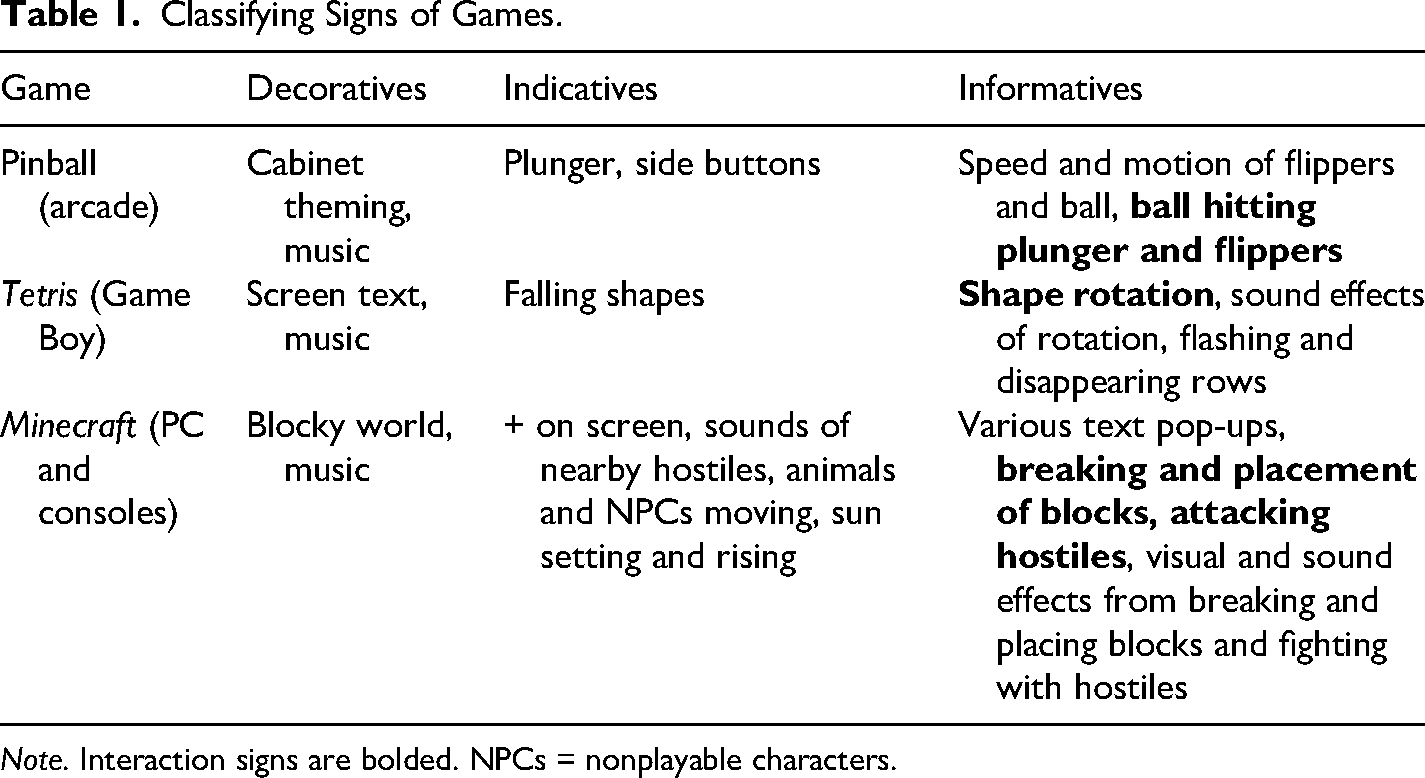
The decoratives that build the ambiance of the game include the blocky, colorful world and music. Different spooky sounds serve as indicatives—these various sounds, made by nonplayable characters (NPCs) that can harm or kill the player (also called hostile mobs), provide a warning that danger approaches. Other ways the game directs the player's attention with indicatives include the + at the center of the screen, indicating where a block will be placed or where the player will be mining/attacking, motion of various animals and other NPCs around the game world, and the sun setting and rising, as the hostiles appear at night and burn and disappear in the sun. Informatives include various text pop-ups that share information about different materials, crafting items, and so on. Informatives include a slew of different types of text that pops up when the player nears something for the first time, when the player clicks on or hovers over an item in their inventory, what recipes will create a given item with the crafting table or furnace, and so on. The player also gains information from breaking blocks and placing blocks—initially discovering these by pressing buttons and experiencing their effects visually and aurally. Table 1 lists the decoratives, indicatives, and informatives in pinball, Tetris, and Minecraft.
Classifying Signs of Games.
Note. Interaction signs are bolded. NPCs = nonplayable characters.
These games still convey a lot of information via combinations of multimodal media. However, information integral to the game and to the player's success in the game are often interactive—games are meant to engage the audience in the game world. In game design textbooks, experts emphasize the need for user feedback—some visual and/or aural indication that the player has effected change in the game world (Fullerton, 2019; Salen & Zimmerman, 2003; Schell, 2020). Feedback makes apparent the effect of an interaction. Interactive informatives like those in bold in Table 1, convey information to the player that is immediate and relevant to the action they just took. In pinball and Tetris, the mechanics of the game are interactive and provide a large amount of information for the player. Minecraft, a much more complex game and game world, also provides decoratives and indicatives through multimedia combinations. Informatives in Minecraft include more text, visuals, and sounds than the other games in the table, but the player still gains a sizable amount of knowledge from direct interactions with the system as they figure out what each material is and can be used to create. There are hundreds of individual types of blocks, with some estimates as high as 830 (How Many Blocks Are There in Minecraft?, n.d.). There are also 78 NPCs, 32 of which will not attack or harm the player under any circumstances, 30 that will attack on sight, and 16 that will attack if provoked (Mob, 2025). The player learns the nature of each one through interaction—by attacking or being attacked. Minecraft is a great example of how games integrate instruction throughout the game rather than only in one tutorial level or cutscene. The large amount of intricate knowledge players need to grasp means that players must continue to learn throughout the game, rather than in one tutorial level or scene.
Moving to VR, Beat Saber is one of the older and more popular games, with a free demo level available to play without paying. The free demo begins with a full screen of health and safety warning text. The layout conveys the formal legalese tone; the continue button at the bottom, circled like a clickable button on a website, is indicative; and the text itself is informative, though it is not likely to be read by many. The player sees a white line emanating from the controller that moves as the controller moves, indicative that they can interact with the world. Pointing the line at “continue” and pressing the “trigger” button behind the index fingers selects “continue.” The player will then be in a dark blue room facing three white text boxes that read as follows: play tutorial, play demo level, buy full game, and exit. Each is accompanied by a white icon: a graduation cap, a stick figure holding a stick (or beat saber), an arrow pointing down, and a door opening, in that order. The boarders around each option and the verbs used signal that they are actions the user can take and are types of indicatives that Amare and Manning (2013) labeled as “action triggers” (p. 124). If the player looks down, there is a set of glowing footprints on the floor, indicating where the player should stand. To the player's left is an additional screen with three similar-looking white boxes that explain how to play the game: cut in the arrow direction and match the color, avoid obstacles with your head, and don’t cut the bombs. Within the text boxes are three icons demonstrating an arrow being cut in its direction, a stick figure leaning back to avoid a wall, and a star-like icon about to be cut in a circle with a slash across it, in that order. These are informatives, providing gameplay instructions—if the player turns to the left to notice them. If not, they can begin the tutorial or demo level.
The tutorial level's decoratives set the tone for a futuristic game requiring quick reactions from players. Spoken instructions remind the players to stand on the footprints and ask them to place their sabers in the circles directly in front of them (informatives). After that, the tutorial begins the motion common to the Beat Saber games: items seem to float directly at the players. The tutorial includes additional key informatives: spoken explanations as the players interact with the flying boxes by slicing them with their sabers. It begins with one cube at a time, cycling through the different colors and types of cut directions. The cubes have triangles on one of their sides, and the point of the triangle closest to the center of the cube indicates the direction in which the player should slice the cube (indicatives). Additional elements are introduced individually, such as blocks that can be cut in any direction, as well as “bombs” and walls to avoid interacting with in the game. Each element has a specific shape to indicate the direction the player should cut it with their saber or move to avoid it. Walls, for example, appear to the left or right side of the player, and the player must move away from them. One type of wall appears to be flying directly at the player's head, and the instructions tell the player to crouch. The verbal instructions (informatives) are repeated in text below the moving blocks, and some, like “lean left,” include an arrow pointing to the left. The minute-long tutorial also provides verbal feedback as well as visual feedback about the player's interactions (informatives) such as “nice!” and “that was too soon,” ending with “Congratulations! You are ready now.” The player learns how to operate the controls while actually executing the motions—each possible move in a short, low-stress tutorial that provides feedback on how accurately the player interacts with the blocks. Of course, many players prefer to skip tutorials, and in that case, the player would need to learn directly through interacting with the blocks and viewing the resulting consequences (like in Tetris). The symbols on the game blocks are designed to be clear enough to support players who have not completed the tutorial, and in such a case, the interaction would be the primary source of learning how to play the game.
In AR, probably the most well-known AR game is Pokémon Go, where players move around in the real world to catch virtual Pokémon characters with their mobile phones. Though this game debuted in 2016, it is still widely played today, with festivals and special events worldwide. 1 Pokémon Go first shows the player a series of short textboxes explaining the game's backstory and goals (informatives); the player then selects and customizes an avatar (decoratives). Next, the player sees a virtual map displaying three Pokémon characters in the player's location (informative). The player is instructed to catch one with a Poké ball (informative). A Poké ball then appears in the center bottom of their phone's screen, and the background then changes to the players’ real-world background (indicative), through the phone's cameras. The player has to push the ball with their finger on their phone screen to throw it. They get visual feedback on the trajectory of each throw, with a successful throw resulting in the Pokémon being replaced visually by the Poké ball (informative). The ball wiggles, and if the Pokémon doesn’t escape, text appears, “[type of Pokémon] was caught!” (informative). The game consists of catching Pokémon characters in various locations in the real world with AR elements and battling them in “gyms”—also locations in the real and AR world. Though the gym setups have evolved a bit from their original look and messaging, the overall feel and mechanics remain similar. Players are presented with three options to select for their team (indicatives), then the Pokémon defending the gym appear (indicatives), and the player selects one to battle. Text is displayed on the screen, “Battle 1 GO” (indicative), telling the player to begin battling. During the battle, progress is conveyed through sound indicating that the Pokémon is throwing or hitting something; informative text naming the Pokémon and the strategy (e.g., “Golbat used Poison Fang!”); informative text stating the efficacy of the player's strategy (either “Super effective!” or “Not very effective…”); informative health bars showing how much damage each Pokémon has sustained; and informative comic-like visuals with lines displaying the trajectory of attacks, flashing colors conveying damage, lines or smoke around the character to show pain, and so forth. The battle ends with informative text saying either “YOU LOSE!” or “YOU WIN!” and, in the case of the latter, more text showing the number of Pokémons defeated, XP (experience points) gained, and gym prestige. The abilities of each Pokémon are each unique and depend on how other players have leveled up with XP, how they powered up and evolved their Pokémon, and the specific attack strength each Pokémon has, as well as how much damage each can sustain. The unique traits of each Pokémon means that each battle a player experiences is different, and they must discern which strategies will be effective in which situation, based on the information the game gives them.
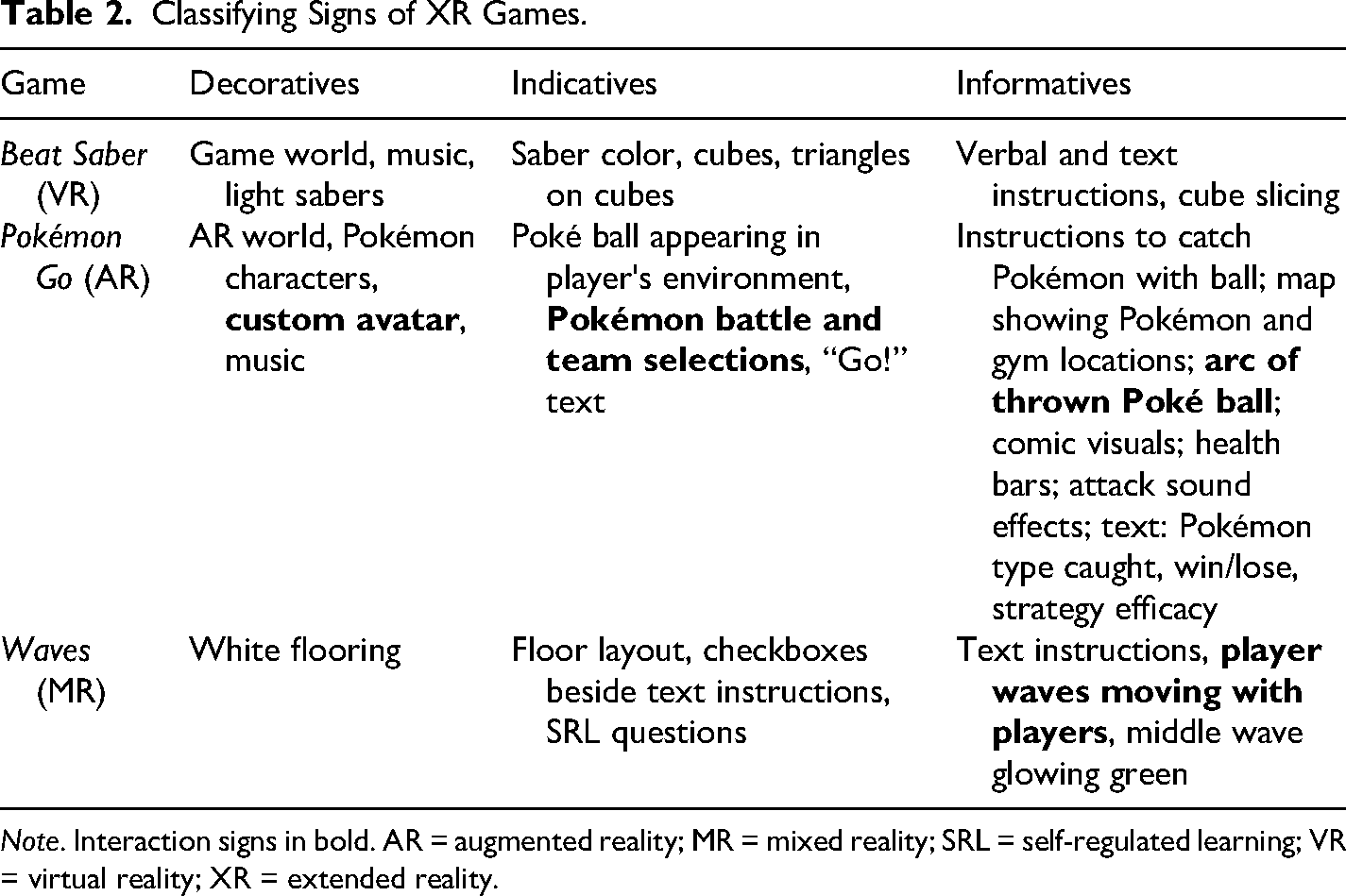
Another MR game that is less mobile and designed for educational research is Waves. This game was adapted in an earlier study to investigate self-regulated learning (Johnson, 2019), assessing the ways that an interactive game could teach middle-school students about light and sound waves. Waves is a two-player MR game where players each control a wave, projected on the floor in front of them, by moving their bodies back and forth. When the game begins, players see a wave that moves in correspondence to their movements—as they walk up, turn to look around, and so forth, their wave is in motion, along with a third wave between the two of them (indicatives). Instructions appear on the floor: “make the middle wave glow green using constructive interference” (informatives). Then, near the players’ feet, the floor displays three tasks with check boxes. If the players are in the right place, the first box, “stand next to each other,” is already checked off and greyed out. The next two read as follows: “turn the middle wave green using constructive interference” and “make a small middle wave glow green using large constructive movements.” Players then have to discern, by interacting with their individual waves, what “constructive” means in this context and how to coordinate motions to achieve the goal. These tasks with checkboxes both perform indicative roles and are what Amare and Manning (2013) call informative indicatives, as they both call the user to action and provide information. In the game, players see the visual feedback of the moving wave, which initially serves a decorative function to set the playful tone of the game. As the players interact with their waves and notice how those two waves influence the size of the main wave, they see—and experience—constructive and destructive interference. Results suggested that this embodied experience helped players learn about the properties of waves. Table 2 shows example decoratives, indicatives, and informatives in Beat Saber, Pokémon Go, and Waves.
Classifying Signs of XR Games.
Note. Interaction signs in bold. AR = augmented reality; MR = mixed reality; SRL = self-regulated learning; VR = virtual reality; XR = extended reality.
At the current state of these technologies, with different types of hardware and software still being created and not yet ubiquitous, there is a lack of public literacy as to how to interact with MR objects—we know to tap our phone screens, click or double-click with a mouse, and so on, but MR experiences are still discovering what types of motions and signs will be common enough to become our default interactions with these systems. VR controllers themselves represent a wider range of size and shape than the relatively standardized console games. The lack of MR standardization puts the impetus of communication on each individual game or simulation. This is the time to study the ways that these systems communicate this technical information and look for principles that can apply to technical communication across media.
Principles That Apply to Technical Communication
As we look to the future of technical communication, we will likely have more of an ability—along with more of a need—to use interactions to convey information. Video games use interactions to help players understand their mechanics and goals, embracing the hands-on user engagement that players have come to expect. Interaction types and frequency naturally vary across games and genres, but the games discussed here provide a sample range of ways that interaction can reinforce or strengthen a user's understanding of complex information. The physics in pinball, Tetris, Minecraft, and Beat Saber are complicated but likely easier (and more fun) to learn via interaction within the game worlds. Pokémon Go combines the familiar with the unfamiliar in an immersive game, simulating real-world physics in an engaging AR environment and teaching the player to interpret the nuanced differences between Pokémon and how that will impact their battle strategies. Waves helps learners embody the motion of a wave, where they learn about wave patterns by experimenting with different motions to create larger or smaller middle waves. As digital worlds expand to become increasingly common across sectors and across different mixes of reality, we can look to video games for cues to create effective interactive technical communication.
One commonality these games share is the abundance of signs; there is no lack of communication between the game and the player, even in simple pinball. The player receives a lot of information from each game, and it often appears in a very short time, with simultaneous types of signs and media. For example, the informative text in a Pokémon Go battle stating the player's attack was not effective reinforces the visual feedback of the opposing Pokémon standing strong. Many of these games provide redundant messaging to ensure the player—busy with a specific mechanic of the game—does not miss key information. The feedback from an interaction provides the player with predominantly informative signs, though game feedback also instills within the player a sense of agency. The games discussed in this paper also occasionally use interaction as indicatives and decoratives. But how can these informative interactions translate to technical communication products?
Let us look at technology most similar to video games: websites and apps. These have the capability to contain interactive elements—and many do. Indeed, sharing a product manual in a digital format increases navigation and search opportunities, due to the nature of digital text. The search results are indicatives, pointing the reader to the location(s) of a word in the text. While interactive, this function is beneficial only to the user who searches for the exact words that the authors used, as others have noted (Barsky & Bar-Ilan, 2012; Novick & Ward, 2006). Another way many technical communication products, like digital manuals, include interactive elements is in the table of contents. Most online manuals (and many PDF manuals) include clickable table-of-contents items (indicatives) that allow the reader to jump to that location in the document. When headings are clear and match user expectations for terminology and topic, this can be even more effective than a search function.
As digital technology has expanded, so have opportunities for interactive elements, especially online. Web pages can include embedded videos, interactive images, and links to further information. Data visualization continues to increase in popularity, especially IDDs and their “dynamic rhetorical spaces” (Rawlins & Wilson, 2014) that the user cocreates with the instructional designer. This ability to manipulate a visualization increases user agency, and as technology continues to expand, we should look for ways to further expand this agency. Interactive simulations of the inner workings of machines, animals, organs, and so forth could allow users to discover information and construct a deeper understanding of the topic at hand, following the educational principles of constructionism (Kafai & Resnick, 1996; Vygotsky, 1978).
The AR game Pokémon Go leverages interaction to include all three classes of signs. Players can create custom avatars (decoratives), select specific Pokémon for their battles (indicatives), and view the arc of their thrown Poké ball (informatives). This may be a predictor of the technical communication formats to come, as AR technology is still not used as expansively as other formats. In AR, it is possible to provide a variety of different visuals on top of or along slide items in the physical world. Maybe, one day, we will want to customize the color tint or contrast of things around us with AR glasses, interacting with the decoratives in our digitally mediated space. Perhaps we might want AR indicatives like a glowing trail to follow when navigating somewhere new. Or we might benefit from informatives like text labels and illustrations that display the inner workings of a washing machine with a tap or gesture as the customer works through a troubleshooting process. AR manuals have shown promise in training manufacturing employees (Wang et al., 2013). Others have worked to create systems to translate 2D-printed materials like handbooks into interactive AR manuals (Mohr et al., 2015).
Though technical communication in these emerging spaces is increasing, the standard for most technical communication remains 2D and text-based. Rather than limiting the interaction to a navigational table of contents, what if manuals could be designed as more interactive experiences, like Minecraft? Instead of having to navigate through a lengthy PDF, a user might instead be presented with a visual simulation of a newly downloaded software program, where they could interact with the platform's various features without fear of breaking anything—like a “sandbox” game. One scholar who has done something like this is my colleague Anastasia Salter, who created an interactive tutorial for students new to GitHub using Claude Sonnet 4. Their tutorial 2 presents students with a screen that mirrors the desktop GitHub application and includes nine “tutorial steps,” easing students into the jargon of the platform (Figure 1). Following the simple Step 1, clicking the button labeled “Start Learning!” (indicative) begins the interactive tutorial, which lists short explanations of tasks and specific actions for users. Step 2's heading introduces the software-specific verb stage, reading, “Stage Your Changes” (indicative). Beneath the heading, two short sentences elaborate, “Before committing, we need to stage our changes. Click the checkboxes next to the files to stage them” (informatives). Beneath this is another box with the heading, “Action needed:” (indicative) and a task-specific action to do, “Stage all three files by clicking their checkboxes” (indicative). As each checkbox is clicked, they visually change, using several informative signs (Figure 2). Checked files alter from being in a gray rectangle with an empty checkbox to being in a green rectangle with a white check in the previously empty box. Additionally, checked rectangles move above the others under a new, green heading, “Staged Changes,” while the unchecked files remain beneath the heading “Unstaged Changes” in black text. When all three are checked, the tutorial moves to Step 3, which explains GitHub's commit message function.

Screenshot of Step 2 of Interactive GitHub Tutorial.

Screenshot of Step 2 of the Tutorial with One of Three Files Staged.
The tutorial continues, covering “commit to main,” “push origin,” and “fetch origin” functions, which display “Action completed successfully!” pop-up messages at the completion of each step. The final two steps cover how to modify the user's GitHub repository settings to enable GitHub Pages so that the user can display their work on a GitHub website. After several semesters of meeting with students individually to walk them through this process (despite posting detailed videos that did the same), my colleague developed this interactive tutorial with the goal of making GitHub seem less intimidating to students who are new to it. This simulation of the complex GitHub program allows users to experience the software without fear of failure or consequences: here, there is no fear of accidentally deleting files or repository branches, and they are reassured and guided every step of the way. My colleague is optimistic that use of the tutorial in this upcoming semester will provide their less confident students with the knowledge and confidence to complete their GitHub webpage and post class assignments to it throughout the course.
The idea of a simulation tutorial aligns with prior work suggesting that many users prefer to play around with new technology rather than reading a text manual or even consulting online help files (Blackler et al., 2016; Novick & Ward, 2006). This echoes a conclusion that Gee reached with video games. In an anecdote about learning to play Deus Ex, he described his frustration: When I started the game, I kept trying to look up stuff. But I understood none of it well enough to find things easily without searching for the same information over and over again. In the end, you have to just actively play the game and explore and try everything. Then, at last, the booklet makes good sense, but by then you don't need it all that much. (Gee, 2003, p. 105, emphasis mine)
Conclusion
Video games leverage several different forms of digital media, and each video game is in and of itself a form of technical communication. Games use every element at their disposal to convey complicated information to the player—from background music to set the feel of the game to text explaining complicated statistics about specific game enemies. Video games often use interaction and provide multimodal feedback to players to impart game goals, mechanics, and player progress. This multimodal technical communication is combined in a way that seems intuitive and seamless to the player, who often quickly learns what to do in each game scenario. While technical communicators have always advocated for the user, we have entered an age where additional agency is required and expected. As McDaniel noted in 2009, it is increasingly necessary to design our online help systems and other technical communication products to be able to handle a range of user requests and needs on users’ terms, and we can learn a lot from interactive video games and their use of procedural rhetoric.
This analysis of the classes of signs in some example games highlights the ways that games leverage interaction as a communicative medium, which both matches the players’ expectations of a video game and provides context-specific information just as the player needs it. Video game signs, classified into Pierce's decoratives, indicatives, and informatives categories, are one approach to better understand the complex and multimodal technical communication of a game. This paper took a holistic approach in classifying game signs only into the three general categories, but future work could investigate how the 10 classes of signs appear in an individual game or specific genre. Additional analysis of other types of games beyond the more popular games selected here would also inform the field—it is not clear at this time if interactive elements predominantly act as informatives across games or only in these. Another interesting question is as follows: if this pattern does not hold across the broader landscape of games, are these games perhaps more popularly played because of the emphasis on interactive informatives?
The need for technical communication across genres and devices continues to expand rapidly. Technical communicators must meet the moment and evolve our best practices to best suit our users and media, and video games have much to teach us about communicating complex information rapidly and painlessly. Educators like Gee have been working for decades now to uncover the ways that games can educate and explain specific content to learners; technical communicators should also be taking this media seriously, following the lead of deWinter, Moeller, and others. We can look more closely at the ways that visuals, text, audio, motion, and interactive feedback convey complex, layered information to video game players, and we can leverage those combinations in our work. Contemporary users expect a higher level of agency, and interaction is one way to increase agency in technical communication products. Video games demonstrate that interactive elements can perform all three classes of signs (decoratives, indicatives, and informatives). Simulation sandboxes, such as the example GitHub tutorial, are another avenue for increasing agency and making the often tedious task of learning an interface more interactive.
Footnotes

Ethical Approval and Informed Consent
This article does not contain any studies with human or animal participants.
Informed Consent
This research did not involve any human or animal participants.
Funding
The author received no financial support for the research, authorship, and/or publication of this article.
Declaration of Conflicting Interests
The author declared no potential conflicts of interest with respect to the research, authorship, and/or publication of this article.