







Abstract
As the number of students with disabilities educated in general education classroom settings increases, there is a greater need for appropriate accommodations, modifications and supports to help these students be successful. Assistive technology (AT) tools, which are designed to mediate the difficulties incurred by disabilities, are one way to help students achieve in general education classrooms. For students with learning disabilities or other difficulties with print-based skills, digital pens are an AT device that can assist with both reading and writing tasks. This article focuses on one digital pen, the smartpen, manufactured by Livescribe™. The authors outline a number of ways smartpens can be used to meet the needs of students with learning disabilities in the areas of study skills, independent work, and assessment. A classroom-based example of implementation is provided.
In today’s schools, approximately 60% of students with disabilities are educated “inside the regular class 80% or more of the day” (Individuals with Disabilities Education Improvement Act [IDEIA], 2004). While serving students with disabilities in the least restrictive environment continues to be a positive realization of special education mandates and initiatives, it is important to remember that an inclusive placement is only a starting point. When opting to place students with disabilities within general education settings, it is the responsibility of the educational team to consider accommodations, modifications, and supports students will need to progress in those settings (IDEIA, 2004).
Students with disabilities require a variety of supports in order to realize the positive effects of an inclusive placement. For students with learning disabilities (or other disabilities impacting literacy), many of the supports needed relate to difficulties with reading or producing text. For example, students may need support with note taking, reading and following assignment directions, reading text for information, and producing written responses for assessment purposes.
Over the past decade, the potential for assistive technology (AT) to meet the needs of students with learning disabilities has been frequently cited in the professional literature (Ahrens, 2011; Hasselbring & Bausch, 2006; Haq & Elhoweris, 2013). AT, as required by IDEIA (2004), refers to any equipment or product designed to increase the capabilities of students with disabilities. AT can assist students with academic needs (e.g., reading, writing, or math), social needs (e.g., interacting with peers), communication needs (e.g., expressing thoughts), organizational needs (e.g., scheduling), or physical needs (e.g., getting around the school and participating in lessons using fine or gross motor skills). In summary, AT is designed to improve students’ access and outcomes within their educational environment.
As everyday technology continues to advance, so do the options teachers have when recommending AT devices for students with disabilities (Miller et al., 2012). One way to increase the access of AT tools is to repurpose technologies such as Mp3 players, cell phones, and other devices to help students learn (Mishra & Koehler, 2009). Additionally, a number of products falling under the category of digital pens have been developed for other fields and applications, but are increasingly being applied to educational contexts.
Digital pens look very much like typical ballpoint pens, and on a basic level, their functionality is the same. They write with real ink on real paper. However, digital pens also digitalize every pen stroke that is made, and then later transfer those pen strokes to digital pages. Words, notes, and diagrams written by the user can quickly be turned into digital files for easy viewing and sharing. In addition, a number of special features exist depending on the specific product. For example, some digital pen products include character recognition software which changes written words into typed words. Some pens need to be connected via cable to a computer to transfer files, while others are able to connect wirelessly. The consumer needs to compare features and functionalities of the various digital pens before selecting a product, as a fairly wide range of variability exits from one model to the next.
In this article, one digital pen product, the smartpen manufactured by Livescribe™, is described in terms of its applications for supporting students with learning disabilities in inclusive settings (Figure 1). While a number of other digital pens exist, the smartpen offers a unique set of features that allow this product to be applied as an AT solution. It is the only digital pen with an audio recording feature that links written words to spoken words and translates both to digital files. This allows the product to be used as AT to meet many of the literacy needs of students with learning disabilities—both in terms of reading and in terms of writing.
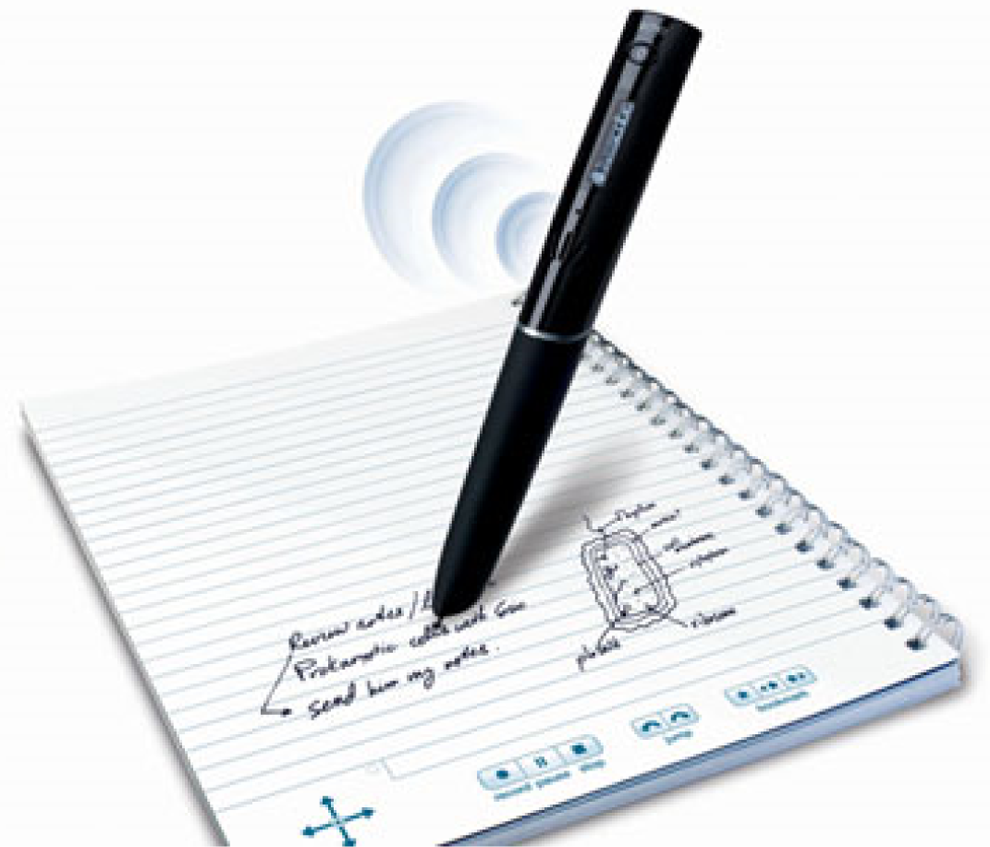
Smartpen and paper.
Smartpen Basics
Smartpens have a wide range of functionality. Smartpens record what their users say and hear, as well as what the users write, on special digital paper. Users can save, search, and play back both audio and written notes and transfer these notes to a computer. Audio and written files can then be saved and shared.
Smartpens currently come in three versions—Echo™, Sky™, and Livescribe Three™. All three smartpens have similar functionality, with some differences in connectivity to the computer (e.g., with USB or wireless), and compatible platforms. Other subtle differences between the models exist, so potential users should research each model to determine what best fits their needs. Smartpens are widely available for purchase through the Livescribe website, or through commercial retailers such as office supply stores. Starter packages include the pen, any needed cables, and a notebook of special paper designed for use with the pen. At the time of publication of this article, starter packages range in price from US$80 to US$200 depending on the place of purchase, model, and size of memory.
Smartpens in the Literature
Due to the tool’s versatility, low cost, and ease of use, smartpens offer great potential for impact in today’s inclusive classrooms. However, at present, research on smartpens, including their application in educational settings, is limited. The majority of published material on the technology consists of product descriptions and reviews (e.g., Hastings, 2011; Olabisi & Aderibigbe, 2013; Ormsby, 2011; Solomon, 2010).
One published study (Belson, Hartmann, & Sherman, 2013) documented the effectiveness of smartpens when used in conjunction with the Cornell note taking method with high school students with specific learning disabilities. The study took place in a self-contained school for students with learning disabilities, during the students’ reading strategies class. In this study, the use of the combined intervention (smartpens and note taking strategy) resulted in significant increases in the content and selectivity of students’ notes, as scored on corresponding rubrics. The content construct related to students’ ability to capture the main idea of a lecture, and to include the appropriate breadth and depth of information in relation to the lecture. The selectivity construct related to students’ ability to appropriately summarize the important ideas of a lecture. Overall, the results of this study demonstrated the potential of smartpens to enhance note taking.
While this one study is promising, at this point, there is a lack of additional research on the use of this tool. The focus of this article is on practical applications for the smartpen in inclusive classrooms, all of which have been piloted by the authors and/or their colleagues. In the absence of additional research, practitioners can use professional judgment to select the uses appropriate for their students and collect efficacy data during implementation in their classrooms.
Smartpen Applications
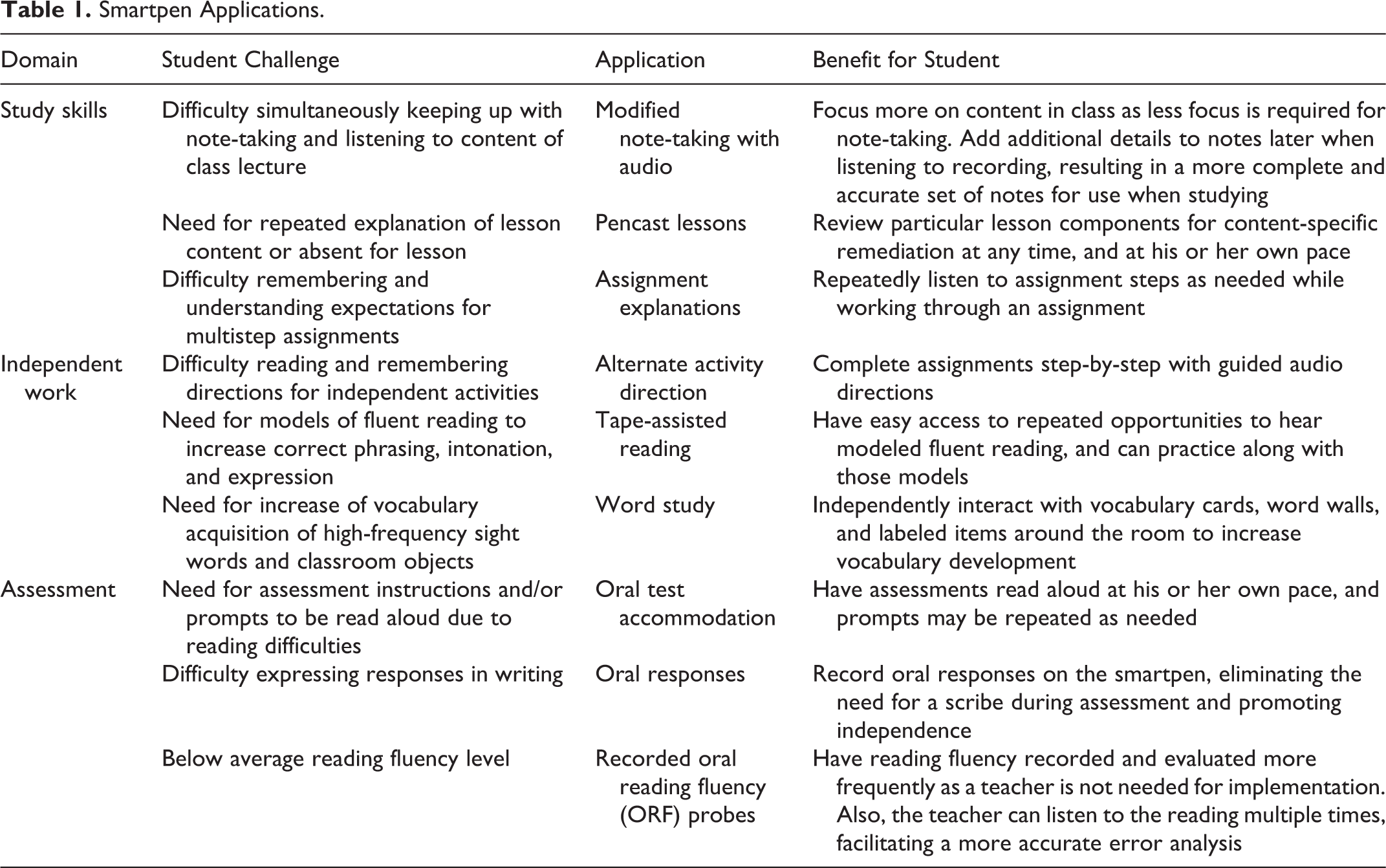
Smartpens can be used as an AT tool to help students with learning disabilities realize success in inclusive settings by providing instructional support and/or a method of accommodation. Three main areas of use include study skills, independent work, and assessment. Descriptions of applications within each of these areas follow. See Table 1 for a summary of applications, student difficulties that may be ameliorated through the applications, and potential benefits.
Smartpen Applications.
Study Skills
Smartpens can be used to help students access, organize, and understand information. This can be done in a number of ways. Because the smartpen links audio with written words, it can be used as AT for students who have difficulty with accessing information through reading, struggle to keep up with the pace of lessons, and/or benefit from audio input when studying.
Modified note-taking with audio
Belson, Hartmann, and Sherman (2013) found an increase in students’ note-taking skills when combining the use of smartpens with a systematic note taking method. By using the smartpen’s audio recording function, students can take abbreviated written notes or write bulleted lists of main ideas during class while simultaneously recording the complete audio lecture. After class, students can review their notes and add additional details while listening to the recorded audio of the lesson. This can be beneficial for students who have difficulty keeping up with note taking during class or for those practicing how to identify the most salient parts of a lecture.
As an added benefit, students may be better able to focus on the lesson by using the smartpen to assist in note taking, as it will allow them to free up a portion of their cognitive load previously dedicated to note-taking. Belson et al. (2013) indicate this as an area of future research. Additionally, students can have access to the audio recording of the lecture later on when studying for a test, or when completing assignments independently. While other devices can be used as AT for recording class lectures (e.g., tape recorder), the smartpen has the added benefit of specifically linking the audio of the lecture with the notes written by the student.
Pencast lessons
Another way a teacher can utilize the audio and written functions of the smartpen is by creating pencast lessons. A pencast typically consists of a brief explanation or topical demonstration created using the smartpen. A teacher creates a pencast lesson by writing notes on the special digital paper with the pen, and simultaneously explaining the written notes. Then, the teacher can quickly and easily upload the pencast lesson and provide students access through a weblink. When viewing a pencast lesson, students can listen to the teacher explain the topic, and simultaneously watch the teacher’s written notes appear on the screen.
Pencast lessons are a viable solution to many concerns students with learning disabilities (or others in need of extra assistance) may face in an inclusive setting. Students in need of repetition of concepts, homework help, review/study tools, or self-paced explanations can have easy access to these lessons. Further, if a student misses a particular full class lesson, a teacher can direct the student to the pencast lesson for a quick overview of the material so the student does not fall behind in the curriculum. Sample pencasts can be viewed at http://www.livescribe.com/en-us/pencasts/
Alternate assignment explanations
Students with learning disabilities may have difficulty remembering and understanding expectations for daily homework and long-term assignments, particularly when those assignments are discussed at a quick pace in an inclusive classroom. Using similar procedures to creating pencast lessons, teachers can create a set of written directions, accompanied with audio explanation.
For daily homework assignments (e.g., set of math problems), the teacher can provide one or more solved examples, with a think-aloud explanation. A link to assignment explanations can be quickly posted to teacher websites, or e-mailed to individuals or groups. If a particular student does not have access to the Internet, the pen and notebook can be sent home with the student and the explanation can be played back directly from the notebook. In this way, either the pen or the online application of the pencast video can serve as AT for students who need additional directions to access assignments. Not only can these explanations be helpful to students who may be struggling, but individuals trying to help the students, such as parents, special education teachers, and tutors, also can utilize them.
Independent Work
Smartpens can help students with learning disabilities work toward independence in a variety of ways. In particular, students who have difficulty with multistep tasks or who struggle with basic, foundational reading skills may benefit.
Alternate activity directions
Using the smartpen, step-by-step directions for independent components of class activities can be presented in both written and audio formats. This allows a teacher to provide a task-analytic approach for those students who benefit from tasks being broken into small steps. Using this approach, teachers also can create activity centers in various areas of the classroom that students can complete independently using the pen. Directions can be written or typed on an activity card, and supplemental audio instructions can be provided by attaching “talking points” to the directions. These talking points can be created easily by tearing or cutting a small piece of paper from the notebook and then drawing a dot on the paper while recording the desired audio information. Students working with the smartpen can touch the pen to the prerecorded talking point to hear the directions and work through the activity one step at a time.
Tape-assisted reading
Tape-assisted reading is an activity that is utilized to increase a student’s ability to read with proper phrasing, intonation, and expression in connected text. To facilitate this activity with the use of a smartpen, a teacher can read a passage on the student’s instructional reading level and record it on the smartpen. Then, the teacher can provide a copy of the passage along with the smartpen at an activity center.
At the center, the student can listen to the recording while following along with the written passage. Next, the student can listen to the passage again—this time reading the text along with the smartpen recording. The student can reread the passage with the audio recording several times, while practicing phrasing, intonation, and expression. Finally, the student can read the passage independently and record his or her reading into the smartpen, allowing the teacher to listen and evaluate the student’s level of fluency at a later time.
Word study
Another way that students can utilize smartpens independently is through the use of word study. Teachers can facilitate the acquisition of vocabulary and vernacular by creating items such as vocabulary cards, word walls, or labels for objects around the classroom or school environment. The pen can then serve as AT for students who need additional assistance in accessing these written study tools.
Vocabulary cards can consist of a selected number of words (e.g., 5–10) for the student to study. A talking point can be attached to each vocabulary word and contain audio information such as correct pronunciation, definition, and use of the word in a sentence. The student can work independently with a vocabulary card by reviewing each of the key terms on the card, and then touching the talking point to verify the correct response (figure 2).
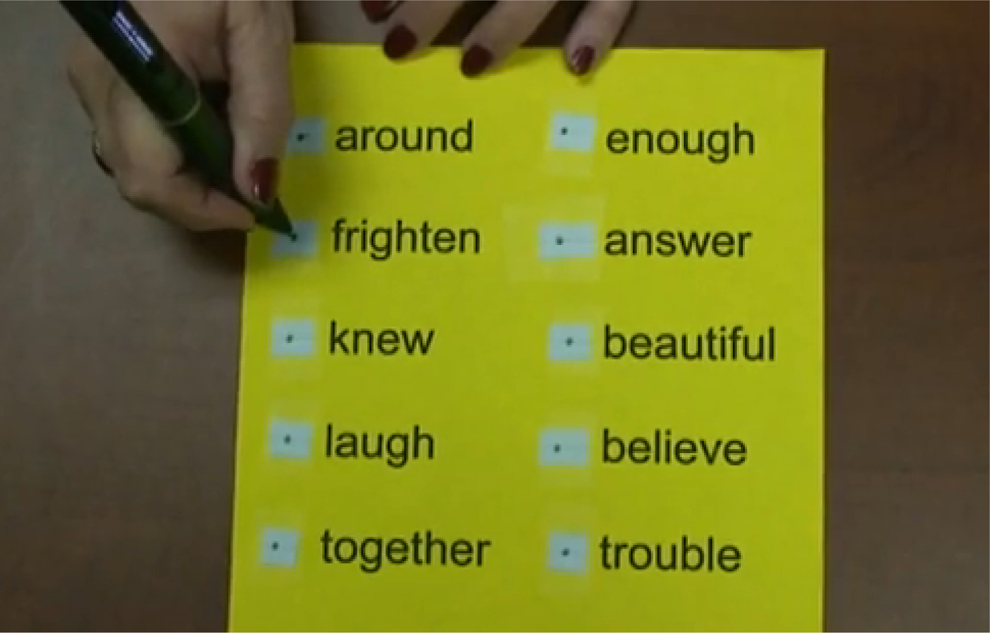
Sample word wall application.
Word walls, which are often created to facilitate vocabulary acquisition, can be enhanced by attaching a talking point to each word contained on the wall. Word walls can include sight words, content-specific vocabulary, or even targeted words for English or second-language development. The use of the smartpen also can be extended across academic domains and include audio information on items such as geographical maps, science diagrams, and math bulletin boards.
Assessment
During assessments, smartpens can offer an alternative to traditional testing accommodations such as having tests read aloud or having a scribe record responses. Further, since students can record oral responses, teachers then have access to a permanent product which can be used to closely examine students’ progress and provide valuable feedback.
Oral test accommodation
Although there are numerous ways to provide testing accommodations to students who require their tests be read aloud, the smartpen provides a unique solution. A typical text-to-speech reader requires the student to start and stop the reader at a desired point. However, the smartpen can be used to record small portions of the test at a time giving the student access to only one question or response at a time. Prior to the test, the teacher records each question and multiple-choice response on the smartpen. During the test, the student can access each question and response individually without the need to stop a screen reader. In addition to the existing text on the assessment, the smartpen may be used to provide orations of written information on items such as tables, figures, graphs, and illustrations that may accompany test questions. Once the documents are developed and programmed into the smartpen, students can use the smartpen as AT to access their test accommodation.
When the assessment is given, a student working with the smartpen can hear the recorded prompts and proceed at his or her own individualized pace, having questions reread as many times as needed. This also helps accommodate students who require extra testing time, since they can work independently as opposed to requiring dedicated personnel. In addition, headphones may be worn with the smartpen if other students are testing in the same or a nearby area, or to simply reduce other auditory distractions.
Oral responses
Students also may utilize the smartpen for recording oral responses to assessment prompts. When the student completes the assessment, he or she can give the smartpen to the teacher who can score the test at a later time.
In this way, the smartpen can be used as an alternative to verbally stating responses and having them recorded by a scribe. This allows students a greater level of independence, frees up otherwise needed personnel, and also allows teachers to conduct more frequent checks of student understanding since fewer resources are needed.
Oral reading fluency probes
Likewise, smartpens may be used when conducting oral reading fluency probes. In this situation, the student can record himself or herself reading aloud a preselected passage and return the smartpen to the teacher. The teacher can listen to and evaluate the student’s progress at a convenient time.
When evaluating a response, a teacher can easily assess where in a passage a student was reading in relation to time since the smartpen contains a timer on its visual display. So, if the teacher is evaluating a 1-min oral reading passage, he or she can stop scoring at the 1-min mark as displayed on the pen. Further, because the student’s response is recorded, the teacher has the ability to listen to the reading multiple times, which may facilitate more accurate error analysis.
A Classroom Example
The following scenario illustrates how the smartpen can be used as AT to assist a student who has a particular academic challenge. It includes a description of the student’s challenge, how the decision to utilize the smartpen was made by the educational team, how the technology was implemented, and the impact on the student’s academic progress.
Description of Student Challenge
At the beginning of eighth-grade English class, several times per week, Mr. Mullen asked his students to write a summary of the reading that was assigned for homework the night before. Each summary needed to include five key ideas—either key plot developments for fiction text or key informational details for nonfiction text. Mr. Mullen graded each summary on a scale of 1–5, with each key idea worth one point. For each key idea to earn a point, it had to be a complete thought, accurate, distinct (i.e., different from the other ideas), and specifically from the reading. Mr. Mullen used these summaries as a quick check for his students’ homework completion and comprehension of the reading as well as a jumping off point for class discussion and activities.
Charles, a student in Mr. Mullen’s class, has a learning disability in the area of writing. His spelling, grammar, and penmanship all interfere with his ability to communicate in writing. For the first month of school, Charles struggled with the reading summary task. Sometimes, he wrote one or two key points on his paper, though Mr. Mullen had difficulty deciphering Charles’ meaning. Other times, Charles simply refused to complete the task, sometimes leading to behavioral difficulties and even removal from class. Charles typically received a score of 0 or 1 on his reading summary, whereas most of his classmates scored a 4 or 5 each day. Charles expressed to his special education teacher, Mrs. Nagle, that he was frustrated this assignment was affecting his overall course grade. He was reading his homework assignments each night, but losing out on the points because of not being able to write the responses well.
Identification of Smartpen as Assistive Technology
At an individualized education program (IEP) team meeting, the team discussed Charles’ difficulty with the reading summary tasks. Mr. Mullen explained that the writing was not what he was trying to assess with the task, but rather whether students completed and understood the assigned reading. Mrs. Nagle shared the idea of using the smartpen as AT for Charles to complete this task. She explained that Charles could complete the same task as the other students, but do so verbally by recording it on the pen, as opposed to producing a written response. Unlike recording the response with a traditional tape recorder, Mr. Mullen would be able to easily locate the recorded response with a simple tap of the pen, as opposed to having to rewind and search for a particular place on a tape. The team, including Charles, agreed to give the smartpen a try.
Implementation of Smartpen
Mrs. Nagle met with Mr. Mullen and Charles for a brief, 10-minute training session on how to use the smartpen. After she demonstrated the basic functions of the pen, including how to record and play back the audio recording, she shared a quick, easy procedure for Charles to complete his reading summaries.
At the beginning of class, Charles took the smartpen and special dot paper notebook to the back of the classroom so he could quietly complete the task. First, he tapped the record button on the dot paper. Next, he wrote his initials and the date on the paper. Then, he narrated his reading summary as the pen recorded. When finished, he tapped the stop button on the dot paper. The whole process was completed within the same time frame his peers completed their written responses.
Later, to listen to the response, Mr. Mullen tapped Charles’ initials with the smartpen which were linked to his recorded, oral response. The oral response played back and Mr. Mullen was able to assess it on the 5-point scale in the same way he did for students who provided written responses.
Impact of Smartpen
Once the use of the smartpen was implemented for Charles’ reading summary responses, his scores immediately and consistently rose to a comparable level to his peers, with typical scores of 4 or 5 each day. Mr. Mullen indicated satisfaction with use of the technology, as it was easy to use, required little additional work on his part, and allowed him to accurately assess Charles’ comprehension of the reading material. Charles reported he also was satisfied with the use of the technology because it allowed him to complete the classroom task in a way that worked for him. He also began talking to Mrs. Nagle about other tasks in his school day for which he thought the pen might be helpful, such as note-taking.
Summary
The smartpen is a relatively low-cost and easy-to-use technology tool, with a number of AT applications for students with learning disabilities in the inclusive classroom. The smartpen has the potential to increase access and performance for students with learning disabilities in the areas of study skills, independent work, and assessment.
As with any AT device, students and teachers will require training on the basic functions of the smartpen as well as methods for use in particular applications. Ashbrook (2011) reported that although teachers may have variable levels of comfort when working with technology such as the smartpen, student learners are fearless. As such, while students may not necessarily require a large amount of structured training, teacher training is indispensable for effective classroom implementation.
While research on the smartpen as an AT tool is limited at this time, Olabisi and David (2013) praise the smartpen by stating “one can say authoritatively that it is a great and intelligent pen; and its immense contribution to education cannot be underestimated” (p. 28). It is recommended that teachers consider practical applications of smartpens that may meet the needs of their students, and use their own data collection and professional judgment to make decisions about use.
Footnotes
Declaration of Conflicting Interests
The author(s) declared no potential conflicts of interest with respect to the research, authorship, and/or publication of this article.
Funding
The author(s) received no financial support for the research, authorship, and/or publication of this article.