






Abstract
The use of teaching portfolios in teacher education programs is a widely accepted practice. This article describes how a traditional teacher work sample was transformed using the online platform, Google Docs. The use of online digital portfolios may help to satisfy both the need to evaluate teacher candidates’ performance in special education settings and encourage deeper reflection through the use of interactive digital technologies. Equally important, when constructing the Google Doc work sample, teacher candidates learn important instructional technologies by implementing them in authentic settings. The author suggests the implementation of digital portfolios may reinforce best practices in special education.
Keywords
Assessment portfolios have been a staple of many teacher preparation programs for the past 20 years (Hartnet-Edwards, 2013). The use of assessment portfolios in teacher preparation programs is a more comprehensive assessment of teaching skills than traditional classroom observation and has been linked to improvement of teacher candidates’ teaching skills (Devlin-Scherer, Burroughs, Daly, & McCartan, 2007; Weber, Wurzback, & Somers, 1998). Furthermore, many conclude these types of portfolios allow teacher candidates to better demonstrate skills and reflect on their teaching practices (e.g., Delandshere & Arens, 2003). The teacher work sample (TWS) is one type of portfolio assessment that is widely used. The TWS originated at Western Oregon University (Schalock & Myton, 1988) and was later adopted by the Renaissance Partnership for Improving Teacher Quality (2002). A more recent iteration of the teacher assessment portfolio is the edTPA (American Accreditation of Colleges for Teacher Education, 2016). Early versions of teacher assessment portfolios typically consisted of a three ring binder which housed the artifacts; however, more contemporary portfolios are increasingly digital. A digital portfolio, or e-portfolio, is a purposeful and organized collection of student work created and shared in a digital format (Milman, 2014). The ability to select best work samples for a digital portfolio is an integral component of teacher candidates’ reflection process (Parker, Ndoye, & Ritzhaupt, 2012; Plaisir, Hachey, & Theilheimer, 2011; Ritzhaupt, Ndoye, & Parker, 2008). The purpose of this article is to describe one type of online TWS currently being used in an introductory special education course. This digital portfolio is constructed using Google Docs, which has transformed the TWS into a more collaborative and reflective portfolio while encouraging teacher candidates to practice technological skills.
The Value of Objectivist Measures and Reflective Practice
The use of assessment portfolios in 21st-century teacher preparation programs has not gone unchallenged. The predictive validity of these assessment tools remains unknown (Henry et al., 2013). Furthermore, some suggest assessment portfolios, like the TWS, are antiquated compliance documents that emphasize summative evaluation of competencies over problem-solving and collaboration skills (Hartnet-Edwards, 2013). This is particularly concerning in special education teacher preparation, where collaboration is an initial preparation standard (Council for Exceptional Children [CEC], 2012).
The realities of accreditation and current certification demands, however, must be considered when teacher education programs develop coursework and corresponding assessments. Accrediting bodies such as the Council for the Accreditation of Educator Preparation [CAEP] require artifacts of student performance that demonstrate competencies of Specialized Professional Association (SPA) standards (CAEP, 2015). Assessment portfolios, like the TWS, are goal-specific documents that capture these data efficiently and simplify the reporting process. Furthermore, many states have adopted performance portfolios (e.g., edTPA) as a certification requirement (American Accreditation of Colleges for Teacher Education, 2016).
Although these objectivist measures are important for the aforementioned reasons, reflective practice in special education teacher preparation programs is equally, if not more, important. Teachers who engage in reflective practices have deeper and more meaningful reflections regarding their learning (Imhof & Picard, 2009). The value of reflection in teaching practice is paramount, but this important practice does not come easily to all teacher candidates. In a review of digital portfolios, Chung, Davidson, and Yeh (2011) found some teacher candidates struggled to engage in deep reflective thought about teaching practice.
The traditional TWS format may present conflicts for teacher educators, who are bound by accreditation and certification requirements, but desire the promotion of deep and reflective learning in special education teacher candidates. The enhanced online digital format of the assessment portfolio described here helps satisfy accreditation demands and supports deep reflective learning. Equally, if not more importantly, the enhanced format models instructional practices essential to the special education field while preparing digitally savvy teacher candidates for the 21st-century classroom. This aligns with two current trends in teacher preparation programs: performance-based assessment and the use of technological tools to record and organize this evidence (Frunzeanu, 2014).
The Google Doc Work Sample (GDWS): An Interactive Assessment Portfolio
The GDWS is a portfolio assessment that measures competencies and includes instructor facilitated reflection as an integral piece. This particular assessment portfolio was created by the instructor and was modeled after both the Renaissance Partnership for Improving Teacher Quality (2002) TWS and the edTPA (American Accreditation of Colleges for Teacher Education, 2016), incorporating features of both. Generally, the GDWS includes the following prompts: (a) observe and provide commentary on the contextual factors of the classroom you are working in; (b) create an individualized learning goal and assessment plan for a student with a disability in the classroom; (c) develop individualized lesson plans and reflect on weekly teaching videos; (d) record, track, and interpret weekly assessment data; and (e) reflect on teacher performance and student performance to guide future instruction. The compilation of the GDWS is not left entirely to the student. Rather, deliberate care is taken by the course instructor to structure the GDWS in such a way that measures of competencies can be easily obtained. Furthermore, the GDWS prompts special education teacher candidates to demonstrate mastery of technological skills as a function of completing the work sample. Specifically, teacher candidates must learn how to create multimedia-based instructional materials to complete the GDWS, one area of special education research that remains underdeveloped (Smith & Kennedy, 2014).
The GDWS is used with sophomore-level teacher candidates in a special education field-based course. A qualitative review by Parker, Ndoye, and Ritzhaupt (2012) explored the use of digital portfolios in field-based courses and found digital portfolios helped structure the field experience and supported reflective practices. This highly structured GDWS is intentionally used with novice teacher candidates. The template guides novice teachers through the data collection process as well as the reflective process. Embedded supports are included in the project and may include (a) links to reference materials, (b) reflective checklists, (c) data-informed decision-making guides, and (d) exemplars of critical reflection. The teacher candidates simply click on the link for the support they seek. The teacher candidates are paired for fieldwork and work with the same partner to complete the GDWS. This is done intentionally to facilitate peer support and help simulate a coteaching environment.
Novice teacher candidates in their first and second year often need more targeted support. More loosely constructed portfolios are reserved for the third and fourth year of the program, when teacher candidates have a stronger content and pedagogical background and the ability to more critically reflect. These third and fourth year GDWSs do not use a guiding template or include the supplementary prompts and supports. Instead, the teacher candidates must draw upon what they have learned to develop the GDWS in a way that is both meaningful and purposeful.
Some may argue simple adaptations could be made to enhance the traditional TWS without the use of a digital format. However, numerous reasons exist for abandoning the traditional “binder-bound” TWS. Furthermore, simply exchanging a traditional paper format for a digital format does not fully take advantage of all the features online digital portfolios have to offer. Online digital portfolios, like the GDWS, have several important defining characteristics that keenly lend themselves to field-based courses. Digital portfolios are portable (Derham & DiPerna, 2007), and this portability allows teacher candidates to take the GDWS into the field and make revisions or add content in real time. The accessibility of the online GDWS is increased because students do not need to have portable devices. They can log onto their private Gmail account virtually anywhere there is an Internet connection or cellular service. This digital “link to reality” affords teacher candidates the luxury of reflecting on practice while engaged in practice.
Why Google Docs?
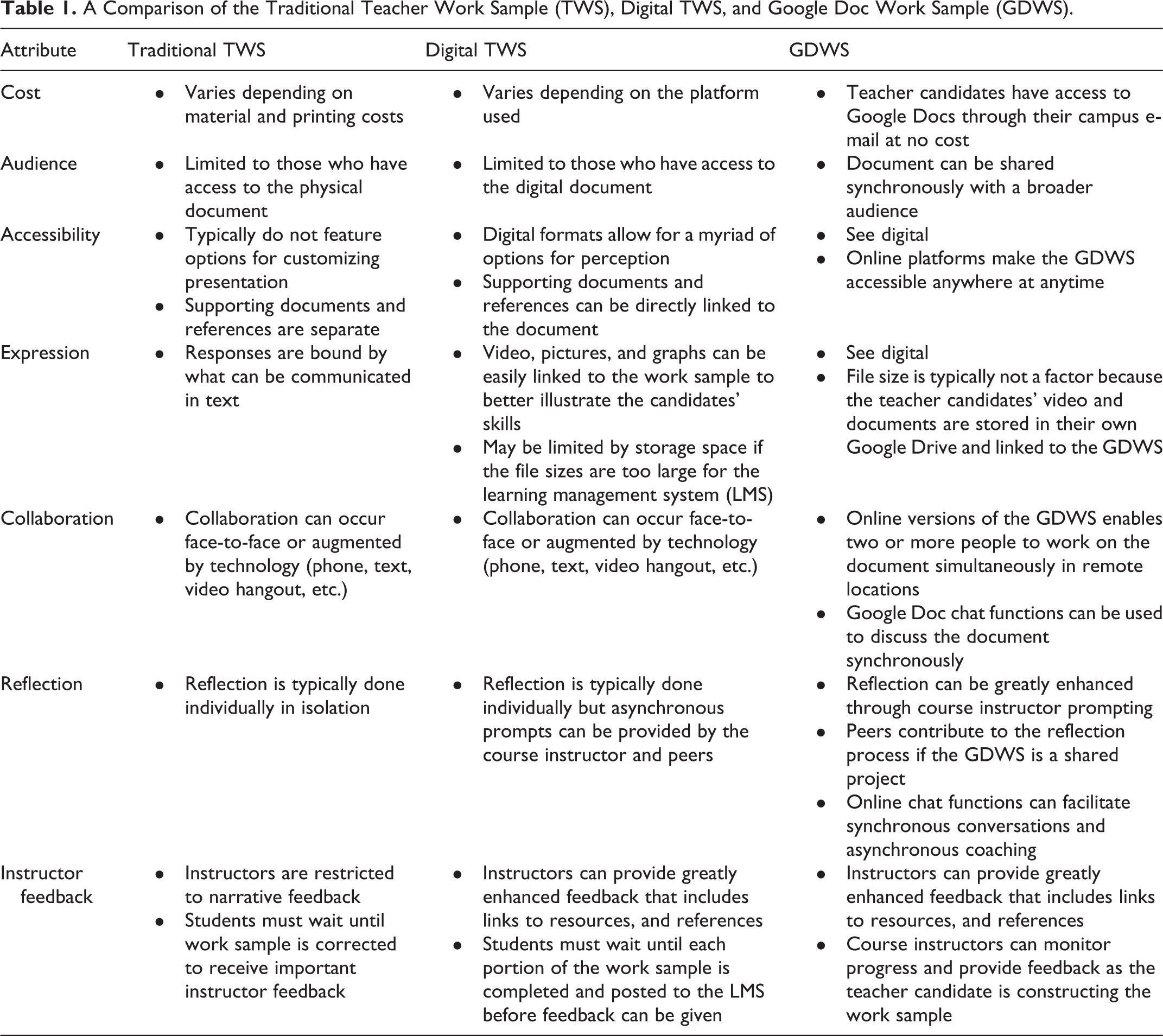
Presently, there are many platforms for creating digital portfolios. Denton and Wicks (2013) discuss examples of add-on platforms, independent platforms, and social media. Add-on platforms include programs typically linked to learning management systems (LMS) such as Moodle or Blackboard. Independent platforms include some of the commercial portfolio programs or sites such as Chalk and Wire. Social media platforms take advantage of Web Version 2.0 technologies to store content and share content online. These platforms include blogging websites and Google sites (Denton and Wicks, 2013). One of the many advantages to using social media platforms for digital portfolios is accessibility and adaptability (Clark & Eynon, 2009). The GDWS described here uses Google Docs as a platform for the portfolio. This is not overwhelmingly innovative, as Google Apps have been used in the classroom in the past (e.g., Curts, 2017; Google, 2017; Statucki, 2012). The integration of Google Docs into the GDWS framework, however, has prompted innovations to the process itself. Table 1 highlights some of the distinguishing features of traditional binder-bound TWSs, digital TWSs, and the web-based GDWS.
A Comparison of the Traditional Teacher Work Sample (TWS), Digital TWS, and Google Doc Work Sample (GDWS).
The GDWS can be simply described as a template embedded in a Google Doc. The template guides the teacher candidates in developing the different components of the GDWS. Some might conceptualize this as the different tabs in the traditional TWS binder. Scoring rubrics, course materials, video, and resources are hyperlinked to the Google Doc for ease of reference. The course instructor creates a “starter” GDWS for each teacher candidate pair and shares the document, allowing editing rights only for those who will be working on that specific GDWS. This feature is used to preserve the confidentiality of the teacher candidates’ work and protect the anonymity of any student work samples included in the GDWS. When an individual is given access to edit a document, he or she can write directly on the document and augment it in any way. A common concern among instructors is that teacher candidates might alter the document or delete the document altogether. Fortunately, Google Docs have a feature that allows users to return to previous versions of the document. In the event that a teacher candidate alters or destroys the template, the course instructor can simply recover a previous version of the GDWS. Other individuals who have access to the document can be restricted to “view only,” which allows them to read the document but not make changes, or “comment only” allowing them to post comments on the document, but not alter it in any way. Figure 1 displays how an instructor might manage students’ individual GDWS in their Google Drive.

Instructor’s view.
The teacher candidates write directly on the Google Doc and hyperlink artifacts to the Google Doc to demonstrate performance competencies. Feedback is provided directly on this shared document. Using Google Docs as a platform enables these interactions to occur more seamlessly while being archived in a single place. As owner of the document, the course instructor has the ability to restrict when the teacher candidates are able to edit the document. When a particular segment of the GDWS is due, for example, the instructor simply changes the editing rights to view only so that the teacher candidates can no longer add to or make changes to the GDWS. Once the course instructor has given the teacher candidates feedback, the settings can be changed back to “edit” and the teacher candidates can resume work on the document.
Confidentiality
The benefits and conveniences of the GDWS do not come without cautions. Like traditional binder-bound and digital portfolios, care must be taken to protect identities of P–12 students whose work may be represented in the artifacts. The CEC (2012) identifies ethical practice as one of its initial preparation standards. Novice teacher candidates must be taught ethical practices for handling student work samples and protecting the identity of the P–12 students they work with. The real names of the P–12 learners should never be referenced in work samples. Likewise, if video of the teacher candidate is utilized, the P–12 learners should never appear in the video. A procedural safeguard unique to the GDWS is the ability to review the teacher candidates’ work in real time. As owner of the GDWS document, the course instructor can promptly uncover any professional oversights as they occur rather than discovering them at the end of the semester when a traditional portfolio might be submitted for scoring.
Access to Google Docs is restricted to those individuals whose e-mail is attached to the document and is password protected. This password protection, however, is only as secure as the teacher candidate’s Google account. For example, if a teacher candidate fails to log off from a public computer, any Google Docs stored in that teacher candidate’s drive could be compromised. For this reason, it is imperative for course instructors to teach and model security procedures for working with students with disabilities. That stated, if a teacher candidate’s e-mail was compromised, the course instructor (as owner of the document) could immediately restrict access to the GDWS to preclude a breach of confidentiality. The course instructor also has the ability to restrict the teacher candidates’ ability to change the access settings and share the document with others. Similarly, the course instructor can also disable options to download and print the document. These options can be found in the advanced sharing settings and may be utilized by the course instructor to increase the security of the document.
Frequent and targeted feedback
One criticism of the traditional TWS is the summative nature of the assessment. A review of research evaluating the use of feedback in special education teacher preparation suggests implementation fidelity can be increased through the use of performance feedback (Cornelius & Nagro, 2014). Furthermore, Cornelius and Nagro suggest this feedback is most effective when it is immediate, specific, constructive, and purposeful (Hattie & Timperley, 2007; Scheeler, Ruhl, & McAfee, 2004). Google Docs enable the GDWS to become a working document with an array of options for providing timely formative feedback compared to traditional binders, which are much too cumbersome to submit for frequent instructor review and feedback. Instructors can review teacher candidates’ work and provide feedback on instructional planning, performance, and reflective abilities before the next instructional segment in the field.
Timely feedback is also important when novice teacher candidates need to make instructional decisions in the field. For example, a teacher candidate may need support from an instructor to interpret data and make data-informed decisions regarding instructional methods. Specifically, novice teacher candidates may need support in making decisions that ultimately impact the academic outcomes of the P–12 students they work with. The GDWS facilitates this important instructor surveillance.
In Google Docs, the instructor provides feedback by writing directly on the document or leaving comments on the document that, in turn, show up in the teacher candidate’s e-mail inbox. This is particularly useful because even if the teacher candidate does not review the GDWS regularly, he or she will be alerted of the comments via e-mail. Another innovative option for providing feedback is live chat sessions. The instructor and the teacher candidate log on to the GDWS document at the same time and use the chat function to both view and discuss the document synchronously from different locations. Figure 2 is an example of how the chat function might be used.
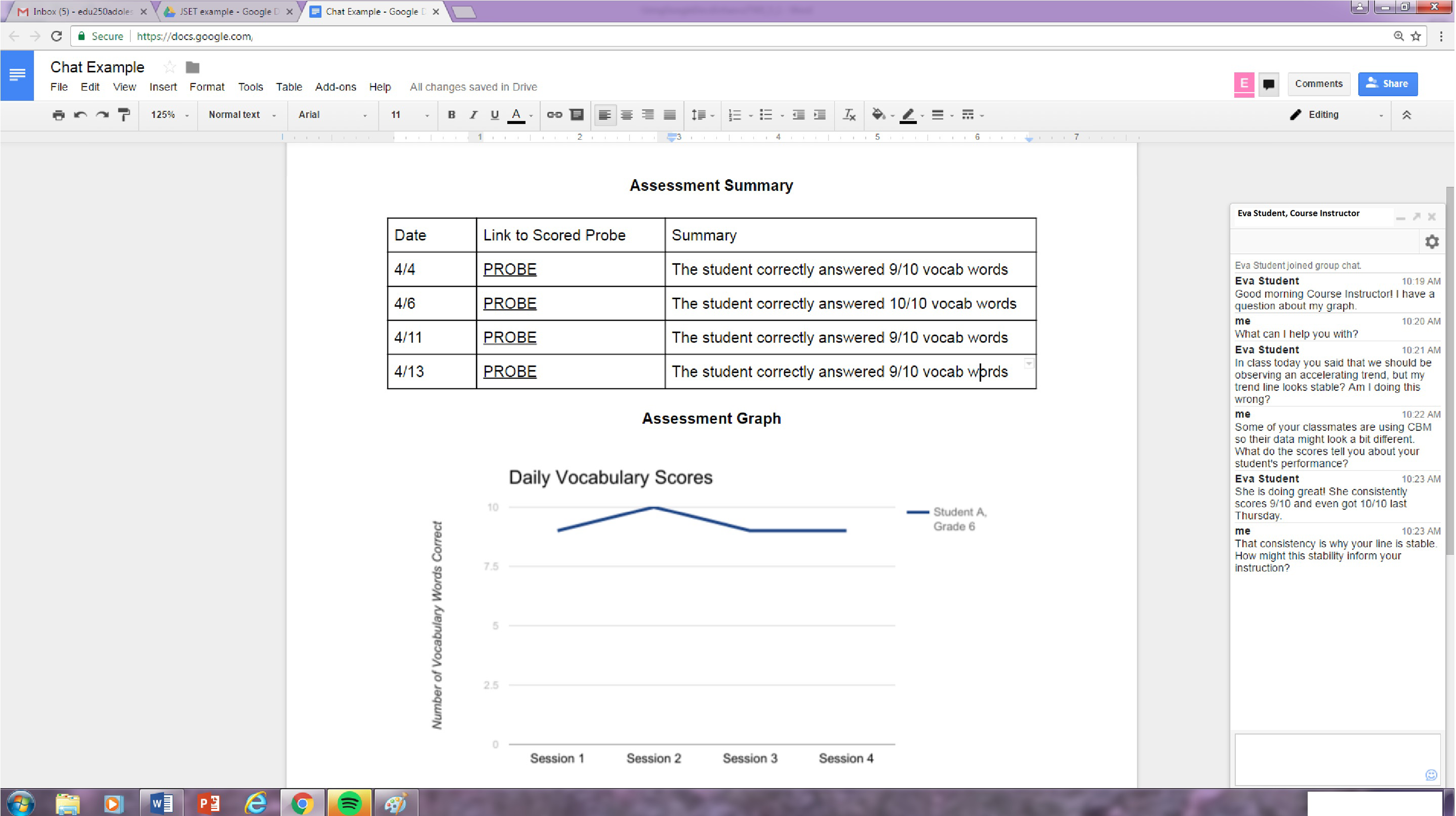
Mock Google Doc work sample chat session.
This flexibility in response may improve the quality of the feedback as well. Instructors are not confined to written textual feedback. Hyperlinking can be used to provide teacher candidates with additional resources (course materials or external references) or visual feedback in the form of videos and/or animated charts and text. For example, if an instructor wanted to provide a teacher candidate with a more thorough explanation of explicit instruction, he or she could simply apply a link to videos of explicit instruction (e.g., Archer, 2017) in his or her feedback.
Monitoring study habits
With enhanced capabilities for frequent formative feedback, instructors also have the ability to monitor teacher candidates’ work habits. This is not meant to be an invasion of privacy but rather scaffolded support to help novice teacher candidates who enter college at varying levels of ability and experience. As the owner of the document, the instructor can monitor when and how frequently teacher candidates work on the GDWS. The ability to monitor work habits help instructors provide teacher candidates with descriptive feedback on performance. For example, an instructor can look at the revision history on the Google Doc to determine when a student began working on the document. If the novice teacher candidate has not begun working on the GDWS by a certain date, the course instructor can intervene and recommend a work completion time line. This may thwart a project started hours before the due date.
Facilitating reflective practices
Formative feedback is not only restricted to content and pedagogical support in the GDWS. The ease of communication Google Docs affords also allows the instructor to support the reflective process itself. The GDWS described here includes embedded links to guiding questions as well as exemplars of thoughtful reflections. Novice teacher candidates who struggle with reflection can use the guiding questions as prompts and may read the example reflections to understand what is expected in a thorough response. These types of resources are easily accessible to the teacher candidates and can be removed by the course instructor as the teacher candidates’ become more capable. In addition to providing additional prompts, the instructor can ask probing questions that encourage teacher candidates to go beyond surface level or superficial reflections. The aim of these questions is to inspire an examination of the more complex aspects of teaching and learning. As a result, this process may turn one-sided reflection into something more akin to problem-solving sessions with an expert. Reciprocal communication is facilitated by the Google Doc platform because the instructor’s prompts are immediately delivered to the teacher candidates’ e-mails and are not recorded as a “grade” but rather necessary support. Other features such as the chat function previously described can also be used.
In the GDWS, all components are presented at the beginning of the semester as a single document “under construction.” This is different than digital formats, where sections of the portfolio are submitted as they are completed or the project is submitted as a whole at the end of the semester. Consider a teacher candidate who submits weekly reflections to a LMS. If a course instructor wanted to help a teacher candidate reflect on his or her growth over the semester and link his or her growth to another skill highlighted in the portfolio, this could only be accomplished by referring to the dates of previous work submitted. Logistically, this would be challenging for the course instructor and would require a search through the complete roster of submissions. It would also require a great deal of effort on the part of the teacher candidate to locate the necessary files and review them prior to reflection. Determining whether a teacher candidate read the instructors’ feedback, reflected on his or her practice, and ultimately changed his or her behavior would be a scavenger hunt of sorts, with the course instructor sorting through numerous submissions in an effort to triangulate. When the GDWS is a working document, these links are much easier to make because they are all part of a single interactive portfolio, where previous work is archived, current work is under development, and future work can be supported by the course instructor. Figure 3 is an example of a mock GDWS that includes feedback from a course instructor.

Mock Google Doc work sample feedback.
Flexibility and enhancement of responses
The GDWS, like other digital portfolios, allows teacher candidates to present artifacts using multimodal formats (Derham & DiPerna, 2007; Kahn, 2014). Teacher candidates demonstrate competencies beyond the limitations of text by using video, animated text, and hyperlinks. From an objectivist perspective, this allows the instructor to more accurately measure a teacher candidates’ ability to teach and not simply their ability to write. Furthermore, multimodal formats arguably may enhance teacher candidates’ expression and subsequent reflection. One such example is video analysis. The use of video analysis in teacher preparation programs suggests, with guidance, its use can promote teacher reflection (Andrews, Bobo, & Spurlock, 2010; M. J. Kennedy, Alves, & Rodgers, 2015; Nagro, deBettencourt, Rosenburg, Carran, & Weiss, 2017; Robinson & Kelley, 2007). In the GDWS, teacher candidates are encouraged to use video clips of their teaching to make targeted reflections with a deliberate focus on pedagogy. Reflection may be enhanced because the teacher candidates are not relying on memory to evaluate their practice (Robinson & Kelley, 2007). Furthermore, reflection checklists can be hyperlinked to the GDWS to support this process. Nagro, deBettencourt, Rosenburg, Carran, and Weiss (2017) recommend the use of reflection checklists but caution checklists alone may not be enough to support teachers’ reflective practices. Instead, Nago et al. advocate for ongoing feedback through guided video analysis. The GDWS lends itself well to this type of feedback loop. Written textual reflections, found in traditional TWSs, can also be based on video analysis. Instructor facilitated reflection, however, may be much more difficult to coordinate. Likewise, when a GDWS is shared among two or more teacher candidates, video reflection can occur at two levels. Teacher candidates can evaluate their own teaching videos and they can evaluate peers’ videos. Both self-evaluation of video and peer evaluation of video have been found to have advantages in teacher preparation (Seidel, Stürmer, Blomberg, Kobarg, & Schwindt, 2011).
The GDWS also permits flexibility in response when reporting data from the field. For example, teacher candidates can use data management software to display data in real time. In the GDWS described here, the teacher candidates link a Google Sheet (Google’s version of a spreadsheet) to the GDWS. As assessment data are collected in the field, the teacher candidates can simply update the sheet, and, in turn, these updates immediately appear on the GDWS. In this way, the course instructor is able to easily monitor the progress of the teacher candidate as well as the P–12 learner he or she is working with.
Ease of collaboration
Peer collaboration is another distinctive feature of the GDWS. When a Google Doc is shared among two or more people, collaboration can occur asynchronously or synchronously at separate locations. For the course in which this GDWS is used, teacher candidates are paired so partners can work on a shared GDWS and engage in structured online coaching. Teacher candidates who live in remote locations can collaborate with their partner or the course instructor at times and locations that are mutually convenient. This can be tremendously helpful in rural areas where the scarcity of special education field placements makes them geographically distant.
Research suggests teacher candidates may require additional training when engaging in collaboration in early field experiences (Gardiner & Robinson, 2011). When teacher candidates are working on a GDWS in pairs, the instructor can monitor the teacher candidates’ ability to collaborate. This is an essential skill for special educators and is identified as an initial preparation standard by the CEC (2012). To foster a sense of accountability, each teacher candidate selects a text color and/or font that represents his or her work on the GDWS. This helps to eliminate disproportionate workloads. The course instructor can also monitor the division of labor by viewing the revision history. This Google Doc feature allows the instructor to see who worked on the document and when the work occurred. If the course instructor observes disproportionate work divisions or unprofessional interactions, support can be provided. One example of this support could include helping the teacher candidates negotiate a workload plan and establish deadlines together. The course instructor can help monitor these deadlines and provide prompts and encouragement when necessary. Another example could be role-playing professional interactions. This can occur face-to-face if necessary or the course instructor can provide the teacher candidates with exemplars of professional discourse on the GDWS. Again, this can be easily monitored throughout the semester by simply reviewing what the teacher candidates have posted on the GDWS and providing feedback as needed. Figure 4 is an example of how collaboration can be monitored and supported.
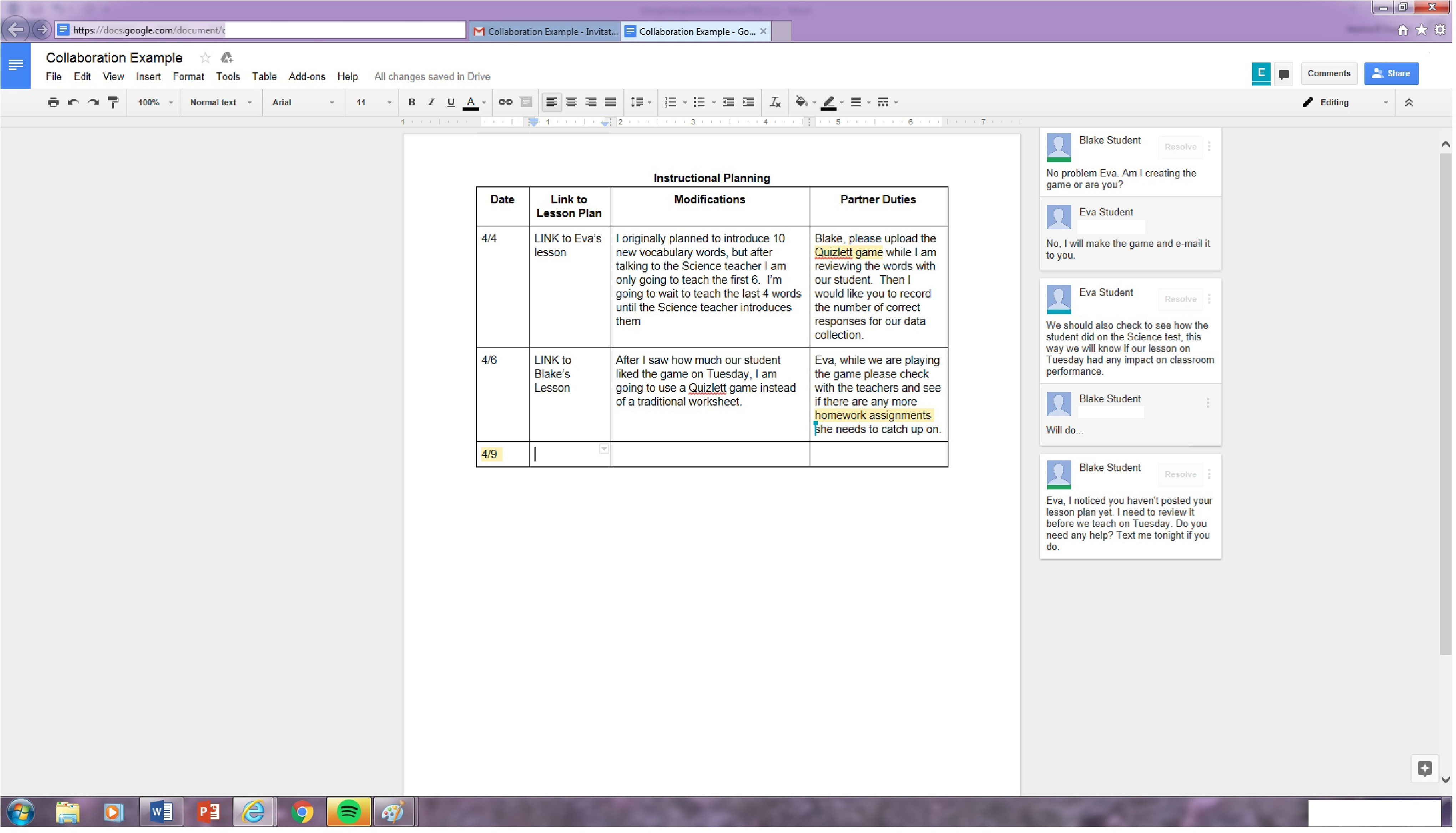
Mock Google Doc work sample collaboration.
Lastly, digital portfolios may also be used to encourage broader interactions (Hixon & So, 2009). The GDWS can be shared with a wider audience in a much more convenient and economical way (Derham & DiPerna, 2007; Hicks et al., 2007). Parts of the GDWS, for example, can be posted in online discussion forums for whole-class review and collaborative reflection. Teacher candidates can also share parts of the GDWS with cooperating P–12 teachers in the field to get additional formative feedback. For example, in the special education course for which this GDWS is used, the cooperating teachers are invited the view select portions of the candidates’ GDWSs. This enables the cooperating teacher to become an integral part of the GDWS completion. All that is required for this sharing to occur is an e-mail address.
Cost
The GDWS is cost effective. Each teacher candidate has access to the various Google applications through their campus e-mail. No additional software or online registration is needed. The digital format of the GDWS also saves teacher candidates the high printing costs associated with traditional paper versions. Many teacher candidates use their own laptops or cell phones to record video for the GDWS, but iPads are also available to rent through the university’s media center.
The technological innovations discussed above do not come without challenges. Google Docs are an online document and, as such, are susceptible to network outages and other Internet interruptions. Teacher candidates and instructors must be mindful of this when collaborating on the GDWS.
Building the GDWS for Learning and Practice
A common concern in the field of teacher preparation is teachers teach the way they were taught (M. M. Kennedy, 1999). Arguably, if teacher preparation programs are not modeling innovative instructional methods, they are unlikely to be used by teacher candidates in their future P–12 classrooms. The following discussion is conceptual and explores how constructing a GDWS with teacher candidates may promote best practices in special education. The extent to which teacher candidates integrate these methods in their future classrooms has not been fully explored, nonetheless they are certainly worthy of further research.
Modeling technology practices
If teacher candidates are exposed to various forms of technology and become comfortable using them, they may be more apt to use them in their future classrooms (Stobaugh & Tassell, 2011). Technology use is one skill that SPAs, such as the CEC, tout as an integral skill individuals instructing students with disabilities must have (CEC, 2012). Some argue teacher education courses do not provide sufficient instruction on how to integrate technology into lessons (Liu, 2012). This may be especially impactful in special education. When asked the degree to which teacher education programs trained preservice teachers to use technology to individualize instruction and accommodate various student learning preferences to a major extent, responses fell below 20% (Kleiner, Thomas, & Lewis, 2007). Additionally, many students enrolled in college do not have the digital competencies often expected of them (Zhang, Fallon, & Russo, 2014).
Google applications
The GDWS is not what Milman (2014) would describe as a “turnkey” approach. Turnkey refers to a shell of a project that is simply pushed out to students who, in turn, “fill in the blanks.” In order to create the GDWS, teacher candidates must become skilled in using various Google Apps, such as Google Drive, Google Docs, and Google Sheets. Therefore, in addition to developing an understanding of content and pedagogy, the teacher candidates acquire technological competencies as well. The use of multimedia instructional materials alone, however, does not necessarily translate to teacher candidate use (Smith & Kennedy, 2014). Therefore, the use of these technologies is part of the classroom coursework and is explicitly and purposefully taught making deliberate connections to use in inclusive P–12 classrooms. Figure 5 is an excerpt from a “starter template” for the GDWS.
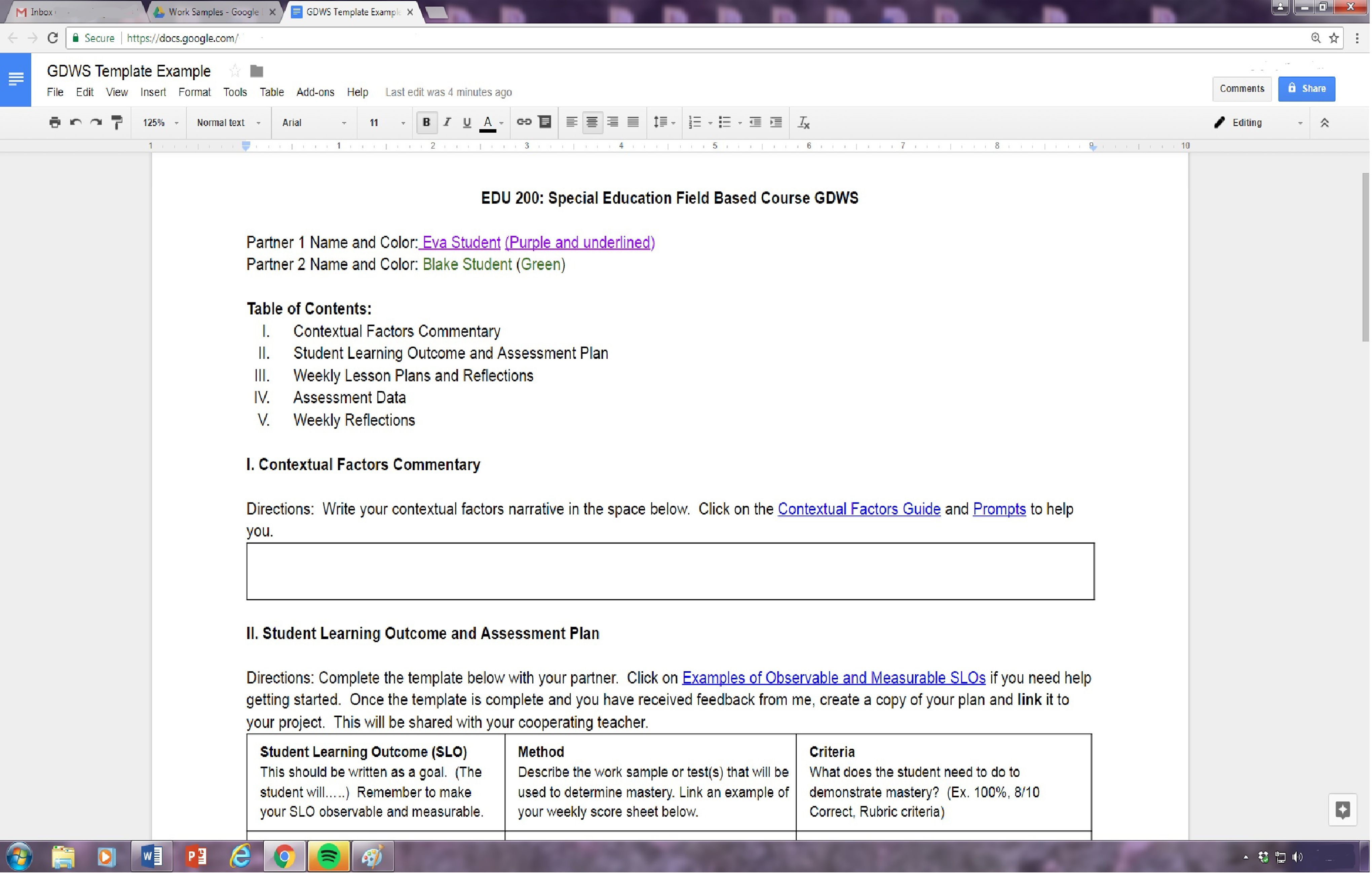
Google Doc work sample template example.
Enhanced and accessible text
When developing the GDWS, teacher candidates learn about technology through the experience (Chung, Davidson, & Yeh, 2011; Graham, Tripp, Wentworth, 2009; Hicks et al., 2007; Impedovo, Ritella, & Ligorio, 2013; Milman, 2005; Parker et al., 2012; Woodward & Nanlohy, 2004) and may become more confident using it (Boulton, 2014). In addition to Google Apps, teacher candidates learn how to create enhanced text using multimedia, embed academic supports through hyperlinks, and enable multimodal responses. These principles of universal design for learning may contribute to the success of students with disabilities in the teacher candidates’ future classrooms in innumerable ways. These technologies enable the classroom teacher to differentiate methods of engagement, representation, and expression when planning and carrying out instruction in the classroom (Center for Applied Special Technology, 2015). If teacher candidates prescribe to using digital media in their future classrooms, the benefits for students with disabilities are plentiful. Digital formats afford the user numerous text enhancing and accessibility features such as voice to text and text reading software. Students with disabilities also have an abundance of options for responding to prompts. Multimodal responses that include pictures, video, and animations can be used to express understandings. All of these important technology skills are practiced and refined as the teacher candidates create their own GDWS.
Technology for organization and sharing
In addition to creating more accessible digital text, teacher candidates fluent in Google applications may use these skills to support students with organizational needs. When Google Docs are used in the classroom, all students’ documents and artifacts are stored in one place and are accessible wherever Internet services are available. Teachers can give formative feedback frequently without intense paperwork management or the risk of losing drafts. Likewise, the ability to share a Google Doc with a broader audience may be utilized to facilitate collaboration among P–12 teachers in inclusive settings. If a student with a disability is working on a Google Doc all of the students’ teachers, both general education and special education, can be privy to the document. Simultaneous data collection can occur and targeted feedback can be given by all teachers.
When utilizing the GDWS, instructors also model how to proactively support time management and study skills. If teacher candidates generalize this skill, they can use online platforms for projects in their future classrooms. This could enable them to observe how students with disabilities approach completing a project through discreet surveillance. This may be valuable because time management can be a difficult skill to monitor outside of the school setting. Tracking students’ work habits through the use of a GDWS could help teachers glean important information that can be used to create goals that support students with disabilities’ study skills and time management needs.
The aforementioned technological skills may prove to be a commanding skill set for future special education teachers. Creating a GDWS with teacher candidates facilitates purposeful modeling of these skills and meaningful practice. If teacher candidates become comfortable using these instructional technologies when completing the GDWS, they may be more disposed to using them in their future classrooms.
Looking Forward
This GDWS was reimagined to enhance the portfolio development process for teacher candidates enrolled in a field-based special education course. It has also resolved some of the criticisms of the traditional TWS. The GDWS has proven to satisfy both objectivist demands for accreditation and stimulate deep and thoughtful reflection in teacher candidates. Frequent, quality, formative assessment is provided to teacher candidates who are working on the GDWS. Feedback is provided for the artifacts as well as the candidates’ reflections and ability to collaborate with a peer. The GDWS is cost-effective and offers conveniences such as portability and flexibility of collaboration for teacher candidates.
When used in conjunction with a field placement, the GDWS supports teacher candidates’ lesson design, assessment plan and data collection, interpretation of data, and decision-making. The GDWS is not a simple collection of competencies, but rather a working and reflective document that can be used for both formative and summative assessment. These innovations would not be possible without the presence of an online platform.
Equally important, participation in the GDWS assessment promotes the use of teaching practices that may benefit students with disabilities in P–12 classrooms. The use of the GDWS models how teachers can provide timely, frequent, and specific feedback. Moreover, when teacher candidates construct a GDWS, they learn advanced technology skills that will enable them to create more accessible text and collaborate with peers. Students with disabilities in P–12 classrooms can certainly benefit from more accessible content and content that is easily organized.
What remains unknown is the impact the GDWS has on teacher candidate performance and future practice from an empirical perspective. An examination of the integration of the GDWS into a field-based special education course warrants further examination. This examination may do well to inform the field of special education teacher preparation. In the meantime, however, it is difficult to ignore the important benefits of technology instruction and practice teacher candidates receive when completing a GDWS. This mirrors the recommendation of Smith and Kennedy (2014) who suggest a closer examination of (a) the extent to which special education teacher candidates can learn to use multimedia-based instructional materials and (b) are prepared to implement instructional technology with fidelity. If teacher candidates have completed a GDWS, they may feel more confident implementing instructional technology practices in their future classrooms. Ideally, this increased level of comfort will facilitate the development of special educators who use technology in creative and innovative ways.
Footnotes
Author’s Note
This research was conducted at the State University of New York at Fredonia. Parts of this article were presented by the author at the State University of New York at Fredonia’s Ninth Annual Teaching and Learning Conference on August 17, 2015.
Acknowledgment
The author would like to acknowledge Dr. Sharon Raimondi and Dr. Stephen Goss at the State University of New York at Buffalo for their assistance in formulating and critiquing this article. The author wishes to thank Dr. Goss for his creative input and Dr. Raimondi for her help reviewing this article.
Declaration of Conflicting Interests
The author(s) declared no potential conflicts of interest with respect to the research, authorship, and/or publication of this article.
Funding
The author(s) received no financial support for the research, authorship, and/or publication of this article.
