







Abstract
Augmented reality (AR) is an emerging technology that can help educators enhance their classrooms. With one-to-one initiatives and application (app) development creating affordable technology, teachers have more access to innovative supports for their students with disabilities’ academic, social, emotional, and behavioral skill development. Using AR, teachers can provide multimedia support while utilizing the student’s own environment. There are multiple apps available for teacher usage, which are free across multiple platforms and/or devices. This article describes exactly what AR is and how it can be used to support students with disabilities. An app is introduced to get started in the classroom with additional ways to utilize AR for learning.
Mr. Keating is a middle school special educator working with students in sixth through eighth grade. He has been with the district for 3 years. Mr. Keating has been in charge of creating his own materials to support a variety of his students. One of his students, Ben, joined the school in mid-fall. Since then, Mr. Keating has been playing catch-up to support him and his peers. Ben struggles with executive functioning, specifically note-taking, losing his materials, and transitioning between classes. Any time change happens between or inside classrooms, Ben struggles to keep up with his peers. Mr. Keating has been searching for ways to support Ben so that he does not have to keep track of notes for class and he has support moving between classes. Mr. Keating saw on social media where some teachers have been implementing augmented reality (AR) through live walls and live note-taking to help kids like Ben. Since the district has secured funding for every student to receive an iPad next year, Mr. Keating wants to capitalize on the opportunity and find the best AR solution for Ben.
Mobile devices continue to permeate the classroom environment with a wealth of available applications (apps). EdWeek’s Annual Technology Counts reported over 54% of all K–12 students and teachers have access to a school-issued mobile device (Molnar, 2015) and that number continues to climb. More and more teachers are trying to incorporate new 1:1 (one device per student) device initiatives not for the sake of technology but to improve teaching and learning. If not 1:1, then 1:3 or simply an increase in devices teachers and students are able to use for a larger portion of their instructional day.
The sheer amount of technology available to teachers and the learning curve for use can be overwhelming. There are currently 2.6 million apps available on Google Play and 2.2 million apps available on the Apple App Store (“Number of Available Apps,” 2019). The challenge for Mr. Keating is choosing an app that further enhances his students’ learning. To offset this challenge, the purpose of this article is to consider ways teachers can use digital innovations, specifically AR, to support students with disabilities.
Implementing AR in the classroom is no longer a far-fetched idea. It is a platform for mixing the physical space and digital space to bring a new level of learning to the environment. Digital innovations such as AR are expanding options for students in and outside of the traditional brick-and-mortar classroom (Daniel, Matheos, & McCalla, 2004). These innovations can support struggling learners by offering alternative ways to meaningfully access content. Support, modification, and enhanced access in the learning process via technology is alluring. However, one of the primary challenges is harnessing these innovations to maximize their impact on the development of students with disabilities. Innovations like AR offer students with disabilities a way to alter the traditional instructional experience of passive learning and can increase the efficiency and independence of a task by removing the need of constant adult support through the use of mobile devices. AR is available in nearly all mobile devices and provides a way to embed digital features for interactive and engaging learning. Additionally, we will distinguish what sets AR apart from other current mixed reality technology, provide popular AR apps available to Mr. Keating, and finally, offer suggestions for the future of AR and classroom innovation.
What is AR?
At the forefront of innovative educational technology is mixed reality, a technology tool that is increasingly available for the PreK–12 classroom through apps and the various devices teachers are integrating into their daily instruction. Nearly three decades ago, Milgram and Kishino (1994; see Figure 1) proposed the concept of a mixed reality continuum to support the use of digital mediums. On one end of the continuum exists AR and on the other end exists virtual reality (VR). Although the technologies may seem similar, they individually offer the student a different experience. VR oftentimes utilizes a computer, monitor, or head-mounted display (e.g., headset), that offers the user an immersive, three-dimensional, fully digital environment. The features of VR provide a feeling of being present in a nonphysical world by surrounding a user with images, videos, sound, motion, and other stimuli (Freina & Ott, 2015). While promising as an instructional tool for individuals with disabilities, the head-mounted display along with similar technical requirements limit the current access and classroom use.
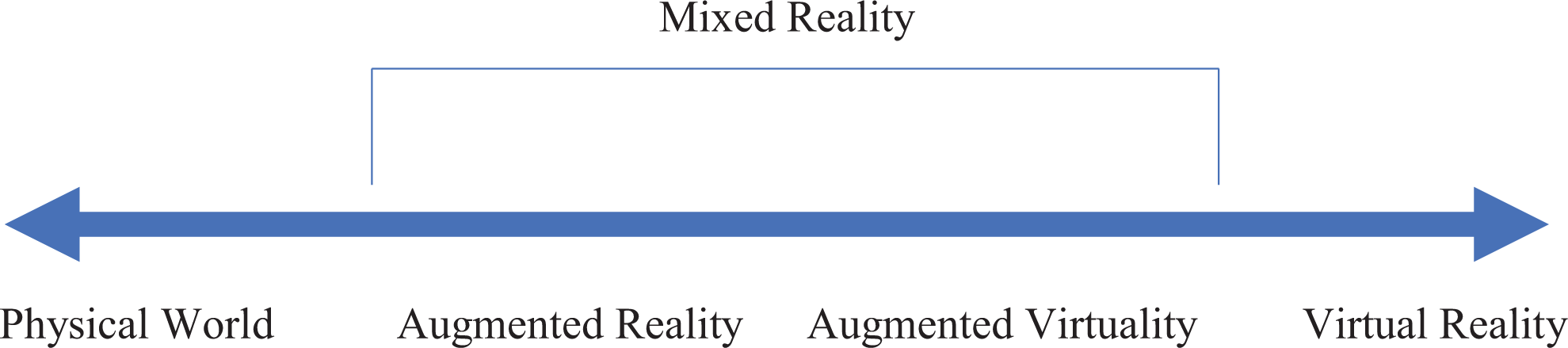
Milgram and Kishino’s (1994) continuum of mixed reality.
AR, on the other hand, utilizes similar characteristics of VR and connects them to the “real” or physical world without many of the technical requirements (e.g., head mounts). Traditionally, AR characteristics are defined in literature as (1) a combination of real and digital content (e.g., text, audio, video, links), (2) a real-time interaction with digital content, and (3) the digital content is integrated fluidly with physical content (Azuma, 1997). Although no definitive consensus on the current definition of AR exists, researchers agree that AR is a way to view digital content embedded in a physical world (Chen, Lee, & Lin, 2016; McMahon, Cihak, & Wright, 2015). Klopfer and Squire (2008) furthered the AR definition to include physical and digital content that is dynamically overlaid. Traditionally, the technology was expensive; however, the constantly improving landscape of technology has made AR technology attainable to school districts. For purpose of this article, AR is practical and the technology represents a continuum, allowing users to create digital layers (3-D models, audio, video, and text) over an image or video of their current environment through the use of a device camera and app. Classrooms today are beginning to implement their own forms of AR (Bacca, Baldiris, Fabregat, & Graf, 2014) ranging from QR codes to interactive 3-D models. While not as robust as the growing definition of AR technology, the interactive aspect of the QR code, where the QR code is the marker to bring video modeling, narration, and hyperlinks to life, does meet the minimum components of what the literature is defining as AR.
AR’s growing popularity can be seen both outside and inside the classroom. Apps are available for download on most devices (e.g., Apple iPad, Android) and allow for a multitude of skill development. For example, the popular Pokémon Go AR app went viral in 2016 with millions of downloads. Participants utilize a mobile device with a global positioning system (GPS) in search of fictional monsters that you can catch in real-world situations (e.g., while walking). Beyond Pokémon, the 2018 winter Olympics had a channel solely broadcasted with the ability to watch in an AR environment. Users with the proper equipment were able to see digital content along with the opening ceremonies. Moreover, the popular furniture store, IKEA, has employed an interactive AR experience, allowing customers to envision how new furniture can and will look in their home. In short, AR is rapidly gaining public appeal, altering the way stakeholders engage with their immediate environment, and with the right tools, it is relatively simple and inexpensive to implement in the classroom.
Implications of AR
The growing appeal and innate features of AR outside the classroom provide teachers with a resource to create opportunities to encounter real-time situations inside the classroom. Many AR apps extend innovative supports for students with disabilities. AR offers districts, teachers, parents, and other stakeholders a cost-efficient, attainable way to harness a growing innovation to support individual student outcomes. It is available for mobile devices in school district 1:1 initiatives, as well as for students with a smartphone, and provides a way to embed features to support a student with an identified disability.
Undoubtedly, the ceiling of what AR can provide seems endless, but it is important to understand what is available as well as what functions it can provide. AR has the ability to bring an interactive experience to an otherwise static environment. AR can mix a bevy of multimedia supports (e.g., video, audio, picture, hyperlinks, and avatars) and provide a platform to blend them with objects and locations in the learning environment. While by definition AR is a visual support that can be interactive, it is important to include all available tools the technology has. This pairing has the ability to “bring to life” objects creating an exciting, interactive, and relevant environment for students with disabilities.
Current literature on AR is limited in education and further limited for students with disabilities. However, research continues to investigate this innovative practice. Recent studies suggest that AR can have an immediate impact for students with disabilities. McMahon, Cihak, and Wright (2015) compared AR navigation to traditional methods of navigation for students with disabilities and found that AR navigation was most successful in aiding students with disabilities. The use of visuals and graphics are a well-known support for students with disabilities, and AR provides the platform to further augment and innovate with visuals such as graphic organizers, picture cards, social narratives, and other picture-based supports.
Additionally, AR can be implemented to support the entire classroom population and is not limited to only students with disabilities (Bacca et al., 2014). Kamarainen et al. (2013) found positive effects of AR on student knowledge of biology by taking students on an AR-supported field trip. Students went to a local pond and collected samples through multiple predetermined locations in an AR environment that provided users with digital prompts and content. Positive gains in biological knowledge and positive engagement were reported at the conclusion of the study. Moreover, McMahon, Cihak, Wright, and Bell (2016) created AR flash cards for teaching students with disabilities science vocabulary words and found students had a significant increase in vocabulary acquisition when using the AR flash cards. The flash cards allowed students to have an interactive, replicable, and easily accessible multimedia support. In short, AR affords teachers the ability to create more independent learners by empowering all students to use the AR supports available in the classroom. By teaming mobile technology with AR, teachers can personalize supports to create more independent and self-determined learners.
Choosing an AR App
Mr. Keating logged on to the App Store and started with a search of “augmented reality.” He found apps that allow Ben and him to create markers on the walls of the classroom that act as supporting media for ongoing lessons. He saw teachers using AR to go on digital field trips to places typically unattainable to students, such as a foreign country and the moon. He also found multiple apps where Ben and him could create their own AR experiences, personalized to Ben’s needs. As he scrolled through the app options, he started to feel overwhelmed. How does an educator take time to sift through all of the possibilities and still keep up with day-to-day activities? Mr. Keating needed help wading through these make-and-take AR apps.
The sheer number of apps available in app stores can make finding a proper and useful AR solution a daunting task. In the growing AR landscape, educators have access to AR apps that enhance the history experience (Google Expeditions), learn basic letters as they walk around their home or school (AR flash cards), create their own AR-based lessons and learning experiences (e.g., CoSpaces Edu, Metaverse, SparkAR), and build upon the existing real world to share creations and enhance context and understanding (Orb). Tools like Apple’s ARKit and Google’s ARCore feature thousands of ways to incorporate AR into the real environment. Unfortunately, not all AR apps are suitable for the classroom with the majority offering limited availability to districts. However, the continuous growth of AR support apps for classroom adoption is improving with the expectation that more will be released in the very near future.
With the current potential of AR as an instructional and learning tool and the growing availability of technology for struggling learners and those with disabilities, AR should be considered. In the following section, we describe an AR app that is currently free and available to educators, used by students, and accessible across varied mobile devices. The intent is to introduce an affordable AR app to empower teachers to understand basic functions and utility associated with AR. The expectation is an understanding of one AR app will translate to similar apps as they enter the market and become available for classroom app. We recognize that technology is constantly changing, and popular apps may become outdated as technology continues to evolve. Table 1, column 3 provides additional apps to implement AR in the classroom.
Enhancing Traditional Education Environments With Augmented Reality (AR).

HP Reveal
HP Reveal is a readily available (i.e., Android and Apple iOS), free, easy-to-use AR app for mobile devices (e.g., iPad, tablet, smartphones). HP Reveal (see https://hpreveal.com), formerly Aurasma, launched in 2011 for iOS and soon added Android compatibility. The app allows users to create personalized AR products. Using image recognition through the camera on their mobile device, users are able to create what the app calls an Aura. An Aura, or marker, is an image or location that the device uses to decide when to display digital content. For example, pointing a device camera over a flash card word that was marked as an Aura/marker can display digital content (e.g., video, audio, image) about the word. Figure 2 offers an example of the word cat; when mixed with HP Reveal, a digital cat can appear with AR. The digital content can add a multimedia approach to learning to support the varied needs of learners. In addition, HP Reveal provides features that include multiple digital overlays (e.g., a digital object portrayed on a real-world image), the ability to add uniform resource locators taking the user directly to a website, and picture/video/audio additions without pre-created files. As an added accessibility feature, HP Reveal allows users to create a marker with a GPS tag. The marker (e.g., image of mascot on a school wall, school calendar, picture of a student’s desk) is tagged. The student scans the marker (e.g., class schedule) with their device and then the digital content (e.g., video, media object) appears on the screen of the device.
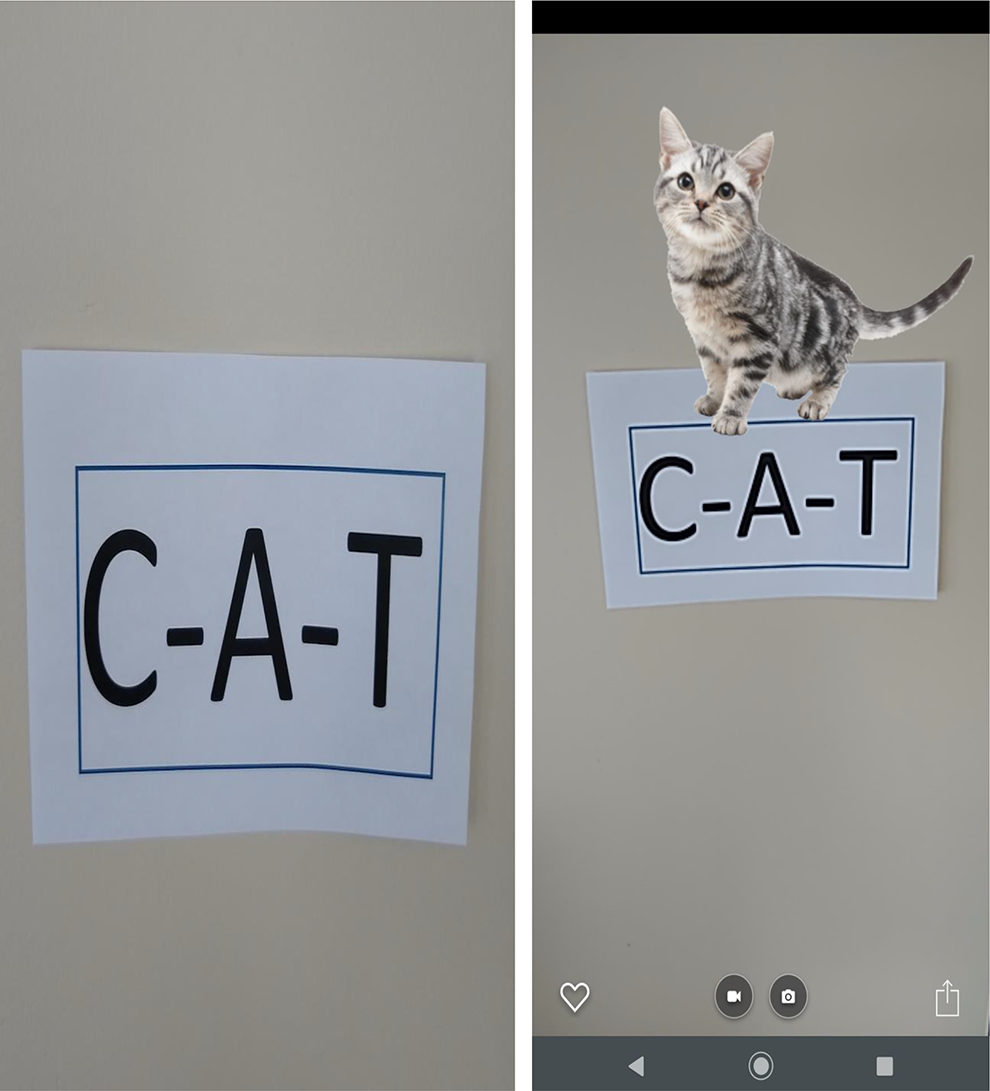
Screenshot of word wall and augmented reality with word wall.
With the HP Reveal app, Mr. Keating can create an interaction between the classroom and the highly sought-after digital space supporting students with disabilities. HP Reveal offers a library of already created content, meaning that making simple AR supports can be as simple as taking a picture and clicking. Additionally, HP Studio and the HP Reveal app allow for personalization, creation, and the ability to incorporate multiple mediums of support. Given the need for a simple app that works and allows for personal creation, Mr. Keating chose HP Reveal. HP Reveal provides him with the ability to create content without relying on the use of pre-created content or difficult model building. Taking into account Mr. Keating’s busy schedule, HP Reveal allows him to create content at home and transfer the creations to the student devices when returning to the classroom. Mr. Keating discovered several practical uses of AR to support Ben’s needs including transitioning between classes, instructions, assessment, and note-taking.
Using AR in the Classroom
Mr. Keating worked to identify strategic markers (identifiers) so that when a student scanned their iPad (with HP Reveal open) over the marker, a video could play (i.e., video clip modeling how to open a locker, walking down the hall, turning), an audio file could sound, or a supportive digital image (e.g., an arrow) would appear. Quickly, students figured out each marker had a fun media object and, after a day of orientation, students were quickly moving through the hallways to find out what each marker offered. Within a week, some of Mr. Keating’s students were able to navigate the markers independently and even began to skip some as they moved to others that offered more engaging markers (e.g., video vs. images).
Navigation
Mr. Keating was able to use AR to help students navigate the school building with interactive support. Students with autism spectrum disorder as well as other disabilities frequently display deficits in navigation skills, which can be further complicated when we consider nearly 25% of one’s school day requires transitioning across one’s instructional environment (Corbett, Constantine, Hendren, Rocke, & Ozonoff, 2009). These students need supports navigating the school to reduce time in transit in order to increase the instructional time. To create this support, markers in the school must be identified. These markers need to be large enough for the camera to recognize at a distance and also need to be “permanent” fixtures in the school (e.g., mural, sign, teacher placard). The teacher can then add multimedia components that are personalized to provide navigation support, motivation, and engagement for entire classes or individual students. For additional support, GPS information can be used instead of the camera. When a student approaches a GPS coordinate, the AR feature will be activated, removing the need for the camera or the need of the student to be holding the device in a certain manner. For example, as a student approaches a right turn, the app will recognize where the student is in the school and provide auditory (i.e., “turn right in 15 feet”) and visual (i.e., moving arrows, hallway video) directions. Excitement and engagement were evident in Mr. Keating’s class as students relied less on paraprofessionals and more on themselves. All students began to decrease their time spent in the hallway between classes. Mr. Keating was thrilled as paraprofessionals were prompting and correcting less. After more research online, he decided that his students could benefit from more interactive AR options in his classroom. Utilizing his limited space, Mr. Keating turned his static walls into interactive word walls and ways to instruct and assess in an interactive independent manner.
Interactive Word Walls
Classrooms walls are used for a wealth of information. Word walls are a common sight in classrooms where vocabulary is being acquired. Vocabulary is essential for communication and knowledge acquisition. However, students with disabilities often need additional support to acquire, practice, and retain vocabulary (Kuder, 2017). Word walls are a display and visual of words usually placed around classroom walls. There is growing evidence that interactive word walls are providing further support for academic success (Jackson, Wise, Zurbuchen, & Gardner, 2017). AR provides an ability to create, augment, and enhance interactive word walls beyond the physical space. Teachers can design the words on the walls to act as markers. When paired with HP Reveal or a similar app, the possibilities for support are endless. Teachers can have video, audio, picture, websites, avatars, and any other support displayed on their device. For example, the word cat can be scanned with a student’s device. When recognized, the device could provide a picture of a cat, a narration of the word cat, and a video of a cat walking, offering students a complete multimedia presentation to support their learning (see Figure 2). These interactive word walls would be available to all students and would not add additional materials to the limited space available to teachers.
Interactive Posters
Extending the use of classroom walls, school hallways, and any wall space is a further consideration for AR. Building upon the desire to engage students within their learning environment, teachers and students can design interactive learning, presentation, and even assessment opportunities with AR. For instance, take any photo, poster, figure, artwork, or similar image that one could attach to a wall (e.g., bulletin board). Using the same technology as with the word walls described earlier, AR allows the image to come “to life.” When paired with HP Reveal or a similar AR app, the classroom wall object can be further complimented through an audio narration describing the visual content, a video that illustrates the 2-D image, or an avatar that jumps from the image further interacting with the student offering instruction, context, and clarity to a complex concept. Furthermore, teachers can design wall images to assess the student. When they pass their device over an image, for example, audio- or text-based directions can ask a question and direct the user to select one of the images available on the wall. If the student selects the correct image with their device, additional audio, video, or similar resources appear to reinforce why that was the correct answer. If an incorrect choice is made, similar AR supports appear to review the selection with additional review and/or prompts to facilitate choosing the correct option. Mr. Keating’s students were certainly getting the hang of using AR in his room. They loved how their learning had spread throughout the halls and on the walls. By bringing typically unused space to life, his students were more informed and engaged throughout their day. He decided to try one more use of AR by empowering his students through interactive notes.
Interactive Notes
Note-taking is a daunting and challenging task for many students with or without disabilities. However, note-taking is an essential component to academic success in schools (Boyle & Joyce, 2019). AR can provide a support for teachers and students. For teachers, classroom notes can be enhanced with digital content. For example, a recording of the lesson can play when a marker is activated, allowing students to constantly replicate what was taught. Moreover, abstract concepts can be displayed visually to support knowledge acquisition of topics that may not have been traditionally accessible such as science content (e.g., centripetal and centrifugal force). For students, note-taking is necessary for success in secondary and postsecondary settings. Handwriting or typing notes for students with disabilities may not be an option. These students can use AR to create markers to link information and digital content on the presented topic. For instance, a quadratic equation could be linked to a video of the student or teacher solving an equation. Students would then have access to the skill and a support that is direct, explicit, and replicable without the need for the traditional mathematics note-taking.
Implications
The natural evolution of innovation continues to present educational stakeholders, such as Mr. Keating, with options to support students. AR and other apps offer ways to facilitate efficiency, potentially impact effectiveness, and address overall learning needs previously unattainable with a traditional classroom. AR is available in a variety of formats, on a variety of platforms, and continues to gain commercial appeal. The AR examples in this article only depict a glimpse of the possibilities to educators and students. Table 1 provides additional examples beyond Mr. Keating’s choices for teachers to augment their classroom environment.
Conclusion
A tremendous growth of affordable technology in education continues to prompt more districts to adopt 1:1 initiatives. AR’s mix of the physical and digital worlds, along with student’s familiarity with mobile devices, offers tremendous potential for supporting all students. Today’s student may find more comfort with mobile devices and may find daily school activities more interactive and engaging with the assistance of AR. The Apple Store, Google Play Store, and Microsoft Store offer a plethora of AR-derived apps for free educational use. This article seeks to aide in the selection of AR uses and offers an in-depth look at the possibilities HP Reveal can have on enhancing traditional methods of student support. It is important that teachers learn how to use the technology and understand the ways in which apps such as AR can engage, motivate, and enhance learning for their students with disabilities as well as all students. As technology continues to evolve, so too will the impact of AR apps and other innovations in the classroom.
Footnotes
Declaration of Conflicting Interests
The author(s) declared no potential conflicts of interest with respect to the research, authorship, and/or publication of this article.
Funding
The author(s) received no financial support for the research, authorship, and/or publication of this article.
