







Abstract
Robots that succeed in factories may struggle to complete even the simplest daily task that humans take for granted, because the change of environment makes the task exceedingly difficult. Aiming to teach robots to perform daily interactive manipulation in a changing environment using human demonstrations, we collected our own data of interactive manipulation. The dataset focuses on the position, orientation, force, and torque of objects manipulated in daily tasks. The dataset includes 1,603 trials of 32 types of daily motions and 1,596 trials of pouring alone, as well as helper code. We present our dataset to facilitate the research on task-oriented interactive manipulation.
1. Introduction
Robots excel in manufacturing environments that require repetitive motion with little fluctuation between trials. In contrast, humans rarely complete any daily task by repeating exactly what was done last time, because the environment might have changed. We aim to teach robots daily manipulation tasks using human demonstrations so that they are able to fulfill them in a changing environment. To learn how humans finish a task by manipulating an object and interacting with the environment, we need three-dimensional (3D) motion data of the objects involved in fine manipulation motions, and data that represent the interaction.
Most of the currently available motion data are in the form of vision data, i.e., RGB videos and depth sequences (for example, Das et al., 2013; Fathi et al., 2012, 2011; Kuehne et al., 2014; Rogez et al., 2014; Rohrbach et al., 2012; Shimada et al., 2013), which are of little or no direct use for our purpose. Nevertheless, certain datasets exist that do include motion data. The Slice & Dice dataset (Pham and Olivier, 2009) includes three-axis acceleration of cooking utensils that are used while salads and sandwiches are prepared. The 50 Salad dataset (Stein and McKenna, 2013) includes three-axis acceleration of more cooking utensils than the Slice & Dice dataset, which are involved in salad preparation. The Carnegie Mellon University multimodal activity (CMU-MMAC) dataset (de la Torre et al., 2009) includes motion capture and six-degree-of-freedom (6-DoF) inertial measurement unit (IMU) data of human subjects making dishes. The IMUs record acceleration in (
The aforementioned datasets are less than ideal in that: (1) calculating the position trajectory using the acceleration may be inaccurate owing to accumulated error; (2) the motions of objects are not always emphasized or even available; and (3) all the activities are not fine manipulations that serve to finish tasks. Having identified those deficiencies, we collected a dataset ourselves that includes 3D position and orientation (PO), force and torque (FT) data of tools/objects being manipulated to fulfill certain tasks. The dataset is potentially suitable for learning either motion (Huang and Sun, 2015) or force (Lin et al., 2012) from demonstration, recognizing geometric constraints (Subramani et al., 2018), motion classification (Aronson et al., 2017) and understanding (Aksoy et al., 2011; Flanagan et al., 2006; Paulius et al., 2018; Soechting and Flanders, 2008), and is potentially beneficial to grasp research (Lin and Sun, 2015a,b, 2016; Sun et al., 2016).
2. Overview
We present a dataset of daily interactive manipulation that can be accessed at http://rpal.cse.usf.edu/datasets_manipulation.html. Specifically, we record daily performed fine motion in which an object is manipulated to interact with another object. We refer to the person who executes the motion as the subject, the manipulated object as the tool, and the object interacted with as the object. We focus on recording the motion of the tool. In some cases, we also record the motion of the object.
The dataset consists of two parts. The first part contains 1,603 trials that cover 32 types of motions. We choose fine motions that people commonly perform in daily life that involve interaction with a variety of objects. We reviewed existing motion-related datasets (Bianchi et al., 2016; Huang et al., 2016; Huang and Sun, 2016) to help us decide which motions to collect.
The second part contains the pouring motion alone. We collect it to help with motion generalization to different environments. We chose pouring because: (1) pouring is found to be the second most frequently executed motion in cooking, right after pick-and-place (Paulius et al., 2016); and (2) we can vary the environment setup of the pouring motion easily by switching different materials, cups, and containers. The pouring data contain 1,596 trials of pouring 3 materials from 6 cups into 10 containers.
We collect the two parts of the data using the same system. We specifically describe the pouring data in Section 10.
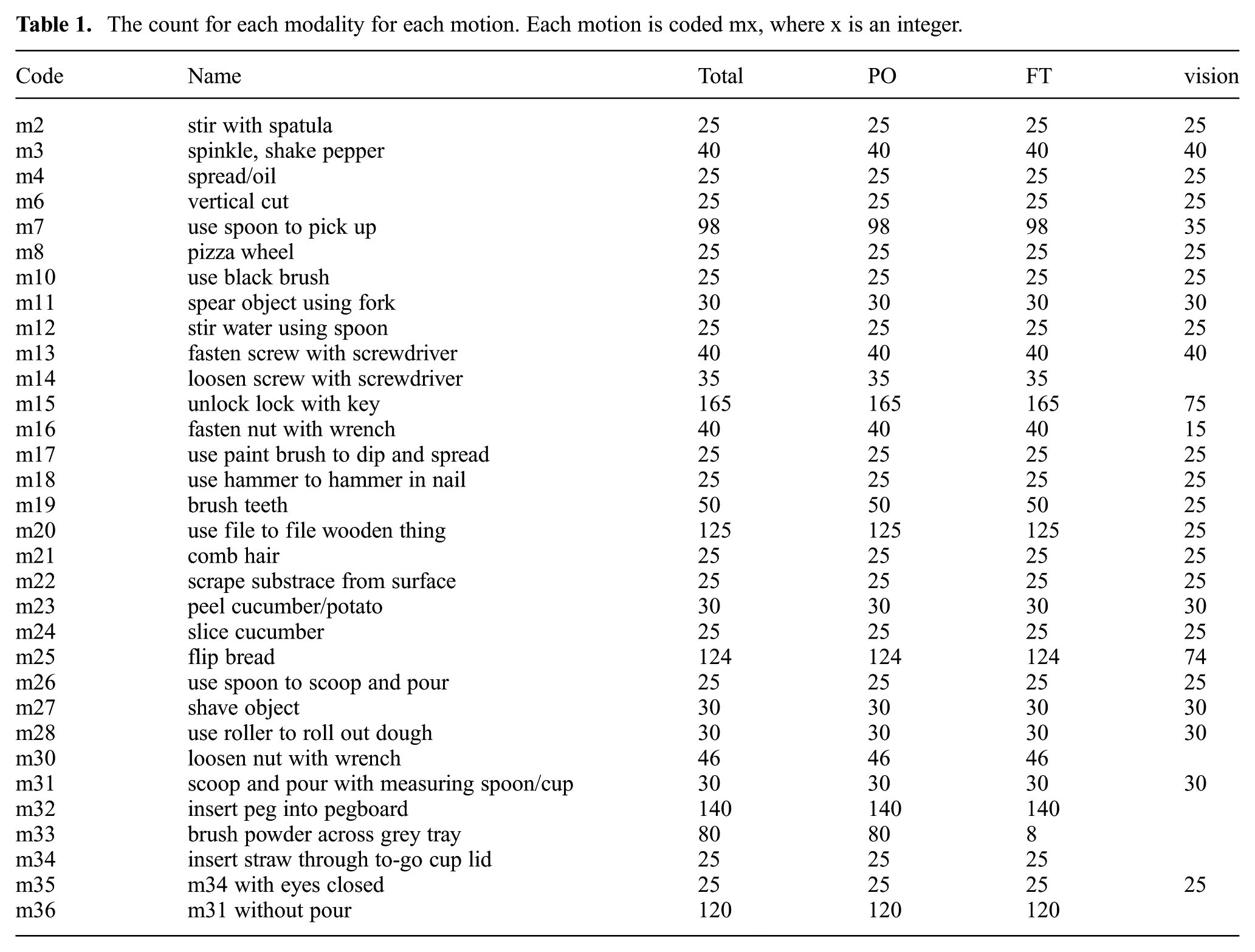
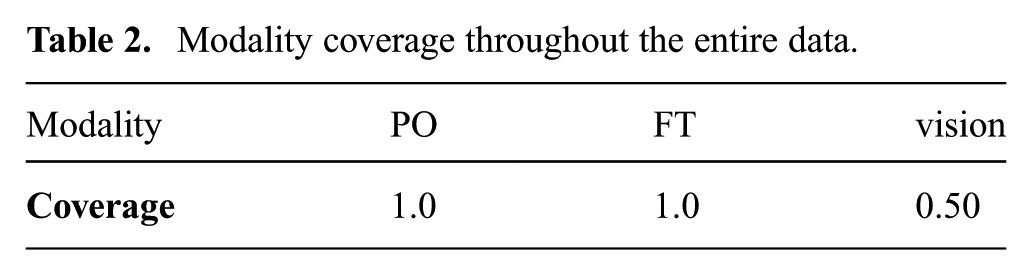
The dataset aims to provide PO and FT, but also provides RGB and depth vision data with a smaller coverage. Table 1 shows the number of trials and the counts of each modality for each motion. The minimum number of trials for each motion is 25. Table 2 shows the coverage of each modality throughout the entire data, where the coverage has a range of
The count for each modality for each motion. Each motion is coded mx, where x is an integer.
Modality coverage throughout the entire data.
3. Hardware
On a desk surface, we use blue masking tape to enclose a rectangular area that we refer to as the working area, and within which we perform all the motions. We aim a PrimeSense RGB+depth camera at the working area from above.
We started collecting PO data using the OptiTrack motion capture (mocap) system and soon afterwards replaced OptiTrack with the Patriot mocap system. Both systems provide 3D PO data regardless of their difference in technology. Patriot includes a source and a sensor. The source provides the reference frame, with respect to which the PO of the sensor is calculated. We use an ATI Mini40 FT sensor together with the Patriot PO sensor. To attach both the FT sensor and the PO sensor to a tool, we used a cascading structure that can be represented as: (tooltip + adapter + FT sensor + universal handle + PO sensor), where “+" means “connect.” The end result is shown in Figure 1. A tool generally consists of a tooltip and a handle. We disconnected the tooltip from the stock handle, inserted the tooltip into a 3D-printed adapter, and glued them together. Then we connected the adapter to the tooling side of the FT sensor using screws. We 3D-printed a universal handle and connected it to the mounting side of the FT sensor using screws. At the end of the universal handle we mounted the PO sensor using screws. In some cases, we tracked the object in addition to the tool, and to do that we put a second PO sensor on the object, as shown in Figure 2.
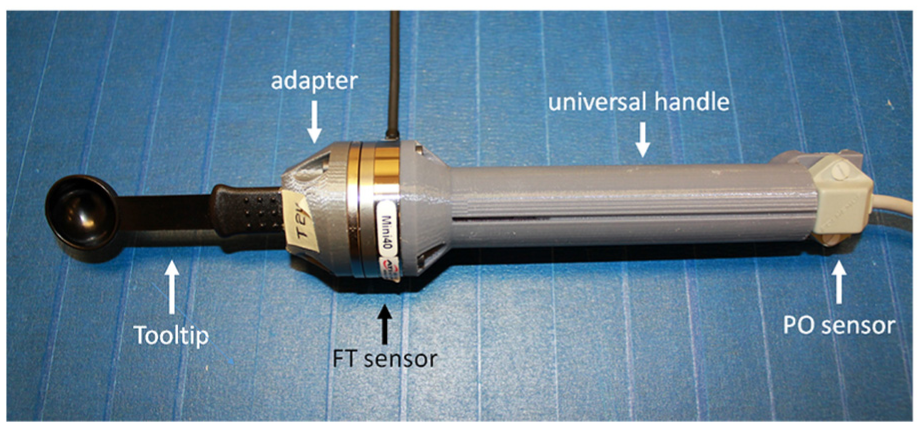
The structure that connects the tool, the FT sensor, and the PO sensor.
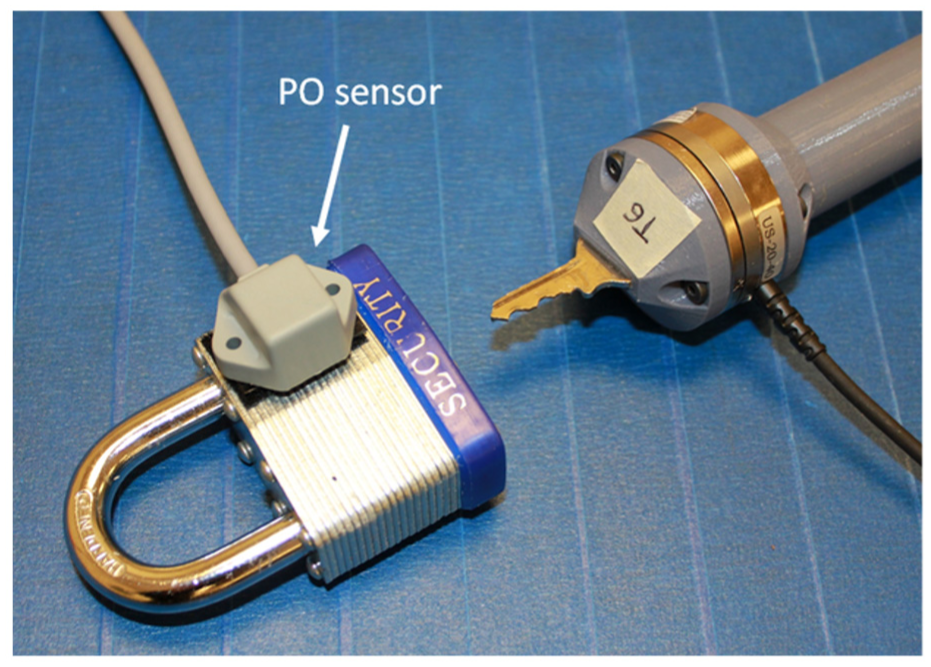
Tracking both the tool and the object with two PO sensors.
Each tooltip is provided with a separate adapter. As the tooltip and the adapter are glued together, a tool is equivalent to “tooltip + adapter.”Figure 3 shows the tools that we have adapted.
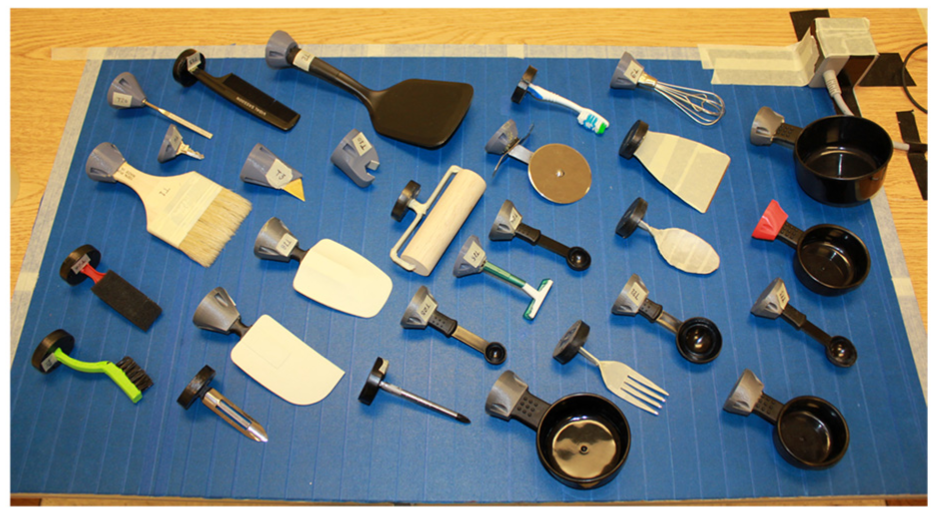
Examples of the tools that we have adapted
4. Coordinate frames
To track a tool using OptiTrack, we need to define the ground plane and define the tool as a trackable. The ground plane is set by aligning a right-angle set tool to the bottom left corner of the working area The trackable is defined from a set of selected markers, and is assigned the same coordinate frame, with the origin being the centroid of the markers. This is shown in Figure 5.
Patriot contains a source that supports up to two sensors. The source provides the reference frame for the sensors as shown in Figure 6. We define the base point of the tool to be the center of the tooling side of the FT sensor, as shown in Figure 4. The translation from the PO sensor to the base point of the tool is
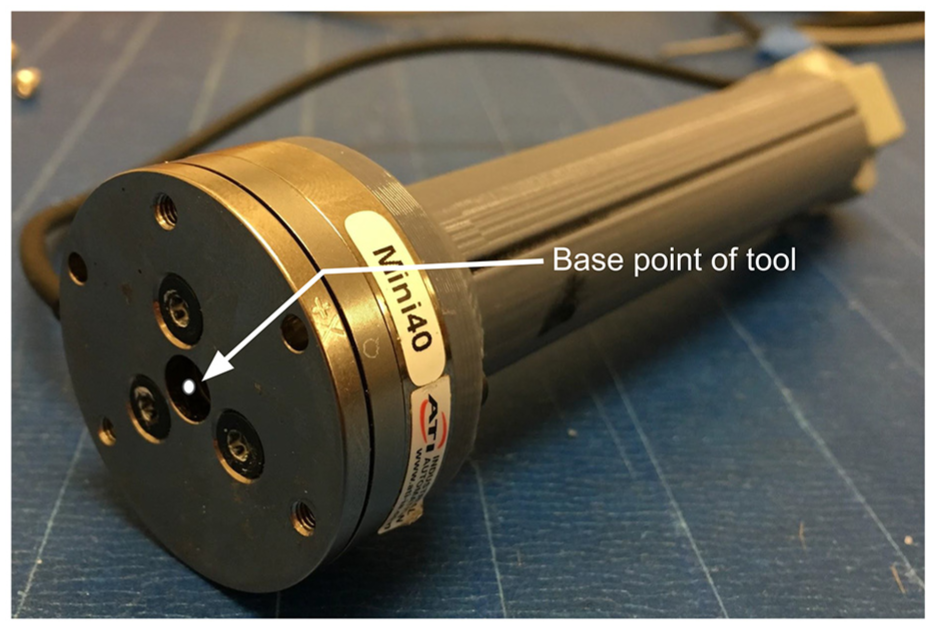
The base point of the tool is the center of the tooling side of the FT sensor.
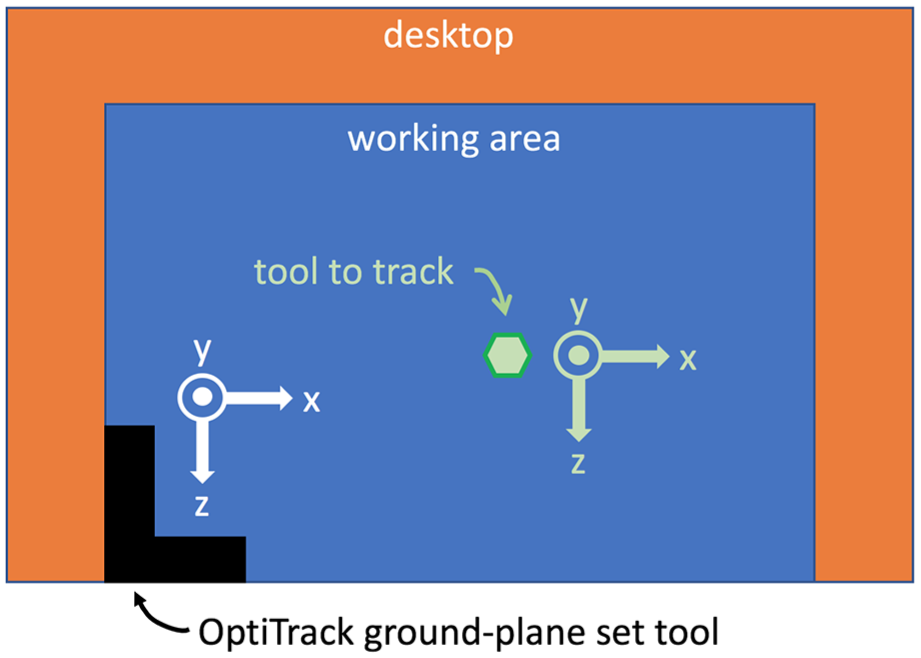
Top view of setting the coordinate frame of the ground plane and the trackable using OptiTrack.
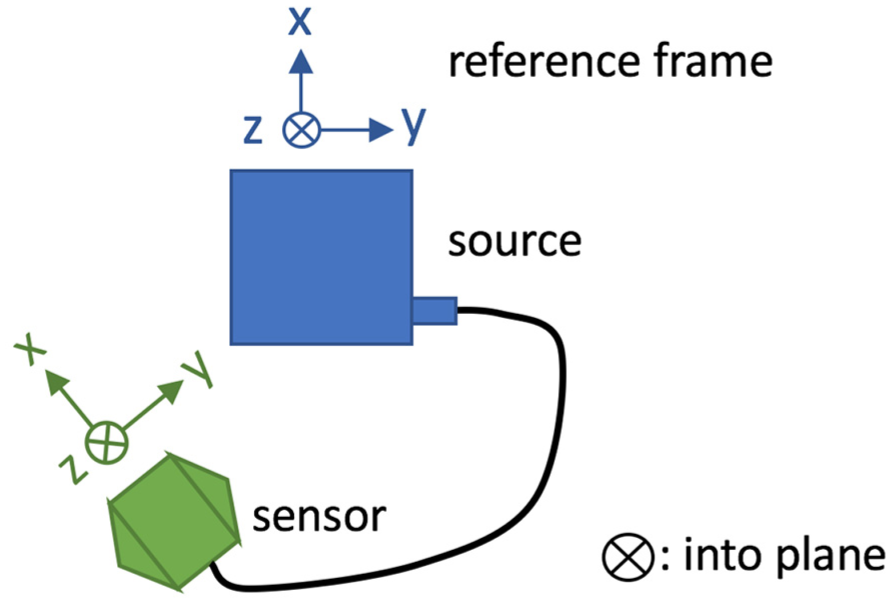
Illustration of the Patriot source and sensor when they are placed on the same plane, and the corresponding coordinate frames. Here ⊗ means into the paper plane.
The FT sensor and the PO sensor are connected through the universal handle. The groove on the universal handle is orthogonal to both the
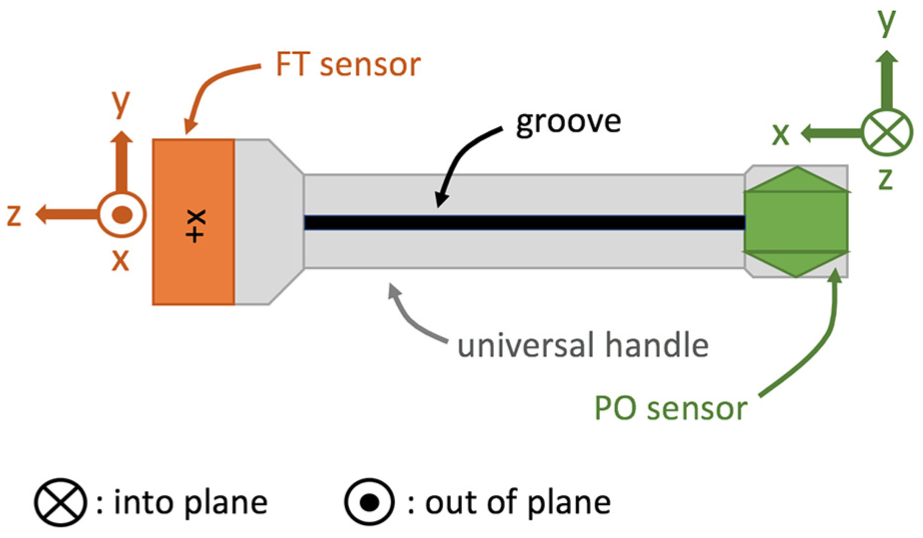
Top view of the FT sensor with its local frame, the universal handle, and the PO sensor with its local frame. Here ⊗ means into the paper plane and ⨀ means out of the paper plane.
5. Calibrate FT
The FT sensor has non-zero readings when it is static with the tool installed on it. We calibrate the FT sensor, or make the readings zero, before we collect any data. We hold the handle in a level pose (Definition 1), and take an average sample (Definition 2) which we set as the bias
6. Modality synchronization
Different modalities run at different frequencies and therefore need synchronization, which we achieve by using time stamps. We use Microsoft QueryPerformanceCounter (QPC) to query time stamps with millisecond precision.
When we start the collection system, we query the time stamp and set it as the global start time

7. Data format
The data are organized in a “motion → subject → trial → data files” hierarchy, as shown in Figure 8, where the prefixes for motion, subject, and trial directories are m, s, and t, respectively.
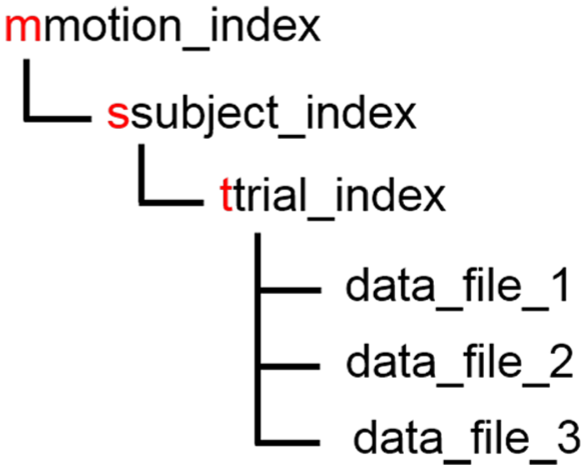
The structure of the dataset where the red text is verbatim.
RGB videos save as . avi, depth images save as . png, and the rest of the data files save as . csv. Both RGB and depth have a resolution of
The csv files excluding those of OptiTrack follow the same structure as shown in Figure 9. The first row contains the global start time and is the same in all the csv files that belong to the same trial. Starting with the second row, each row is a data sample, of which the first column is the time stamp (Equation (1)), and the rest of the columns are the data specific to a certain modality. The OptiTrack csv file differs in that it contains a single-column row between the start-time row and the data rows, which contains the number of defined trackables (1 or 2). In the following, we explain the data part of a row for each different csv file.
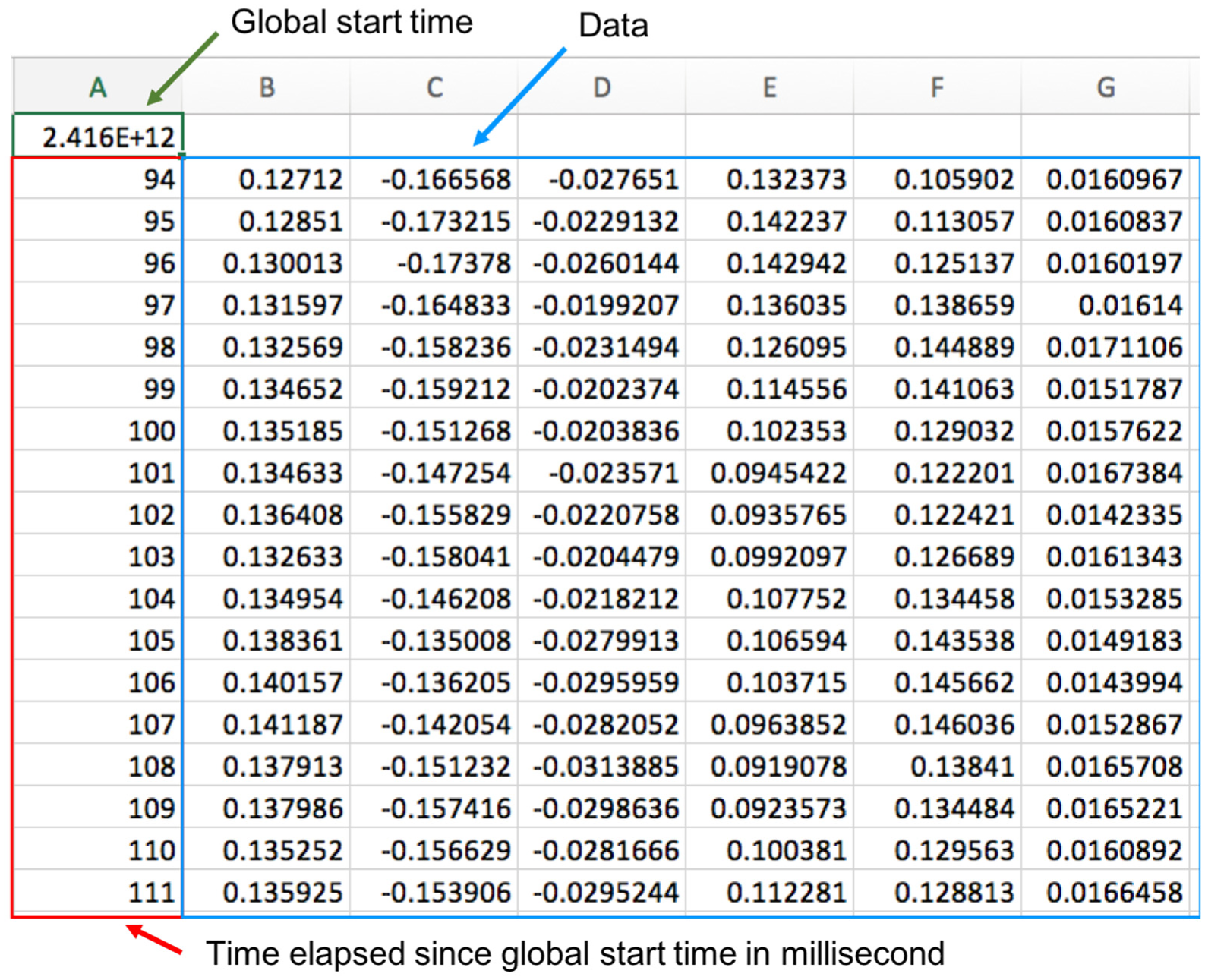
The structure of a non-OptiTrack csv data file.
FT sensor outputs six columns (
For the RGB videos and depth image sequences, we provide the time stamp for each frame in a csv file. The data part has one column, which is the frame index.
The PO data contain the tool, and may also contain the object. With two PO capture systems, and with or without the object, four different formats exist for the PO data, which are listed in Figure 10. Patriot expresses the orientation using yaw–pitch–roll (w–p–r) as depicted in Figure 11, and OptiTrack uses unit quaternion
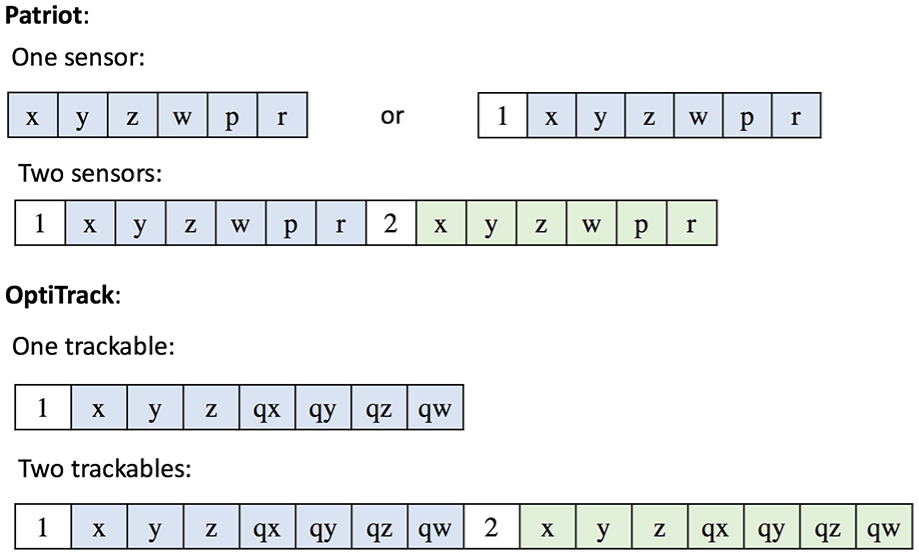
Formats of the columns for PO for one and two sensors.
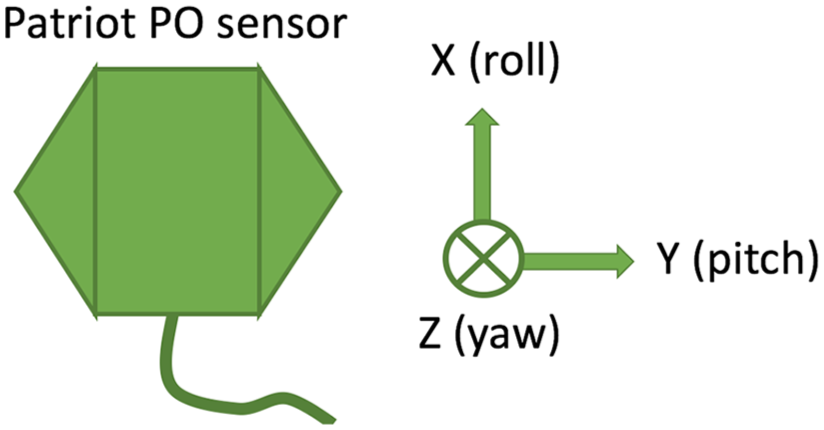
The relationship between the axes and yaw–pitch–roll for the Patriot sensor.
Patriot samples at 60 Hz, its x–y–z has unit centimeter and its yaw-pitch-roll has unit degree. OptiTrack samples at 100 Hz, and its
8. Using the data
We provide MATLAB code that visualizes the PO data for OptiTrack as well as Patriot, as shown in Figure 12. The visualizer displays the trail of the base point of the tool (Figure 4) and the object if applicable as the motion is played as an animation in three dimensions. The user can also manually slide through the motion forward or backward and go to a particular frame.
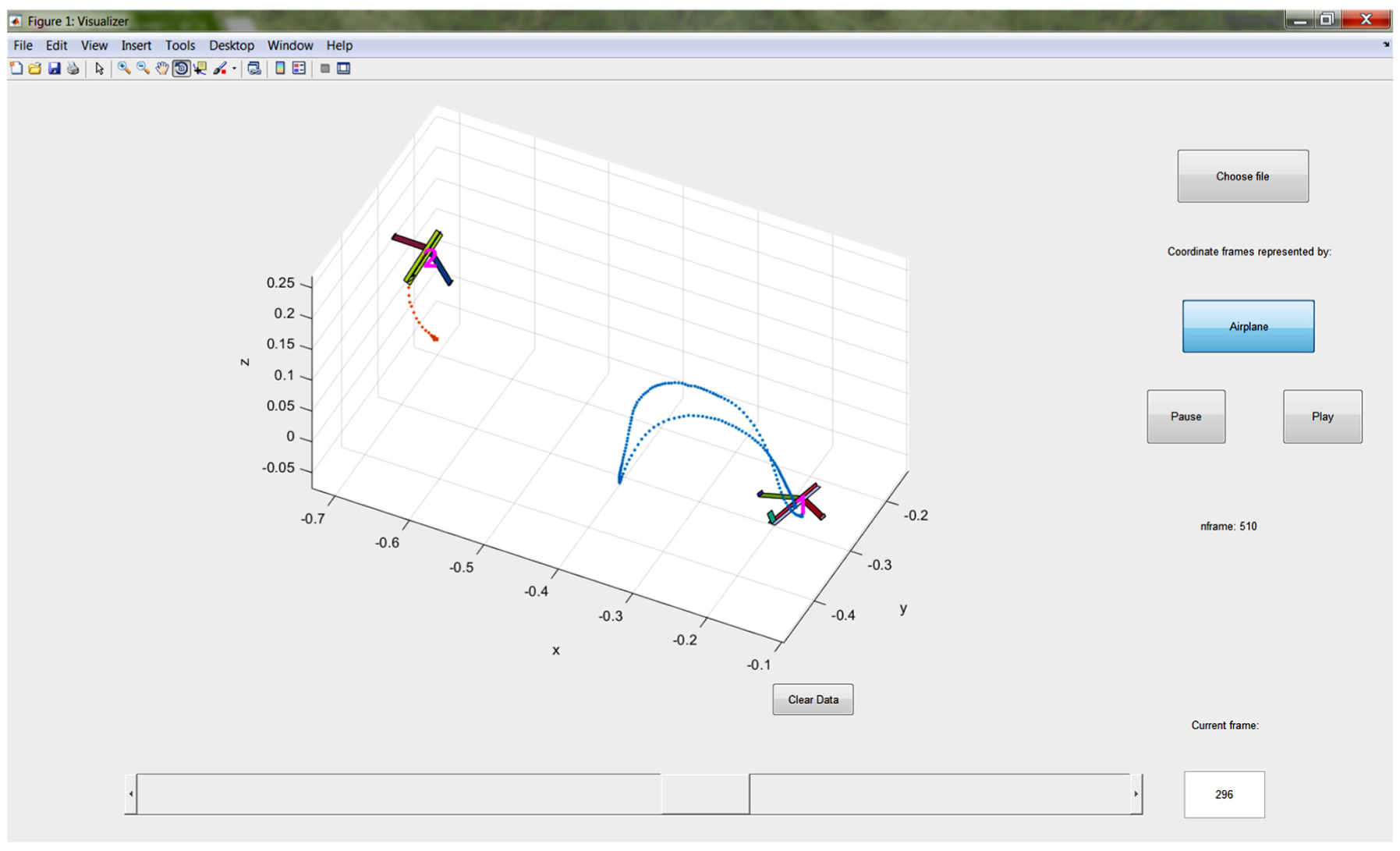
Visualizing the PO data.
The FT and PO csv files have multiple formats, and we provide Python code that extracts FT and PO data from each trial given the path of the root folder. Although we have explained the format of the csv files of the FT and PO data in Section 7, we highly recommend using our code to obtain the FT and PO data to avoid error.
Each modality is sampled at a unique frequency, and using multiple modalities requires using the time stamps. One or more modalities need upsampling or downsampling.
9. Known issue
The PO data recorded using OptiTrack contain occasional flickering and stagnant frames. This is caused by the dependency of OptiTrack on the line of sight. This issue is not present in the data collected with Patriot.
10. The pouring data
We wanted to learn to perform a type of motion from its PO and FT data, and generalize it, i.e., execute it in a different environment. Thus, we need data that show how the motion varies in multiple different environments. We realize that because pouring is the second most frequently executed motion in cooking (Paulius et al., 2016), it is worth learning. In addition, collecting pouring data that contain different environmental setup is easy thanks to the convenience of switching material, cups, and containers. Therefore, we collected the pouring data.
The pouring data include FT, Patriot PO, and RGB videos (no depth). We collected the data using the same system as described above. In the following, we explain what has not been covered and what differs from above.
The physical entities involved in a pouring motion include the material to be poured, the container from which the material is poured, which we refer to as the cup, and the container to which the material is poured which we refer to as the container. The pouring data contain 1,596 trials of pouring water, ice, and beans from 6 different cups to 10 different containers. Cups are considered as tools and are installed on the FT sensor through 3D-printed adapters.
A second PO sensor is taped on the outer surface of the container just below the mouth.
We collected the FT data differently from above. When the cup was empty, we held the handle in a level pose (Definition 1), and took an average sample (Definition 2) that we call “FT_empty.” Then we filled the cup with the material to a desired amount, held the handle in a level pose, and took an average sample that we call “FT_init.” Then we poured, during which we took a number of samples (not average samples) that we call “FT.” After we finished pouring, we held the handle in a level pose, and took an average sample that we call “FT_final.” In summary, we saved four kinds of FT data files: three contain an average sample each, FT_empty, the FT_init, FT_final, and one contains regular samples, FT. We do not consider bias.
The organization of the data is shown in Figure 13.
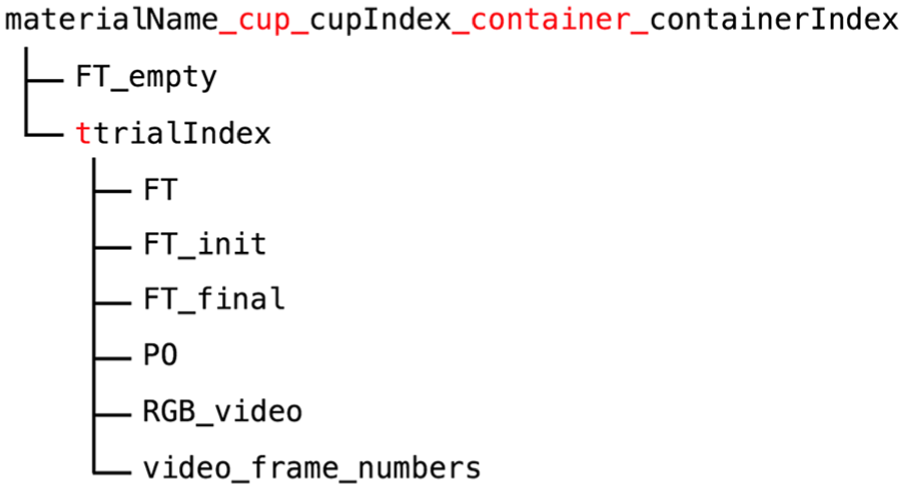
The organization of the pouring data where the red text is verbatim.
The pouring data can be used to learn how to pour in response to the sensed force of the cup. The force is a nonlinear function of the physical properties of the cup and the material, the speed of pouring, the current pouring angle, the amount of material remaining in the cup, as well as other possibly related physical quantities. Huang and Sun (2017) presented an example of modeling such a function using a recurrent neural network and generalizing the pouring skills to unseen cups and containers.
11. Conclusion and future work
We have presented a dataset of daily interactive manipulation. The dataset includes 32 types of motions, and provides PO and FT for every motion trial. In addition, to support motion generalization to different environments, we chose the pouring motion and collected corresponding data. We plan to extend the collection to other types of motions in the future.
Footnotes
Funding
The author(s) disclosed receipt of the following financial support for the research, authorship, and/or publication of this article: This material is based upon work supported by the National Science Foundation (grant numbers 1421418 and 1560761).