







Abstract
This article introduces the British Library’s Flashback project, which is exploring the practical challenges of preserving digital content currently stored on physical media (magnetic and optical disks). It reports on a Flashback proof of concept that conducted experiments on a sample of content from hybrid collection items dating from between 1980 and 2000. It describes some of the activities undertaken by the proof-of-concept stage of the project from July 2015 to February 2016, including the initial collection profiling and sampling of content, the extraction of content from the disks, and the project team’s experiments with identifying and applying preservation approaches to the content, which included both emulation and migration. It concludes with some general observations on the approaches taken by the proof of concept and shares some recent findings from the second phase of the project, which is concerned with the practical challenges of developing an implementation strategy for the Library’s capture and preservation of digital content currently stored on physical media.
Keywords
Introduction
The British Library is the custodian of ever-increasing amounts of digital content, both born digital and digitized. As a national library, it is the Library’s responsibility to preserve this content and make it available for current and future users. The preservation of digital content, however, is not always straightforward and digital content typically requires interventions throughout its lifecycle, typically often far earlier and far more frequently than would be typical with physical collections.
One of the significant challenges that the British Library faces is the preservation of digital content acquired and stored on handheld media, typically floppy disks, compact discs (CDs) or digital versatile discs (DVDs). While some digital content continues to arrive on media, this is to a large extent a legacy issue, related to collection items received by the Library in the years before the establishment of its current digital preservation infrastructures and the digital preservation team.
Context
The British Library is the national library of the United Kingdom. As well as being a legal deposit library, the British Library is one of the largest research libraries in the world, with significant collections of printed works (e.g. books, journals, and newspapers), manuscripts, maps, sound recordings, postage stamps, and much else. Its digital collections are similarly diverse, including digitized versions of existing Library content (e.g. printed books, manuscripts, and sound recordings) as well as an increasing amount of ‘born-digital’ content, something which has been amplified by the extension of legal deposit in the United Kingdom to non-printed works in 2013. In response to these changes in legal deposit, the Library has developed workflows for acquiring electronic journals and books from publishers, as well as the capability to make periodic harvests of the UK web domain. At a smaller scale, the Library also collects digital and hybrid content in the form of personal papers and archives, and has previously successfully applied digital forensics approaches to these (John, 2008).
The British Library’s current vision, published in 2015 as Living Knowledge, reaffirms the importance of ‘custodianship’ to the Library, noting that it is its ‘first and core purpose, the one on which all the others depend’ (British Library, 2015). One of the custodianship priorities identified in Living Knowledge was the need to address the long-term preservation of born-digital content received through legal deposit. The extension of legal deposit to non-print content, including the periodic capture of the entire UK web domain, was described in the vision as ‘the heart of our single greatest endeavour in digital custodianship’.
The British Library’s digital preservation team has been working on approaches to preserve the digital elements of the Library’s collections since around 2005. Over the past few years, the team has spent time developing a deeper understanding of the Library’s digital collections through collection profiling (Day et al., 2014a, 2014b) and by producing assessments of the main file format types in use (Pennock et al., 2014). As this work evolves into a more comprehensive approach to preservation planning across the Library’s digital collections, the team has also begun to turn its attention to some of the digital content received prior to 2005. Much of this content was received in handheld form and is still stored on the media on which it was originally acquired, typically floppy disks or optical media (e.g. compact discs or digital versatile discs). Some of these digital collections date back to at least the 1980s. This ‘legacy’ content, still stored on its original media, provides an excellent corpus for the testing of preservation strategies, as much of the content is reliant on technology that is, in many cases, already ‘institutionally obsolete’ and therefore inaccessible on a modern standard desktop deployment.
A further complication is the increasing risk of both bitstream and physical disk degradation over time, impacting our ability to access or reliably render the files stored on legacy disks. It is notoriously difficult to calculate disk lifespans with any certainty due to huge variations in original disk quality and storage/usage conditions, though some guidance is available. The Optical Storage Technology Association (2003) has previously estimated the unrecorded shelf life of a compact disc-recordable (CD-R) or compact disc-rewriteable (CD-RW) disc between 5 and 10 years. Accurate data on the longevity of floppy disks is difficult to find, but estimates on the lifespan of magnetic tape (in the same broad family of storage media as floppy disks) range from 1 to 30 years (Van Bogart, 1995). With these rough timeframes in mind, the age of the legacy content stored at the Library increases the urgency of developing a solution.
Flashback proof of concept
In order to better understand the challenges and solution options for preservation of digital content stored on handheld media, the British Library’s digital preservation team conducted a proof-of-concept project in 2015–2016, in particular to gather empirical data that could inform decision-making regarding preservation actions for legacy born-digital acquisitions. Initially scoped as a single proof-of-concept project to run over 6 months, Flashback had three main objectives: To devise a bit-level preservation process for legacy handheld content stored on disks; To test migration and emulation workflows designed to deliver authentic representations of content into the Library’s reading rooms; To make recommendations on turning the proof-of-concept workflows into business-as-usual processes, including costs.
For the proof-of-concept phase, the scope of the project was largely (but not exclusively) limited to disk-based collections that had been acquired as part of hybrid acquisitions, that is, those received as an insert or attachment to a physical item such as a book or magazine. The focus for the proof of concept was primarily on published content, which meant that the project team could ignore (for the time being) disk-based content that formed part of personal digital archives collections as well as those situations where disks were primarily used as a means of transferring content to the Library. Audio collections were also considered to be out of scope as the capture of this kind of content was already being addressed by a major British Library programme known as Save our Sounds.
The collections eventually chosen for the proof of concept included CDs and DVDs, as well as 3.5-inch and 5.25-inch floppy disks. Older media (e.g. digital audio tape, compact cassette tape) as well as more recent storage types (e.g. universal serial bus (USB) sticks), while present in the Library’s collections, were deemed to be out of scope due to the short timeframe of the project.
The project board included not only digital preservation staff but also representatives from the Library’s information technology and curatorial sections. Three work packages defined the main work carried out by the Flashback proof of concept: collection profiling, content extraction, and content preservation.
Collection profiling and content sampling
Collection profiling is an established process used within the British Library to describe specific types of digital collections (e.g. e-journals, web archives, geospatial data) and to define the Library’s preservation intent for the material in that collection (Day et al., 2014a; Day et al., 2014b). This process built on work to describe digital collections and preservation intent that had previously taken place at the National Library of Australia (Webb et al., 2013). At the British Library, earlier profiling work had not previously been applied to legacy born-digital content from (mostly) hybrid acquisitions, so the first stage of the project was the development of a collection profile. This helped initiate discussions with curators about preservation intent and subsequently informed the selection of a suitable sample for testing.
Testing for the proof of concept was based on two main collections: (1) hybrid and disk-based content acquired for document supply between the 1980s and early 2000s and (2) disk-based content received under legal deposit in the 1980s and 1990s. The first challenge was to obtain a representative sample of the content that could be used as a basis for the proof of concept. The sampling approach used was a relatively crude attempt to apply some logic to selection. The aim was to ensure that the proof of concept was able to test a broad range of different technical, content, and storage types, as represented in the chosen collection as a whole.
Having consulted with curators on the collection profile to identify parts of the collection with the potential for consideration in the project, a ‘long list’ of around 200 items was developed through physical analysis of material stored upon the shelves used to store legacy hybrid material and disk collections (which were primarily CDs). This attempted to obtain examples of content covering the whole date range of the content in the specific collections under consideration. This process noted basic technical dependencies, for example, as described in the pages of the accompanying item or on the outer casing of storage boxes.
In an effort to differentiate between the different types of content stored on each item, and thereby to begin to understand the content beyond its technical dependencies and title, project colleagues also began to classify items in terms of their main content type. As the sampling progressed, we were subsequently able to classify objects in different ways, but primarily with regard to storage media format, file format/s, original (technical) environment, and an evaluation of the main content type. Other data was also collected, including bibliographic metadata, though the four categories outlined in the classification matrix (Figure 1) were the four that were most commonly used to ‘group’ items:
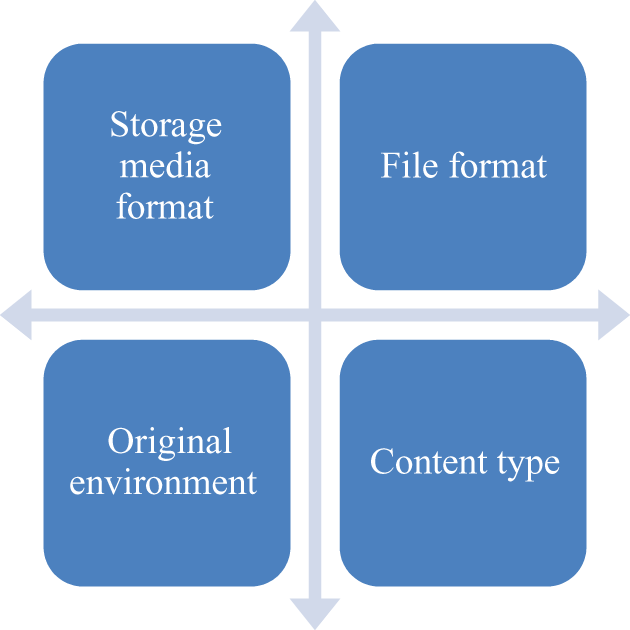
Classification matrix.
‘Storage media format’ refers to the type of handheld storage media upon which the files were located, for example, CD, DVD, 3.5-inch floppy disk, or 5.25-inch floppy disk.
‘File format’ refers to the specific way in which the data is encoded, for example, as an Excel spreadsheet in *.xls format or a WordPerfect file with the format extension *.wp (note that these were identified in the first instance by the file extension alone, not by an automated tool; this was possible due to the small scale of the proof of concept though we accept that automated identification tools would need to be used within a production workflow).
‘Original environment’ refers to the original technical environment in which the content was intended to be used, for example, a British Broadcasting Corporation (BBC) Micro running the Acorn operating system (OS) or a Pentium PC running Windows 95.
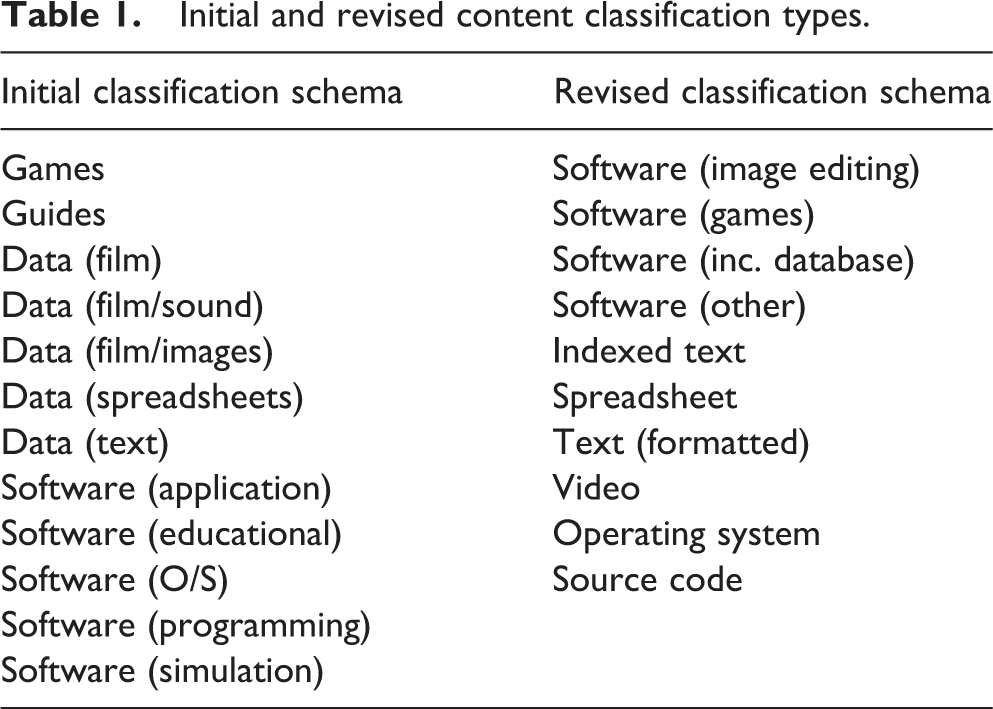
‘Content type’ refers to the classification given by project staff to identify the manner of intellectual content stored in the file. Classifying content in this way helped staff to describe the content consistently prior to accessing it and also informed the selection of which preservation approach to test first, for example, migration or emulation. Original classifications were reviewed and refined during the testing process as they were found to sometimes be misleading or unhelpful. These are identified in Table 1 (although note that there is no direct correlation between the items in each row).
Initial and revised content classification types.
The long list of 200 items was then analysed to identify those items with unique or near-unique combinations of technical and content criteria. This was then sampled to produce a final shortlist of 50 titles with the same broad profile as the long list. The resulting sample included titles stored on the following storage media: 19 titles on 5.25-inch floppy disks – comprising 23 disks in total (with one title distributed across eight different disks); 10 titles on 3.5-inch floppy disks – comprising 17 disks in total; 17 titles on CD – comprising 22 discs in total; 4 titles on DVD.
Items in the sample dated from 1980 to 2010. Original environments represented by the shortlist included the BBC Micro, Microsoft disk operating system (MS-DOS), Apple® II, Mac 7, Mac 9, and several variations of Microsoft Windows® (3.x, 95 and 2000).
It is acknowledged that this selection process did not necessarily result in a fully representative sample, particularly with regard to the proportional distribution of items across different generations of technology and content types. Nonetheless, the resulting sample did sufficiently represent a range of different types of material in line with the aims of the process.
Content extraction
The broad approach to content extraction was based on tools and techniques developed for digital forensics, which is gradually becoming an important part of the digital preservation toolbox (Kirshenbaum et al., 2010; Lee et al., 2013). The content extraction process (also known as ‘disk imaging’) copied content from disks and performed a number of additional checks such as fixity and virus checking prior to storage of content and metadata on the network.
Three disk-imaging solutions were tested in the project: BitCurator, an open source free digital forensics software tool from the School of Information and Library Science at the University of North Carolina, Chapel Hill and the Maryland Institute for Technology in the Humanities. ISOBuster, data recovery/forensics shareware from Smart Projects, free to download and available to purchase additional features. Kryoflux, a commercial USB-based device from the Software Preservation Society for imaging floppy disks.
BitCurator was the preferred tool for imaging CDs, DVDs, and 3.5-inch floppy disks. Staff at the British Library previously played a leading role in the development of BitCurator and the application of digital forensics procedures to digital library and archives material (John, 2008) and the Library is a charter member of the BitCurator Consortium. It was therefore the logical choice and was installed as a primary operating system on two dedicated machines. Kryoflux was used to image the 5.25-inch floppy disks.
The project developed a generic workflow that was modified as necessary to address the peculiarities of specific storage formats. This was built upon the workflow elements for digital forensics identified by John (2012). Virus checking was a non-negotiable requirement for storage of the content on the Library network. Modern viruses are typically circulated over the internet but prior to the global connectivity of today, it was not uncommon for viruses to be spread maliciously or otherwise using floppy disks. From the mid to late 1980s onwards, increasingly sophisticated mechanisms for hiding and spreading viruses were developed. Some notable viruses spread in the mid to late 1980s, including in 1986 Brain (code that infected and inhibited access to boot servers of disks) and 2 years later the Morris Worm (code that had the same effect as a modern denial of service attack). Both appear to have been unintentionally malicious yet neither are included in the Symantec A–Z of viruses and risks and it was not clear at project start whether modern antivirus software would identify these threats.
BitCurator can be configured to launch ClamAV antivirus service and this was implemented for CDs, DVDs and 3.5-inch floppy disks; 5.25-inch disks were checked using ClamAV at a different stage of the workflow. Center Endpoint Protection was used for secondary testing and MagicISO was used to check for viruses on Mac disks. In all there were two instances of false positive virus identification: One item was known to contain an exemplar reference to an inactive virus. Center Endpoint Protection falsely identified this as a virus; ClamAV on Ubuntu did not detect a virus (exemplar or not). Note, however, that this was an exemplar virus – that is, it was an example email containing reference to the Nimda virus that is used to train spam/virus filters in email clients – and was not itself a virus. The detection of it by Center Endpoint Protection was effectively a false positive. In another, ClamAV falsely detected a Trojan within a specific file. Web searches revealed that of 36 tested AV scanners (on this file), only ClamAV detected it as infected.
These results were inconclusive due to the limited testing. Further work will be required to test antivirus software, preferably with a data corpus that includes known viruses.
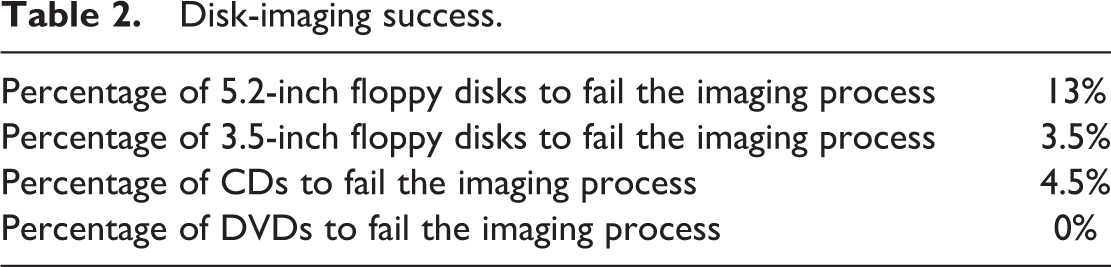
Imaging results were largely successful: All four DVD-ROM items were imaged successfully. The standard extraction script written by the Library staff was successful in all cases. Only one of the 22 CDs failed imaging; this was due to the disc itself being physically damaged. The standard extraction script was successful for all but one of the remaining items (from 1992), for which ISOBuster was able to capture an image. Two of the 3.5-inch floppy disks failed imaging, in both cases due to physical damage to the disk. The standard extraction script was successful with all but one of the remaining items, for which Kryoflux was able to capture an image. Three of the 5.25-inch floppy disks failed extraction (all were items that were based on a single floppy disk).
Imaging success rates are summarized in Table 2.
Disk-imaging success.
Unsurprisingly, older material exhibited a greater number of problems than newer material when trying to extract the content. The average time taken to capture the disk images also varied quite widely, as might be expected. These are summarized in Table 3 (disks which could not be imaged have been excluded from the average times provided).
Disk-imaging times.
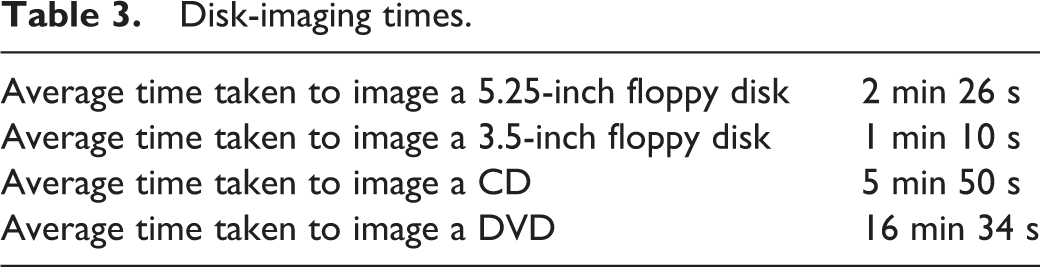
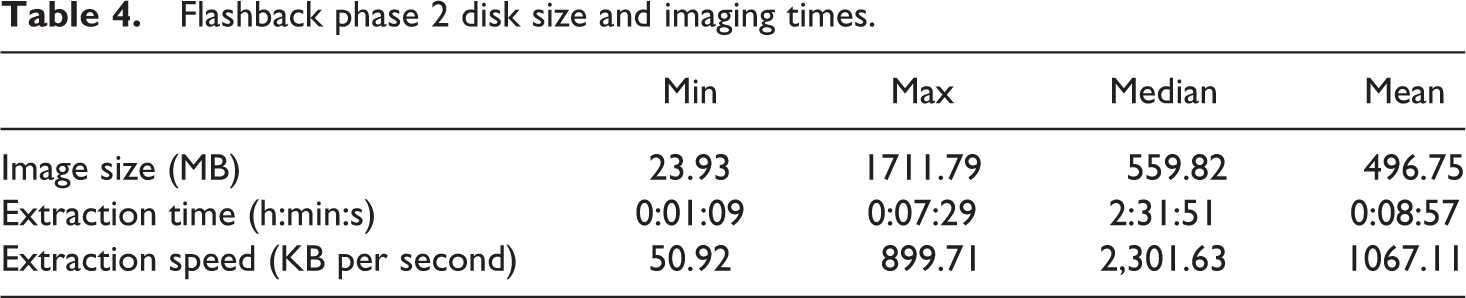
As we have previously acknowledged, the sample from which these results have been derived is relatively small. However, the second phase of the project is currently underway and results from imaging a larger number of CDs have recently become available. The test set used was 259 CDs, selected from those kept in the social sciences reading room at St Pancras. These represent a range of content types, including multi-disc collections of historical census data, official publications, and remote-sensing images. The size of the content on the discs varied considerably (from 24 MB to 1712 MB), as did the imaging time (from 1 min and 9 s to 8 min and 57 s). The average (mean) time taken to image these discs was 8 min and 57 s, which was considerably longer than that recorded by our phase 1 experiments with CDs (Table 4). We still need to analyse in detail the reasons for this and its implications for scaling up the Library’s disk-imaging activities. We will also image samples of other disk-based collections to gather more empirical data on extraction times.
Flashback phase 2 disk size and imaging times.
Content preservation
A fundamental objective of the Flashback proof of concept was the testing of emulation and migration processes designed to deliver authentic representations of the content to reading room computers. A laboratory was established and populated with the legacy computing equipment required to provide ‘native’ access to material contained in the sample (Figure 4). After testing and learning how to use the machines, project members were able to run and assess the materials in their native environment before comparing them with the ‘preserved’ versions of the content, as delivered on modern PCs.
Equipment for the laboratory was sourced over a period of 4 months, mainly from British Library colleagues or purchased through eBay. Purchase was relatively inexpensive though use of the equipment was not always straightforward and an excellent example of why reliance on old hardware is probably not a sustainable long-term preservation approach. Some items were temperamental and one in particular seemed to display a different error message every other time it was switched on. We also found out that research was often required for younger staff to work out how to use some of the older equipment. As might be expected with hybrid content, an understanding of the content itself often required consultation with the printed counterpart to the item.
A decision tree (Figure 2) was produced, which differentiated between content types in order to inform selection of an initial approach for testing in the lab, either emulation or migration. For emulation, the project team tested Emulation as a Service (EaaS) from the University of Freiburg (Liebetraut et al, 2014; Suchodoletz et al., 2013) alongside a small number of existing emulators freely available online. For migration, software was selected as appropriate to the content type and original format of each title.
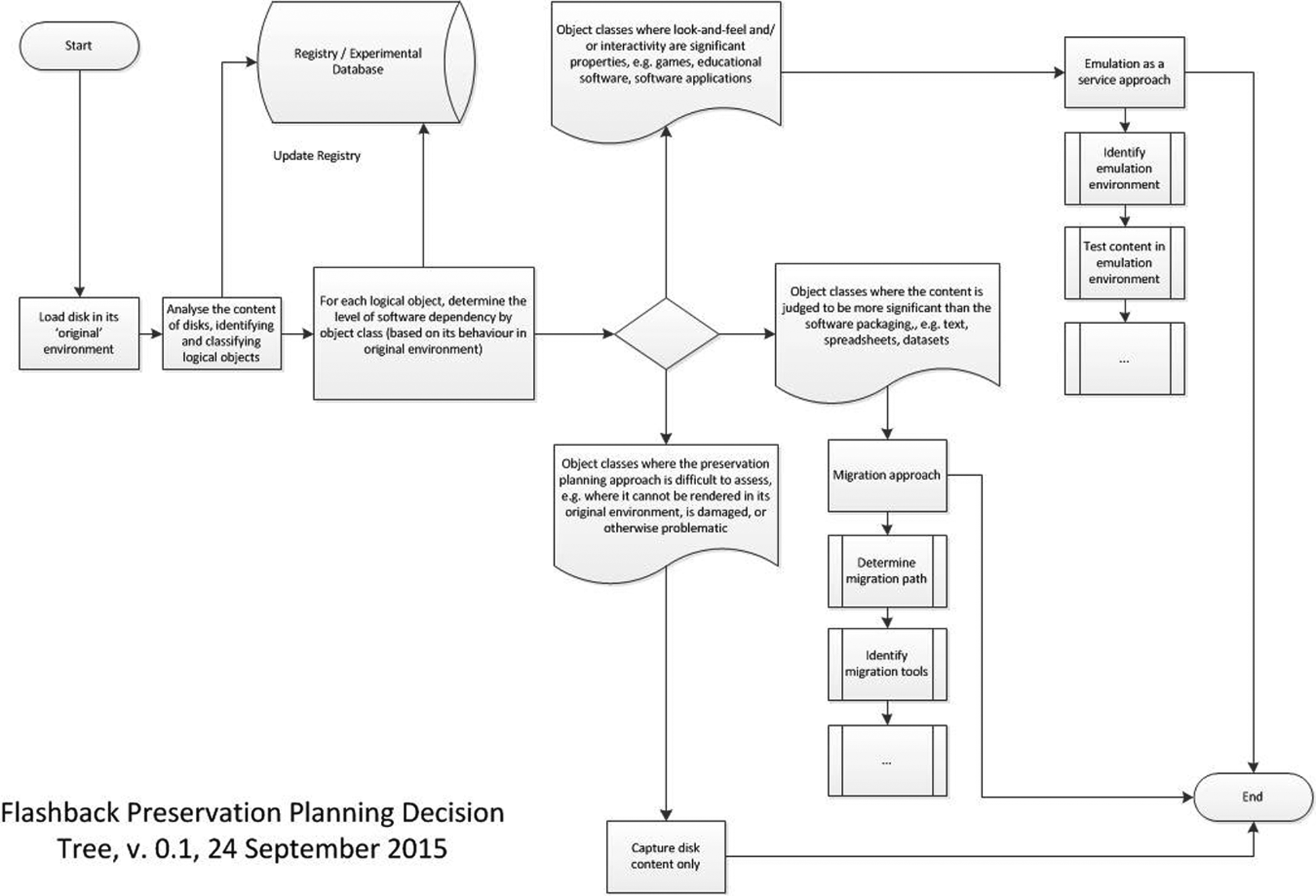
The Flashback preservation planning decision tree.
The decision tree proved mostly accurate on the question of appropriate preservation approaches for different types of content, though we again acknowledge the limitations of a small sample and the need for further testing.
The tree was refined during the project to account for the following observations: It was important to base preservation planning decisions on the observed behaviour of content objects. Initial decisions about preservation planning were often based on the (relatively limited) information available in the registry. However, our knowledge of the sample content objects developed as we gained more experience with using the content in an approximation of its original environment as well as with our other tools (especially the EaaS environment). It was important to take into account the granularity of content. As expected, most disks (especially the CDs and DVDs) contained more than one content type, including software. Software source code should not be considered in the same way as executable software applications. Several items in the sample primarily contained source code; others contained complete operating systems or required particular hardware. Neither emulation nor migration was deemed necessary for this class of content and a bit-level preservation approach deemed more suitable. Disk directory structures and data formats within databases can impact on the selection of a preservation approach. For example, one CD in the sample contained research datasets in comma separated values (CSV) format where the original files would have, according to the decision tree, been a prime candidate for a migration approach. However, the way the files were arranged on the disc provided additional context, for example, the results from particular experiments/instruments were stored in separate folders, datasets were supported by plain text ‘readme’ files and so on. It was clear that the directory arrangement would be of use to anyone within the ‘designated communities’ of those particular datasets. It was also considered unnecessary to migrate CSV files, as this is a standard form with widespread support. Any chosen migration approach (e.g. file extraction and packaging) would need to retain some aspects of the original directory structure. Simple emulation, however, might provide a more straightforward way of doing the same thing, whereby the disk content could be investigated, then selected datasets of interest could be extracted (i.e. removed from the emulation environment) for further analysis.
A simple process was developed to analyse, document and compare rendering of item-significant characteristics in both native and preserved environments, with the former being as rendered on an appropriate machine contemporary to the age of the content, the latter as rendered as migrated or in an emulated environment run on a modern desktop machine. Items were evaluated using the five attributes – ‘content’, ‘context’, ‘structure’, ‘appearance’ and ‘behaviour’ – identified and defined by Rothenberg (Rothenberg, 2000; Rothenberg and Bikson, 1999), and also used by the Dutch Testbed Digitale Bewaring project experiment process (Potter, 2002) and the Plato preservation planning tool (Becker et al., 2009; Kulovits and Rauber, 2008). The project team ran an initial analysis of each item and documented these within an ‘experiment plan’ that also captured other details of the process and evaluation results. To illustrate, a sample plan is provided in Figure 3.
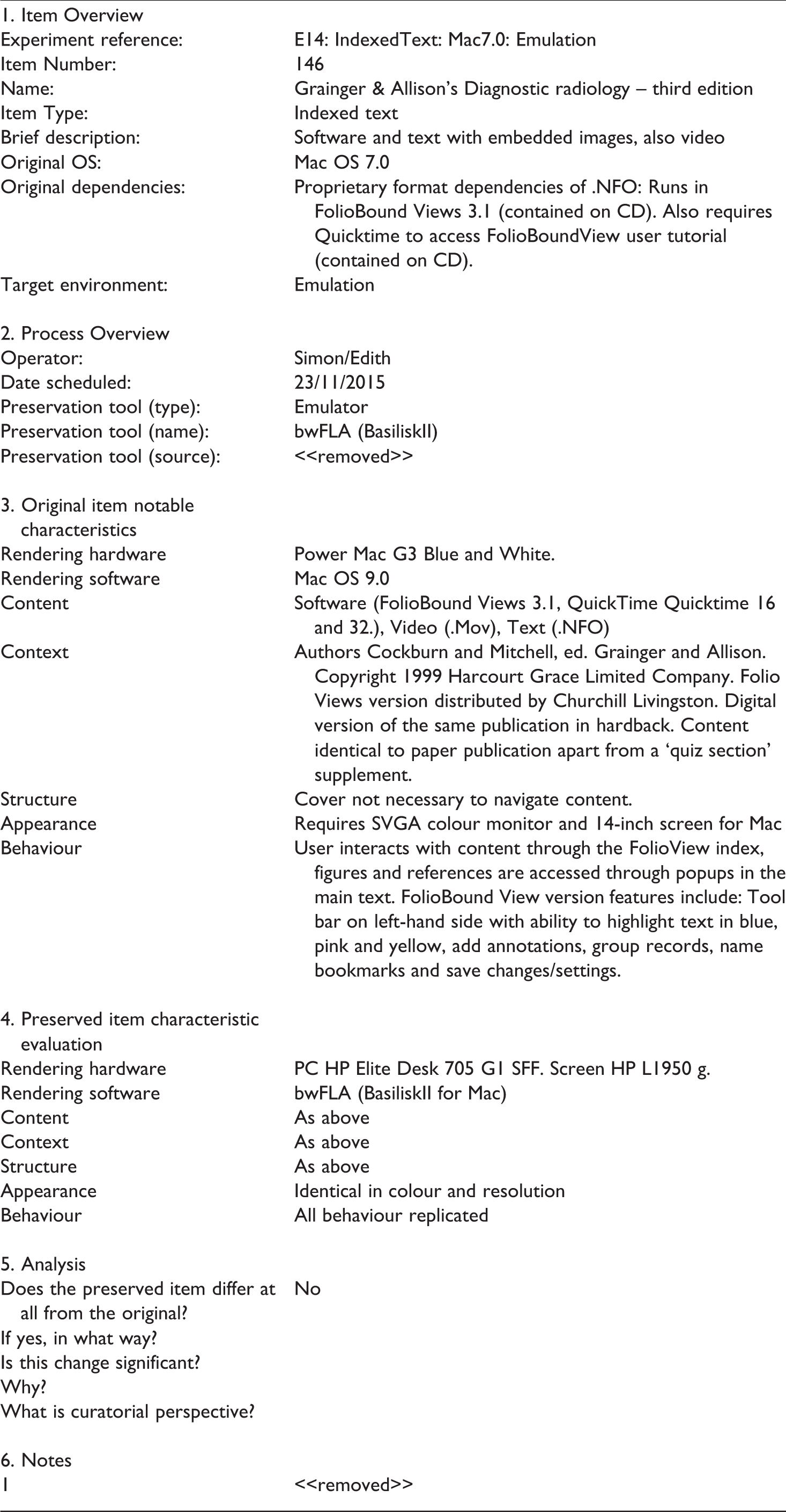
Sample completed preservation plan.
The decision tree featured in Figure 2 was used to indicate whether a migration or emulation approach should be tested first, and the specific details of the migration or emulation tool to be used were determined by options available to the project team for the original technical environment or format of the item. Some items underwent multiple experiments, depending on the viability of the first approach tested.
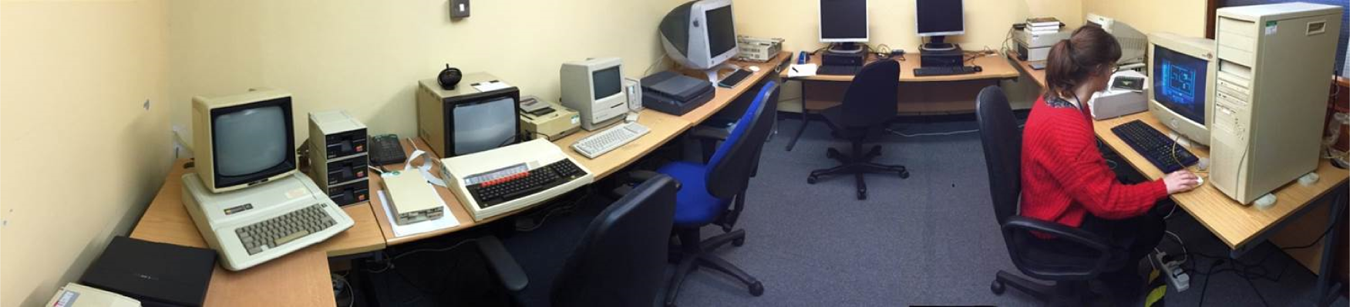
The Flashback laboratory with two modern PCs and a number of legacy machines.
The EaaS platform installed for the Library by the University of Freiburg was a demonstration installation, hosted on an Ubuntu 14.04 VM and providing MS-DOS, Windows 3.1, Mac OS 7.5 and 9.0 emulators. Project colleagues also installed three stand-alone emulators of Apple II, BBC Micro and MS-DOS/PC-DOS environments.
Emulation results overview
In line with the decision tree, emulation approaches were tested on several items from the sample with interactive elements. The results varied quite widely, but broadly speaking, the emulation approach seemed to work well with much of the content. A summary of the main results, organized by hardware/OS environments, is presented in Table 5.
Emulation results.
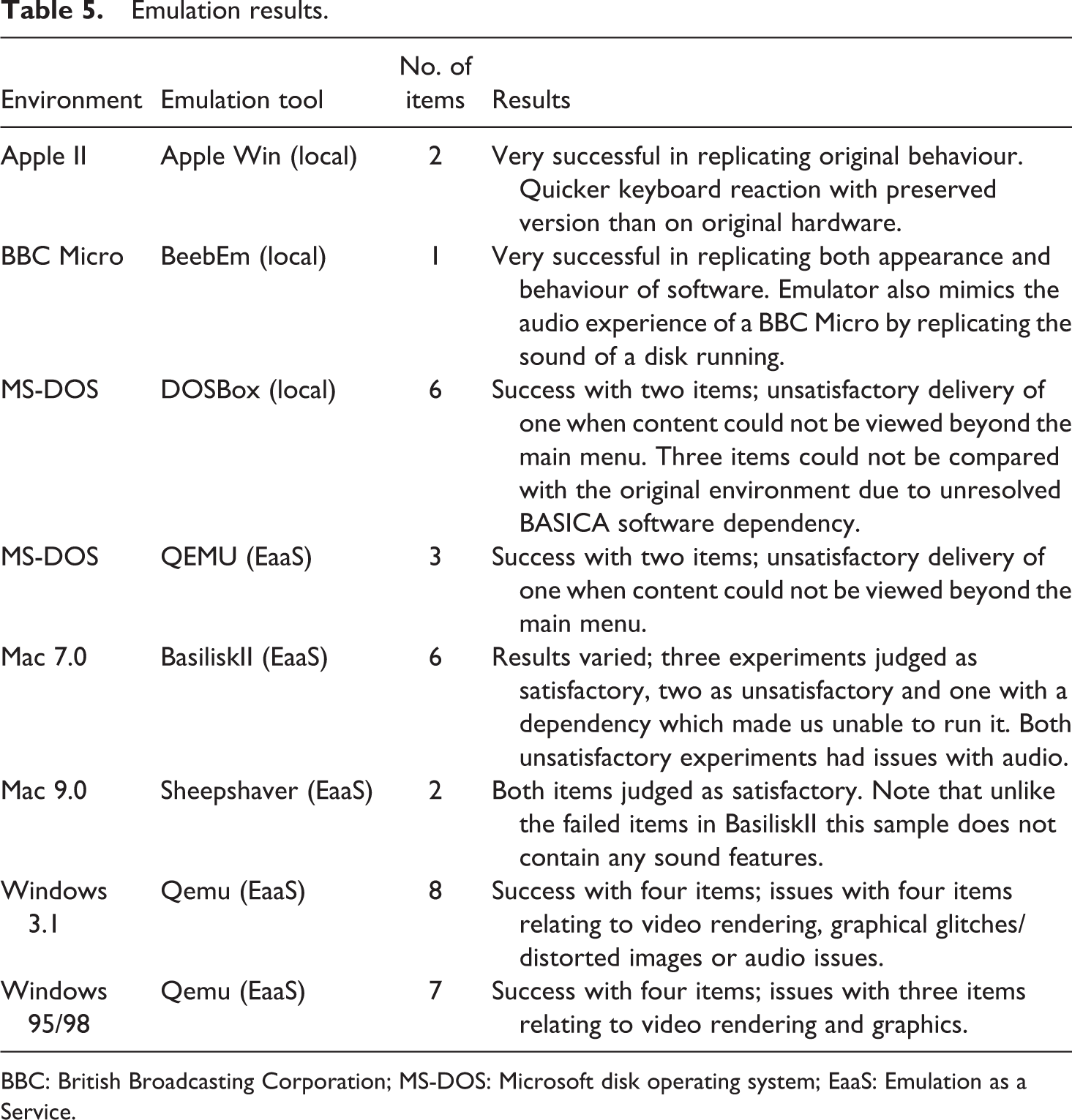
BBC: British Broadcasting Corporation; MS-DOS: Microsoft disk operating system; EaaS: Emulation as a Service.
Migration results overview
In line with the decision tree, a small number of migration approaches were tested on text documents and spreadsheets. Unlike the work of Gattuso and McKinney (2014) with WordStar files, which was based on file conversion, the Flashback experiments were based on attempting to open files using later versions of appropriate software, that is, using the format conversion facility of software to undertake the appropriate transformations. These migration items required a smaller range of original environments than those requiring emulation, namely MS-DOS and Windows (3.1, 95/98).
It was not possible within the project timescale to acquire original software for the MS-DOS experiments, so our assessments in that environment remain incomplete. We noted, however, that one item could not be opened successfully by any of the migration tools tested (Open Office, LibreOffice and MS Excel) though it could be rendered using Qemu emulation software. The same issue occurred with a different item from a Windows 3.1 environment. Items from a native Windows 95 environment contained CSV files which rendered well with MS Microsoft Excel 2010.
The project team also ran three migration approaches with interactive items as they required relatively recent hardware and software (Windows XP and 2000). Running these on Windows 7, only one item was problematic. This was due to digital rights management issues, caused by attempting to run the program from a disk image rather than the original disk.
Lessons learned
Many of the lessons learned are interspersed in the text above, particularly, for example, regarding use of the decision tree, classification of content types and the need to sometimes try more than one approach when imaging or virus checking a disk. It was clear from the sample that older content is likely to exhibit a greater number of content integrity issues than newer content, at least when storage conditions have been comparatively similar. The number of disks to exhibit problems during the content extraction phase was clearly greater when dealing with 5.25-inch floppy disks than with more recent CDs and DVDs. We note, however, that these are two different types of storage medium – one optical while the other magnetic – so that may also impact on the findings. As previously noted, further tests are required in order to validate these findings.
Overall, in the limited number of experiments conducted during phase 1 of the Flashback proof of concept, emulation consistently, and perhaps unsurprisingly, yielded better results than migration in terms of preserving aspects of behaviour and appearance. This would seem to fit with the observation of Woods and Brown (2009) on the inherent interrelationships between the disparate file types typically stored on a single disk image (or the original disks).
The small sample used by this project suggests that older material (such as those based on Apple II and the BBC Micro) emulated successfully, as long as dependent software was available. For multi-environment disks, for example, those designed to run in both a Windows and Mac environment, the Mac environments performed better than the Windows ones. Emulation results for each generation were identical between locally installed emulators and EaaS. Memory capacity was an issue with later generations of software when using the Freiburg system and this was easier to address with local emulators. However, setting up EaaS emulators was slightly quicker than local installations, especially with multi-disk installations which generally run smoothly in EaaS following recent upgrades.
Conclusions and subsequent activities
The limitations of working with such a small sample have been referenced several times in this article and these have been recognized by both the project team and project board. As a result, the second phase of Flashback is using a much larger sample and is considering objectives, which were not able to be fully addressed by the proof of concept, in particular, the treatment of disk images as objects within collections (Woods et al., 2011) and the deployment of solutions at scale. Flashback phase 2, which should be complete by the end of 2016, has three main strands.
The first is developing a more complete understanding of the extent and incidence of born-digital content stored on handheld media within the British Library’s digital collections. This builds on the collection profiling activity established during the proof of concept phase, but is seeking in particular to identify specific collections that can be prioritized for content extraction. In undertaking this and in considering all questions of preservation planning, the project continues to work with the Library’s curators and collection specialists.
A second strand is considering the practical aspects of implementing disk content extraction workflows and preservation decision-making in the context of the British Library’s existing digital operations (including an assessment of costs). In particular, there is a need to investigate the packaging and ingest of disk-imaged content into the Library’s digital repository and explore how disk-based content, which is a part of hybrid items (e.g. attached to print items) can be integrated into the Library’s collection metadata architectures. There is also a need to consider the role of software registries in the preservation of legacy material.
The third strand is looking in more detail at user perspectives, especially with regard to the use of extracted content in the British Library’s reading rooms. For example, there is a need to assess how emulation might work for readers, for example, in an on-demand situation.
The age of the material being tested during the proof of concept has allowed the British Library’s digital preservation team to move beyond preservation theory and to begin to analyse the realities of undertaking digital preservation in practice. However, the value of this project lies not just in its practical use to the Library itself but also in the sharing of our experiences and evidence with the wider community, hoping to contribute a deeper understanding of the comparative benefits and practicalities of using migration and emulation approaches in situ.
Footnotes
Declaration of conflicting interests
The author(s) declared no potential conflicts of interest with respect to the research, authorship, and/or publication of this article.
Funding
Flashback was funded by the British Library as an internal project. The author(s) received no additional financial support for the research, authorship, and/or publication of this article. We are grateful for the support of the project board at the British Library, including Paul Clements (Architecture), Ian Cooke (Collections) and Alasdair Ball (Collection Management), as well as Klaus Rechert and Isgandar Valizada of the University of Freiburg.