







Abstract
In an age where the world is becoming ever more aware of paper consumption, educators are turning toward technology to cut back on paper waste. Besides the environmental reasons, a paperless music classroom helps students develop their musicianship in new and exciting ways. This article will look at the considerations for setting up a paperless music classroom by examining hardware, software, and hybrid models for the music classroom.
After just a few years of teaching, I became aware of paper waste. In 1 year, I requested over 41,000 copies to be made. This means I used over 82 reams of paper and eight cartridges of toner. The math is flexible on this front, but at current prices in 2015, that means I spent $240 on toner and $656 on paper, totaling at least $896. This is just the paper consumption that was predictable. This does not take into account the odd, “I need copies of this and that.” It is safe to say, my paper consumption cost more than $1,000 in 1 year. This number does not take into account the energy consumption required by the copy machine to make all of these copies. When I looked into my recycling bin on a daily basis and saw the piles of barely used paper, I decided to find a better way.
The paperless music classroom is not without cost itself. It is not effective to simply cut paper from the classroom without substituting some manner in which to share the information previously stored on paper. Looking at current trends, this means an injection of technology to substitute for the loss of paper. When considering the implementation of technology, there are two considerations: the hardware and the software.
Hardware
Paperless classrooms are difficult to implement without devices available for students to use in their classroom. The kind of program that is discussed frequently is called 1:1 (1 to 1). This means that in a school, each child has a piece of hardware dedicated to them. It can occur in different forms, but the ratio implies that each child has access to a computer and they do not have to share that device with other children. Often, 1:1 programs allow the students to take their devices home and use it both for in-school and out-of-school work. There have been many successful implementations of 1:1 programs across the country (Dohr, 2015; “District 301 launches 1:1,” 2015; Erwin, 2015; The Sullivan Independent News Staff, 2015; Wagner, 2015).
When considering the appropriate piece of hardware for a music class 1:1 program, there are a few questions to ask. The first question has to do with the existing technology in the school. For example, if your school is completely powered by PC technology, it may be inappropriate or inefficient to establish a 1:1 program with Macintosh technology. When considering all options available, Table 1 shows the pros and cons of each device as it applies to the music classroom.
Hardware Options for 1:1 Programs.

Even if a 1:1 program is currently not an option, many schools have carts of devices available for checkout in classrooms. With a cart, the device is still a consideration, but multiple students will likely use the same device. With either a cart or a 1:1 program, some tutelage on the device will be required, but with a cart, students will need to delete their private information when finished. Sometimes the information technology (IT) department can set up separate log-ins for each student, but this is not an option on all tablets. Carts can offer some benefits that are not available with a 1:1 program, especially when thinking about software. As software is typically purchased for individual devices, if a school does not need to purchase a music-specific software for every student and only purchase that software for the cart that is used in the music room, it can significantly help costs.
Software
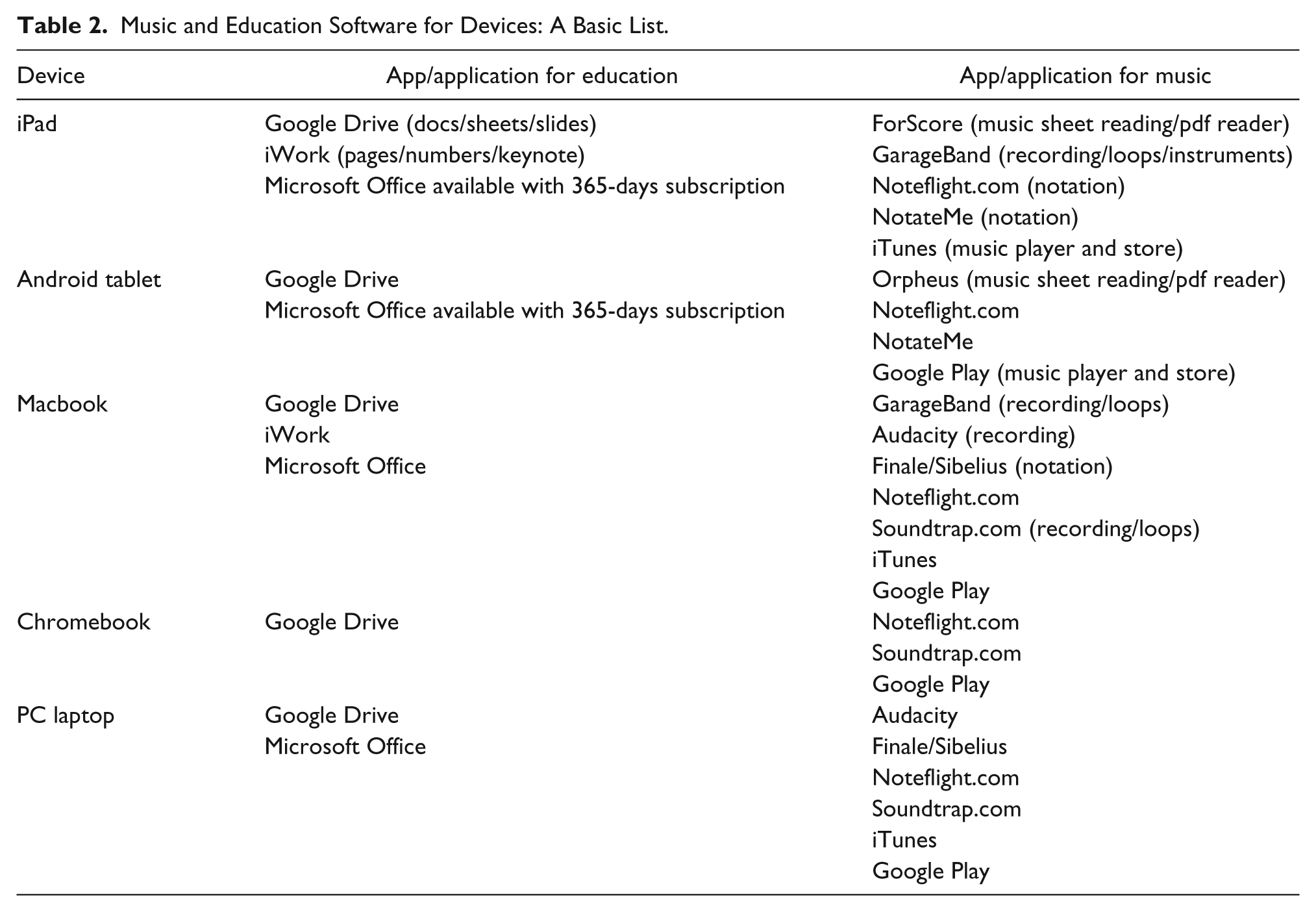
While the device you choose for your music classroom is a major consideration, equally important is the software that can be run on the device. Certain platforms offer more options for the music classroom than others. Table 2 looks at current options for various applications that would be important to consider for integration in the music classroom. For me, when choosing a 1:1 device for my students and music classroom, iPads and Macbooks were the best options because of the program GarageBand and how that integrated into my teaching.
Music and Education Software for Devices: A Basic List.
Management
It is unlikely that you will want to undertake the task of managing 30 or more devices in your classroom on your own. Therefore, it is important that prior to purchasing whatever device you choose for your classroom, you work with your IT staff to devise a system for management. Managing laptops or tablets means coming up with a system for app/application distribution, initializing updates, and general maintenance on the devices. This is what IT professionals do; it is not something you should do on your own unless you are exceedingly tech-savvy and look forward to this opportunity.
Hybrid Options
If you are not quite ready for a 1:1 program or a cart system, hybrid systems are something to consider. Hybrid systems cut back on paper consumption but do not eliminate them completely. This is how I initially approached my high paper usage prior to the current 1:1 program I utilize. One of the simplest ways to cut back on paper is to share information on a digital projector rather than paper. While this may not work in every situation, it can help when you want to share music or art and writing on the board will not do.
Another option would be to create an online presence. This can happen in many mediums; social media or personal Web sites are typical options. On either of these platforms, a teacher can disseminate information or share documents online that would normally create paper waste. You can also share recordings and videos of performances that would help parents have a more holistic understanding of your music classroom. If confident with Web-building skills, you can also invite students to submit their own assignments for your class through your Web space. This could include things like blogging about their practice, uploading recordings of their practice, listening logs, or music theory exercises. Online spaces allow music teachers to construct individual assessments for students, something that music educators often struggle to design. Schoology.com, Edmodo.com, and Wikispaces.com are three sites designed to be helpful for educators in this capacity. To see an example of an online portal in action, see http://rgiebelhausen.wikispaces.com/Music+Composition%2C+Highland+Middle+School.
The other considerations for a hybrid model in music teaching are computer labs and e-mail. It may be an option only once in a while, but think about visiting the computer lab for a music theory assignment on http://musictheory.net/, a composition assignment on https://noteflight.com/, or an exploration of sound recording and loops at https://soundtrap.com/. These kinds of experiences are incredibly valuable in a world where music may interest all our students, but music performance is not the medium with which they connect. Not every assignment that students complete needs to take place on paper, and some assignments can be turned into the teacher via e-mail rather than expecting students to print assignments on their own.
Grants
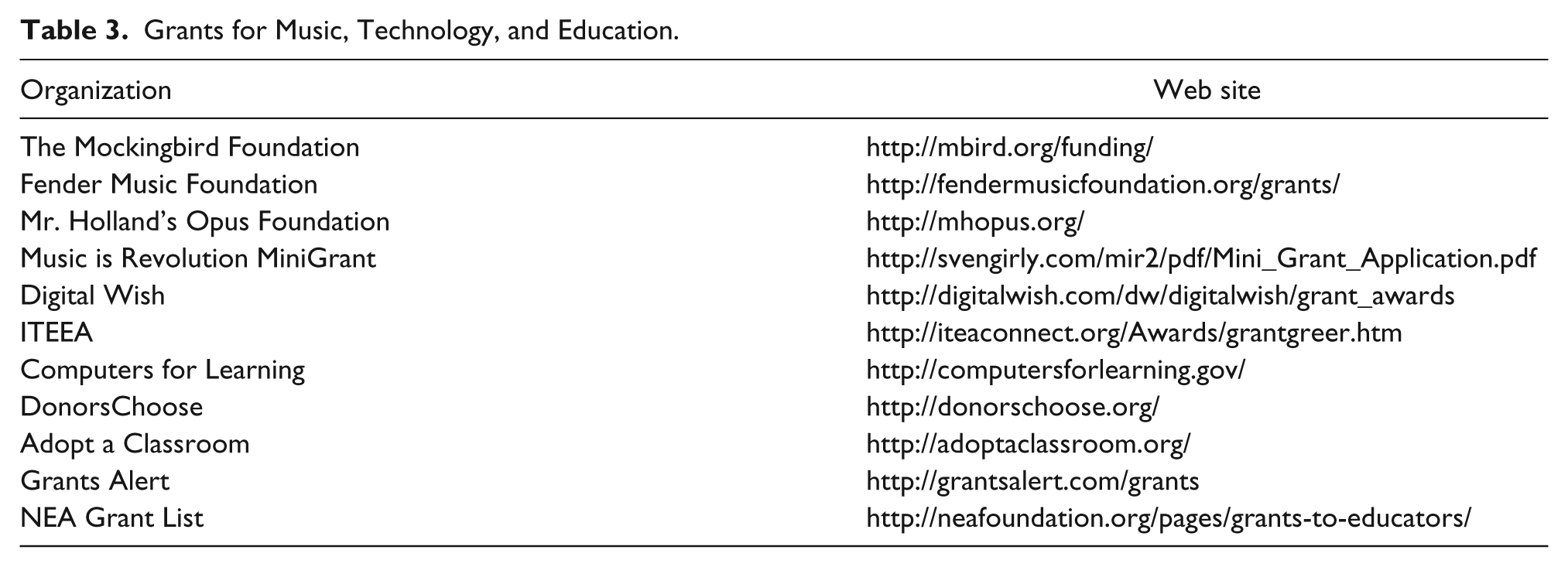
No matter which direction you go, money is needed to see these plans to fruition. If a school is not in the position to fund your technology requests, grants are the next choice to help fund these kinds of projects. Some districts and schools may provide internal help for grants, but if these resources are not available, Table 3 showcases some places to apply and look for grants for educators. Most grant proposals tend to be funded if they are smaller ($500–$3,000), so consider applying for multiple smaller grants rather than trying for one large grant.
Grants for Music, Technology, and Education.
Final Thoughts
Even if a paperless music classroom may be your ultimate dream, eliminating all paper consumption is likely an unrealistic ideal and perhaps cost-prohibitive on initial exploration. But over time, a paperless classroom is a possibility if one plans properly and integrates slowly. Even if you substitute one paper activity with a paperless one, you are helping to eliminate some paper waste and teaching students how to engage with music in ways beyond playing acoustic instruments. Many young students value the role of music in their lives, but would like to engage with it in ways that move beyond public performance. By making small steps to remove paper in our classroom, we help eliminate some paper waste and add to the ways we make music in our classroom.
Footnotes
Declaration of Conflicting Interests
The author(s) declared no potential conflicts of interest with respect to the research, authorship, and/or publication of this article.
Funding
The author(s) received no financial support for the research, authorship, and/or publication of this article.