






Abstract
Mobile technology has introduced a new communication opportunity for students with autism spectrum disorder. Tablets, like the iPad, allow users to customize applications for their needs. Users also have found iPads to be less stigmatizing because so many people own them and use them for various purposes. In the fast-paced world of technology, however, research cannot always keep up. It is becoming more important for teachers and caregivers to evaluate the iPad and its applications for their efficacy in helping improve a child’s communication skills. A review of current research indicates that there are five important considerations for evaluation: (a) the ability to customize the application, (b) the motor skills the student needs to operate the system, (c) the resources and time needed for the intervention, (d) the research or evidence-based practices behind the application, and (e) the cost of using the specific device and application. A rubric delineating these considerations that can effectively guide teachers and parents in their evaluation process is provided.
Increasing numbers of children with disabilities are being served in general education settings, including students with autism spectrum disorder (ASD; Dunlap & Burton-Pierce, 1999; Simpson & deBoer, 2008). The prevalence rate of ASD has increased considerably over the past decade and is rising at a rate of 10% to 17% per year for a rate of 1 in 88 children (Centers for Disease Control and Prevention, 2011). Autism spectrum disorder is characterized by impairments in language and social communication as well as repetitive patterns of behavior (American Psychiatric Association, 2000). Specifically, individuals with ASD often exhibit atypical language development, atypical social development, repetitive behaviors, problem behavior, sensory and motor disorders, and differences in intellectual functioning (Turnbull, Turnbull, & Wehmeyer, 2012). These children may have limited verbal skills or be completely nonverbal, making communication difficult.
Many students with ASD benefit from the general curriculum and can achieve at a high academic level (Zager & Shamow, 2005), yet their limited social skills, communication challenges, and behavioral difficulties often hinder their successful inclusion in general education classrooms. The social difficulties children with ASD experience manifest themselves in a number of ways. For instance, children with ASD may have problems forming and maintaining relationships with peers, understanding subtleties of social communication (e.g., interpreting nonverbal cues such as facial expressions and gestures), and participating in symbolic/dramatic play (National Research Council [NRC], 2001). While all children with ASD will inherently demonstrate difficulty with social communication, some children actively attempt to engage others socially, with varying levels of success, while others avoid social interaction (Volkmar, Carter, Grossman, & Klin, 1997). This does not mean that children with ASD are not attempting to communicate, but rather their communication attempts may appear atypical (Prizant & Wetherby, 2005), leading to miscommunications or misunderstandings (Marans, Rubin, & Laurent, 2005). As such, social communication is often recommended as a vital instructional target beginning in the earliest grades (American Speech-Language-Hearing Association [ASHA], 2006; NRC, 2001).
In spite of the high probability that both general and special educators will encounter students with ASD in their classrooms, consistent with the findings of the NRC (2001), the majority of teacher graduates receive little preparation in evidence-based practices for students diagnosed with ASD (Morrier, Hess, & Heflin, 2011). The most frequently reported type of training in ASD among current teachers is attendance at a full- or half-day workshop, with fewer than 15% of teachers reporting training via their university preparation program; moreover, training type is not correlated with the use of evidence-based practices. It is not surprising that current teachers of students with ASD seldom employ evidence-based instructional strategies (Hess, Morrier, Heflin, & Ivey, 2008). Although there is anecdotal evidence that some schools have designated one teacher who is trained in methods for ASD to assist other teachers at the school site, comprehensive and ongoing professional development for all teachers of students with ASD is not readily available. Therefore, both general and special education teachers are in need of strategies and other innovations to assist their students on the autism spectrum with communication skills. Moreover, they require guidance in evaluating the quality and suitability of interventions suggested.
The purpose of this article is twofold; it provides a review of the current evidence-based literature for evaluating the quality of applications available for the iPad that relate to promoting communication for ASD and then translates the evaluation criteria into a usable tool that provides teachers and caregivers the ability to effectively conduct such assessments. Because research to date has centered on the iPad almost exclusively, it is the focus throughout this article. Although there are other tablets on the market, these have not yet been the subject of extensive study and therefore would require additional review before applying the evaluation criteria suggested herein. It should be noted that teachers and caregivers should not begin implementing assistive technology without proper evaluation and discussion by a student’s individualized educational program (IEP) team. The information in this article, however, may help guide such a discussion.
Role of Assistive Technology
Augmentative and alternative communication (AAC) comprises all forms of communication (other than oral speech) that are used to express thoughts, needs, wants, and ideas. It was introduced over three decades ago in order to help individuals with speech challenges communicate, giving them the opportunity to express through other means what they cannot express verbally (ASHA, 2002). Although AAC includes more than just technology, the focus of this article is on technology-based AAC. Augmentative and alternative communication began with strategies such as hand gestures or manual signs and evolved into low-tech tools such as communication boards and graphic symbols that were non-electronic (Shane et al., 2011). With these boards and graphics, users could either point to what they wanted or exchange a symbol signifying what they wanted, generally with the use of a Picture Exchange Communication System (PECS; Shane et al., 2011). As PECS became more popular, more high-tech AAC software and hardware was developed, including portable speech generating devices (SGD), which expressively communicated what the user wanted (Shane et al., 2011).
In a meta-analysis of single-case research studies testing the effectiveness of AAC systems on students with ASD, AAC appeared to have the largest impact on communication skills, but positive impacts also were found for behaviors, social skills, and spelling (Ganz et al., 2012). Ganz et al. (2012) further suggested that “although the effects were not as strong as those for communication skills, it appears that improving communication may lead to improved social interaction and academics and decreased challenging behavior” (p. 71).
Even with advances in AAC systems, the products typically remain “expensive, cumbersome, and time-consuming to program and personalize” (Shane et al., 2011, p. 1229). However, SGDs now face competition from consumer-level products such as tablets and personal computers that appear less stigmatizing to the user. A recent meta-analysis study concluded that iPods and iPads are gaining popularity because they are more accessible and affordable, as well as socially acceptable, making users feel more comfortable using the device and less stigmatized by its presence (Kagohara et al., 2013). Furthermore, applications for the devices are readily available and may be more affordable and customizable than previous AAC systems. Even with the features of the new technology, however, care still needs to be taken in order to match a person to the appropriate technology.
The Apple iPad quickly became a device of interest in the AAC field. While other devices such as the Samsung Galaxy, Microsoft Surface, and Google Nexus are now available, research thus far has focused on the iPod Touch and iPad. The lower cost, easy-to-use interface, and customizable applications of the iPad have gained favor with parents and teachers (Joshi, 2011). Companies have caught on and have begun producing more applications to help students communicate and succeed in and out of the classroom. In fact, a search for applications related to communication in the Apple App Store returns approximately 180 results. However, how do parents and teachers ascertain whether the applications they are buying for their student(s) are the most effective and practical for meeting their communication needs?
Design Criteria for Educator/Caregiver Use in Evaluating Apps
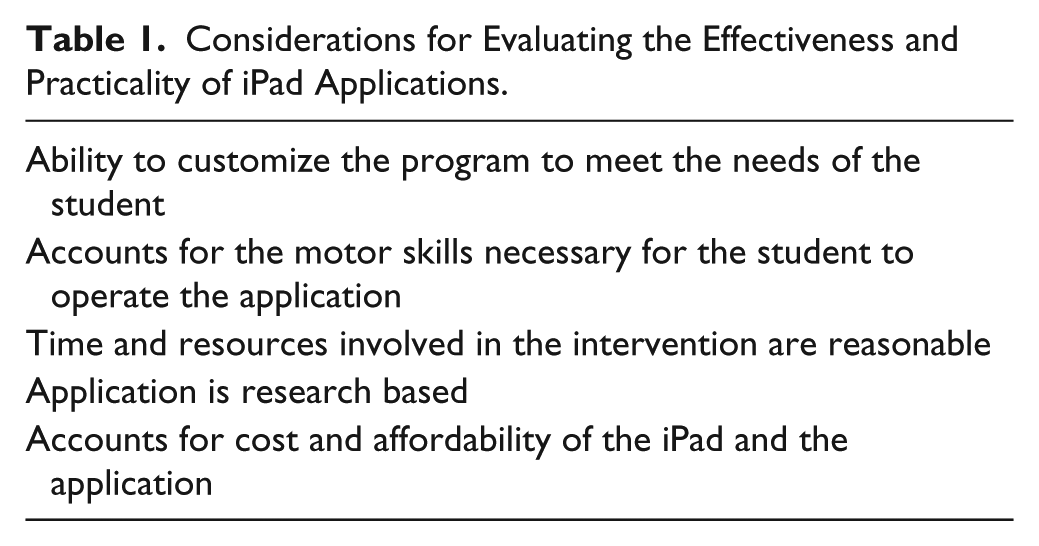
Research cannot always keep pace with the rapidly changing world of technology, requiring educators to become more adept at evaluating technology and applications for educational purposes (More & Travers, 2013). For caregivers and teachers to understand the applications available and determine the best fit, they must know about certain elements of the applications that can either help or hinder the student’s use of the application (McNaughton & Light, 2013). It is therefore the responsibility of the educators and parents to determine the child’s individual and unique needs, understand the end goals as they relate to the child’s IEP, and then use this information to select the appropriate technology (Cooper, 2005; McNaughton & Light). Early research studies of both the iPhone and iPad as tools for effective communication indicated specific criteria for effective and practical communication use (Table 1). Users should evaluate:
the ability to customize the program to better fit the individual user’s needs,
the motor skills necessary to operate the application,
the time and resources it will take to teach the user how to operate the iPad and the application,
whether the application is based on current research,
the cost and affordability of the iPad and application (Achmadi et al., 2012; Flores et al., 2012; van der Meer, Didden, et al., 2012; van der Meer, Kagohara, et al., 2012; van der Meer, Sutherland, O’Reilly, Lancioni, & Sigafoos, 2012).
Considerations for Evaluating the Effectiveness and Practicality of iPad Applications.
Criterion 1: Ability to Customize Programs
The role of AAC is to help individuals with disabilities such as ASD communicate effectively in their environment. ASD is a spectrum disorder, making it unlikely that every student with the disability will benefit in the same way from the same application or even form of AAC. That is where the customization of an application comes into play. Teachers and caregivers should be aware of certain features within an application that are taking advantage of the iPad interface to allow for customized programs, such as using the iPad’s built-in camera to create personal visual supports.
Certain programs already have built-in customization features using the iPhone and iPad interface. Proloquo2Go, for example, allows users to take photos with the iPhone or iPad camera and enter them into the application, creating customized visual supports (Sennott & Bowker, 2009). Students can use these pictures to communicate about family members or friends whose pictures are added into the system. Instead of just looking for an icon asking for candy, users can be more specific with a photo of their favorite type of candy. These added visuals allow the users to incorporate more personal and specific communication and ultimately expand their opportunities for interaction.
The default vocabulary system in Proloquo2Go allows for customization of vocabulary that goes beyond wants and needs (Sennott & Bowker, 2009). Instead of only using AAC to communicate a need, students can add vocabulary that allows them to communicate about “what they did last night or how they are feeling.”
While customization may be necessary for some students who need more specific visual cues or are ready to expand on their vocabulary, there may be certain instances where it is not necessary for a student. For instance, students who are new to AAC may become overwhelmed by too many options, so it is important to evaluate the student’s needs and potential growth with AAC before making the decision to introduce the iPad and its applications.
Criterion 2: Requisite Motor Skills to Use the App
Many students with ASD have issues with fine motor skills, which teachers and caregivers should keep in mind when deciding whether to use an iPad and a certain application (McNaughton & Light, 2013). It is important that teachers understand the student’s level of motor skills and what skill level it will take for the student to effectively use the iPad’s application before deciding to implement an iPad as AAC. It may be helpful to collaborate with the occupational therapist to determine the level of fine motor skills functioning of the student as a precursor to investigating various technologies to enhance student communication and learning.
When developers were working on creating Proloquo2Go, the iPad was not yet available, but the small, 3.5-inch touch-screen display of the iPhone was cited as a hindrance to effective use, especially for users with severe motor impairments (Sennott & Bowker, 2009). The larger screen of the iPad seemed to provide a solution to this issue. In one study, for example, a participant struggled to use the iPod Touch because of the display size, but when researchers switched the iPod Touch with the iPad, the student became more engaged (van der Meer, Sutherland, et al., 2012).
Operating the iPad requires the user to be able to push a button to unlock the screen, slide or scroll between screens, and gently touch an icon to open an application or make a selection. The larger screen on the iPad means that icons are slightly larger, increasing the surface area that users have to select the icon. For those with limited motor skills, this may be an added benefit to help them communicate more effectively.
One study comparing SGDs, manual signing, and PECS included participants who had no prior experience with SGDs and who exhibited fine and gross motor skills that were adequate for their developmental level because these traits allowed them to operate the iPod Touch (van der Meer, Didden, et al., 2012). Other studies selected participants based on an age level of 1 or higher on the Fine Motor Skills Domain of the Vineland-11, meaning they had sufficient motor skills needed to operate the iPod Touch (van der Meer, Kagohara, et al., 2012; van der Meer, Sutherland, et al., 2012). Only one of the studies reviewed taught users to turn the device on and unlock the screen, which required motor control and more steps than selecting an icon to communicate (Achmadi et al., 2012). The remaining studies taught the users to scroll between pages to select the icon they wanted or just to select the icon itself (van der Meer, Didden, et al., 2012; van der Meer, Kagohara, et al., 2012; van der Meer, Sutherland, et al., 2012).
iPads allow users to adjust the sensitivity of the screen, making it easier to scroll through and select icons. Some students may find adjusting the sensitivity necessary in order to operate the iPad. For example, if a student becomes frustrated that the icon they want to select is not being selected properly, lowering the iPad’s sensitivity may allow them to more easily select the icon. Likewise, if a student accidentally hits icons more frequently, an increased sensitivity on the screen may help him or her be more specific in selection and reduce his or her frustration level.
Criterion 3: Resources and Time Needed to Teach iPad Operation
It takes time and resources to introduce a student to any kind of AAC, including iPads. The commercial availability of iPads, however, has caused an issue for intervention. Students are not always getting the proper intervention for the device because they do not have to go through such a routine evaluation as they would have to with another SGD; instead, they can buy it at an Apple Store and begin using it immediately (McNaughton & Light, 2013). Since the iPad has only been around for a few years, there is no set procedure for teaching children with ASD how to operate and communicate with an it. Instead, each teacher must determine the most appropriate way to implement the iPad. On the other hand, PECS has been around longer, and researchers have found a six-step teaching method that effectively teaches children how to use this system, starting with the presence and exchange of one picture and moving up to a communication book with sentence strips (Flippin, Reszka, & Watson, 2010). In this system, students start to learn how to make requests and later move on to learn how to make comments using the system (Flippin et al., 2010). Some applications on the iPad are modeled after this concept, so teachers and caregivers may find it useful to review these strategies as well while incorporating training specific to the iPad’s operation.
Researchers have explored how to teach students to initiate a request using touch-screen devices. In recent studies, students were shown an iPod Touch with a screen showing just one page of two symbols that allowed them to request either a snack or playtime from two preferred stimuli (van der Meer, Didden, et al., 2012; van der Meer, Kagohara, et al., 2012). Sessions with one of three AAC devices, including the iPod Touch, were conducted for either two to four times per day for sessions of 5 or 10 minutes (van der Meer, Didden, et al., 2012; van der Meer, Kagohara, et al., 2012) or two to four times a day for 5 minutes per session (van der Meer, Kagohara, et al., 2012). In these studies, teachers placed a tray of toys or snacks out of reach of the student and set the AAC device near them. The instructor said, “Here’s a tray of snacks (toys). Let me know if you want something.” If the student didn’t respond within 10 seconds, the tray was moved closer in order to provide motivation (van der Meer, Didden, et al., 2012; van der Meer, Kagohara, et al., 2012). The two students with ASD required 13 and 14 sessions with the iPod Touch before reaching acquisition of the concept (van der Meer, Kagohara, et al., 2012). When teaching more advanced operations, (e.g., multiple word requests), additional sessions were required because each new skill taught required a new intervention (Achmadi et al., 2012).
Despite slight changes in experimental design, these studies had a few traits in common. The use of the device was taught in conjunction with preferred stimuli, thus creating motivation for the student to participate and use the device (Achmadi et al., 2012; van der Meer, Didden, et al., 2012; van der Meer, Kagohara, et al., 2012). Moreover, teachers or others giving the intervention used graduated guidance until the student could make requests or complete the skill independently (Achmadi et al., 2012; van der Meer, Didden, et al., 2012; van der Meer, Kagohara, et al., 2012). It is also important to note that the intervention and acquisition took time. The intervention was not something to complete in one day but rather was gradually introduced during a school day and built up progressively over a number of days until the student could perform the skill independently (Achmadi et al., 2012; van der Meer, Didden, et al., 2012; van der Meer, Kagohara, et al., 2012).
While the iPad system takes time to learn, some find that it has time-saving advantages in other areas. Adults may feel more comfortable introducing the iPad because it is an everyday device for many, whereas other AAC devices require them to master a whole new technology system complete with various menus, navigation, and commands (McNaughton & Light, 2013). Flores et al. (2012) asked teachers to rate their experience teaching a child how to use both PECS and an iPad for communication. Instructors who were surveyed showed a preference for the iPad system due to its ease of use, decreased preparation time, fewer materials needed overall to implement, and increased speed of students’ communication (Flores et al., 2012). Although both the iPad and PECS require preparation and time to implement, researchers concluded that the iPad may be advantageous because it requires the least work of the two systems, whereas picture-based systems require instructors to prepare picture cards, store the cards, and move them from place to place (Flores et al., 2012). Since the iPad contains all the pictures on the device, it may be easier to transition from one activity to the next.
Criterion 4: Research Basis for Popular Software/Apps for iPads
A simple search for “autism communication” iPad apps in the iTunes store yields too many results for parents and teachers to know which applications will reliably and effectively assist the child. Teachers may find it helpful to start by evaluating applications made by educational companies, whose application developers may possess some experience working in the education field. It should be noted that application developers vary in credentials and experience, which is why teachers may find it helpful to investigate the background of the application. Teachers can also consult education journals in the field of special education that publish informative and research-based articles on special education assistive technologies.
Parents should look for recommendations from autism organizations such as Autism Speaks, the Organization for Autism Research, and the Council for Exceptional Children. These organizations provide background information on characteristics of and interventions for ASD, AAC, and resources for parents. Autism Speaks lists applications by rating them on their research basis (Autism Speaks, 2013). Some organization websites offer forums for parents to ask questions, which also may offer the opportunity to ask other parents which applications they have found helpful and which ones didn’t work as effectively. See Table 2 for a list of useful websites for teachers and caregivers.
Useful Websites for Teachers and Caregivers.
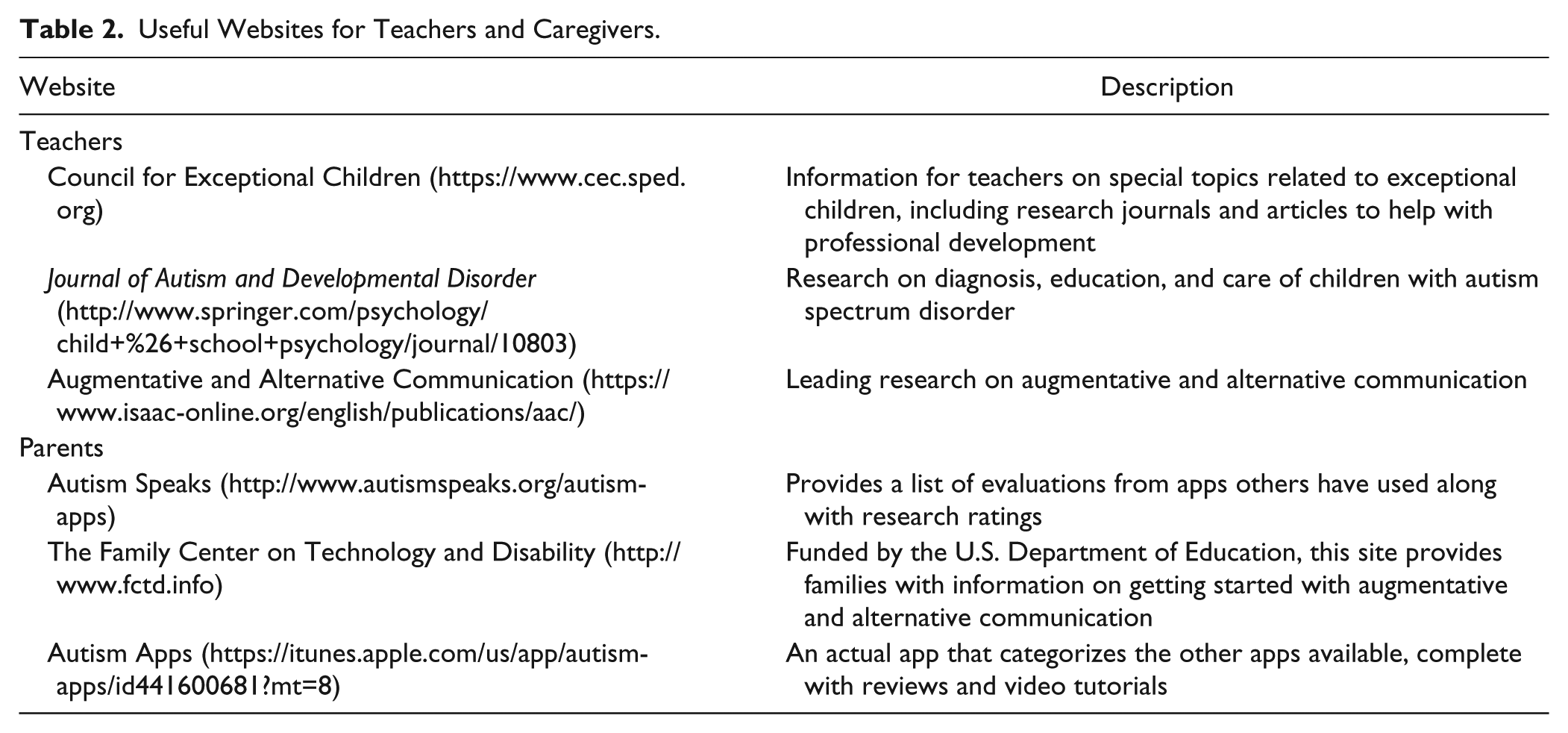
For both teachers and parents, it is critical to look for applications that are created with evidence-based practices (Boone & Higgins, 2007). While this information may be hard to find, some application developers have written articles outlining the research-based practices they used in developing the software. Proloquo2Go, for example, published an article outlining how they used the iPhone’s interface to allow customization of pictures taken by the iPhone’s camera and utilized the swiping technique to benefit students with limited motor skills (Sennott & Bowker, 2009). Many of the researchers cited in this article also used Proloquo2Go either on the iPod Touch or iPad while implementing their studies (Achmadi et al., 2012; Kagohara et al., 2013; van der Meer, Didden, et al., 2012; van der Meer, Kagohara, et al., 2012; van der Meer, Sutherland, et al., 2012). One study asked developers to create Pick-a-Word, an application, because at the time of their study other applications were not yet available (Flores et al., 2012). Knowing which types of criteria, technologies, or applications researchers are using in their studies may also provide some validation on the effectiveness of the application.
Criterion 5: Cost/Affordability
While researchers acknowledge that iPads and applications may be less costly than other speech-generating devices, they warn that not enough research is available to conclude that the iPad is always a better option. It is important to deliberate on the fact that the resources saved by investing in devices such as iPods and iPads may be more expensive in the end if they do not result in effective and efficient communication (Flores et al., 2012). In addition, most iPad applications do not come with the same level of technical support, if any, that a standard SGD would. This is a factor that most parents and teachers do not often consider when comparing the cost (McNaughton & Light, 2013).
Aside from the cost of the iPad itself, teachers and caregivers need to consider the cost of each individual application. Some iPad applications, including many games, are free. However, the communication applications typically have a cost associated with them. A recent check of Proloquo2Go indicated the cost was $189.99 in the iTunes app store. MyTalkTools Mobile, which was mentioned in one study, was $99.99 in the iTunes app store. Teachers and caregivers should be aware of pricing because an expensive price tag may not necessarily signify the highest quality. Correspondingly, cheaper options may not provide the full support for students being sought in an application. At this point, the other criteria described previously may come into play to determine the appropriate application.
Some application developers allow a trial period for their product, giving teachers and parents a chance to test out the application first before committing to the expensive product, which may offer better results and give the teachers and parents more control over choosing the appropriate program for the child. MyTalkTools Mobile, for example, offers a less comprehensive application known as MyTalkTools Mobile Lite, which is free through iTunes. Users can download this version of the application to test out the interface before committing to the more comprehensive MyTalkMobile. If an application doesn’t currently allow a trial period, teachers and caregivers may consider contacting the developer to see if a trial is possible. In this way, they can use the application and begin implementing it with the student. If it does not seem to be working, they can end the trial and try something else.
Conclusion
While researching these criteria for evaluating iPad application use, we found a few limitations. First, the iPad is still relatively new to the education field. The amount of research available in this particular field of communication for students with ASD remains limited. Furthermore, some investigators had to create their own application in order to research iPad usage because the product was so new that applications were not yet available. Now that more applications are available, more studies on individual applications or comparing two or more applications could be useful to teachers and to caregivers as well. In addition, most of the studies reviewed only investigated students using the iPad apps to make a request. Future research on other types of communication (e.g., communicating needs, greetings) may be beneficial. Further research should also examine how schools are actually using iPad technology in the classroom. Last, as more tablets become readily available, researchers should investigate the different types of tablets and expand their research beyond the iPad.
Research focusing specifically on the most efficient way of implementing the iPad itself is also needed. Researchers cited their method for introducing the iPad, but research on the most effective means of intervention was limited or not available. As previously noted, whereas an actual process for introducing PECS is established, teachers and caregivers would benefit from a research-based process for iPad intervention.
The criteria for evaluating the iPad technology should be used wholly, as a composite set, and not individually. All five criteria should be taken into consideration, not just one or two. It is important to periodically reevaluate the criteria as well, especially as students’ motor skills may be refined or new applications become available, to ensure that the technology is still helping the child reach his or her end goals (More & Travers, 2013). Technology is constantly being updated, so teachers and caregivers should be aware of changes or updates to the iPad and the applications they are currently using. In Figure 1, a rubric encompassing the five considerations is provided to enable teachers and caregivers in the process of evaluating iPad apps to promote the communication of their students with ASD. Applying this tool and the principles therein, educators and caregivers can continue the search for the most useful apps to facilitate the communication of their children with ASD.

Rubric for evaluating iPad apps to improve communication skills of students with autism spectrum disorder.
Footnotes
Declaration of Conflicting Interests
The author(s) declared no potential conflicts of interest with respect to the research, authorship, and/or publication of this article.
Funding
The author(s) received no financial support for the research, authorship, and/or publication of this article.