







Abstract

Management Journals’ Statements on Double-Anonymous Review
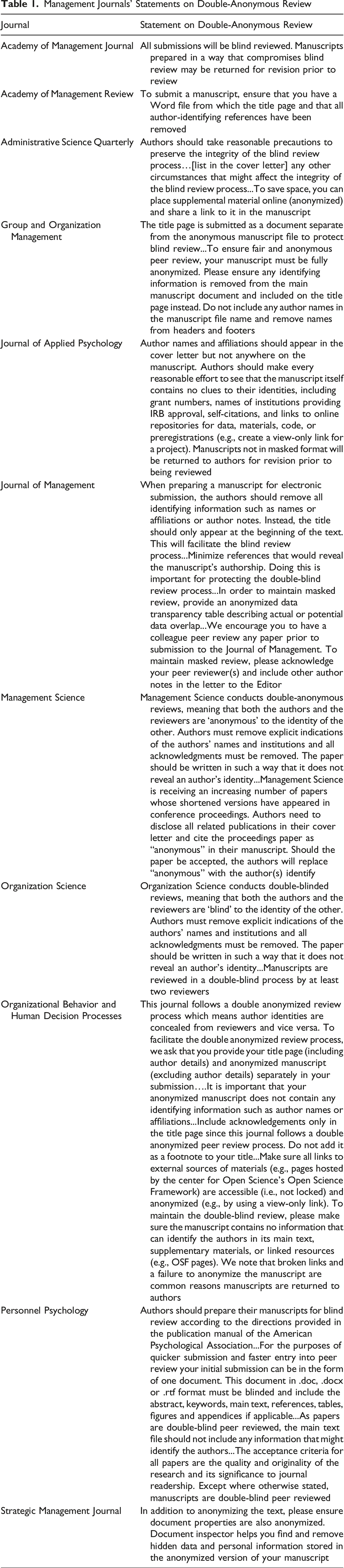
Researchers have studied (e.g., Blank, 1991) and debated (e.g., Nature editors, 2008; Shoham & Pitman, 2021) the merits of double-anonymous review. Compromising anonymity can negatively impact authors lacking prestige (MacDonald & Kam, 2007; Tomkins et al., 2017), of traditionally marginalized identities (Giannakakos et al., 2025; Teele & Thelen, 2017), and lacking influential personal relationships (Carland et al., 1992; Lipworth et al., 2011). Indirectly compromising anonymity (e.g., disclosing author count) could also influence outcomes. Articles in top management journals typically comprise two to four authors 1 . Skeptics of large author teams (e.g., Grant et al., 2018; Scott, 2024) may respond negatively to manuscripts with large teams that violate this norm. Sole-authored manuscripts may also experience unique challenges in peer review (König & Ropers, 2018). Therefore, when integrating new processes, such as open science practices (OSP), guidance for preserving anonymity is critical.
OSPs aim to increase research transparency through practices such as data sharing, posting materials, replication, and preregistration (Banks et al., 2019), thus strengthening the credibility of organizational science (Rudolph, 2021). While the use of OSPs has grown recently, there have been calls for publishers to expedite their implementation (Torka et al., 2023) and for scholars to adopt OSPs that are most accessible to them (Castille et al., 2022), whether or not they are required by journals (Banks et al., 2016). OSP adoption has been slower than many would prefer, but actual adoption rates may exceed perceived rates (Ferguson et al., 2023).
Discussion about preserving author anonymity while engaging in OSPs, however, has been limited. For example, while the Journal of Applied Psychology (JAP) instructs authors to “make every reasonable effort to see that the manuscript itself contains no clues to their identities, including…links to online repositories for data, materials, code, or preregistrations,” the only resource JAP provides to authors is the Open Science Framework’s (OSF) instructions for creating an anonymized view-only link (Journal of Applied Psychology, 2025; Open Science Framework, 2025). Guidance on preserving anonymity when engaging in OSPs is typically incomplete and fragmented across various websites. Consequently, researchers engaging in OSPs often unknowingly compromise double-anonymous peer review (Briker, 2024).
Articles that Include Terms Associated with Different OSP Tools
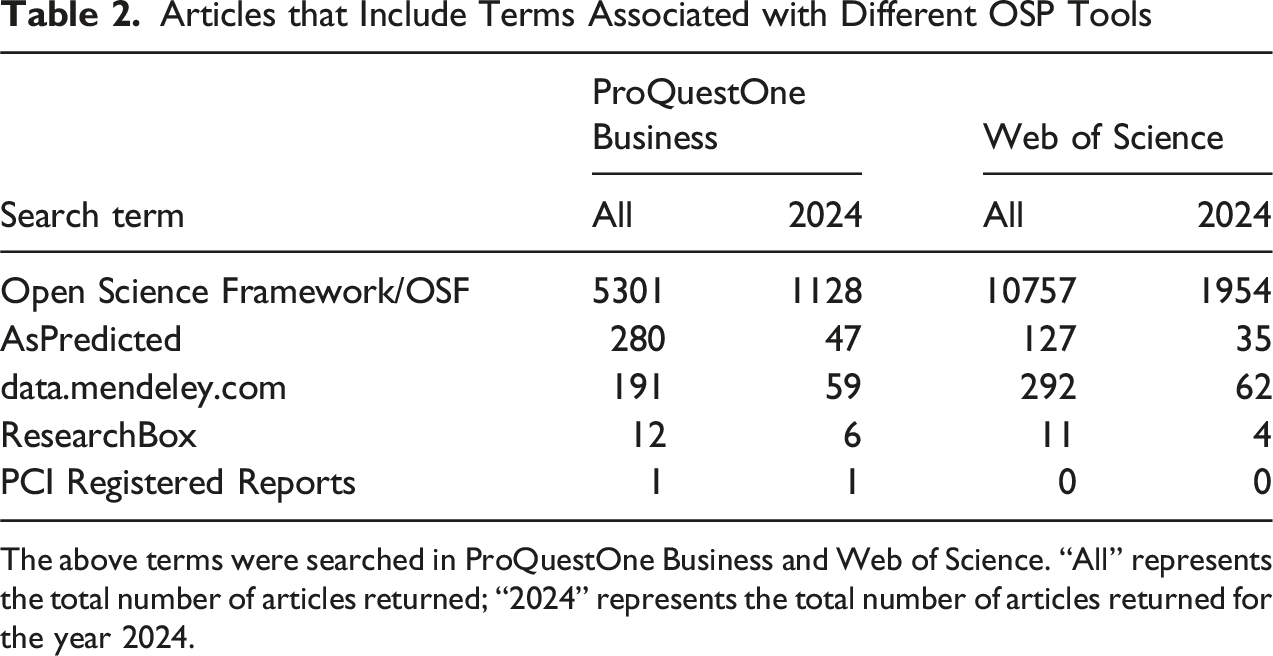
The above terms were searched in ProQuestOne Business and Web of Science. “All” represents the total number of articles returned; “2024” represents the total number of articles returned for the year 2024.
Anonymizing Your OSF Project
Researchers using an OSF project to support OSPs in their research may wish to share that OSF project with reviewers during the peer review process. OSF supports this by allowing users to create “anonymous view” links for their projects while projects are still in private mode. When a user shares an “anonymous view” link, the reviewer will see a version of the OSF project in which all references to researchers refer to “a user.” For example, where recent activity would typically say “[author name] initiated a registration of a project,” when using an anonymous view link, the reviewer will see “A user initiated a registration of a project.” The anonymous view lists contributors as “Anonymous Contributors,” even when there is only one contributor on the project. This helps to preserve double-anonymous review by anonymizing both contributor names and the number of contributors. The anonymous view link will share the name of the project, so researchers should be careful not to include identifying information in project names (e.g., “Bruce’s dissertation”). As long as the project is still in “Private” mode (i.e., has not been made public), it will not be discoverable in the OSF database.
The steps for creating an anonymous view link are simple. As shown in Figure 1, from within the project, the researcher will access the settings tab and scroll down to the “View-only Links” box. Creating a view-only link allows reviewers to view, but not edit, a project that is in “Private” mode. Clicking the green “Add” button will open a new dialog box entitled “Create a new link to share your project.” Within this dialog box, the researcher should click the checkbox next to “Anonymize contributor list.” While adding a link name is optional, it is recommended because it can help researchers identify the anonymous view link later on, particularly if the researcher uses a self-explanatory name such as “peer review” or “anonymous sharing.” The resulting link can be shared within the manuscript during peer review. Creating an Anonymous OSF Project Link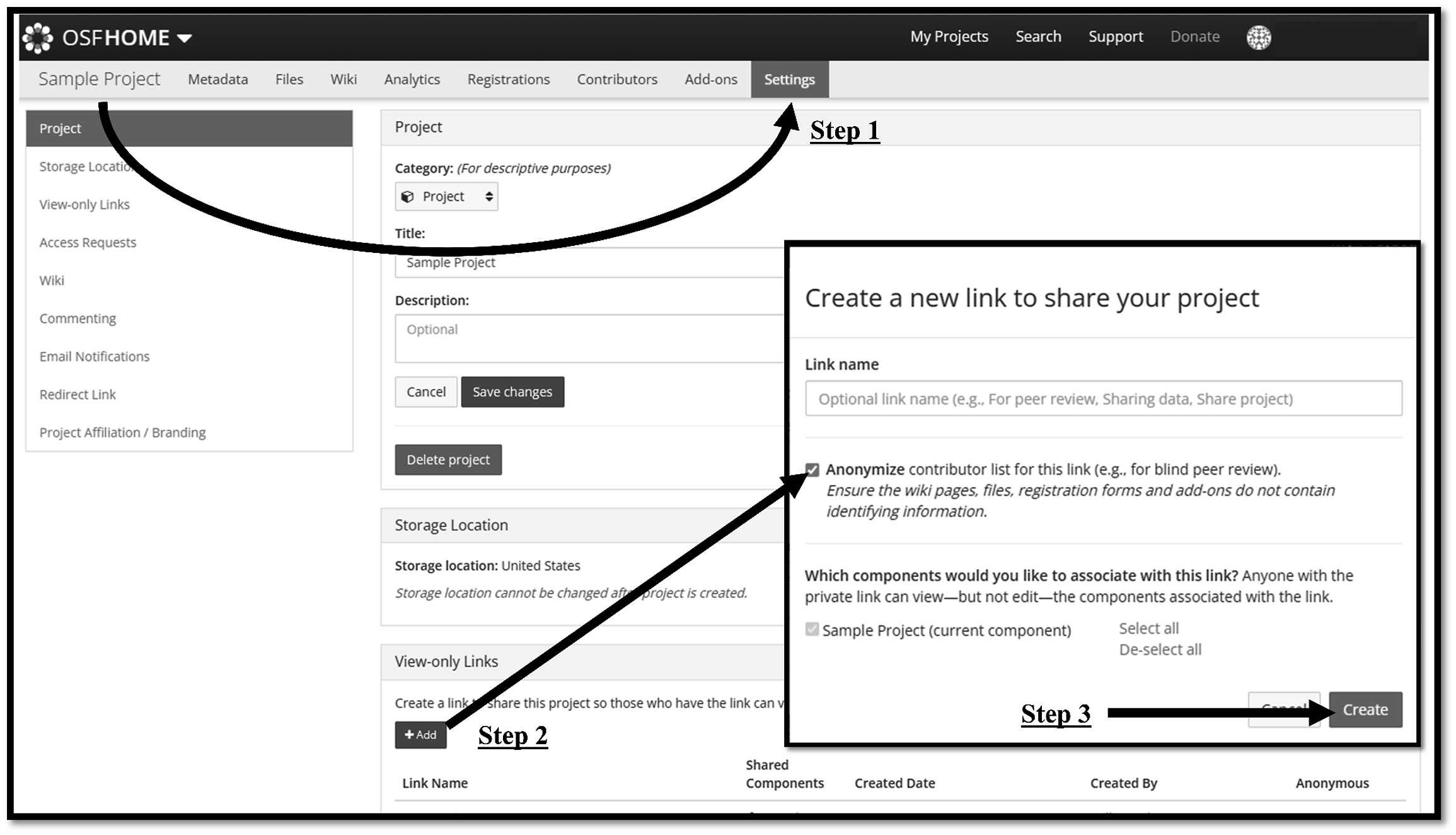
Researchers should recognize that creating an anonymous view link for an OSF project anonymizes the framework for the project, but it does not fully anonymize the project. Elements of the preregistration or materials shared within the project can still disclose information about the identities of researchers associated with the project. In the following sections, we will go into greater detail about steps to anonymize preregistrations and materials within an OSF project.
Sharing Anonymous Preregistration
The pathway to anonymizing and sharing a preregistration will vary depending on the preregistration tool being used. The most commonly used preregistration platforms in the organizational sciences are AsPredicted and the OSF (Logg & Dorison, 2021). Because preregistration from either one of these platforms can be integrated into an OSF project, we provide guidance for anonymously sharing preregistrations created with both platforms.
AsPredicted Preregistrations do not Fully Protect Anonymity
Many researchers use OSF to house their OSP materials, but create their preregistrations on another site such as AsPredicted. The process for using AsPredicted (aspredicted.org) is straightforward. After logging into their AsPredicted account, the researcher will click the blue button that says, “See All” and is located next to the text “see your pre-registrations.” Then, select the preregistration to be shared by clicking on it. Scroll to the bottom of the pre-registration, and there will be instructions for sharing the preregistration. Click on “Anonymous PDF.” After agreeing to the terms, there will be an option to “Make Anonymous PDF.”
AsPredicted will then provide a link to an anonymous copy of the preregistration. The researcher can refer to that link within their manuscript, share the link within their OSF project, or use the link to create a PDF that can be uploaded to their OSF project. To create a PDF, simply visit the anonymous AsPredicted link and select “Download PDF.” If choosing to upload the PDF to an OSF project, the researcher should verify that the document properties have been anonymized. This is discussed more in the next section.
Researchers should be aware that as of the time of this manuscript, AsPredicted has two potential limitations that may compromise anonymity. First, as shown in Figure 2, while the anonymous preregistration is clearly marked as anonymous, it does disclose how many authors are associated with the project (up to five authors). While it does not disclose the identity of the author(s), it does share information about the structure of the author team. Therefore, if team structure is inconsistent with the two-to-four-author norm discussed above, disclosing the number of authors may activate a bias related to team structure. Sample Anonymous Preregistration From AsPredicted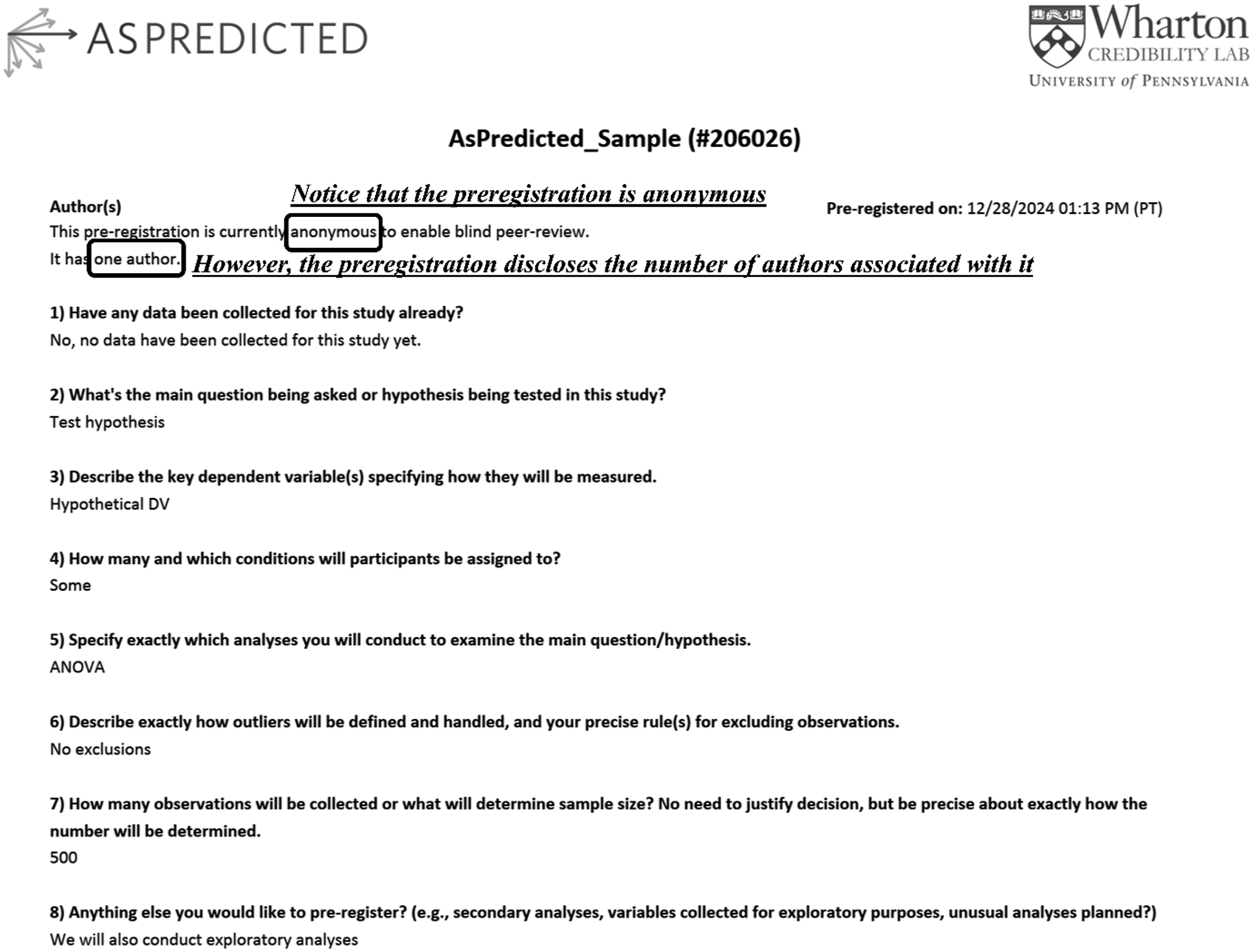
The second limitation may be exposed if a reviewer suspects that they know the identity of an author and has a desire to confirm their suspicions. AsPredicted’s website allows users to verify if a preregistration’s ID number is associated with a researcher’s last name. To do this, the user would go to AsPredicted’s home page and select the blue “Look Up” button. They would then enter the last name of the suspected author and the AsPredicted ID number provided on the preregistration (206026 in the example provided in Figure 2). If the author were guessed incorrectly, AsPredicted would return a message that reads, “Seems like none of the authors of pre-registration #[registration number] has the entered last name [last name].” However, if the author were guessed correctly, the reviewer would be taken directly to the preregistration, confirming that they identified the author correctly. 2 For years, the specialized nature of our field has provided reviewers with tools to identify authors (Hillman & Rynes, 2007), thus there may always be threats to anonymity. However, the AsPredicted feature described above serves as another potential threat to double-anonymous peer review.
For researchers who have used AsPredicted for their preregistration but wish to preserve double-anonymous review, they should redact their preregistration PDF before uploading. The most transparent way to do this is to enter black boxes over any information that must be redacted. In Figure 2, this would be (1) the number of authors listed, and (2) the preregistration number (i.e., 206026). It is important to note, though, that boxes inserted over text can be deleted by another user so the file must again be “printed to PDF.” Printing to PDF uses a virtual printer and essentially mimics the printing and scanning of a file. Consequently, these boxes become integrated into the file differently than simply saving and cannot be easily deleted. After cleaning the file’s metadata of identifying information as described below, the resulting file can be uploaded to the OSF project where it can be easily accessed by reviewers. Although it should be obvious, it may be helpful to also upload a document explaining to reviewers that the preregistration has been redacted.
OSF Preregistrations are not Automatically Linked to Anonymous Projects
Given the potential for preregistrations created using AsPredicted to compromise double-anonymous review, researchers may prefer to create preregistrations using OSF. If they are already building a project on OSF, this may introduce some efficiencies for both the researcher and readers. Once the manuscript is published and the OSF project is made public, preregistrations can be easily accessed through the “Registrations” tab at the top of the project. However, the “Registrations” tab is not available to viewers using an anonymous link. Consequently, researchers who share an anonymous OSF project link in peer review may mistakenly think that they are sharing preregistrations. This could contribute to Simonsohn’s (2023) concern about not being able to locate OSF preregistrations.
The preregistration should be removed from draft mode before collecting data. Before removing from draft mode, however, the researcher should review the preregistration for identifying information. For example, in the “Data collection procedures” section, researchers should ensure that they have not stated the name of the university or organization in which they are collecting data. To preserve anonymity, researchers should remove OSF preregistrations from draft mode by entering registrations into an embargo (see Figure 3). This strengthens anonymity by ensuring that the preregistration is not discoverable in the OSF database. Preregistrations should be embargoed for the maximum time allowable because embargoes can be ended early, but they cannot be extended. Registering an OSF Preregistration Using an Embargo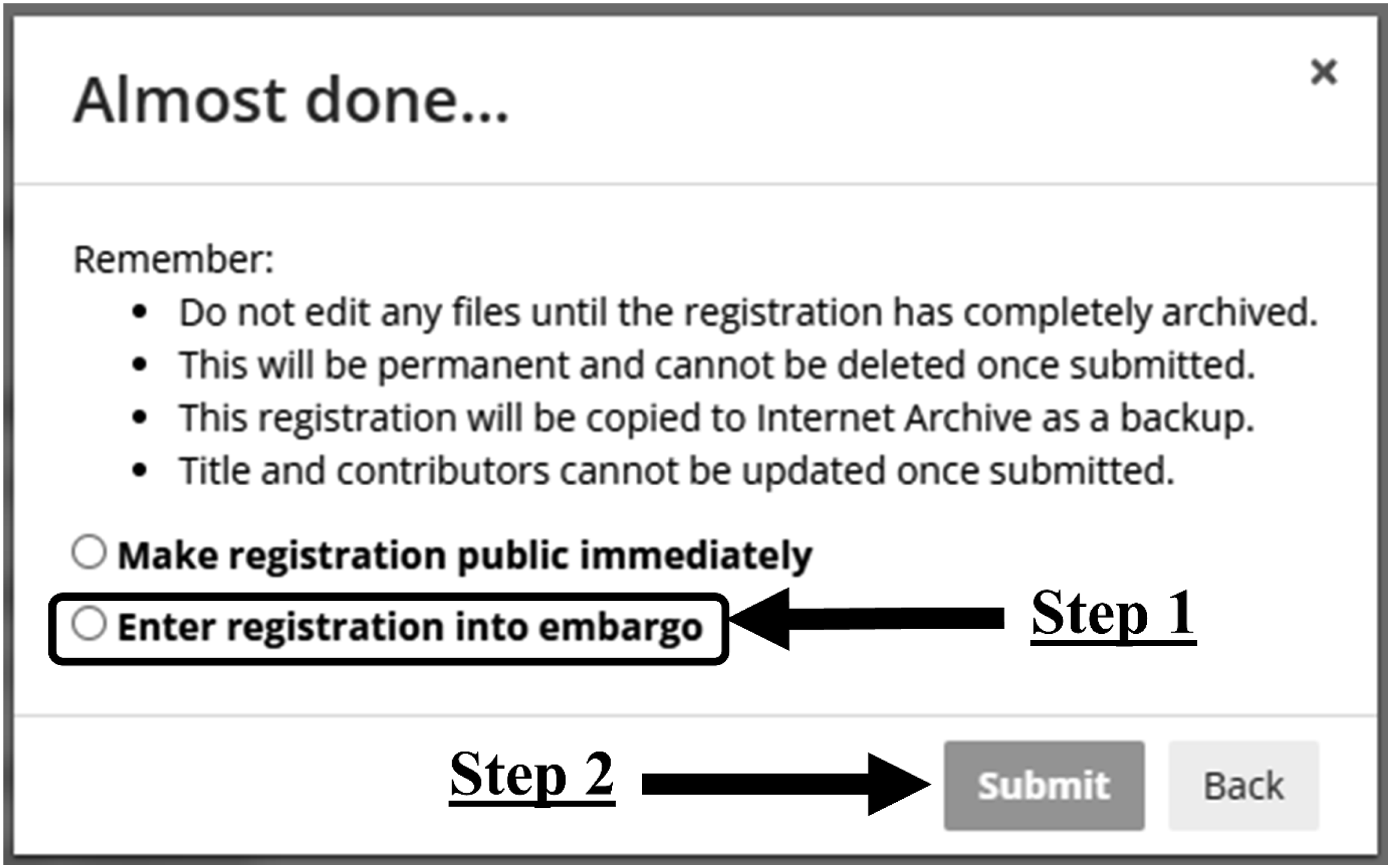
After removing the preregistration from draft mode, the researcher can create an anonymous view link for the preregistration. This process, which has never been intuitive, was recently changed to become even more complex. The complexity of the process for creating anonymous view links for preregistrations likely contributes to some of the challenges researchers experience sharing these preregistrations. The first step in creating the anonymous view link for a preregistration is to access the embargoed or public preregistration and select “Wiki” or “Analytics” (see Figure 4). Either selection will load a screen that includes “Contributors” in the navigation heading. The next step is to select “Contributors.” Please note that this will take the researcher to a different page than if they access the project’s metadata and select contributors. As described in this manuscript’s OSF project, users can no longer create anonymous preregistration links through the metadata page. Steps for Creating an Anonymous View Link for OSF Preregistration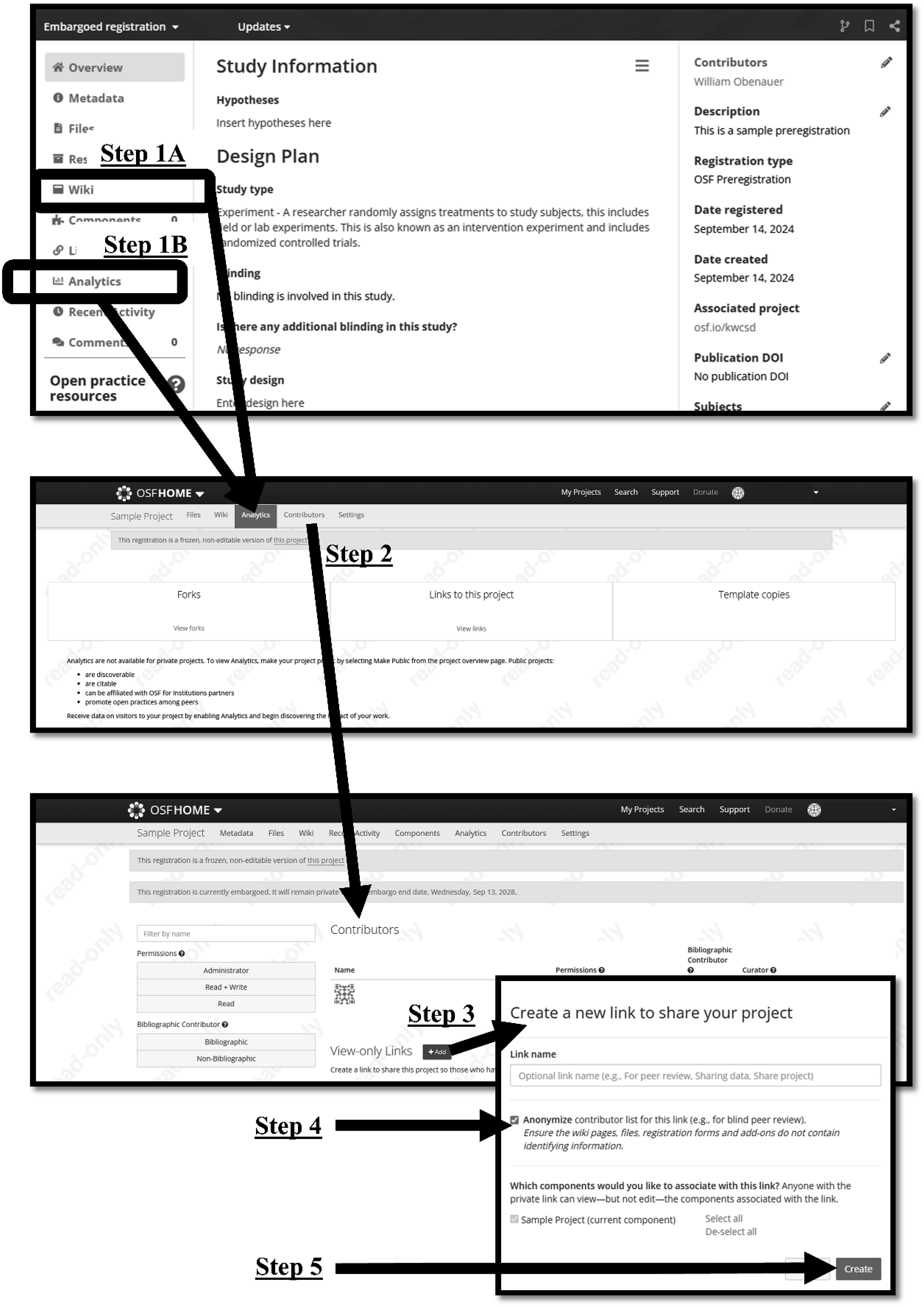
At the bottom of the contributors page is a “View-only Links” section. After clicking the green “Add” button, a new dialogue box will appear. Similar to the process described above for creating anonymous project links, the checkbox next to “Anonymize contributor list” should be checked, and the link should be given a recognizable name (e.g., “Peer review preregistration”) before creating the link.
To share the preregistration link, there are several options. The first option is to include it directly in the manuscript. This is the most straightforward option, but it can create complications with deanonymizing preregistrations post-acceptance. Anonymous OSF links do not convert to public links after a project goes public so all anonymous links in the manuscript must be replaced before the manuscript goes into production. Researchers can maintain more control over the deanonymizing process by sharing the preregistration links within the OSF project. The simplest way to do this is to share preregistration links within the OSF project’s “Wiki” by editing the Wiki on the project’s home page (see Figure 5). This positions the links in a location where they are easy for reviewers to find. Alternatively, the researcher can organize preregistration links in a file, clearly name the file (e.g., “Preregistration Links”), and upload the file to the OSF project in the “Files” section. Both of these methods can be used for preregistration links created using the OSF or AsPredicted. Adding Links to a Project Wiki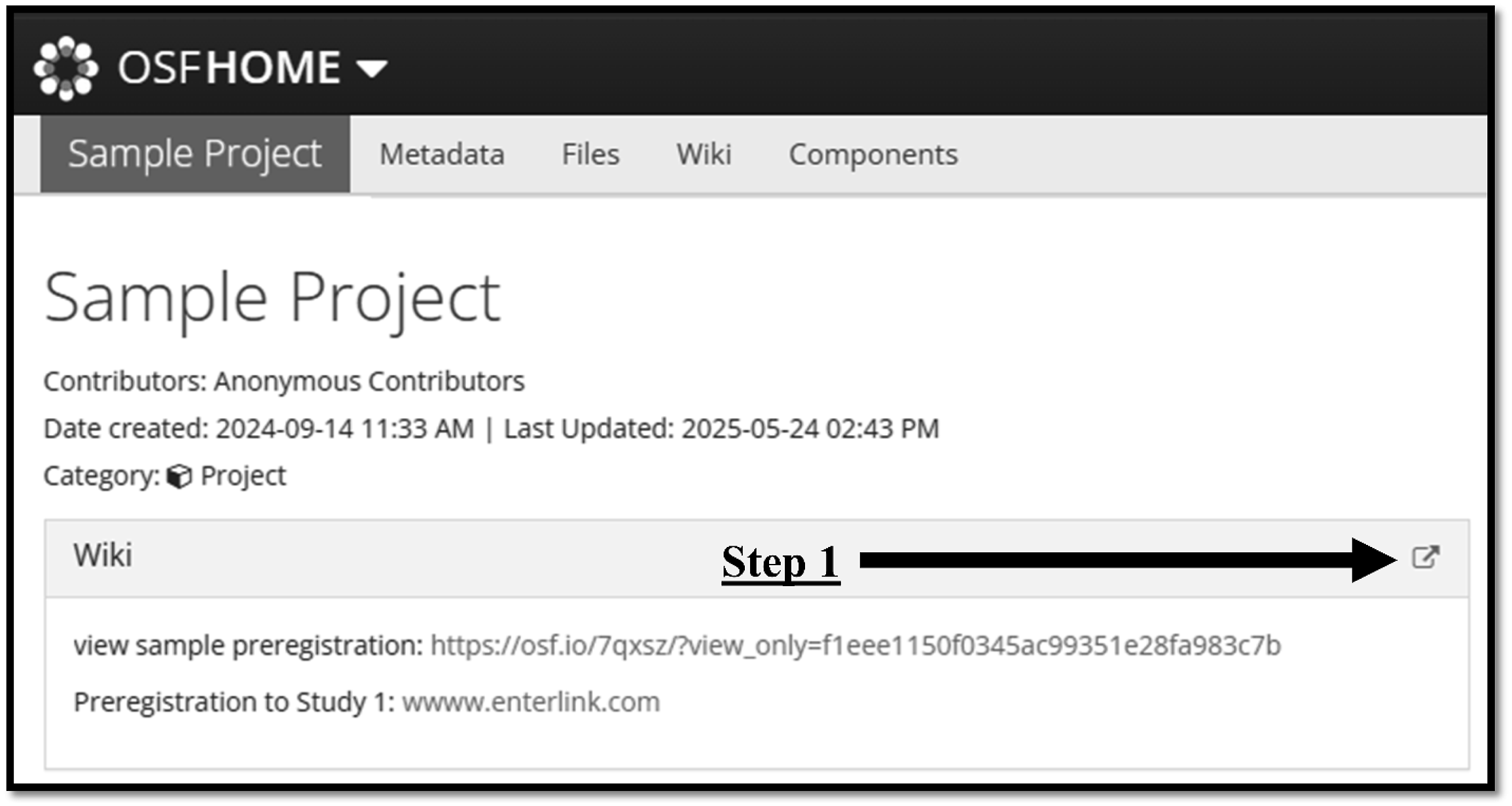
At this point, it is worth addressing concerns about anonymity being compromised by altering OSF links. In academic circles, there have been claims that removing the query string from an anonymous OSF link will deanonymize it. While this concern has some basis in fact, it is based on a general misunderstanding. For example, if we look at the anonymous link shared in Obenauer and Kalsher’s (2023) paper described below (https://osf.io/6wfet/?view_only=e1baa7ba5fba4f869fd5693cfd578039), the query string is everything from the question mark on. If we deleted the query string, the link https://osf.io/6wfet would appear to take us to a deanonymized project, but only because the project is public. If the project were private, this would not work. To illustrate, we’ll look at the anonymous link for this manuscript’s sample project (https://osf.io/kwcsd/?view_only=2411c93526834f4fad72afc8f28cdc85). If we remove the string query, the link https://osf.io/kwcsd will not lead us anywhere. This should alleviate concerns that anonymous OSF links can be stripped of their anonymizing characteristics. As long as a project is private or a preregistration is embargoed, removing the query string will not deanonymize the project or preregistration. However, researchers should test their links to ensure that they are working and anonymous before including them in a manuscript. These tests should be done in an incognito browser or when the researcher is not signed into their OSF account.
Finally, the researcher may choose to upload a printed PDF of the preregistration to their OSF project instead of sharing the preregistration link. This is particularly likely if they have noticed identifying information in their preregistration. This most commonly occurs when researchers copy text directly from their IRB protocols to their OSF preregistrations and forget to redact this information. For example, in the example preregistration found at (https://osf.io/kb8nj/?view_only=81856c8b9be34d27b21ca0b5fb943de3; see Figure 6), the researcher has accidentally compromised anonymity by including a unique course number and the name of their university in the description of data collection. They have also uploaded a file with their last name in the file name. Unlike the general OSF project, where information can be updated at any time, the information entered into a preregistration is archived once the preregistration is embargoed or made public. This archiving allows viewers to review the original or current version, thus after the preregistration is embargoed or made public, any identifying information accidentally included in an OSF preregistration cannot ever be fully removed. Anonymizing a Compromised Preregistration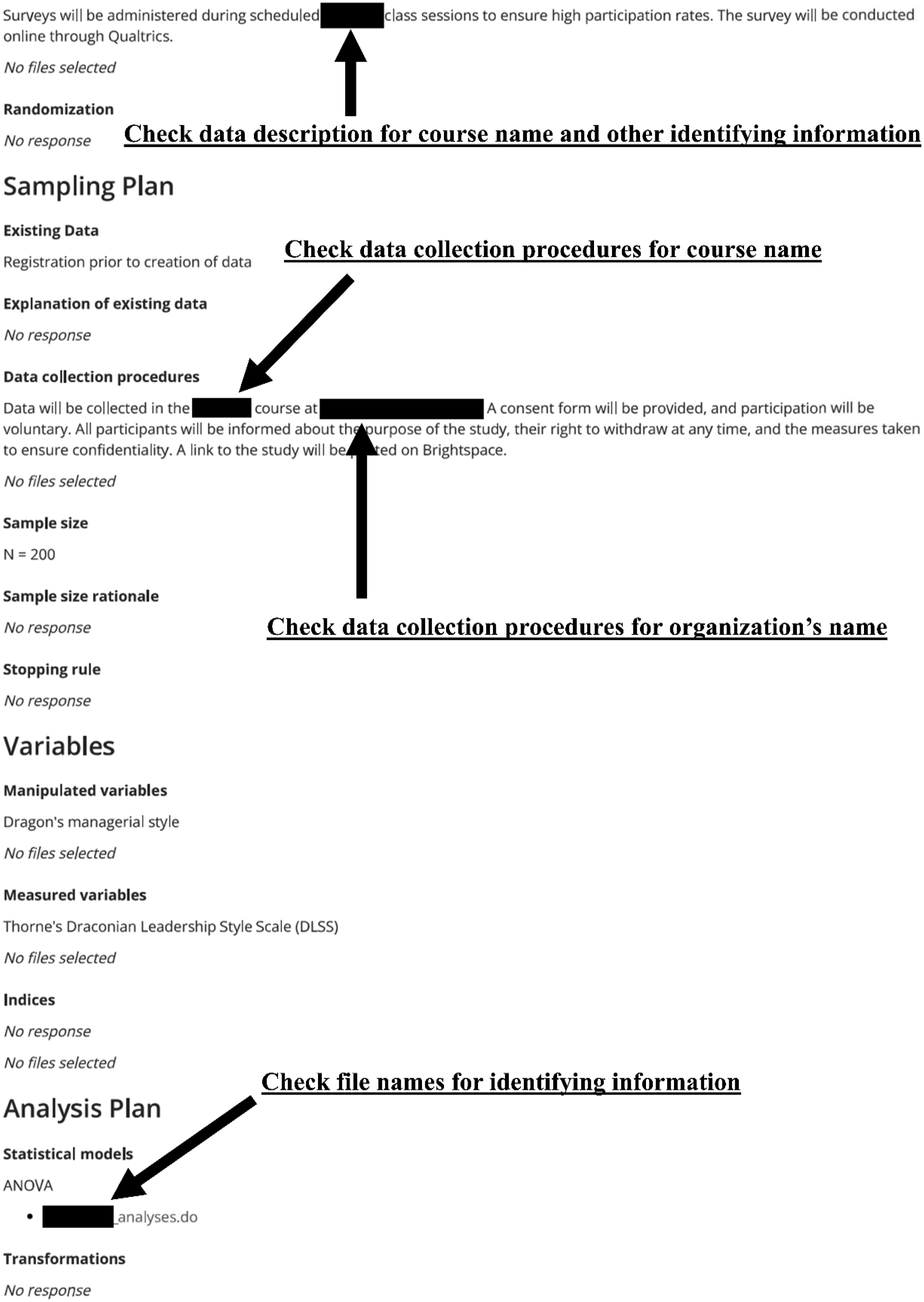
This information, however, can be redacted if the preregistration is converted to a PDF. To do this, the researcher will still need to create an anonymous link using the steps described above. Then the researcher will need to access the anonymous link and print to PDF. Then, similar to the process described for AsPredicted preregistrations, they will edit the PDF to redact the file by entering black boxes over any information that must be redacted (see Figure 6). As described above, because these boxes can be deleted by another user, the file must be printed to PDF a second time and stripped of identifying metadata before uploading to the OSF project.
It is also possible that the preregistration can have documents attached that compromise anonymity. This most frequently happens when survey documents or analysis files are attached to preregistrations (discussed more below). Even if these documents are deleted from the OSF project, they remain attached to the preregistration. Printing the preregistration to a PDF and uploading it to the project files (instead of sharing the link) should prevent reviewers from accessing the link as file links are typically deactivated through the print to PDF process. Researchers should double-check that the file links are deactivated before uploading a preregistration PDF to the OSF project. If printing to PDF fails to deactivate the file link, the preregistration can be printed to paper and manually scanned to PDF. This will ensure that the file link is not functional.
Anonymizing Documents
Briker (2024) recently summarized his experience reviewing for top management journals saying that researchers often anonymize their OSF projects, but not the components within their projects. This section outlines steps that researchers should take to anonymize files uploaded to their OSF project. It also discusses files that may need to be withheld from the OSF project until after peer review.
Including an author’s name or initials in a file name is a basic file-naming convention (Parker-Wood et al., 2014). However, this practice compromises anonymity in the peer review process. Researchers should review file names for identifying markers before uploading them to their OSF project.
Additionally, the metadata on files (e.g., Word, Excel, PDF) often includes identifying information. How to remove this identifying information varies by file type, but we provide an example using Microsoft Word to ensure that researchers fully comprehend the problem. In a Microsoft Word file, the researcher should click the “File” tab and select “Info.” As shown in Figure 7, there are several places where identifying information could emerge on this page (e.g., tags, manager, author, last modified by). To remove data from all applicable fields, the researcher should select “Check for Issues” followed by “Inspect Document.” After inspecting the document, Word will prompt the user to remove identifying information. The process for removing identifying information will vary by program (e.g., in PDF, this information is in the “Document Properties” menu item) so researchers are encouraged to investigate the appropriate process for the program(s) they are using. This step should be repeated just before uploading the file because any changes made to the file could result in the metadata being updated. Removing Identifying Data From Document Properties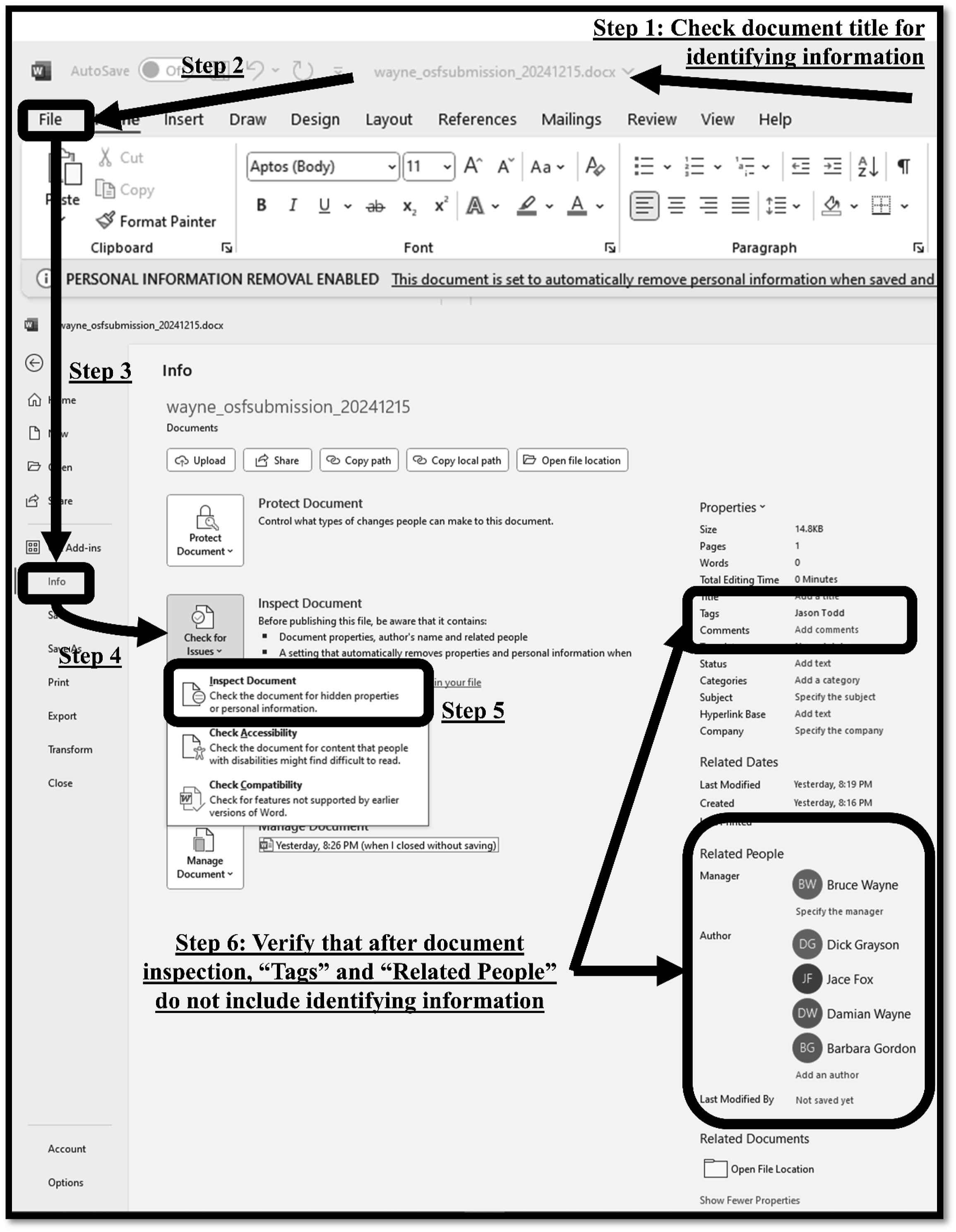
Related to file metadata, remnants from edits or collaborations are sometimes present in documents uploaded to the OSF, particularly when using Microsoft Word. For example, if the “Track Changes” function was used, but all changes were not accepted/rejected, the suggested edits will remain in the document. Each of these edits discloses the identity of contributors. Similarly, comments that are not removed from the document also disclose the identity of the contributor through either the name of the user associated with the comment or the actual content of the comment itself. If tracked changes and/or comments are hidden in Word and the file is converted to a PDF before uploading to the OSF, the identifying information will be visible in the PDF as well. Before uploading documents to the OSF for peer review, researchers should resolve all tracked changes and delete all comments to preserve anonymity.
Perhaps the most overlooked aspect of files that can reveal identifying information, however, is their actual content. For example, shared syntax (i.e., analysis code) files may include lines used to open datasets: use “C:\Users\[user identifying information]\OneDrive – [university pathway with identifying information]\folder_name\file_name.dta”. Sharing the exact file path in an OSF project is unnecessary. This should be replaced with a line such as: ***open [insert file name identical to file name shared on OSF project]***. Syntax files should also be reviewed for comments that may compromise anonymity by mentioning names, locations, or other identifying information. Even if comments do not specifically include identifiable information, syntax files could include comments in languages other than the journal’s primary language that could activate biases related to nationality (Giannakakos et al., 2025). Researchers should carefully evaluate all comments in syntax files and remove potentially identifiable information before sharing files through OSF for peer review.
Data files present another area in which researchers can accidentally disclose identifiable information. For example, in Stata17, users can add notes to the entire data file or individual variables. They can also add labels to individual variables. These notes and labels can all include identifiable information. Variables can also include identifiable information. For example, if a researcher collects data at NYU and Rutgers, they may have a binary variable called “NYU” that is used to identify the data collection site. Alternatively, they may have a variable called “site” that includes the values “NYU” and “Rutgers.” Either one of these variable constructions would provide indicators of the researchers’ affiliations. Therefore, before sharing data for peer review, researchers should review notes, labels, variable names, and variable values for potential identifying information that could compromise anonymity.
Word, Excel, and PDF documents may include unintended identifiers. For example, if recruiting materials or survey documents are shared, they may include the name and institution of the researcher(s). To account for this, before uploading any documents to the OSF project for peer review, researchers should open the documents and perform a search (i.e., CTRL + F) for the names of researchers and institutions. These searches should be as broad as possible to ensure that they are not limited by specific language. For instance, instead of searching “Harvard University” or “Harvard Business School,” a researcher at Harvard Business School should search terms such as “Harvard,” “HBS,” and “H.B.S.” to account for different ways that the school’s name may have been referenced in the document. Similar to the discussion about notes above, the language or spelling (e.g., British vs. American English) presented in documents can provide indicators of researchers’ home countries. Users may consider sharing documents in which the language conforms with the journal’s style guide if they are attempting to mask location. However, if they have shared the country in which data were collected in the manuscript, such modifications should not be necessary.
As the open science movement has progressed, there have been increased calls for researchers to share exact material such as survey documents (e.g., qsf files) and recruitment scripts (Bowman & Spence, 2020). Researchers should consider how the timing of sharing these materials can influence double-anonymous review. For example, Qualtrics qsf files often contain identifying information within consent forms and debriefing statements (e.g., Anderson & Cameron, 2023). The data within these files cannot be easily masked for peer review. Of course, surveys can be exported to PDF documents, which may be more easily edited, but these PDFs may include additional identifiers such as university logos. During the peer review stage, it may be more practical to share a well-formatted Word document that includes survey questions and manipulation materials. Such a document can be more effectively scrubbed of identifying information. Similarly, sharing IRB protocols during peer review can also reveal identifying information. Therefore, researchers should carefully consider the documents that they are willing to include in their OSF project during review. If there are documents that they plan to include post-publication but cannot make available during peer review because they would compromise anonymity (e.g., qsf files, IRB approvals), they can upload a document that (1) lists all files that will be uploaded upon acceptance and (2) clarifies how including these files during peer review could compromise double-anonymous review.
Deanonymizing Post Acceptance
Just as Batman must sometimes remove his cowl, once a manuscript has been accepted for publication, researchers should share their identities within the OSF. Anonymous “view only” links created using the OSF do not automatically deanonymize once a project is made public. If these links are not replaced with deanonymized links before publication, the manuscript will link to an anonymized OSF project post-publication—see Obenauer and Kalsher (2023) and Wolff et al. (2024) for examples. Because anonymized project links do not seamlessly link to preregistrations on the OSF, this negatively impacts the user experience. 3
To replace an anonymous view link with a public link, the researcher should create a public “view only” link using the process described above with one exception: do not check the box next to “Anonymize contributor list.” The name for this link should be made easily identifiable (e.g., “Public link”). During the copyediting process, the anonymous project link within the manuscript should be replaced with the public link. If the researcher fails to replace this link before publication, they can add the public link to the OSF project Wiki as done by Obenauer and Kalsher (2023). The OSF settings show a “Redirect Link” option, but this option does not allow one to redirect to the same project, thus researchers cannot redirect users from the anonymous view link to the public link using this option. Finally, as the research resulting from the project has been accepted for publication, the project should be made public. This increases the transparency and discoverability of the project. From the home page of the OSF project, the researcher simply needs to click the “Make Public” button in the top right-hand corner of the screen and confirm their selection.
The process for deanonymizing the project’s preregistrations is dependent on both the platform with which preregistrations were made and the medium within which they were shared. One advantage of using AsPredicted for preregistrations is that anonymous view links can be easily converted to public links. To do this, the researcher simply needs to access their AsPredicted preregistration, scroll to the bottom of the registration, and select “Deanonymize.” After doing this, the link will display contributor names.
To deanonymize OSF preregistrations, there are two options. The simplest option is to end the preregistration embargo early and allow the preregistration to be accessed through the OSF project. If the OSF project and the preregistration are both public, readers can access the preregistration using a public view link for the OSF project and selecting the “Registrations” tab. To end a preregistration embargo, access the preregistration. There will be a line that reads “Embargoed registration” with an arrow next to it (see Figure 8). Click on the arrow and select the “End embargo early.” This will make the preregistration public so that it can be accessed through the OSF Project. If anonymized preregistration links were shared within the OSF project through either the Wiki or a document, they can be deleted as they are no longer necessary. If the anonymized preregistration links were shared within the manuscript, they can be replaced by the public link to the project or a line directing the reader to the project (e.g., “Please see the associated OSF project”) as long as the project link has been shared in another location within the manuscript. Sharing the project link rather than individual preregistration links reduces the burden on the reader by giving them a single link for all relevant materials. Ending OSF Preregistration Embargoes Early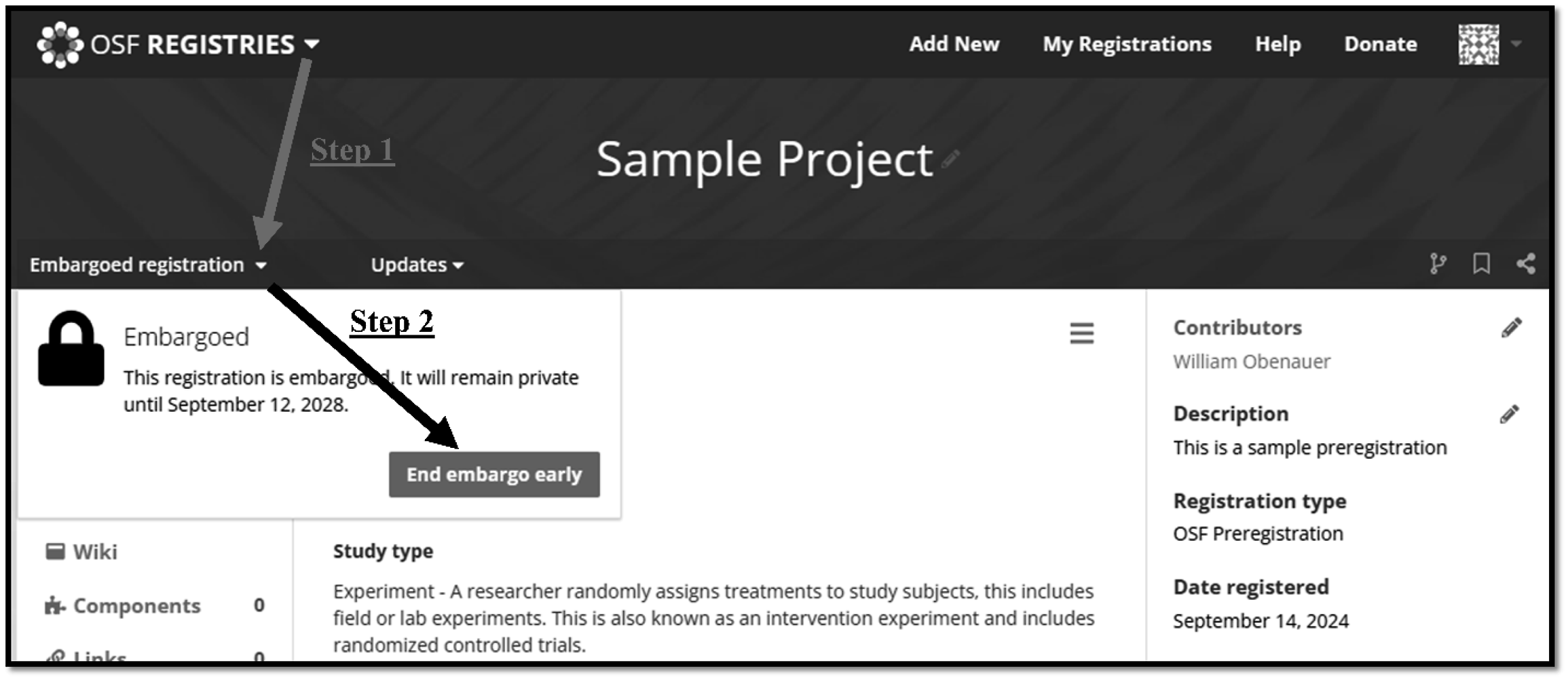
The other option for deanonymizing the OSF preregistration is to create a new view-only link using the process described in the “Sharing Anonymous Preregistration” section. When creating this link, the researcher should NOT select “Anonymize contributor list” and should name the link “public preregistration” or something similar. When using this method, all references to the anonymous preregistration link in the manuscript, in the OSF project, and elsewhere must be replaced by the newly created public link. This option is not preferred because it involves more steps and has more opportunities for error that could limit the transparency of preregistrations.
There is no need to undo the steps taken to anonymize documents on the OSF project. However, once the manuscript is accepted for publication, researchers who wish to upload IRB documentation, Qualtrics files, and/or other documents that include identifying information to the OSF project can do so without fear of compromising double-blind review.
Discussion
When researchers share preregistrations and materials through the OSF during the peer review process, a reviewer often does not need to be the world’s greatest detective to stumble upon the identity of the researcher(s). This manuscript provides users with a comprehensive overview of threats to anonymity in the peer-review process that can emerge when engaging with OSPs. While the risks associated with directly compromising anonymity are well-documented (Giannakakos et al., 2025; MacDonald & Kam, 2007; Tomkins et al., 2017), expressed concerns about the threats of indirectly compromising anonymity (e.g., author team composition) have been influenced by data from alternative contexts, anecdotal observations, and academic dialogues. However, a historical failure to scientifically test academic rhetoric (e.g., publish or perish) does not invalidate the phenomenon as such tests can be labeled “unsurprising,” making them difficult to publish, even if the phenomenon exists (e.g., Miller et al., 2011). Given the low cost to researchers of preserving anonymity when using OSPs, limited empirical evidence of consequences associated with indirectly compromising anonymity should not prevent authors from following the recommendations discussed in this manuscript.
The recommendations provided are not labor-intensive and can positively impact the quality of materials that researchers share. Disseminating best practices for preserving anonymity while engaging in OSPs should help to strengthen the peer-review process by supporting both open science and bias mitigation in peer review. Researchers should recognize, however, that as OSPs and their supporting technologies evolve, the threats to anonymity and resolutions will evolve as well. Thus, they should stay current on changes to different OSP platforms.
While this manuscript provides an extensive discussion regarding the preservation of anonymity when engaging in OSPs, following these recommendations does not guarantee anonymity. Elements of researchers’ identities can still be communicated through mechanisms such as sample descriptions, geographically specific terms (e.g., discussing compliance with the GDPR), citation patterns, language in notes, and spelling (e.g., British vs. American English). Additionally, sometimes a writing style can be so unique that reviewers simply recognize an author’s writing (Carland et al., 1992). Thus, following the guidelines provided in this manuscript should not be perceived as a guarantee of anonymity.
Furthermore, while this manuscript focused on the OSF and discussed AsPredicted, it should be noted that other platforms for data sharing (e.g., data.mendeley.com), general OSPs (e.g., ResearchBox), and registered reports (e.g., PCI Registered Reports) may have their own idiosyncrasies that could influence anonymity. However, as shown in Table 2, OSF and AsPredicted are the most commonly used OSP tools in management research that support anonymity. A comprehensive review of all tools is beyond the scope of this manuscript. Scholars could build upon this work to provide methodological guidance for other OSP tools.
Conclusion
This manuscript provides researchers with detailed instructions on how to preserve double-blind peer review when utilizing the OSF to engage in OSPs (see Figure 9). These instructions cover the most common threats that OSPs present to double-anonymous review, but may not be inclusive of all threats, particularly as both technology and OSPs evolve. Therefore, researchers should work to stay informed as to how their identity can be revealed when sharing materials. While the guidelines discussed in this paper can help researchers prepare their OSF projects, they can also help reviewers understand why certain practices (e.g., sharing qsf files or IRB protocols) may not be practical during the peer review process. Furthermore, the guidance provided in this manuscript can be used by editors and review teams to educate researchers who have a limited understanding of OSF functionality. The potential for OSPs to compromise double-anonymous peer review is high; by utilizing the guidelines shared in this manuscript, researchers can reduce that risk. Checklist for Preserving Anonymity in Peer Review When Using OSPs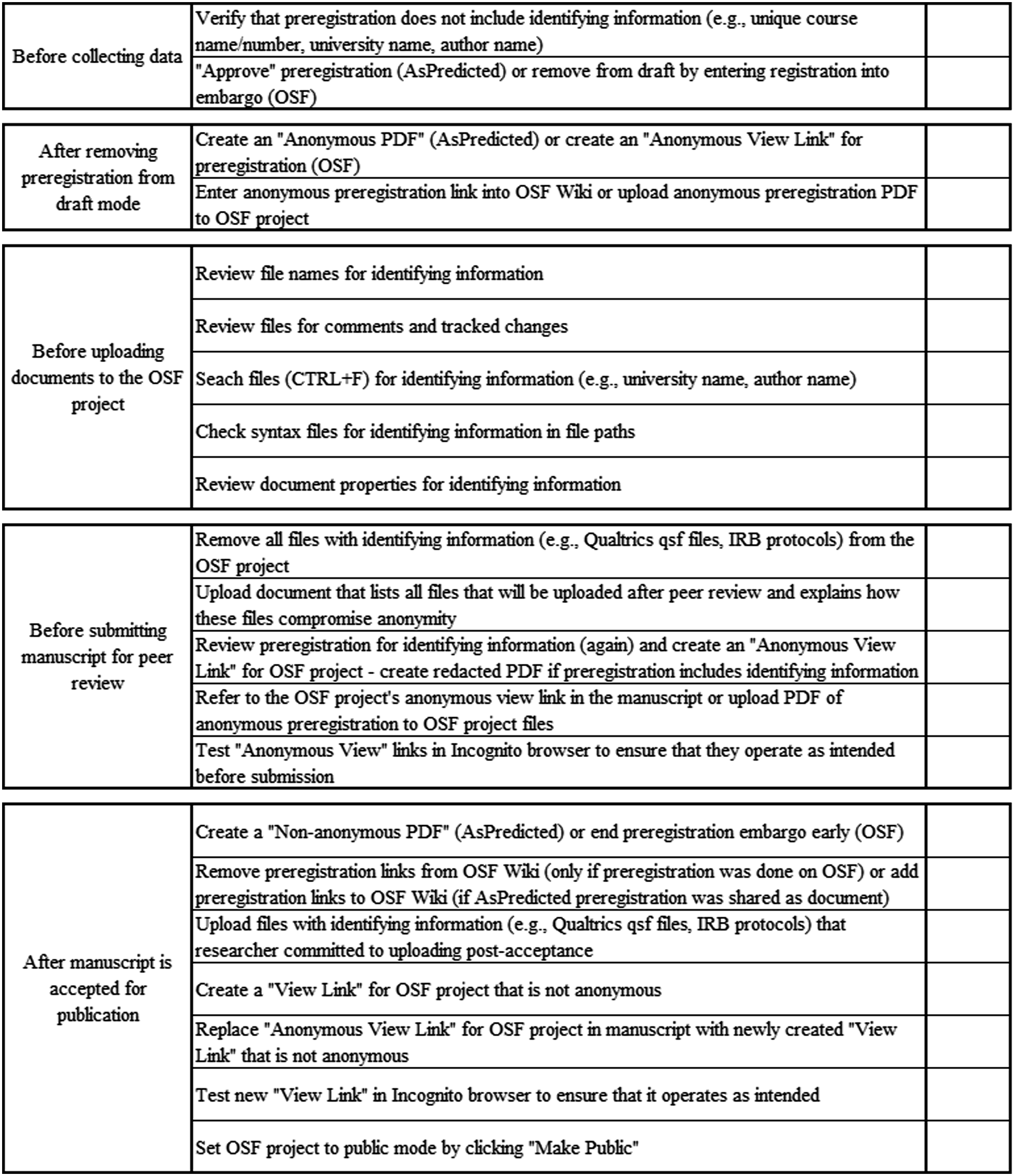
Footnotes

Funding
The author received no financial support for the research, authorship, and/or publication of this article.
Declaration of conflicting interests
The author declared no potential conflicts of interest with respect to the research, authorship, and/or publication of this article.