






Abstract
The authors report their experience from various task analysis projects in which users have been observed in situ. Solutions for simultaneous video recording, often needed to adequately observe and analyze a workspace, are discussed. Of the various analog- and digital-based solutions, the authors deem a low-cost solution using entry-level computer hardware to produce sufficiently high-fidelity feedback for most task analysis purposes. Such systems can be acquired and set up by novice computer users for a fraction of the cost of broadcast video systems. A case study demonstrates the application of one such inexpensive solution.
Low-cost camera technology is a useful tool that makes video analysis more accessible to practitioners.
Simulation in medical training is becoming an integral part of a trainee practitioner’s curriculum (Weller, Nestel, Marshall, Brooks, & Conn, 2012), and its importance may soon be recognized through legislation. However, the design of simulations is often driven by the ideas and practices of single pioneering individuals rather than through detailed multihospital task analysis.
A detailed analysis must be performed to accurately identify and analyze skills that can be effectively trained outside the traditional apprenticeship model. To facilitate such studies, this tech note describes a low-cost, synchronized multistream video task analysis setup. This system offers an alternative solution to expensive digital mixers and professional-grade camera technology often used in such studies, making synchronized video analysis accessible to the average simulation designer. The presented system is described in the context of the authors’ bronchoscopy task analysis, but this low-cost approach is applicable to many disciplines and procedures.
Recording Solutions
Multiple consumer-grade software alternatives to professional synchronized multivideo recording solutions have been released in recent years. These are primarily software designed for webcasting and video broadcasting with the ability to record video on local machines. Uses for this technology include broadcasting of meetings and lectures whereby video of both slides and the speaker are provided and the real-time broadcasting and/or recording of video game play.
Of the available consumer-level solutions, two Windows-only solutions are XSPLIT broadcaster by Split Media Labs (Manila, Philippines), primarily aimed at the gaming community, and VidBlaster Home by CombiTech (Middelburg, Netherlands). XSPLIT is the lowest-cost solution available (US$99 for 12 months) but has only recently (April 2012) progressed from a beta product to a full-release, subscription-based service. VidBlaster Home is the consumer edition of a Microsoft Windows–based software package intended for a range of customers, from home users to broadcast professionals. Software cost reflects the edition chosen. However, for the purpose of synchronized video recording in the operation room, the home edition provides sufficient features.
TeleStream (Nevada City, CA) produces the most mature consumer video broadcasting software solution, called WireCast. Traditionally available only for Mac OS software, TeleStream is now platform neutral, running on either Mac OS or Windows. A “Pro” version of the software adds features not necessary for basic synchronized recording.
A Macintosh-only consumer broadcasting solution called BoinxTV produced by Boinx Software (Puchheim, Germany) also provides features for synchronized video recording.
In addition to these commercially available options, cost challenges may force the development of an open-source solution involving software such as Avisynth, a tool for video postproduction. Unfortunately, Avisynth is not an integrated tool for synchronized video recording and currently requires multiple software components to produce the same output as commercial software.
Capturing a medical procedure to provide objective data for uses such as ergonomic input and equipment design often requires an immediate response on short notice from the operating room (OR) as suitable cases become available. As such, the use of commercial-grade software is recommended, as these integrated and tested solutions should provide the user with a simpler and more robust recording environment. Speed of setup and reliability is paramount.
Example Solution
A system developed for bronchoscopy task analysis is described. This solution records three video images synchronized with one audio feed, producing a single 1,440 × 1,080 MPEG-4 video stream (see Figure 1). One video feed is used to capture a view of the medical team and patient as a whole so that team interaction can be monitored. A second video stream is used to capture the practitioner’s bronchoscope manipulations, and a third video feed is captured directly from the endoscope video processor through a FireWire connection. A directional microphone captures the team’s verbal interaction.
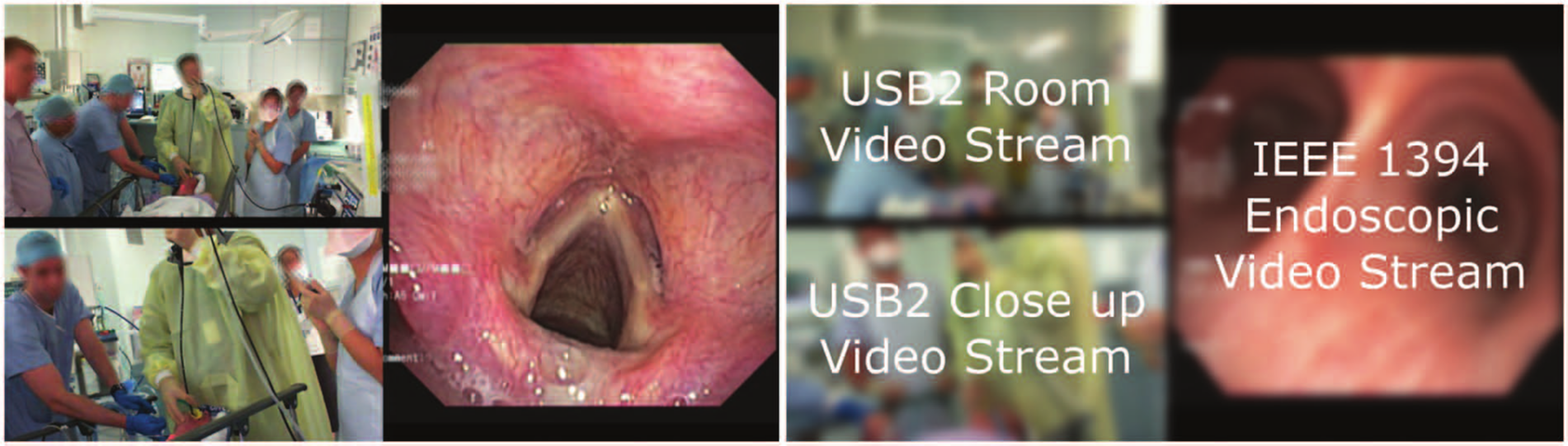
Example format of a 1,440 × 1,080 MPEG video stream. A single video containing three synchronized video feeds and one audio channel is produced (left) based on two USB2 high-definition webcams, one showing team interaction and one recording fine bronchoscope manipulations, and a FireWire (IEEE 1394) video source, the endoscope video source captured from the endoscope processing unit (right).
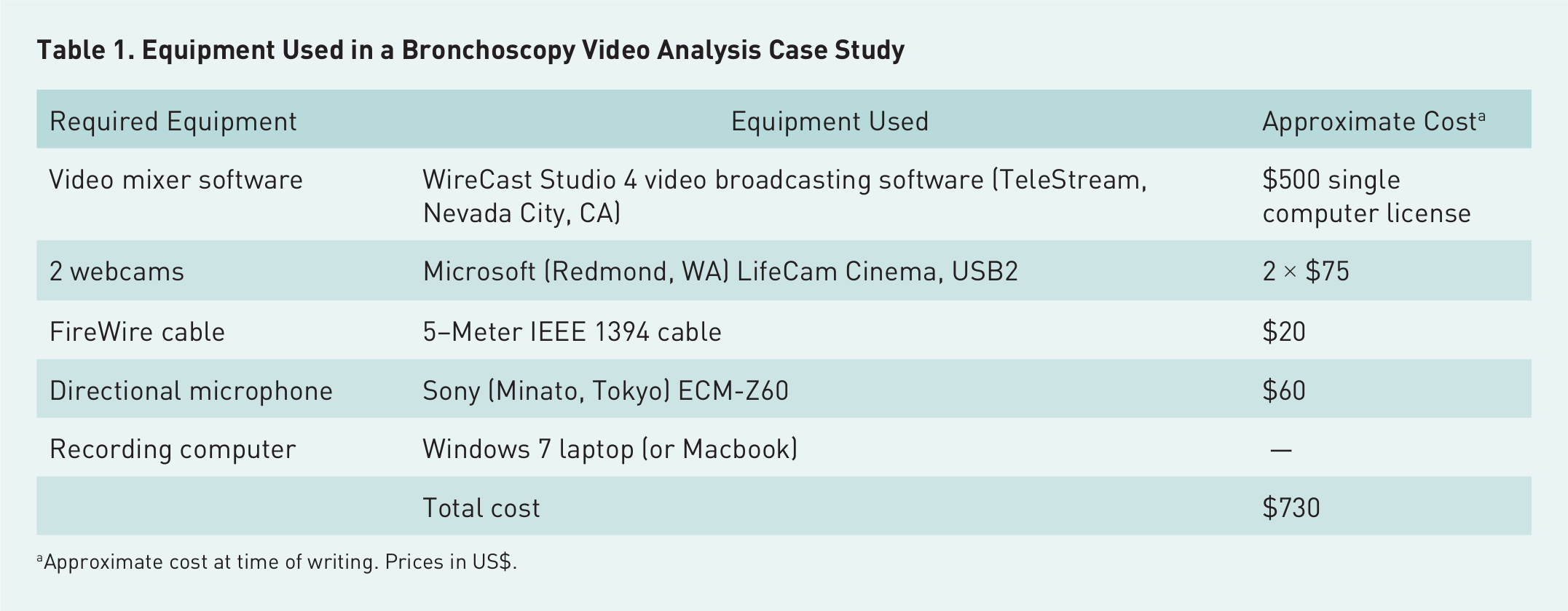
The video was encoded using TeleStream’s WireCast software, chosen for its proven track record and our experience with it. The software runs on either Mac OS or Windows and can use USB and FireWire computer peripherals as recording streams. In this example, two Microsoft LifeCam Cinema HD USB2 webcams with a resolution of 1,280 × 720 were used to video the practitioner, patient, and other attendees. The third video stream was captured via an IEEE 1394 FireWire stream directly from the endoscopy video-processing unit. Approximate solution costs at the time of writing are described in Table 1. Laptop costs have not been included, as these vary greatly, and a unit was not purchased specifically for recording purposes.
Equipment Used in a Bronchoscopy Video Analysis Case Study
Approximate cost at time of writing. Prices in US$.
Benefit
This low-cost and portable solution can be set up easily by users with minimal video and computer skills. In contrast, some of the potential difficulties of using professional solutions are as follows:
Complex and varying connections of high-quality cables
Large, intrusive cameras used in professional systems, which make it difficult to place cameras in desired locations and may distract the physician from performing the procedure
Difficult-to-manage/coordinate recording formats.
These have been overcome in the presented solution:
Standard connectors, such as USB and FireWire, are used.
Recent lightweight webcams offer high-definition resolution and the ability to deliver images with good contrast despite variable lighting conditions in ORs. In addition, small, unobtrusive form factors can be discreetly placed in the working environment to aid image interpretation.
A standard system such as this can record three high-definition video sources and audio in real time (25 images per second) without image flow interruption or audio latencies when stored in MPEG-4 format.
Even without professional broadcast equipment, modern high-definition webcams and FireWire output can be used to produce synchronized video at a quality exceeding that is necessary for an average task analysis. The system is small and light enough to fit into a standard laptop bag and produces a single-session audio-video file that can be replayed by most laptops and current media players. This video can be instantly replayed after recording, without the need for postprocessing, enabling self-confrontation interviews (Leblancs, 2002) or other task analysis exercises to be performed. This allows for a high degree of task analysis observation flexibility.
Recommendation
Although this lightweight system solves many of the issues previously faced with synchronized video recording for task analysis, in the design of a recording system, several important considerations still need to be addressed:
Frame rates may be affected by the controlling computer’s specifications and the ambient light conditions. It is useful to run some test recordings in the intended environment to determine optimal scene resolution and frame rate.
A shotgun (directional) microphone may be required to record speech. Embedded webcam or laptop microphones may record a high level of ambient noise.
Any microphone chosen must be designed for computer use (asymmetric, passive with high impedance) and come with a 3.5-mm jack connector. Professional microphones use 6.35-mm or XLR connectors and may require an external battery, need a preamp, and so on.
If three USB webcams and a laptop are to be used, faster processing may be achievable by adding a third USB port via a USB Express card. Most laptops have only two “root” USB ports instead of the required three. These inexpensive cards should prevent any recording problems attributable to bandwidth limitations.
Precheck the recording location and carefully plan the mounted camera positions. Because of the camera’s small size, it may be possible to unobtrusively mount it close to the practitioner. A large variety of tripods and other mounts are available.
Conclusion
A synchronized video stream is encoded with use of the H.264/MPEG-4 video compression standard with 16-bit stereo sound, the highest video quality provided by WireCast. A configuration file can be found at www.aehrc.com.au/task-analysis. The 1,440 × 1,080 video offers a clear playback of the procedure, enabling a detailed video task analysis to be performed. This system not only offers a less costly solution compared with common practice but also allows small, unobtrusive cameras to be placed within the OR. The use of small cameras in turn lowers the practitioner’s awareness of the recording in progress and makes it possible to place cameras in positions deemed inappropriate for larger cameras. Feedback from collaborators experienced in the use of high-cost, professional-grade recording solutions has been extremely positive, with no disadvantages identified for this solution.