







Abstract
Teachers of students with emotional and behavioral disorders often struggle with increasing student participation while maintaining a positive classroom environment. Active student responding (ASR) occurs when a student says, writes, or engages in some observable response following a question. This article identifies and describes three electronic approaches to ASR and provides teachers with tips for effective implementation with students with emotional and behavioral disorders.
Mrs. Garcia is a high school teacher serving students with emotional and behavioral disorders in a self-contained classroom. She really enjoys seeing the progress her students make throughout the school year. Mrs. Garcia believes that one of her professional strengths is her use of planning time to design activities that pique both students’ curiosity and enhance their understanding of targeted concepts. This year, however, she has noticed that it is much more difficult to engage her students throughout her lessons. Students seem to look at her, for the most part, but she can never be quite sure that they are grasping the information. When she asks questions, rarely do students volunteer, and if they do, it is usually the same two or three individuals. After asking a question, most of the students avert their gaze to their notes or books, possibly seeking the answer but most probably avoiding the interaction. The lack of responsiveness makes it very difficult for Mrs. Garcia to get a definitive picture of what the students are learning and how she should appropriately respond. She wants something to change. That is, she does not want to continue waiting through awkward silences hoping for her students to respond.
In the above scenario, it makes sense to think that Mrs. Garcia wants to ensure her students are engaged in the lesson but having a hard time evoking student participation. She knows that increasing her students’ opportunities to respond (OTR) can help her assess student understanding as well as inform her next steps as the instructor. She might also know that making changes in how she provides instruction may reduce the likelihood that challenging student behaviors such as class disruptions occur because students are exhibiting engagement behaviors (Lane et al., 2015). Mrs. Garcia is not unlike other teachers who struggle to engage their students during instruction, particularly teachers serving students with emotional and behavioral disorders (EBD).
Affecting meaningful change for students with EBD starts with teacher behaviors. Mooney and colleagues (2012) asserted that targeting teacher behaviors for change can impact both teacher and student behavior via the power of reinforcement. That can occur in a number of ways. According to Sutherland and Oswald (2005), teachers who provide frequent negative reactions to their student’s problem behaviors while ignoring positive behaviors may unintentionally increase the likelihood of future challenging behavior. Teachers can also negatively reinforce their own behavior via removal of students from classrooms for challenging behavior. In this instance, if a student is causing disruptions in the classroom and a teacher removes that aversive situation by referring the student to the office or hallway, the probability of the teacher engaging in that behavior in future increases. Gunter and colleagues (1994) hypothesized that challenging behaviors displayed by students with EBD could be explained through a negative reinforcement paradigm where disruptive behaviors are maintained by escape/avoidance from academic tasks.
However, Leflot et al. (2010) recognized that if teachers focus on positively reinforcing prosocial behaviors, these behaviors increase while maladaptive behaviors decrease. Essentially, reinforcement has the ability to increase or decrease challenging student behaviors and it is up to the teacher to use this principle of behavior to create positive instructional interaction with students with EBD. Working with students with EBD, Haydon and colleagues (2009) demonstrated that when teachers increased the rates of their students’ responding there were associated increases in student on-task behaviors and correct responding and decreases in students’ challenging behavior. Gunter et al. (1994) also demonstrated that changing instructional interactions with students with EBD led to positive student–teacher interactions. Overall, providing students with EBD with information and support can increase the likelihood of success in the instructional setting and reduce the likelihood of maladaptive student behavior.
Active Student Responding
One way that teachers can provide students with EBD with information and support is to increase students’ correct responses to instruction. Active student responding (ASR) is defined as students emitting detectable responses to ongoing instruction. ASR occurs when a student raises his or her hand, says an answer, writes an answer, or engages in some observable response following a teacher-posed question or other instructional cue (Tincani & Twyman, 2016). Increasing students’ OTR allows teachers to engage in formative assessment that can be used in instructional decision-making. In the case of student learning, the main purpose of formative assessment is seen as promoting learning while the main purpose of summative assessment is to provide information about what learning has been achieved at a certain time (Dolin et al., 2018).
Recently, Rila and colleagues (2019) discussed how delivering high rates of OTR is shown to improve student outcomes for students with challenging behaviors and how those high rates of OTR can maximize student engagement while allowing students to work toward mastering instructional content. Rila et al. (2019) stated that if students are off task, inattentive, or disruptive during instruction, they are more likely to be excluded from classroom activities and fall behind academically.
Using ASR
Texts on pedagogy have, until recently, paid almost no attention to the potential of the use of formative assessment to assist in the day-to-day learning of students (Black, 2016). Checking for understanding is an important part of a formative assessment system, and ASR tools provide teachers multiple opportunities to assess student learning. Looking at student responses or student work informs the teacher, and that information can be acted upon to create better understanding (Fisher & Frey, 2015). One way to do this is through an ASR formative assessment loop following these steps:
Teacher poses a question.
Students answer the question.
Teacher analyzes student response data in real time.
If the students respond correctly, the teacher provides reinforcement and continues with the lesson including OTR regarding upcoming content. If the students respond incorrectly, the teacher takes a moment and reteaches the concept so misconceptions are not formed. Once reteaching has occurred, the teacher provides reinforcement for appropriate behavior during reteaching and provides additional OTR on that concept. Figure 1 displays a formative assessment loop that can be used to incorporate ASR in the classroom.
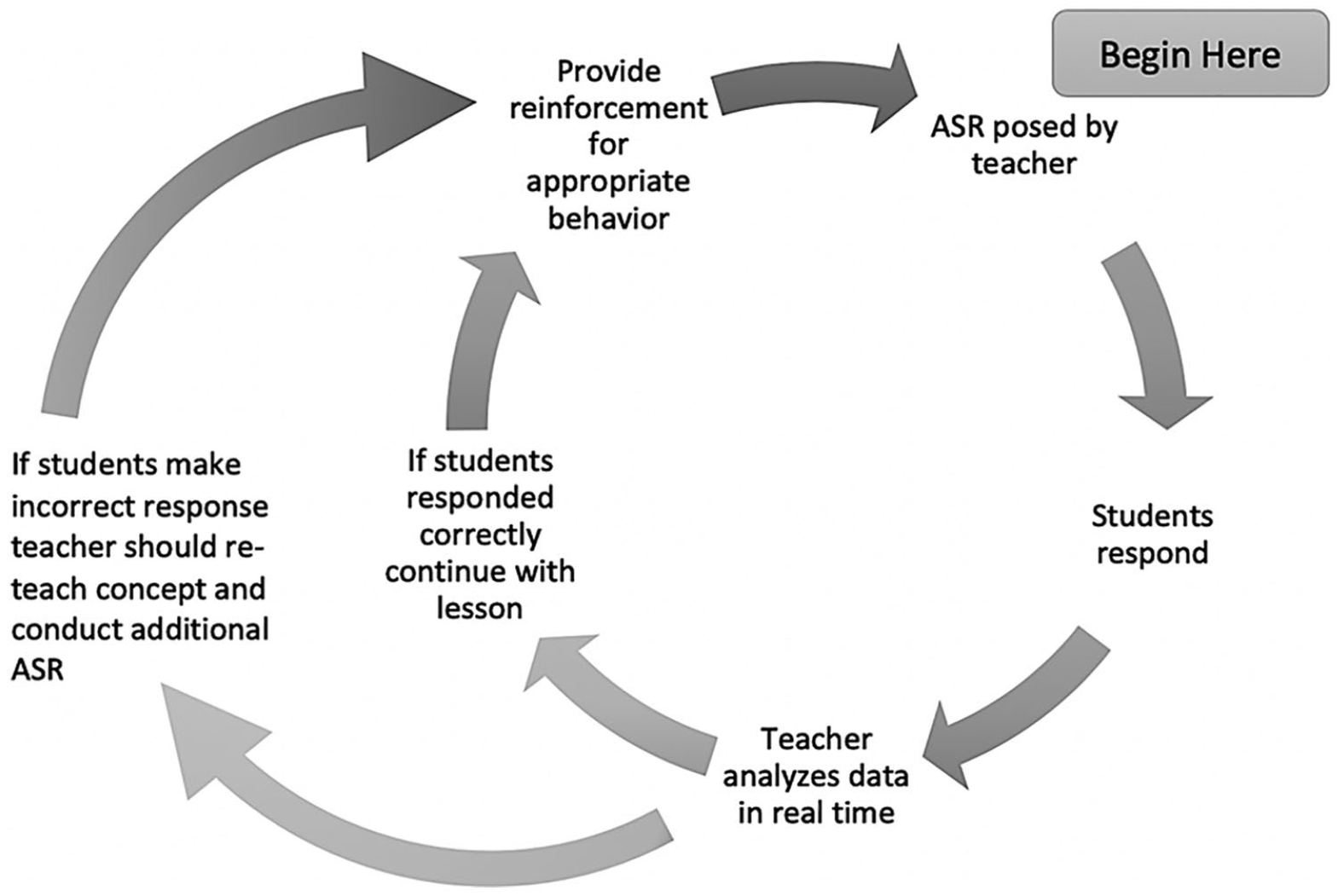
Formative assessment loop incorporating active student responding (ASR).
When student engagement increases, those students are demonstrating more appropriate and on-task behaviors, and typically providing a greater number of correct responses to teacher prompts (Simonsen et al., 2008). Consequently, ASR has been shown to increase student engagement, increase student responding (Heward et al., 1989), and produce better student outcomes (Malanga & Sweeney, 2008). Furthermore, electronic ASR allows teachers to make real-time data-based decisions on their students’ mastery of the content that has been delivered. By posing questions using different ASR modalities teachers can increase the number of opportunities to which students respond in a classroom. Returning to our vignette, after speaking with Ms. Li, Mrs. Garcia believes implementing ASR in her classroom is worth trying with her class.
Using Electronic ASR Tools
Electronic ASR tools have become increasingly used in classrooms from elementary schools to colleges and universities. Three popular electronic ASR tools are Kahoot!, iClicker, and Google Forms. There has been a limited number of studies examining the effectiveness of these technologies in classrooms (e.g., Dichev & Dicheva, 2017; Oliver, 2017). For example, Göksün and Gürsoy (2019) reported higher academic achievement and active engagement for students that used Kahoot!-based instructional activities than comparison students who did not. Bury (2017) found increased student motivation and participation for students using online assessment tools, including Kahoot! They concluded that online assessment tools developed students’ grammar knowledge and the students developed a desire to master the content using the online tools. Turan and Meral (2018) investigated the effects of game-based and non-game-based online student response systems, including Kahoot!, on student achievement, engagement, and exam anxiety levels. They found that the game-based student response systems increased student achievement and participation and decreased test anxiety levels.
iClicker has also been examined as an ASR technology. Whitehead and Ray (2010) found that using iClicker enhanced student involvement and learning. Although empirical evidence is scant, there is some support for the use of ASR technologies in increasing student responding. In the following sections we describe three technologies that can be used to increase student responding. In addition, we provide steps and description of each technology following a task analysis model suggested by Rila and colleagues (2019).
Kahoot!
Kahoot! is a game-based instructional tool that uses learning games called kahoots in the form of multiple choice questions students answer via web browser or mobile applications (https://kahoot.com). There are three options that a teacher can select when signing up for Kahoot! According to their website, the Kahoot! base plan is free to users and allows teachers to create and host their own learning games in class, search kahoots by subject/grade, assign kahoots as homework challenges, and collect data on student responses (https://kahoot.com). Kahoot! Plus and Kahoot! Pro have an annual fee (see Table 1) and include additional features like kahoot organization, co-creating and editing, viewing and sharing reports, and more. Kahoot! is a competitive, fast-paced game in which the faster the student responds to the questions, the more points the student earns (Mahoney & Hall, 2017). Kahoot! can be shared or made public on the website to enable students to visit and review the questions and answers as often as needed when studying prior to testing (Johns, 2015). Using Kahoot! teachers can formatively assess their students’ learning and address content their students may have struggled with during a lesson. Kahoot! can be used by students with disabilities reviewing for a test providing students with the opportunity to see the questions and correct answers multiple times, therefore providing them the chance to self-assess their own understanding and knowledge with each time they play the game (Mahoney & Hall, 2017). See Table 2 for a Kahoot! implementation guide.
Examples of Active Student Responding Technology.
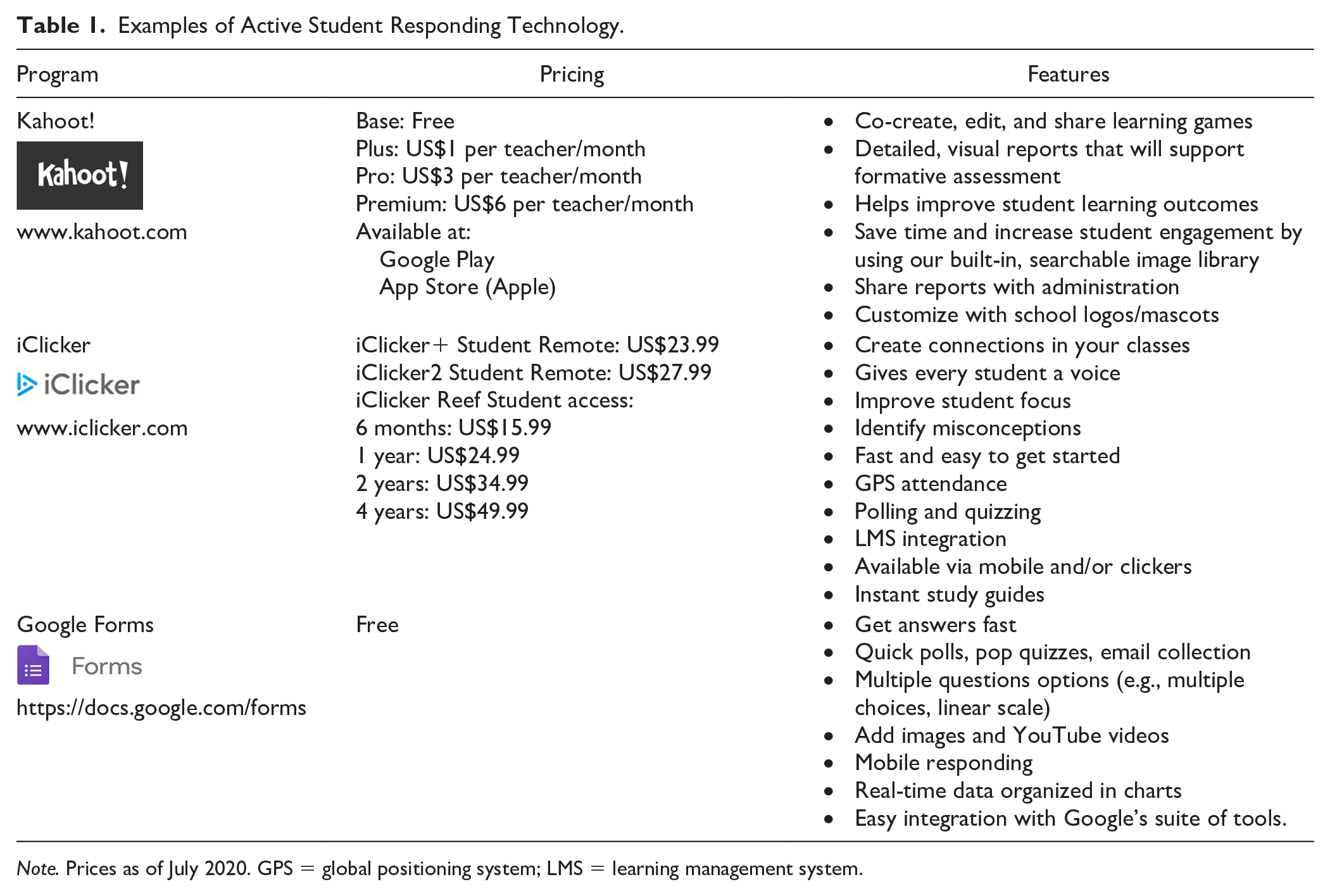
Note. Prices as of July 2020. GPS = global positioning system; LMS = learning management system.
How to Use Kahoot! to Increase Student Responding.
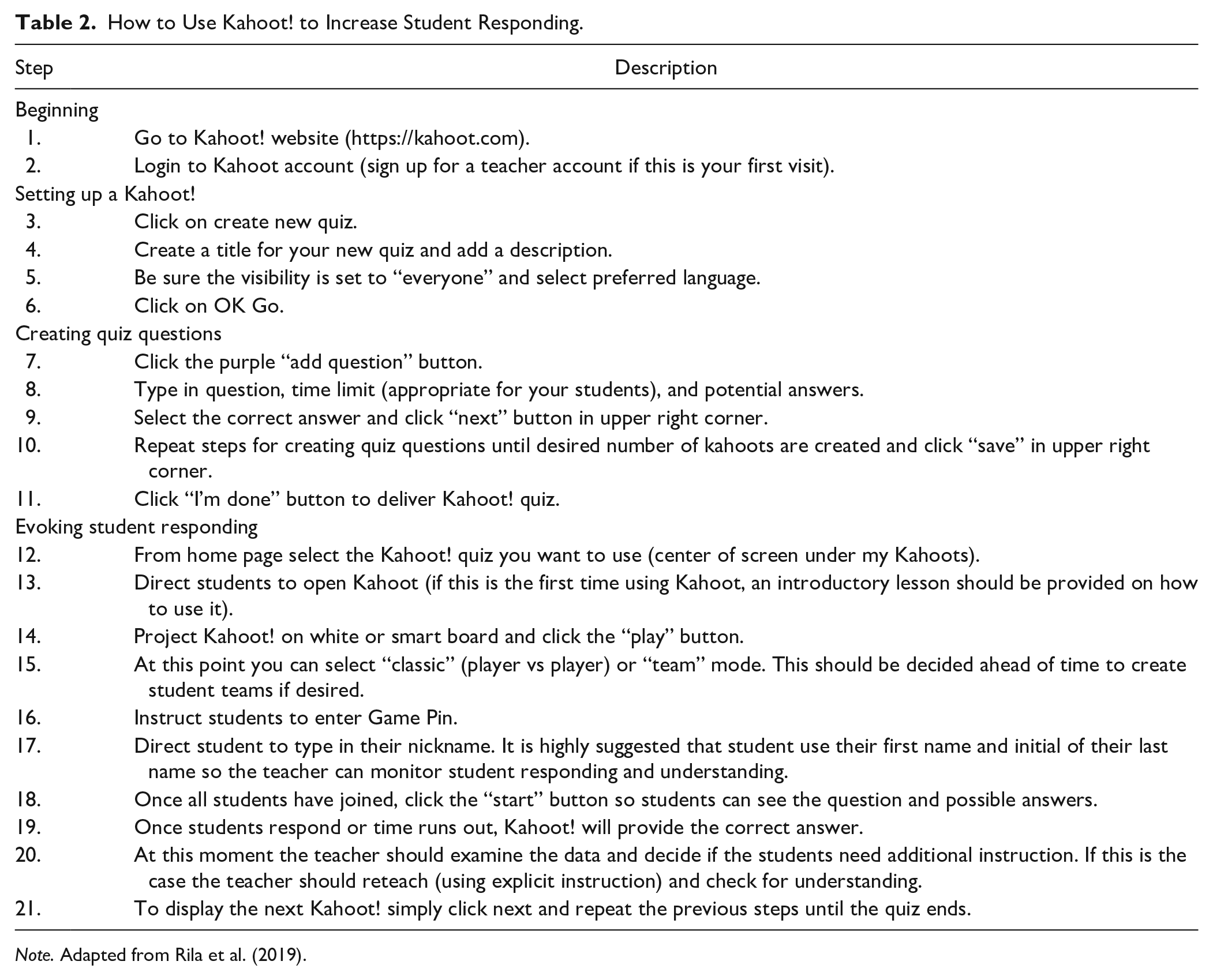
Note. Adapted from Rila et al. (2019).
iClicker
iClicker is a device that allows a student to anonymously respond to questions in class. This technology allows teachers to quickly assess how well students are understanding the content that is being presented. iClicker’s stated mission is to create simple, intuitive, and reliable technology solutions that promote active learning in the classroom (https://www.iclicker.com). Students are able to access this active learning technology via a student application for iOS or Android, using the iClicker website, or purchasing an iClicker remote (https://www.iclicker.com). To get started, a teacher creates an account, creates a course, and starts teaching their class. Using the iClicker, a teacher is able to implement interactive polls and quiz options that act as formative assessments during the lesson and promote active engagement in the classroom. Once students answer questions, teachers instantly know if students are learning the content that is being taught and adjust instruction based on real-time data. Another highlight of iClicker is the learning management system (LMS) integration. iClicker integrates with Sakai, Blackboard, Canvas, Brightspace, Moodle, and ANGEL (https://www.iclicker.com). Educators choosing to use iClicker in their classrooms may give a student who is reticent to answer questions in front of their peers the opportunity to engage in responding in a way the feel safe. See Table 3 for an iClicker implementation guide.
How to Use iClicker via Mobile Devices or Laptops to Increase Student Responding.
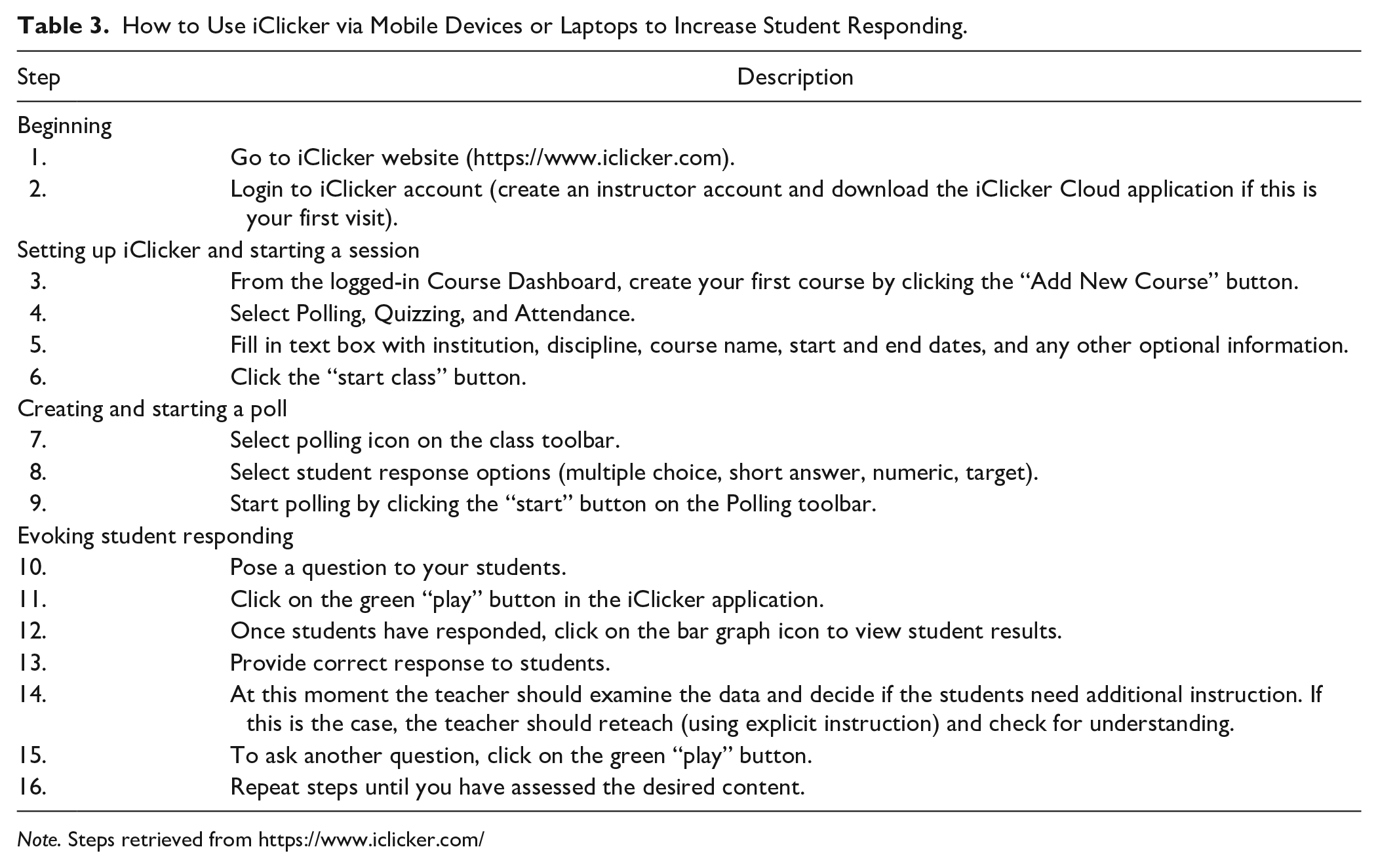
Note. Steps retrieved from https://www.iclicker.com/
Google Forms
Google Forms is a survey administration app that is included in the Google Drive office suite along with Google Docs, Google Sheets, and Google Slides. Google Forms features all of the collaboration and sharing features found in Docs, Sheets, and Slides. Using Google Forms allows teachers to get answers from student in real time, customize their Forms, select from multiple question options (e.g., multiple choice, true/false, linear scale), create or respond on the go, and organize and analyze response data that are neatly and automatically organized in Forms. The literature on the use of Google Forms is predominantly geared toward being a worthwhile tool when it comes to surveying and assessment (Rodriguez, 2018). Koury and Jardine (2013) suggest that Google Forms can be used effectively to assess students. Rodriguez (2018) notes that it enables the instructor to provide immediate feedback to students. Google and its platform of tools are free to users and allows educators to ask content area questions to students in the class including those who may be reluctant to verbalize a response, but feel comfortable responding in a more anonymous manner. See Table 4 for a Google Forms implementation guide and Figure 2 for examples of Kahoot!, iClicker, and Google Forms questions.
How to Use Google Forms to Increase Student Responding.
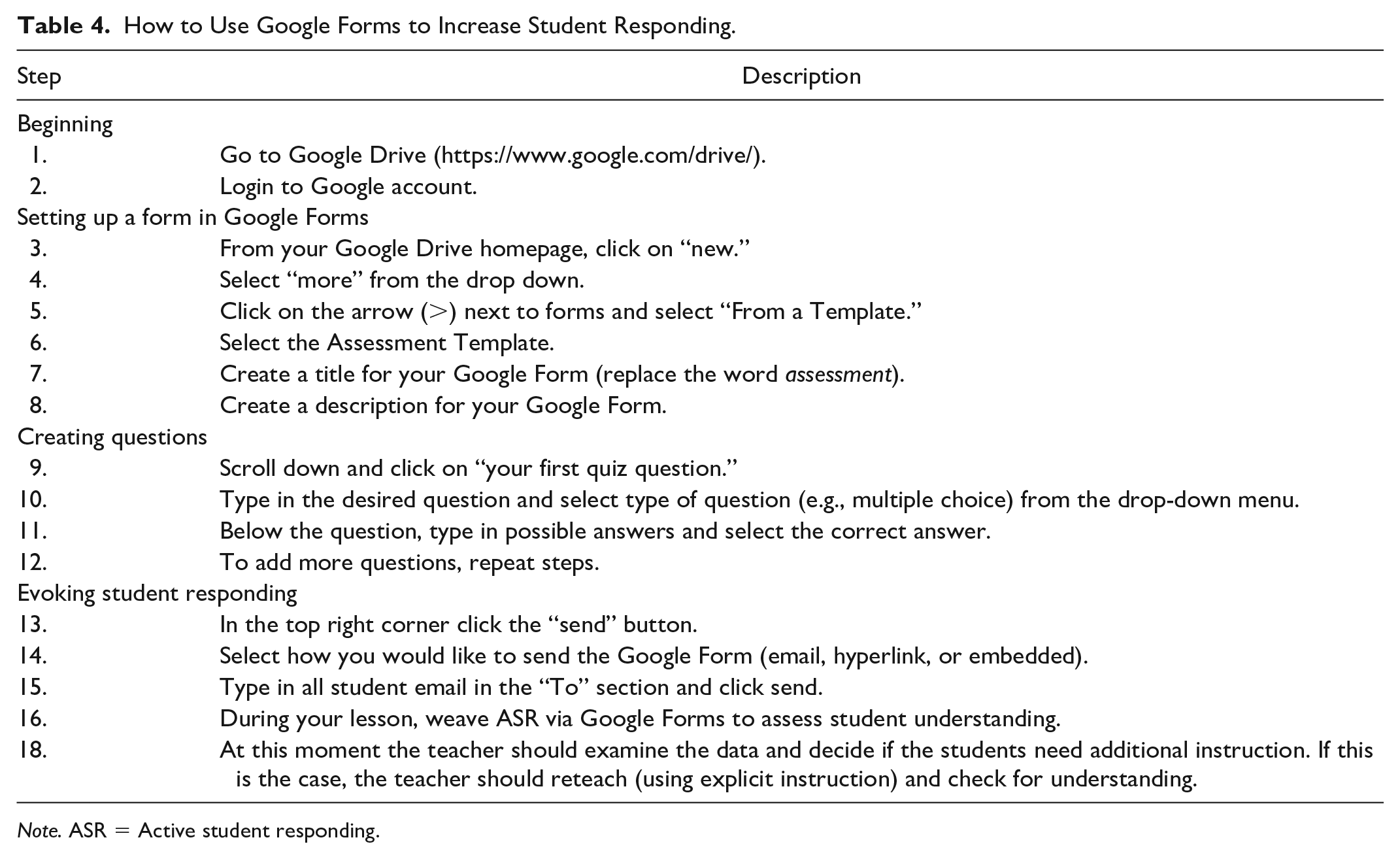
Note. ASR = Active student responding.
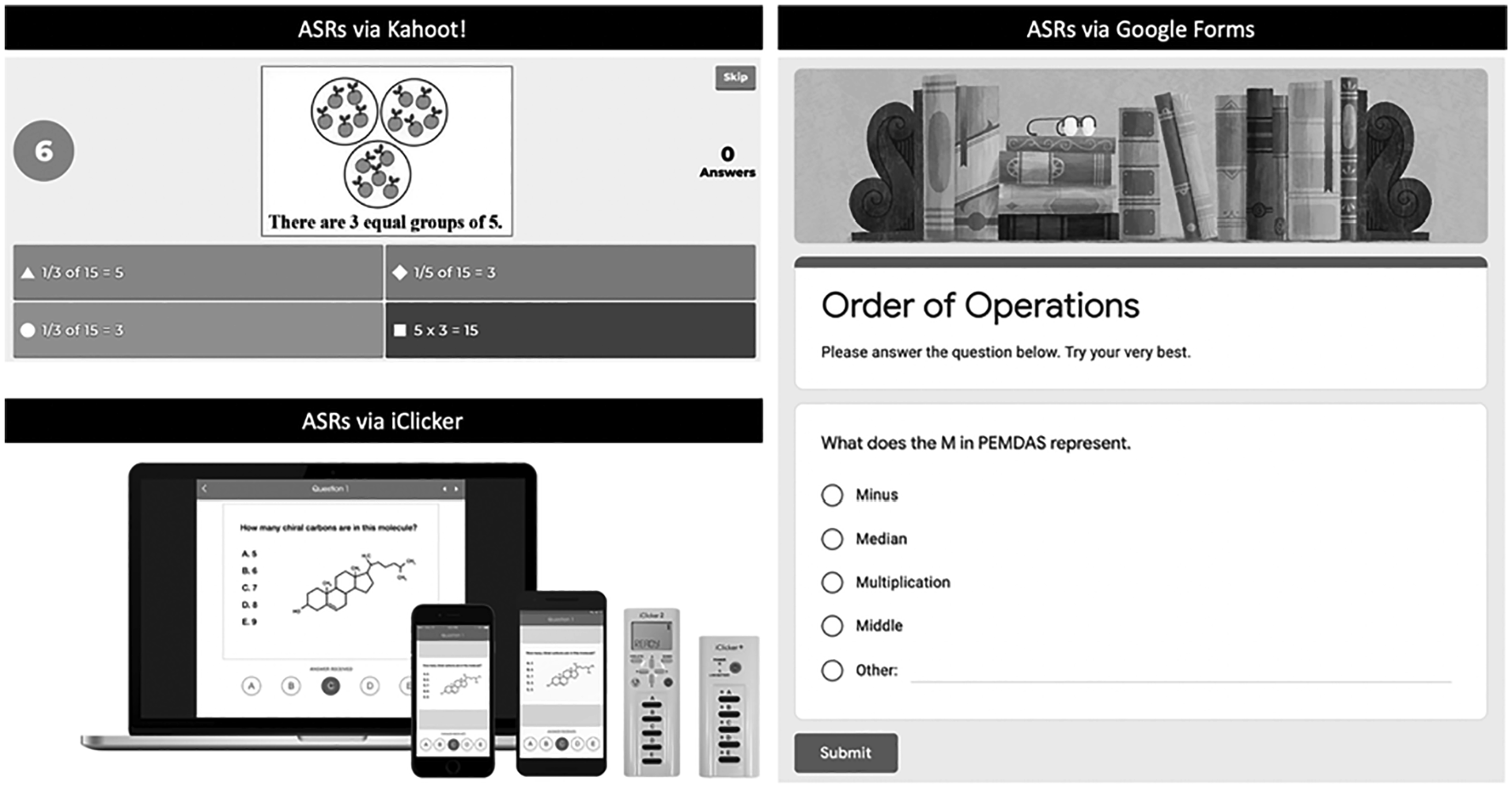
Sample questions from Kahoot!, iClicker, and Google Forms.
Mrs. Garcia shares her concern about the lack of student responsiveness with her mentor, Ms. Li, who asks if Mrs. Garcia has ever considered implementing an electronic ASR in her classroom. Ms. Li explains that an electronic ASR is similar to unison responding in that the students respond simultaneously and potentially anonymously. Ms. Li also suggests that if electronic ASR is used, Mrs. Garcia can embed the questions into her teaching—maybe after every few PowerPoint slides— to ensure multiple opportunities of responding throughout a single lesson. According to Ms. Li, if student responding is accurate, then Mrs. Garcia can maintain the pace. However, if student responding does not show mastery, Mrs. Garcia has a reason to review the targeted concept. Ms. Li tells Mrs. Garcia that she uses electronic ASR frequently throughout her class to be sure that her students remember the relevant content from previous lessons and that they are primed for the new information to come. Ms. Li says that in the years that she has incorporated electronic ASR into her teaching, she has noticed that her students are much more involved in the lessons and have even become more active in asking questions for clarification or providing their own insights.
As Mrs. Garcia is listening to Ms. Li, she starts thinking back to the lectures she attended in college and how her professors used “clickers” to assess student understanding electronically when there was a large number of students enrolled in the class. She mentions this to Ms. Li and discusses how she was glad clickers were an option because she felt uncomfortable answering a question in front of such a large group of people. “Exactly!” Ms. Li says. Now think about some of your students that might have internalizing behavior disorders (e.g., anxiety, social withdrawal) that may prevent them from willingly answering questions in front of their peers or your students that do not want to look like too much of a smarty pants in front of their friends. Mrs. Garcia considers an electronic ASR and believes this method might be a great opportunity to increase student involvement in her lessons. By getting her students to respond to multiple questions through electronic means, Mrs. Garcia believes it will give them the opportunity to be more active. She will also have additional opportunities to provide feedback on their performance, while simultaneously providing a clearer picture for her of what concepts might require further attention. Mrs. Garcia decides to get more information from Ms. Li on what would be a good electronic ASR method to implement in her class. Mrs. Garcia considers clickers, but since that would require the school or students to make a purchase, she decides she would not want to ask for that until she sees that electronic ASR can be useful for her students. Ms. Li suggests Kahoot! or Google Forms, and since they both have similar benefits, Mrs. Garcia decides to start with Google Forms since she is most familiar with the site. Also, as the students each have access to a school laptop, they are able to access the necessary website through their school mail. Prior to implementing Google Forms, Mrs. Garcia asks Ms. Li if there are any tips to successful implementation.
Tips for Successful Implementation of Electronic ASR
To assist Mrs. Garcia, Ms. Li provides a few implementation tips that she should consider to successfully implement ASR in her classrooms. We outline them next.
Tip 1: Get Familiar With the Technology
Prior to introducing anything new to one’s classroom, become familiar and comfortable navigating and using the program. Spend some time practicing using the new technology as you would in your classroom to build fluency (Riden et al., 2018). For example, there are a wide range of options (e.g., multiple choice, short answer, true/false) when creating ASR activities using Google Forms and you should be familiar with those options and how they may best suit the needs of your students and classroom setup.
Tip 2: Be Explicit
Use an explicit instruction approach (Archer & Hughes, 2011) to teaching your students about electronic ASR. It is important to teach your students what ASR is and how you will be using ASR tools in the classroom. Explicit instruction is a structured, systematic, effective methodology characterized by supports or scaffolds, where students are guided through the learning process with clear explanations and demonstrations of the instructional target, and supported practice with feedback until independent mastery has been achieved (Archer & Hughes, 2011). Hughes et al. (2017) identified five essential components and seven common components of explicit instruction. The essential components are: (a) segmenting complex skills, (b) drawing student attention to important features of the content through modeling/think-alouds, (c) promoting successful engagement by using systematically faded supports/prompts, (d) providing opportunities for students to respond and receive feedback, and (e) creating purposeful practice opportunities. The common components of explicit instruction include: (a) selecting critical content, (b) logically sequencing skills, (c) ensuring students have prerequisite skills and knowledge, (d) providing clear statements of learner goals and expectations, (e) presenting a wide range of examples and nonexamples, (f) maintaining a brisk pace, and (g) presenting information in ways that help students understand how it is organized.
Several ASR strategies, including choral responding and response cards have been used to evoke student responses in the context of an explicit instruction lesson. Delivering ASR via choral responding occurs when you pose a question during small group or whole class instruction, provide appropriate wait time, deliver a signal for student to respond, and ensure that students respond in unison to your query. Once student responding occurs, you can take that information, assess formatively, and respond appropriately. Technologically driven ASR such as the use of Google Forms allows you to reflect on student learning during and after a lesson via permanent product, which is a reporting of student response saved in the technology of your choosing. Using ASR technologies and the five essential components of explicit instruction also allows you to determine if your students’ responses are increasing or if they are taking less time to respond. Furthermore, you can assess the accuracy of your students’ responses in real time by providing positive and when needed corrective feedback during the use of ASRs. Table 5 provides an alignment matrix of ASR technologies and the five essential components of explicit instruction.
Five Essential Components of Explicit Instruction and ASR Technologies Alignment Matrix.
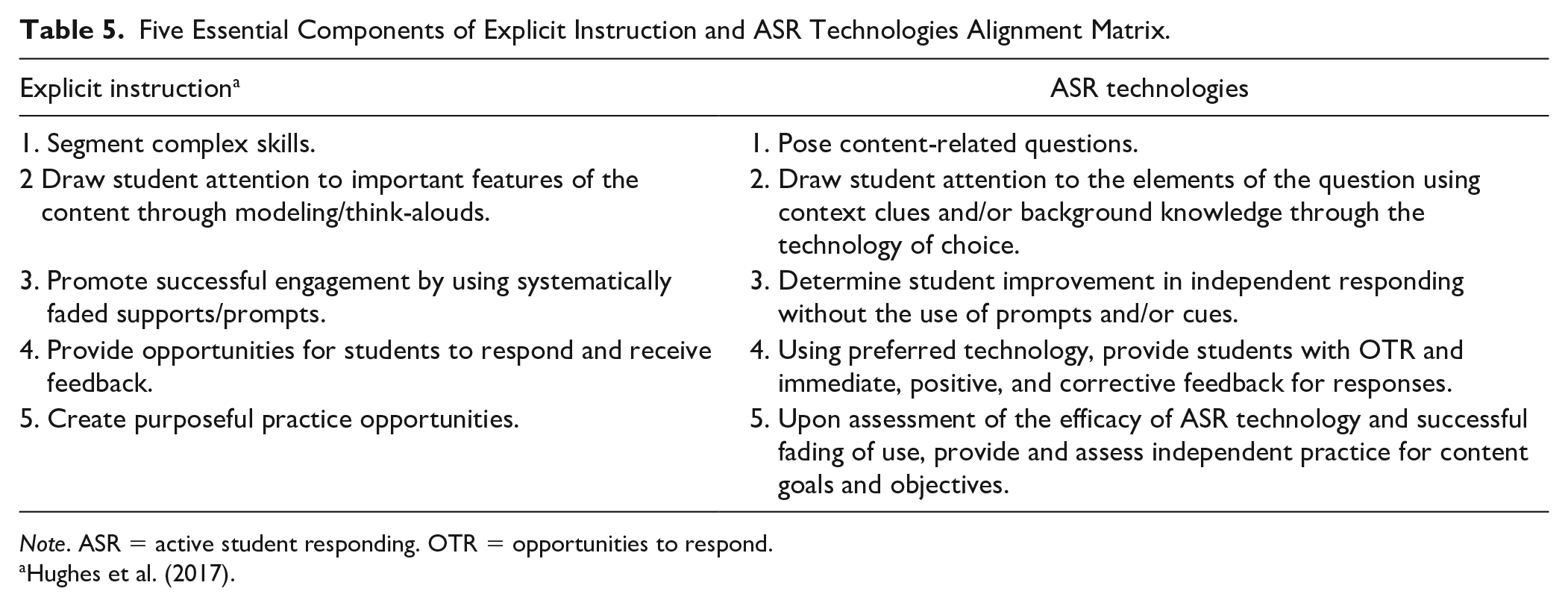
Note. ASR = active student responding. OTR = opportunities to respond.
Tip 3: Develop Rules
As with all procedures, it is important to have rules about using technology in the classroom. According to Cooper and colleagues (2020), a rule is a verbal description of a behavioral contingency. That is, rules are specific behaviors to which consequences are connected. An example of a rule focusing on classroom technology might be, “When we are not using our devices in class, you should have your devices stored in your desk, backpack, or pocket.”
Tip 4: Use Positive Reinforcement
Using technology in the classroom requires application of positive reinforcement strategies for appropriate use of technology in the classroom. Cooper et al. (2020) define positive reinforcement as occurring when a behavior is followed immediately by the presentation of a stimulus and, as a result, occurs more often in the future. An example would be you noticing a student using technology appropriately in the classroom—answering an ASR without looking at social media—and delivering a token or a statement of behavior-specific praise to the student as an acknowledgment of the student’s positive behavior.
Tip 5: Use Corrective Feedback
Do not ignore student’s misuse of technology. If such a situation occurs, then engage in a cycle of corrective feedback, prompting of positive behavior, and then delivering positive reinforcement contingent on the student engaging in the positive behavior. For example, if you ask students to answer a question on Rube Goldberg machines and notice that two of students are texting each other, you can discreetly mention to the students that this is against the classroom rules for using technology in the class and that when an ASR is ready to be responded to they are expected to answer the question and promptly put their devices down. Next, prompt the students to answer the question and put their devices down. After the students do as you ask, you can deliver behavior-specific praise to the students: “I really like that way you both followed my instructions. Fantastic work!” or “Nice work putting your phones down after answering the question!”
Tip 6: Provide Access
Be aware of students that do not have access to their own devices and take steps to ensure all students are able to participate. In 2015, 94% of children ages 3 to 18 years had a computer at home and 61% of children ages 3 to 18 years had internet access at home. The percentages of children with computer and internet access at home in 2015 were higher for children who were older, those whose parents had higher levels of educational attainment, and those whose families had higher incomes. Also, a lower percentage of students eligible for free or reduced-price lunch reported that they had a digital device in their home, or that they first used a computer prior to first grade, than their peers who were not eligible for free or reduced-price lunch (U.S. Department of Education, National Center for Education Statistics, 2018).
Mrs. Garcia decides to begin her next lesson with questions on Google Forms, just as Ms. Li suggested. She creates 10 questions she can use throughout her lesson. She really likes creating the questions because it forces her to focus on the main points she wants the students to walk away with from the lesson. A majority of the questions are multiple choice, but she also has the option to ask questions which require a short response or even an essay response. Mrs. Garcia opens up her class with three multiple choice questions to prime the students on the day’s topic. She asks the students to answer the questions independently and once all of them have responded, she reviews the information with the students, clarifying any questions which show a poor outcome. She also takes this opportunity to praise the students on the questions which show a positive performance. Mrs. Garcia then starts her lesson and embeds two to three questions after she has outlined a targeted concept. A couple of times she asks the students to check with a buddy before answering the question to provide an opportunity for them to verbalize the concept. At the close of the class, she asks the students to respond to a short question item by sharing three main points from the day’s lesson. After the class is finished, Mrs. Garcia realizes how much more informed she is on the concepts her students understood versus the ones they may have struggled with. This new understanding relieves her. She now has much more information that can guide the lessons to follow. This one change helped Mrs. Garcia feel much more confident in her teaching and lesson planning.
Conclusion
Students with EBD often have difficulty learning and interacting in socially appropriate ways in academic settings (Vaughn & Bos, 2011) and demonstrate off-task and disruptive behaviors that interfere with learning (Kauffman & Landrum, 2018). Inappropriate or disruptive behavior of students with EBD can lead to lower rates of participation in classroom instruction compared with their peers (Mulcahy et al., 2014; Weeden et al., 2016). One approach that can increase student participation, reduce challenging student behavior, and focus on content acquisition is ASR. Implementing ASR in the classroom has been facilitated with the acceleration of technology use in the classroom. Programs like Kahoot!, iClicker, and Google Forms allow students to anonymously participate in class activities, increase OTR, and afford teachers the ability to make real-time and data-based instructional decisions.
Footnotes
Declaration of Conflicting Interests
The author(s) declared no potential conflicts of interest with respect to the research, authorship, and/or publication of this article.
Funding
The author(s) received no financial support for the research, authorship, and/or publication of this article.
