






Abstract
The best practices presented in textbooks and professional publications provide separate guidelines for paper-based and electronic or “scannable” résumés. This article recommends changing these practices so that writers can prepare one résumé for both paper and electronic delivery. These recommendations focus on three areas. Résumés should be formatted based on eye-tracking research about on-screen reading. Specific guidelines should help writers decide when to include an objective or summary. Keywords should be prioritized over active verbs. Last, résumés still must be formatted for paper but designing for on-screen reading is now equally or more important, and best practices need to reflect this change.
There are stories on the Internet about people who send out their résumés stuffed in a shoe (to get a foot in the door) or in a pizza box (to deliver a top-notch candidate). Students want to know: Should I do that? They are really asking: What should a résumé look like in 2013?
What expectations about traditional résumés still exist? Are U.S. employers ready for sneaker résumés? Résumés in color? Image-based résumés?
If an objective is optional, what criteria should be used to decide when to use one?
Is the practice of using active verbs and parallel construction to “emphasize your vitality, and help you stand out” (Lannon, 1994, p. 481) still important today?
Do employers really use optical character recognition (OCR) software to scan résumés so that they can be “read” by computers?
In this article, I identify current résumé-writing practices and then recommend practical changes to these practices based on research about the way people read from computer screens and on employer preferences for receiving résumés.
Establishing Current Practices: Materials Consulted
To determine the current best practices for résumé writing, I collected and examined materials that students are likely to encounter. These materials include approximately 30 textbooks, a magazine distributed by campus career centers, trade books, and advice that students might encounter online. The collection focuses on printed and online materials for which college students are the main audience. Students also may seek advice about résumés from advisors, relatives, internship supervisors, and others, but information from these types of sources was not collected.
The textbooks examined were published between 1982 and 2013 for business and technical communication courses. Current best practices were established based on the materials published between 2010 and 2012; materials published in or prior to 2009 were used to place practices in historical context.
I examined the articles about résumé writing published in the 2011 and 2012 editions of Job Choices, a magazine published annually by the National Association of Colleges and Employers (NACE; 2011a, 2011b) and distributed through career centers at 2-year and 4-year colleges and universities. NACE publishes three print and digital editions of each issue: a business and liberal arts edition; a science, engineering, and technology edition; and a diversity edition. Each edition includes the same articles related to résumés. Job Choices is free for students.
Another free resource is information available online. While impossible to capture and catalog all information available online, I drew on information published on RésuméEdge.com, a professional résumé preparation company operating online, and information curated on CareerBuilder.com.
Alison Doyle’s Job Search Guidebook (2011), authored by the curator for About.com’s Job Searching site, is one of two trade books referenced in this study. Doyle’s ebook is available at times for free download to Kindle. Communications consultant Arthur D. Rosenberg (2008) authored the second book, The Résumé Handbook: How to Write Outstanding Résumés & Cover Letters for Every Situation. These books are representative of information available in the trade press.
Review of Current Practices
Some readers may find a review of current résumé-writing practices to be unnecessary; however, these practices need examining specifically because they have become an unquestioned part of how we teach and talk about résumés. Current résumé instruction focuses on four topics:
Résumé structures: chronological or functional (skills-based) résumés
The résumé objective and career summary
Active verbs and parallel construction
“Electronic” and “scannable” résumés
Since 1981 (the starting point of my study), one practice has remained consistent over time: employers continue to prefer traditionally structured résumés. Other practices have changed considerably. Personal computing, fax machines, and the Internet have changed the way résumés are delivered and received. Applicants no longer worry about typing a “perfect” original résumé or pay expensive lithography fees to prepare excellent copies, but instead must worry about what a résumé looks like when pasted into an online textbox. Our résumé-writing practices need to be updated based on current technologies and the way résumés are submitted and shared within organizations. The four most common practices and topics of instruction are reviewed below.
Current Practice: Use a Chronological or Functional Résumé Structure
Research shows that employers prefer conventional résumé structures and do not like “creative” résumés, which include almost any résumé that differs from a conventional structure: one with color, photos, images, graphs/charts, or with pictographic displays. This preference suggests that any updates to current practices must support conventional structures.
Conventional structures include chronological and functional résumés. Chronological résumés present education and employment in reverse chronological order, and in the 1980s, résumés were ordered as follows: name and address; career objectives; educational background; work experience; personal activities, interests, awards, and special skills; and references (Lannon, 1982). Now, personal activities, interests, and references are not included on a résumé. People with a “solid” work history might put their work history before their education. A functional résumé, sometimes called a “skills-based” résumé, “focuses on a candidate’s skills rather than on past employment” and “groups skills and accomplishments in special categories . . .” (Guffey & Loewy, 2011, p. 504). Employers continue to prefer conventionally structured résumés over “creatively” formatted résumés.
Arnulf, Tegner, and Larssen (2010) confirmed employers’ preferences for conventionally structured résumés. Arnulf et al. evaluated which layout of a résumé influenced an applicant’s chance to be shortlisted for an interview. During this study, résumés were presented in “creative” and “formal” formats. Formal formats followed a traditional ordering of information, based on a template from Microsoft Word. In “creative” formats, “the contents of the résumé such as education, work experience, etc. were written into a graphical pattern of circles and squares that conveyed a more dynamic, but less orderly, shaped presentation” of a person’s credentials (p. 225). The study found that “[t]he same candidate was nearly twice as likely to be shortlisted when [the résumé was] presented in a formal as opposed to a ‘creative’ layout” (p. 227). Textbooks consistently advise students to use chronological or functional résumés, and any changes to current practices should occur with this preference in place.
Current Practice: Consider Using an Objective, Qualifications Statement, or Summary
Almost every résumé writer asks: Do I need an objective or a summary statement? A 1983 survey of personnel administrators of 500 top-ranked organizations in the United States confirmed that 90% expected to see an objective (Hutchinson, 1984). The current consensus among textbook authors is that the objective and career summary are optional, but none of the sources examined explain how to decide when to use an objective or summary statement.
Some current textbooks examined maintain that the objective is necessary, but do not support their assertions well. Gerson and Gerson (2012) recommend using both an objective and a summary of qualifications, advising applicants to list their top three to seven most marketable credentials. Flatley, Rentz, and Lentz (2012) and Locker and Kaczmarek (2011) promote using an objective, and out of the books reviewed, provide the most specific instructions for composing the objective, but still do not provide instructions for deciding when to use an objective. Flatley et al. provide the best information for composing an objective, recommending that the applicant use the “exact job title” or “[use] words to convey a long-term interest in the targeted company” or “[word] the objective to point out your major strengths” (p. 312). Locker and Kaczmarek suggest using an objective that reads like the advertised job description and contend that the objective is optional, but hold that every résumé should have a statement of qualifications. Anderson (2011) also holds that résumés need an objective, and cites a 2003 publication, but this source is not listed in his reference list. A Google search leads to a post on a job-search website. Have we accepted résumé practices as so commonplace that we do not question the source of such advice or whether the advice is complete, as the following examples show?
Other textbooks wander around the subject of objectives, but never explain when to use an objective, as this discussion illustrates: A career objective identifies either a specific job you want to land or a general career track you would like to pursue. Some experts advise against including a career objective because it can categorize you so narrowly that you miss out on interesting opportunities, and it is essentially about fulfilling your desires, not about meeting the employer’s needs. In the past, most résumés included a career objective, but in recent years more job seekers are using a qualifications summary or career summary. However, if you have little or no work experience in your target profession, a career objective might be your best option. If you do opt for an objective, word it in a way that relates your qualifications to employer needs. . . . Avoid such self-absorbed (but all too common) statements as “A fulfilling position that provides ample opportunity for career growth and personal satisfaction.” (Bovée & Thill, 2010, pp. 537-538)
This description, like others, assumes the student already knows which criteria to use when deciding whether to use an objective, qualifications statement, or career summary.
Also sharing this assumption are Alred, Brusaw, and Oliu (2011), who write, “A job objective introduces the material in a résumé and helps the reader quickly understand your goal. If you decide [emphasis added] to include an objective, use a heading such as ‘Objective’ . . .” (p. 243). In this description, the underlying assumption is that students already know that the objective is optional and that they know how to decide whether or not to use one.
Similarly to textbooks, trade press publications agree that the objective is optional, but they do not explain how to decide when to use one. Doyle (2011) holds that the objective “is optional, but taking time to write a customized objective that matches the job you are applying for will definitely help you stand out from the other candidates” (loc. 843). Without clear guidance about when to include an objective or summary, the current best practice is vague and not useful. An updated best practice needs to explain how to decide when to include an objective, qualifications statement, or career summary.
Current Practice: Use Active Verbs and Parallel Construction
As conflicted as experts are about the use of an objective or summary, experts agree that the job descriptions listed in the work history/employment section of a résumé should be formed using active verbs and parallel construction. But where did this advice originate? For what purpose? Is using active verbs and parallel construction still important today?
In the mid-1970s, résumé writers were advised to use phrases instead of sentences to describe work history. The Advanced Management Journal (“Writing your first,” 1975) explains that “the writing style . . . should be short, telegraphic phrases. You should think of the résumé as a telegram; every word is costing the reader time and energy, so all unnecessary verbiage should be eliminated” (p. 53). This article included this sample job description from a résumé’s work history:
Eventually, all textbooks began advising résumé writers to use sentence fragments with active verbs and parallel construction to enhance the readability of paper résumés, and this advice remains in place today.
Textbook authors Tebeaux and Dragga (2012) explain that “[t]o save space and to avoid the repetition of I throughout the résumé, use phrases rather than complete sentences. . . . Use nouns and active verbs in your descriptions” (p. 308). Guffey and Loewy (2011) point out that the use of active verbs ensures the parallel construction of job descriptions, advising that “[s]tatements describing your work experience can be made forceful and persuasive by using action verbs. . . . Starting each of your bullet points with an action verb will help ensure that your bulleted lists are parallel” (p. 507).
Using active verbs and parallel construction to make résumés more forceful worked well in the 1980s and 1990s when résumés were composed on typewriters, and later, word processors that offered few options for enhancing the readability of a résumé. However, with today’s technology, résumé writers can emphasize specific information by changing typefaces and font sizes. In addition, very slowly, textbook authors are beginning to advise résumé writers to use specific nouns—or keywords—to describe job duties. But this advice is always related to creating “scannable” résumés and not related to writing clear and specific work histories. We need to determine whether either practice is effective, and if so, when each should be used.
Current Practice: Achieve Visual Appeal Through a Balanced Layout
Current practices related to visual appeal have changed the most since the 1980s. Early practices related to visual appeal focus on the quality of paper and reproduction. In 1982, Lannon recommended that “[w]hen fully satisfied with your résumé, have your model printed by a lithographer or printer. For about forty dollars, you can obtain a better-looking copy than you could produce on a typewriter” (p. 379). Current advice focuses on how to achieve a visually appealing résumé as it is laid out on paper.
Pfeiffer and Adkins (2013) advise students to “arrange information so that it is pleasing to the eye and easy to scan” (p. 606). To make the résumé easy to read, Tebeaux and Dragga (2012) recommend that writers “leave generous margins and white space. Use distinctive headings and subheadings. The use of a two-column spread is common, as is the use of boldface in headings” (p. 316). The underlying assumption about guidelines for balanced and well-designed résumés is that résumés need to be designed as paper documents. In reality, today’s résumés are often electronic texts first, emailed to potential employers, and read on screen as electronic texts.
Balderrama (2010) urges job seekers to consider how résumés look when they are received and displayed on a screen: Make sure the formatting looks good on your computer screen. Before hitting the “send” button, check hyperlinks, turn off the spell checker so that proper nouns don’t have red squiggles underlining them, and pick a font that’s easy to read. (para. 7)
The way a résumé looks on screen after it has been sent electronically is important to updating résumé writing practices.
Current Practice: “Scannable” and “Electronic” Résumés Need to Be Prepared Differently
Many textbooks and trade books advise applicants to prepare a second, “scannable” résumé. A “scannable” résumé is scanned by a corporation into a database using OCR software. One major difference between a scannable résumé and a regular résumé is that authors recommend including a list of keywords at the top of the scannable résumé. Gerson and Gerson (2012) describe the technology used to do this work: The company’s computer program scans résumés as raster (or bitmap) images. Next, the software uses artificial intelligence to read the text, scanning for keywords. If your résumé contains a sufficient number of these keywords, the résumé will be given to someone in the human resources department for follow up. (p. 246)
Kolin (2012) explains that “the more matches, or hits, [employers] find between appropriate keywords on your résumé and those on their list, the better your chances are of being interviewed” (p. 177). What few texts ever explain is how an applicant could possibly know which type of résumé to submit—a regular résumé or a scannable one. Only one text of those reviewed advises calling the company to find out whether it uses scanning software (Guffey & Loewy, 2011).
But, more interesting is that approximately half of private-sector nonfarm workers are employed by small businesses, which account for 99.7% of all employers, according to the U.S. Department of Commerce (U.S. Small Business Administration, 2012). These employers are unlikely to have software that reads résumés. Of the companies that do have such software, Schullery, Ickes, and Schullery (2009) found that only 3% of U.S. and multinational company survey respondents preferred résumés that could be read by an optical reader. Most knowledge about how the optical readers work is speculative because companies tend to keep these types of processes proprietary, but Schullery et al. found that companies using an optical system often find them unreliable and maintain redundant systems or input data manually. In other words, the résumés are read by human eyes and data from each résumé is gleaned by a person.
The idea of the “scannable” résumé with a string of keywords listed across the top is outdated, but the idea that résumés are manipulated in multiple ways by employers needs more attention. Markel (2012) acknowledges that OCR scanning of résumés is “less common,” but Markel still differentiates between a résumé read by a person and one that is searched: “However, if you submit a printed résumé to a company, you should consider how well the document will scan electronically” (p. 421). Zambruski (2008), writing for RésuméEdge.com, suggests using keywords throughout the résumé, which eliminates the need for a list across the top. Anderson (2011) advises “[putting] your keywords in nouns, even if your scannable résumé becomes wordy as a result” (p. 47). Although this instruction is not clarified further, the emerging idea is that keywords need to be included throughout the résumé.
Flatley et al. (2012) instruct applicants preparing scannable résumés to change generic terms to specific keywords. For example, “[i]nstead of listing a course in comparative programming, you would list the precise languages compared, such as PHP, C++, and Java” (p. 328). Today, this advice should apply to every résumé, and updated best practices need to focus on writing one résumé without knowing precisely how the employer, or even a specific résumé reviewer, will approach the résumé.
Any change to résumé practices needs to be made with the assumption that once an applicant submits a résumé, the applicant loses control over what happens to it: A paper résumé may become an electronic document read by a computer search engine, and an electronic résumé may become a paper résumé read by a ballerina doing temp work between productions.
Updating Résumé-Writing Best Practices Based on How People Approach On-Screen Texts
Eye-tracking research provides the most scientific evidence for guiding how we should write and format résumés that work as paper and electronic documents. Nielsen (2006) found that people read web pages in an “F-shaped” pattern. Shrestha and Lenz (2007) confirm Nielsen’s finding, further explaining that this reading pattern suggests that “pages should be structured so that the important content falls in the ‘F’ pattern” (para. 14). Both studies rely on heat maps to measure how the eye travels around a website that has few or no pictures, and this “F-pattern” approach to online texts provides insight regarding how résumés might be examined on screen.
F-Pattern Reading
According to Nielsen (2006), the “F” stands for “fast,” but also represents the way readers approach online texts. Nielsen describes this F-pattern reading style as follows:
Users first read in a horizontal movement, usually across the upper part of the content area. This initial element forms the F’s top bar.
Next, users move down the page a bit and then read across in a second horizontal movement that typically covers a shorter area than the previous movement. This additional element forms the F’s lower bar.
Finally, users scan the content’s left side in a vertical movement. Sometimes this is a fairly slow and systematic scan that appears as a solid stripe on an eyetracking heatmap. Other times users move faster, creating a spottier heatmap. This last element forms the F’s stem.
The “F” pattern is a phenomenon that applies specifically to text-based web pages or web pages with few images or photos. Shrestha and Lenz (2007) conclude that “the ‘F’ pattern style of viewing does not seem to hold true while browsing or searching a picture-based webpage” (para. 13). Nielsen and Pernice (2010) explain that “users look at more words at the beginning of a line than at the end, and more words toward the top of the text section than the middle or bottom” (p. 422). This reading practice does not hold every time for every website as Nielsen (2006) points out.
Nielsen (2006) explains that a reader sometimes extends the F-pattern reading into an “E” or “L” pattern, scanning across the screen at the top and lower down on the screen. When a screen has two columns, Shrestha, Owens, and Chapparo (2008) confirm that the right column does not receive as much attention as the left, but the top right side of a two-column page receives more attention than the bottom of a single-column page. When designing résumés, we can infer two principles from these studies: First, résumé text receives the most attention when located across the top and down the left side of a page. Second, using a two-column design for a bulleted list of relevant courses, technical skills, or certifications might work well at the top or at the bottom of a résumé.
The F-pattern provides a distinct formatting guideline for preparing a résumé that might be read on screen. A résumé’s most important information should appear in the space where the F-pattern reading occurs, or what could be called a résumé’s “F-zone.” Figure 1 shows how Nielsen’s (2006) F-pattern of screen reading might apply to a paper document, such as a résumé, when examined on a screen. The “F-zone” in Figure 1 is based on the reading patterns found by Nielsen and confirmed by others (Shrestha & Lenz, 2007; Shrestha et al., 2008).
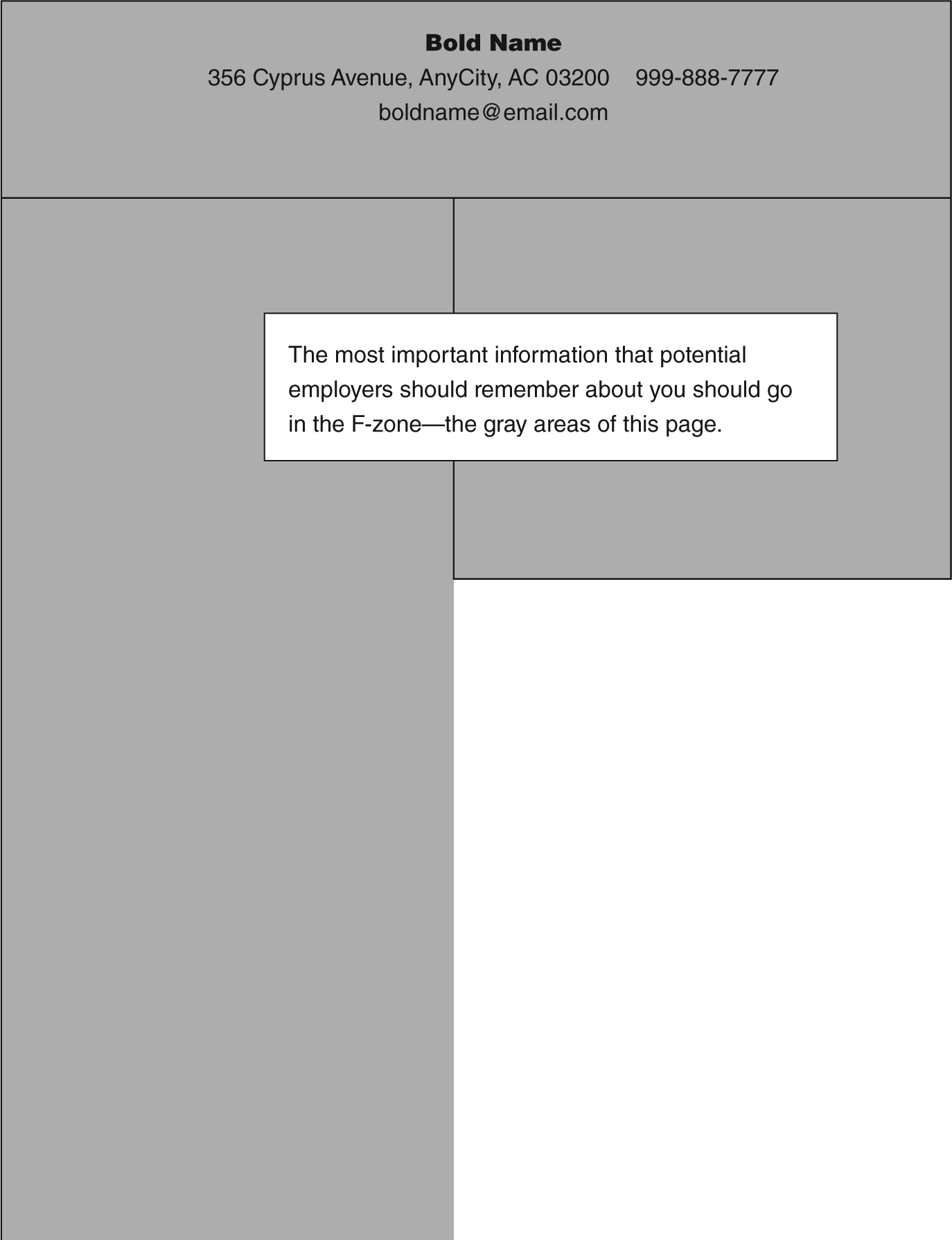
The “F”-pattern reading area for resume design is based on eye-tracking research (Nielsen 2006; see also Shrestha & Lenz, 2007; Shrestha et al., 2008).
The résumé in Figure 2 shows how a résumé designed with the F-zone in mind might be scanned by a human eye. A typical reader’s eyes might scan across the top of the page in the gray area and then down the page in the gray area. The most important information should appear in this area.
Second, we might infer that if two columns are used, the columns should be used at the top of the “F” or at the bottom of the “L” or “E” pattern. We would not want to include information on the right side of the page in an area that is least “scanned” by a person reading on screen. Aligning less important information to the right, such as job locations and dates of employment may pull the eye in that direction, distracting from the more content-rich areas of the résumé (see Figure 2).
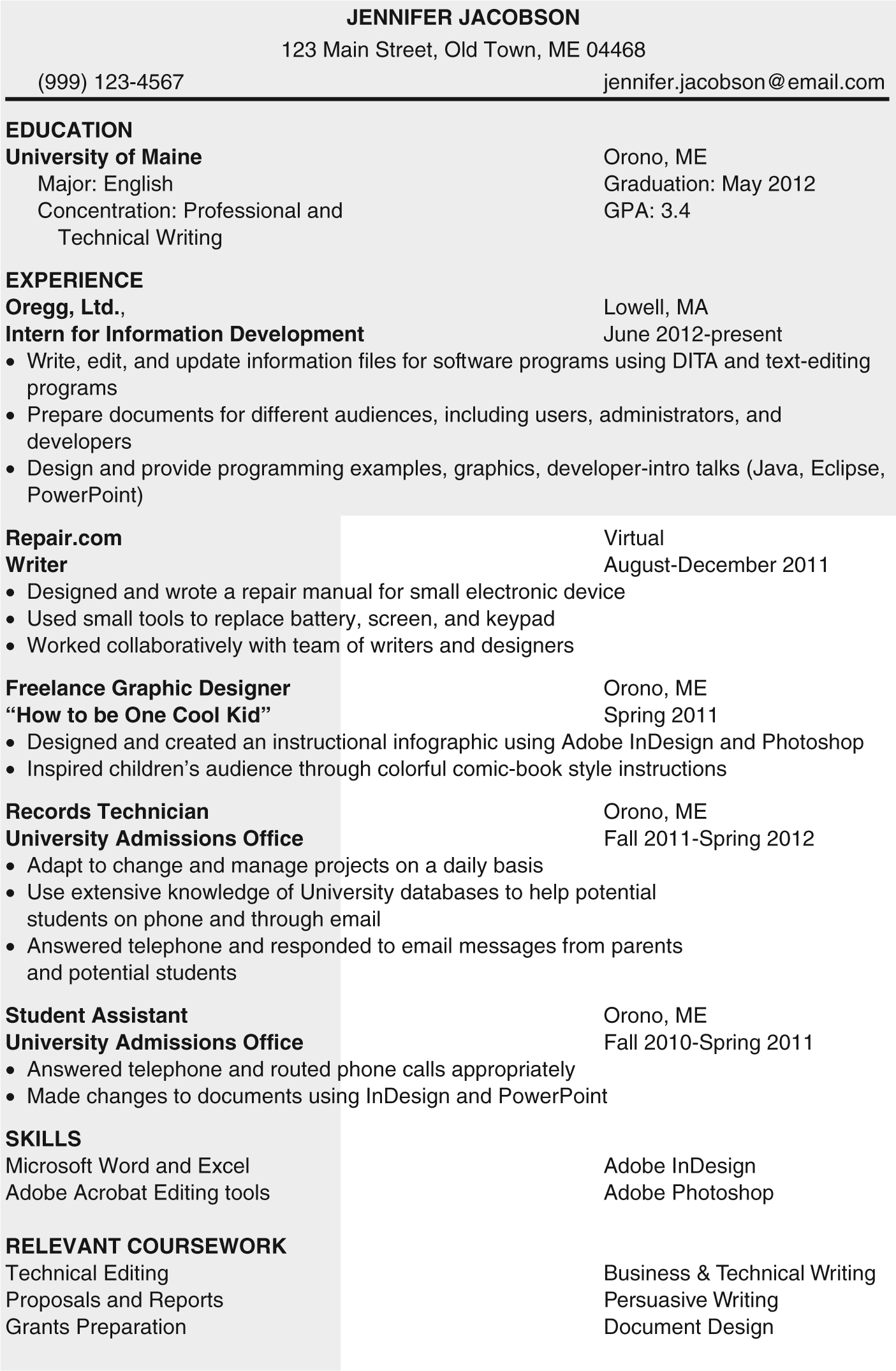
A paper-based resume designed to be read on-screen or on paper.
When a reader is pulled away from the main text to the right side, the reader employs a “hot-potato” reading strategy (Nielsen & Pernice, 2010, p. 422), jumping around the page and simply may miss information in the content-rich area of the résumé. Résumé writers need to place the most important information in the locations on-screen readers tend to browse first—across the top and down the left side, taking care to remember that the bottom left side typically receives the least attention by on-screen viewers (Shrestha et al., 2008).
Maximizing the F-Zone with Keywords
Nielsen (2009) holds that when looking at online content, people tend to use the first 11 characters of a line to make decisions about whether or not to continue reading website headlines. Nielsen calls these words “a signal for the scanning eye” (Nielsen, 2009). So, for example, people tend to consider the first two to three words of a headline when deciding whether to click a link. This tendency suggests that the first two words of a line on a résumé are of the utmost importance. Nielsen (2006) advises using “information-carrying words that users will notice when scanning down the left side of the content,” and points out that users “will read the third word of a line much less often than the first two words” (Nielsen, 2009, para. 8). In résumé-speak, these information-carrying words are the keywords that relate to a specific job or industry.
Using specific keywords down the left side of the résumé increases the likelihood that a potential employer will see them. A bonus to focusing on the F-zone and using keywords toward the beginning of each line is that these strategies are effective for paper résumés as well as résumés read on screen. This means résumé writers can prepare one résumé and not worry about whether it will be read on a screen or on paper, diminishing the need for a separate “scannable” résumé. The following updated best practices rely on this research as well as research about employers’ preferred résumé structures, as described earlier.
Updated Best Practice: Construct Purpose and Movement With a Résumé’s Structure
Using the F- or E/L-pattern approaches to on-screen documents as a guide, résumé writers should choose a conventional structure that allows placement of the most important information in the F-zone. For example, when choosing a chronological résumé, a student might place education first, whereas a seasoned professional might place work history first. Other choices should support the way a human eye might approach an on-screen text:
Choose a conventional structure (Arnulf et al., 2010) that places the most important information in the area that Nielsen identifies as the top of the “F”-Pattern, or F-zone (Nielsen, 2006).
Use a regular, readable font, like Times New Roman or Tahoma.
Make the first 11 characters count by beginning with keywords whenever possible (Nielsen, 2009).
Align elements to the left to honor on-screen reading practices (Nielsen, 2006).
Use bold or italics to emphasize important keywords or details (Nielsen, 1997).
Use only one column, except at the bottom of a résumé (to create an E- or L-pattern of reading; Nielsen, 2006, 2009; Shrestha et al., 2008).
Do not use tabs or tables because résumés loaded into a database could become distorted.
If the résumé is scanned and searched electronically, the keywords will still garner “hits,” eliminating worry about whether a company uses such software. If the résumé is pasted into an online box or into the body of an email message; however, the special codes used by some word processing software do not translate well, causing bullets to disappear, spacing to change, and unintended characters to appear. Instead of creating an entirely different résumé, writers can simply change the way emphasis is created by using these strategies:
Replace bolded text with all caps.
Replace bullets with asterisks.
Replace “rules” (the line that can be inserted above or below text) with a line created by using hyphens.
The résumé in Figure 3 is ready for pasting into an online form or into the body of an email. This résumé is a revised version of the Jacobson résumé shown in Figure 2. Critical information has been placed in the F-zone, and the information aligns on the left.
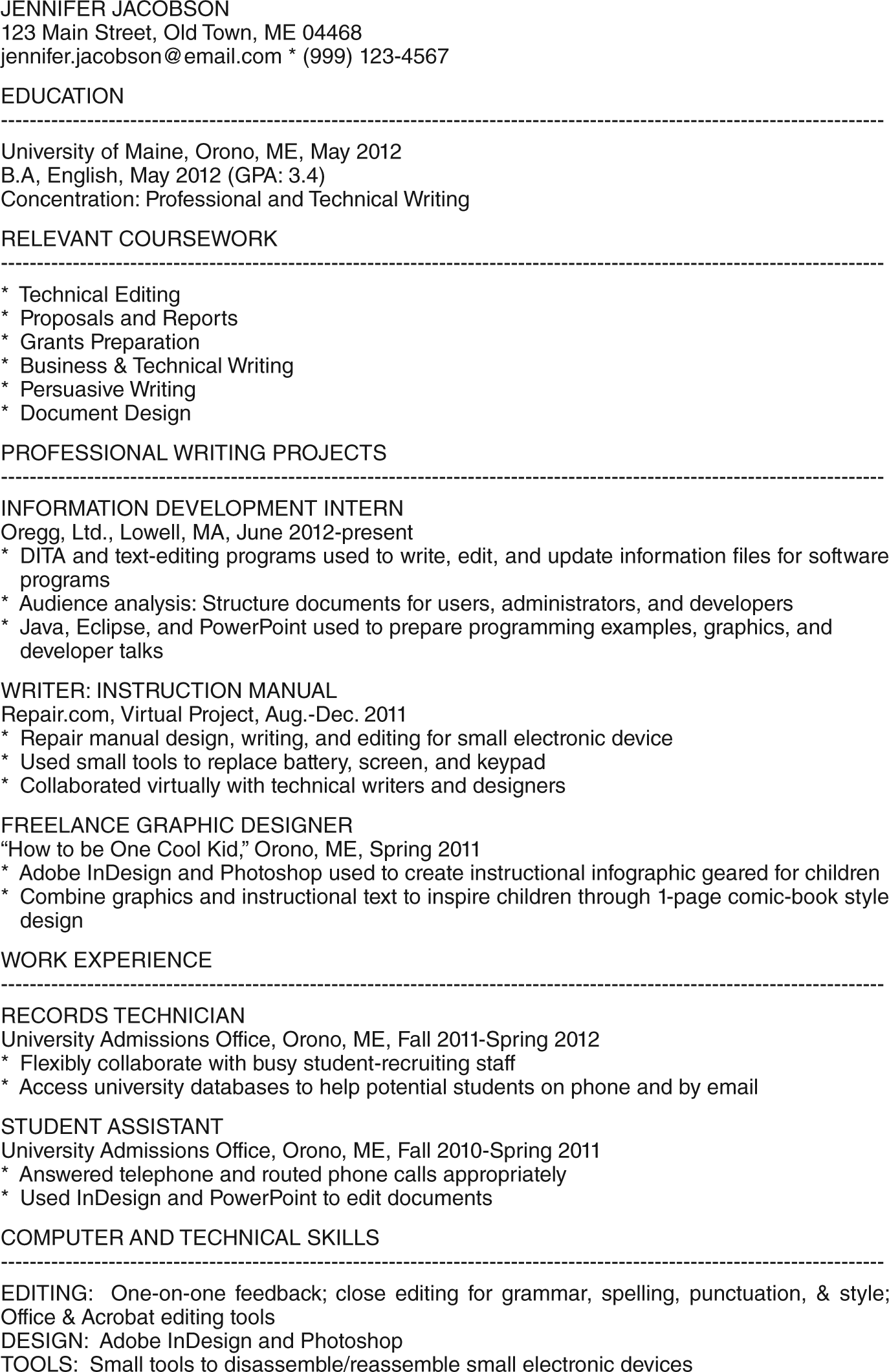
Jacobson’s resume is ready to be pasted into an online box or into the body of an email.
Deciding which information should appear in the résumé’s F-zone is crucial, and one way to begin making this decision is to determine whether the résumé needs an objective or summary statement.
Updated Best Practice: Use an Objective or Summary Statement When Persuasive
An objective or summary should be included only if it can be used persuasively to show how an applicant might fit with a company. If, on the other hand, an applicant is trying to make a vague connection between chemistry courses and a laboratory research position, this is a waste of valuable “F-zone” space. The space would be better served by listing courses or laboratory experience, showing a diligence toward being a good chemistry student rather that attempting to already be a lab researcher.
The following questions and examples can be used to help students decide whether to include an objective, a summary of qualifications, or a career summary.
Can you use a definitive, memorable descriptor? A descriptor is akin to a career summary and serves as a memorable, repeatable description of the applicant, which are also elements of a good “pitch” statement: Lindsey A. Becker, ACP 1234 South Street, Forest City, IA 50436 (641) 585-1313
Advanced Certified Paralegal: Discovery and Trial Practice
In this example, Lindsey holds a specific credential and is seeking work as a litigation paralegal, a position for which this credential has value. A bold, headline-style descriptor provides an immediate snapshot of the résumé writer. While this descriptor does not include the traditional language seeking paralegal position, these words are understood to be true. This credential would be persuasive enough for a trial department to examine the résumé further.
Do you hold a required prerequisite or qualification for the position? Immediate disclosure of required qualifications is akin to providing a hybrid objective-qualifications statement. Some positions have specific requirements or qualifications. The U.S. Department of Agriculture (USDA), for example, requires applicants for the position of soil scientist to meet certain educational criteria. In the following example, Lindsey communicates that she has researched the position and states that she is qualified: Lindsey A. Becker, M.S. 1234 South Street, Forest City, IA 50436 (641) 585-1313
Glacial geologist seeking soil scientist position. Education and experience exceed USDA’s Qualification Standards for Professional and Scientific Positions.
While this information can be confirmed or found by examining her transcripts, she helps the USDA find a reason to review her résumé further without first stopping to check her minimum requirements.
Are you seasoned in a specific profession? Or do you have experience that would benefit the company? If so, the descriptor is akin to a career summary. This time, Lindsey summarizes her qualifications and possibly addresses qualifications requested in the advertisement, such as experience in mediation or arbitration: Lindsey A. Becker, CP 1234 South Street, Forest City, IA 50436 (641) 585-1313
Certified Paralegal offering:
12 years of experience providing estate planning and estate administration services to attorneys
Advanced Paralegal Certification in Alternative Dispute Resolution
Notary Public
This statement provides the employer a snapshot of the potential employee.
If an applicant cannot answer yes to any of these questions, then the F-zone might be better used in other ways: listing coursework, technical skills, and training that show an applicant’s field-specific abilities. As the most valuable space on a résumé, the F-zone leaves little room for including an objective or summary statement that does not contribute to the persuasiveness of the résumé.
Updated Best Practice: Lead Work History Descriptions With Keywords
The way that people approach on-screen texts suggests that résumé writers need to consider violating the current active verb/parallel construction practice by placing keywords at the beginning of lines. (When these ideas were presented to career consultants at the University of Maine Career Center and to Eastern Maine Development Center, this recommendation was the most difficult to consider. The active verb/parallel construction rule has been followed for 30 years, and it is one rule on which everyone seems to agree.) The best way to violate this rule is to try to work keywords into the first two or three words of a description so that the first 11 or so characters of the line matter, similarly to the way Nielsen (2009) holds that the first 11 characters matter when reading online.
For example, the Jacobson résumé shown in Figure 2 follows the current best practice of using active verbs and parallel construction. Some readers may find their eyes drifting to the right side, where the city, state, and dates of employment are because that area has more white space and is less cluttered. Moving away from the content-rich area means a reader is using a hot-potato reading strategy and may not go back to the content-rich area of the résumé.
The résumé in Figure 4 is a revised version of Jacobson’s résumé that places keywords at the beginning of lines whenever possible.
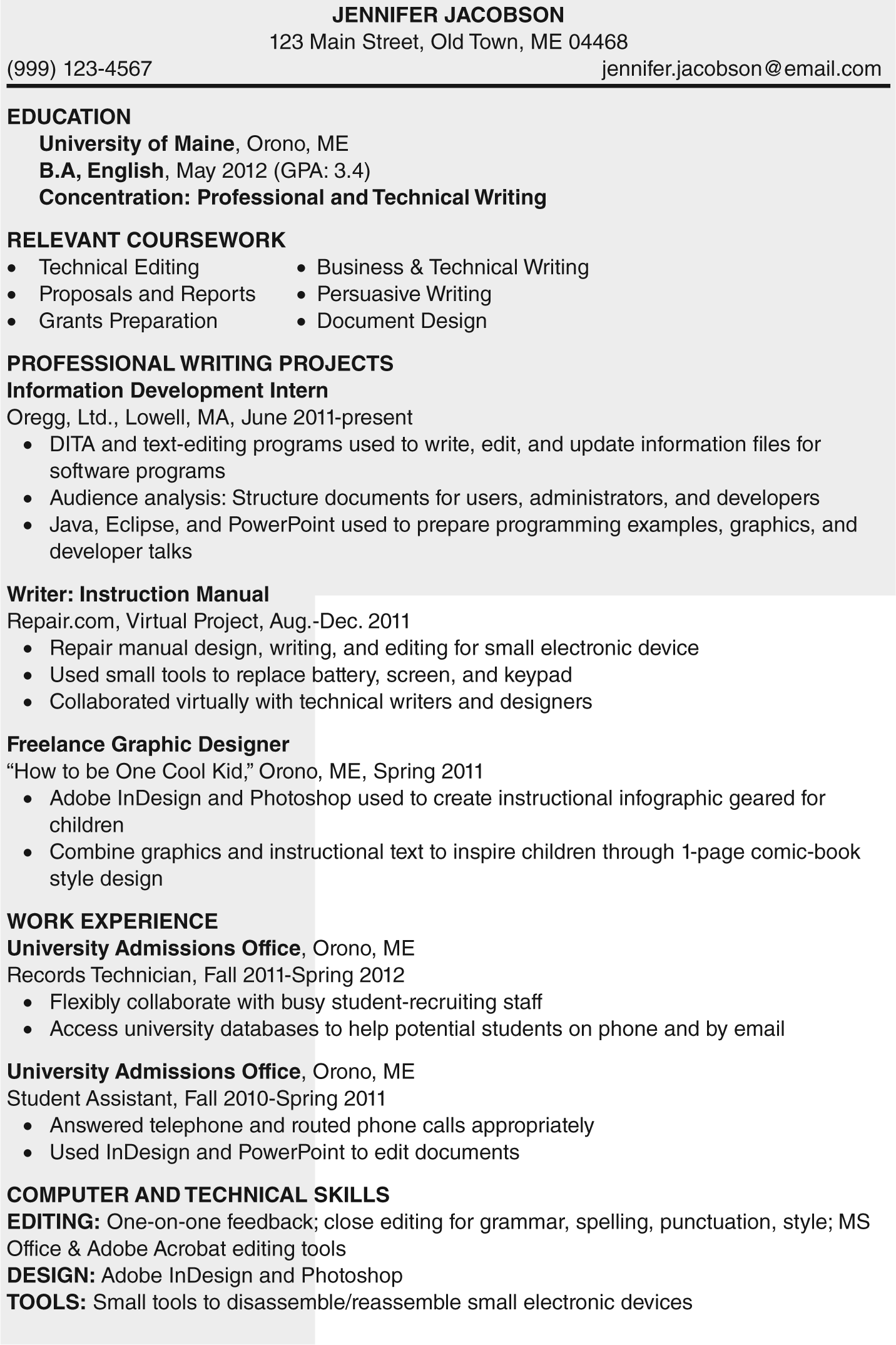
A paper-based resume designed to be read on-screen or on paper.
In the revised example, a reader’s eyes should travel down the left side of the résumé and pick up keywords and phrases without much effort. Notice, too, that the dates of employment have been aligned to the left to keep our eyes from wandering over to the right and away from key information. Some readers may not “see” or pause to read this information, but on the first pass of a résumé, this information is the least important. Overall, the recommended changes to best practices are subtle and reflect that employers continue to prefer conventionally structured chronological and functional résumés.
Conclusion
The way that people engage with online texts provides an emerging set of best practices for résumés that are read on paper or on screen. To summarize, these new best practices should encourage writers to use a single résumé for paper or electronic delivery; to use the F-zone to make decisions about structure; to determine whether to include an objective or summary; and to let go of using active verbs and parallel construction in favor of using keywords throughout the résumé, especially at the beginning of lines. While résumés still must be written using a frame of 8.5-by-11-inch paper, designing for reading on screen is now equally or more important than designing for the printed page, and best practices need to reflect this change.
Footnotes
Acknowledgements
I would like to thank the two anonymous reviewers for their valuable comments and suggestions. I would also like to thank Pat Burnes for her numerous readings of this article and the University of Maine Career Center for allowing me to present these ideas and receive their feedback about them.
Declaration of Conflicting Interests
The author(s) declared no potential conflicts of interest with respect to the research, authorship, and/or publication of this article.
Funding
The author(s) received no financial support for the research, authorship, and/or publication of this article.