in an ado-file? Have you written it? In this tip, I explain why it is utterly useless
[U]18.2 Relationship between a program and a do-file discusses how the do-file
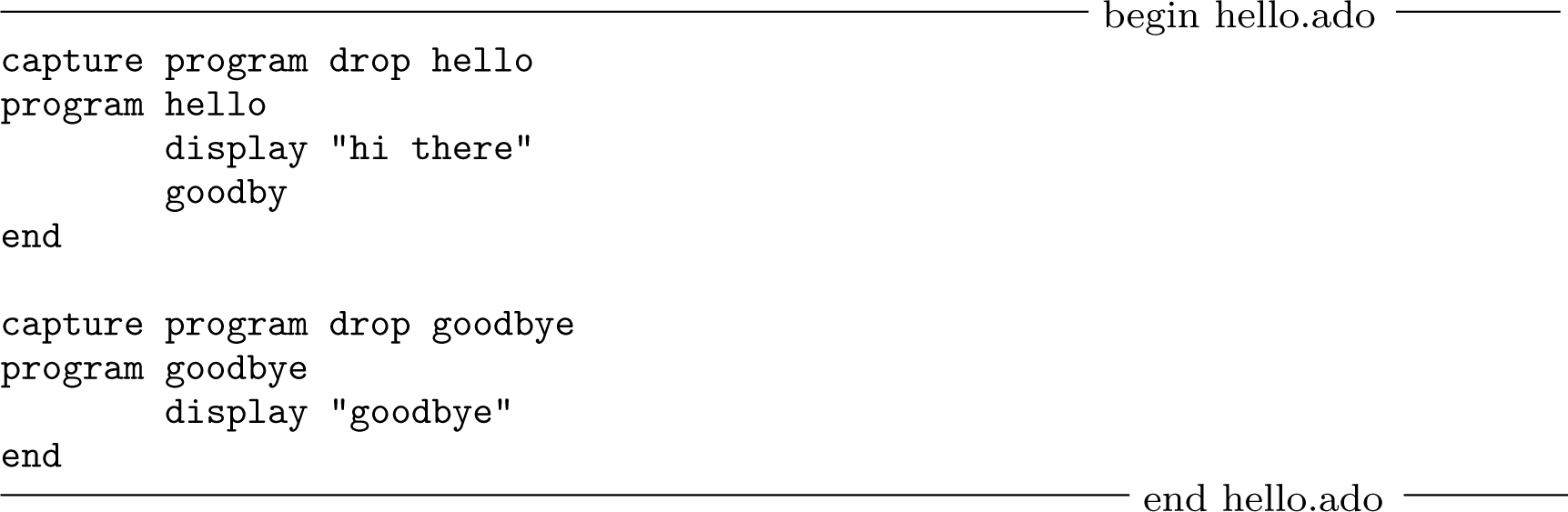
defines the program hello in memory (see [P] program). However, this do-file can run only once. Trying to rerun the do-file will cause Stata to complain because the program hello has already been defined in memory and Stata does not allow redefining programs. The suggested solution to this problem is the modified do-file
where program drop hello will eliminate the program hello from memory if it has already been defined and the capture prefix (see [P] capture) will suppress the error message if the program hello has not been defined.
As useful as capture program drop is in do-files, it is completely useless in ado files. To see why, suppose we store the do-file above as hello.ado and place it along the ado-path (see [U] 17.5 Where does Stata look for ado-files?). Now recall how ado-files work. As explained in [U] 18.11 Ado-files, when we type hello, Stata first checks whether hello is a built-in command (also, see [U] 17.3 How can I tell if a command is built in or an ado-file?). If it were, Stata would execute it. Stata would not even look for hello.ado let alone execute the line capture program drop hello inside. Because hello is not a built-in command, Stata then checks whether the program hello is defined in memory. If it were, Stata would execute it. Again, Stata would not bother looking for hello.ado and would not execute the line capture program drop hello. Stata looks for and executes the ado-file hello.ado only if hello is neither a built-in command nor a program defined in memory. Thus, the line capture program drop hello inside hello.ado is executed only if the program hello has not yet been defined in memory. But if hello is not a program in memory, there is little need to eliminate it. Actually, the line capture program drop hello inside hello.ado results in an error every time it is executed. You will not notice, though, because capture hides the error from you.
Supposedly dropping local subroutines: Don’t!.
As explained in [u] 18.11.4 Local subroutines, an ado-file may define more than one program. Occasionally, ado-files contain capture program drop commands before defining such additional programs. As an example, suppose we add a second program to the ado-file hello.ado
While capture program drop hello is useless, capture program drop goodbye is even worse. To understand why, recall that goodbye is a local su broutine. As such hello.ado never defines the program goodbye in memory. Instead, hello.ado de fines the two programs hello and hello.goodbye. There might still be another program goodbye defined in memory, but it would have nothing to do with hello or hello.goodbye. Yet capture program drop goodbye inside hello.ado would happily eliminate the other goodbye from memory. If goodbye were needed again, it would then have to be redefined either from an ado-file or, much worse, interactively.