Writing Stata code that produces the same results on another user’s machine is an essential component of modern reproducible data analysis workflows. However, a number of reasons may make it difficult to do so without detailed knowledge of the recipient’s environment. For example, differences between installation of (third-party) community-contributed files may cause failures. Furthermore, even when the environment is not an issue, users may make errors regarding random-number generation in the Stata code. These issues can be very challenging to detect from the code output alone. The repkit package provides new tools to automate: the location of root file paths; the configuration of community-contributed command installations; “linting” of the Stata code for readability; and the precise detection of code issues affecting reproducibility.
The growing demand for reproducibility and transparency has reshaped empirical research across disciplines, particularly in the social sciences. As methods become more complex and data driven, ensuring that results can be independently reproduced using the same code and data is now seen as a baseline requirement for credible research. This shift is reflected in rising expectations from journals, funders, and institutions. Many leading economics journals, such as Econometrica, Journal of Political Economy, Quarterly Journal of Economics, and those published by the American Economic Association, now require replication packages as a condition of publication, with some appointing dedicated staff to enforce compliance (Vilhuber 2020). Similar efforts to strengthen computational reproducibility have emerged in other fields, including biomedicine, psychology, and political science, though enforcement and data and code availability remain uneven (Gertler, Galiani, and Romero 2018). These initiatives reflect a growing recognition that reproducibility is central to research credibility.
In this context, we developed repkit, a package designed to make reproducibility more practical and accessible. It streamlines several tedious yet critical steps in creating transparent and verifiable code: setting root paths, managing community- contributed command dependencies, cleaning code syntax, and evaluating the stability of the code. Although opinionated by design, repkit reflects the practical needs encountered through years of reproducibility verification at the World Bank.1
We focus here on computational reproducibility: the ability of a third party to recreate the exact results of a study using the original code and data (Vilhuber 2020; Bollen et al. 2015). While this may seem straightforward, even minor issues such as platform-specific folder paths, different versions of community-contributed command dependencies, unstable sort orders, or inconsistent seeds for random-number generators (RNGs) can introduce discrepancies that are hard to detect and diagnose. As others have documented, successful reproduction rates remain low in social science (Christensen, Freese, and Miguel 2019; Vilhuber 2020), and in our own work, fewer than one-third of packages run cleanly without revision. Tools like repkit aim to raise that number.
Reproducibility challenges are not unique to Stata. A growing ecosystem of tools across languages, such as pylint and require in Python and here and renv in R, aims to support reproducible workflows. In Stata, similar problems are tackled by other packages, including setroot (Correia 2023), here (Koren 2020), require (Correia and Seay 2024), dependencies (Goldemberg 2021), and ssc2 (Vilhuber 2023). However, some gaps remain unaddressed. In the section for each respective command, we explain how repkit’s commands fill these gaps differently, highlighting when those differences are advantageous and when they come down to personal preference.
The repkit package comprises four commands that streamline key tasks in writing reproducible code. reproot automates the creation of global macros for project root paths, removing the need for manual edits across systems. repado manages paths for community-contributed commands, enabling self-contained packages and reducing conflicts from ad hoc installations or version mismatches. lint offers a fast—if opinionated—way to standardize code structure and eliminate common ambiguities. Finally, reprun ensures that results remain stable each time the code is run, particularly when random-number generation or sorting is involved. It helps researchers detect when and where their code might produce inconsistent outputs, allowing them to identify and correct issues before finalizing a reproducibility package.
repkitdependencies and community contributions
reproot, repado, and reprun require Stata 14.1 or a more recent version to run. lint requires Stata 16 or above, a Python 3.x installation integrated with Stata, and the Python libraries pandas and openpyxl.2
All code for the package is open source and available for public contribution, suggestions, bug reporting, and general comments on GitHub. The repkit repository is hosted at https://www.github.com/worldbank/repkit.
In addition to the repository, the package is documented through a dedicated website: https://worldbank.github.io/repkit/. This site displays the most current version of the help files, which are dynamically rendered from the main branch of the repository. Thus, the documentation is always aligned with the latest Statistical Software Components (SSC) Archive release, allowing users to browse it before installing the package.
Beyond the standard help files, the website also features a growing set of articles. While help files focus on what each command does and how its options alter behavior, the articles provide broader context. They illustrate how the commands are intended to be used, expand on recommended workflows, and offer a more subjective and narrative format than what is appropriate for help files.
The reproot command
The reproot command simplifies setting file paths using global macros in Stata. These macros dynamically construct the full path unique to each user when referencing files throughout the code. According to our style guide,3 these paths should generally be set at the beginning of a main.do file, which then runs the do-files that make up the entire project.
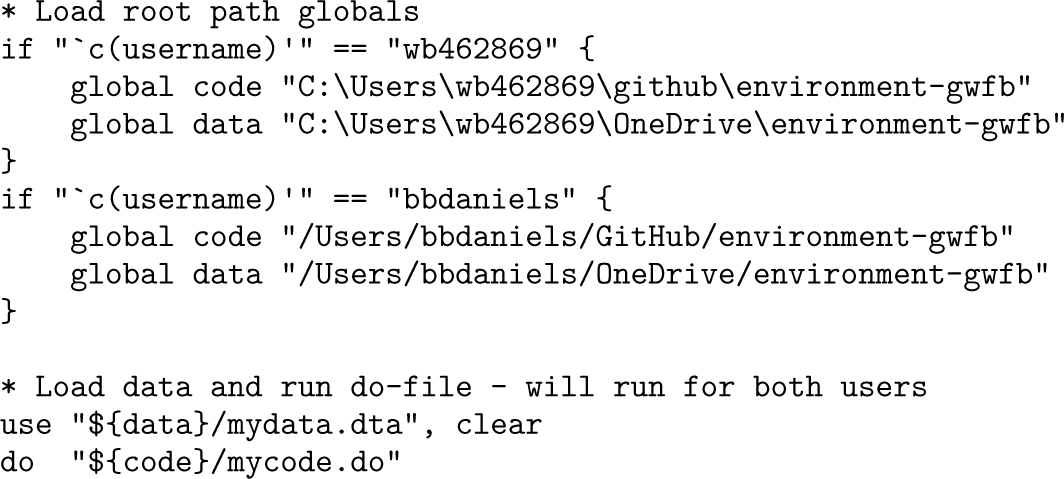
For example, consider a project called environment-gwfb. This project might use a “code” root in a version-controlled location such as a Git folder and a “data” root in a synced folder such as OneDrive. In a manual implementation, this typically results in code like the following:
Such code will not run on a new user’s machine without a one-time setup per project, because they will need to specify the required paths. While this is not a terrible solution, the manual setup can be somewhat inconvenient. Instead, the reproot workflow allows the original author to include a “root file” in each relevant “root folder” for the project. reproot will automatically locate the root paths and store them in the appropriate global macros. This eliminates the need for the new user to manually specify where those roots are located on their computer for each project.
Defining and detecting root folders
reproot automatically identifies root folders by locating root files. To do this, a single team member creates a file called reproot.yaml in each directory they want to treat as a root folder. These are extremely small plain-text files—just two lines—in the following format:
For example, in the project mentioned earlier, the root directory that the author wants to store in the global code macro would have a file named reproot.yaml with the following content:
And the root directory for data would have a file—also named reproot.yaml—with the content
Once these files are created, the basic syntax for the command is
If the project name in a root file matches the name specified in the project() option, reproot assigns the file location of the root file to a local macro named after the corresponding rootname. Note that project names must be universally unique for this mechanism to work reliably across different users’ computers. We recommend choosing a moderately descriptive project name—for example, a project acronym combined with a keyword or an author-year-acronym combination is usually sufficient. project() and roots() are required.
The underlying concept of searching for root files is not unique to reproot. However, existing tools support only single-rooted projects. The novel contribution of reproot lies in its ability to manage multiple roots. Common scenarios involving multiple roots include cases where some files are stored in synced folders (for example, Dropbox or OneDrive), others stored on a network drive, and others tracked in version control systems (for example, Git).
Tools such as setroot (Correia 2023) and here (Koren 2020) search upward from the current working directory along a single branch of the file tree until a matching file is found. Because only one root is expected, the criteria for identifying a root file are more relaxed, and various types of files may serve as a root. However, this approach limits these tools to single-rooted projects. For such projects, these tools are typically sufficient and often more convenient because they do not require a specifically formatted root file.
By contrast, reproot searches across multiple branches of the file tree and therefore requires stricter formatting for root files. Because a search may identify multiple root files, each must specify both a projectname (to identify the project it belongs to) and a rootname (to distinguish between different roots within the same project). This added specificity is a deliberate tradeoff to support multirooted projects.
Usage
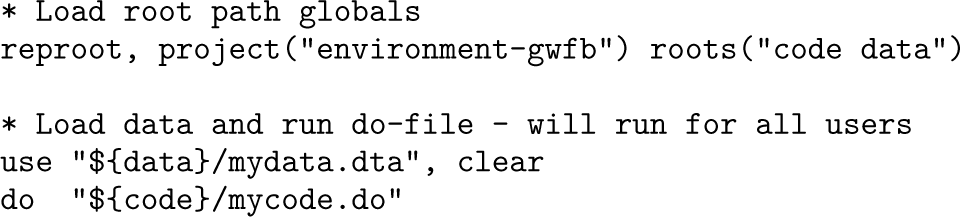
In this example, project(“environment-gwfb”) is an identifier for the project, and roots(“code data”) specifies the list of root folders that should be located for the project. After the root files are set up, the code author simply includes the following at the beginning of the main.do file:
Each user’s absolute file paths to the desired root folders will be stored in globals named code and data whenever they run the code. The author can then reference any file in a subfolder of these folders by using relative file paths together with these global macros. Because of this setup, recipients never need to make any project-specific modifications in the code to run the entire package—regardless of where they have saved the code and data directories on their local machine.
Because most projects have roots named code and data, the command includes an option called prefix(), which prepends a project-specific prefix to the global macro names. This prevents macros from different projects from being mixed up if a user switches between multiple projects in the same session.
Scoping the search for root paths
Although filename searching is highly efficient today, it is still too slow to scan every folder on a computer’s file system. Therefore, reproot requires a settings file named reproot-env.yaml, located in the home or user directory (that is, the directory that Stata points to when running cd ∼). This location can always be accessed programmatically, even before any root paths have been defined. This settings file is also very brief: it specifies the maximum recursion depth for searching root folders, the specific folders to search (with optional custom depths for each), and optionally, a list of directory names to always exclude from the search.
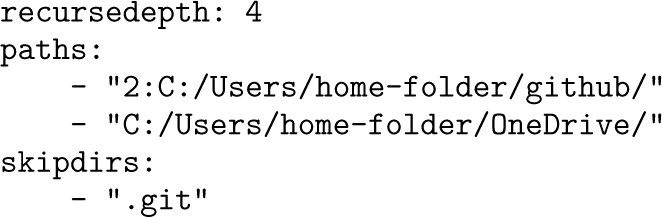
If the user does not have a reproot-env.yaml file yet, reprootwill display a dialog box explaining each setting and allow the user to create the file in the correct location. We recommend limiting the search to a few well-defined locations, because most users store their work in just a handful of places—such as a GitHub folder, OneDrive/Drop- box/Box, a network drive, or the Documents folder. For example, a common setup in our team—where GitHub and OneDrive are the IT-approved solutions for managing code and data, respectively—looks like this:
In this example, the default recursion depth is set to 4, meaning reproot will search up to 4 subfolder levels starting at each path. Two search paths are included: one for the user’s GitHub directory and one for the base OneDrive directory. The first path includes a custom recursion depth of 2, overriding the default for that specific path. If a user stores files in a third location, they would need to add it to the settings file for reproot to include it in the search. Finally, the user has configured reproot to skip all folders named .git, which often contain many irrelevant files. We recommend doing the same for whatever version control system you use.
While this settings file introduces a manual step—which setroot and here do not— it is a one-time setup per computer, instead of a one-time setup per project, as required by other tools that support multirooted projects.
The repado command
A well-known issue in Stata is that using third-party, community-contributed packages can compromise code reproducibility. Specifically, a new user may not be able to access the same version of a package if, for example, the version on SSC has been updated. Conversely, if the user has an older or newer version of the package installed locally, they might mistakenly conclude that the results are inconsistent with those obtained by the original code author.
Various attempts have been made to address this problem through code-based solutions. To achieve gold-standard reproducibility, one must ensure that the exact version of each package is available to all collaborators and to anyone seeking to reproduce the results in the future. For these strict requirements, a more recent version is not sufficient. This means that each project must manage its own project-specific dependency space, allowing one project to use a newer version of a command while another uses an older version for reproducibility verification.
Additionally, the tool should work with any community-contributed command, regardless of how or where it was distributed, and without requiring the inclusion of specific meta-information in the ado-file itself. Finally, the solution should also help the original author ensure that all commands used in a project are indeed included in the reproducibility package.
Existing tools fall short in one or more of these aspects. For example, require (Correia and Seay 2024) relies on specific version meta-information in the ado-file, which is optional, and provides access to a required command only when the minimum version is sufficient—unless the command is hosted on GitHub and uses the release tag feature. Another example is ssc2 (Vilhuber 2023), which allows users to install older versions from a mirror of SSC with daily snapshots. However, this applies only to commands distributed through SSC. A third example is dependencies (Goldemberg 2021), which provides access to the exact version used by the original author but requires managing a zip file. Furthermore, unless all previously installed commands are included in the zip file, there is no convenient way for the author to verify that all necessary commands have been properly captured.
To meet the gold standard for reproducible Stata code, we introduce repado, a utility designed to enforce that Stata install community-contributed packages only to a specified directory within the reproducibility package. It also ensures that all users exclusively use the exact command files—and thus the exact versions—stored in that project directory. When this directory is shared along with the reproducibility package, all future users have access to the correct exact versions of the commands, regardless of the state or availability of the original distribution source.
The syntax is
All that is required is the using path, which generally specifies a directory, something like “${code}/ado/”, where all the community-contributed packages needed for reproducing will be stored and redistributed with the reproducibility materials. The responsibility for confirming acceptable licensing for the redistribution of code materials rests with the user; we understand that the General Public License v3 license used on SSC provides a way to facilitate this.
In the default (“strict”) mode, the command will remove all other locations from Stata’s adopath listing and set the specified directory as the PLUS adopath. Consequently, only Stata’s built-in commands in BASE and any community-contributed commands installed in the specified folder will be available for the remainder of the Stata session. Any community-contributed commands added using net install (the method used by ssc install) will be placed in this location. Thus, users who later run the same script with the same repado setting are guaranteed to access the same versions of the same community-contributed packages. Other users do not need to have any version of the commands required by the project installed and do not need to install commands before running the reproducibility package: repado ensures that all users only use the command files already shared in the package.
The repkit package also includes a complementary command called repadolog, which lists all commands—along with their distribution dates and sources—installed in the current PLUS folder. This command can be used to inspect installed commands regardless of whether repado is being used. However, when users manage project- specific dependency spaces, it is particularly useful for listing what is currently installed in the active PLUS adopath.
If nostrict is specified, community-contributed commands from other adopath locations will still be available. In this mode, the command will set the specified directory as the PERSONAL adopath. Consequently, net install will install commands in the user’s default PLUS location rather than in the indicated path. While we generally do not recommend this mode, it may be useful during development phases when users are uncertain about the final list of community-contributed commands to include in the reproducibility materials.
There are still several known cases in which even this functionality is insufficient to guarantee reproducibility in a new environment. Specifically, commands that require external scripts (such as those written in C) may depend on the operating system and will install only materials appropriate to the installing user’s machine. As of now, we have not implemented a solution to address this issue.
The lint command
Stata code is relatively flexible and allows for multiple ways to express equivalent instructions, including the use of nonfunctional elements such as whitespace and comments. However, this flexibility often leads to inconsistent coding conventions among users, which can hinder readability and make it difficult to identify functionality, especially errors, when code is shared within teams or with external collaborators. Stata does not provide an official style guide, though the community has proposed various conventions for coding style and workflow organization (Cox 2005; Reif 2023). Building on our experience verifying the reproducibility of World Bank publications, our team has developed a Stata style guide to promote consistency and clarity in shared codebases (Bjärkefur et al. 2021). The lint command extends these efforts by offering an automated tool that not only checks adherence to style guidelines but also adds improvements to enhance code quality and clarity in line with the principles outlined in our style guide. While similar tools exist in other languages, lint is the first automated style reviewer and corrector developed specifically for Stata.
The lint command is intended to be used interactively. In its simplest form, the command can be written
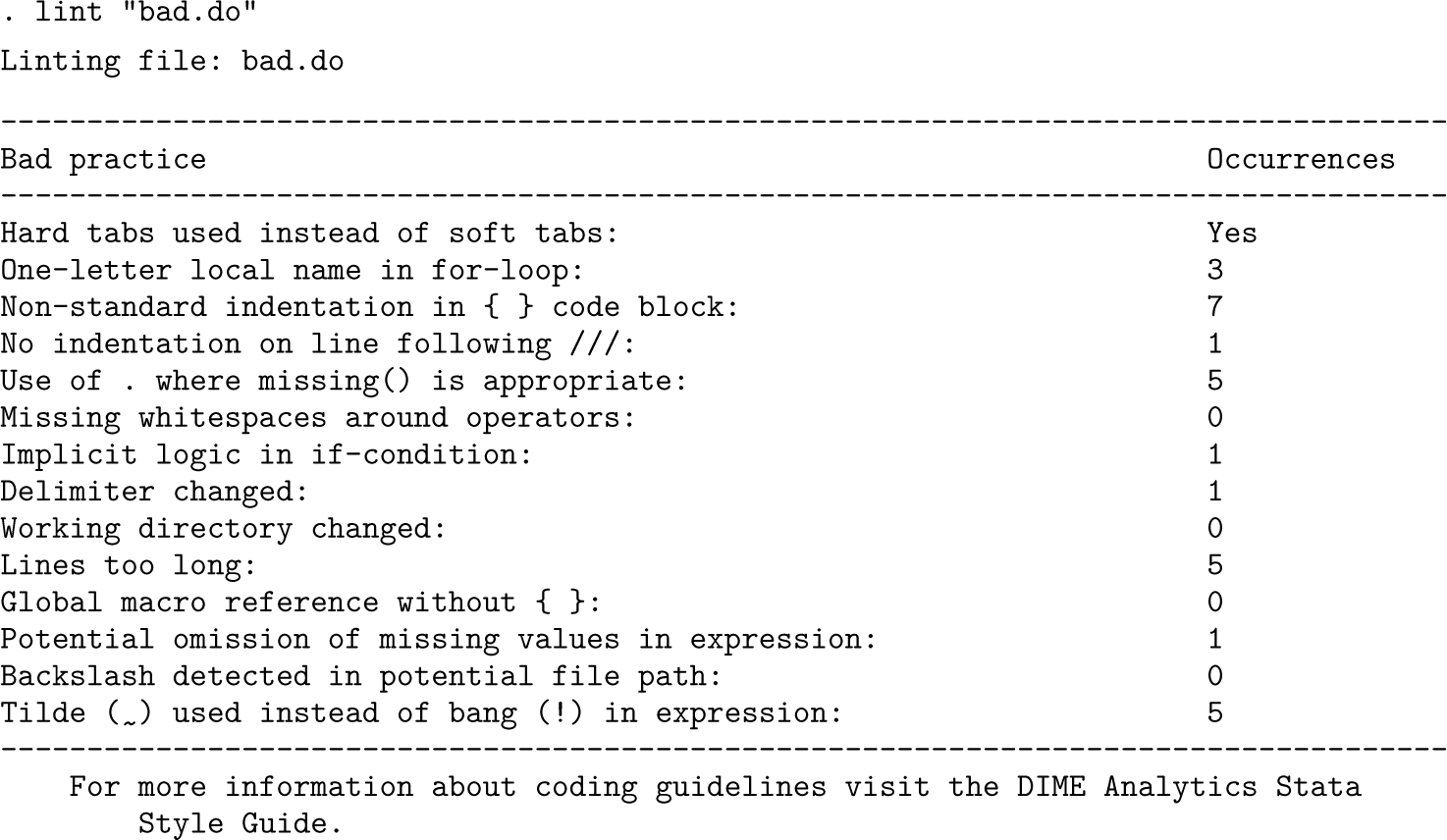
If no options are specified, the command will load and read the indicated do-file. It will then return a table indicating the frequency of each of the following code practices, which we recommend eliminating for readability:
Use of hard tabs. We recommend whitespaces—usually two or four—instead of hard tabs. (You can change the behavior of the tab key in most editor preferences, including Stata’s Do-file Editor.)
Abstract index names. In for-loops, index names should describe what the code is looping over. The command will flag any loops in which a loop index is just one character.
No indentations after nested commands. After declaring a for-loop statement or if-else statement, add indentation on new lines with whitespaces (usually two or four).
No indentations after newline symbols. After a new line statement (///), add indentation on new lines with whitespaces (usually two or four).
Imprecise handling of missing values. Use !missing(var) instead of potentially mishandled expressions like var < . or var != ..
No whitespace around math symbols (+ = < >). For better readability, add whitespace around math symbols. For example, write gen a = b + c if d == e instead of gen a = b + c if d==e.
Implicit logic statements. Always explicitly specify logic conditions, because Stata evaluates most nonzero values as true, and there is no way for anyone reading the code to tell whether that is intentional. For example, write if var == 1 instead of if var.
Use of #delimit. In general, use /// for line breaks.
Use of cd. Do not rely on the working directory, because many Stata commands change this location without asking. Instead, use absolute and dynamic file paths in global macros, such as those provided by reproot.
Overly long lines. For lines that are too long, use /// for line breaks, and divide them into multiple lines. We recommend restricting the number of characters in a line to under 80. This is most important for long lines of code. Long strings are often still readable even when exceeding 80 characters, and adding line breaks within double quotes can sometimes be impractical.
No curly brackets for global macros. Always use ${} for global macros. For instance, use ${global} instead of $global.
Not accounting for missing values in logic. Conditional expressions like var != 0 or var > 0 are evaluated true for missing values. Make sure to explicitly account for missing values by using missing() in expressions.
Forward slashes in file paths. This will prevent Unix (Mac) users from running code entirely. Check whether backslashes are used in file paths; replace them with forward slashes (/).
Use of tildes (∼) for negations. Use the bang symbol (!).
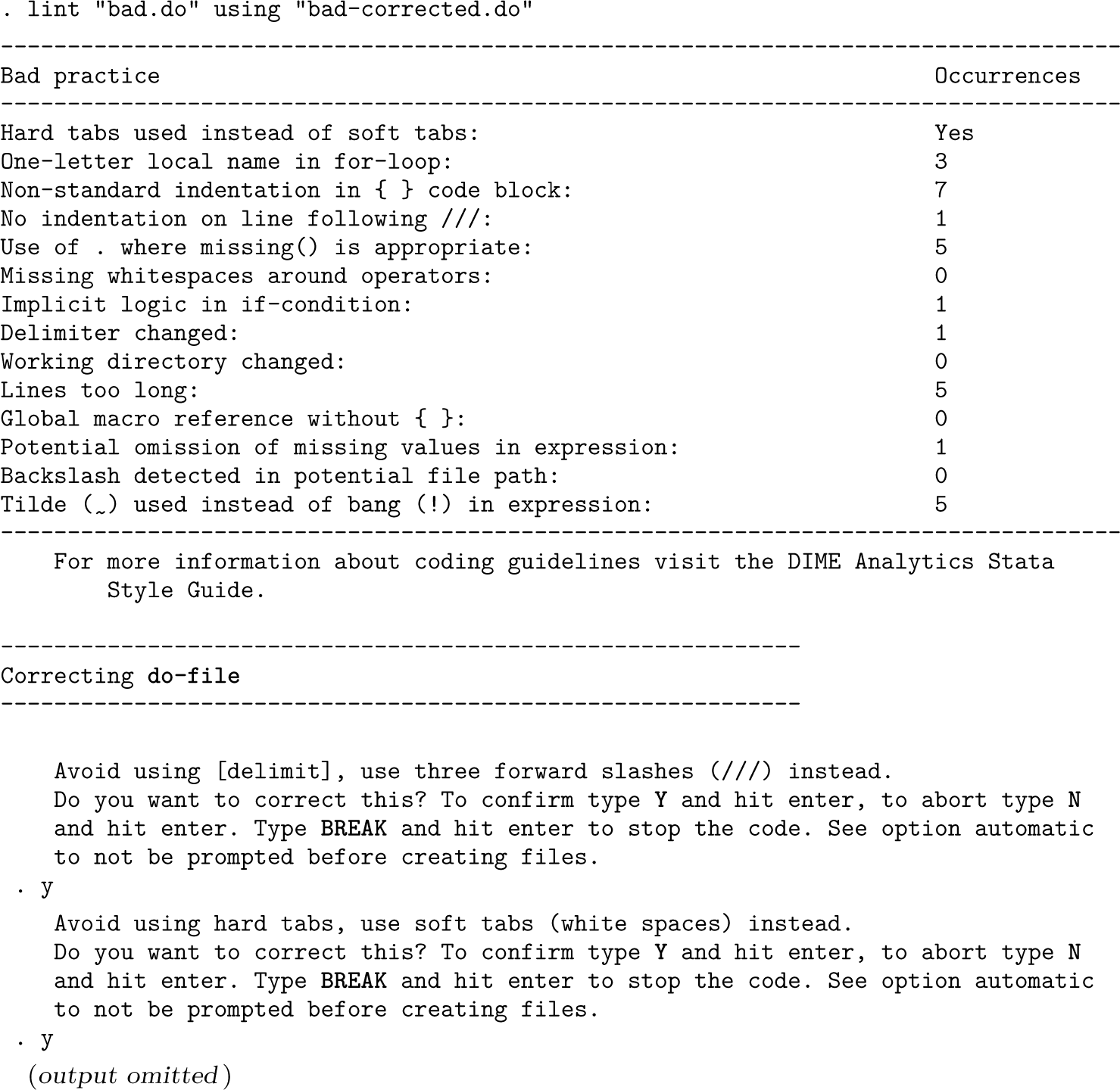
If the command is executed interactively with no options, it will return something like the following to the Results window:
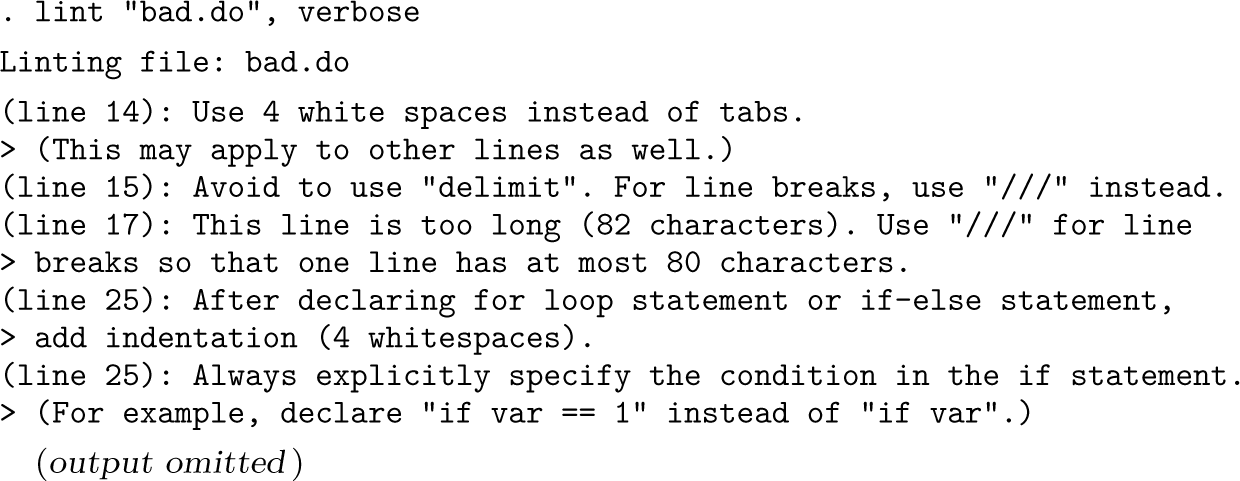
If nosummary is specified, this output will be suppressed. Instead, the user may prefer to use the verbose option to receive line-specific results in the following form. Additionally, the user can use the excel() option to print the results of verbose to the specified Excel workbook.
Automated correction of coding practices with lint
The lint command can also attempt to replace instances of the practices that it has flagged. To use it, write
When using “ output_file” is included, lint will create a new do-file at the specified location and will copy over the content from the original do-file to the new one, correcting some practices along the way. By default, the user will be prompted to accept (with a capital or lowercase Y) or reject (with a capital or lowercase N) each change related to a coding practice. The user can also introduce BREAK (uppercase or lowercase) to interrupt the prompts at any time.
These are the practices that are corrected by lint:
Replaces the use of #delimit with three forward slashes (///) in each line affected.
Replaces hard tabs with soft spaces (four by default).
Indents lines inside curly brackets with spaces (four by default).
Breaks long lines into two lines (at 80 characters by default).
Adds a whitespace before opening curly brackets, except for globals.
Removes redundant blank lines after closing curly brackets.
Removes duplicated blank lines.
The replace option allows lint to overwrite the using file. The automatic option disables prompts for each of the changes and applies all of them at once. The force option allows the command to overwrite the initial do-file (if both paths are identical).
The indent() option allows the user to specify the number of whitespaces used for indentation (default is four). The linemax() option sets the maximum number of characters in a line (default is 80). The space() option sets the number of whitespaces used to replace hard tabs (default is the same value used in indent()). These options also affect the detection of code practices in the default table output and in verbose(). For example, using linemax(100) will prevent the linter from detecting lines between 80 and 100 characters as bad practices.
The reprun command
One common challenge in reproducible research is ensuring that results stay the same every time the code is run, especially when random-number generation or sorting is involved. The reprun command helps researchers detect when and where their code might produce different results across runs. It does so by running a do-file twice— including, recursively, all do-files executed by that do-file, capturing the internal state of Stata at every step and identifying mismatches in the RNG state, data sort order, or the data themselves. This makes it easy to pinpoint the specific lines of code that cause reproducibility failures. The complete syntax is
The reprun command works by executing the specified do-file twice. In the first run (run 1), it records the state of Stata after each line of code. Specifically, it tracks
the RNG state, using c(rngstate);
the sort-order RNG state, using c(sortrngstate); and
the structure of the data by calculating a checksum from a comma-separated value (CSV) version of the dataset.
reprun then repeats the process (run 2), recording the same information. After both runs are completed, reprun compares the results line by line. If any of these values differ between runs, that line is flagged as a mismatch. Mismatches indicate a potential failure of reproducibility—meaning that results might change if the code is rerun in the future.
The summary of mismatches is shown in the Results window and saved in a SMCL log file inside a new folder called /reprun/, which is created in the same location as the do-file. If a using directory is specified, this folder will be saved there instead. If the debug option is used, detailed log files and datasets for both runs will be saved for further inspection.
What counts as a mismatch?
Seed RNG state. A mismatch occurs whenever the RNG state differs from run 1 to run 2, except any time the RNG state is exactly equivalent to set seed 123456789 in run 1 (the initialization default). By default, reprun invokes clear and set seed 123456789 to match the default Stata state before beginning run 1. The noclear option prevents this behavior; this is not recommended unless you have a rare issue that you need to check at the very beginning of the file. Most projects should very quickly set the randomization seed appropriately for reproducibility.
Sort-order RNG. Because the sort RNG state should always differ from run 1 to run 2, a mismatch is defined as any line where the sort RNG state is advanced and checksum fails to match when comparing with the run 1 data (as a CSV) at the same line. This mismatch therefore occurs whenever the sort-order RNG is used in a command that results in the data taking a different order between the two runs. Users should never manually set the sortseed to override these mismatches— instead they should always implement a unique sort on the data using a command like isid with the option sort.
Data checksum. A mismatch occurs whenever checksum fails to match when comparing the result from the run 1 data (as a CSV) in run 2. Users should understand that the lines where only the data checksum fails to match are unlikely to be the lines where problems originate in the code—these mismatches will generally be due to earlier failures of reproducibility in randomization or sorting. Note that results from datasignature are unique only up to the sort order of each column independently; hence, we do not use this command.
Interpreting results
The compact option displays only lines where there is both a change in the RNG or sort state and a data mismatch. This helps highlight the source of instability, because problems often originate earlier and cause errors that cascade through the code. The verbose option will alternatively report any line in which any of these values changed, whether or not there is a mismatch between run 1 and run 2. This can be useful for advanced code diagnostics.
When you review the results table, it is best to resolve mismatches from top to bottom. Early issues in the RNG or sorting usually explain later data mismatches. Reading from left to right in the output can also help: RNG mismatches are often the root cause, sort issues may follow, and data mismatches are typically the consequence.
Examples of reproducibility issues
The following examples illustrate how reprun identifies common reproducibility problems in Stata code.
Example 1: Random-number generation without a set seed
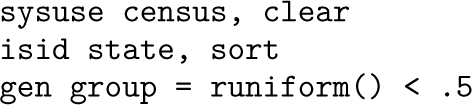
Consider this simple script, saved as myfilel.do:
The last line creates a random variable using runiform(). Because no seed is set, this will produce different results every time the code runs. When reprun checks this file, it identifies mismatches in both the seed RNG state and the dataset:
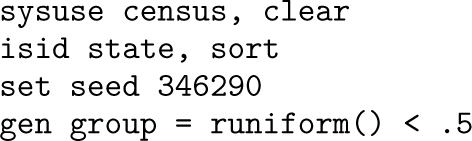
To fix the issue, simply set a seed before generating the random variable:
Rerunning reprun now shows no mismatches, confirming that results are reproducible.
Example 2: Sorting on a nonunique variable
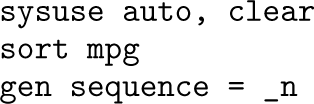
Now consider another script, myfile2.do:
The mpg variable is not unique, so the sort order may vary each time the code is run. This causes the line that generates a sequence using _n to also produce different results. Here is what reprun outputs:
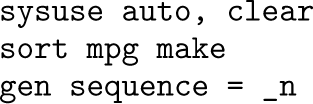
The solution is to sort using a unique combination of variables—for example, mpg and make:
Additional options for reviewing results
• The suppress() option hides reporting of changes that do not result in mismatches, especially when verbose is specified. For example, the sort RNG frequently changes without causing errors, so specifying suppress(srng) can reduce unhelpful output. To suppress all types, use suppress(rng srng dsum). Suppressing loop cleans up loop displays so that titles are shown only on the first line, though when combined with compact, this may remove the display entirely.
• The debug option allows the user to save all the underlying materials used by reprun in the /reprun/ folder, where the reporting SMCL file will be written. This will include copies of all do-files for each run for manual inspection, text files of the states of Stata after each line, and copies of the dataset at specific lines when it is needed. This can take a lot of space and is automatically cleaned up after execution if debug is not specified.
Fixing reproducibility issues with set seed
Reproducibility issues related to random-number generation and the sort-order RNG should be resolved by improving the code structure, not by simply inserting set seed or set sortseed at the top of a do-file. While this might stabilize results, it masks the underlying issues.
We recommend following a clear principle: seed the RNG once via a statistically independent process. This ensures that changes in the order or structure of unrelated processes do not affect results. As noted in the Stata manual for set seed, reseeding too frequently can reduce randomness and introduce hidden dependencies.4
Sort-order RNG should generally never be set manually. Instead, ensure that your code is invariant to the order of data by always sorting on a unique identifier when the order matters. If results change with sort order, the code likely needs restructuring.
Once sort-order dependence is addressed, the main RNG can be seeded appropriately, once per process, using a seed generated from a reliable source (for example, http: //random.org). This makes the analysis reproducible without introducing fragile dependencies on execution order.
The certainty of error detection
In rare cases, two runs are not sufficient to detect the existence of reproducibility issues. For example, it may be the case that a particular sort is not unique but only results in two observations potentially changing places. Then the odds that the first and second run are identical is 50%. It is not difficult to come up with even more extreme situations where one configuration dominates most runs of the code and alternative results appear in an arbitrarily small percentage of executions. We have no solution to this issue at present; we rely on the fact that the vast majority of reproducibility problems have probability very near 100% of not producing the exact same configuration of states in any two consecutive runs.
Reproducibility of by and bysort
Commands like by and bysort are commonly used to calculate statistics within groups. However, if the sort order within each group is not unique, later commands may behave inconsistently. For example, bysort group: egen rank = rank(var) will work, but the order of tied values might change from one run to the next—producing instability. reprun flags such cases because they can affect reproducibility downstream.
To prevent this, we recommend adding a unique identifier to the sort: bysort group (id):.… This ensures that within-group sorting is consistent and reproducible. If you are using community-contributed commands or functions that internally use bysort but do not guarantee stable sorting, be aware that reprun may continue to flag these lines. In those cases, explicitly resorting the data using a unique sort key is good practice.
Reproducibility of merge m:m and set sortseed
These commands will be flagged interactively by reprun with warnings following the results table, regardless of whether any instability is obviously introduced according to the Stata RNG states. This is because merge m:m and set sortseed, while they often appear to work reproducibly, generally have the function of creating false stability that masks underlying issues in the code. For merge m:m, the data produced are always sort dependent in both datasets and thus almost always meaningless. For set sortseed, the command often works to hide an instability in the underlying code that is sort dependent. Users should instead remove all instances of these commands and fix whatever issues in the process are causing their results to depend on the (indeterminate) sort order of the data.
Conclusions
The repkit package provides a practical set of tools to help researchers write reproducible Stata code from the outset. Rather than relying on downstream fixes or post hoc checks, repkit encourages workflows that are reproducible by design, supporting common needs such as setting up file paths, managing dependencies, cleaning syntax, and checking for instability.
Each tool in repkit responds to specific issues frequently encountered during replication efforts. While there is overlap with existing tools, the focus here is on usability across multirooted projects and compatibility with team-based workflows in applied research settings.
There are some limitations. The reprun command can be time consuming to run on large projects because it executes every do-file twice to detect instabilities. To address this, we are developing a companion command, repscan, that will scan do-files and flag commands known to compromise reproducibility—such as those affected by uncontrolled randomness, system-dependent sorting, or unstable defaults. This allows researchers to identify potential issues early and reserve reprun for final validation. On lint, the need for Python integration may limit adoption in certain environments.
Within the reproducibility effort at the World Bank, led by our team at DIME Analytics, we are continuously learning about reproducibility challenges. For unique issues, we support the specific team directly. For recurring but infrequent issues, we develop guidelines and trainings. And for common, widespread issues, we build general-purpose tools like those found in repkit. This package is therefore not a finished product—we will continue to incorporate best practices as we identify and develop them in future versions of these commands.
Whether used by individual researchers or verification teams, these tools contribute significantly to improving transparency and rigor in the research process. At the same time, once integrated into a team’s workflow, repkit will also contribute to productivity and improved collaboration.
Acknowledgments
We extend our gratitude to Maria Jones for her insightful comments on this article. Our sincere thanks also go to the World Bank Reproducible Research Initiative team—Maria Reyes Retana Torre, Mahin Tariq, and Marina Visintini—for their diligent testing of the commands and their invaluable feedback. We wish to express our appreciation to Arthur Shaw, who was instrumental in suggesting the concept of reproot and provided crucial feedback during its early development. Finally, we are deeply grateful to the Berkeley Initiative for Transparency in the Social Sciences, managed by the Center for Effective Global Action of the University of California, Berkeley, for its generous funding support for this project.
Mizuhiro Suzuki and Rony Rodriguez-Ramirez are coauthors of the lint command, and Luiza Cardoso de Andrade contributed with extensive testing and feedback.
The findings, interpretations, and conclusions expressed in this article are entirely those of the authors. They do not necessarily represent the views of the International Bank for Reconstruction and Development/World Bank and its affiliated organizations or those of the Executive Directors of the World Bank or the governments they represent.
Programs and supplemental materials
To install the software files as they existed at the time of publication of this article, type
Supplemental Material
sj-py-1-stj-10.1177_1536867X251398246 - Supplemental material for repkit: Tools for reproducible coding
Supplemental material, sj-py-1-stj-10.1177_1536867X251398246 for repkit: Tools for reproducible coding by Kristoffer Bjärkefur, Benjamin Daniels, Luis Eduardo San Martín and Ankriti Singh in The Stata Journal
Supplemental Material
sj-py-2-stj-10.1177_1536867X251398246 - Supplemental material for repkit: Tools for reproducible coding
Supplemental material, sj-py-2-stj-10.1177_1536867X251398246 for repkit: Tools for reproducible coding by Kristoffer Bjärkefur, Benjamin Daniels, Luis Eduardo San Martín and Ankriti Singh in The Stata Journal
Supplemental Material
sj-py-3-stj-10.1177_1536867X251398246 - Supplemental material for repkit: Tools for reproducible coding
Supplemental material, sj-py-3-stj-10.1177_1536867X251398246 for repkit: Tools for reproducible coding by Kristoffer Bjärkefur, Benjamin Daniels, Luis Eduardo San Martín and Ankriti Singh in The Stata Journal
Supplemental Material
sj-txt-1-stj-10.1177_1536867X251398246 - Supplemental material for repkit: Tools for reproducible coding
Supplemental material, sj-txt-1-stj-10.1177_1536867X251398246 for repkit: Tools for reproducible coding by Kristoffer Bjärkefur, Benjamin Daniels, Luis Eduardo San Martín and Ankriti Singh in The Stata Journal
Footnotes
About the authors
Kristoffer Bjärkefur is a data scientist consultant with the DIME department at the World Bank. He has previously worked in development research in the agricultural sector but is now focusing his work on supporting other researchers in their data work. This includes developing packages like repkit and ietoolkit, training research teams in different programming methodologies, and providing teams with general data work advice when planning large data projects. He is also the CEO and CTO of Primi.ai, which develops a platform for AI-led qualitative interviews.
Luis Eduardo San Martín is a junior data scientist with the DIME department at the World Bank. He coordinates and conducts code reviews to ensure the reproducibility of World Bank research and develops tools and protocols to increase the robustness of reproducibility standards.
Benjamin Daniels is a PhD student at the Harvard T.H. Chan School of Public Health. His research focuses on the delivery of high-quality primary healthcare in developing contexts. His work has highlighted the importance of direct measurement of healthcare provider knowledge, effort, and practice. To that end, he has supported some of the largest research studies to date utilizing clinical vignettes, provider observation, and standardized patients.
Ankriti Singh is a data coordinator with the DIME department at the World Bank. She contributes to Stata trainings and tools, conducts reproducibility verifications, and supports the development of data quality-assurance tools. She has hands-on experience in supporting data collection, monitoring, and analysis for rural development impact evaluations.
Notes
References
1.
BjärkefurK.de AndradeL. CardosoDanielsB.JonesM. R.. 2021. Development Research in Practice: The DIME Analytics Data Handbook. Washington, DC: World Bank.
2.
BollenK.CacioppoJ. T.KaplanR. M.KrosnickJ. A.OldsJ. L.. 2015. Social, behavioral, and economic sciences perspectives on robust and reliable science. Report of the Subcommittee on Replicability in Science Advisory Committee to the National Science Foundation Directorate for Social, Behavioral, and Economic Sciences.
3.
ChristensenG.FreeseJ.MiguelE.. 2019. Transparent and Reproducible Social Science Research: How to Do Open Science. Berkeley, CA: University of California Press. 10.2307/j.ctvpb3xkg.
4.
CorreiaS. 2023. setroot: Stata module to find the root path of a project and set it as a global variable. Statistical Software Components S459234, Department of Economics, Boston College. https://ideas.repec.org/c/boc/bocode/s459234.html.
5.
CorreiaS.SeayM. P.. 2024. require: Package dependencies for reproducible research. Stata Journal24: 599–613. 10.1177/1536867X241297915.
6.
CoxN. J. 2005. Suggestions on Stata programming style. Stata Journal5: 560–566. 10.1177/1536867X0500500406.
7.
GertlerP.GalianiS.RomeroM.. 2018. How to make replication the norm. Nature554: 417–419. 10.1038/d41586-018-02108-9.
8.
GoldembergD.2021. dependencies: Stata module to manage required user-written commands (ado version freeze). Statistical Software Components S458900, Department of Economics, Boston College. https://ideas.repec.org/c/boc/bocode/s458900. html.
Please find the following supplemental material available below.
For Open Access articles published under a Creative Commons License, all supplemental material carries the same license as the article it is associated with.
For non-Open Access articles published, all supplemental material carries a non-exclusive license, and permission requests for re-use of supplemental material or any part of supplemental material shall be sent directly to the copyright owner as specified in the copyright notice associated with the article.