






Abstract
Researchers continually face challenges finding ways to test the fundamentals of psychology: affect, behavior, and cognition. Since 2000, researchers have used a universal tool called Cyberball to investigate these outcomes. Cyberball is a virtual ball-toss game played with computer-controlled players. We updated the Cyberball paradigm, creating CyberballOS (Open Source), to make it require no special resources, have easy-to-set-up games, and record behavioral data. In addition, we developed CyberballOS as open-source software, making its code transparent, accessible, and extendable, which enhances reproducibility of findings and enables limitless program modifications. In this tutorial, we provide an overview of CyberballOS and instructions on how to create a new game, how to load a previous game, and where to find detailed help. We illustrate the process, step by step, for configuring a game (e.g., characteristics of the players, who the computer-controlled players throw to) for both typical use cases (with ready-to-go presets) and newer, more advanced CyberballOS features (e.g., the participant and other players being able to leave). To implement CyberballOS easily, we incorporated a critical feature: the ability to integrate CyberballOS into the popular online survey platform, Qualtrics (including collecting gameplay data). To demonstrate CyberballOS’s utility and how to use its features, we highlight three example studies based on research from developmental, social, and cognitive psychology. Ultimately, the goal is for researchers to easily and dependably work with CyberballOS to meet their needs and better understand affect, behavior, and cognition across psychology disciplines.
Keywords
The ABCs—affect, behavior, and cognition—are the cornerstones of psychology. The ever-present challenge for psychology researchers is to find a means to study these processes. Since the year 2000, researchers have relied on previous versions of Cyberball to accomplish this. Cyberball (Williams et al., 2000; Williams & Jarvis, 2006) is a virtual ball-toss game in which participants play with computer-controlled players, believing they are other participants. Unbeknownst to participants, the researcher controls the behaviors of the computer-controlled players while the game records ball-toss information. The paradigm provides a minimal, tightly controlled, manipulable, virtual environment, suitable for examining many basic and applied questions in psychology. In this tutorial, we discuss the importance of Cyberball and introduce our new version: CyberballOS (Open Source; cyberball.osu.edu; see Fig. 1). We designed CyberballOS to be approachable and easy to implement, collect gameplay data efficiently, and allow researchers to modify the game to investigate their own research questions. Although the ball-tossing premise is simple, it can be employed to answer a wide range of questions, which we highlight by applying examples from developmental, social, and cognitive psychology.
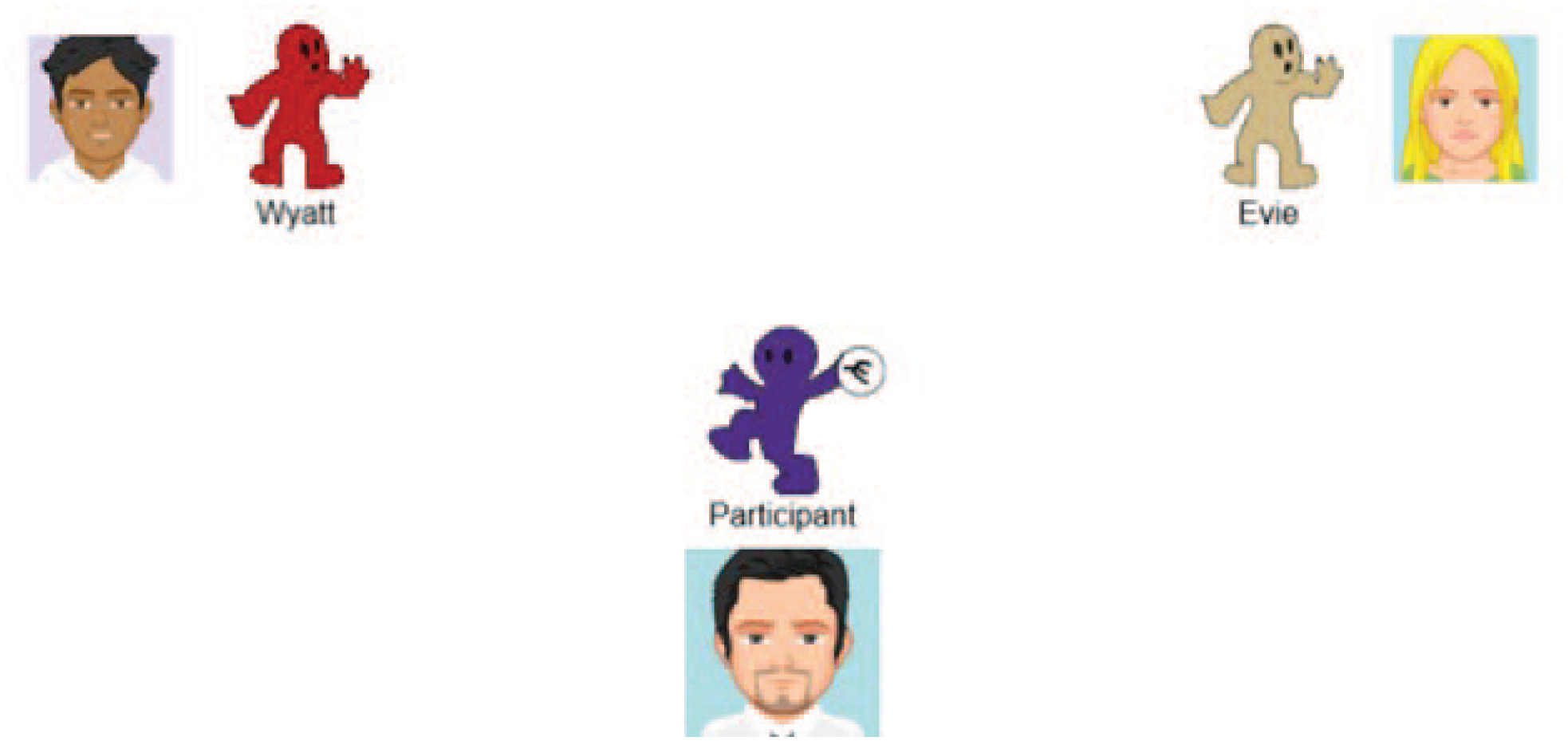
Example CyberballOS game.
Cyberball has typically been used to study ostracism (being excluded and ignored), but we believe it is a tool with overlooked potential. Here, we highlight the many ways Cyberball has been used to study the ABCs associated with ostracism, illustrating how useful it could be as a general research tool. Ball tossing with others includes emotional reactions throughout the course of the game (affect), throwing the ball to another group member (behavior), and being influenced by multiple mental processes (cognition). Considering an example of affect, we note that participants who do not receive the ball (i.e., are ostracized) report increased feelings of negative affect and social pain (pain from the perceived loss of a social connection; MacDonald & Leary, 2005; for a meta-analysis, see Hartgerink et al., 2015). Cyberball also enables directly observing psychologically meaningful behaviors, such as biases (e.g., participants are less likely to interact with overweight players; Pryor et al., 2013), responding to burden (participants ostracize a burdensome group member; Wesselmann et al., 2013), and mindfulness (trait mindfulness increases attention toward other group members; Jones et al., 2019). Finally, Cyberball produces important insights into human cognition. For instance, people’s reactions to events in the game depend on how they cognitively attribute the behavior of the other players (i.e., internal vs. external attributions; Yaakobi, 2021, 2022). Following the game, failing to receive the ball led to riskier decisions (Buelow & Wirth, 2017) and participants report temporary negative self-perceptions of their personality traits (Wirth et al., 2024). However, ostracized participants are better at determining social cues of inclusion (Bernstein et al., 2010; Sacco et al., 2011). Cyberball serves as a foundation for investigating a range of basic and applied research questions, as demonstrated by psychologists who have worked with Cyberball in the following fields: neuroscience (e.g., Eisenberger et al., 2003), developmental (e.g., Abrams et al., 2011; Bolling et al., 2011; Pharo et al., 2011), social (e.g., Williams et al., 2000; for a review, see Hartgerink et al., 2015; Williams, 2009), memory (e.g., Wölfer & Scheithauer, 2012), health (e.g., Meneguzzo et al., 2020), clinical (e.g., De Panfilis et al., 2015; Gutz et al., 2015; Weinbrecht et al., 2018), psychophysiology (e.g., Ijzerman et al., 2012; Paolini et al., 2016; Sleegers et al., 2017), and genetics (e.g., Way et al., 2009). Making Cyberball more general, transparent, and useable is valuable for psychology research given that Cyberball can investigate the foundational nature of the ABCs of psychology and researchers have already introduced Cyberball across multiple disciplines.
The Development of CyberballOS
Despite Cyberball’s strong internal and external validity and its use across psychological disciplines worldwide, previous versions of Cyberball had limitations. We used our combined 30 years of Cyberball experience to identify the strengths and weaknesses of previous versions to guide us in developing a new version: CyberballOS. We focused on three areas of development. (a) We made CyberballOS as approachable as possible to researchers with any level of experience. To accomplish this, we implemented a straightforward, organized setup interface with an integrated game preview, quick access to descriptions about features, and a detailed manual. Researchers can easily upload previous CyberballOS settings files (generated by themselves or others) or use built-in default presets, reducing the knowledge and time required to set up a game. (b) We made CyberballOS easy to implement and collect gameplay data. To increase accessibility, CyberballOS games can be run in a web browser (requiring no server costs or external software costs), or they can be embedded into Qualtrics (a popular web-based platform for data collection), where researchers get the benefit of a record of the ball tosses during the game. (c) CyberballOS must adapt to researchers’ needs and the latest technology. The most recent tutorial of Cyberball was published in 2006 (Williams & Jarvis, 2006). The prior version of Cyberball is from 2019 (i.e., Cyberball 5) and is no longer actively supported. Therefore, we made CyberballOS open-source software, meaning the code powering the paradigm is accessible to anyone. Researchers can view, download, and manipulate the code. This increases transparency and allows any researcher to change the paradigm to suit specific research needs by downloading the code and programming the feature into the game. Making CyberballOS open-source software allows it to be nimble and adapt quickly and efficiently to researchers’ needs while simultaneously adapting to changing technology—a distinct feature absent from all other prior Cyberball versions.
To ensure CyberballOS functions correctly, we conducted several rounds of independent testing for every feature and game process, checked features worked in concert with others, checked the accuracy of the tool tips, and then asked research assistants to “break” CyberballOS to identify any lingering issues before we addressed them. We also collected data from approximately 1,500 participants in our own studies (e.g., Wirth & Hales, 2025). To make sure this tutorial would be as clear and beneficial as possible, J. H. Wirth developed the tutorial steps, and A. H. Hales, S. G. Wicks, and B. M. Okdie each tested the steps and provided feedback. We then asked multiple research assistants to use this tutorial to create a variety of CyberballOS games and integrate them into Qualtrics using minimal or no instruction; we made revisions based on the assistants’ feedback.
Overview of the Tutorial
In this tutorial, we guide researchers through key facets of using CyberballOS while demonstrating its capabilities, beginning with basic game-setup knowledge and ending with more advanced features (e.g., how to integrate with Qualtrics). We also include three examples of how CyberballOS can be employed to illustrate its utility.
Getting Started Using CyberballOS
Snapshot of CyberballOS
CyberballOS is a free, open-source, online virtual ball-toss game accessible from cyberball.osu.edu. CyberballOS uses a minimalistic gameplay environment (see Fig. 1), in which participants are typically instructed to mentally visualize tossing a ball with others playing online. The other players are actually computer-controlled avatars (CPUs) whose game behavior is controlled by the researchers. Researchers can manipulate several aspects of the game, such as the game duration and whether participants can leave the game. In-game behaviors can be recorded and observed by incorporating CyberballOS into Qualtrics, which means the record of the players’ throws is integrated with the study output. Because CyberballOS is open source, modifications can be made to the game to change any part of the paradigm (e.g., add desired features).
How to navigate CyberballOS
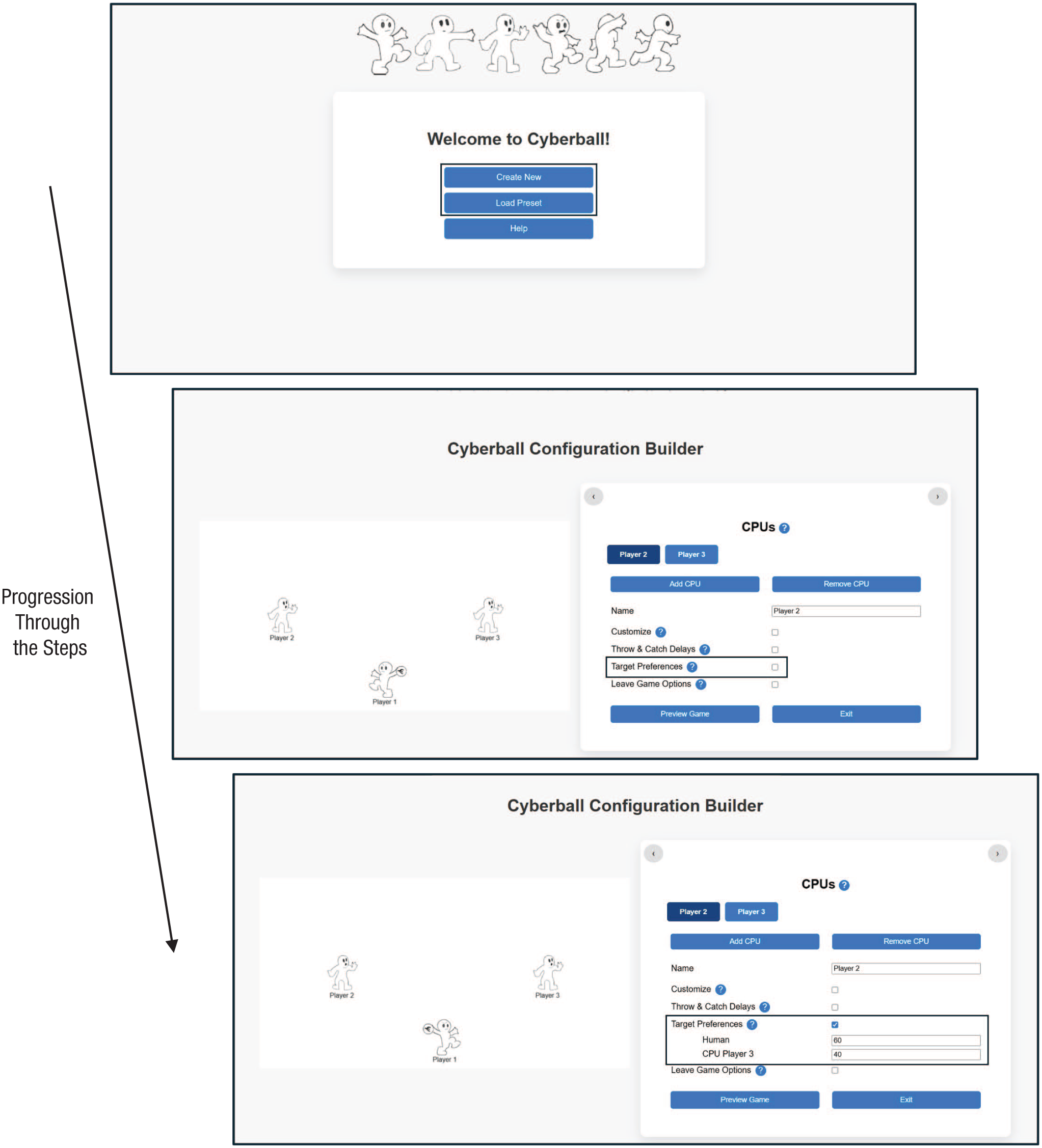
At cyberball.osu.edu, researchers are greeted with a landing page (see Fig. 2, upper panel), where they can choose from the following options: “Create New,” “Load Preset,” and “Help.” Researchers may select “Create New” to build a CyberballOS game from scratch—modifying any features they would like. When researchers click “Create New,” they are taken to the CyberballOS Configuration Builder, where they can begin setting up their game (see Fig. 2, lower panel). Clicking “Load Preset” takes researchers to a set of commonly used Cyberball games (e.g., participants included by receiving the ball), the researcher’s saved presets, or an option to upload preset files. Clicking “Help” reveals a “Frequently Asked Questions” page containing answers to the most frequently asked questions and provides access to the user’s manual that includes specific step-by-step instructions.
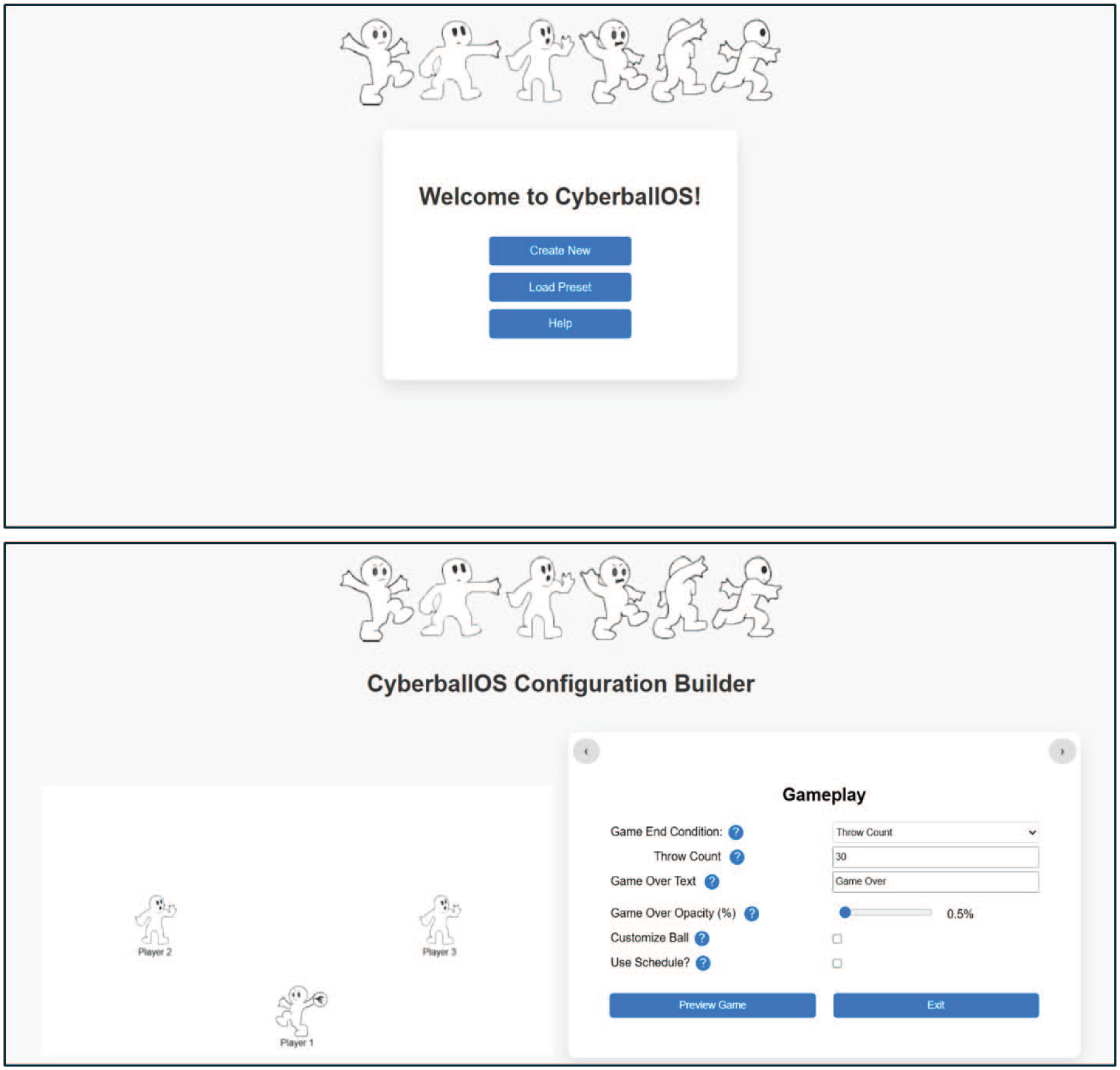
CyberballOS opening landing page and example Configuration Builder page.
To set up games, researchers use the CyberballOS Configuration Builder, which consists of three pages: “Participant,” “CPUs,” and “Gameplay.” The “Participant” and “CPU” pages control features for these players (e.g., name, leaving behavior), and “Gameplay” establishes the course of the game (e.g., length of the game). As researchers work on these pages, they can go between the pages using arrows at the top of each page. For these pages, we include several features to facilitate setting up the game. (a) CyberballOS includes a preview of the current game, which appears by clicking “Preview Game” (see Fig. 2, lower panel). (b) Question-mark icons appear next to the programmable features that pop up brief descriptions of the feature. (c) We use prepopulated boxes with sensible (but easily changed) default settings based on typical gameplay.
CyberballOS Configuration Builder: Fundamental Features
Providing a name for the participant and CPU players
After creating a new game or loading a preset game (see Fig. 3; to load a preset game, see the section CyberballOS Presets), researchers can go to the configuration page for the player of interest. They can use the “Name” window to change the label of the participant (often something generic, e.g., “Player 1 (you),” to convey to participants they control that player) or to name a CPU.
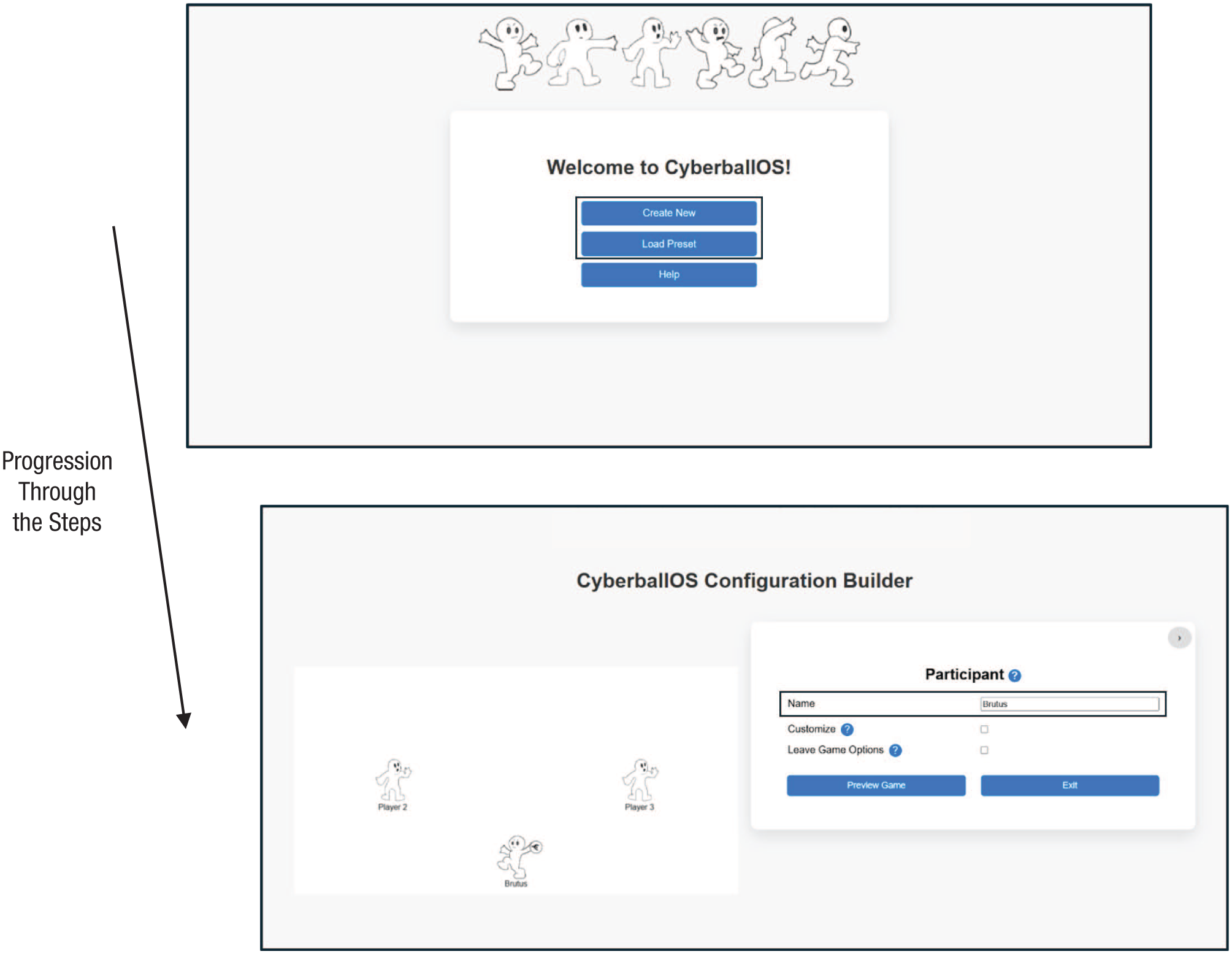
How to provide a name for the participant and computer-controlled avatar (CPU) players.
Customizing the color of the player and including an image next to a player
Researchers can change the color of the players by first checking the “Customize” option and selecting a color from the color pallet or specify color through standard computer color-code schemes (i.e., RGB, Hex; see Fig. 4).
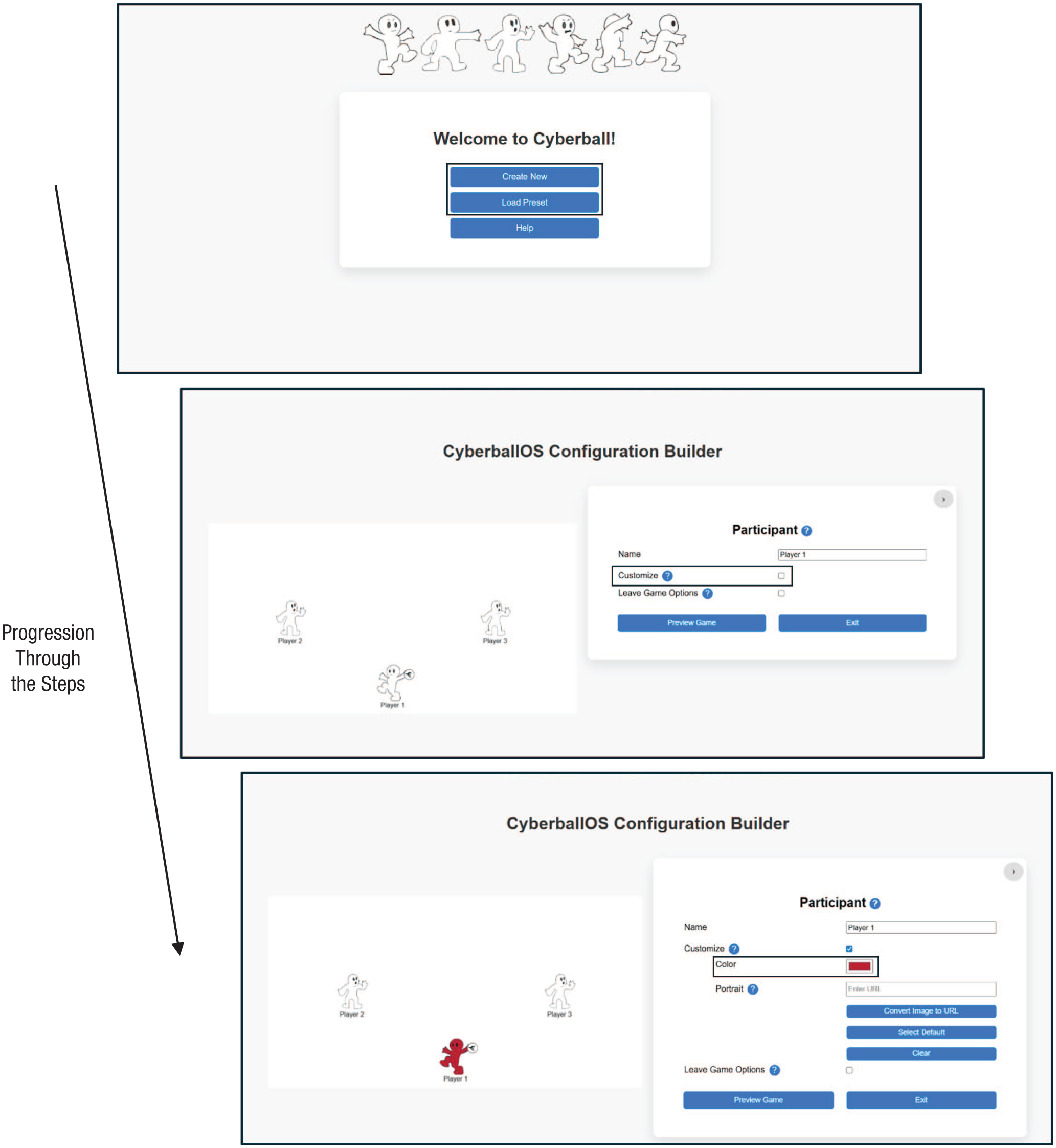
How to customize the color of the player and include an image next to a player.
Researchers can add portraits next to each player in one of three ways. (a) Researchers can “Select Default” to choose from the provided images. (b) In “Portrait URL,” paste in the URL location of an image. This works especially well with images saved in a Qualtrics Library. (c) Alternatively, if researchers want to use a specific image, they can use the “Convert Image to URL” feature, which then creates a URL for the image that can be pasted into the “Portrait URL” box.
Who the CPUs throws the ball to
When CPU players receive the ball, researchers can determine who the CPU subsequently throws the ball to by specifying the percentage of throws to the participant and the other CPUs. For example, depicted in Figure 5, when CPU 2 receives the ball, CPU 2 will give a slightly greater percentage of throws to the participant (60%) compared with CPU 3 (40%). If researchers want to control who the CPU throws the ball to specifically after each individual throw, they will need to use the “Use Schedule?” feature (see the section Gameplay Settings: Using a Schedule of Ball Tosses).
How to set up who each computer-controlled avatar (CPU) throws the ball to.
Gameplay settings: ending gameplay
The “Gameplay” page allows designers to specify how the game ends and what is displayed on the CyberballOS conclusion screen after the game finishes. Researchers have three options for how to end the game (i.e., “Game End Condition”). (a) Researchers can set a throw count, which ends the game after a certain number of total throws (including the throws between the participant and CPUs). (b) Researchers can set a time limit, which means the game would end after a set duration of gameplay (this includes a customizable timer display). (c) The game can end when all CPUs leave based on the researcher’s predetermined settings (for more information on setting the CyberballOS CPUs to leave, see “Leave Game Options” for the participant and CPUs; see Fig. 6).
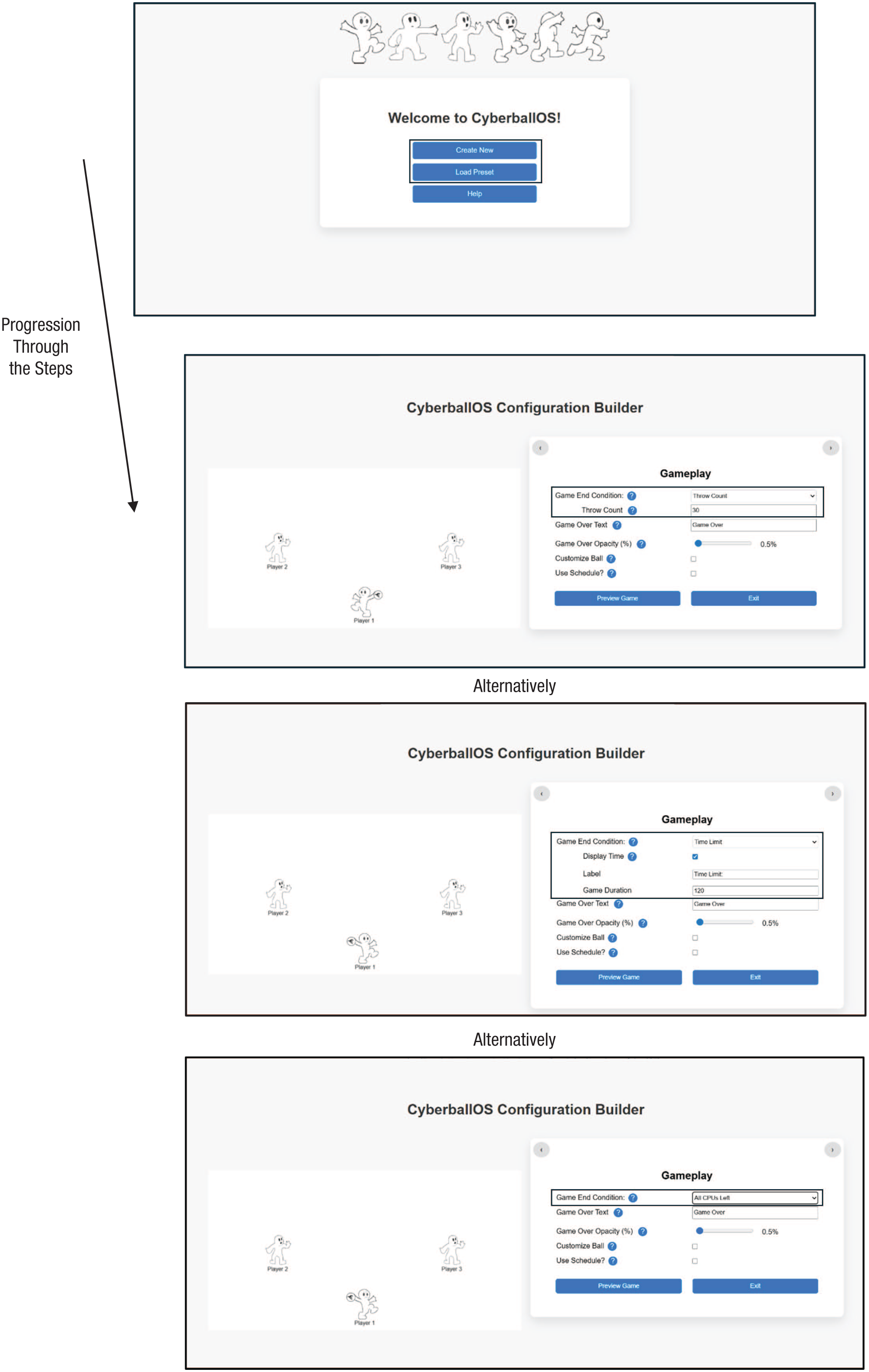
How to set when the game will conclude.
When the game is over, an end-game screen will appear, providing information to participants. The “Game Over Text” can indicate the game has ended and possibly provide instructions for how to proceed. The “Game Over Opacity” (%) indicates how well the CyberballOS game is visible behind the end-game screen. Figure 7 shows some examples of end-game screens.
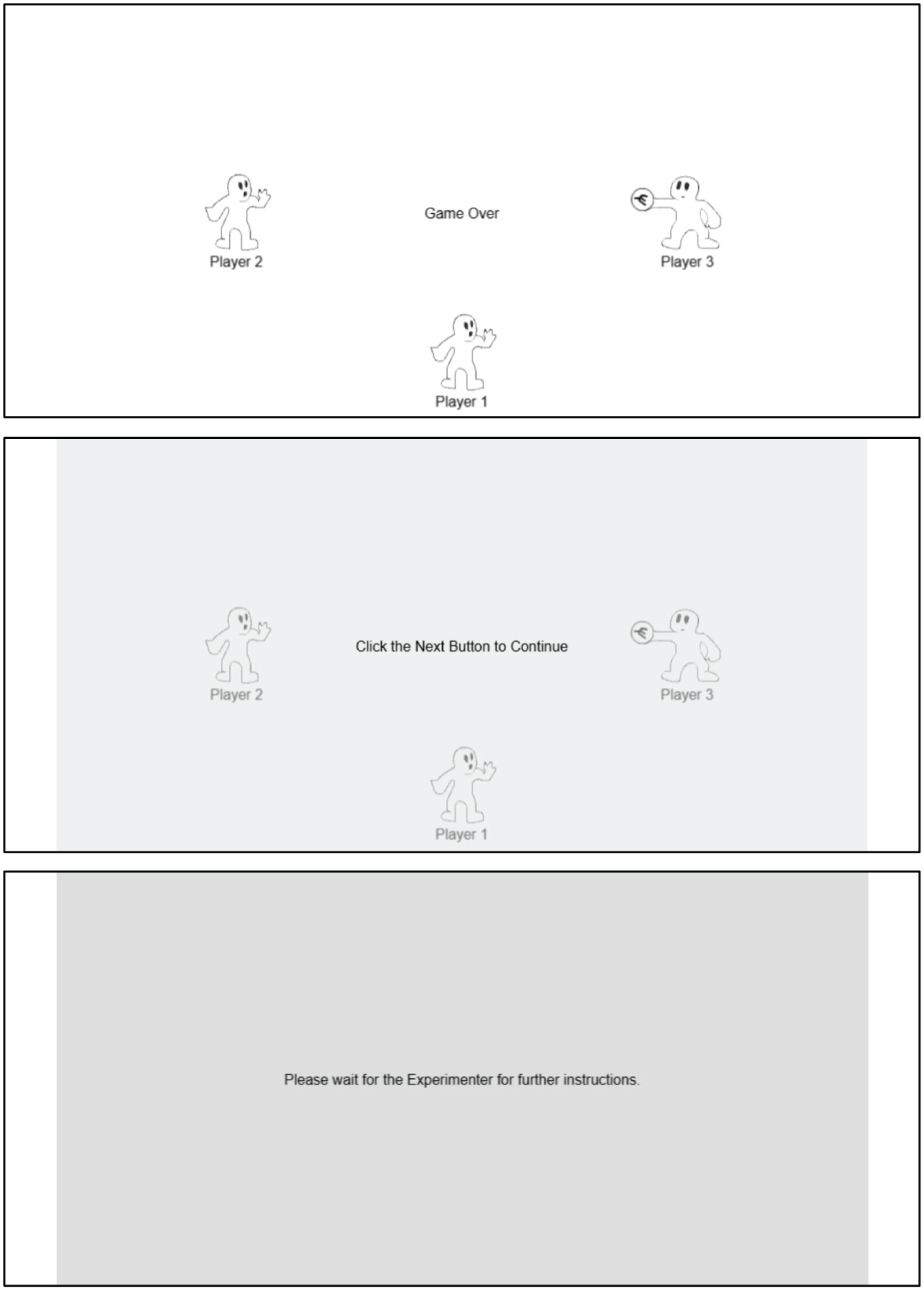
Examples of the end-of-game screens at 0%, 50%, and 100% opacity with examples of end-of-game messages.
CyberballOS presets
Researchers can start with a basic template for common versions of the game (see Fig. 8). Current presets are frequently used games setups—inclusion, ostracism, and a slow-throwing Cyberball CPU—but others may be added. Alternatively, researchers can select previous games they created and implement or modify these games. As another option, researchers can load a CyberballOS file from one they saved previously or received from a collaborator or one posted on an Open Science repository. The preset files are simple text files, making them portable, depositable (e.g., Open Science, GitHub), and technologically durable, which increases research transparency and reproducibility.
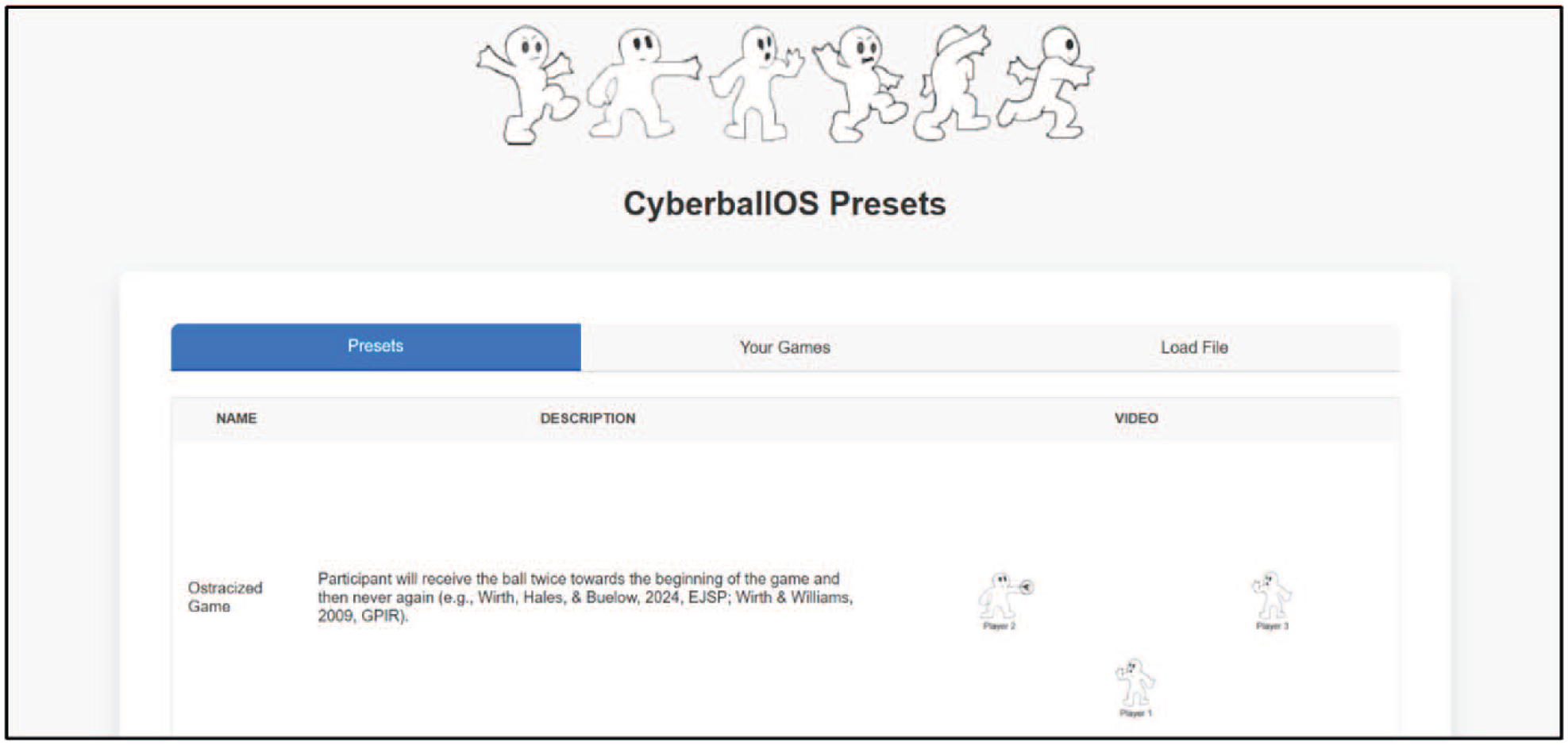
The preset page that can be used to load preconfigured games.
CyberballOS Configuration Builder: Advanced Features
Leave-game options for the participant and CPUs
Participant leave options
Researchers can create games in which the participant is given the opportunity to click a “Leave” button and exit the game (see Fig. 9). Researchers can make the “Leave” button appear by selecting one of several “Leave Game Options”: based on the number of throws that transpired during the game (“Throws Elapsed”), the amount of time playing (“Time Elapsed”), how many throws occurred and the participant did not get the ball (“Throws Ignored”), how much time has gone by and the participant did not get the ball (“Time Ignored”), and finally, how many CPUs leave (“CPUs Leaving”; see Fig. 10). For all “Leave Game Options” except “CPUs Leaving,” there is a variance parameter. The variance is the number of throws or time around the leave threshold that CyberballOS will incorporate into deciding when the “Leave” button appears exactly. For instance, if a researcher sets a leave threshold at 10 tosses and sets the variance to two tosses, then the “Leave” button may appear anywhere from eight to 12 tosses after the game begins.
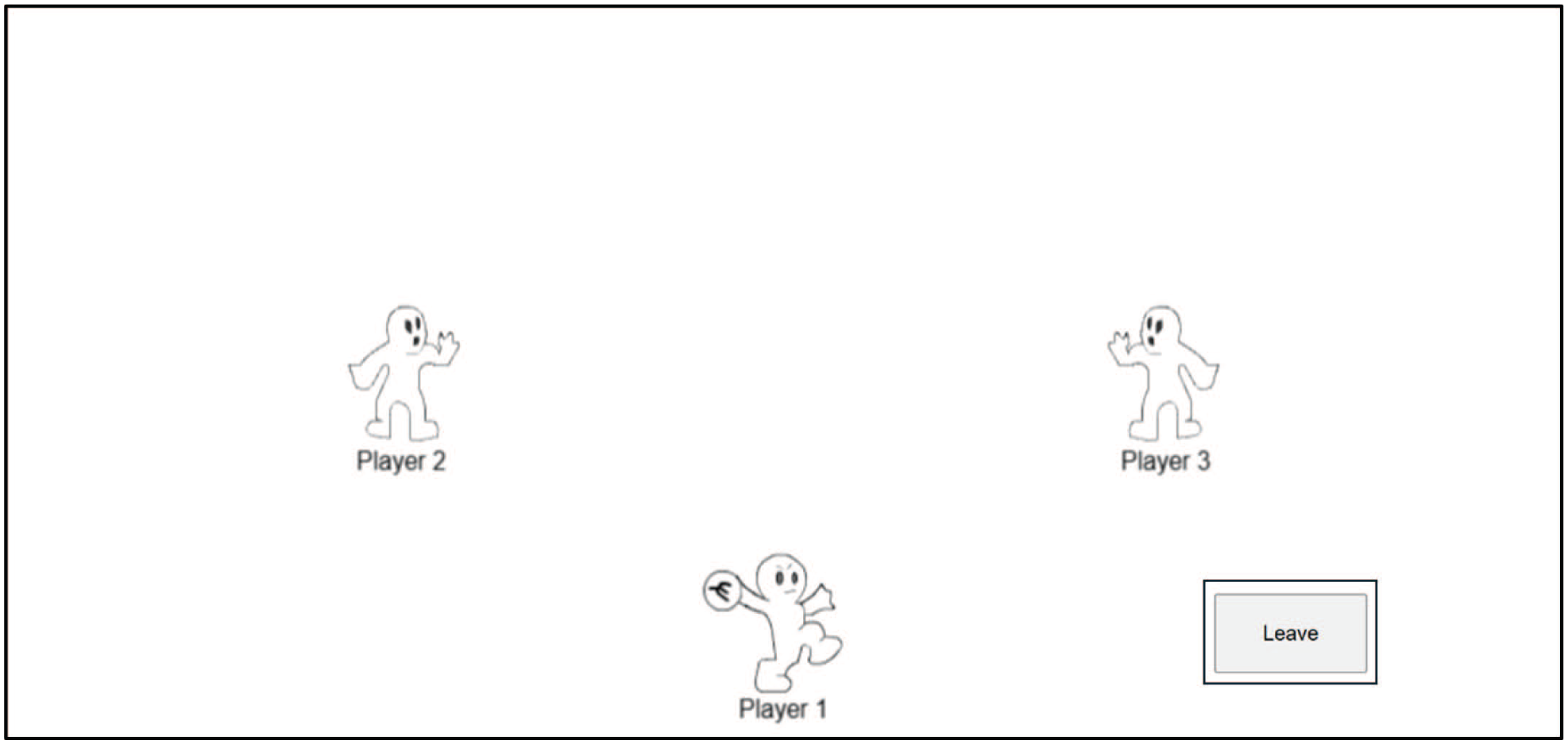
Researchers can give participants an option to leave the game using a “Leave” button.
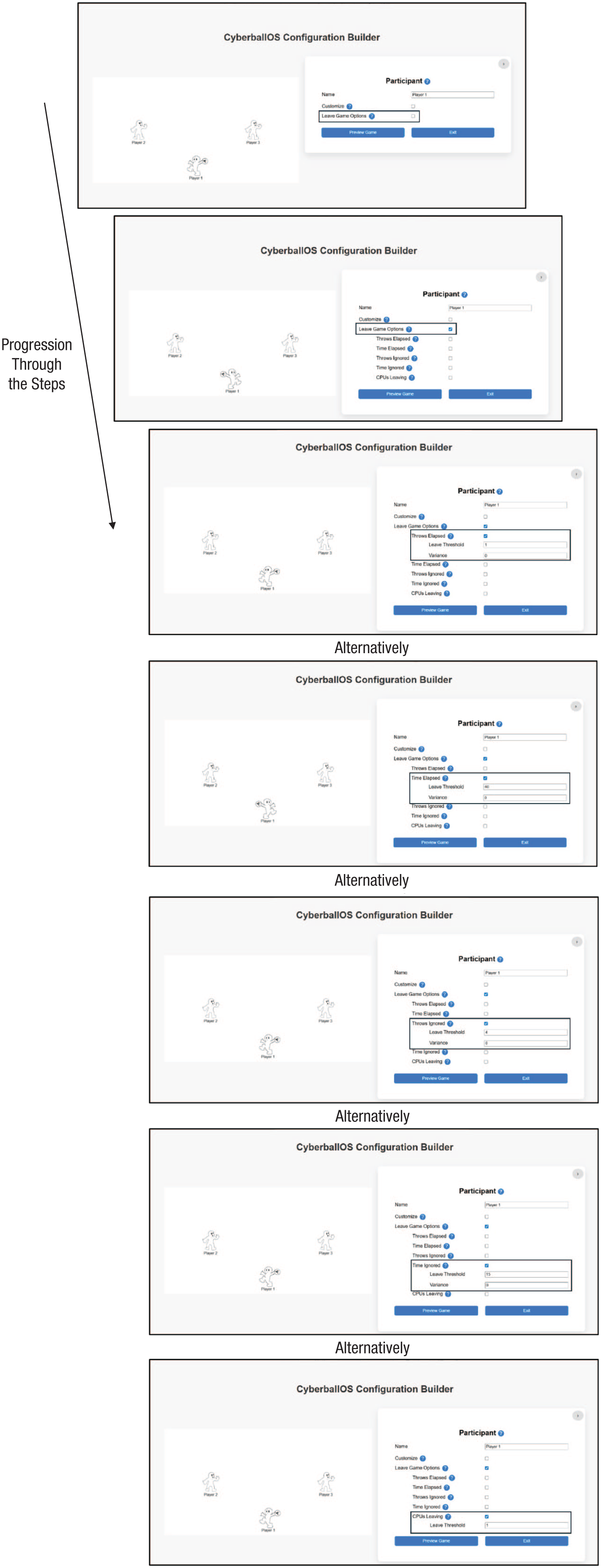
How to set up when a participant can leave the game.
CPU leave options
Researchers can also set when a CPU leaves the game and can designate a leave threshold and variance (such that CPUs leave at staggered times). The variance parameter around the timing of a CPU leaving is useful when researchers want to increase the realism of the CPU-controlled players by introducing random variability to gameplay actions, mimicking human behavior. Researchers can also add variability by indicating the likelihood the CPU will leave by setting the “Chance (%).” In Figure 11, for example, CPU 2 will leave after 40 s, with a variance of 5 s, so within the time frame of 35 s to 45 s after the game started. The example includes CPU 2 having a 75% chance of leaving within the indicated time frame.
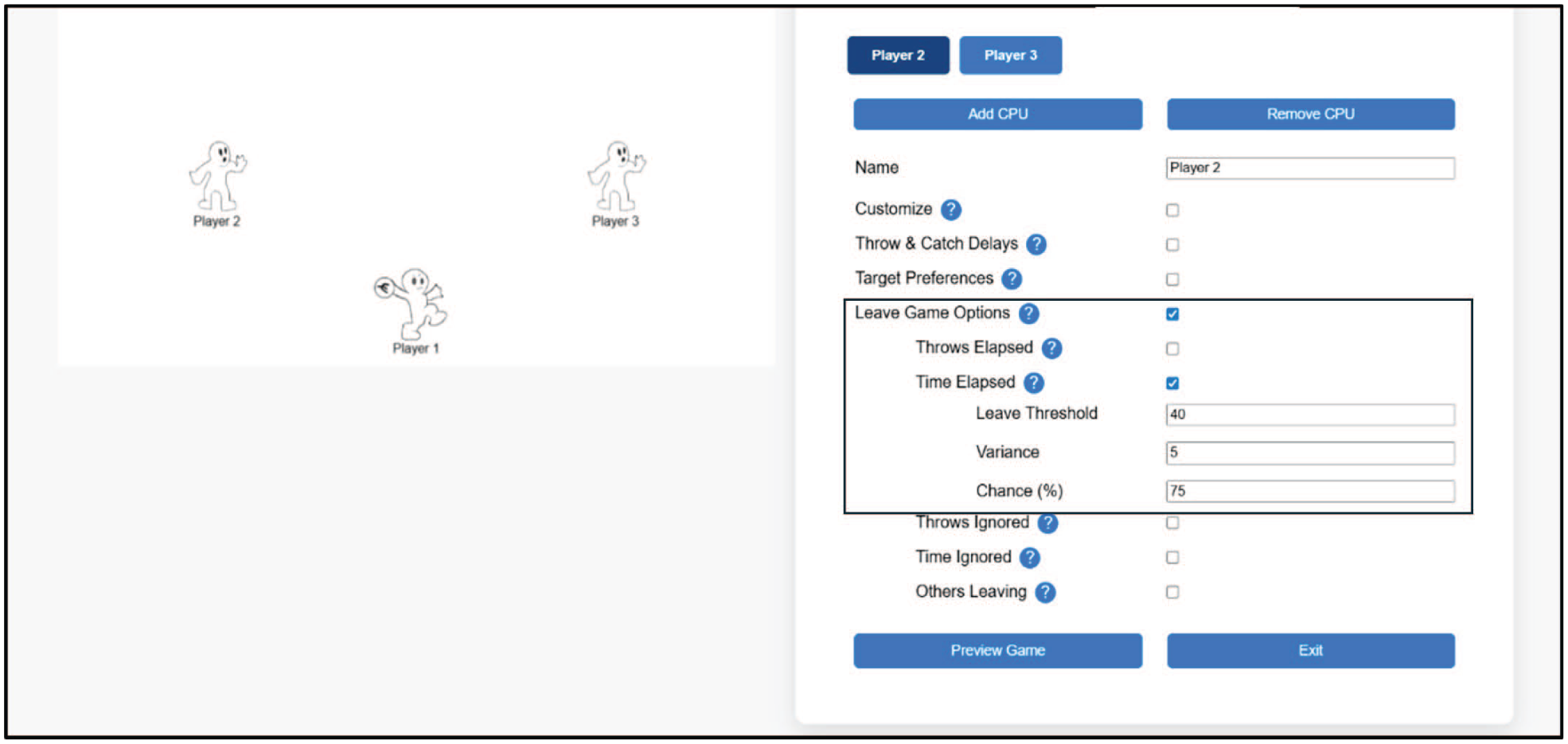
Example of a computer-controlled avatar (CPU) leaving the game. The CPU has a 75% chance of leaving between 35 and 45 throws after the start of the game.
CPU throwing-behavior settings
Researchers can set who the CPU throws the ball to and “Throw & Catch Delays.” Options allow control of how long it takes for the CPU to complete catching the ball and how long it takes to throw the ball. In Figure 12, the settings indicate CPU 2 will hold the ball in a catch position for half a second, with a variance of .2 s. For throwing, CPU 2 will hold the ball for 4 s, with a 1 s variance (range = 3–5 s), before throwing it to the next player.
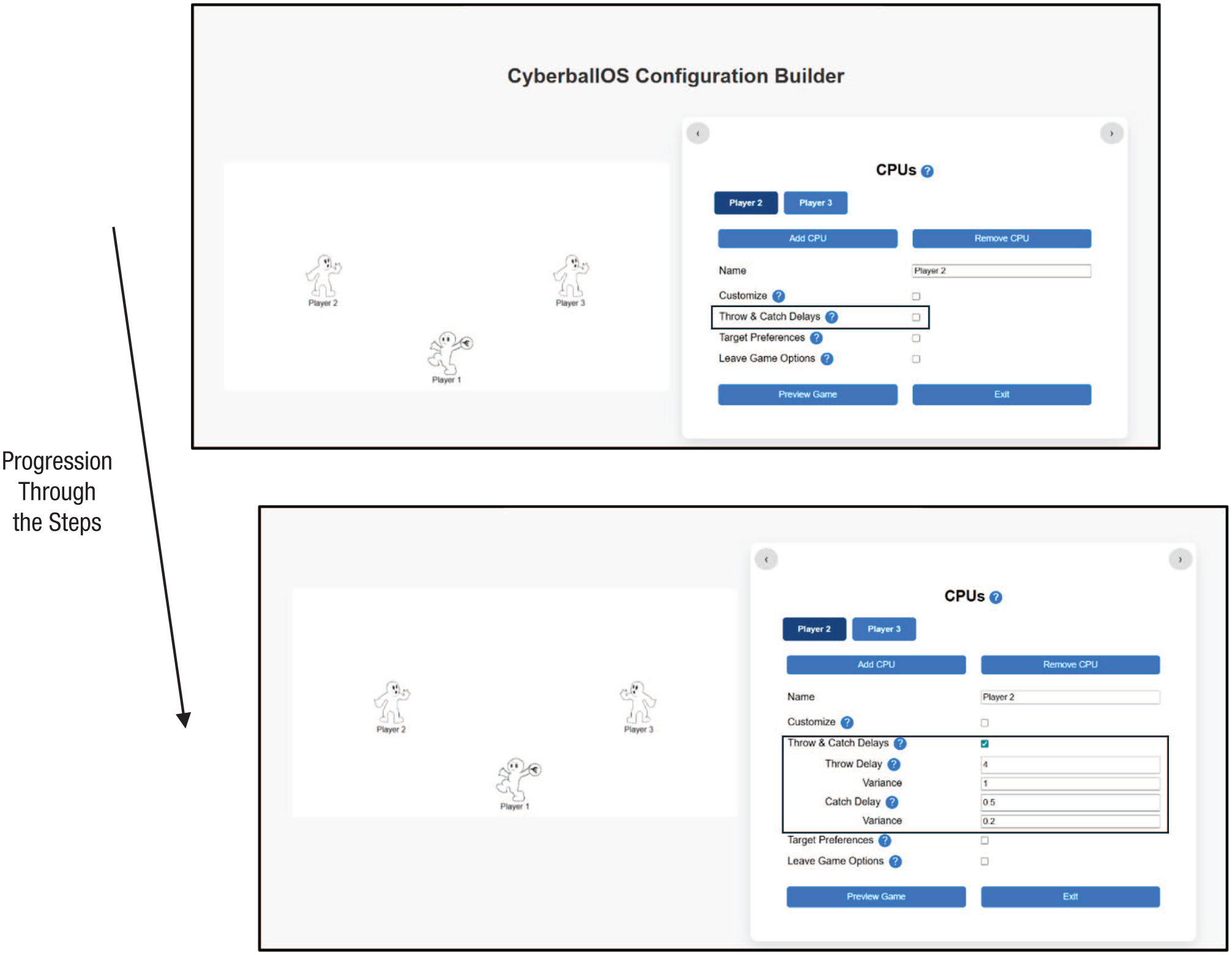
Setting the throwing behavior of the computer-controlled avatars (CPUs).
Gameplay settings: using a schedule of ball tosses
Researchers may want to specify the exact target of each CPU ball throw following every time a CPU receives the ball, allowing CPU behavior to change at predetermined points during the game. For instance, researchers could create a game in which each of the CPUs throws the ball to the participant once at the beginning but then never again. To have this greater degree of control over the CPUs’ throwing behavior, researchers will need to check “Use Schedule?” and input a throwing schedule for each CPU. Of course, the game cannot control or predict who the participant will throw the ball to, so it is not possible to dictate the exact throws of any game. However, researchers can control how CPUs behave when they do receive the ball through the course of the game.
To begin programming the throwing behavior of the CPUs, researchers will have to select which CPU they want to create a schedule for. On the left will be the name of the CPU player the researcher is setting the throws for. On the right, there will be a text box in which researchers can input the schedule of throws for who the CPU should throw to. The schedule is established by specifying the number of the CPU or the participant who will receive the ball. Researchers create blocks of throws bound on each side by commas. In each block (between each set of commas), CyberballOS randomly selects who the CPU will throw to and then moves to the next number until it reaches the end of that block. Specifically, numbers grouped together between the commas will be randomized (like:,124,) without replacement such that all throws will occur in a randomized order before moving on to the next block of throws. A single specific throw will be between commas (like:,3,), which means the CPU will throw to the specific CPU or participant and then immediately move on in the sequence.
As an example, consider the throwing behavior of CPU 2 in a four-player CyberballOS game (see Fig. 13). Consider the first three blocks—1, 4, 3: This means that the first time CPU 2 gets the ball, it will throw it to Player 1 (the participant); the second time it gets the ball, it will throw it to CPU 4; and the third time it gets the ball, it will throw it to CPU 3. After these three throws, the next block contains several numbers grouped together indicating who the CPU throws to will be randomized between the players appearing in the block. CyberballOS will choose randomly without replacement who to throw the ball to, within a block, until all numbers in the block are completed. In the example “134,” this means CPU 2 will throw the ball once to each other player in a randomized order before moving the next block of number(s) between the commas. For instance, CPU 2 may throw the ball to CPU 4, then Player 1, and then CPU 3 before moving on to the next block of numbers (denoted by commas).
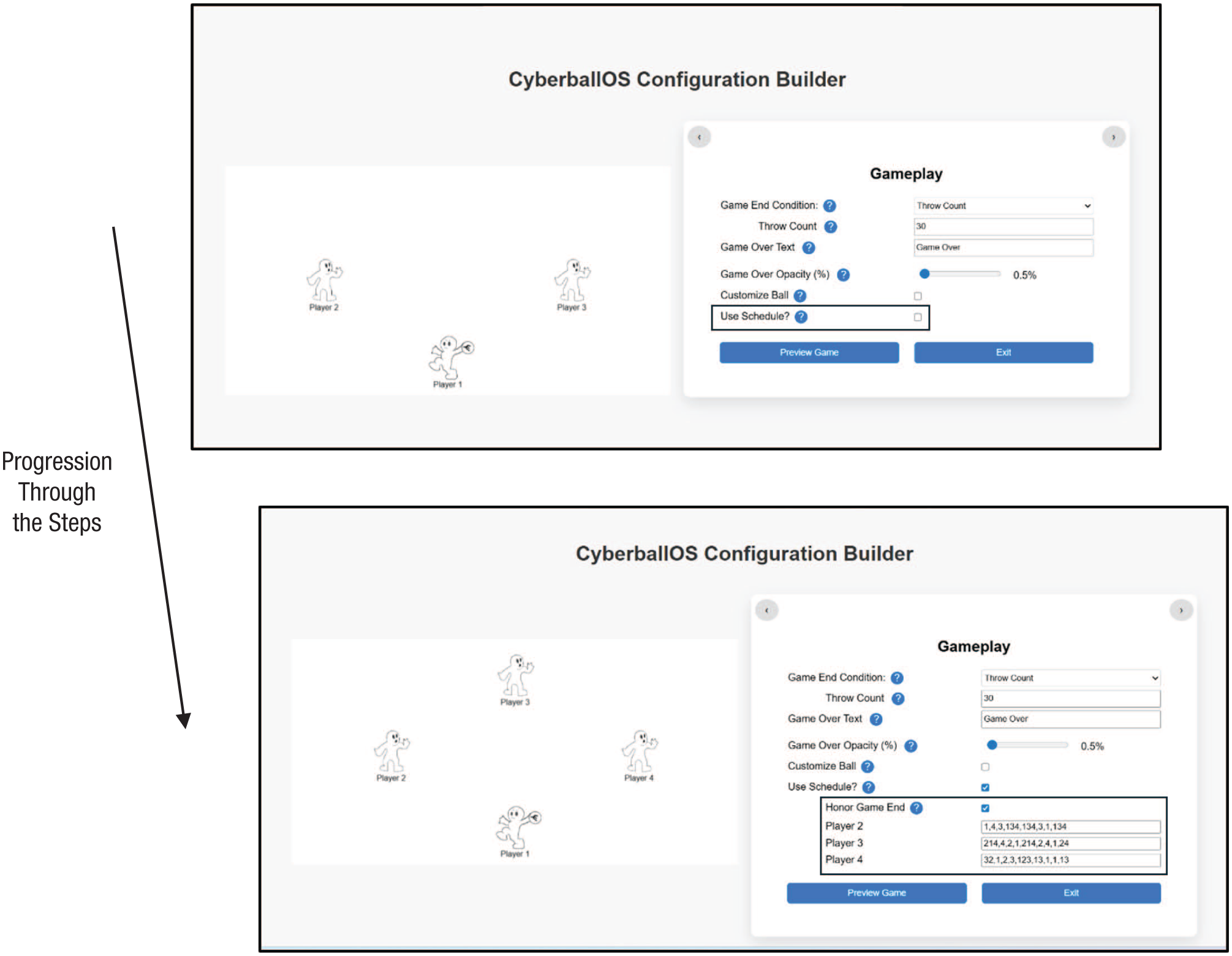
Using the scheduling feature to dictate specific computer-controlled avatar (CPU) throwing behavior.
After establishing the CPU’s throwing behavior, the researchers decide if CyberballOS should honor the “Game Ending Condition” they established at the top of the “Gameplay” configuration box. If the “Honor Game End” box is checked, then the game ends based on the criteria set for “Game End Condition” (e.g., “Throw Count”). If the “Honor Game End” box is unchecked, then the game will end after the sequence of throws in the scheduler is completed.
How to Implement a CyberballOS Game
Researchers have several ways to implement the CyberballOS game they set up using “Application Options” (see Fig. 14).
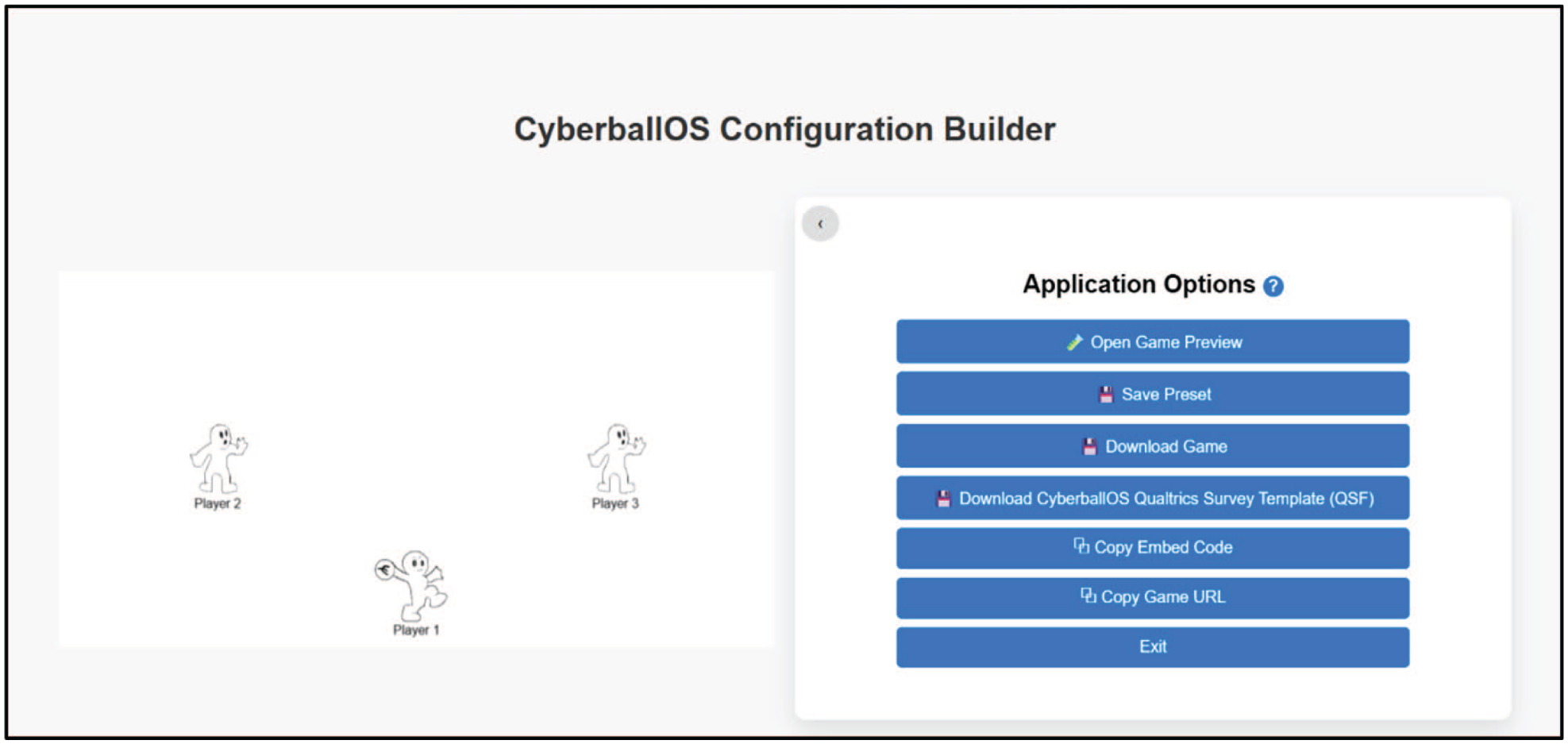
Using “Application Options” to prepare implementing a generated game or to save one.
Open game preview
Researchers can preview games before deploying them by clicking the option to open a game preview. This option displays the current game in a new window, allowing researchers to play the game exactly as participants will experience it.
“Save Preset”
By clicking “Save Preset,” researchers can save the settings they used to create the CyberballOS game to then recall them later using the CyberballOS “Presets” page.
Download game
Downloading game files gives researchers the ability to store a particular game setting on their local computer, generate a file that can be shared with other researchers, or archive the settings on an open-source platform (e.g., OSF.org) for researchers to be able to replicate the original study, thereby increasing methods transparency. Game-settings files are stored as simple editable text files (i.e., .txt), enabling ease of sharing while simultaneously ensuring their longevity—the text-file format is the simplest file format and is largely regarded as future-proof. Thus, we intentionally chose this format to ensure CyberballOS game files will work in perpetuity.
Download CyberballOS “Qualtrics Survey Template”
If researchers wish to run CyberballOS as part of a Qualtrics study, they can download the “Qualtrics Survey Template” (a .QSF file). This file integrates CyberballOS into the running of the experiment on the Qualtrics platform and allows Qualtrics to record gameplay data in the data-output file. We provide more details about the CyberballOS.QSF in the section below, Integrating CyberballOS Into Qualtrics.
Copy embedded code
As part of setting up CyberballOS in Qualtrics, researchers will need to put embedded code into the provided CyberballOS Qualtrics Survey Template. This block of embedded code tells Qualtrics how the game should appear and what information will be passed along to the Qualtrics data output.
Copy game URL
By copying the game URL and pasting it into a web-browser address bar, researchers can directly take participants to the CyberballOS game they set up, outside of any survey software or online platforms. In this case, when CyberballOS is run through the web browser, all features will work except for collecting ball-toss data. This can be useful when researchers need to deliver only a manipulation.
Integrating CyberballOS Into Qualtrics
Qualtrics (qualtrics.com) is a common online platform for creating surveys and experiments for researchers to collect data online. Although CyberballOS can be used as a stand-alone program using the options above, to maximize the utility of CyberballOS, we designed it to be integrated easily into Qualtrics.
Setting up the CyberballOS Qualtrics Survey Template
To integrate CyberballOS into Qualtrics, researchers must upload the .QSF file into Qualtrics. The first step, as part of the “Application Options” page, is to click the option “Download CyberballOS Qualtrics Survey Template (QSF).” In their Qualtrics account, researchers can click the button “Create” to create a new project and can select “Import” to import a QSF file. From the researchers’ computer, they can then select the CyberballOS QSF file they downloaded from the CyberballOS page. This process will then open the CyberballOS QSF survey file in Qualtrics.
The QSF file begins with standard editable Cyberball instructions. An ostensible loading page then follows to enhance the cover story of playing online by suggesting to participants they are waiting for other participants to join the game (this and all other elements can be edited in Qualtrics). Researchers will then see the CyberballOS Template and instructions on how to embed the code from the game the researchers created into this question (see Fig. 15). Below the CyberballOS Template is an “Example Game,” so researchers have a complete example of how CyberballOS looks when it is embedded in Qualtrics. Having imported the Qualtrics file successfully, researchers will now need the embedded code they created for the game they set up.
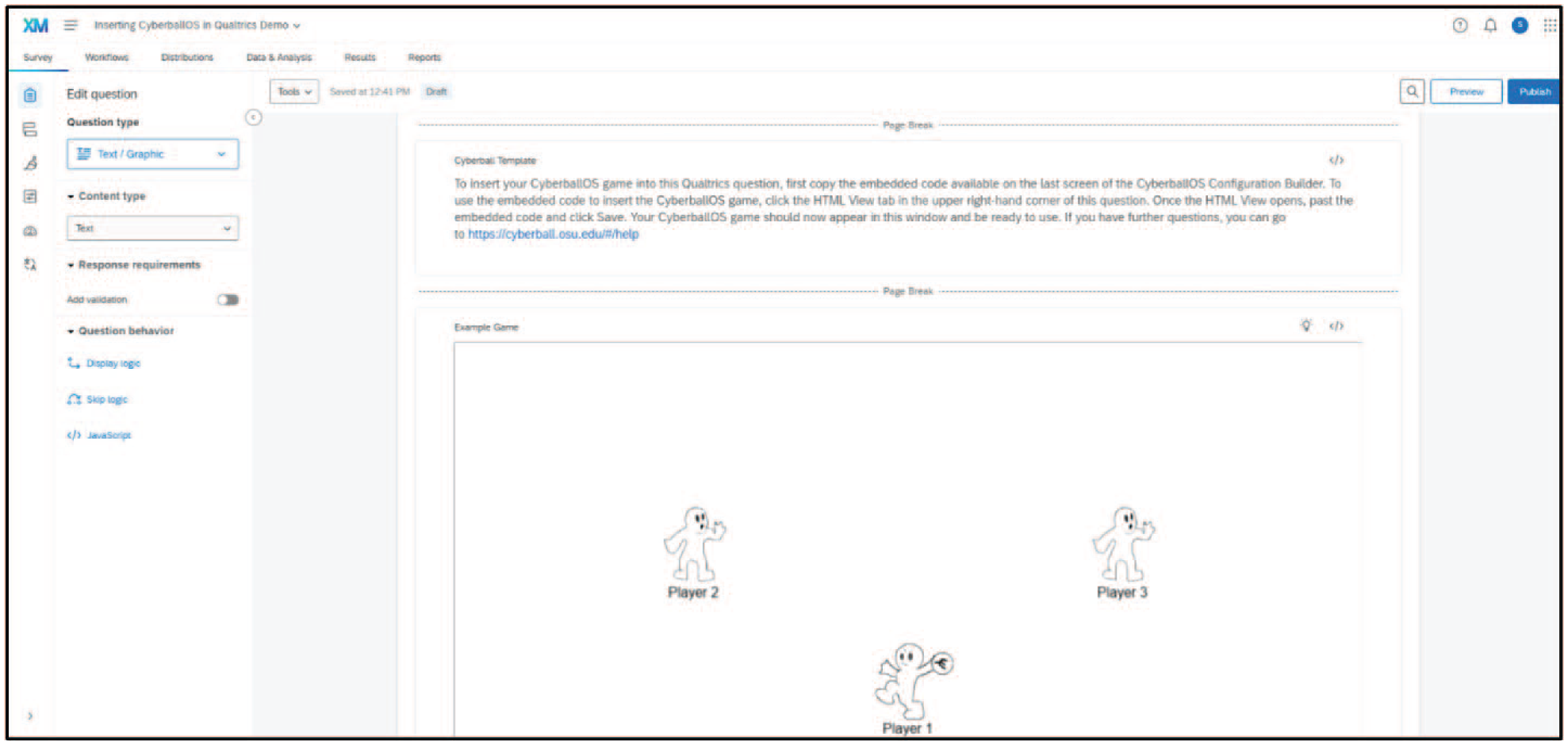
Screenshot of CyberballOS template and example game questions in Qualtrics.
Using embedded code to insert CyberballOS into Qualtrics
To embed a CyberballOS game in Qualtrics, researchers will click “Copy Embed Code” from the “Application Options” page. This code is unique to the particular CyberballOS game the researcher created and instructs Qualtrics on how to run the game. Once copied, researchers can place it in the CyberballOS Template question of the CyberballOS QSF file they opened previously (see Fig. 16). To do this, researchers will click on the question to enable editing and then click the button to switch to the HTML view, where they can insert the embedded code. Following this, the researcher’s CyberballOS game will appear, and the researchers can build the rest of their study around the CyberballOS game and instructions. For instance, researchers can create different game-playing conditions (as separate games using the CyberballOS Configuration Builder) and assign participants to these game conditions using “Survey Flow” in Qualtrics.
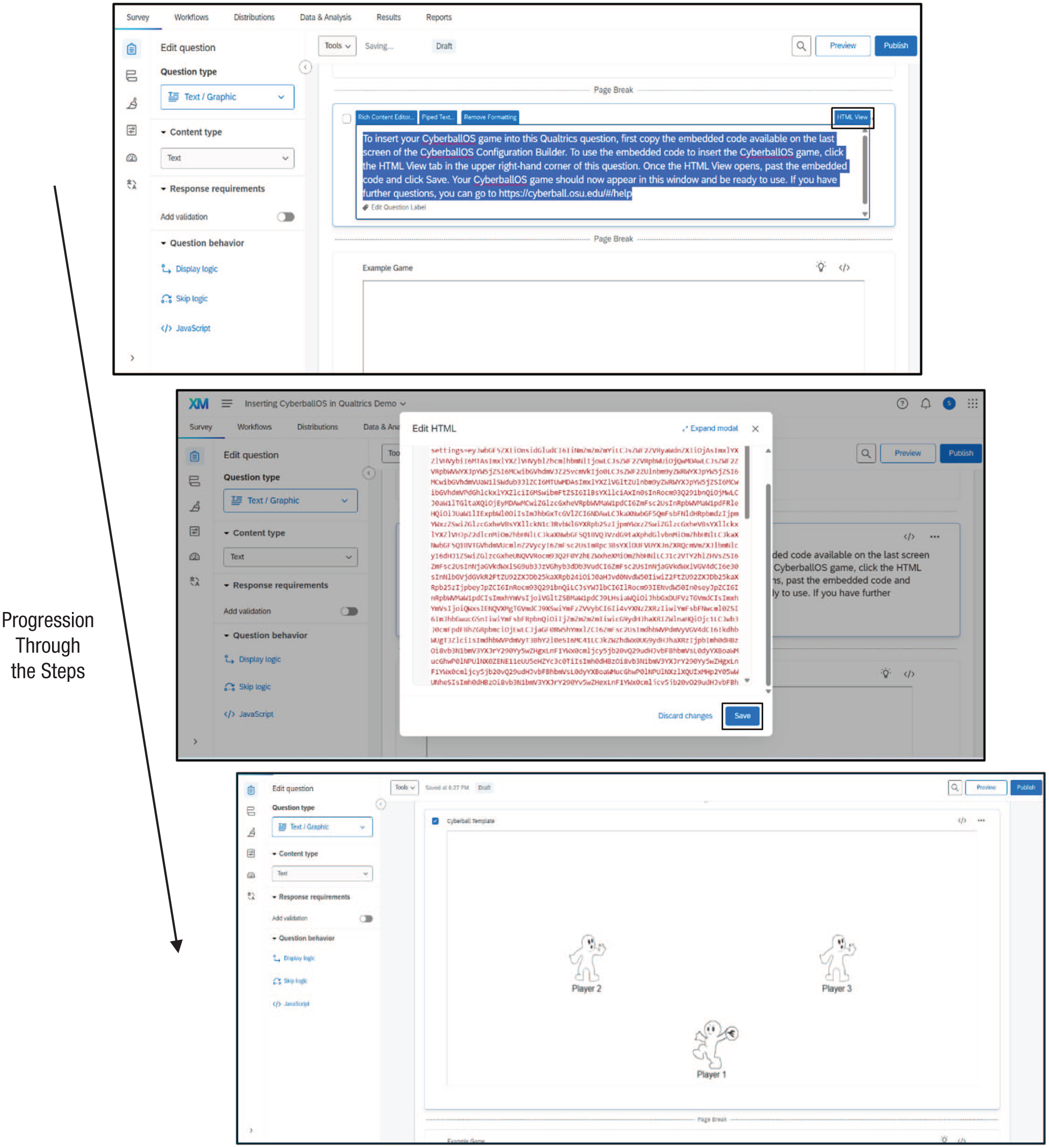
How to insert a CyberballOS game into a Qualtrics study.
Collecting CyberballOS throw data in Qualtrics
A significant feature of CyberballOS is the ability to collect data about participants’ ball-toss behavior. To take advantage of this feature, users must set up the correct embedded-data variables in Qualtrics.
In the Qualtrics output, CyberballOS records who the participant throws the ball to, how long it takes to decide to throw the ball to the player, and the total number of throws. When researchers embed these data variables in the Qualtrics survey flow, they get included as part of the downloaded file from a Qualtrics survey along with the other data the researchers collected.
The downloadable CyberballOS QSF template file is already set to record the total number of throws and the throws between all players (up to a game with a participant and three CPUs). This information will automatically be recorded in the overall Qualtrics data as part of the embedded-data feature of Qualtrics. Toss data include specific information about throws to a given player. Given this, we review how to adjust the toss embedded data. As a backup, the embedded-data field, “game_log,” will capture, as a string, a record of all ball-toss events in the game.
To access the embedded-data feature, researchers will click “Survey Flow” on the Qualtrics design page. Using the “Set Embedded Data” section of the survey flow, researchers can delete or add specific embedded toss variables. To delete any irrelevant fields, simply remove the name (see Fig. 17). To add fields (see Fig. 18), first click “Add a New Field” and then put in the specific sequence of throws of interest (e.g., “Player 5 to Player 1”) following the naming scheme used for the other embedded data used to record tosses (note that this must be entered precisely according to the naming scheme, i.e., with underscores in the correct places). Once finished, the researcher can click on “Options,” which opens a window in which researchers can modify the variable type to be “Number.” In the example depicted in Figure 18, the variable type is changed from “Text” to “Number,” which will then correctly record the number of times Player 5 threw the ball to Player 1 (the participant).
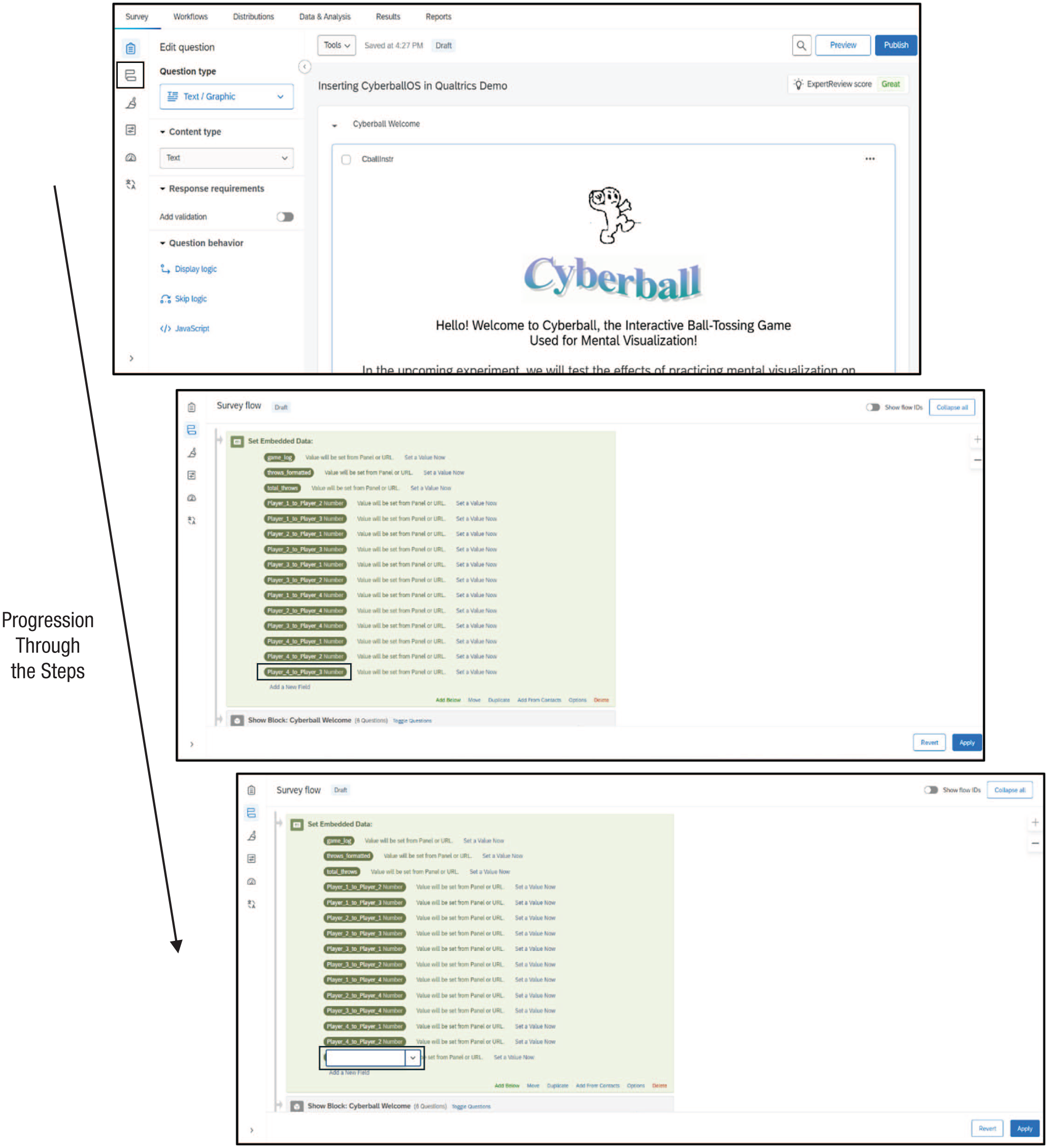
How to delete a toss variable in Qualtrics.
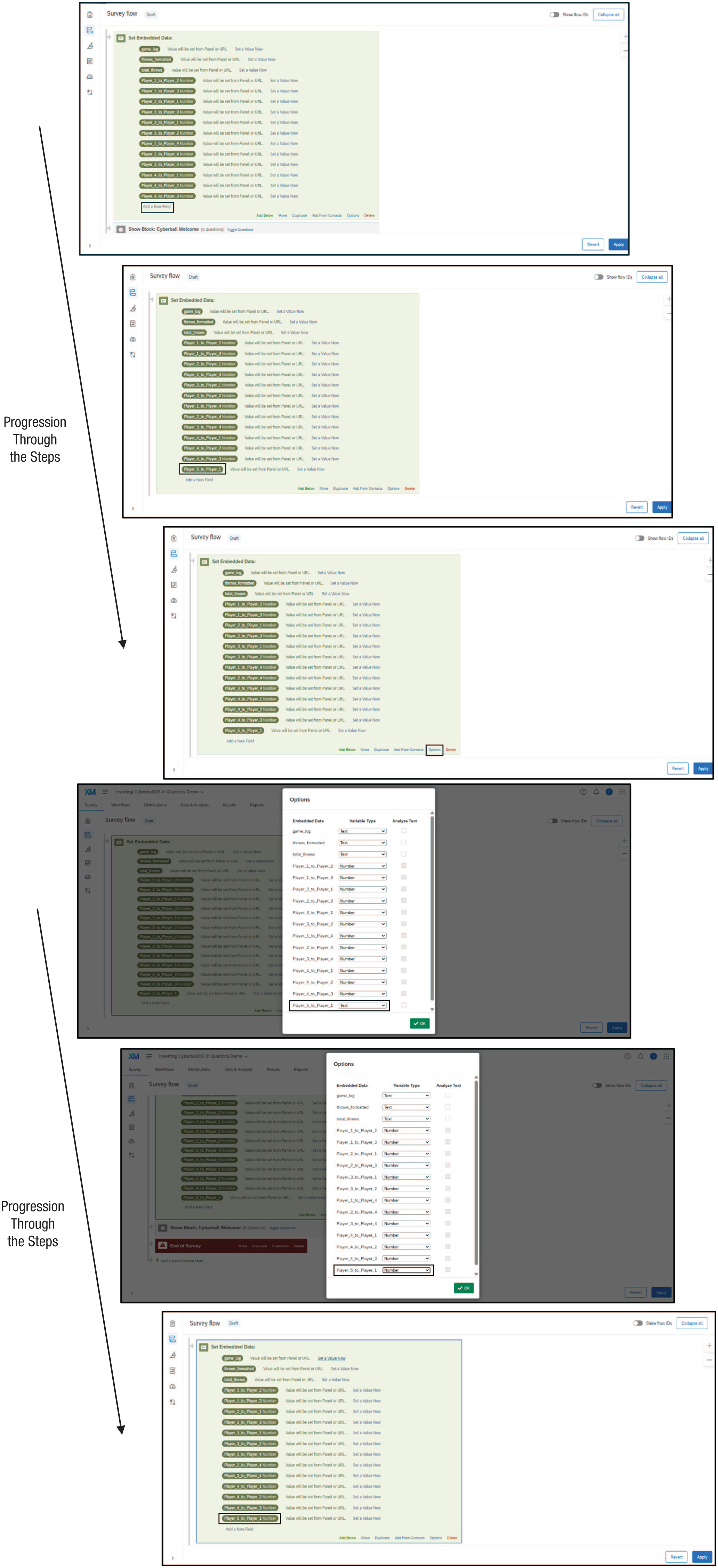
How to add a toss variable in Qualtrics.
Example Uses of CyberballOS
To illustrate CyberballOS’s breadth and inspire more creative uses, we present several ways it might be used to answer novel research questions.
“You can’t say ‘you can’t play’!”
From the very beginning years of playing with others as a child, a common refrain is to make sure everyone is included when playing games. For example, as illustrated in the documentary film Reject, children learn to recite the rule “You can’t say ‘you can’t play’!” (Paley, 1993; Thomas-Suh, 2013). That is, if a group member is not getting the ball, it is a child’s responsibility to include another child by throwing the ball to the child. But are children any good at remembering to be inclusive without constant reminders? Are adults any better? CyberballOS affords the opportunity for researchers to investigate: If a group member is not getting the ball, will a participant make up for the lack of throws to the group member and thereby put into practice the rule to include others? Given the simplicity of CyberballOS and the familiarity of a ball-tossing game, children and older adults (potentially including individuals with cognitive limitations) can participate, which creates the opportunity to examine inclusion across the life span. If including a group member not getting the ball is related to empathy, researchers might see several possible results: inverse U-shape (e.g., O’Brien et al., 2013), no age-related changes (e.g., Beadle et al., 2015; Eysenck et al., 1985; Grühn et al., 2008; Hannikainen et al., 2018), decreases across the life span (Helson et al., 2002), or increase across the life span, particularly after 40 (e.g., Oh et al., 2020; Sze et al., 2012). CyberballOS now enables easy storing of gameplay data, so these types of questions using CyberballOS as a dependent measure can be investigated. Figure 19 demonstrates an example game examining if participants will include a group member not receiving the ball.
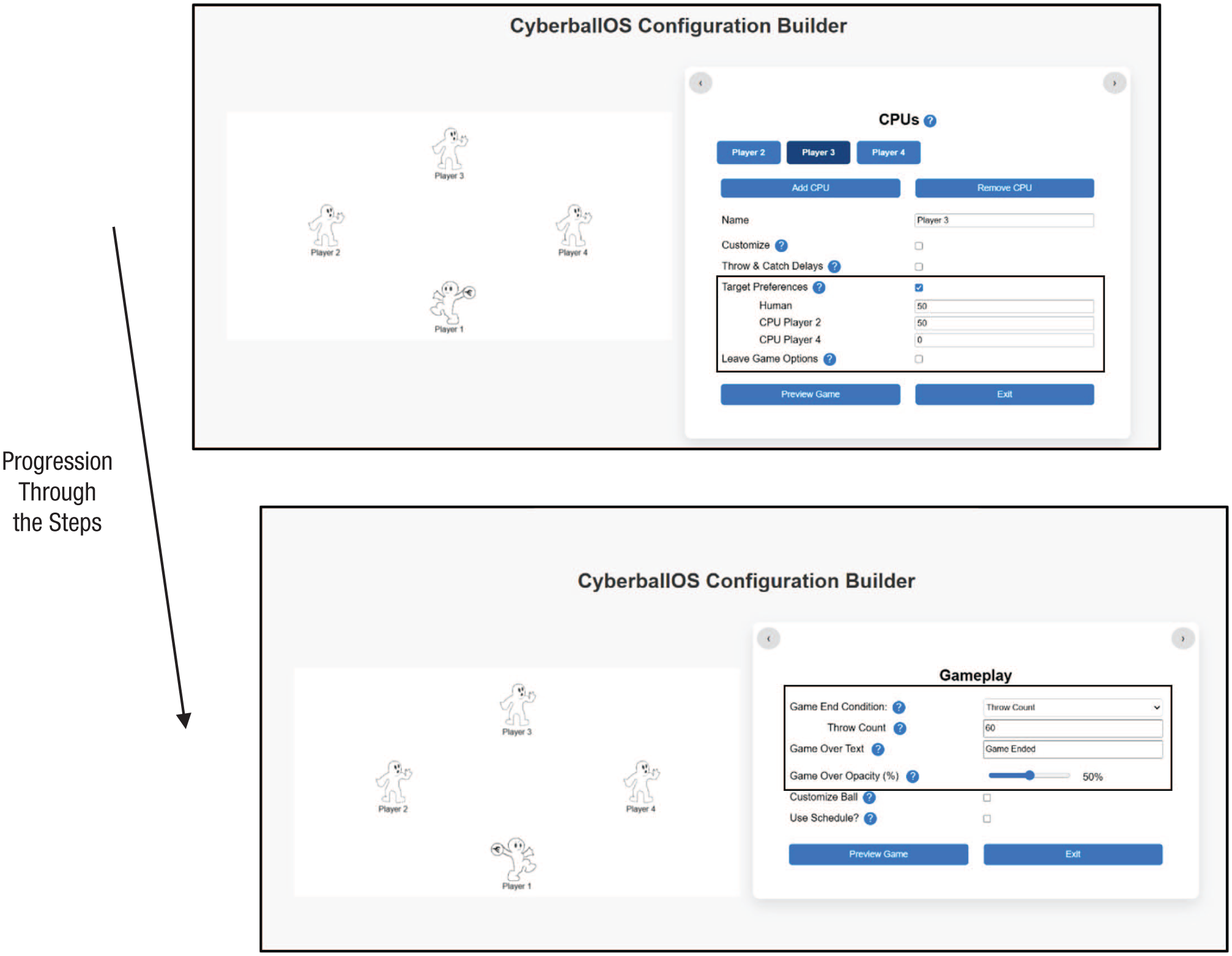
How to set up examining if participants will include a group member not receiving the ball. The figure shows the settings for the computer-controlled avatar (CPUs) and gameplay. In this case, CPU 4 is not receiving the ball from the CPUs, and the researcher will examine the number of tosses from the participant (Player 1) to CPU 4. When CPU 4 receives the ball, it evenly distributes it among the players.
Should I stay, or should I go?
Most groups are dynamic, and membership changes over time. Yet researchers have not systematically investigated the factors motivating an individual’s decision to leave a group. A possible reason is the lack of suitable research tools to test the dynamics of group composition in a simple online space. To address this limitation, CyberballOS now allows participants and CPUs to exit the game. As a means to motivate participants to leave a group using CyberballOS, CPUs might start leaving the interaction one by one (see Fig. 20 for an example game). Using CyberballOS, researchers (Wirth & Hales, 2025) found individuals can feel ostracized by a group member who leaves (a first use of this CyberballOS feature). This finding suggests individuals might choose to leave a CyberballOS game to avoid feeling ostracized or potentially because of leaving contagion such that when other players start to leave, individuals become more likely to do so as well.
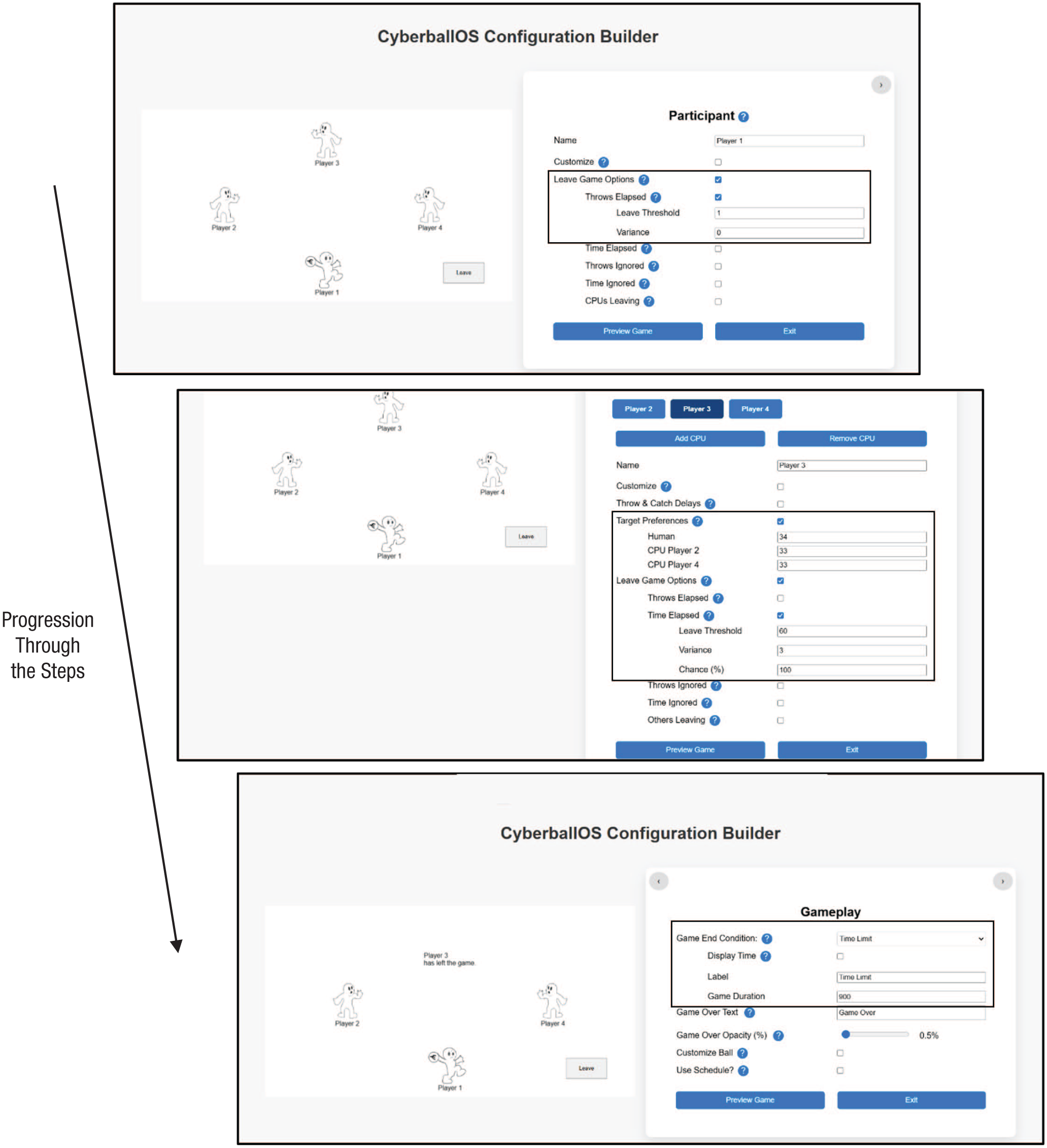
How to set up a participant leaving based on being motivated by others leaving. This figure shows the settings for the participant, computer-controlled avatars (CPUs), and gameplay. The example shows CPU 3 leaving after 60 s, with a 3 s variance, and with 100% certainty of leaving. Researchers can program the CPUs to leave at varying times. The “Game Duration” was set at 900 s, which is 15 min—which is long but consistent with the goals of this experiment.
Recalling events and experiences during CyberballOS gameplay
CyberballOS has untapped potential for advancing cognitively oriented research as well. Human memory is not only unreliable (e.g., Frenda et al., 2011; Loftus & Palmer, 1974) but also often systematically biased (e.g., Roediger & McDermott, 1995). A Cyberball game represents a uniquely pristine social event with verifiable facts, discrete occurrences, and measurable behaviors. This makes it well suited to study people’s memory, measured against the objective criterion of what actually occurred at each moment in the game. Researchers previously used earlier versions of Cyberball to induce ostracism and then measure unrelated tasks’ information processing, memory, judgment, and decision-making (e.g., Blanchard et al., 2020; Buelow et al., 2015; Hawes et al., 2012; Xu et al., 2018). However, to our knowledge, no research has investigated memory (in)accuracy of the actual events that occurred in the CyberballOS episode. A possible reason for this paucity of research is the unwieldy output of the classic Cyberball game logs in previous versions, which typically required data processing before analyses. In contrast, by recording game events and including the data in columns directly in the output of a Qualtrics survey, CyberballOS offers a convenient way for researchers to assess individuals’ recall of specific facts, such as how many times or in which order specific players threw and received the ball. Beyond memory, other information-processing questions can be asked with objective benchmarks as well, including fairness judgments (how often certain players get the ball), temporal judgments (how long certain players held the ball), and in games with more players, judgments of the degree to which properties of the players (e.g., gender) do or do not correlate with in-game behaviors, again with objective benchmarks against which to assess accuracy.
Figure 21 illustrates an example of a game rich with social information and events that participants could be tested on later. It involves seven different players with unique names (implying different genders and ethnicities), and gameplay shifts over time to favor some players more than others.
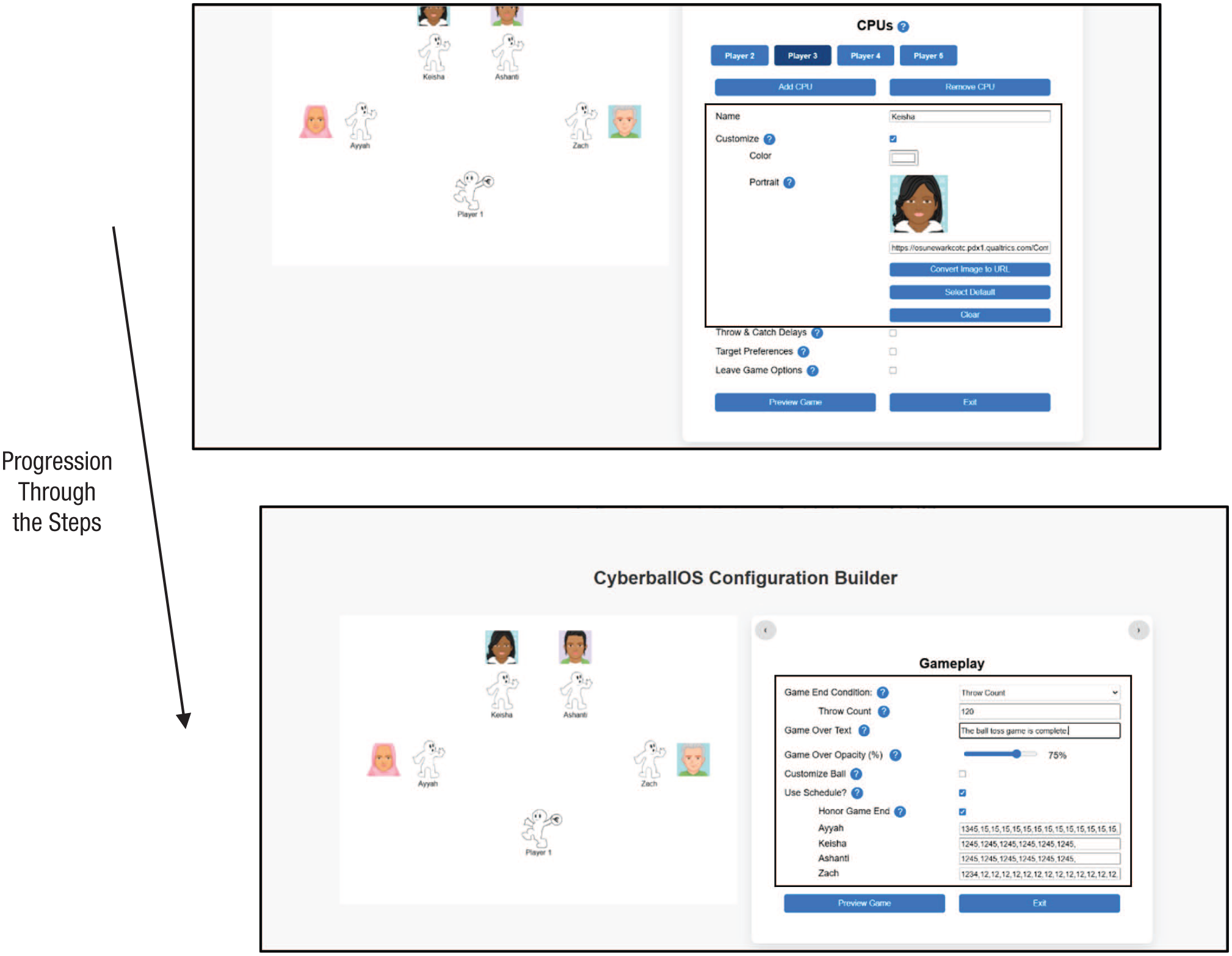
How to set up a game to examine memory of social information based on race and gender of the group members and changes in the frequency of getting the ball. In this example, Keisha (computer-controlled avatar [CPU] 3) and Ashanti (CPU 4) stop receiving the ball after receiving it once each from Ayyah (CPU 2) and Zach (CPU 5). This was set up using the “Schedule” feature.
Ultimate Goal and Summary
Our ultimate goal for CyberballOS was to create a platform researchers across psychological domains can use to learn about human nature. Thus, we designed CyberballOS to be an open, modular codebase, which we invite researchers to contribute to. In this spirit, researchers can go to the official GitHub repository to download the CyberballOS code: https://github.com/CyberballOS/CyberballOS. From here, researchers can set up their own version of CyberballOS and use the code to modify smaller aspects of the current version (e.g., background color of the game, asset images) or do more advanced customization (e.g., adding a chatting component). Researchers can then share the code used to create new elements with others to increase the replicability of studies. When new elements are added, researchers can always compare results with the fundamental CyberballOS program we introduced in this tutorial. In addition, if researchers modify the CyberballOS code in a way that is beneficial for its overall functionality or adds an in-demand feature, we can incorporate these into future CyberballOS offerings. Our goal was to ensure CyberballOS is dynamic and adaptable to new technology and scholarly insights. 1
Psychology researchers have used Cyberball for decades, and increasing numbers of disciplines have recognized Cyberball as a valuable tool. CyberballOS is designed to accelerate this cross-disciplinary utility. We increased the utility of Cyberball by making it easier to set up games and by being able to incorporate it into the popular data-collection platform, Qualtrics. Furthermore, CyberballOS does not require any special equipment or computer-programming knowhow. At the same time, if researchers wish to add their own features, CyberballOS’s open-source nature and the infrastructure make this possible and ensure that CyberballOS can adapt to technological advances. In addition, we view the open-source nature of CyberballOS to be an extension of the open-science movement (e.g., Nelson et al., 2018; Nosek et al., 2015, 2022). Researchers can look at data and use analysis syntax from published articles, but if they cannot use the computer program to replicate the work, then transparency is limited. Ultimately, we believe CyberballOS is a valuable tool for researchers to understand the important psychological outcomes of affect, behavior, and cognition.
Footnotes
Transparency
Action Editor: Pamela Davis-Kean
Editor: David A. Sbarra
Author Contributions
