






Abstract
This column has traditionally focused on portable technology in pharmacy practice. As you are intimately aware, many other health information technologies affect pharmacists and other health care professionals on a daily basis. Accordingly, beginning with our next column, we will address other technologies influencing pharmacy. We will see you here next month for our new, broader focus and for our new title.
As pharmacists, we spend much of our time focused on professional responsibilities; for many of you that means caring for patients throughout the medication-use cycle, whereas others focus on the management and leadership of pharmacy departments and staff. Accordingly, most of our columns have spotlighted professional uses of mobile devices. With this installment, we are taking a “blended” approach in that several of the topics addressed support personal use of devices and other topics fall into the professional realm. Regardless of a personal or professional focus, you hopefully will discover that the tactics and strategies discussed in one domain frequently apply to usage of your device in the other area.
Whether searching for information from a desktop or notebook computer, we have and continue to recommend Google.com as the best search engine available. This recommendation holds true as well when searching for information on a mobile device. In addition to the Internet search function, several other Google products are available for mobile devices, including Maps, Gmail, and Calendar. There are a few free options for using Google on a portable device. You can visit http://www.google.com/mobile from the device to determine exactly which Google mobile products are available for your specific device. Another way to access Google's mobile applications is by entering your device's phone number at http://www.google.com/mobile/default and following the instructions provided in the text message you subsequently receive from Google. The third option, for those of you on the go, is pointing your device's browser to http://www.google.com/m (the mobile interface for a Google search) and beginning a search for Google applications.
Although Google provides unparalleled services, we sometimes find ourselves wanting to compare search results across multiple engines. MobileLeap at http://mlvb.net is a valuable tool in this respect. Using this search engine's Settings option, one can personalize a search to include the appropriate screen size for displaying results. MobileLeap also allows users to choose whether or not to display images, and, if they are displayed, to customize the size of the images. The Settings option permits specification of which search engine is used (Google, AskJeeves, Yahoo Mobile, MSN, or AOL) and performance of the same search with multiple search engines for comparison purposes. Other settings give users the ability to add direct dialing for phone numbers displayed on Web sites found when searching and to specify words that are highlighted when they are found on sites returned from a search. MobileLeap also has free registration, giving users the opportunity to create accounts for which their settings are saved for future use.
If searching for health information that the general public may be reading—in anticipation of questions you may be asked—Reuters Health Information resources at http://www.reutershealth.com/pda are worth checking out. Their Health eLine provides information for the general public that focuses on wellness, health care, and treatments for medical conditions. The top 3 stories of the day are displayed for selection, and each article has an abstract that can be accessed by clicking on the title. A link within the abstract provides additional information from the article. Furthermore, the Reuters Health Information resources go beyond providing information targeted for the general public. Other components of this site include Professional Medical News (see Figure 1) and Health Industry Briefing. As indicated by the titles, these resources focus on health care professionals and essential news regarding health care and the health care industry. These resources can be found and navigated through in the same manner as for Health eLine.
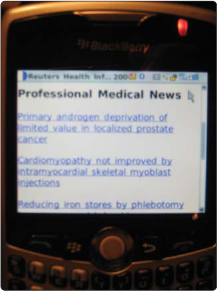
Reuters wireless-friendly health news portal.
As much information as is available on the Internet and in print and other media, we still find ourselves traveling to professional meetings to collaborate with our colleagues and learn from their experiences. We find that any resource or tool that makes traveling easier is worth exploring. For mobile devices, this means book-marking the personal digital assistant (PDA)–friendly Web sites for the major airlines. Most major US carriers have Web sites that are designed for viewing on the small screens of mobile devices. Some airlines use their primary site that can be accessed from any device, whereas others use a separate site designed specifically for mobile devices. Table 1 lists the URLs for several Web sites. As with the full Web sites that are designed for desktop or laptop access, there is some variation in features found across the carriers' sites.
Web Addresses of US Airlines' Sites Designed for Access Using a Portable Device
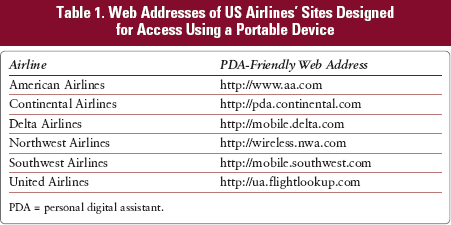
PDA = personal digital assistant.
A key component of any trip—whether business or pleasure—is planning for and, often, reacting to the weather. Fortunately, www.accuweather.com provides several wireless tools for “weather on the go.” You can determine which tool is best for you by visiting their site created specifically for mobile devices (http://wireless.accuweather.com/index.asp?mPartner=accuweather). Services are available for free and through subscription purchase. AccuWeather provides services for 28 different cellular service vendors; your provider determines which services are available to you.
At AccuWeather, information is offered through 4 methods: downloadable applications, text messages, mobile Web sites, and video. The range of available services is beyond the scope of this article, so we encourage visiting the Web site if you are interested in exploring the varied uses of this tool. Two caveats regarding this site deserve mention. At this time, there are no downloadable applications available for the BlackBerry platform. However, BlackBerry users can access the AccuWeather mobile site by visiting their previously mentioned home page. (Figure 2 shows an AccuWeather radar image displayed on a BlackBerry.) Second, Sprint is currently the only provider offering mobile access to AccuWeather's video service.
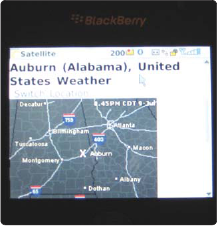
AccuWeather radar image displaying the Auburn, Alabama, area.
Mobile access to gas price data is surely something that everyone values. Fortunately, it is available and it is free. Point your mobile browser to www.GasBuddyToGo.com for the latest pricing information in your area. Enter the ZIP code (or city and state) for which you need pricing, and you will instantly see the 10 lowest prices, including station location and the time prices were last updated. You can also send a text message to
We leave you with 2 important notes. Many of these services are free and require only a data service plan on your smartphone and/or text message capability. Make sure these services are included in your monthly cellular plan, or your provider will charge a per-usage fee. Also, several of these wireless services are not focused toward patient care, but we would argue that the services are important to your personal lives. Many of you may have already identified wireless sites that you frequently visit. Please feel free to send us an e-mail to let us know which sites you do or do not prefer; you can reach us at