







Abstract
BACKGROUND:
Nowadays, although using laptops to perform many routine activities is inevitable, many wheelchair users are not able to efficiently use their laptops due to their movement limitations and inappropriate workstations.
OBJECTIVE:
The purpose of this study was to design and evaluate a novel ergonomic laptop desk for wheelchair users by considering their movement limitations.
METHODS:
In this experimental study, we ergonomically designed and assessed a novel laptop desk in two phases in a laboratory. In the first phase of the study, design specifications were identified by an expert panel; accordingly, a new laptop desk was designed and prototyped for the wheelchair users. In the second phase, in order to evaluate the laptop desk, 14 wheelchair users were asked to complete a typing task within 20 minutes, both with and without using the laptop desk. Postural risk level, perceived discomfort, and task performance were evaluated using the Rapid Upper Limb Assessment (RULA) technique, Local Perceived Discomfort (LPD) questionnaire, and the number of letters typed and typing errors, respectively.
RESULTS:
The postures of the wrist, arm, and neck regions were corrected from RULA action level 3 to 2 when the designed laptop desk was used. In addition, the average perceived discomfort of the participants significantly decreased in the neck, shoulder, and wrist regions. Furthermore, typing accuracy was improved significantly when novel laptop desk was used.
CONCLUSIONS:
Accommodating wheelchair user’s workstation with the novel designed laptop desk could reduce musculoskeletal disorders risk factors and help wheelchair users to perform their work more efficiently.
Introduction
People should have equal rights to use education systems and employment opportunities, and to participate in all social, creative, or recreational activities, yet many particular services are designed exclusively for non-disabled people [1]. Although many assistive devices (i.e., wheelchair) are designed to allow users enough personal independence to be able to move and even return to work, it has not been enough, and it is estimated that barely 25% of individuals with mobility impairments are employed in their working age [2, 3]. Additionally, it is shown that many wheelchair users experience a lower quality of life due to functional limitations of their workstation design [4].
There are many factors that exacerbate occupational problems of wheelchair users, many of which are associated with performing tasks by using a computer or laptop [5, 6]. Zolna et al. showed that poor workstation design and inappropriate workplace accommodation as a concern raised by wheelchair users [4]. While performing computer tasks, the workers’ arms may outstretch, the wrists can diverge from neutral position, and repetitive movements may lead to many adversities including fatigue, pain, physical weakness, and inability to work for long periods [7, 8]. Additionally, performance may be negatively affected [9–12].
Nowadays, electronic devices are an inseparable part of people’s lives at home and workplaces [13]. Interestingly, studies have shown that wheelchair users are more interested in using such devices especially laptops and personal computers since these devices can have a positive impact on their quality of work and life [14, 15]. In this regard, results of previous studies have shown that having the right equipment, such as laptop and wheelchair, helps people with lower limb disabilities to cope with challenges of their environment more efficiently [16].
The progress of technology does not come without concerns [17, 18]. Hence, Despite the beneficial role of laptops and other types of equipment in supporting wheelchair users, using them in awkward postures can lead to adverse outcomes [19]. Literature shows that the static and inappropriate posture of wheelchair users can lead to development of musculoskeletal disorders [20, 21]. Hough et al., reported that students, who used their laptop in an inappropriate posture without putting it on a desk, had musculoskeletal discomfort in their neck, hands, arms, and wrists [22]. Moreover, it is shown that inappropriate interaction between wheelchair users and their work layout not only affects their health but also can reduce productivity and increase human error [23].
Studies argue that common wheelchairs lack the appropriate design for properly accommodating the needs of wheelchair users [24, 25]. To address this issue, there is growing evidence that implementing ergonomic principles in designing wheelchairs can minimize risk factors for musculoskeletal disorders, resulting in improved performance and satisfaction [26, 27]. Therefore, it is conceivable that one practical way to solve design issues is to ergonomically enhance wheelchairs, e.g., by adding accessories [28].
Accordingly, many wheelchair users need proper accommodation in their workstation while performing computer tasks. Given the necessity of ergo-nomic interventions for implementing necessary work improvements to such work, this study aimed to design and evaluate a novel laptop desk for wheelchair users. It is hypothesized that the new prototyped wheelchair desk will improve users’ working posture, comfort and functional performance.
Method
The present experimental study was approved by the Ethics Committee and Research Council at the University of Social Welfare and Rehabilitation Sciences in Tehran, Iran (reference number: IR.USWR.REC.1395.343). It was conducted in two phases. The first phase involved introductory, brainstorming and conceptualization sessions with an expert panel to explore ideal design requirements by considering ergonomic principles. Additionally, a few sessions were held solely with an industrial engineering team to turn the requirements into concrete design specifications and subsequently produce a prototype. Finally, the second phase of the study was aimed for ergonomic evaluation of the laptop desk during a simulated typing task, whose purpose was to investigate the effects of using the new furniture on posture and performance of participants.
Phase one
Expert panel
The aim of the expert panel was to identify both general and ergonomic design requirements. The panel included two ergonomics specialists with 5 years of field experience and teaching experience, two industrial designers with 10 years of work experience, and three wheelchair users who had been wheelchairs for the last 5 years.
The first session was an introduction meeting, during which people introduced themselves and the topic of interest (including the background, necessity and goals of the research) was presented to them in form of a visual presentation. The experts also were asked to share any relevant experience or knowledge regarding the topic.
The second session served as a brainstorming session during which a package containing catalogs of various types of wheelchairs and laptop desks available in the market was prepared and distributed to the panel. Then, a brainstorming process took place, during which experts’ opinions regarding using a laptop desk on a wheelchair were collected on sticky notes. At the end of the session, general requirements (i.e., shape, size and function) of a new laptop desk installable on a variety of wheelchairs were approved by the panel members.
In the third session, in order to achieve the ideal conceptual design, various ergonomic requirements including safety, weight of laptop desk, wheelchair dimensions, viewing angle, viewing distance of the laptop screen, hand reaching zone, and convenient installation were specified by the panel of experts.
Identifying design specifications
After identifying the requirements, appropriate solutions were determined by the help of the industrial design team. These solutions included the inclusion of an installable base for the laptop desk which could be fixed on wheelchair handles in such a way that it does not interfere with the propulsion of the wheelchair (as a safety factor). In order to reduce the weight of the laptop desk, any accessories or unnecessary parts were removed, and a hollow structure was introduced into its design (weight factor).
To design a laptop desk that was dimensionally fit to wheelchairs, relevant wheelchair dimensions were considered for the laptop desk size (dimension factor). Dimensions were measured by researchers with a measuring tape from a conventional wheelchair, which included the handle length and the distance between them (520 and 560 mm, respectively). To adjust the viewing angle, the base part No.3 in Fig. 1 was designed to be movable in Y-axis (viewing angle factor). In addition, the air outlet grooves and the place of the teacup and pen were included to provide comfort and convenience. Convenient installation and the hand reaching zone (for simultaneous adjusting of viewing angle and hand reach distance) were not considered in the prototype fabrication. These items could be part of the final design that may be accomplished after a summative and ergonomic assessment of the prototype in the near future. Based on the specifications mentioned above, Fig. 2 shows the basic sketch of 2D and 3D rendering of the laptop desk drawn by Catia v5-6 R2016 software.
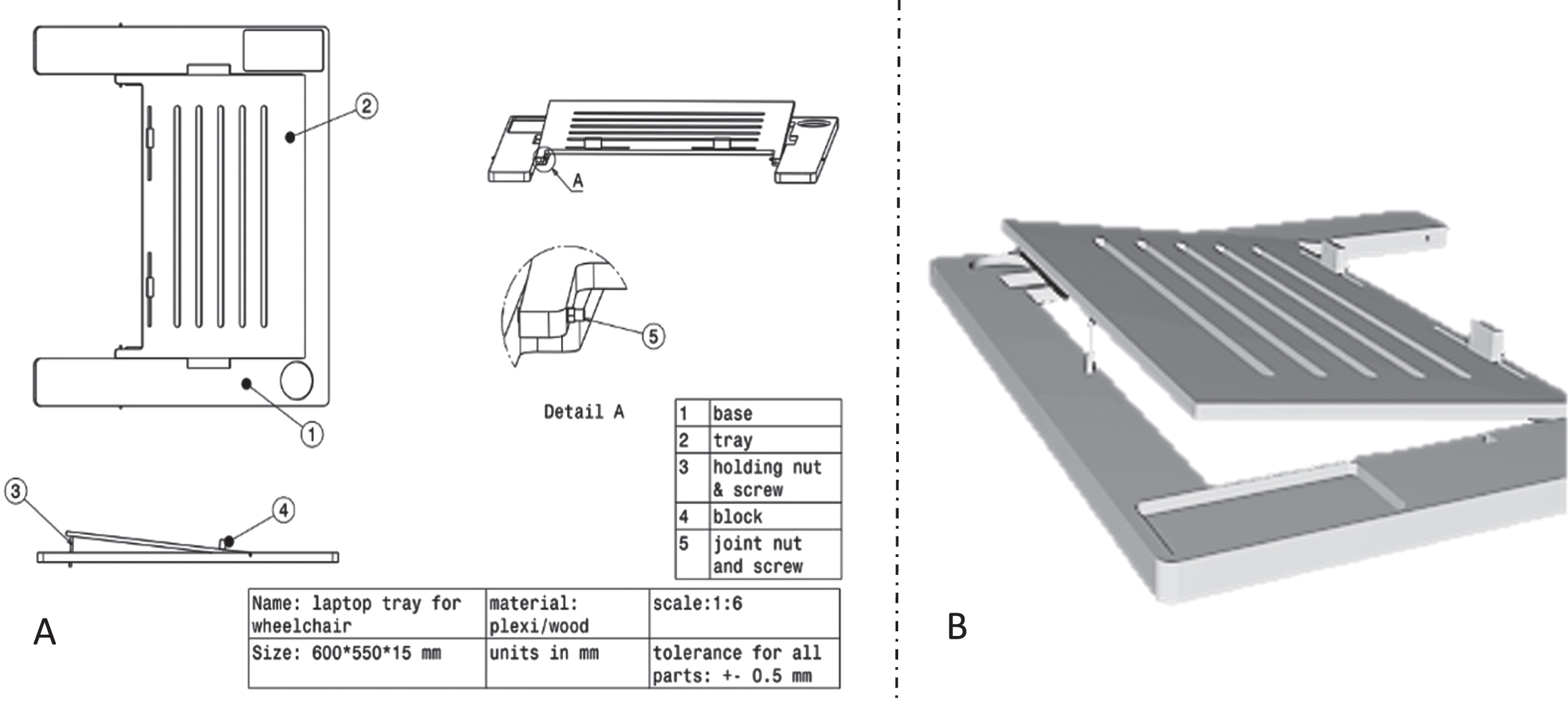
The laptop desk sketch, A: 2-dimensional view, B: 3-dimensional rendering view.

The conventional wheelchair with the designed laptop desk.
After drawing the 3D map, the components of the prototype were separately made with Plexiglas material with a thickness of 10 mm. The horizontal angle of the laptop desk could be modified between 0 and 30 degrees from the joint (part No. 5). The weight of the prototype was 2 kg and its dimensions were 600×550×15 mm. A tray (part No. 2) was designed for placing a laptop, and a block (part No. 4) was added to stop laptops from slipping over the tray. Additionally, an option was designed (Fig. 1 part No.3) to adjust the viewing angle. Finally, the prototype was fixed to the armrests by attaching sides beneath the base (part No. 1). Figure 2 shows the prototype of the laptop desk while fixed to a wheelchair.
Phase two
Ergonomic evaluation of the prototype laptop desk
In the second phase, ergonomic evaluation of the laptop desk was performed in the ergonomics laboratory of the University of Social Welfare and Rehabilitation Sciences in Tehran, Iran. During the experiment, the participants were asked to perform a typing task in two conditions with and without the use of the prototype while being assessed by the researchers. For the ergonomic evaluation of the typing task, three evaluation methods were used. Posture and local discomfort were assessed by RULA technique and Local Perceived Discomfort scale, respectively. The former is an observational method, while the latter is a subjective self-rating measure. Finally, the performance of the participants was assessed by counting the number of typed words and typing errors.
Participants
The study participants were wheelchair users who had referred to the Rehabilitation Center Clinic at the University of Social Welfare and Rehabilitation Sciences and used to move by a wheelchair. To recruit participants the homogeneous sampling method was used [29]. A poster reflecting the procedure of the study, inclusion criteria, and contact information was installed in different areas of the clinic, and people were asked to send their information via email or a phone call if they met the study criteria. The inclusion criteria were: mobility impairments (being a wheelchair user), psychological and mental health, having no infectious diseases or musculoskeletal disorders in the upper limbs (examined by a medical record at the clinic), having an average typing speed (in Persian language).
Out of 27 contacts, 20 fulfilled the study criteria. To eliminate bias and have a homogeneous sample, the typing speed of individuals was investigated in a pilot study, through which 6 participants, whose typing speed diverged significantly from 20 words per minutes, were excluded from the study. Finally, 14 wheelchair users were selected as the study participants, out of whom nine were female. The participants’ demographic information were also collected (mean and SD age: 33±5.5 years, weight: 56 kg±9.7).
Participants had used wheelchairs for at least 3 years, and all of them were right-handed. The majority of participants suffered from paraplegia due to injury at the lumbar level L1–L4 vertebrae, while 2 of them had to use wheelchairs due to Multiple sclerosis (MS) condition. It was not possible to correctly measure the stature of the participants due to deformity.
Study procedure
After phone call coordination, the participants were invited to the laboratory, and the procedure of the study was explained to them. Then, with the help of the research team members, the participants sat in a wheelchair with a randomly assigned condition (with or without the laptop desk). While sitting in the wheelchair, the participants were asked to complete the typing task. The typing text was selected from a typical Persian storybook. This text was shown in the split view of a 15-inch laptop display with a font size of 14 in Microsoft Word software. The task completion time was 20 minutes. For each participant, viewing angle was adjusted by the researchers according to the optimal screen height for the wheelchair user (5 cm below the eye level) [25].
In the condition of not using the laptop desk, the participants placed the laptop either on their knees or leaned it on the wheelchair handle based on their preferences. Participants were instructed to perform the task at their own pace. On Windows timer, the start and end of the task were fixed and an alarm sounded when the task time was up. There was a 20-minute break between the conditions.
Rapid upper limb assessment technique
The posture was assessed by using the RULA technique. The assessment was simultaneously performed by two ergonomic specialists for each side of the body. This evaluation was completed for all 14 participants, and finally, according to the RULA final score, the results for the worst posture were reported [30].
Local perceived discomfort
Local Perceived Discomfort Scale (LPD) is a subjective method to report discomfort in the major body regions. An upper limb body map, consisting of five regions of the body, was presented to the participants. They were asked to rate their perceived discomfort in the neck, trunk, shoulder, wrist, and fingers on a 10-point scale (ranging from 0, no discomfort; to 10, extreme discomfort) [31]. The participants reported their discomfort immediately after finishing the test in both study conditions
Performance assessment
To evaluate the performance of the typing task, the error rate (typographical errors) and the number of typed words were evaluated by Microsoft Word software 2018. For checking the number of typing errors, Word software “spelling and grammar” command was used, and the error rate was evaluated by visual inspection and counting the errors. To check the number of the written words, the number of typed words in this software was used.
Data analysis
In this study, after collecting the data, the RULA technical scores were first reported as a final score with descriptive statistics. After examining the normality test using the Shapiro-Wilk test, the scores for the discomfort scale and performance revealed that the data were non-normal. Therefore, by considering each participant as their control group, the Wilcoxon signed-rank test was used to compare the results of different conditions. A p-value of less than 0.05 was considered to be statistically significant for all the tests.
Results
Out of 28 accomplished RULA worksheets, 4 worksheets had the worst grand score for two study conditions. The worst postures were related to participant No. 3 with or without using the laptop desk, respectively. Table 1 shows the RULA scores and related action levels. When the participants performed the typing task using the laptop desk, the action level was calculated 2, which meant “further investigation is needed and changes may be required. On the other hand, without using the laptop desk, the action level was calculated 3, which implied “investigation and change are required soon”. A typical body posture during both experimental conditions is shown in Fig. 3.
Results of posture evaluation for each side of the body during the typing tasks
Results of posture evaluation for each side of the body during the typing tasks
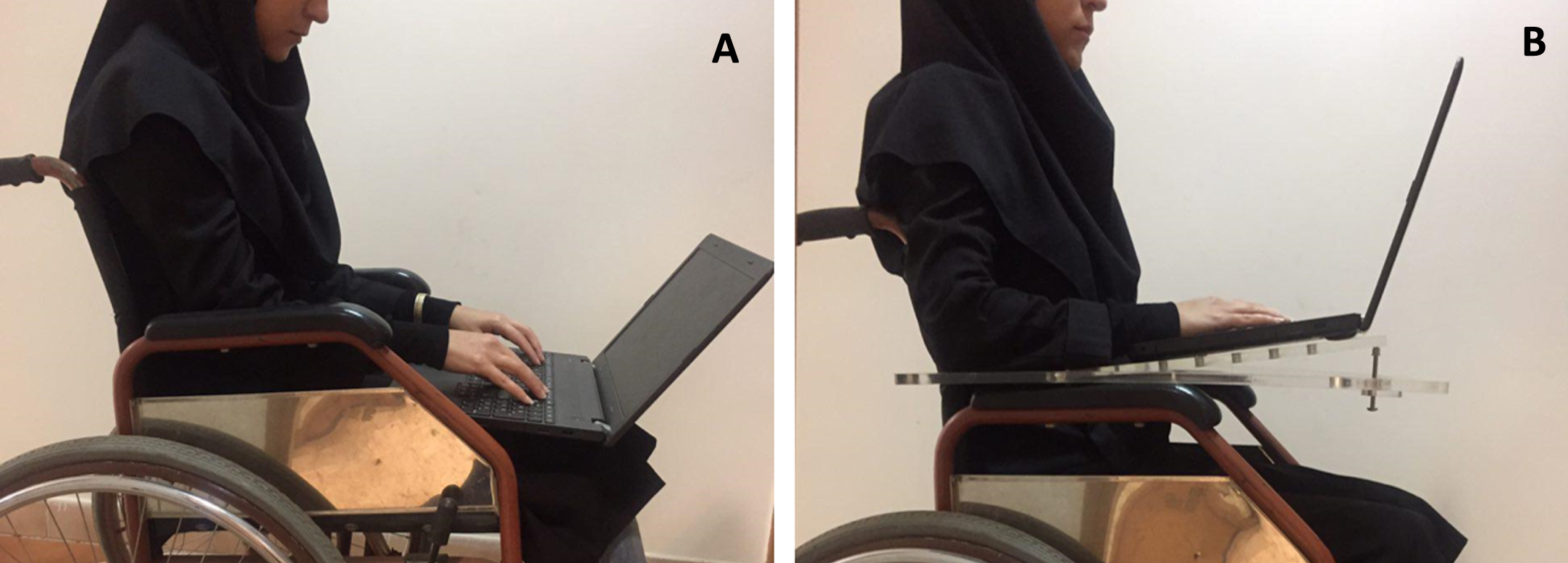
Illustration of the typing conditions, A: without laptop desk, B: using laptop desk.
Regarding the results of LPD for all participants, the Wilcoxon signed-rank test showed that there was a statistically significant difference between the perceived discomfort in the neck, shoulder, and wrist regions (P = 0.01, 0.04, 0.01), respectively. However, the results were not significant for trunk and finger regions (P = 0.12, 0.14). Figure 4, shows the mean LPD scores for both study conditions.
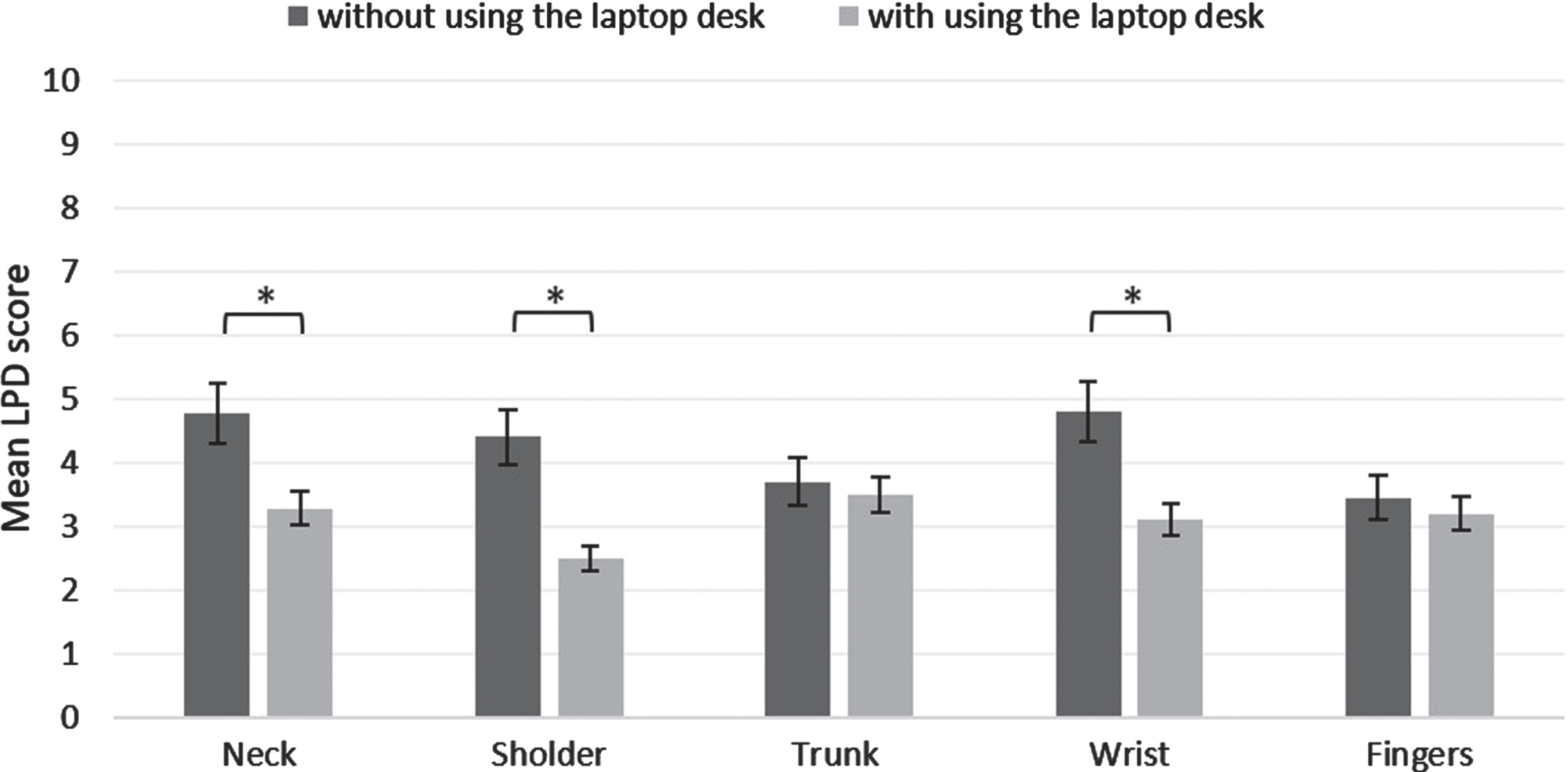
Mean scores of LPD in the neck, shoulder, trunk, wrists and fingers. Error bars show standard deviations. The Significant results of the Wilcoxon signed-rank test are marked by (*).
The results regarding performance are shown in Table 2. On average, the participants typed 381 and 375 words in the study conditions of with and without the laptop desk, respectively. Additionally, the mean typing error was significantly higher when participants did not use the laptop desk (19 errors, P =0.03).
Results of Wilcoxon signed-rank test on typing task in both study conditions (N = 14)
The main purpose of this study was to design and manufacture a laptop desk for wheelchair users, and to identify its ergonomic advantages during a typing task. During the first phase of the study, necessary design specifications were identified by an expert panel, and the laptop desk was prototyped accordingly. The second phase of the study was aimed for ergonomic evaluation of the furniture during a simulated typing task. The data analysis demonstrated that the new laptop desk could improve body posture, and decrease discomfort, and typing errors.
In the condition of not using the desk, the results obtained from the worst case by the RULA technique showed an action level of 3 which implied “Investigation and change are required soon”. Based on the results of the different regions of the RULA technique, when a person is not using a laptop desk, the wrist is kept in an inappropriate bending angle of up to 15 degrees, which is a risk factor for wrist musculoskeletal disorders such as Carpal Tunnel Syndrome (CTS) [32]. This condition was a result of the laptop placement in a semi-reclined position on participants’ lap and the wheelchair armrest. Additionally, placing a laptop on the lap causes the neck to bend more away from the neutral position, which can manifest itself in a high score in the RULA technique [22].
After using the new desk, the results revealed that participants’ posture was corrected as the RULA action level decreased from level 3 to 2 implying “further investigations are needed and changes may be required”. Such reduction pointed to a less risky environment regarding the posture of the participants. Compared to other body regions, the wrist and neck areas were more positively affected by the usage of the new laptop desk. By using the new desk, the neck angle was corrected considerably, which was due to the possibility of manipulating the horizontal angle of the desk (tray’s slope). Besides, when the laptop desk was used, the participant’s forearms and hands were put on the laptop desk. Therefore, wrist’s posture was improved by reducing wrist’s flexion and lateral deviation angles. These findings are consistent with the literature, according to which improved workstation design have reduced risk factors of musculoskeletal disorders [33, 34]. Correcting wheelchair users’ posture by accommodating their workstation is considered among ergonomic interventions that reduce musculoskeletal disorders risk factors [25, 35]. Additionally, wheelchair users’ complications such as fatigue, pain, physical weakness, inability to work long periods may be improved [7, 8].
In addition to improving participants’ posture, using the laptop desk was also associated with lower levels of discomfort in the upper extremities. The difference was statistically significant for the neck, shoulder, and wrist regions. As the condition of posture is improved (toward a more neutral posture), the comfort level increases; That is, because in a neutral posture muscles are under less demand, the perceived exertion is less as well. According to Hyness et al., changing posture from upright to supine on a wheelchair during a typing task can reduce discomfort [36]. It is also shown that the height of chairs and their arm rests are associated with improper upper extremity postures and these factors can contribute to musculoskeletal pain among computer office workers [37]. In the present study, according to the RULA scores (scores A and B), the postures of the neck, shoulders, and wrists were improved by using the laptop desk. Therefore, participants felt more comfortable in those regions.
In contrast to the neck, shoulders and wrists, altering the working layout did not make a significant difference in the trunk and fingers’ posture. Because the trunk region was immobile and the participants were reclining to the wheelchair’s backrest. Discomfort evaluation in Hyness et al.’s study also showed that the largest area of discomfort were upper extremities while trunk was not much of a concern [36]. Fingers were also in the same situation after using the new furniture, and their posture condition did not change noticeably. In addition, grooves were designed on the tray to transfer laptop heat, which may have resulted in reduced heat discomfort effects; however, we did not assess it in this study. Moreover, without using a laptop desk, the wheelchair users put the laptop on their lap which could lead to discomfort in the region of the legs. However, such discomfort in the lower extremities was not tested, since some participants did not have any sensation in those regions.
Based on the results of Table 2, the typing performance of the participants, in the case of using a laptop desk, showed a significant improvement for typing accuracy; However, there was no statistically significant difference between two conditions for typing speed (total written words). By using the laptop desk, on average, participants could type 6 more words, and they had 7 or fewer errors. A plausible explanation is that the improvement of posture and reduction in discomfort may have led to the reduction of typing errors. In a similar study, Haynes and Williams (2008) found that altering posture of participants during a typing task on the wheelchair could impact typing accuracy although any improvement in typing speed needed more investigation [36]. It is also important to recall that participants were instructed to perform typing tasks with their own pace and accuracy; that could be a reason why typing speed remained unchanged in this study.
Other studies have indicated that a new design or adding new enhancements such as Brain-Computer Interface (BCI), touchpads, and audio interfaces, can play a significant role in improving performance of wheelchair users regarding typing tasks [9–12]; hence, their specific occupational performance can be enhanced [19, 38]. Kannan et al., showed that a new design for wheelchair users could improve their performance, which is in line with the results of the present study [38]. On the other hand, task performance can also be influenced by other variables. Seizo’s study showed that people’s performance including their accuracy and speed of typing not only depends on the body posture, but it is also associated with the design of the laptop itself, e.g., its keyboard size [39, 40].
Poor workstation design and inability to achieve equality in the workplace have led to exclusion of wheelchair users from physical worksite environment [4], and their low employment rate [3]. There are many alternatives recommended by other studies to improve wheelchair users’ employment. These solutions comprise low-cost technologies, modified workstations, working from home and using Universal Design principles [4, 42]. According to Arlati et al. and Whiteneck et al., new design and additional accessories for wheelchairs could improve wheelchair users’ accessibility and quality of work-life; thus, foreseeing wheelchair users’ requirements and implementing them into their workstation design should be considered as a part of their quality of working life improvement programs [43, 44]. With this in mind, we believe using an extra device such as the present laptop desk could help wheelchair users to cope with their work challenges in a more inclusively designed environment.
One limitation of the study was that, although the researchers sought to comply with all the standard requirements of an experimental study, because the laptop desk was designed and evaluated by the researchers themselves, the results may have been influenced by the researcher’s own potential bias. The second limitation of the study was evaluating the laptop desk through one type of task. Other tasks such as browsing on the internet may show other results. The third limitation was about the measurement instruments of the study. As using objective methods, such as electromyography, can confirm the results of the subjective tools; they could be valuable to build a more concrete evidence to complement the results. The fourth limitation was that because the study population was difficult to access, it was not feasible to gather a representative sample of people with a variety of pathologies or anthropometric characteristics; Such limitation may have affected the results of the study although we believe that the adjustability of the furniture could have provided similar accessibility for a more diverse population. Overall, these results suggest that using a laptop desk has the potential to be an effective intervention; However, future work is needed to assess its longer-term consequences (e.g., quality of work life, benefits, side effects, employments, changes in work strategies) among larger populations.
Conclusion
The results of the study showed that using a novel desk for laptop usage of wheelchair users could be very effective in improving upper body posture and reducing local perceived discomfort in the neck, shoulders, and wrists. The new furniture also improved typing accuracy of the participants although typing speed remained unaffected. These findings add to the growing literature on the effects of appropriate working layout on health and performance of wheelchair users.
Footnotes
Acknowledgments
This article was developed under Project No. 1351 / T / 95 at the Department of Ergonomics, University of Social Welfare and Rehabilitation Sciences. The authors thank all participants for their kind collaboration.
Conflict of interest
The authors have no conflicts of interest to declare.